Blog

  • Stop Writing TypeScript Types By Hand: Generate Them From APIs

    Stop Writing TypeScript Types By Hand: Generate Them From APIs

    You’re building a frontend. You need types for the third-party API. So you manually write out interfaces: userId, userName, isActive, metadata…

    This takes forever. And halfway through, you realize the API returns different shapes for different endpoints. You rewrite. You discover optional fields you missed. You rewrite again.

    Stop.

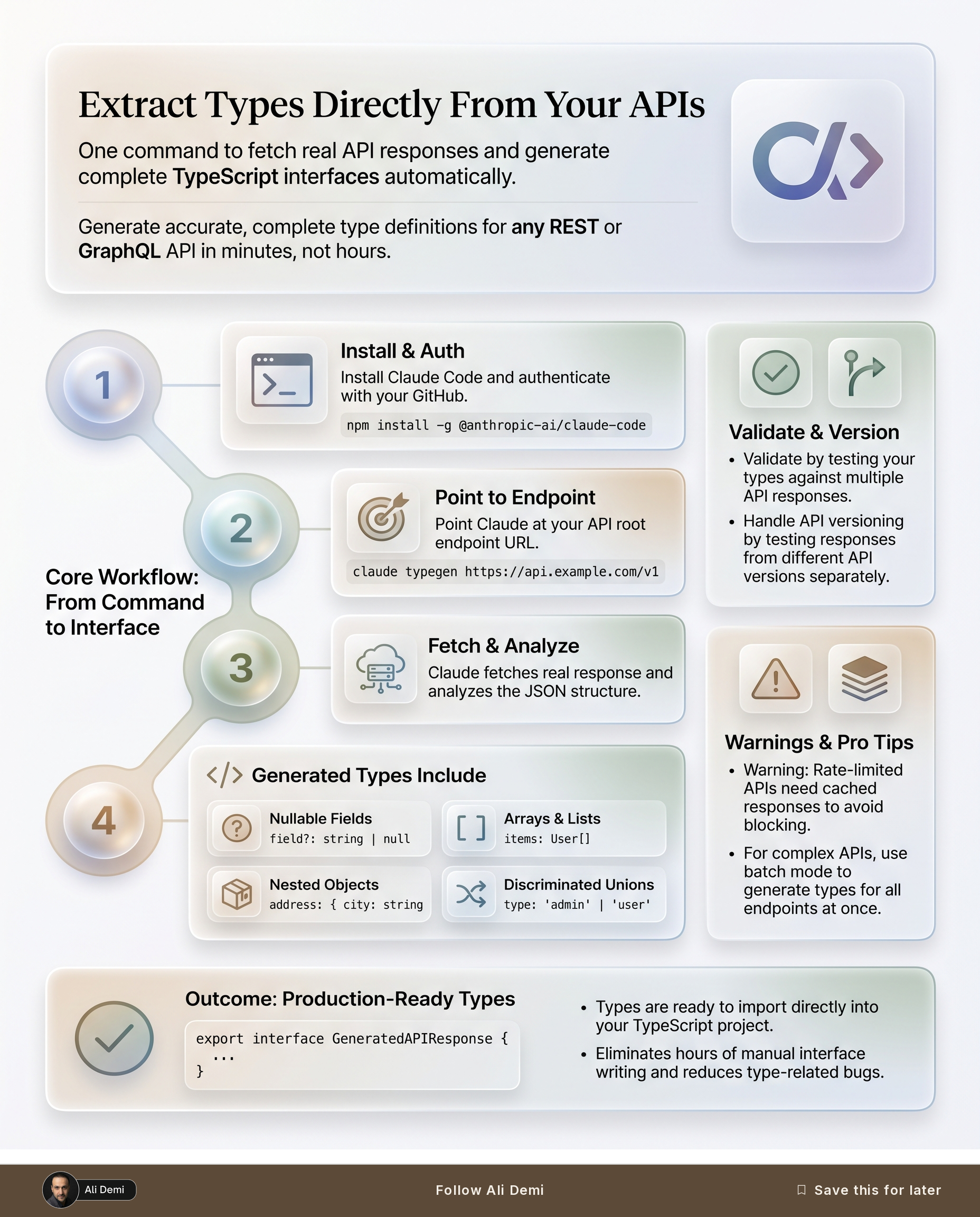
    Claude Code can fetch your API, see what it actually returns, and generate complete TypeScript interfaces in one shot.

    Here’s how:

    1. Point Claude at your API endpoint.
    2. Claude makes a real request and captures the response.
    3. Claude analyzes the structure: types, nullability, nested objects, arrays, union types.
    4. Claude generates ready-to-import TypeScript definitions.
    5. Validate against multiple responses to catch edge cases.

    The beauty: Claude sees your actual responses, not assumptions. Optional fields that appear sometimes? Caught. Discriminated unions? Handled. Deeply nested objects? Generated correctly.

    For APIs with dozens of endpoints, Claude can batch the work. Generate types for all of them in one go.

    The gotchas:

    Some APIs rate-limit. Fetch once, save the response, reuse it. Some APIs return different shapes based on query params. Test multiple variants to ensure your types are complete.

    No more hours lost to manual interface writing. No more debugging because a field was optional and you didn’t know it.

    ——

    Book your free AI clarity call, NOW!
    https://buff.ly/TpWy277

    ——

    Repost this. Thanks.
  • Your Git History Is Full of Secrets: Scrub Them Automatically

    Your Git History Is Full of Secrets: Scrub Them Automatically

    Your API keys are probably in your git history right now.

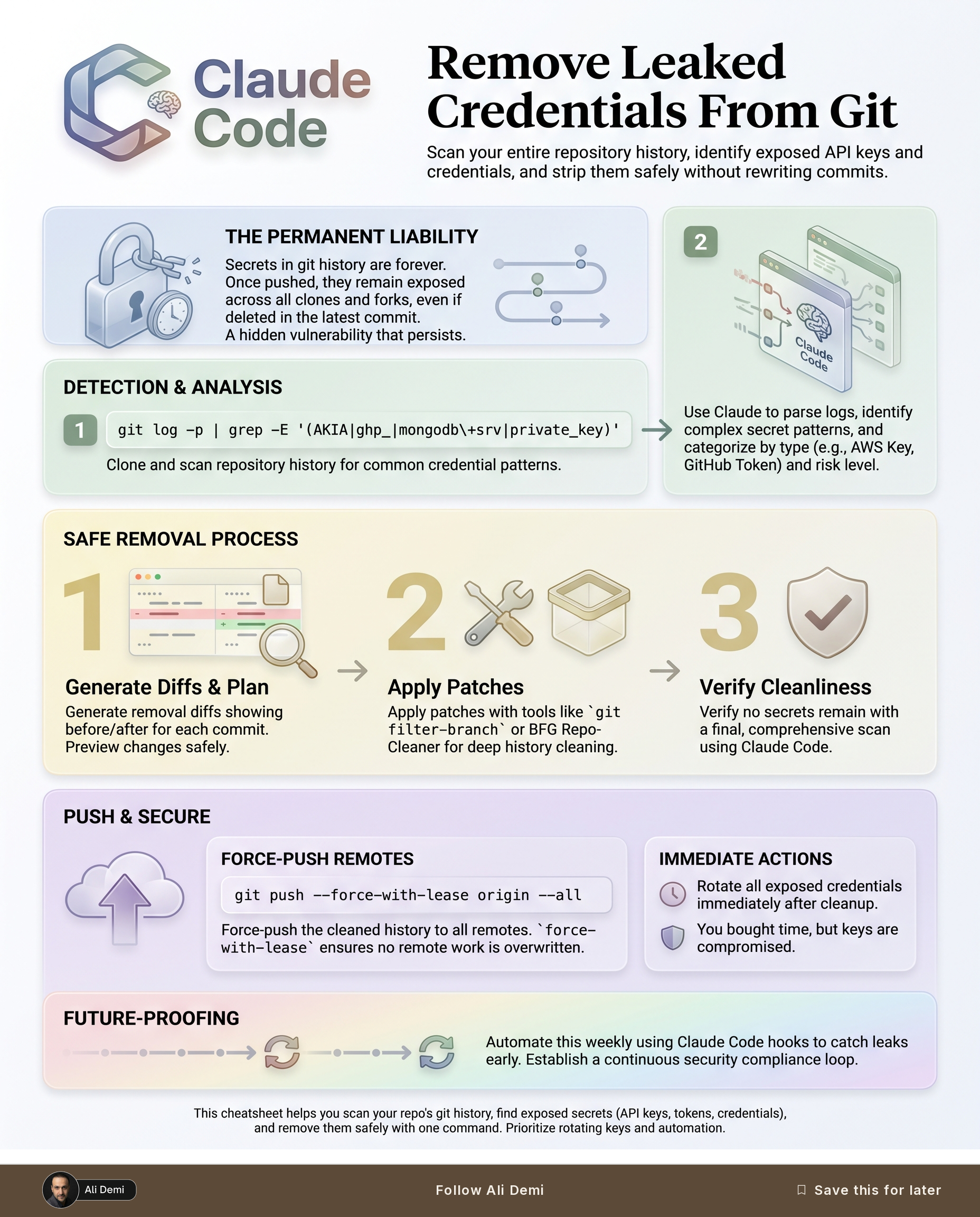
    You committed them once, didn’t notice, and pushed them. Maybe weeks ago. Maybe from a laptop you lost. Now they’re floating in every clone, every fork, every backup. No amount of revoking the key changes the fact that it’s permanently visible to anyone who can see your repository history.

    Traditional secret-removal tools like git-filter-branch or BFG require rewrites that break everyone’s checkouts. Claude Code can do better: scan your entire history, find the secrets, strip them, and regenerate commits without the chaos.

    Here’s how it works:

    1. Point Claude at your repo.
    2. Run a scan for common secret patterns: AWS keys, GitHub tokens, database passwords, private keys, API credentials.
    3. Claude finds them, shows you what it found and where.
    4. Approve the removal (it’s non-destructive until you verify).
    5. Claude strips them from history and regenerates the commits cleanly.
    6. Force-push once to update all remotes.

    Your history is now clean. Your team doesn’t have to rebase. Your secrets aren’t exposed anymore.

    Run this weekly as part of your security routine, especially after adding new developers or onboarding new services.

    ——

    Book your free AI clarity call, NOW!

    https://buff.ly/TpWy277

    ——

    Repost this. Thanks.
  • Your PRs Deserve Great Announcements: Auto-Generate Them

    Your PRs Deserve Great Announcements: Auto-Generate Them

    Your best features ship quietly. A dev merges a PR. Marketing gets a Slack link. Someone reads tech jargon and thinks: “How do I explain this to customers?” Five emails later, you have a one-liner and no announcement.

    Claude Code can fix this. Watch your PRs. Extract what changed. Generate the announcement.

    Here’s the workflow:

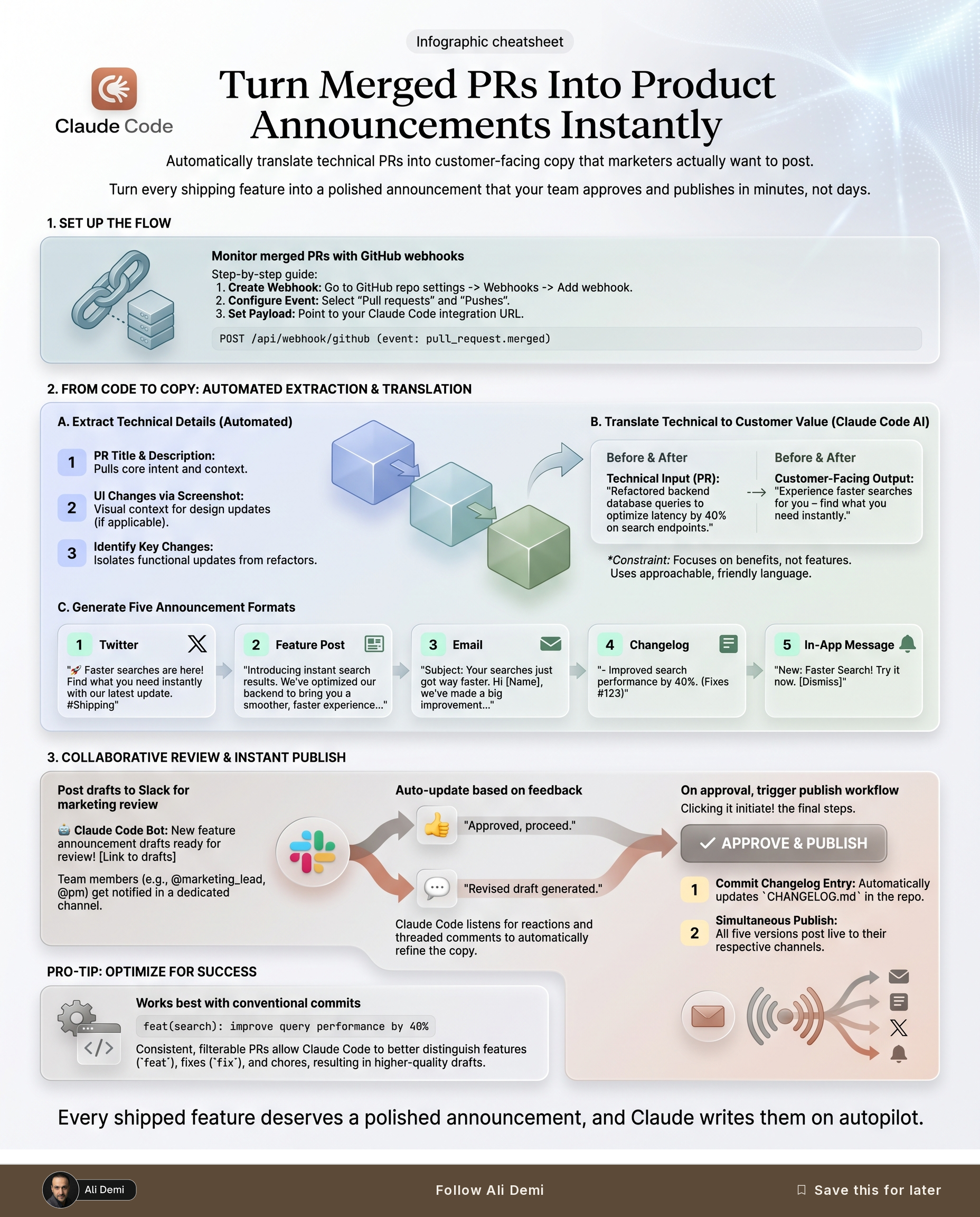
    Step 1: PR merged. Your GitHub webhook fires Claude Code. Claude reads the PR, PR description, and takes a screenshot of the changed UI.

    Step 2: Claude generates copy. One prompt produces five versions: a Twitter/X post, a feature announcement paragraph, an email subject line, a changelog entry, and an in-app notification. It translates “API response time improved by 40%” to “Faster searches, every time.”

    Step 3: Marketing reviews. Claude posts all five versions to Slack in a thread. Marketing says yes or tweaks them. Claude updates based on feedback.

    Step 4: Everything publishes at once. Claude commits the changelog entry, triggers your announcement service, and posts to email lists. One approval flows everywhere.

    The result: Features announced in minutes. Consistent voice. No missed launches.

    Set it up: Use Claude Code hooks to listen for merged PRs. Call Claude’s Messages API with the PR data and a prompt that asks for five specific announcement formats. Post drafts to Slack, collect reactions, and auto-commit on approval.

    ——
    Book your free AI clarity call, NOW!
    https://buff.ly/TpWy277
    ——

    Repost this. Thanks.
  • Your PR Queue Is Killing Velocity: Automate Code Review Triage

    Your PR Queue Is Killing Velocity: Automate Code Review Triage

    Your team just shipped 50 PRs this week. Three reviewers.

    AI made developers 60% faster in the last year, but your review team didn’t get faster. They got slower. Your backlog isn’t growing because code is broken-it’s growing because nobody can review it fast enough.

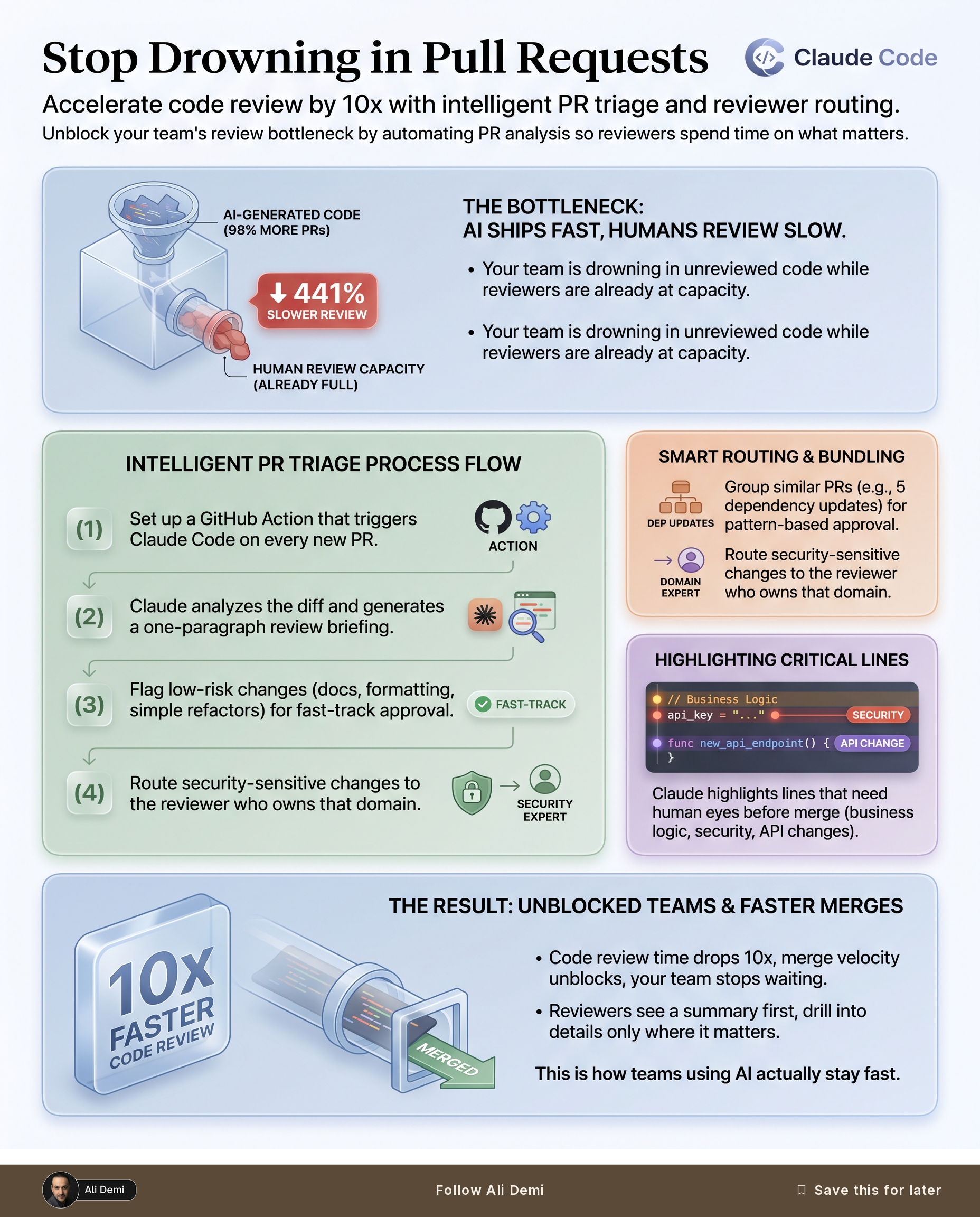
    Here’s what’s changed: teams using Claude and Copilot now merge 98% more PRs, but code review time jumped 441%. The bottleneck moved from coding to reviewing. And reviewing AI-written code is harder-it surfaces 1.7x more issues that need careful eyes.

    Claude Code can fix this. Not by replacing review, but by making it 10x faster.

    Start with a simple GitHub Action that triggers Claude Code on every PR. Claude reads the diff and generates a **review briefing**-one paragraph saying what changed, why, and which lines need human eyes. Flag low-risk changes (docs, formatting, simple refactors) for instant approval. Route complex changes to the engineer who owns that code. Batch five similar PRs together so reviewers spot patterns instead of reading boilerplate ten times.

    The math changes immediately: instead of every reviewer reading every line, they see **only what matters**. Security-sensitive changes get a checklist. Business logic changes surface the exact data flows to verify. Dependency updates get grouped-approve the pattern, not each file.

    Your reviewers actually review again. Developers stop waiting. Merge time drops from three days to three hours.

    This isn’t optional anymore. AI accelerated the generation side. If you don’t accelerate review, you break velocity.

    ——

    Book your free AI clarity call, NOW!
    https://buff.ly/TpWy277

    ——

    Repost this. Thanks.
  • Stop Scripting Workflows: Teach Claude by Speaking

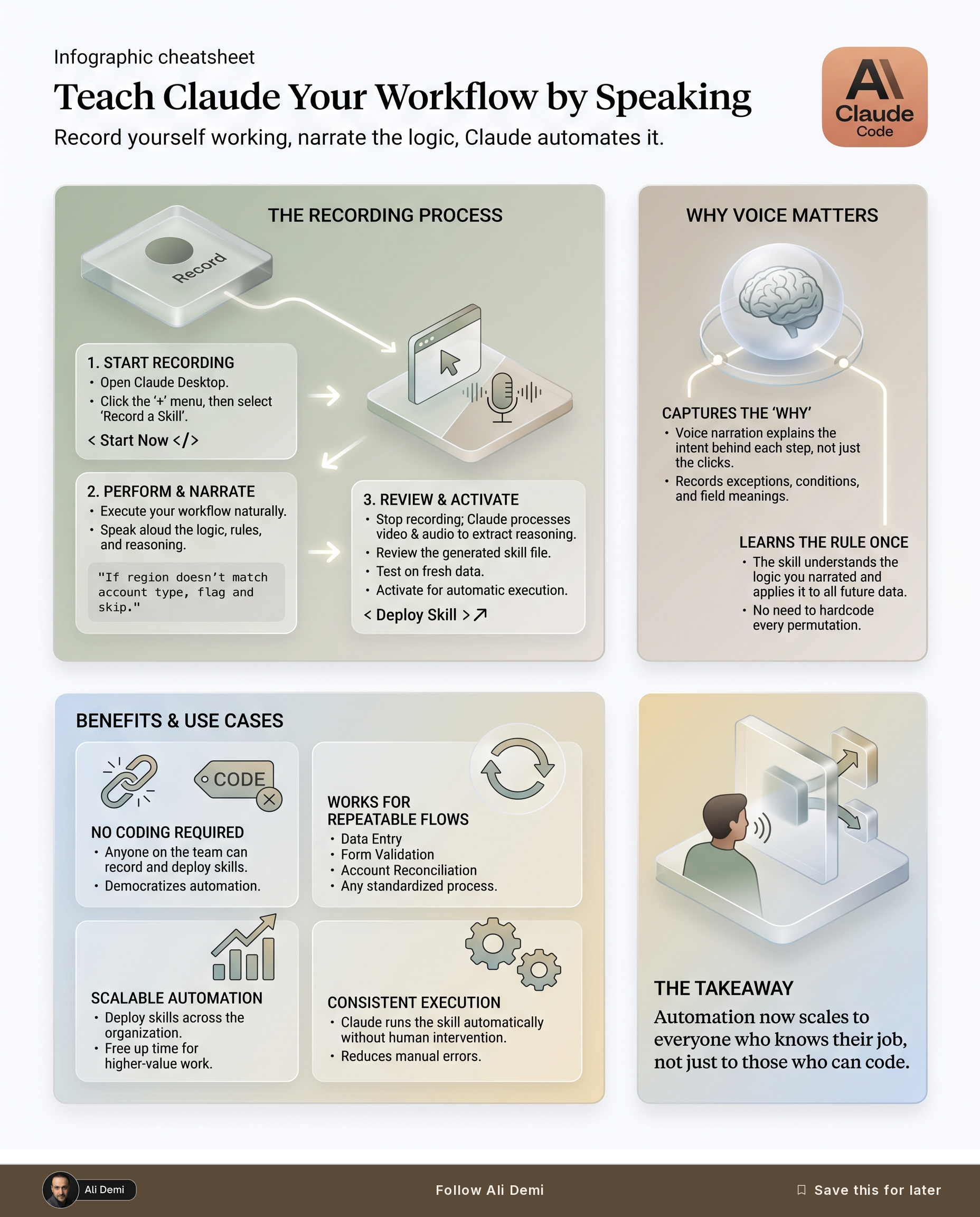
    Stop Scripting Workflows: Teach Claude by Speaking

    You know your job inside out. But automation tools ask you to translate that knowledge into prompts, scripts, or rules. That’s the wrong way around.

    Claude’s new Record a Skill feature flips it: you show Claude how you work, narrate the logic as you go, and Claude learns.

    Open the Claude Desktop app (Pro, Max, or Team), hit the plus menu, and pick Record a Skill. Hit record. Do your workflow the way you actually do it. Speak aloud as you work: the rules, the exceptions, what each field means, when to stop and escalate. Let Claude hear your reasoning, not just watch your clicks.

    Stop recording. Claude processes your video plus audio and generates a reusable skill file that captures the logic you narrated, not just the screen movements. Test it on fresh data. When it’s right, activate it and Claude runs it hands-free.

    This changes who can automate. Data entry clerks, operations managers, finance teams, anyone who repeats a workflow can now build automation. No engineers needed. No prompt tuning. Just show, speak, and done.

    The voice narration is the secret. Screen recording alone is brittle: it re-clicks the same buttons on the same screen. But when you speak the logic (“check the branch field matches the account type; if it’s mismatched, flag and skip”), Claude learns the rule, not the click sequence. It generalizes. It handles edge cases you narrate once. It scales to new data without re-recording.

    This is automation for humans, not automation for engineers.

    ——

    Book your free AI clarity call, NOW!
    https://buff.ly/TpWy277

    ——

    Repost this. Thanks.
  • Stop Shipping Bloated Bundles: Automate Your Bundle Optimization

    Stop Shipping Bloated Bundles: Automate Your Bundle Optimization

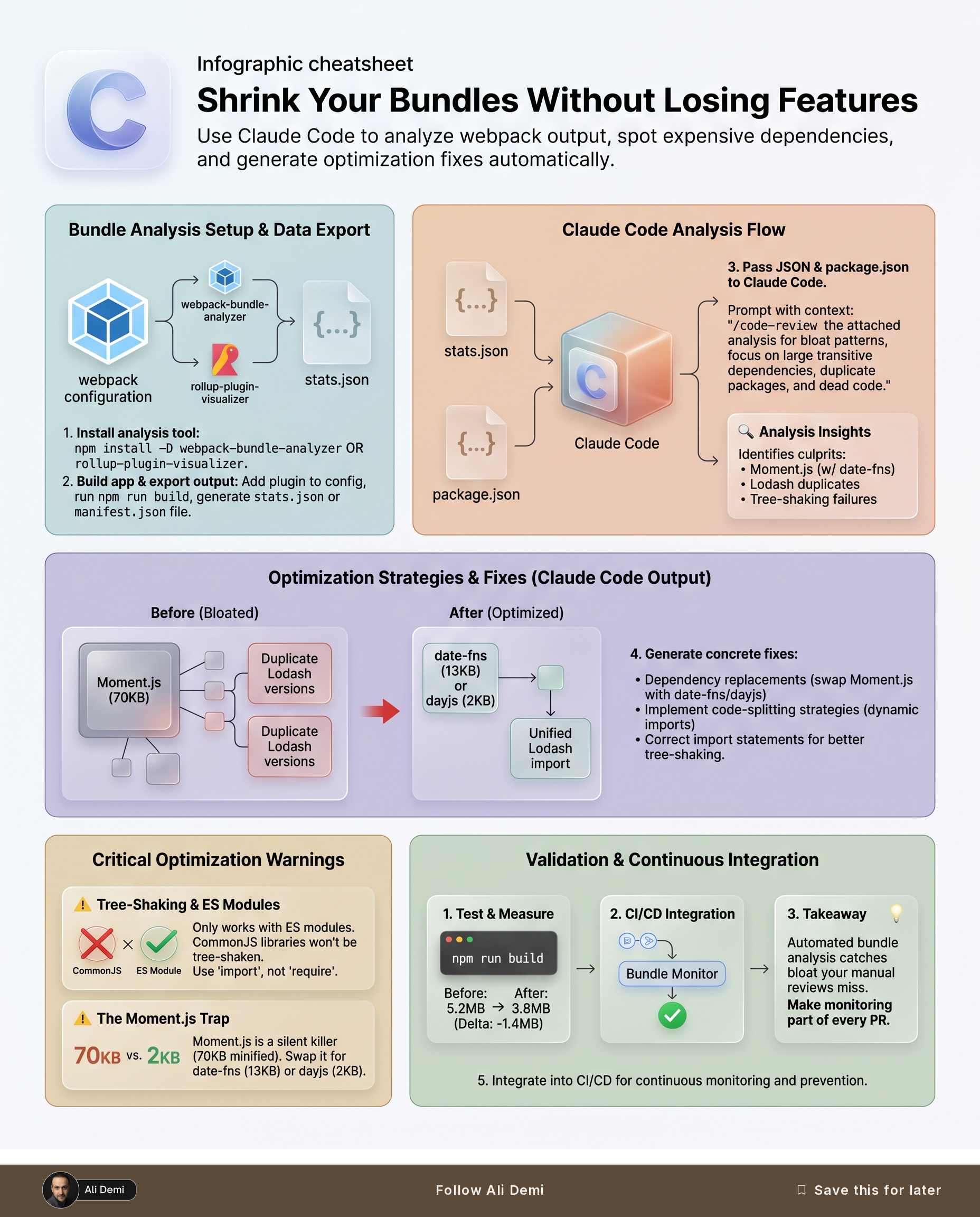
    Your bundle is 50KB too big, but you don’t know why. You ship Moment.js and date-fns both. You have three copies of Lodash. Tree-shaking failed silently. Welcome to the nightmare every frontend team faces.

    Claude Code can read your webpack or rollup analysis in seconds, spot every expensive pattern, and generate a prioritized fix list that actually works.

    The workflow: Build your app and generate a bundle report JSON (webpack-bundle-analyzer or rollup-plugin-visualizer both output this). Pipe it to Claude Code with one command. Claude reads the dependency tree, identifies your real culprits (over-reliance on heavy libraries, duplicate packages, dead code), and generates concrete fixes: swap Moment.js for day-fns, split this route into its own chunk, remove this unused utility. Each fix comes with its impact estimate and implementation steps.

    Then Claude runs your tests to make sure it still works.

    You’ll catch things manual optimization misses. Duplicate packages hiding under transitive dependencies. A library you thought was tree-shaken but isn’t. Lodash-es imported the wrong way, pulling the whole library instead of one utility.

    This isn’t a one-time audit. Build this into your CI/CD. Every PR gets an automated bundle report: this change added 3KB, that one saved 12KB. Teams who do this routinely ship 15-30% smaller bundles without sacrificing functionality.

    Production applications load faster. Your users in slow networks see results sooner. You ship less code, so JavaScript parsing and compilation time drops too.

    ——

    Book your free AI clarity call, NOW!
    https://buff.ly/TpWy277

    ——

    Repost this. Thanks.
  • Your API Docs Are Already Code: Generate Type-Safe Clients from curl

    Your API Docs Are Already Code: Generate Type-Safe Clients from curl

    You’ve got the curl examples. You’ve got the API working. You’ve got no type-safe client.

    Whether it’s a legacy internal API, a third-party service documented only in curl, or a Postman collection gathering dust, extracting patterns and writing a client is tedious and error-prone. Teams end up with a Python version, a TypeScript version, a Go version, all slightly different, all missing the same edge cases.

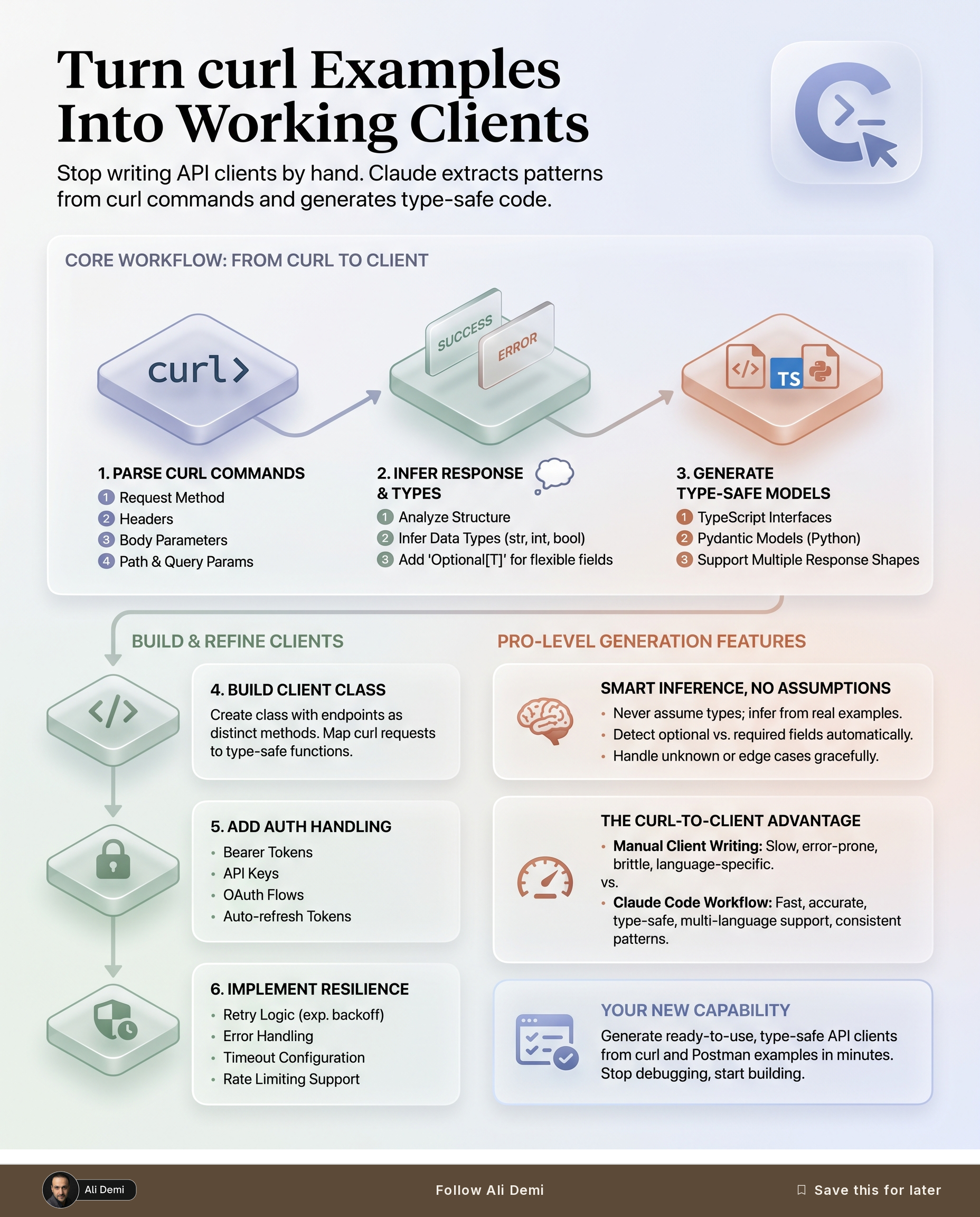
    Claude Code can flip this on its head. Feed it your curl commands. Claude analyzes the requests and responses, infers types from the data shapes, generates type definitions, and writes a complete client with auth, retries, and error handling. In minutes, not days.

    Here’s the workflow:

    1. Collect your curl examples from README, API logs, shell history, Postman. Anywhere they live.
    2. Point Claude at them and ask it to analyze the request/response patterns.
    3. Claude generates TypeScript interfaces or Pydantic models from the data.
    4. Claude writes a client class with methods for each endpoint, type signatures, and built-in resilience patterns.
    5. You get production-ready code you can use or customize.

    The payoff is huge. One source of truth (your curl examples). Type safety across languages. Consistency. No more “what parameters does this endpoint actually take” – it’s in the types now.

    And because curl examples are human-readable and persistent, your documentation becomes your code contract. Change the curl example, regenerate the client, everything stays in sync.

    ——

    Book your free AI clarity call, NOW!
    https://buff.ly/TpWy277

    ——

    Repost this. Thanks.
  • Your Code Deserves Comments: Automate Them at Scale

    Your Code Deserves Comments: Automate Them at Scale

    You inherit a 50,000-line codebase with zero comments.

    Nobody remembers why half of it was written. The business logic is implicit. New hires spend weeks reverse-engineering functions that should have taken hours to understand.

    Manual commenting takes forever. AI can help.

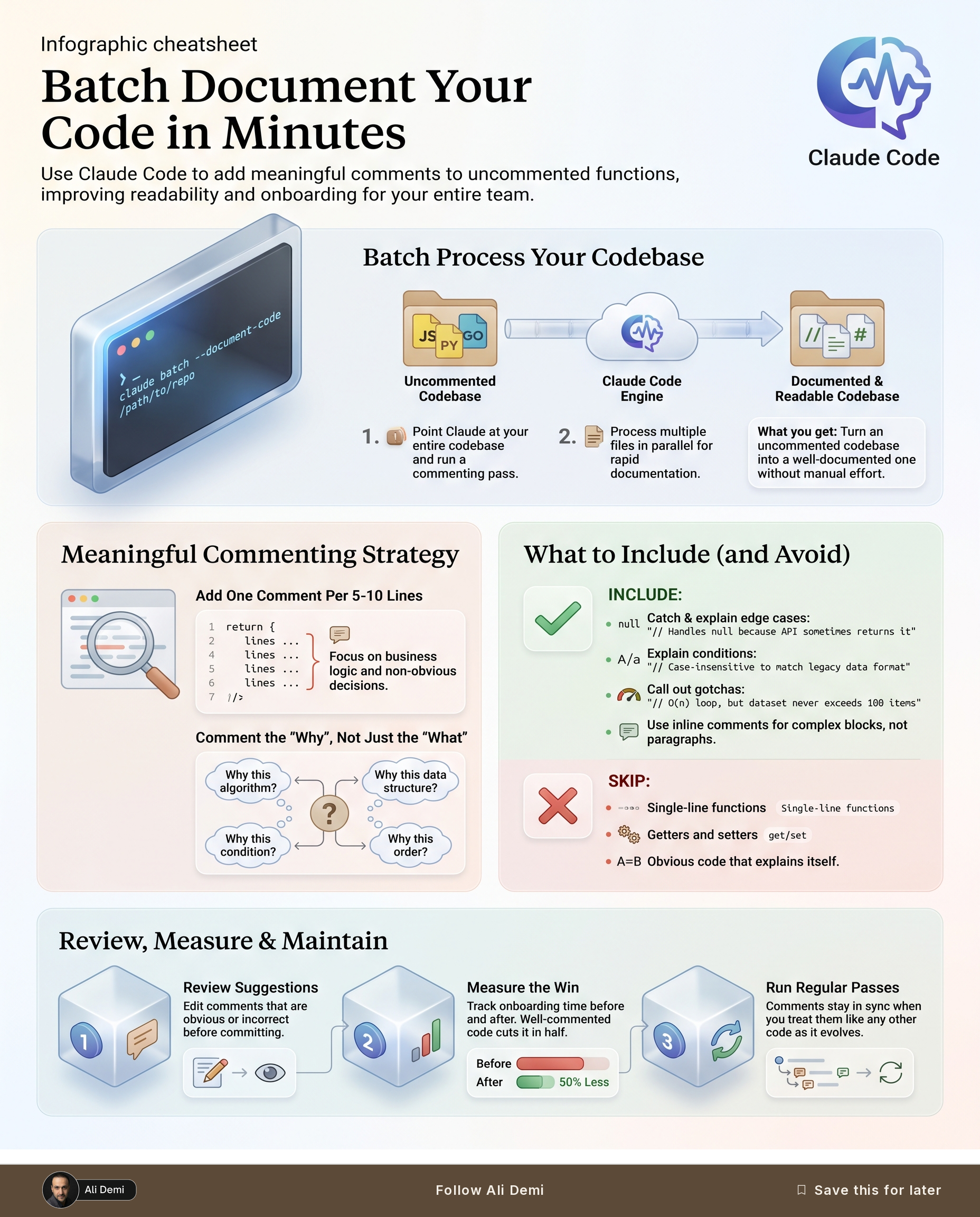
    Claude Code can read your functions semantically, understand what they actually do, and add comments that explain the “why,” not the obvious “what.” Then you batch the whole codebase in parallel.

    The workflow:

    1. Point Claude Code at your functions using the batch tool to process multiple files at once.
    2. Ask it to add one meaningful comment per 5-10 lines of code.
    3. Skip trivial single-line functions and getters.
    4. Focus on business logic, non-obvious decisions, and edge cases.
    5. Review the output, refine, and commit.

    The payoff: onboarding drops from weeks to days. Code audits take hours instead of days. Refactoring becomes less risky because the intent is documented.

    Claude doesn’t just comment. It understands the code’s purpose and documents why someone chose this approach over the obvious one.

    ——

    Book your free AI clarity call, NOW!

    https://buff.ly/TpWy277

    ——

    Repost this. Thanks.
  • Stop Hunting Memory Leaks: Automate Heap Dump Analysis

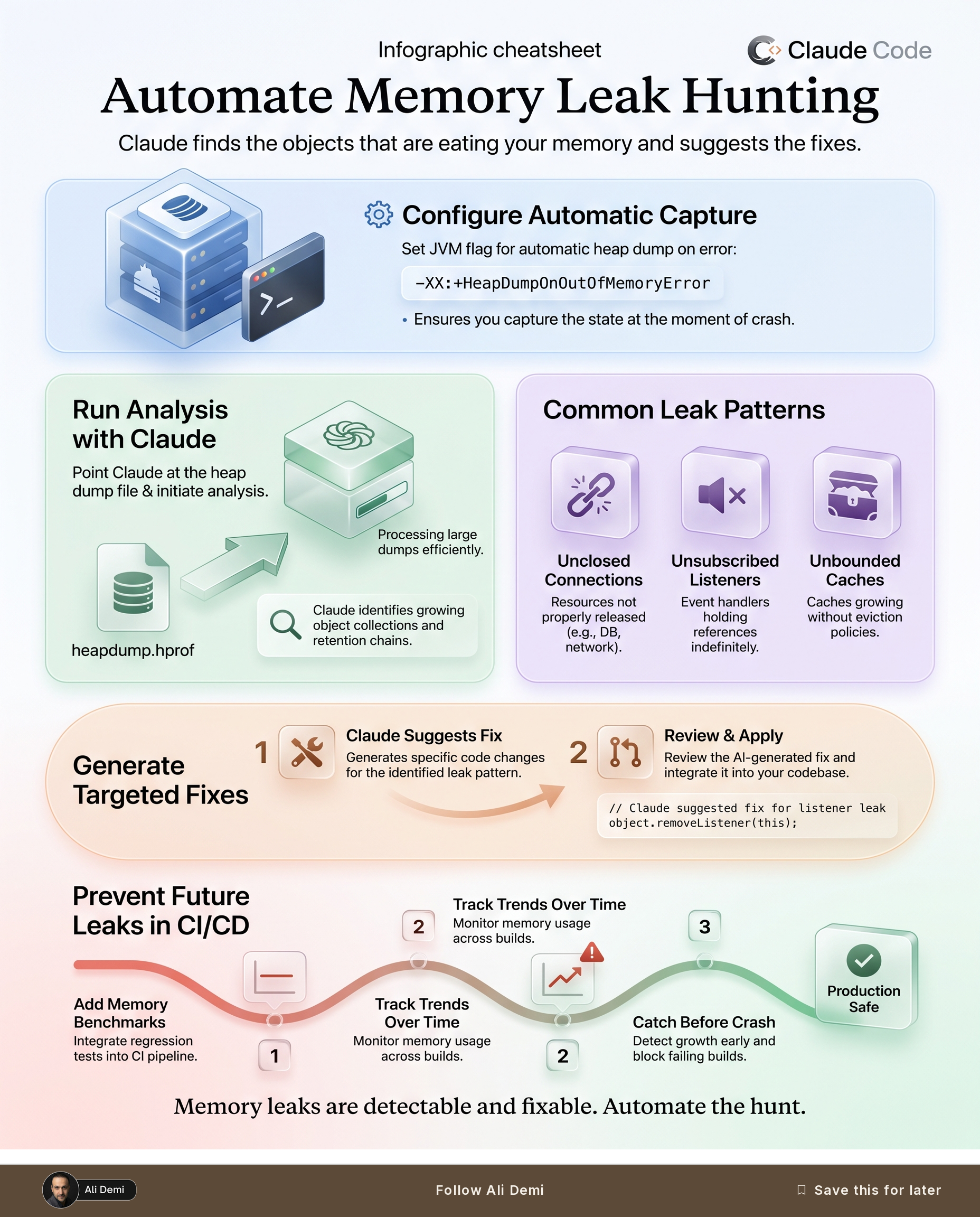
    Stop Hunting Memory Leaks: Automate Heap Dump Analysis

    Memory leaks kill production at 3am.

    Your app runs fine in dev. Tests pass. Then at 2:47am a heap fills up, OutOfMemoryError fires, and your service goes dark. By morning you’re staring at a 500MB heap dump that won’t open in most tools.

    Manual heap dump analysis is nightmare fuel: you dig through object retention graphs, hunt for growing collections, trace references back to code, and guess which pattern is leaking.

    Claude can automate the whole hunt.

    First, configure your JVM to auto-capture heap dumps when things go wrong. One flag: -XX:+HeapDumpOnOutOfMemoryError. Now every crash leaves evidence.

    Point Claude at the dump file. Claude loads it, finds object collections that have grown since the last dump, and traces retention chains back to your code. The analysis happens in minutes instead of hours.

    Claude identifies the pattern: unclosed database connections, event listeners never unsubscribed, caches with no eviction policy, circular references keeping objects alive. Each pattern maps to a specific fix.

    Then Claude suggests the fix and runs memory benchmarks to verify the leak stops.

    Add this to your CI/CD pipeline as a scheduled job. Every week Claude captures memory profiles under realistic load, detects trends, and flags memory growth before it becomes a crisis.

    ——

    Book your free AI clarity call, NOW!
    https://buff.ly/TpWy277

    ——

    Repost this. Thanks.
  • Test Your Prompts Like Code: Automate LLM Evaluation

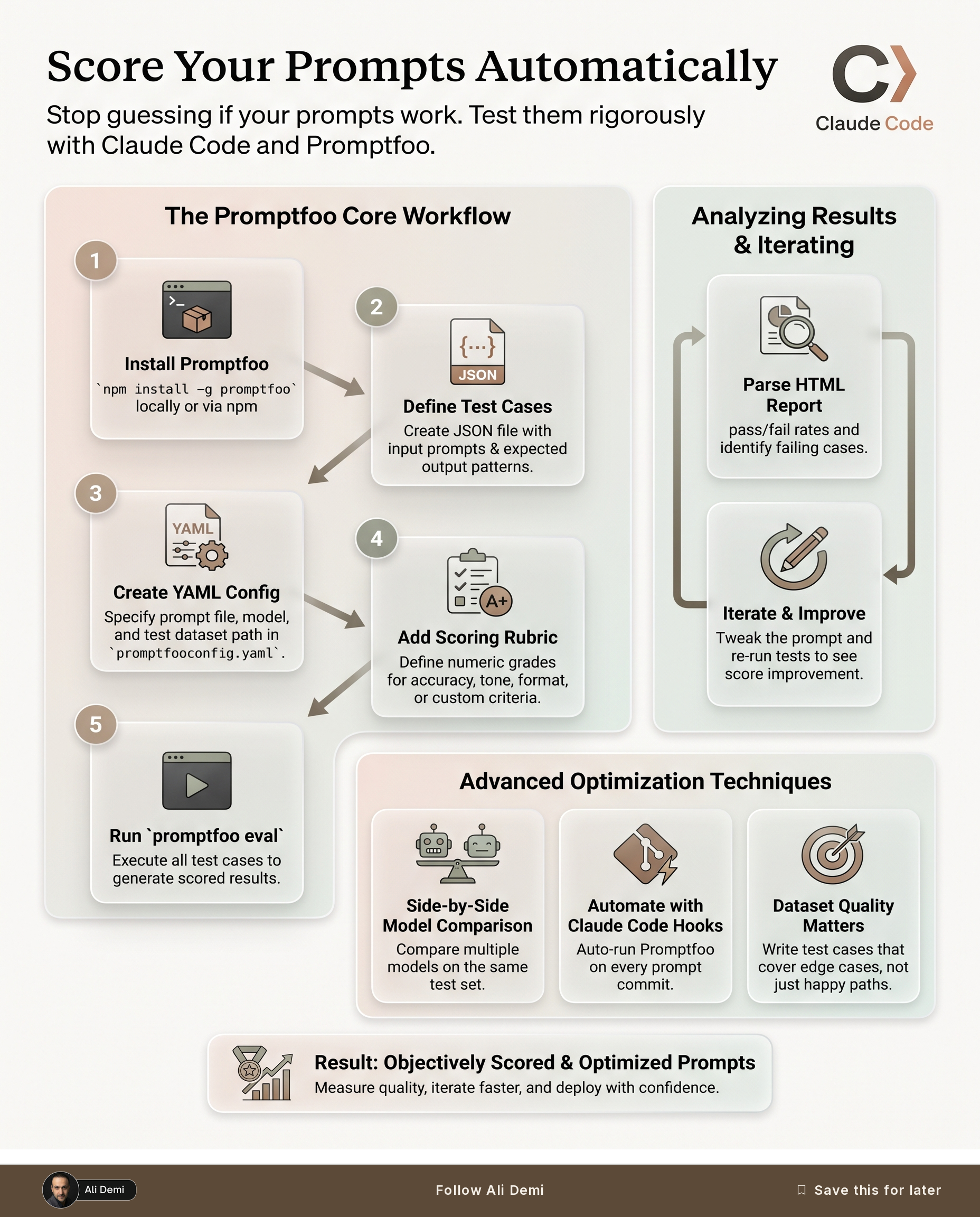
    Test Your Prompts Like Code: Automate LLM Evaluation

    You write a prompt, ship it to production, and hope it works across all your use cases. Then you discover it fails on edge cases. No metrics. No score. Just broken.

    Treat prompts like code. Test them with a scoring rubric. Measure against baselines. Iterate until you win.

    Promptfoo is a testing framework for LLM applications. It runs your prompt against a dataset of test cases, scores each result with a rubric (accuracy, tone, format compliance, whatever you need), and shows you pass/fail rates. Claude Code automates the whole pipeline.

    You define the rubric once. Claude Code sets up your test harness, runs Promptfoo, parses results, and shows you exactly which cases fail and why. Then you tweak the prompt, re-run the tests, and watch your score climb.

    You can test different prompts in parallel, compare Claude Opus vs Sonnet on the same cases, or measure the cost-quality tradeoff of switching models. Data, not vibes.

    ——

    Book your free AI clarity call, NOW!
    https://buff.ly/TpWy277

    ——

    Repost this. Thanks.