Tag: documentation

  • Your Code Deserves Comments: Automate Them at Scale

    Your Code Deserves Comments: Automate Them at Scale

    You inherit a 50,000-line codebase with zero comments.

    Nobody remembers why half of it was written. The business logic is implicit. New hires spend weeks reverse-engineering functions that should have taken hours to understand.

    Manual commenting takes forever. AI can help.

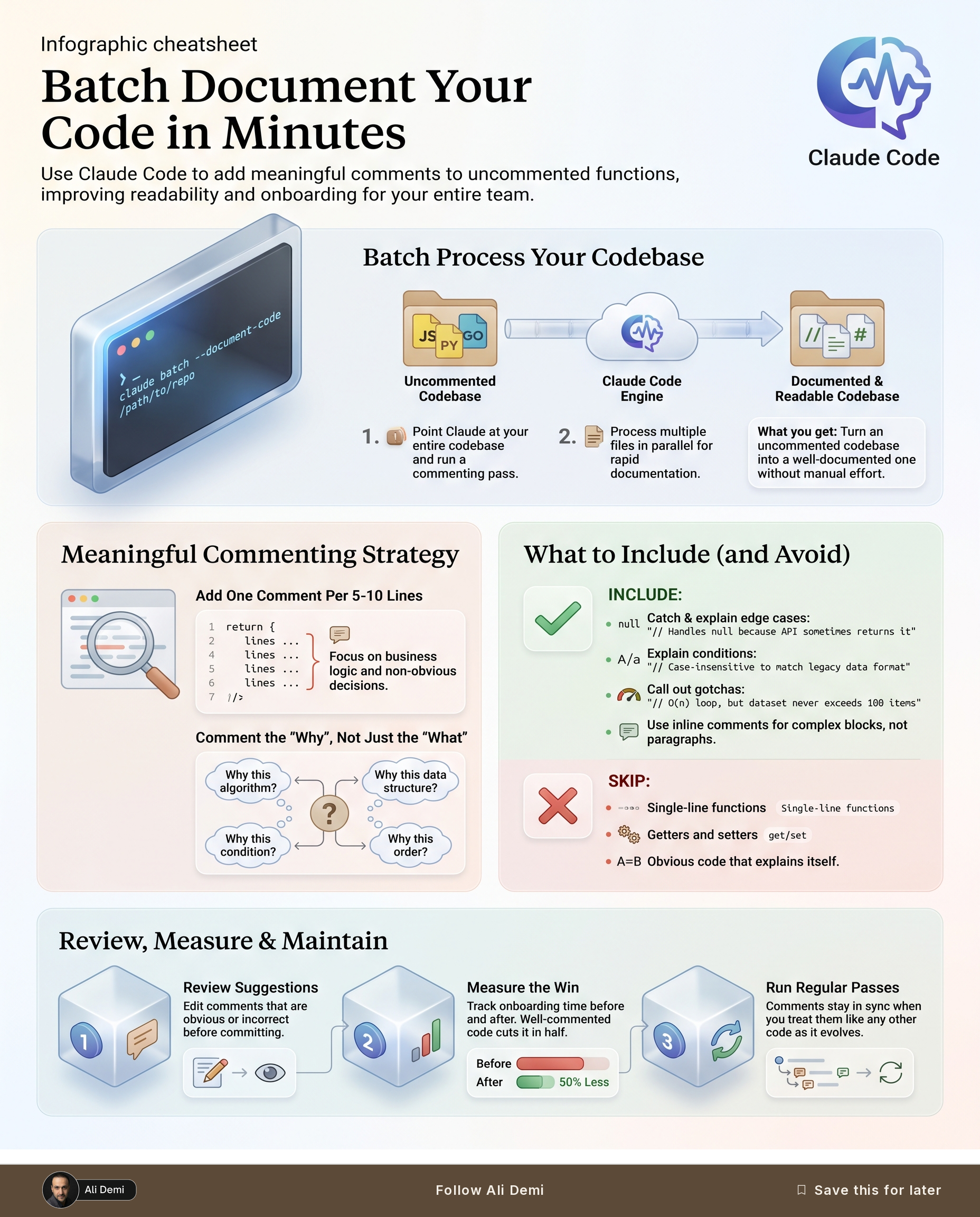
    Claude Code can read your functions semantically, understand what they actually do, and add comments that explain the “why,” not the obvious “what.” Then you batch the whole codebase in parallel.

    The workflow:

    1. Point Claude Code at your functions using the batch tool to process multiple files at once.
    2. Ask it to add one meaningful comment per 5-10 lines of code.
    3. Skip trivial single-line functions and getters.
    4. Focus on business logic, non-obvious decisions, and edge cases.
    5. Review the output, refine, and commit.

    The payoff: onboarding drops from weeks to days. Code audits take hours instead of days. Refactoring becomes less risky because the intent is documented.

    Claude doesn’t just comment. It understands the code’s purpose and documents why someone chose this approach over the obvious one.

    ——

    Book your free AI clarity call, NOW!

    https://buff.ly/TpWy277

    ——

    Repost this. Thanks.
  • Your README Doesn’t Have to Be Stale: Auto-Generate It

    Your README Doesn’t Have to Be Stale: Auto-Generate It

    Your README is outdated the moment you ship a new feature.

    Maintaining docs by hand is a losing game: they drift, examples break, API endpoints change, and no one notices until a user complains. The truth is, the source of truth for what your code does is your code itself.

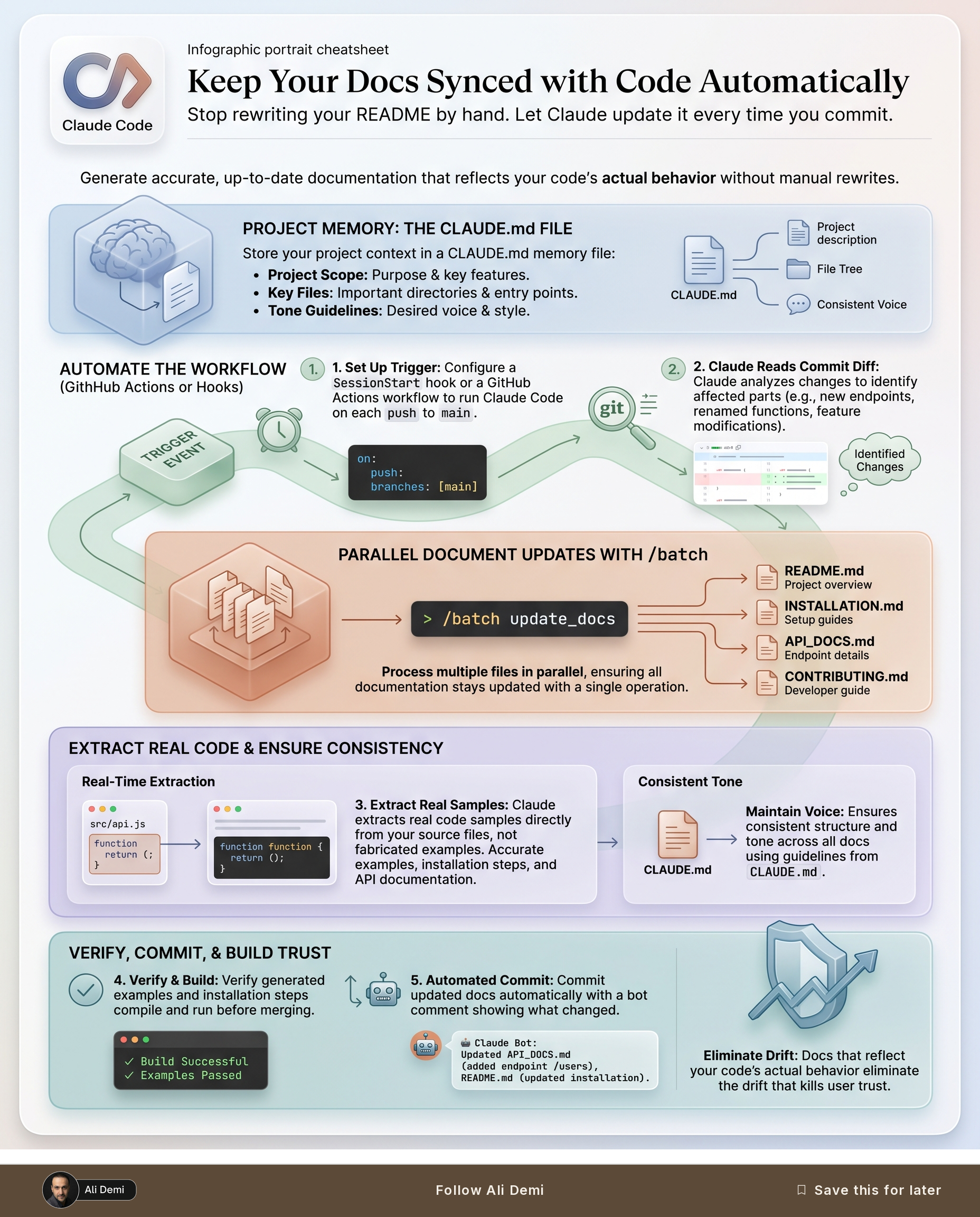
    Clause Code can read your codebase and keep documentation fresh. Store your project context in a CLAUDE.md memory file, set up Claude Code to trigger on each commit, and it will analyze your changes, generate accurate examples directly from your source, and update README, API docs, and guides automatically. No manual rewrites. No drift.

    Here’s how it works:

    Step 1: Seed your project context. Write a brief CLAUDE.md in your repo root that describes your project’s purpose, key files, and the tone you want in docs. Claude uses this to maintain consistency.

    Step 2: Trigger on commits. Add a SessionStart hook or GitHub Actions workflow that invokes Claude Code whenever you push to main. Use your CLI or web interface to set it up no OAuth dancing.

    Step 3: Analyze the diff. Claude reads the commit diff and identifies what changed: new endpoints, renamed functions, updated config, new features. It notes which docs are affected.

    Step 4: Generate new docs. Claude extracts real code samples from your source, generates accurate installation steps, writes API documentation directly from your endpoints, and updates examples in your README. It uses the tone and structure from your CLAUDE.md to stay consistent.

    Step 5: Commit and push. The updated docs are committed automatically, ready for review. A bot comment surfaces what changed so humans can audit before merge.

    This workflow scales: use `/batch` to process multiple doc files in parallel. Your README, INSTALLATION.md, CONTRIBUTING.md, and API_DOCS.md all stay in lockstep with your code.

    The gotcha: Ask Claude to extract real code samples from your project, not fabricate examples. Broken examples in docs kill trust faster than missing docs.

    Docs that reflect reality are docs people actually use.

    ——

    Book your free AI clarity call, NOW!
    https://buff.ly/TpWy277

    ——

    Repost this. Thanks.
  • Stop Writing Recap Notes: Share Your Claude Sessions as Replays

    Stop Writing Recap Notes: Share Your Claude Sessions as Replays

    You finish a complex refactor or figure out a tricky bug. Your team asks “what did you do?” So you write a 500-word recap, paste code snippets, explain your thinking.

    There’s a better way.

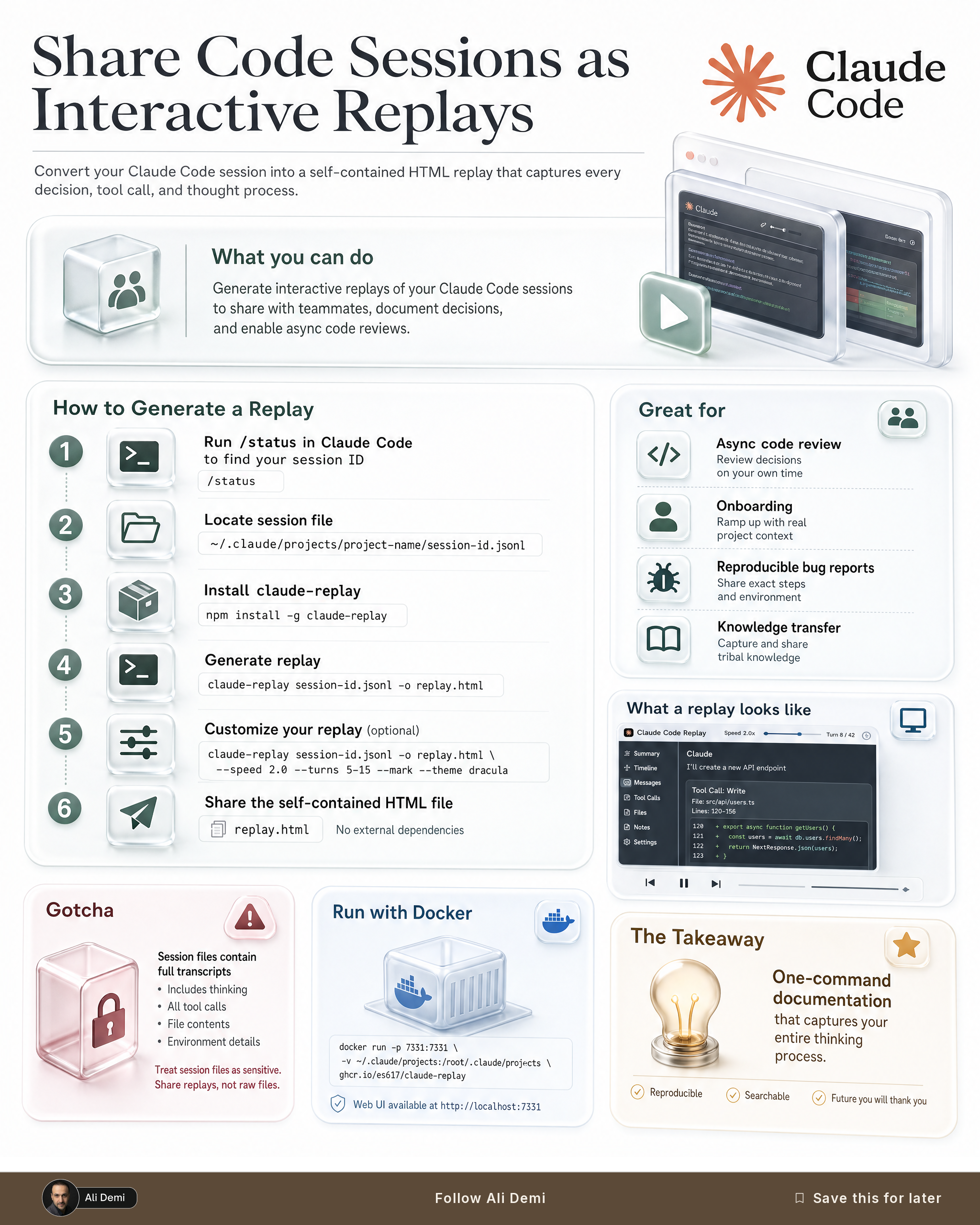
    Claude-replay turns your entire Claude Code session into an interactive, self-contained HTML file. Your teammates watch the session unfold – every prompt, every tool call, every decision – in a shareable replay. No video player, no external dependencies. One HTML file.

    Here’s how:

    1. Run `/status` in Claude Code to grab your session ID.
    2. Find the session file at `~/.claude/projects/project-name/session-id.jsonl`.
    3. Install the replay tool: `npm install -g claude-replay`
    4. Generate the HTML: `claude-replay session-id.jsonl -o replay.html`
    5. Customize it: add flags like `–speed 2.0` to skip slow parts, `–turns 5-15` to focus on specific exchanges, `–mark` to add chapter markers.
    6. Share the HTML file – email it, drop it in a doc, push it to a repo.

    Your team opens it in a browser and steps through your thinking at their own pace. They can expand any tool call to see the exact output, search the transcript, rewind to a moment they missed.

    Perfect for onboarding new devs (“watch how we debug this”), code review (“see the approach I tried”), reproducible bug reports (“here’s exactly what happened”), and async work (“I’ll review your replay tomorrow”).

    The session JSONL file holds everything – your prompts, Claude’s full responses, all thinking and tool calls, timestamps. It’s already being recorded. Claude-replay just makes it shareable and navigable, without you lifting a finger.

    ——

    Book your free AI clarity call, NOW!
    https://buff.ly/TpWy277

    ——

    Repost this. Thanks.
  • Stop Maintaining Docs By Hand: Auto-Generate OpenAPI Specs

    Stop Maintaining Docs By Hand: Auto-Generate OpenAPI Specs

    Your API docs are out of sync again. Someone added a query parameter. A response type changed. Your docs still say the old thing. It happens every time because docs live in a separate file, divorced from the code that changes.

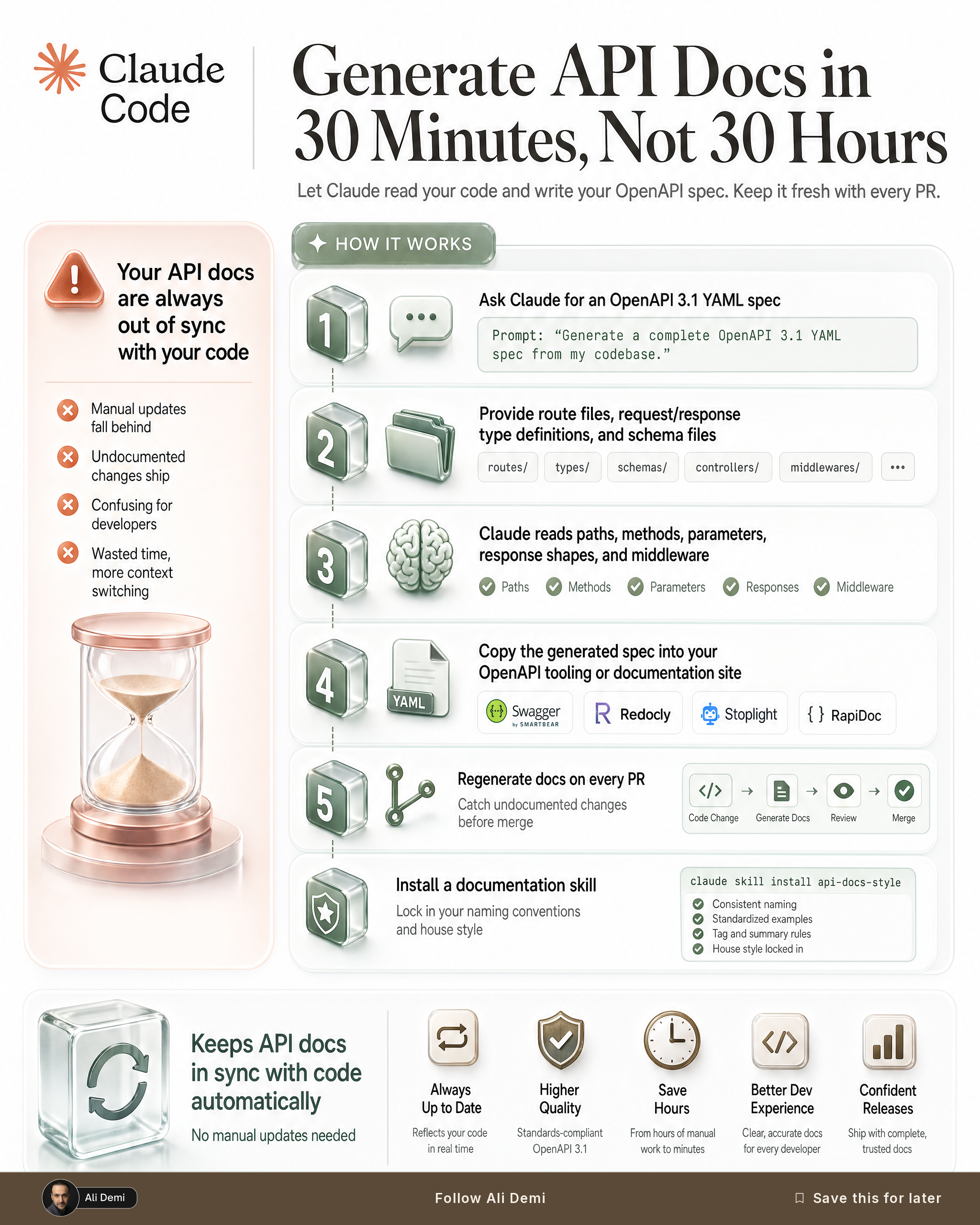
    Claude Code solves this by reading your code and writing the spec for you.

    Point Claude at your route files, request handlers, and type definitions. It extracts the path, HTTP method, request body shape, query parameters, response types, and authentication middleware. Then it writes a complete, standards-compliant OpenAPI 3.1 specification. A typical 30-50 endpoint REST API takes 8 to 20 hours to document by hand. Claude generates a first-draft spec in under 30 minutes.

    The real win is integrating this into your PR workflow. Regenerate docs on every merge. Claude catches undocumented changes and new endpoints before they ship. Documentation stops drifting because the source of truth is always the code.

    For teams running the same workflow repeatedly, install a documentation skill. It locks in your conventions (response format, error schemas, naming) so every doc Claude generates follows your house style automatically, across Claude Code, Cursor, and Codex.

    ——

    Book your free AI clarity call, NOW!
    https://buff.ly/TpWy277

    ——

    Repost this. Thanks.