Tag: git

  • Your Git History Is Full of Secrets: Scrub Them Automatically

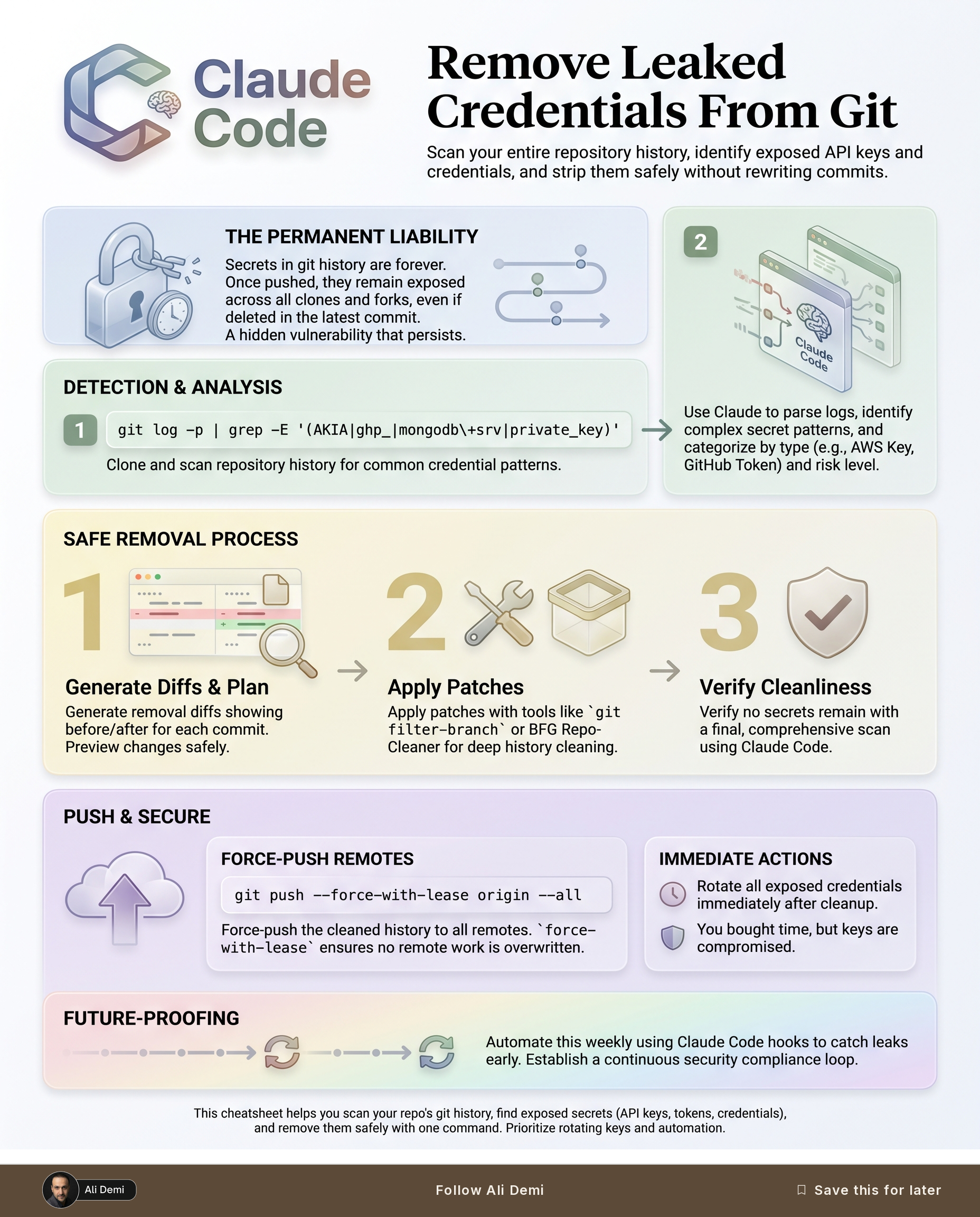
    Your Git History Is Full of Secrets: Scrub Them Automatically

    Your API keys are probably in your git history right now.

    You committed them once, didn’t notice, and pushed them. Maybe weeks ago. Maybe from a laptop you lost. Now they’re floating in every clone, every fork, every backup. No amount of revoking the key changes the fact that it’s permanently visible to anyone who can see your repository history.

    Traditional secret-removal tools like git-filter-branch or BFG require rewrites that break everyone’s checkouts. Claude Code can do better: scan your entire history, find the secrets, strip them, and regenerate commits without the chaos.

    Here’s how it works:

    1. Point Claude at your repo.
    2. Run a scan for common secret patterns: AWS keys, GitHub tokens, database passwords, private keys, API credentials.
    3. Claude finds them, shows you what it found and where.
    4. Approve the removal (it’s non-destructive until you verify).
    5. Claude strips them from history and regenerates the commits cleanly.
    6. Force-push once to update all remotes.

    Your history is now clean. Your team doesn’t have to rebase. Your secrets aren’t exposed anymore.

    Run this weekly as part of your security routine, especially after adding new developers or onboarding new services.

    ——

    Book your free AI clarity call, NOW!

    https://buff.ly/TpWy277

    ——

    Repost this. Thanks.
  • Find Your Knowledge Gaps: Detect Code Silos Automatically

    Your codebase is a map of who knows what. But that map stays hidden until someone leaves, and suddenly you realize a critical system was entirely in one person’s head.

    You can analyze this automatically. Use Claude Code to run git blame and commit history on your critical modules, then extract ownership patterns – which developer wrote most of the auth system, who owns the database layer, where is knowledge scattered versus concentrated.

    The workflow:

    1. Point Claude at critical modules (auth, payments, core business logic).
    2. Claude runs git blame and commit history analysis to extract per-author contribution ratios.
    3. Calculate ownership concentration: if one author wrote 90% of a file, that is a silo.
    4. Identify red flags: modules touched by only one or two people, files not modified in 6+ months with no documentation.
    5. Generate a report mapping expertise, flagging risk zones, and suggesting who to pair for cross-training.

    Now you know where your knowledge actually lives. Cross-train deliberately. Distribute ownership of critical systems. Reduce the bus factor.

    ——

    Book your free AI clarity call, NOW!
    https://buff.ly/TpWy277

    ——

    Repost this. Thanks.
  • Keep Your Commits Clean: Auto-Enforce Conventions with Claude

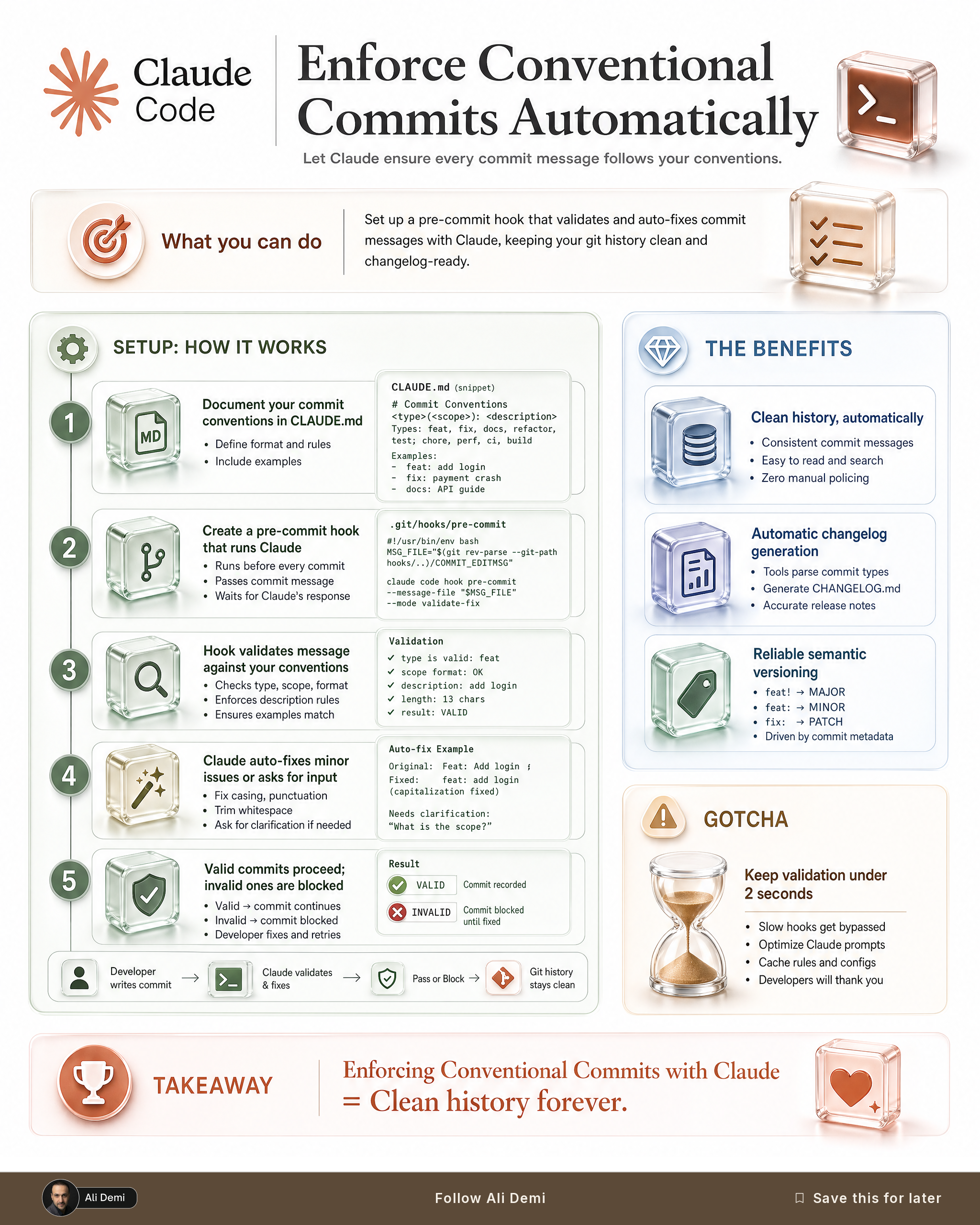
    Keep Your Commits Clean: Auto-Enforce Conventions with Claude

    Your git history is a mess. Commits say “updates” and “fix bug.” When you need to generate release notes or understand what changed, you are digging through commit messages that tell you nothing.

    Conventional Commits solves this, but only if everyone follows the format. Documenting the standard in a README doesn’t work. People forget, or misremember, and now you are cleaning up history manually.

    Here is the fix: a pre-commit hook that runs Claude on every commit message. Claude validates it against your conventions and either auto-fixes minor issues or guides you to the right format. Clean git history becomes automatic.

    The workflow:

    1. Document your conventions in CLAUDE.md with examples for your team’s commit prefixes
    2. Create a pre-commit hook in your version control system
    3. Hook runs Claude to check the message against your documented format
    4. Claude auto-fixes trivial violations or asks for clarification
    5. Commit lands in standard format or is blocked until fixed

    Result: you can now reliably generate changelogs, auto-bump versions by commit type, and your git log actually tells a story instead of being a wall of vague messages.

    Teams using this report cleaner history, fewer PR comment threads about commit message standards, and release notes that assemble themselves from git.

    ——

    Book your free AI clarity call, NOW!
    https://buff.ly/TpWy277

    ——

    Repost this. Thanks.

  • Stop Hunting Breaking Commits: Let Claude Auto-Bisect Your History

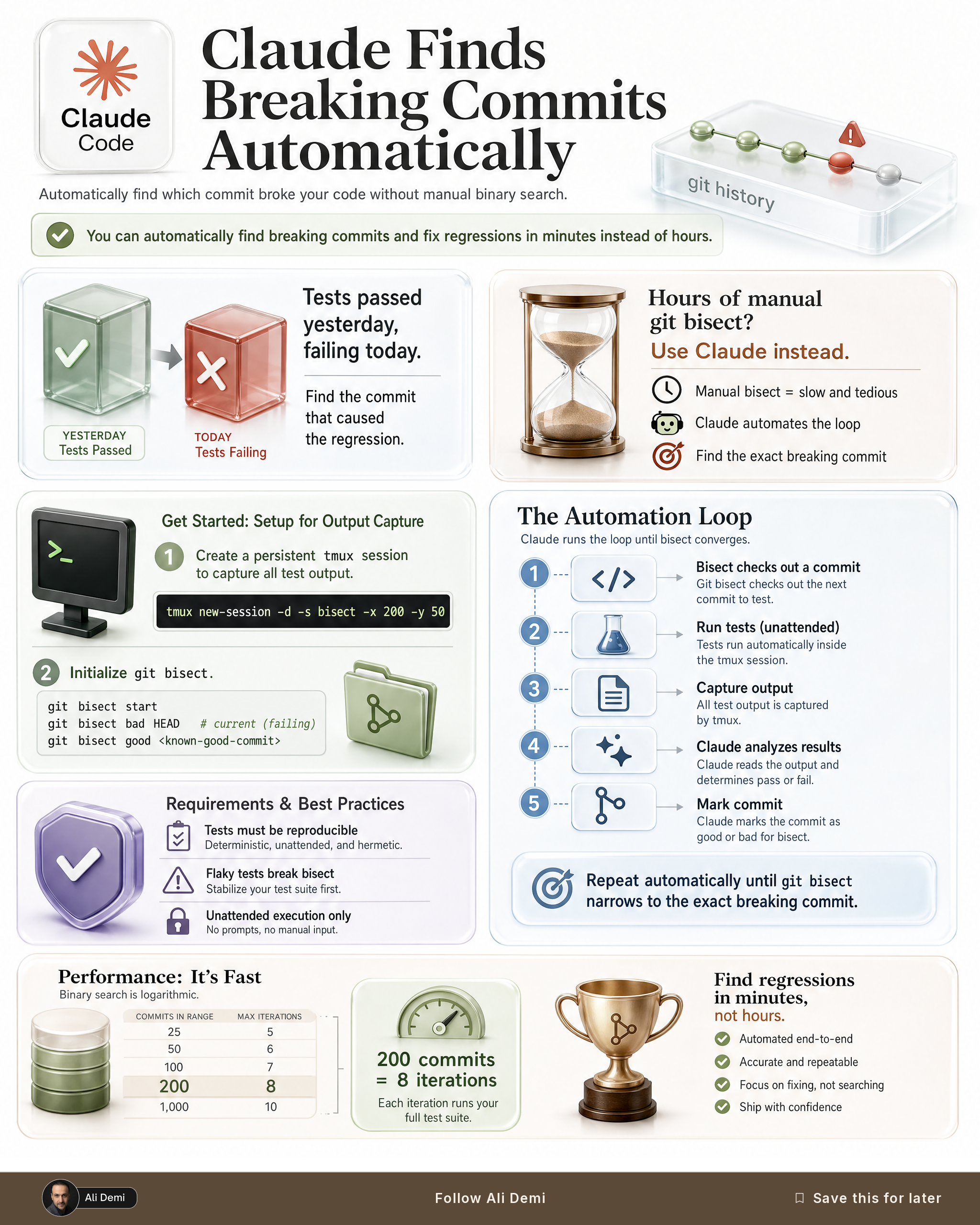
    Stop Hunting Breaking Commits: Let Claude Auto-Bisect Your History

    Your tests passed yesterday. Today they fail. You don’t know why.

    You could manually git bisect – running tests at each commit, marking good/bad, binary searching through history. That takes hours.

    Or you could let Claude do it.

    Claude Code can autonomously run git bisect: spawn a tmux session, run your test suite, read the pass/fail output, and instruct git bisect to mark commits. It loops until it finds the exact commit that broke your code.

    It’s fully automated. No human in the loop, no guessing.

    Set it up:

    1. Start a tmux session for output capture.
    2. Tell Claude the known-good commit and current broken state.
    3. Claude runs the bisect loop: test, read output, mark commit, repeat.
    4. When bisect finishes, Claude shows you the breaking commit with full diff context.

    The trick is reproducible tests. If your tests flake, bisect gets confused. Stabilize them first.

    Commit ranges can take time – each iteration runs your full test suite. A 200-commit range might take 8 iterations. Plan for that.

    One run finds your regression. No manual searching, no guesswork.

    ——

    Book your free AI clarity call, NOW!
    https://buff.ly/TpWy277

    ——

    Repost this. Thanks.