Here’s the problem: a junior engineer joins your team and spends two days figuring out why the transaction system works the way it does. A teammate leaves and their architectural decisions live only in git history nobody reads. You answer the same architecture question three times a month.
Your codebase already knows the answers. It just can’t talk.
Claude Code can fix that. Build an AI assistant that indexes your repo and lets developers ask it questions in plain English.
What you’re building:
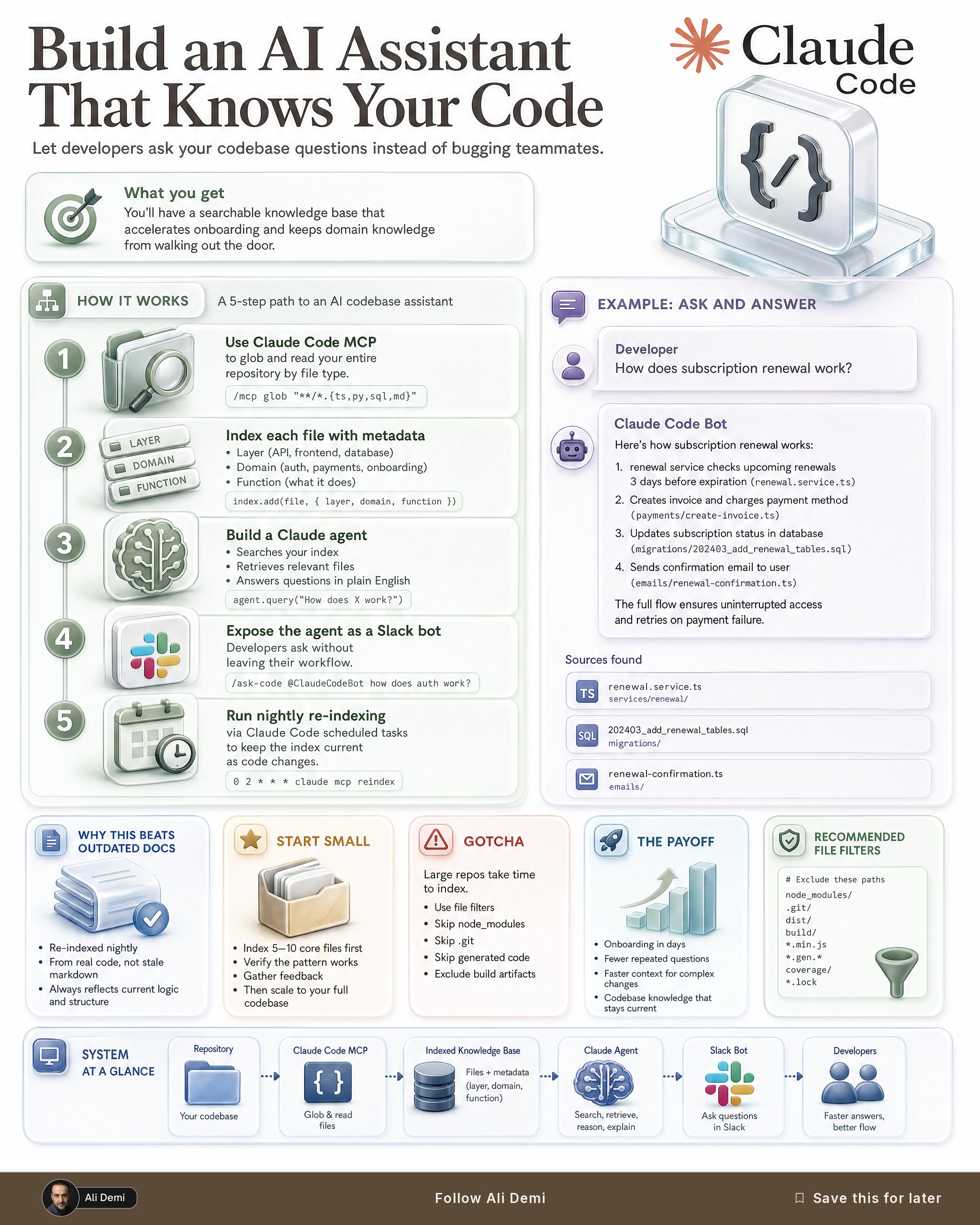
- Use Claude Code MCP tools to glob and read files by type (controllers, models, migrations, schemas).
- Index the structure: each file gets tagged by layer (frontend, API, database), business domain (auth, payments, reports), and functionality.
- Build a Claude agent that searches your index, reads relevant files, and synthesizes answers to natural language questions.
- Wire it as a Slack bot, CLI, or internal web tool so your team can ask it without leaving their workflow.
- Run a scheduled task nightly to re-index; Claude finds new files, renamed patterns, changed architecture, and updates the index.
Real-world example: A developer asks, “How does the subscription renewal process work?”. The agent finds your subscription service, the renewal cron, the database migrations that track billing state, and the email notifications. It synthesizes: “Here’s the flow, here’s the code path, here’s where it can fail, and here’s how we handle retries.” Boom. Onboarding cut by hours.
Why this beats traditional docs: Your README gets stale in weeks. This assistant re-reads your codebase nightly. When you rename a module, move a file, or refactor an algorithm, the assistant knows. Developers ask current questions; they get current answers backed by the real code.
The gotcha: Indexing a large repo takes time and tokens. Start with your core services (5-10 key files), verify the pattern works, then scale. Use file filtering to skip node_modules, .git, and generated code.
Make it sticky: Wire it into Slack so developers use it without friction. Add a “cite sources” feature so answers include file paths and line numbers. Let anyone on the team update the index with a single command.
The result: onboarding in days instead of weeks, fewer repeated questions, and institutional knowledge that doesn’t depend on any one person staying.
——
Book your free AI clarity call, NOW!
https://buff.ly/TpWy277
——
Repost this. Thanks.