Tag: playwright

  • Stop Writing Test Scripts: Generate E2E Tests from User Stories

    Stop Writing Test Scripts: Generate E2E Tests from User Stories

    Writing E2E tests is the work that never ends. Your QA team gets a user story, reads it three times, writes forty lines of Playwright code, and guesses whether they got the flow right. By the time tests ship, the spec’s already changed.

    Instead: feed your user story straight to Claude, point it at the app, and watch it generate tests that actually work.

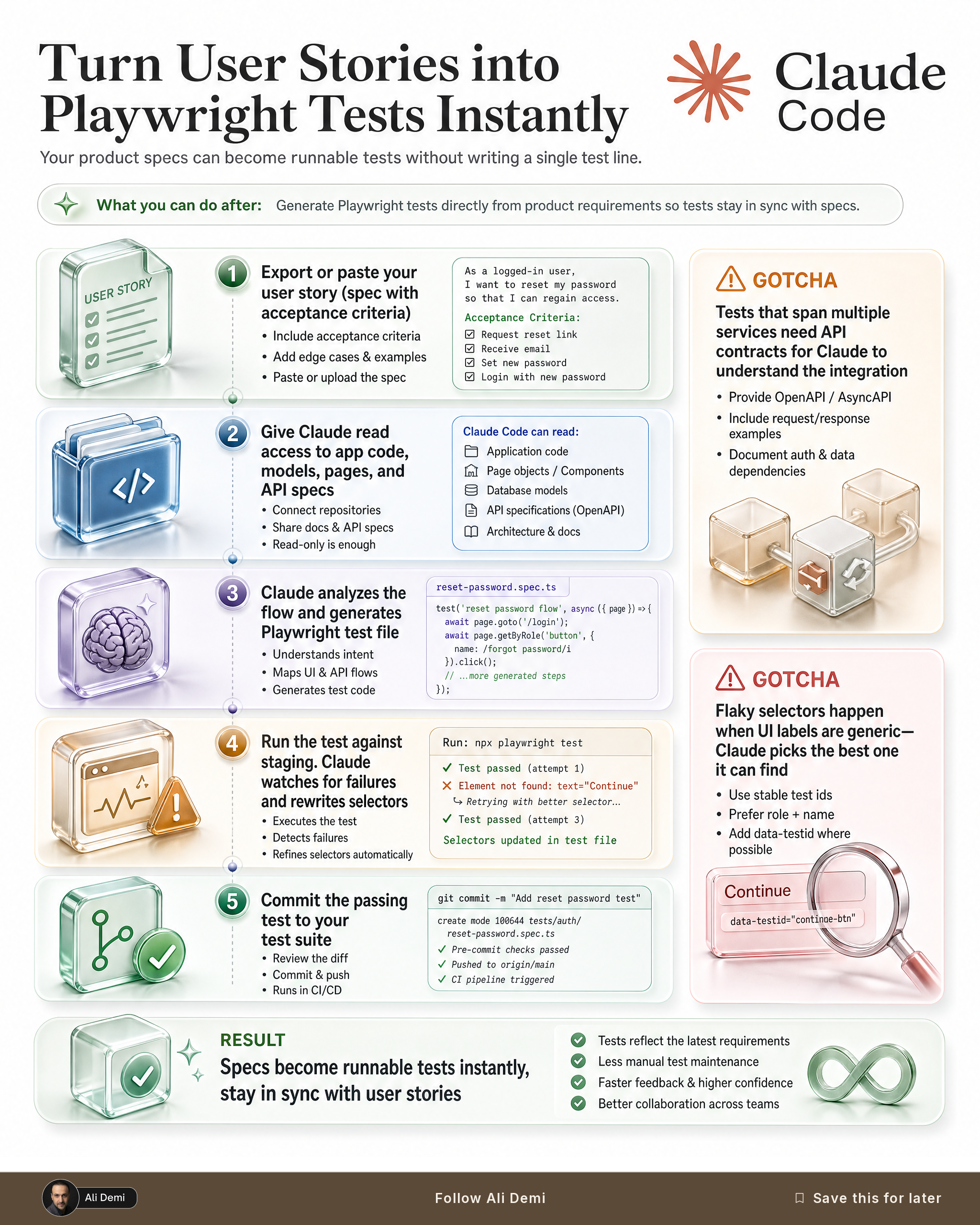
    Here’s how it works:

    1. Paste your user story into Claude Code. Example: “As a user, I sign up with email, set a password, verify my email, and land on the dashboard.”
    2. Claude reads your codebase, finds the login page, understands the form fields and API calls.
    3. Claude generates a Playwright test that navigates the flow, fills forms, clicks buttons, and asserts the expected outcome.
    4. Run the test. If it fails, Claude sees the error and rewrites the selector or the assertion.
    5. Commit. Your test is maintainable because Claude understands WHY it exists-not just WHAT it does.

    The magic: Claude doesn’t just write click(‘button’). It understands your app’s structure and labels inputs by their actual purpose-“email input”, “submit button”-so tests survive refactors.

    Gotcha: Claude needs access to your app’s code (models, pages, API routes). If your test depends on a flow that spans multiple services, give Claude the API contracts too. Otherwise it’ll generate tests that look right but fail on integration.

    This scales. One story per Claude run. String together twenty stories, you have a full smoke test suite in an afternoon, not two weeks.

    ——

    Book your free AI clarity call, NOW!
    https://buff.ly/TpWy277

    ——

    Repost this. Thanks.
  • Your CSS Isn’t Broken, Claude Just Can’t See It

    Your CSS Isn’t Broken, Claude Just Can’t See It

    Your CSS looks fine in the mockup.

    You tell Claude to build it.

    Claude builds it.

    You click the link and… buttons are cut off, the form is off-screen, the footer overlaps content.

    Claude’s code parses fine, so what changed?

    Nothing.

    Claude just built it blind.

    Here’s the thing: Claude writes HTML and CSS flawlessly – syntax is perfect, logic is sound. But it can’t see what it creates. It has no idea the buttons are cut off or the z-index is wrong or contrast fails.

    You take a screenshot, paste it back, and say “nope, try again.” Three rounds later, you’re done.

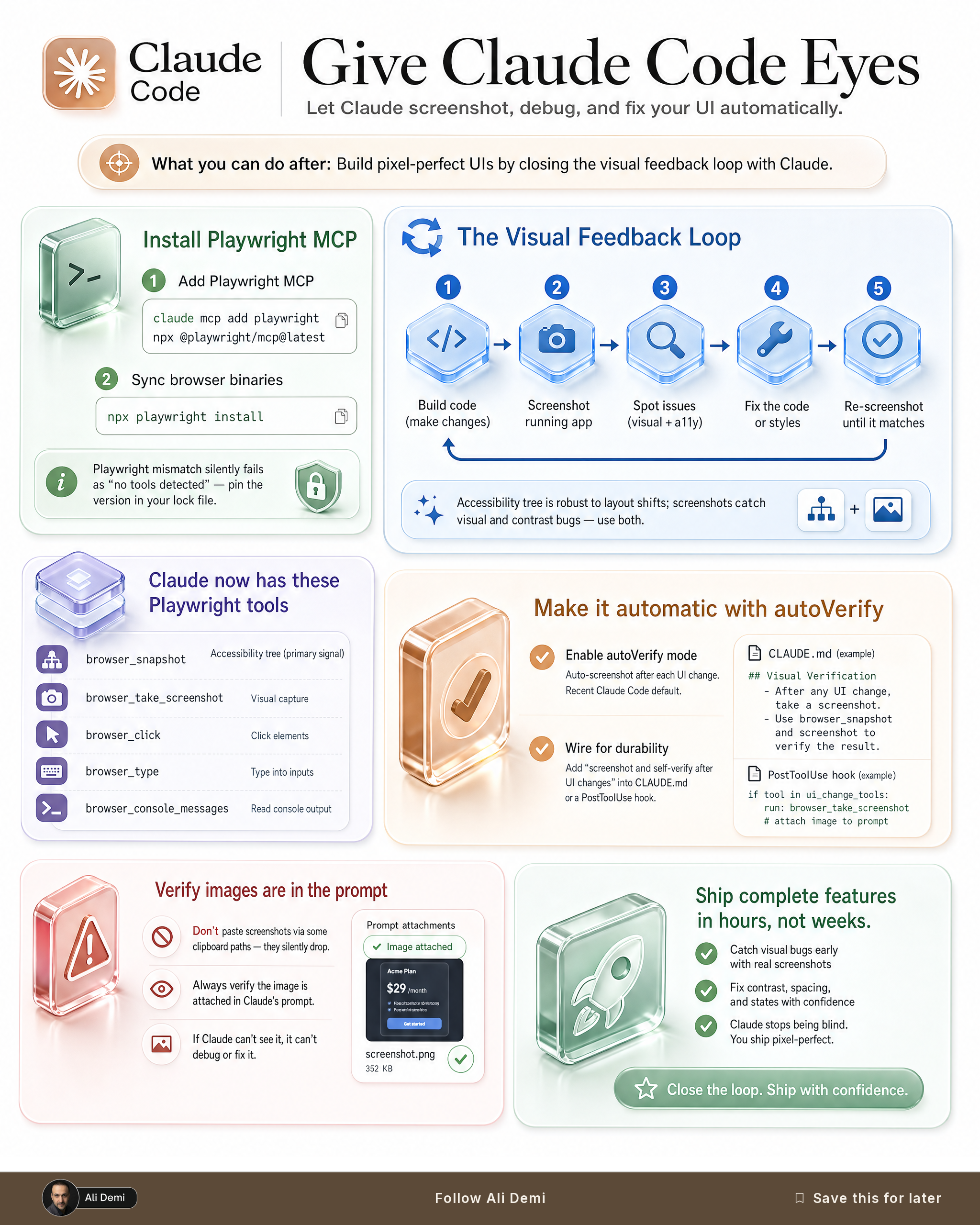
    With visual feedback, Claude sees its own work and fixes it automatically.

    Give it a browser.

    Then it stops being blind.

    Playwright MCP is the hook. It lets Claude Code see what it built – snapshots of the DOM structure, screenshots of the running app, the ability to click and type, access to browser console errors. Claude can now navigate to localhost, screenshot the page, compare it to your mock, spot what’s broken, edit the code, and verify again. The loop closes.

    The result: pixel-perfect UIs built in a single conversation. No “take a screenshot for me” back-and-forth. No guessing at CSS fixes. Claude sees the same pixels you do and corrects them before you ever load the page.

    ——

    Book your free AI clarity call, NOW!
    https://buff.ly/TpWy277

    ——

    Repost this. Thanks.