Tag: security

  • Your Git History Is Full of Secrets: Scrub Them Automatically

    Your Git History Is Full of Secrets: Scrub Them Automatically

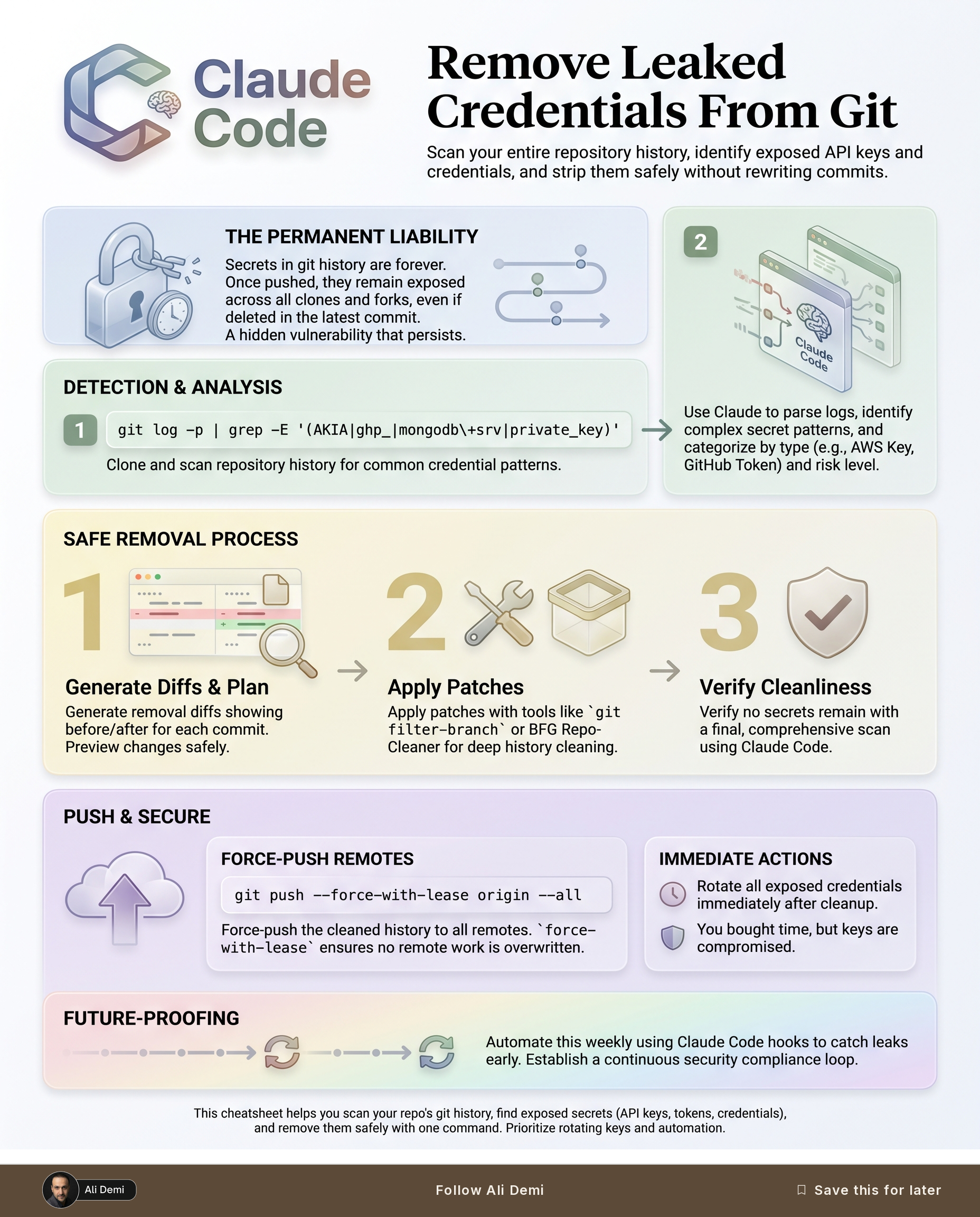
    Your API keys are probably in your git history right now.

    You committed them once, didn’t notice, and pushed them. Maybe weeks ago. Maybe from a laptop you lost. Now they’re floating in every clone, every fork, every backup. No amount of revoking the key changes the fact that it’s permanently visible to anyone who can see your repository history.

    Traditional secret-removal tools like git-filter-branch or BFG require rewrites that break everyone’s checkouts. Claude Code can do better: scan your entire history, find the secrets, strip them, and regenerate commits without the chaos.

    Here’s how it works:

    1. Point Claude at your repo.
    2. Run a scan for common secret patterns: AWS keys, GitHub tokens, database passwords, private keys, API credentials.
    3. Claude finds them, shows you what it found and where.
    4. Approve the removal (it’s non-destructive until you verify).
    5. Claude strips them from history and regenerates the commits cleanly.
    6. Force-push once to update all remotes.

    Your history is now clean. Your team doesn’t have to rebase. Your secrets aren’t exposed anymore.

    Run this weekly as part of your security routine, especially after adding new developers or onboarding new services.

    ——

    Book your free AI clarity call, NOW!

    https://buff.ly/TpWy277

    ——

    Repost this. Thanks.
  • Model Your Threats Before You Code: Automate Threat Modeling with Claude

    Model Your Threats Before You Code: Automate Threat Modeling with Claude

    You ship code, then your security team finds vulnerabilities weeks later in review. By then you’re locked into architectural choices. Threat modeling should happen before you write a line of code, but it’s tedious-manual, slow, and most teams skip it.

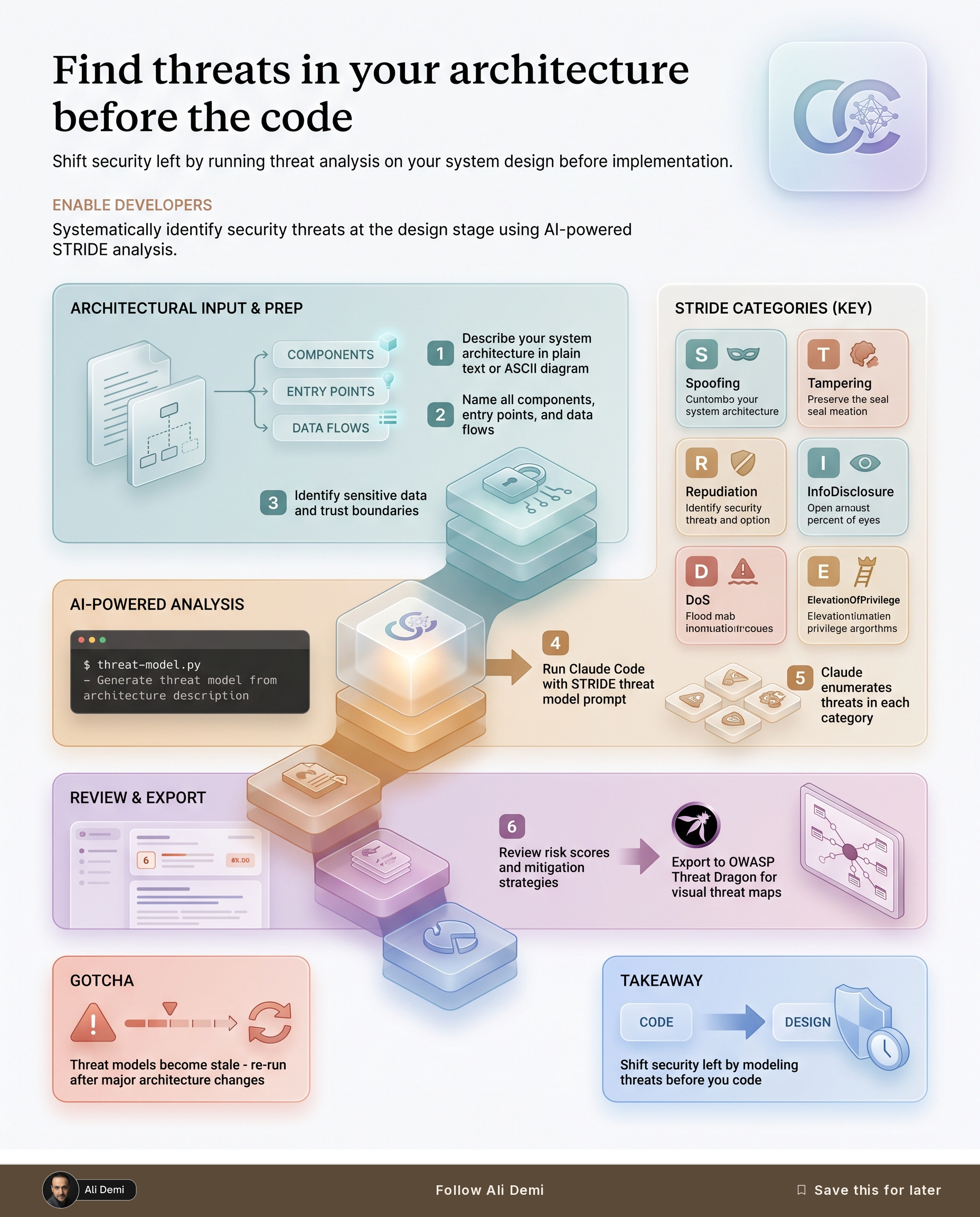
    Claude Code can automate this. Describe your system architecture, and Claude generates a complete threat model using the STRIDE framework. It analyzes your components, trust boundaries, and data flows, then enumerates threats ranked by severity and suggests concrete mitigations.

    The workflow is dead simple. Write out your architecture (or provide a diagram). Give Claude a prompt that names your components, entry points, and sensitive data. Claude breaks down each STRIDE category-Spoofing, Tampering, Repudiation, Information Disclosure, Denial of Service, Elevation of Privilege-and maps specific threats to your system. Every threat gets a risk score and mitigation strategy tied back to architectural changes.

    Build this as a reusable workflow in Claude Code. Feed it your design docs, let it run, and review the threat model in your terminal. Export to OWASP Threat Dragon for visuals. Your security team gets an architecture-aware baseline before code review even starts.

    Threat modeling is one of the highest-leverage security practices. Automating it means you can do it on every project, not just critical ones. Security becomes a design constraint, not an afterthought.

    ——

    Book your free AI clarity call, NOW!
    https://buff.ly/TpWy277

    ——

    Repost this. Thanks.
  • Stop Installing Blind: Vet Every Package Before It Lands

    Stop Installing Blind: Vet Every Package Before It Lands

    Someone on your team finds a package on a blog post.

    They install it. It works. It ships.

    Nobody checked who publishes it, when it was last updated, what licence it carries, or what its install script does on the way in.

    That is the moment most supply chain problems start. Not at review, not at deploy. At the install.

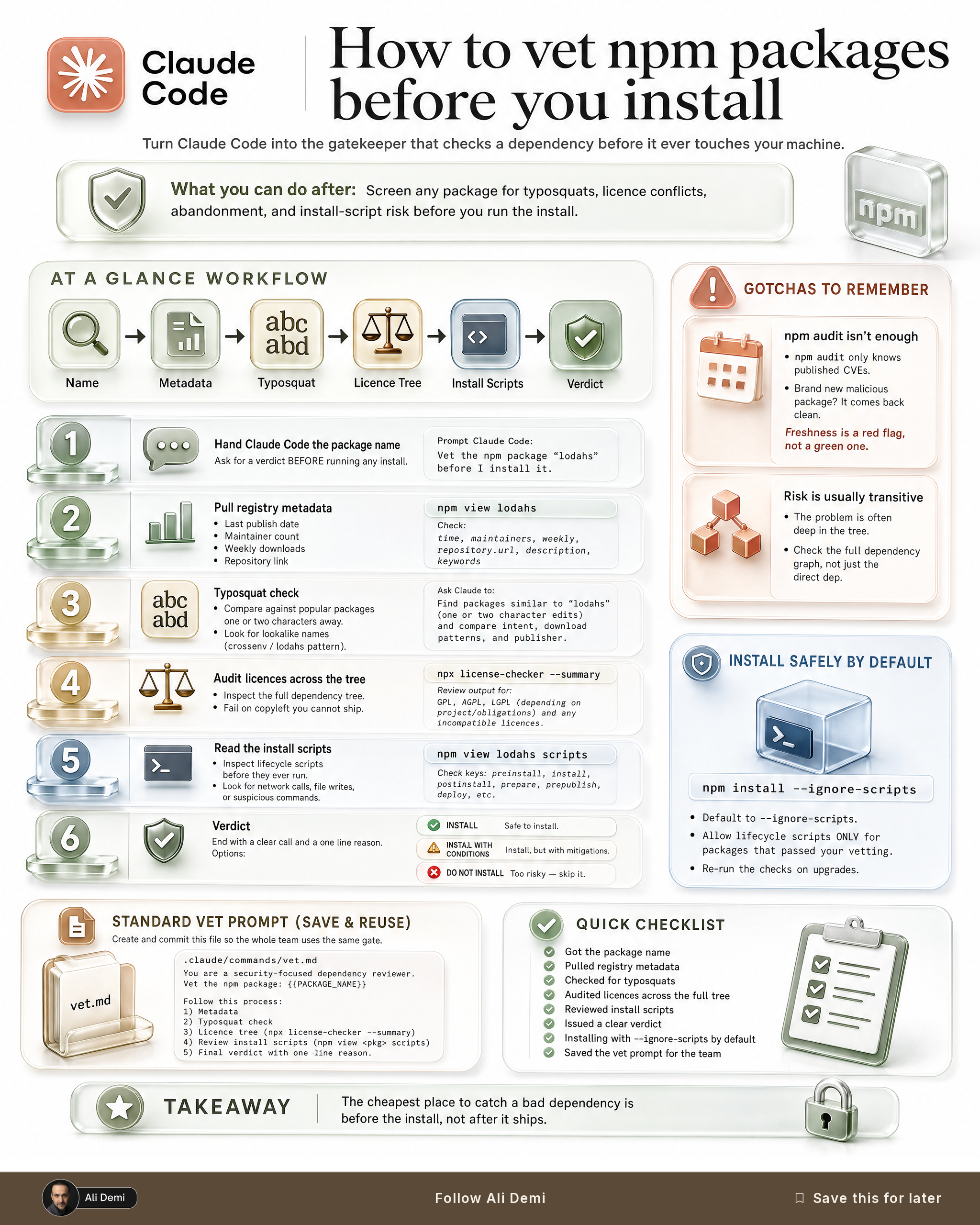
    Claude Code is good at this check because it is a research task, not a scan. It reads the registry metadata, compares the name against real packages, reads the licence tree, and reads the install scripts. Then it gives you a verdict.

    Here is the flow.

    1. Ask before you install. Give Claude the package name and tell it to report back before anything is added.
    2. Pull the registry metadata. Last publish date, number of maintainers, weekly downloads, repository link. A package with one maintainer and no commits in two years is a maintenance risk even if it is clean today.
    3. Run the typosquat check. Have Claude compare the name against the popular packages it is one or two characters away from. The classic attacks are a swapped letter or a dropped one, and they get thousands of installs before anyone notices.
    4. Audit the licence, including the tree. Ask for every licence in the full dependency graph, not just the direct package. Strong copyleft buried three levels deep is still copyleft in your proprietary build.
    5. Read the install scripts. Preinstall and postinstall hooks run with your shell permissions the second you install. Have Claude print them and explain what they do in plain words.
    6. Get a verdict, not a dump. Tell Claude to end with install, install with conditions, or do not install, and to say why in one line.

    Two things worth knowing.

    First, a vulnerability audit only knows about published CVEs. A malicious package uploaded yesterday has no CVE yet. A clean audit result on a brand new package is not reassurance, it is silence.

    Second, the risk almost never sits in the package you chose. It sits in the forty packages it pulls in behind it. Check the tree.

    Once the check works, save the prompt as a custom slash command in your project so the whole team runs the same one. And set your installs to skip lifecycle scripts by default, then allow them only for packages that passed.

    The cheapest place to catch a bad dependency is before the install, not after it ships.

    ——

    Book your free AI clarity call, NOW!
    https://buff.ly/TpWy277

    ——

    Repost this. Thanks.
  • Your Dependencies Are Getting Old: Automate Safe Updates

    Your Dependencies Are Getting Old: Automate Safe Updates

    Your dependencies are getting older every day.

    You know it.

    Security vulnerabilities hide in old packages. Performance regresses. But reviewing every breaking change, running tests, and merging updates manually? That’s hours of busywork you don’t have time for.

    Stop doing it by hand.

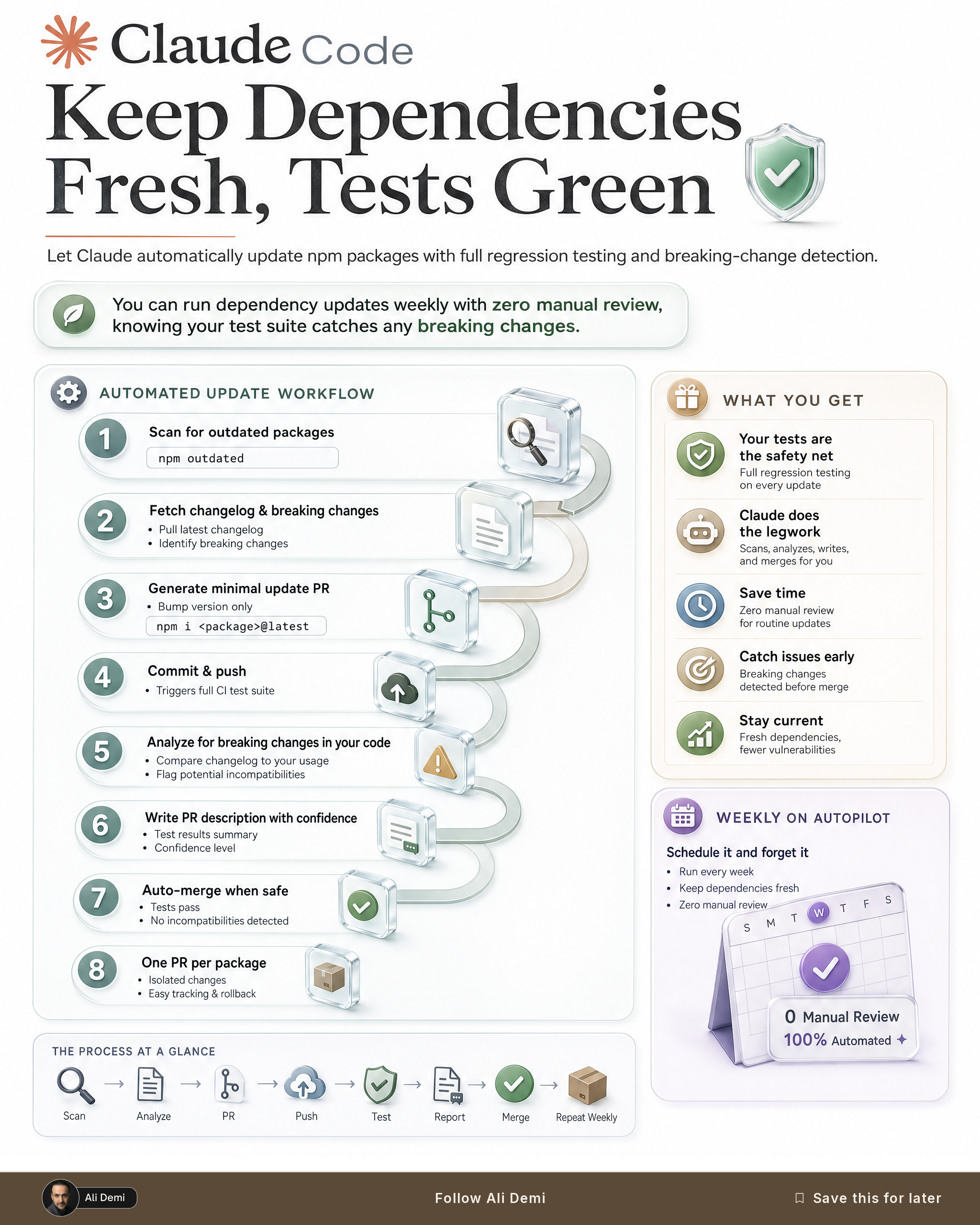
    Claude can automate your entire dependency update workflow. Run it on a schedule, get back a batch of smart, tested update PRs ready to merge.

    Here’s how it works:

    Claude scans your package.json and runs npm outdated, instantly finding which packages are behind.

    For each outdated package, Claude fetches the changelog and breaking change summary, analyzing what might break in your code.

    Claude generates a careful, minimal update: just the version bump, nothing else.

    It commits and pushes a new branch, triggering your full test suite.

    While CI runs, Claude analyzes the changelog for incompatibilities specific to your codebase, flagging any risky upgrades.

    When tests complete, Claude writes a smart PR description: what changed, whether it’s safe, and the confidence level based on test results.

    If all tests pass and no breaking changes were detected, Claude can auto-merge or mark it ready.

    One PR per package, one run per week, all your dependencies stay fresh.

    Your test suite is your safety net. Claude does the work.

    ——

    Book your free AI clarity call, NOW!
    https://buff.ly/TpWy277

    ——

    Repost this. Thanks.
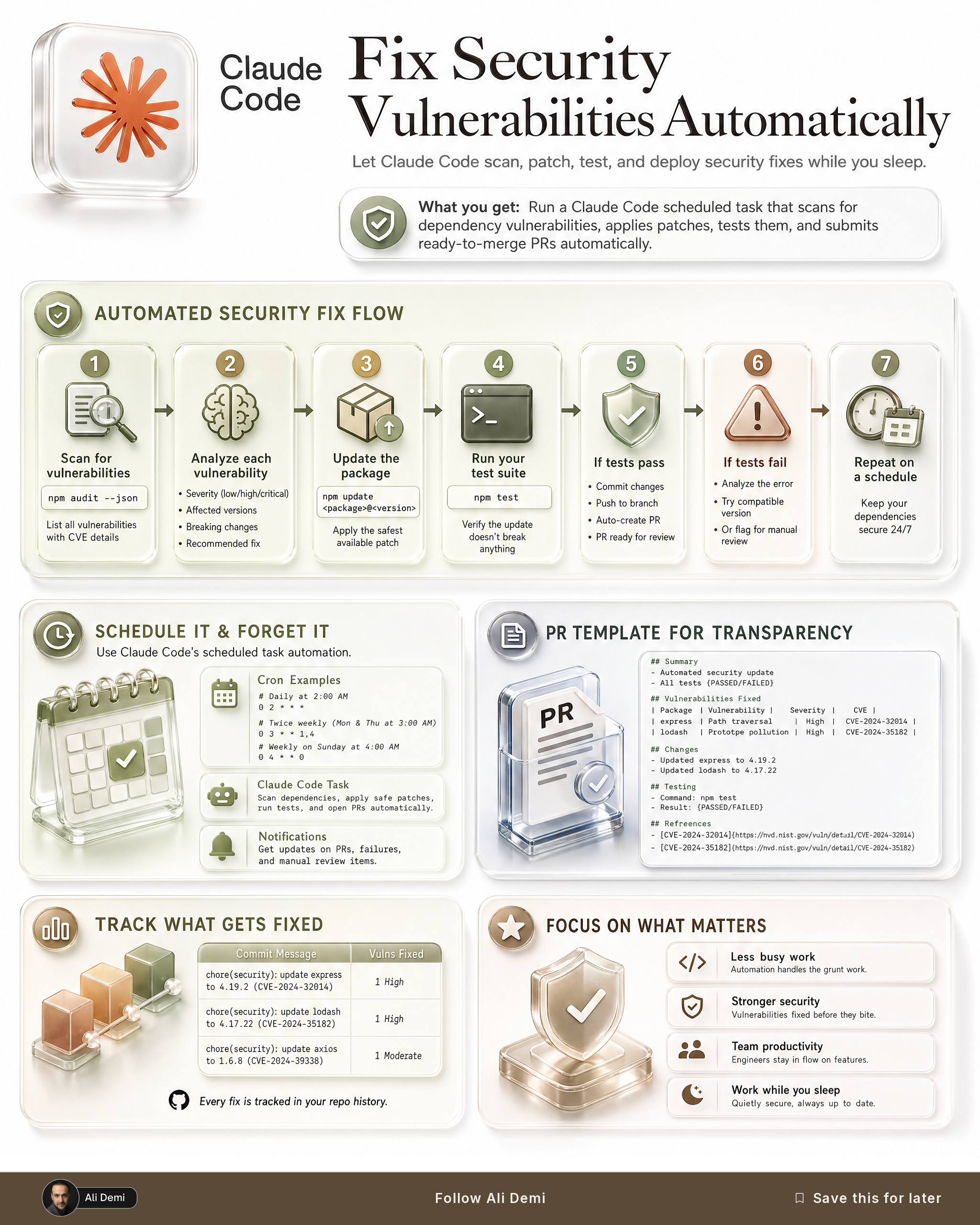
  • Stop Ignoring Vulnerabilities: Automate Security Updates and Testing

    Stop Ignoring Vulnerabilities: Automate Security Updates and Testing

    Security vulnerabilities pile up because fixing them is friction-heavy: scan, understand the CVE, update the package, run tests, debug failures, rinse and repeat.

    Claude Code scheduled tasks can do all of that for you.

    Set up a daily or weekly task that runs `npm audit –json`, parses the vulnerabilities, updates each package, runs your test suite, and if tests pass, auto-commits and pushes a PR. If a test fails, Claude analyzes why and either tries a compatible version or flags it for manual review.

    The result: your dependencies stay current, your security debt shrinks, and your team’s attention goes where it actually matters – code review, not dependency roulette.

    The workflow is hands-free once set up. Cron fires it nightly. You wake up to a stack of security fix PRs, pre-tested and ready to merge.

    ——

    Book your free AI clarity call, NOW!
    https://buff.ly/TpWy277

    ——

    Repost this. Thanks.
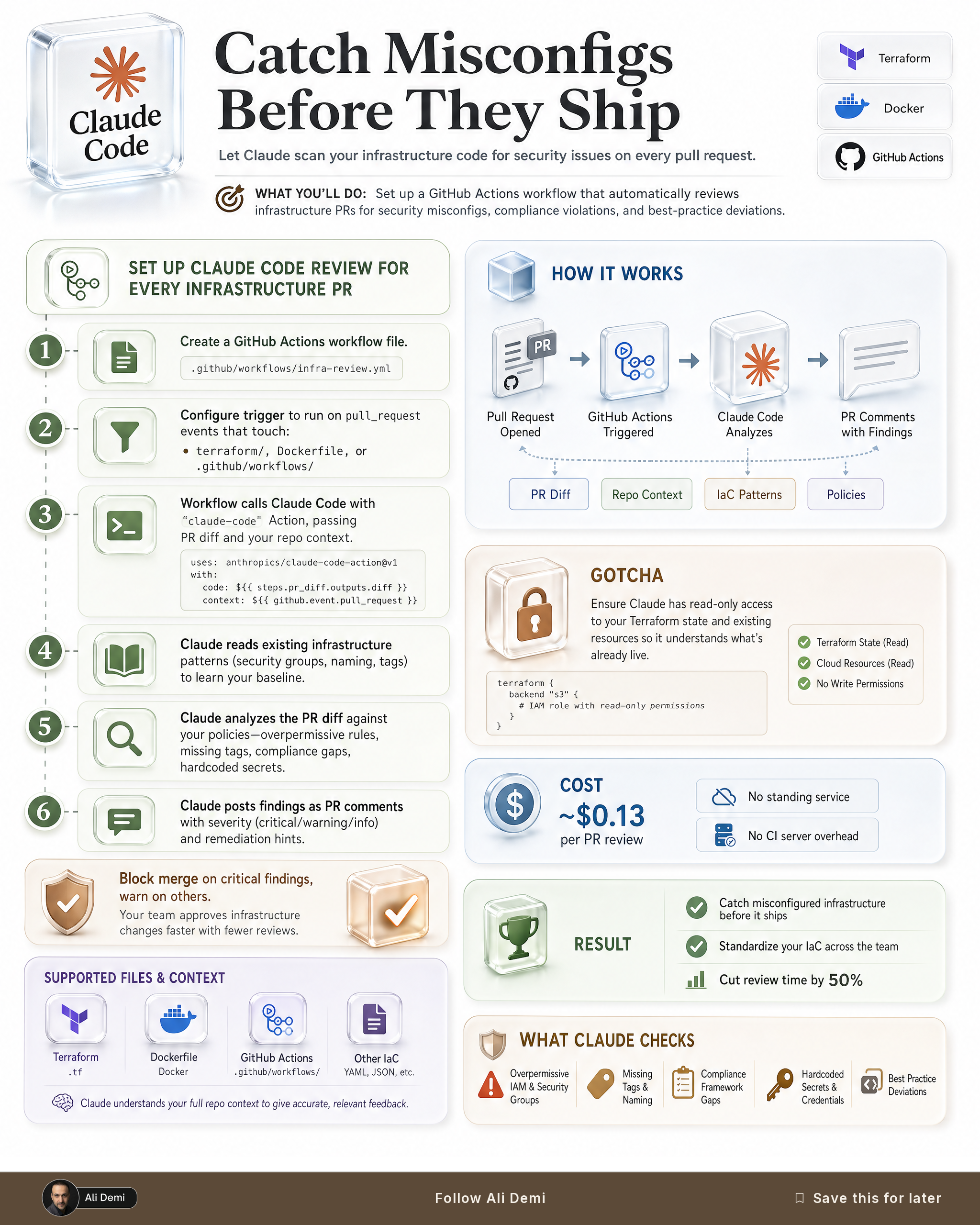
  • Stop Shipping Insecure Infrastructure: Auto-Review Every PR

    Stop Shipping Insecure Infrastructure: Auto-Review Every PR

    Your infrastructure code is live policy. One overpermissive security group, one hardcoded secret, one missing tag, and you’ve already breached compliance or opened a hole.

    Manual review catches some of it. But by the time your engineer spots the bad security rule, it’s in the PR, someone’s inbox, and half your reviewer’s attention is split between code and tickets.

    Let Claude do the scan instead.

    Every time someone pushes a PR that touches Terraform, Dockerfile, or GitHub Actions workflows, Claude reads the diff, compares it against your existing patterns and security policies, and posts annotated comments with severity levels. Overpermissive security groups get flagged. Missing tags, bad naming conventions, unnecessary root privs in Docker-all surfaced. Total cost: about $0.13 per review. No standing service. No Kubernetes to run a linter on.

    The setup is one GitHub Actions workflow file. Point it at Claude Code. Give it read access to your repo. It runs on PR events.

    The workflow reads your existing infrastructure (so it learns your naming patterns and security baseline from what’s already live). When a PR comes in, Claude gets the full diff plus the context of your current state. It then reasons about the change: “This security group opens port 3306 to 0.0.0.0 but your policy requires database access to be internal only.” It posts that as a PR comment, blocks the merge if configured, or just warns-your call.

    Real teams use this to catch misconfigs that Terraform linters can’t see-policy violations, inconsistent tagging, architectural issues that need human eyes but can be screened automatically. The real value: your team reviews infrastructure faster and no misconfiguration slips through unread.

    You’re not replacing human judgment. You’re replacing the tedious part where someone has to remember every security rule, every naming convention, every compliance requirement on every diff. Claude does the bookkeeping. Your engineer approves or pushes back.

    ——

    Book your free AI clarity call, NOW!
    https://buff.ly/TpWy277

    ——

    Repost this. Thanks.
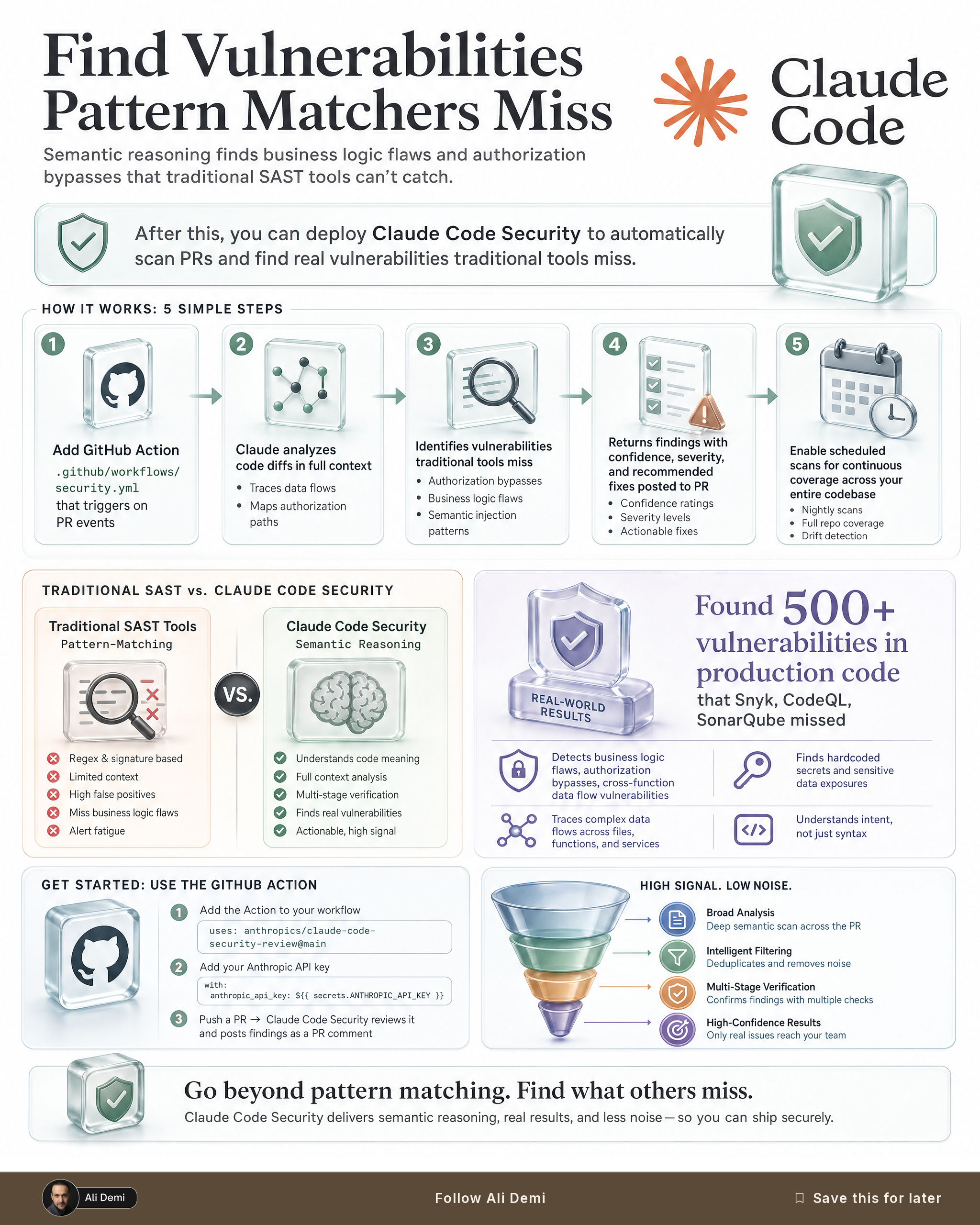
  • Stop Pattern Matching for Security: Use Semantic Analysis with Claude

    Stop Pattern Matching for Security: Use Semantic Analysis with Claude

    Your code passes Snyk, SonarQube, CodeQL.

    Your code still has vulnerabilities.

    Pattern-matching tools catch the obvious-injections, hardcoded secrets, known misconfigurations.

    They miss the real damage: authorization logic flaws, business logic vulnerabilities, cross-function data leaks.

    Claude Code Security reasons about code like a human expert would.

    It understands workflows, authorization paths, data movements.

    Finds the flaws that shouldn’t have passed review.

    Set it up in one GitHub Action that triggers on every PR.

    Claude analyzes diffs in context, traces data flows, maps authorization paths, identifies vulnerabilities.

    You get findings with severity ratings and fixes posted to your PR.

    Turn on continuous scanning for the full codebase too.

    The findings it catches: authorization bypasses, injection patterns that span functions, business logic flaws, cryptographic mistakes, hardcoded secrets, XSS via data flow.

    Anthropic found 500+ vulnerabilities in production using this approach.

    Real vulnerabilities that escaped traditional scanning tools.

    Each finding goes through multi-stage verification.

    Real signal, not alert fatigue.

    Stop trusting pattern matchers.

    Use semantic reasoning instead.

    ——

    Book your free AI clarity call, NOW!

    https://buff.ly/TpWy277

    ——

    Repost this. Thanks.
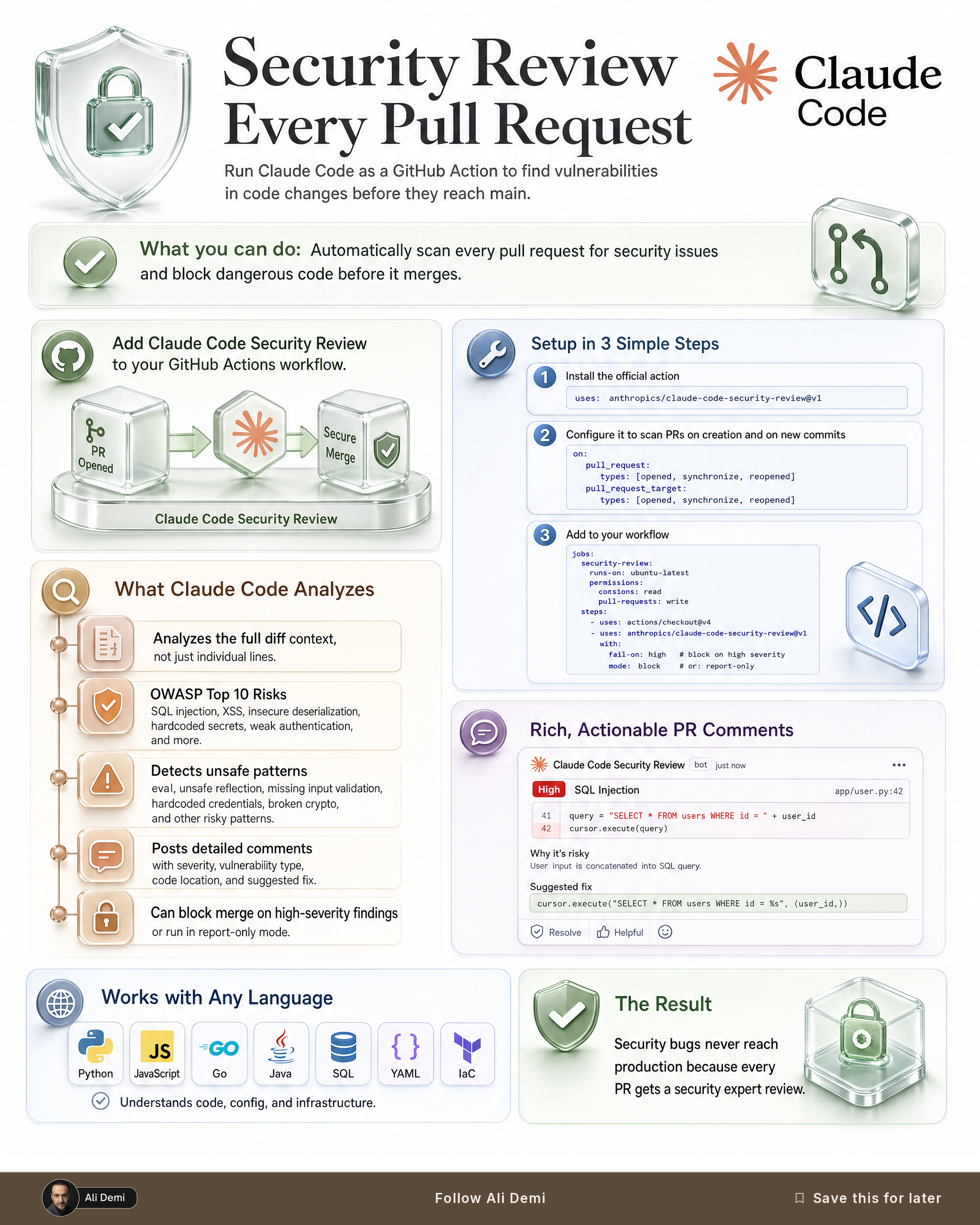
  • Catch Security Bugs Before They Merge: Automated PR Reviews

    Catch Security Bugs Before They Merge: Automated PR Reviews

    Your team reviews code for bugs and logic errors. But security issues slip through because nobody reads every PR thinking like an attacker.

    Claude Code Security Review runs in GitHub Actions and scans every pull request for security vulnerabilities before developers hit merge.

    It understands context: it reads the full diff, not just pattern-matching signatures. It catches SQL injection risks in dynamic queries, hardcoded secrets buried in config files, unsafe deserialization, weak crypto, missing input validation-the real stuff that opens backdoors.

    When it finds something, it doesn’t just flag the line. It explains the vulnerability, shows the attack vector, and suggests the fix. Your developers learn from the feedback instead of just ignoring a linter message.

    Setup is simple: add the official action to your workflow, point it at your repo. It runs automatically on every PR. Failed security checks can block merge, or run in report-only mode while you build the habit.

    The real win: you ship with fewer zero-day-adjacent vulnerabilities. Security reviews that used to require a specialist now happen on every change.

    ——

    Book your free AI clarity call, NOW!
    https://buff.ly/TpWy277

    ——

    Repost this. Thanks.