Author: Rene Kowalski

  • Stop Maintaining Docs By Hand: Auto-Generate OpenAPI Specs

    Stop Maintaining Docs By Hand: Auto-Generate OpenAPI Specs

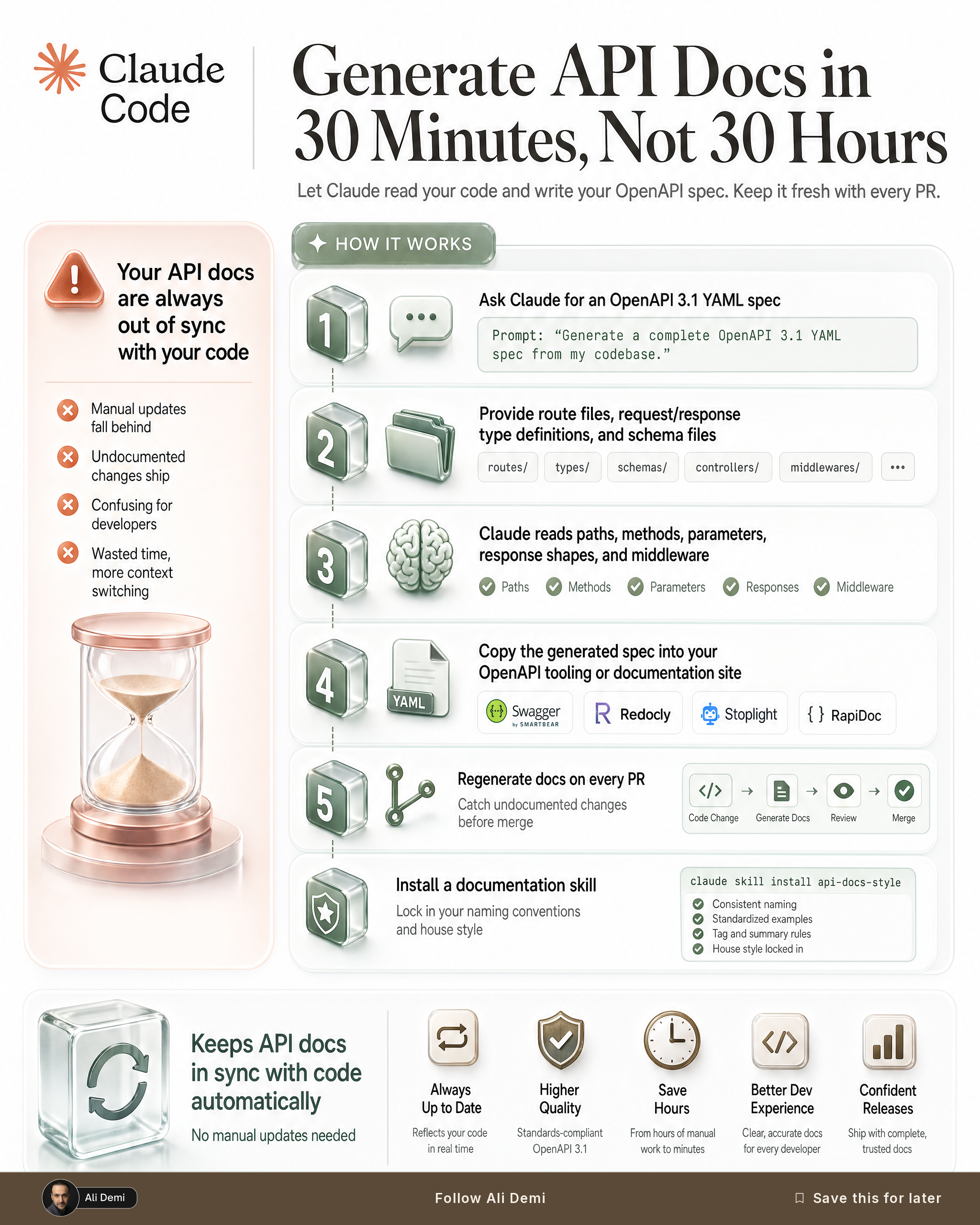
    Your API docs are out of sync again. Someone added a query parameter. A response type changed. Your docs still say the old thing. It happens every time because docs live in a separate file, divorced from the code that changes.

    Claude Code solves this by reading your code and writing the spec for you.

    Point Claude at your route files, request handlers, and type definitions. It extracts the path, HTTP method, request body shape, query parameters, response types, and authentication middleware. Then it writes a complete, standards-compliant OpenAPI 3.1 specification. A typical 30-50 endpoint REST API takes 8 to 20 hours to document by hand. Claude generates a first-draft spec in under 30 minutes.

    The real win is integrating this into your PR workflow. Regenerate docs on every merge. Claude catches undocumented changes and new endpoints before they ship. Documentation stops drifting because the source of truth is always the code.

    For teams running the same workflow repeatedly, install a documentation skill. It locks in your conventions (response format, error schemas, naming) so every doc Claude generates follows your house style automatically, across Claude Code, Cursor, and Codex.

    ——

    Book your free AI clarity call, NOW!
    https://buff.ly/TpWy277

    ——

    Repost this. Thanks.
  • Refactor 10x Faster: Parallel Batch Processing

    Refactor 10x Faster: Parallel Batch Processing

    Refactoring your whole codebase file-by-file takes forever.

    You make the same change ten times, wait for tests to pass ten times, debug the same edge case across ten PRs.

    Claude Code’s /batch command breaks that pattern.

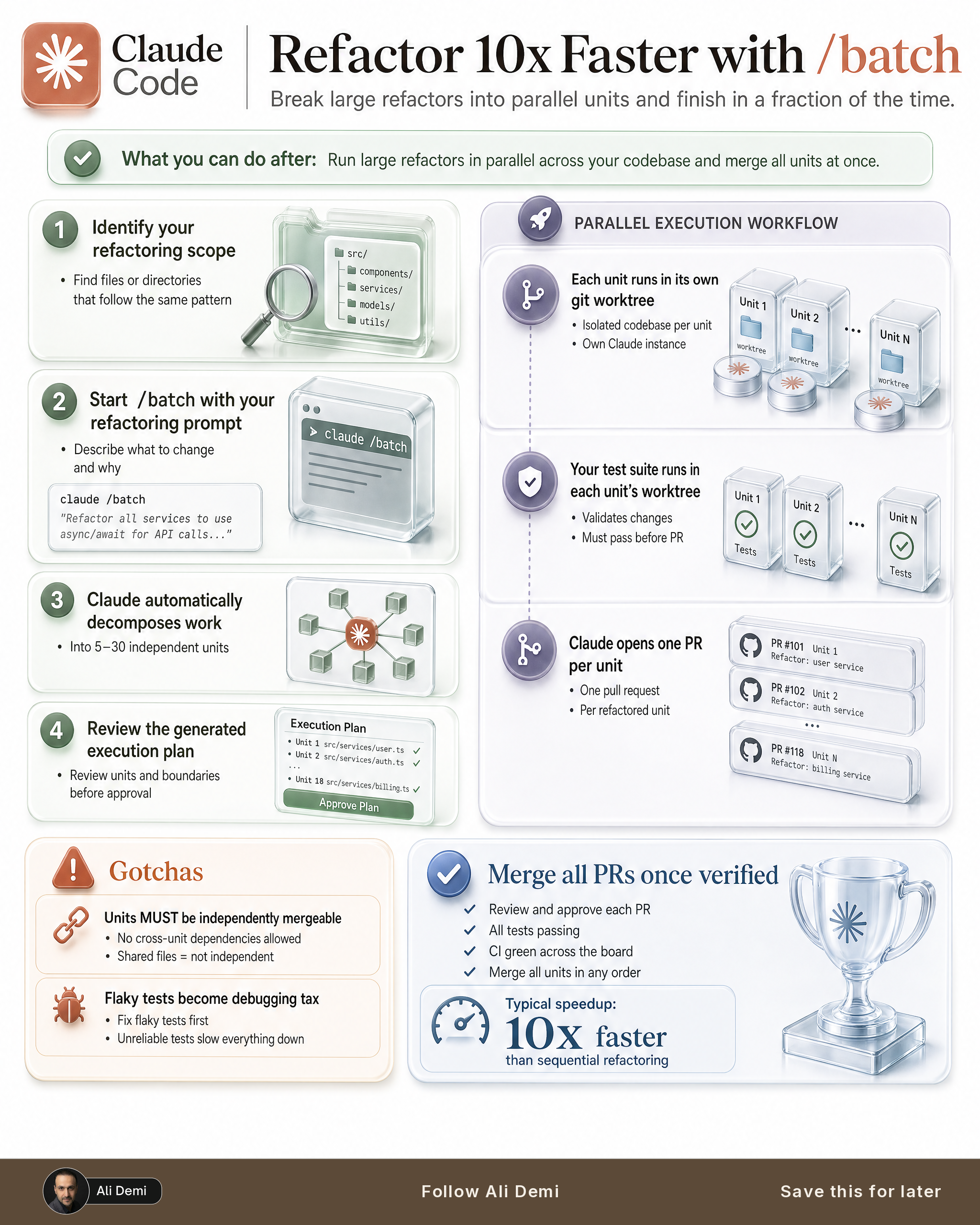
    Instead of one refactor running sequentially, /batch decomposes your task into 5-30 independent units and runs them in parallel. Each unit gets its own Claude instance, its own git worktree, its own PR. When they finish, you merge them all at once. Typical speedup: 10x faster than file-by-file.

    Here’s the flow:

    First, identify your refactoring scope. Large codebases usually have clusters of files that follow the same pattern. An old API client library used in 15 places. A deprecated utility function scattered across the backend. A style migration across all React components. Find them with grep, a glob, or your own knowledge of the codebase.

    Pass your refactoring prompt to /batch. Tell it what you’re changing and why. Claude decomposes the work: one unit per file, or one per logical scope if they’re naturally grouped. It shows you the plan before executing anything. Read it. Does each unit stand alone? Can a reviewer merge one without waiting for another? If yes, approve.

    From there, /batch takes over. Each unit spins up in its own worktree. Claude runs your refactoring prompt independently on each one. Tests run. Changes go into a PR. No waiting for one unit to finish before the next starts.

    Watch the PRs come in. Merge when tests pass. Done.

    One gotcha: units must be independently mergeable. If unit B depends on unit A’s result, /batch isn’t the right tool. For that kind of sequential work, run the refactors one at a time. Another gotcha: each unit needs its own passing test suite. If your tests are flaky, fix that before starting /batch or you’ll spend more time debugging than you saved.

    For codebases with hundreds of files, /batch is a productivity multiplier. It’s especially useful for migrations, deprecations, and style updates where the change is the same everywhere but independent per-file.

    ——

    Book your free AI clarity call, NOW!
    https://buff.ly/TpWy277

    ——

    Repost this. Thanks.
  • Stop Writing Dummy Tests: Generate Tests That Actually Matter

    Stop Writing Dummy Tests: Generate Tests That Actually Matter

    You write tests, but something is always breaking in production that your test suite didn’t catch. The problem isn’t that you have too few tests-it’s that your tests are missing the paths that actually break.

    Claude Code can analyze your code, spot the untested corner cases and critical paths, and generate real test cases for exactly those scenarios. No more generic boilerplate.

    The workflow:

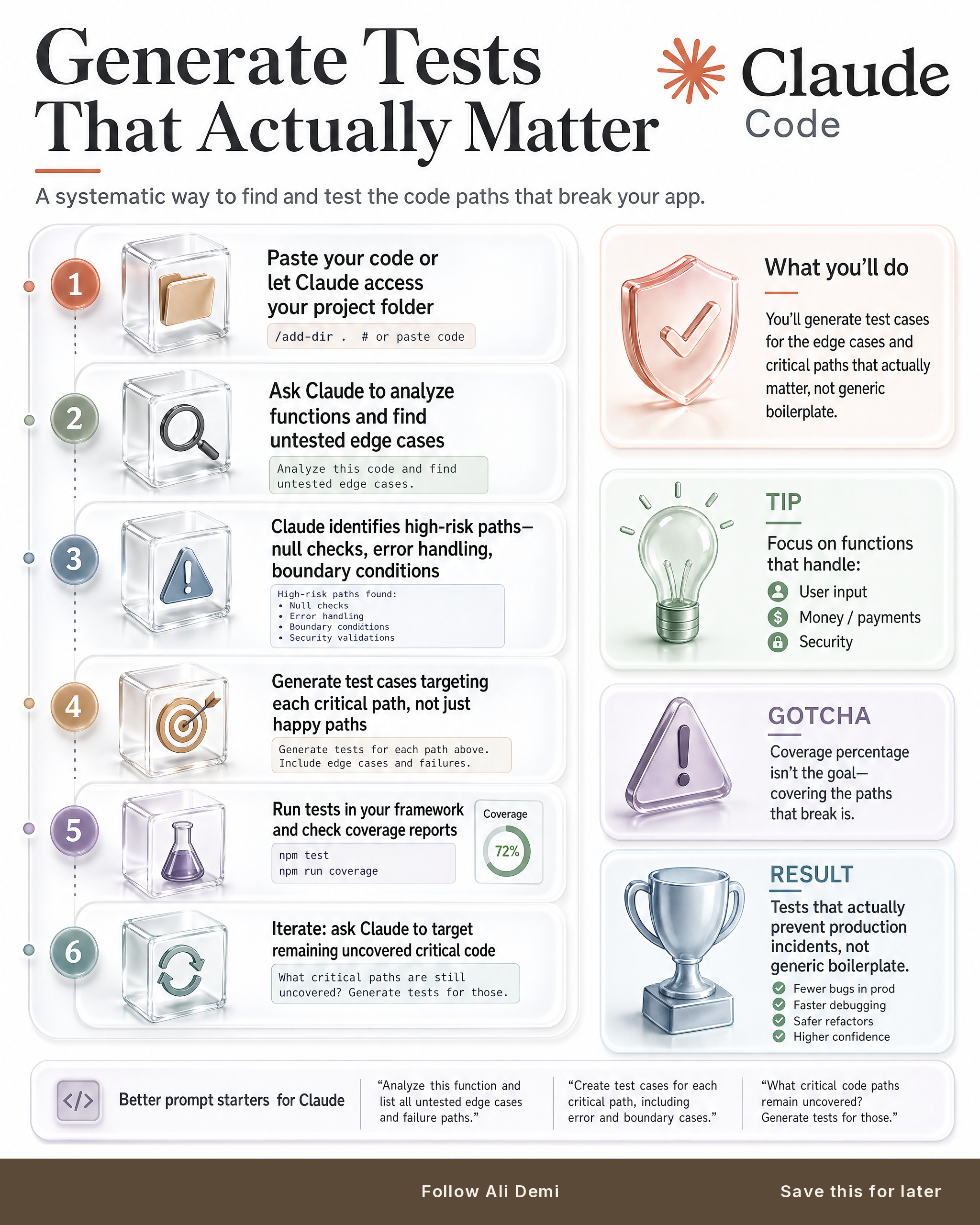
    1. Point Claude at your code files-paste them into the chat or give Claude Code access to your folder.
    2. Ask Claude to analyze your functions and identify the edge cases, error paths, and critical logic branches that aren’t covered.
    3. For each high-risk path, Claude generates test cases that exercise that scenario.
    4. Run the tests in your test framework and use the results to spot gaps.
    5. Use coverage reports to iterate: ask Claude to target the remaining critical uncovered paths.

    Why this matters:

    Manual test writing focuses on the happy path. Claude thinks in corner cases. It spots off-by-one errors, null pointer risks, race conditions, and boundary violations that humans skip. When you target the code paths that break most often, your tests actually prevent production incidents.

    Example:

    If you have a payment function, Claude doesn’t just test “successful payment.” It generates cases for: zero amounts, negative amounts, currency mismatches, timeout scenarios, duplicate requests, and network failures. Those edge cases are where real bugs hide.

    ——

    Book your free AI clarity call, NOW!
    https://buff.ly/TpWy277

    ——

    Repost this. Thanks.
  • Build Your Daily AI News Digest with Claude Code

    Build Your Daily AI News Digest with Claude Code

    You’re drowning in AI news feeds and newsletters.

    You want curated stories, not the noise.

    But you don’t want to pay for another SaaS tool.

    Here’s the move: build your own AI news digest in Claude Code using subagents.

    It’s simpler than it sounds.

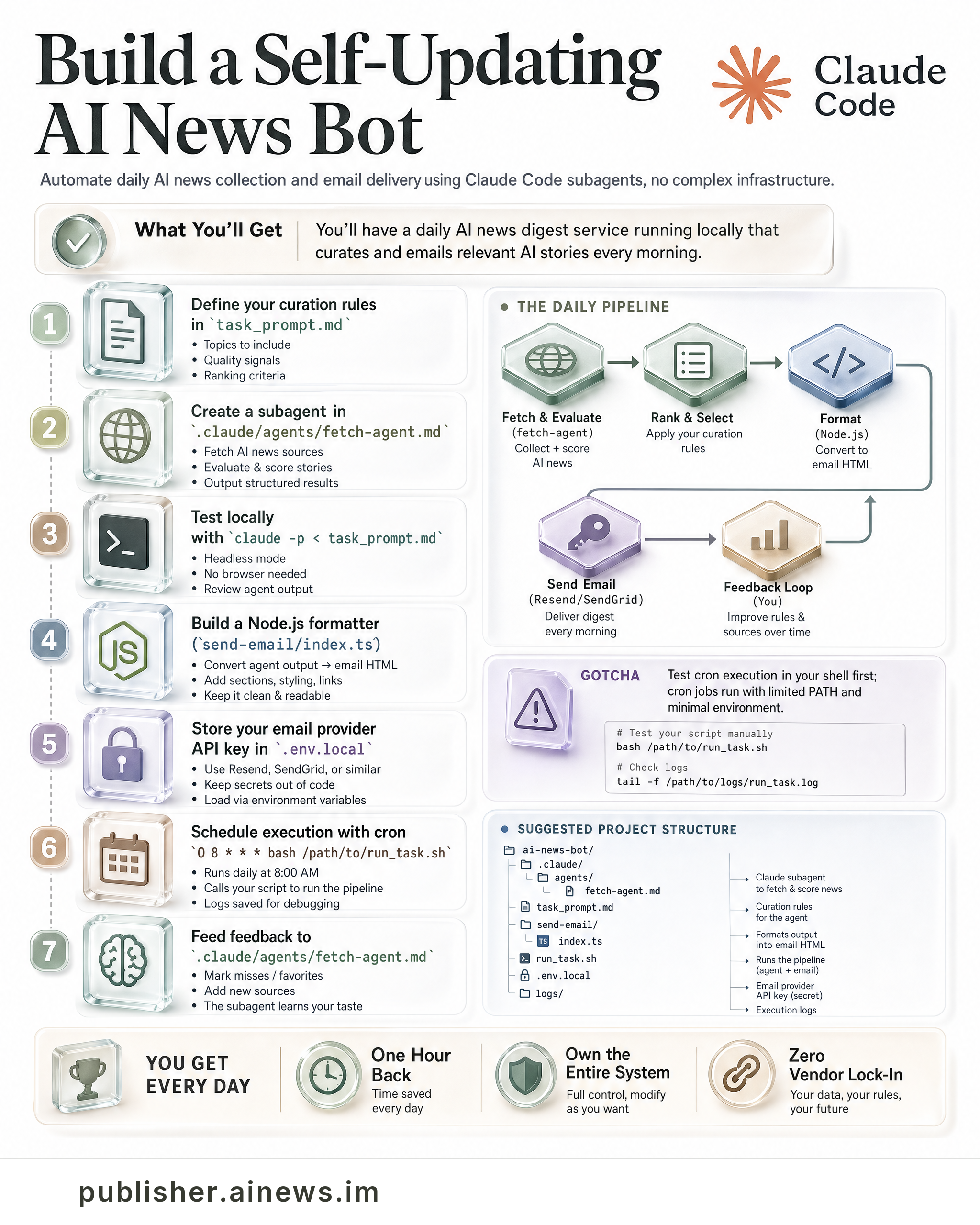
    Your Claude Code subagent fetches stories from multiple AI news sources, evaluates them by relevance, and ranks the best ones.

    You write a task prompt that tells the subagent what to look for: specific topics, quality signals, anything that matters to your work.

    The agent does the analysis.

    A simple Node script formats the top picks into an email.

    You schedule it with cron (one line in your terminal) and it runs every morning at 8am without touching your main Claude Code session.

    Here’s why this beats the newsletter spam trap: the subagent learns from feedback in your project memory.

    If it’s picking the wrong stories, you document what “wrong” means: language, domain, context. Then it recalibrates.

    Tomorrow’s digest is smarter.

    No API keys, no deployments, no DevOps nightmare.

    Just Claude Code doing exactly what you’d do if you had an hour every morning: read widely, filter hard, send the highlights.

    The real win?

    Once it’s running, you get back that hour every single day.

    And because it lives locally, you own the whole system: no vendor lock-in, no pricing surprises, no account to manage.

    ——

    Book your free AI clarity call, NOW!
    https://buff.ly/TpWy277

    ——

    Repost this. Thanks.
  • Stop Asking Claude to Remember: Automate with Hooks

    Stop Asking Claude to Remember: Automate with Hooks

    You’re in Claude Code, making changes, and you know linting should happen before commit. But someone’s going to forget to run it.

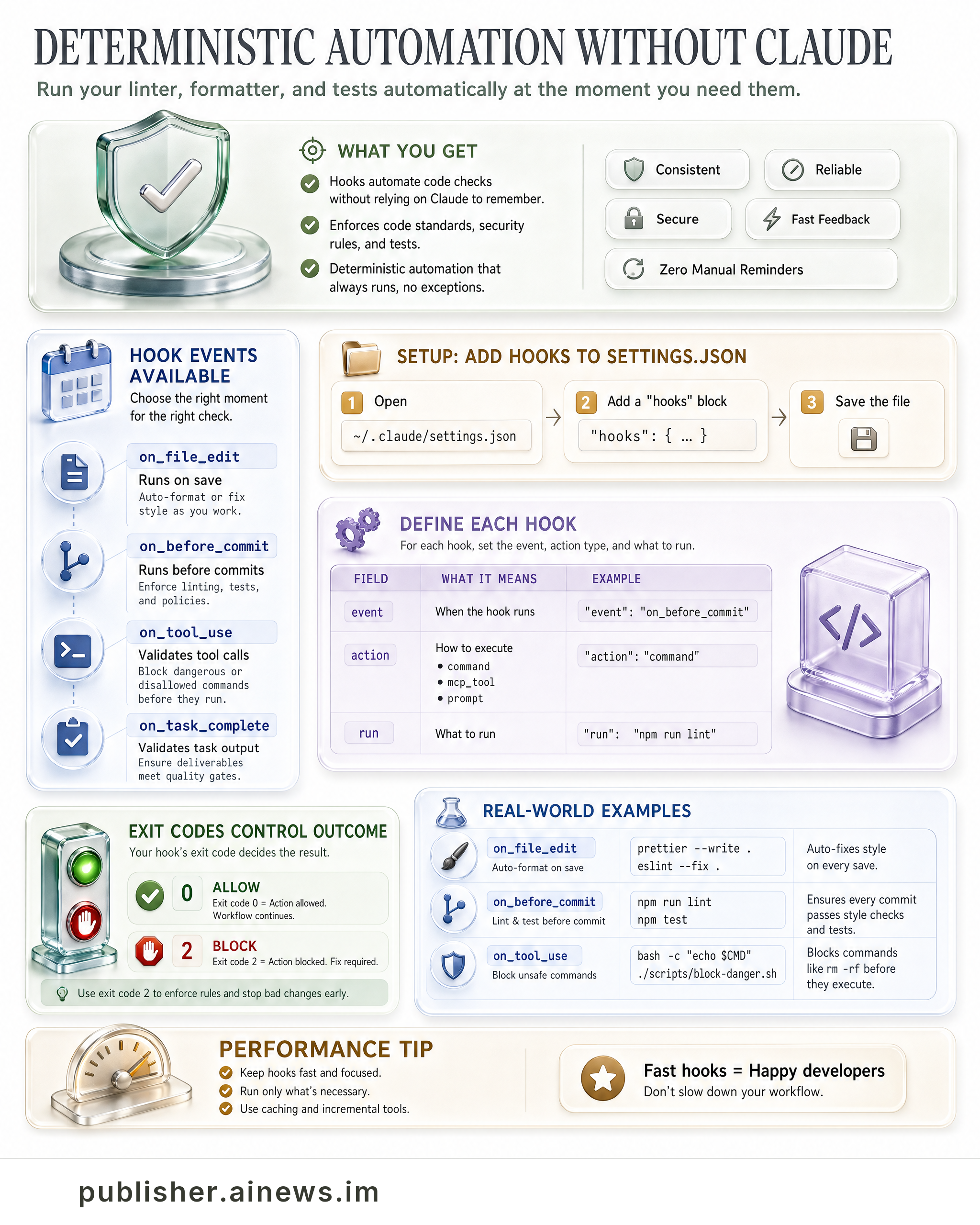
    Hooks solve that. They’re event handlers that automatically run shell commands, call tools, or trigger workflows at the exact moment Claude Code needs them. No prompts. No guessing. Just deterministic automation that always works.

    Set it up once in your settings, and your linter runs on every file save. Your tests run before every commit. Your security scanner checks every tool use. It’s not “ask Claude nicely.” It’s guaranteed.

    How to set this up:

    1. Open your Claude settings.json file
    2. Add a hooks block with the event you want to trigger on (file edits, before commits, task completion)
    3. Define the action: a shell command, a script, or a call to an MCP tool
    4. Save the file
    5. From now on, that automation runs every time the event fires

    Common hooks: auto-format on file edits, block dangerous commands on tool use, validate output on task completion, run tests before commits.

    The payoff is huge. Your code standards run whether Claude remembers or not. Security checks run automatically. Tests run automatically. You go from hoping to knowing it will always happen.

    Book your free AI clarity call, NOW!
    https://buff.ly/TpWy277

    Repost this. Thanks.

  • Turn Messy Spreadsheets Into Clean Data in Minutes

    You export a contact list from three different sources and end up with 2,000 rows: duplicates galore, phone numbers in a dozen formats, missing first names, extra whitespace.

    Claude Code can codify your cleanup rules and generate a script that does it once, reproducibly, for the next export too.


    Book your free AI clarity call, NOW!
    https://buff.ly/TpWy277


    Repost this. Thanks.

  • Turn Scattered Notes Into a Searchable Knowledge Base in Minutes

    Most knowledge workers have it: a notes folder that is part goldmine, part chaos. Hundreds of files in no particular order, duplicate ideas scattered across different files, no way to find the connection between that marketing insight from three months ago and today’s project brief.

    Claude Code can fix this in one run. Point it at your notes folder, give it a simple structure rule, and Claude reads every file, extracts the key concepts, identifies which notes are related, generates tags, and builds a wiki with wikilinks that connect everything.

    Create a project folder with three directories: `input/` (your raw notes), `output/` (where the wiki lives), and a CLAUDE.md file with your rules. Tell Claude: read every markdown and text file in input, extract one topic per note, identify 3-5 entities and concepts, look for connections to other notes, generate 2-4 relevant tags, and create structured markdown output with yaml frontmatter (title, tags, related-notes).

    Claude generates three outputs: your organized notes with wikilinks in output/notes/, a root index.md that lists all topics and tags, and a graph.json file that maps connections. Open index.md in any markdown app or wiki tool and start navigating. All your scattered ideas are now one search away.

    The magic is the wikilinks: Claude finds that your note on customer retention connects to your note on pricing strategy, and embeds that link so you discover the connection you didn’t know you made.


    Book your free AI clarity call, NOW!
    https://buff.ly/TpWy277


    Sources:
    https://obsidian.md/
    https://roamresearch.com/
    https://docs.anthropic.com/en/docs/claude-code/overview

    Repost this. Thanks.

  • Turn Zoom Transcripts into Action Items

    Turn Zoom Transcripts into Action Items

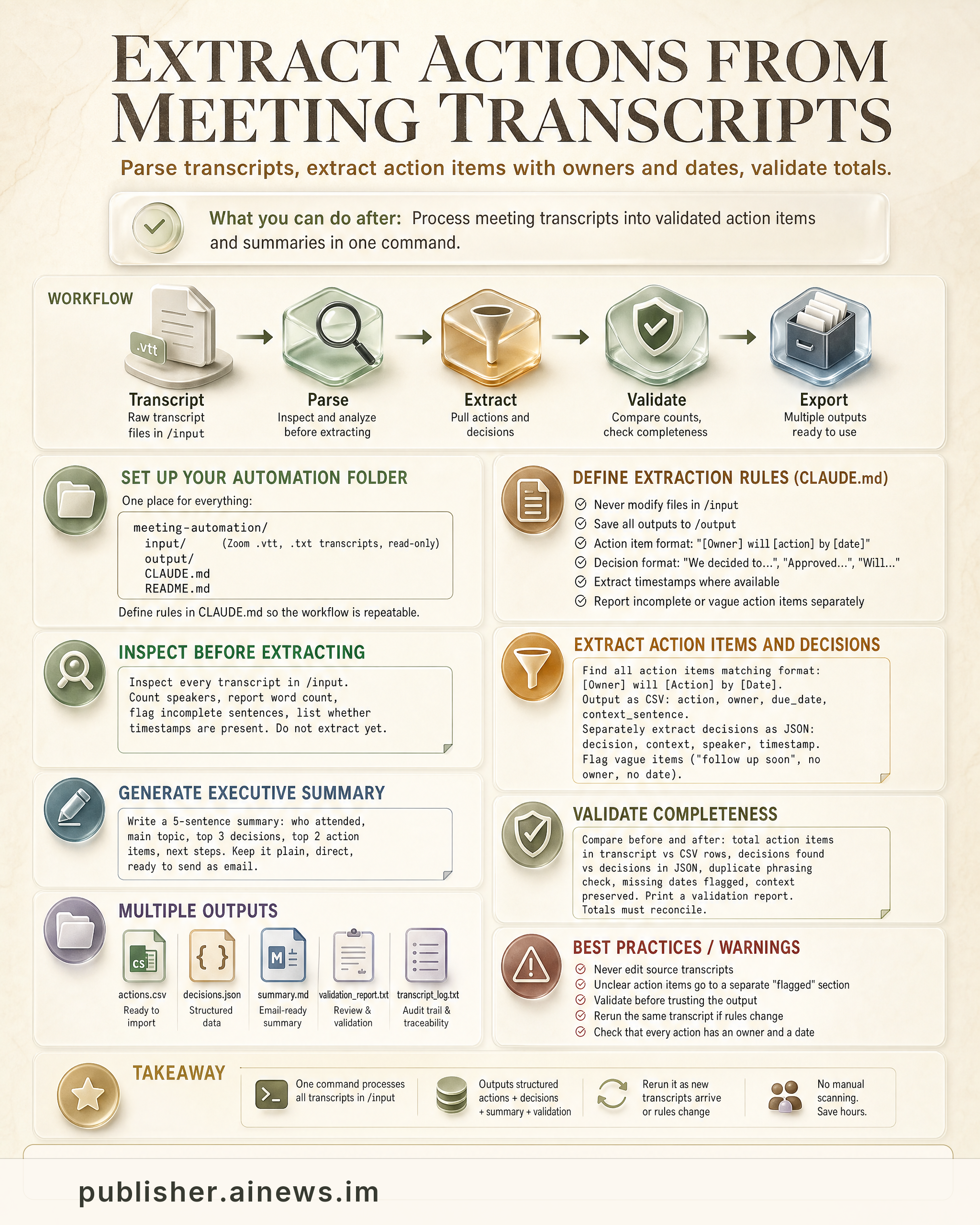
    Meeting transcripts arrive as text files, Zoom .vtt exports, or voice memo dumps. Most teams manually scan them: highlight action items, note who owns what, spot the decisions, write a summary email. Claude Code can read transcripts from a folder, extract structured data, and save multiple outputs in one pass.

    Start with a project folder: an /input directory for transcripts (read-only), an /output folder for results, and a CLAUDE.md file that defines extraction rules. Rules matter. Define what counts as an action item: “X will do Y by DATE” is clear; “follow up soon” is not.

    Ask Claude to inspect first. Count speakers, report word count, flag incomplete sentences, list timestamps present or missing. Do not extract yet. Then define the rules: extract action items with owner, deadline, and context. Extract decisions separately. Generate a 5-sentence summary. Output three files: actions.csv, decisions.json, and summary.md.

    Before export, validate. Compare total action items mentioned in the transcript vs items in the CSV. Check for duplicates phrased differently. Report any action items that mention dates vs those that don’t. A validation report shows what was captured and what might have been missed.

    Once it works, rerun it with one command across all new transcripts. The output is ready to paste into project trackers or send as a follow-up email.


    Book your free AI clarity call, NOW!
    https://buff.ly/TpWy277


    Sources:
    https://docs.anthropic.com/en/docs/claude-code/overview

    Repost this. Thanks.

  • Synthesize 50 research papers into a literature review matrix in hours

    Synthesize 50 research papers into a literature review matrix in hours

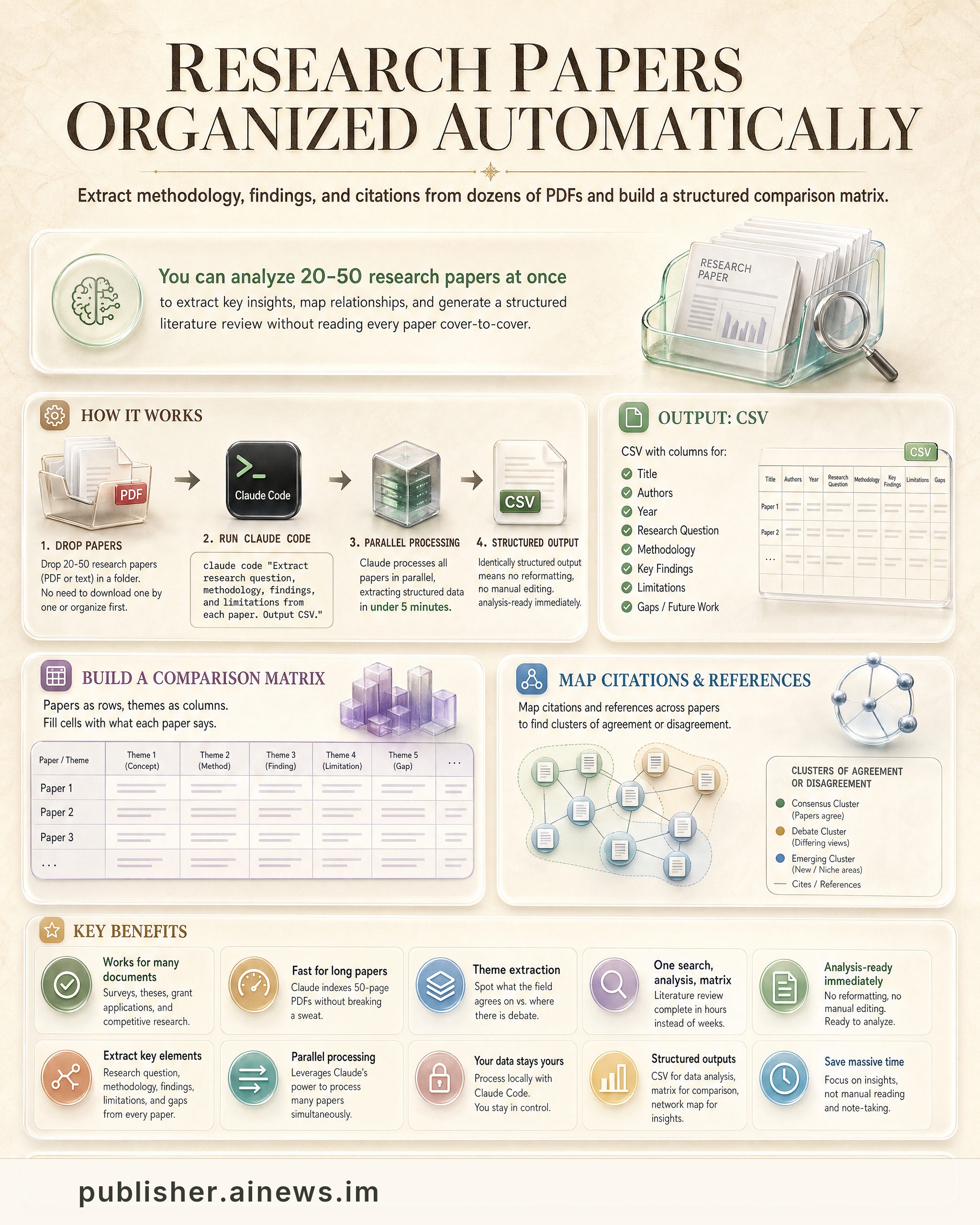
    Literature reviews kill weeks. You download 30 papers, read abstracts, then read the ones that matter, then go back through your notes to map which papers agree on what and which contradict. By Friday you have a folder of PDFs and a mess of highlights. Claude Code ends that.

    Drop your research papers (PDF or text) in a folder. Tell Claude Code: extract the research question, methodology, findings, and limitations from each one. It reads all 30 at once and builds you a CSV that maps each paper against every other one by topic and conclusion. Rows are papers. Columns are themes. Cells show what that paper says about that theme.

    The matrix is the literature review. You are done. You can cite from it, spot contradictions, find gaps, and trace how thinking has evolved across papers. All in a format that lives in spreadsheet, not in your scattered highlights.

    It works for survey papers, grant applications, thesis outlines, and competitor analysis. Anywhere you need to know what 20 sources say about one question. Claude Code cuts the reading time from 40 hours to 8. You read the abstracts. Claude reads the papers.


    Book your free AI clarity call, NOW!
    https://buff.ly/TpWy277


    Sources:
    https://www.anthropic.com
    https://docs.anthropic.com/en/docs/build-a-chatbot
    https://github.com/anthropics

    Repost this. Thanks.

  • Turn Meeting Chaos Into Actionable Notes in Seconds

    Turn Meeting Chaos Into Actionable Notes in Seconds

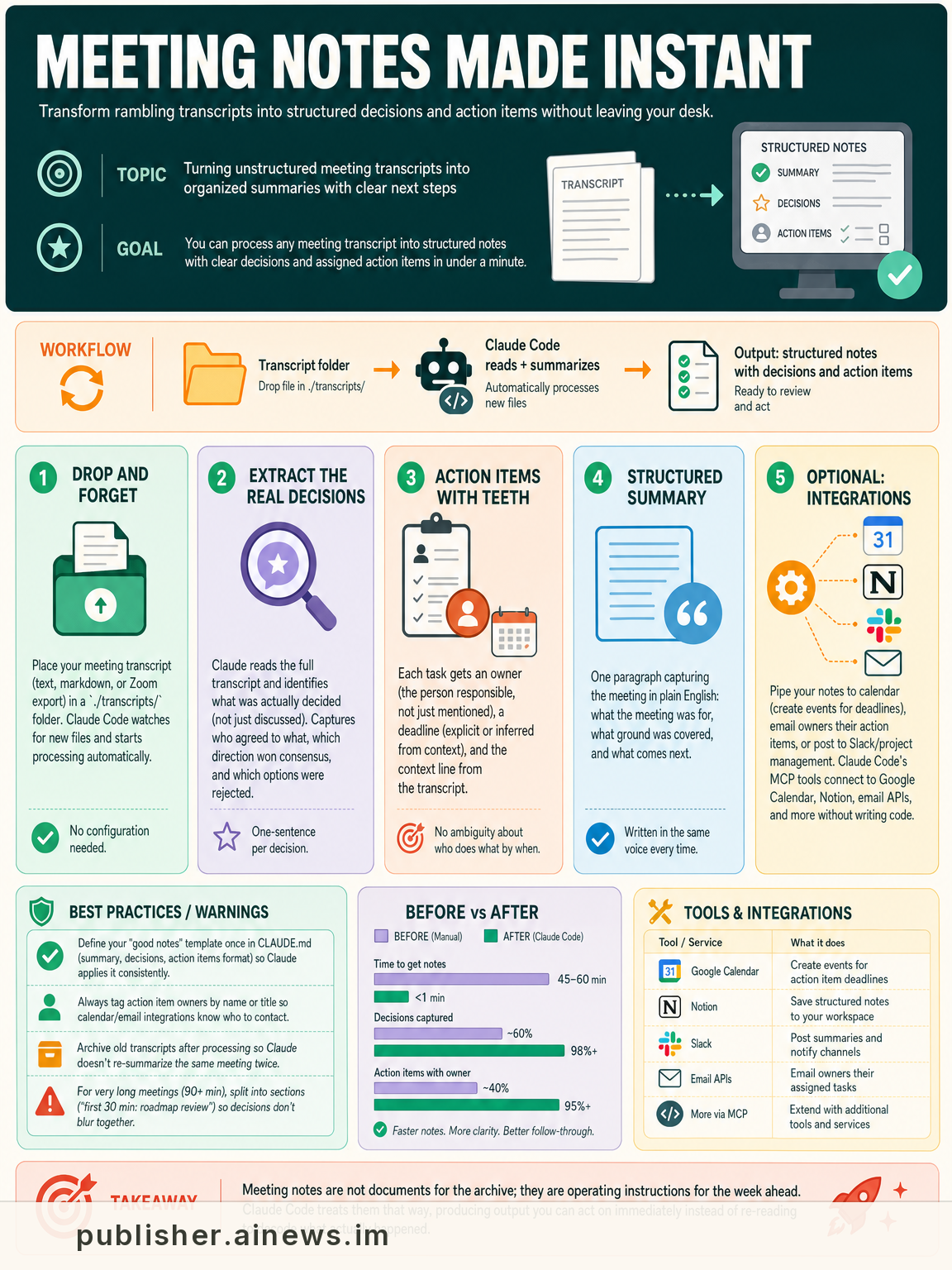
    Every meeting ends the same way: someone volunteers to “send the notes” and then nothing arrives until people start asking what they were supposed to do. Claude Code stops that. Drop your transcript or Zoom recording in a folder, and within seconds you have a document that lists decisions, action items with owners, and deadlines.

    The structure beats any human note-taker. Claude reads the whole transcript at once, doesn’t miss side comments where decisions actually happen, and formats everything the same way every time. Meetings with 5 people or 50 feel identical in the output.

    You need no code. You need no templates to memorize. You describe once what a good note looks like (summary, decisions, action items with owners). Claude Code learns it and applies it to every meeting for the rest of the quarter.

    The payoff compounds. A team of 10 running 4 meetings a week saves 40 hours a quarter on note-taking, follow-up emails asking “wait, was I supposed to do this?”, and hunting through Slack threads for decisions. That’s 10 hours per person per quarter spent on things that actually matter.


    Book your free AI clarity call, NOW!
    https://buff.ly/TpWy277


    Sources:
    https://www.hustlebadger.com/what-do-product-teams-do/project-meeting-summarizer/
    https://www.analyticsvidhya.com/blog/2026/03/ai-meeting-summarizer-with-claude-code-mcp/
    https://every.to/source-code/how-to-use-claude-code-for-everyday-tasks-no-programming-required

    Repost this. Thanks.