Author: Rene Kowalski

  • Your LLM Bill is Too High: Cut Costs by 80% with Prompt Caching

    Your LLM Bill is Too High: Cut Costs by 80% with Prompt Caching

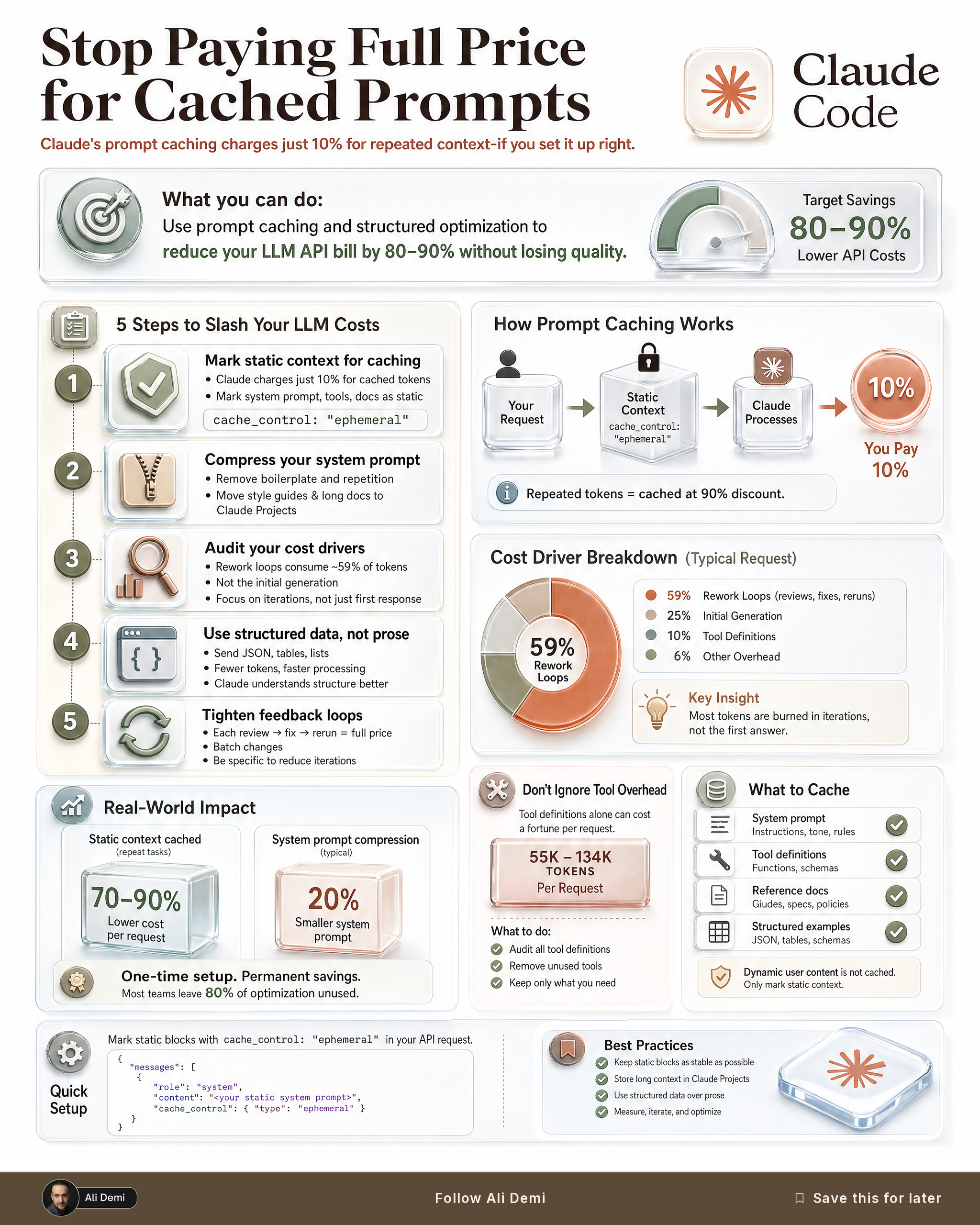
    Your LLM API bill is climbing because every prompt starts from scratch. System prompts, tool definitions, context blocks-all billed at full price, every single request.

    Claude has a fix: prompt caching. Mark sections of your prompt with `cache_control: “ephemeral”`, and Claude charges just 10% on those tokens if they repeat. That’s a 90% savings on cached content.

    Here’s the catch: most teams don’t use it. And even if they do, they’re leaving money on the table.

    Where your costs actually hide:

    It’s not the initial generation. Research shows rework loops consume ~59% of your tokens. Review, fix, rerun-all full price, every round. Your tool definitions alone? 55K to 134K tokens, billed on every call.

    How to cut it:

    Enable caching on your system prompt, full tool definitions, and any context block you reuse. If you’re iterating on the same code review or code generation task, those prompts stay cached across runs.

    Compress your system prompt to essentials-move boilerplate and style guides to Claude Projects, so they stick without being rewritten every call. Use structured data for context instead of prose paragraphs. Claude parses JSON and tables more efficiently than walls of text.

    Most important: audit your review loops. If you’re asking Claude to check its own work, then human review, then more fixes-you’re paying full price three times. Tighten your feedback loop so iterations shrink.

    The math: Cut 59% of rework tokens by streamlining iteration. Cache 30% of your static context at 10% cost. Compress 20% from your system prompt. Real teams are seeing 70-80% reductions. One company hit 90%.

    Your bill is high because no one set it up. Do it once, and your LLM costs flatten.

    ——

    Book your free AI clarity call, NOW!
    https://buff.ly/TpWy277

    ——

    Repost this. Thanks.
  • Stop Converting By Hand: Generate Kubernetes Manifests from Docker Compose

    Stop Converting By Hand: Generate Kubernetes Manifests from Docker Compose

    You’ve got a working docker-compose setup.

    Now you need to deploy it to Kubernetes.

    So you spend a day hand-writing YAML: Deployments, Services, ConfigMaps, PersistentVolumeClaims, and Kustomization overlays for dev/staging/prod.

    Every service gets the same boilerplate. Every environment needs the same structure tweaked.

    Claude Code can automate this entirely.

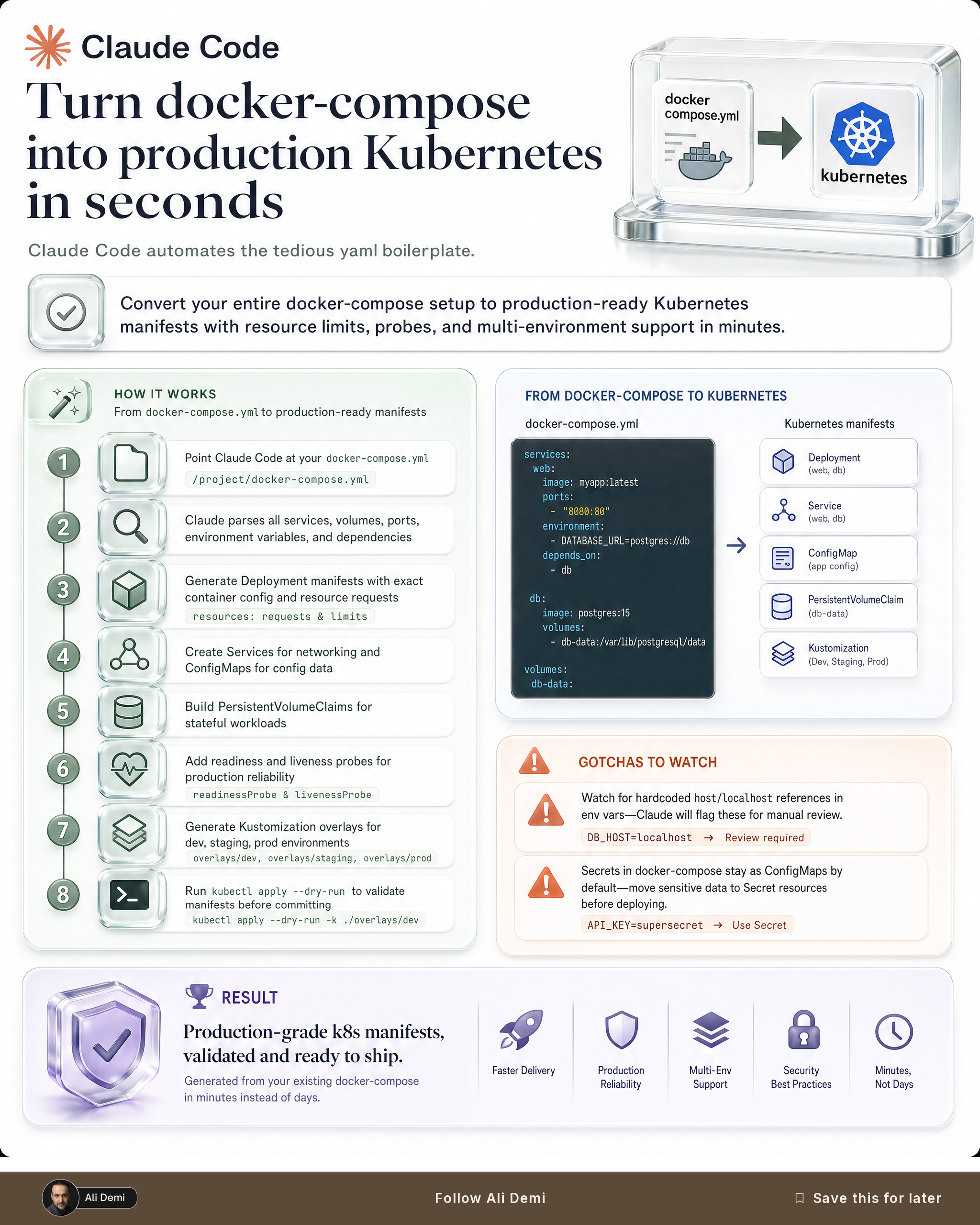
    Point it at your docker-compose.yml and it will:

    1. Parse every service, volume, port, and environment variable
    2. Generate clean Deployment manifests with container args and env vars
    3. Create matching Services for each component
    4. Extract config into ConfigMaps, secrets into Secret resources
    5. Set up PersistentVolumeClaims for stateful volumes
    6. Add resource requests and limits based on your setup
    7. Inject readiness and liveness probes for reliability
    8. Build a Kustomization structure for multi-environment support
    9. Validate everything with kubectl dry-run

    What took a day now takes five minutes.

    Your manifests come out organized, validated, and immediately deployable.

    ——

    Book your free AI clarity call, NOW!
    https://buff.ly/TpWy277

    ——

    Repost this. Thanks.
  • Stop Surprising Your API Clients: Auto-Detect Breaking Changes

    Stop Surprising Your API Clients: Auto-Detect Breaking Changes

    You refactor your API. You test it. You ship it.

    Then your customers wake up to 500 errors.

    You forgot to tell them you removed an endpoint. Or changed how the status codes work. Or you didn’t realize a parameter rename was a breaking change.

    It’s a mess. Blame gets passed around. Trust erodes.

    Claude Code can catch this before you ship. Here’s how.

    The workflow:

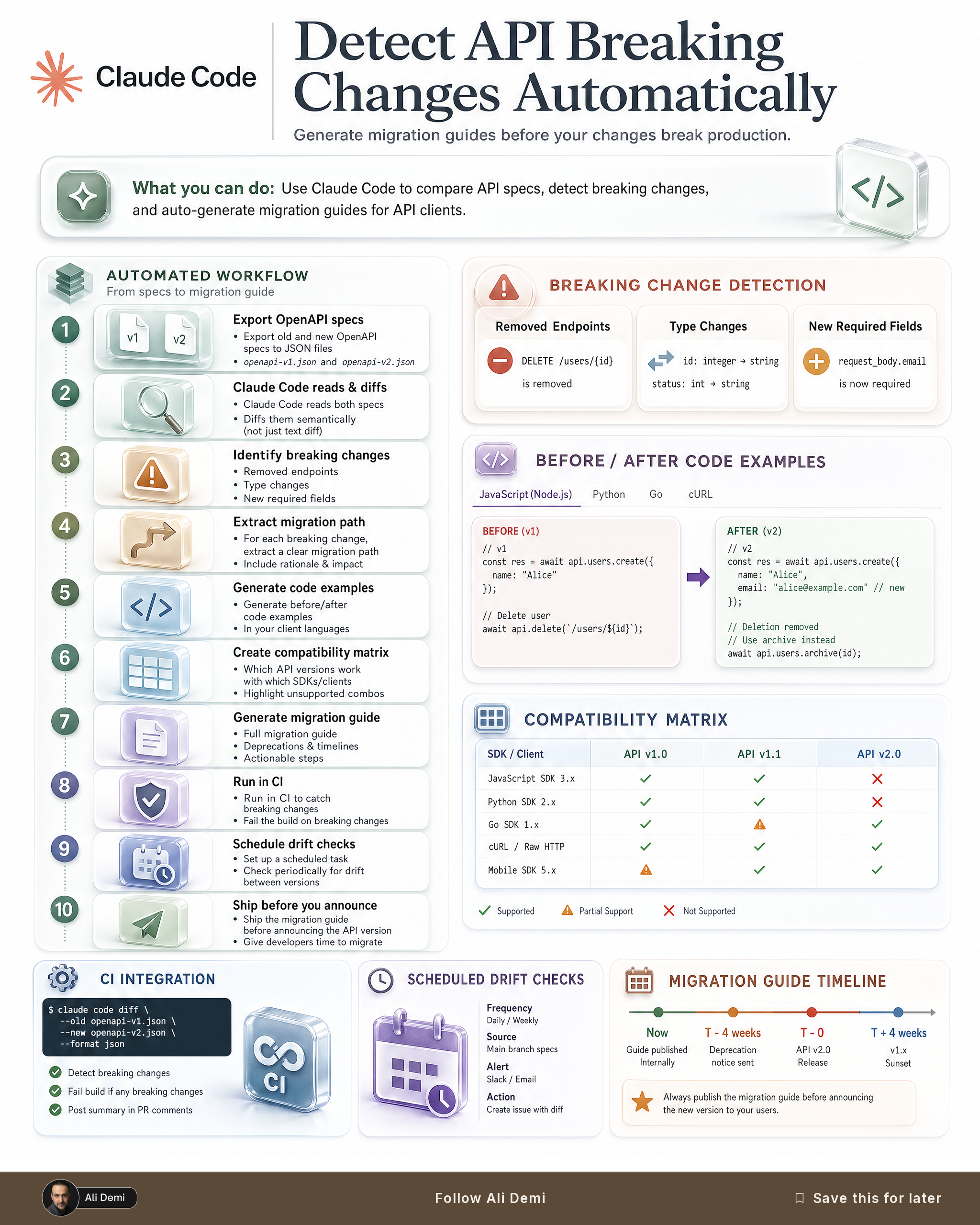
    1. Export your old and new OpenAPI specs (or Swagger JSON). Claude reads both.
    2. Claude compares them semantically, not string-by-string.
    3. It detects: removed endpoints, changed parameter types, new required fields, status code changes, authentication changes.
    4. For each breaking change, Claude generates: what broke, which clients are affected, how to migrate, before/after code examples.
    5. You get a migration guide your customers can actually follow, plus a deprecation timeline.

    What breaking changes it catches:

    • Removed or moved endpoints
    • Required fields added to request bodies
    • Response field types changed (string to int, etc.)
    • Status codes removed or their meanings changed
    • Authentication method changes
    • Rate limit changes
    • Pagination format changes

    The migration guide it generates includes:

    • Breaking change summary (what changed, when it’s live)
    • Which SDK versions are affected
    • Step-by-step migration for each change
    • Before/after code snippets in your client’s language
    • Deprecation timeline (when old endpoints stop working)
    • A compatibility matrix (which API versions work with which SDK versions)

    Pro tip: Run this in CI before you merge any API-touching PR. Let Claude flag breaking changes before code review. Your team sees the migration work required, and it might even be cheaper to fix the API than generate the docs.

    ——

    Book your free AI clarity call, NOW!
    https://buff.ly/TpWy277

    ——

    Repost this. Thanks.
  • Refactor Components Once, Update Everywhere Automatically

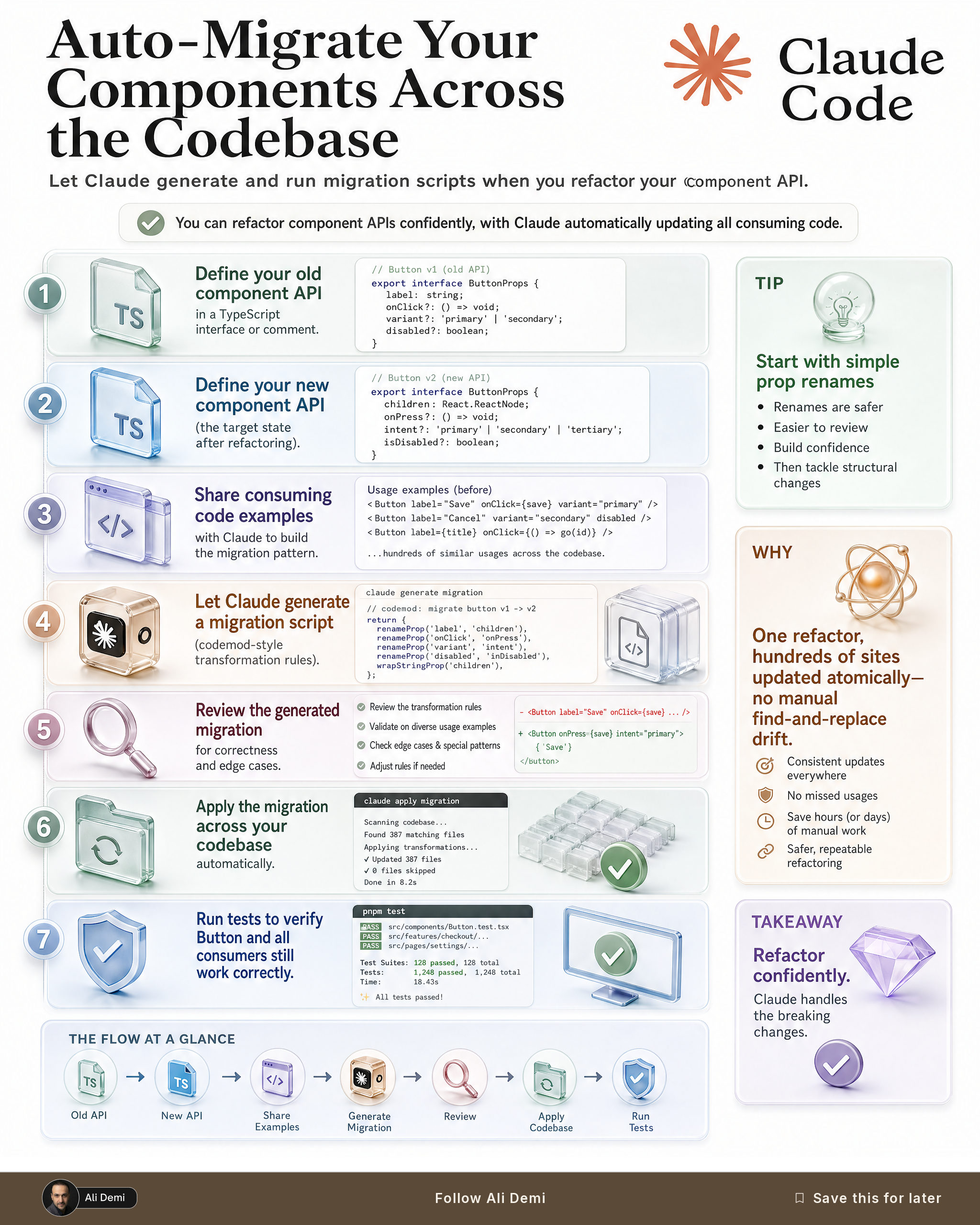
    Refactor Components Once, Update Everywhere Automatically

    You just realized your Button component has five different ways to handle size. Time to consolidate.

    But you also have 200 uses of Button scattered across your codebase.

    Manual find-and-replace? That’s error-prone and takes hours. Let Claude do it.

    The workflow:

    1. Write the old component API (current prop shapes and interfaces).
    2. Write the new component API (desired changes, renamed props, restructured objects).
    3. Paste a few examples of current usage into Claude Code.
    4. Ask Claude to generate a migration script that transforms all usages from old to new.
    5. Claude analyzes the consuming code and outputs transformation rules (regex or AST patterns).
    6. Review the generated script, then let Claude apply it across your entire codebase.
    7. Run your test suite to verify nothing broke.

    Real example: Your Button component goes from separate `loading`, `disabled`, `variant` props to a single `state` prop. Claude generates the migration that rewrites all 200 Button usages from `

  • Your Data Analyst is Just a Question Away: Query Data in Plain English

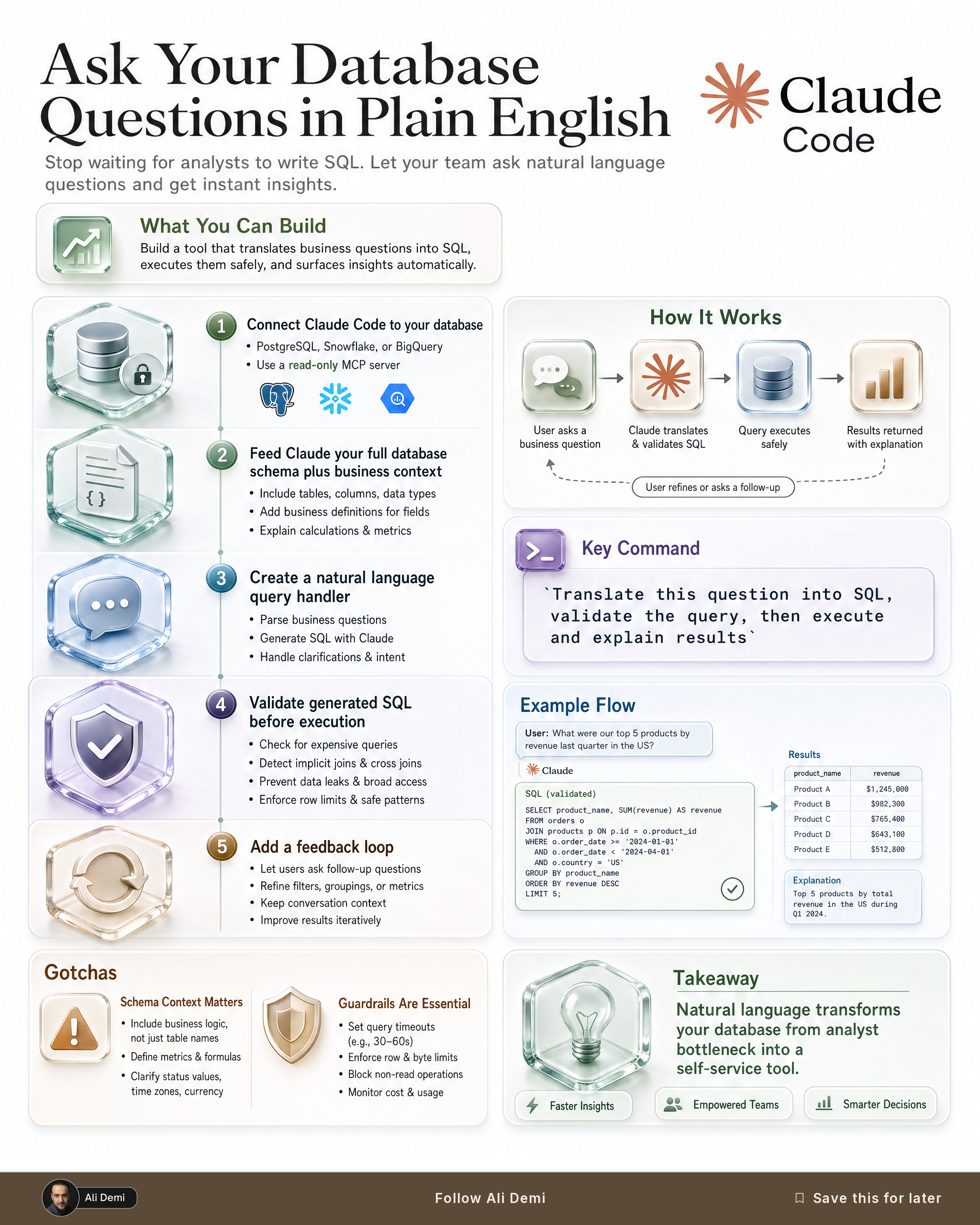
    Your Data Analyst is Just a Question Away: Query Data in Plain English

    Your analysts spend half their time writing SQL for questions that take five minutes to answer.

    Your business users wait days for simple data questions, and your team spins in that cycle.

    What if your team could just ask their database questions in plain English?

    Claude Code can translate natural language questions directly into SQL, validate the queries, execute them safely, and explain the results back in plain English.

    Here’s how to build it:

    1. Connect your database. Use Claude Code with a read-only MCP server to Postgres, Snowflake, or BigQuery. Set up separate credentials for query execution so Claude can’t write or delete.
    2. Feed the schema. Paste your database schema into context, but include the business dictionary too. “Users table has a revenue field” isn’t enough. Say what revenue means to your business, how it’s calculated, which fields are test data.
    3. Write a question handler. Create a function that takes plain English input, asks Claude to generate SQL, validates it for cost and safety, executes it, and surfaces the results with an explanation.
    4. Validate before you execute. Use Claude to review generated queries for red flags: expensive full table scans, implicit joins that might miss data, queries against tables users shouldn’t see.
    5. Add a feedback loop. Let users ask follow-up questions. “Show me this broken down by region” should refine the query, not start from scratch.
    6. Set guardrails. Timeouts on queries. Cost limits on BigQuery. A whitelist of tables users can ask about. This keeps curious questions from turning into expensive mistakes.

    The payoff is big: analysts stop being a data bottleneck, your team self-serves answers in minutes, and you get better questions asked because people don’t have to pre-filter for feasibility.

    ——

    Book your free AI clarity call, NOW!
    https://buff.ly/TpWy277

    ——

    Repost this. Thanks.
  • Stop Searching Blind: Find Code by Intent, Not Keywords

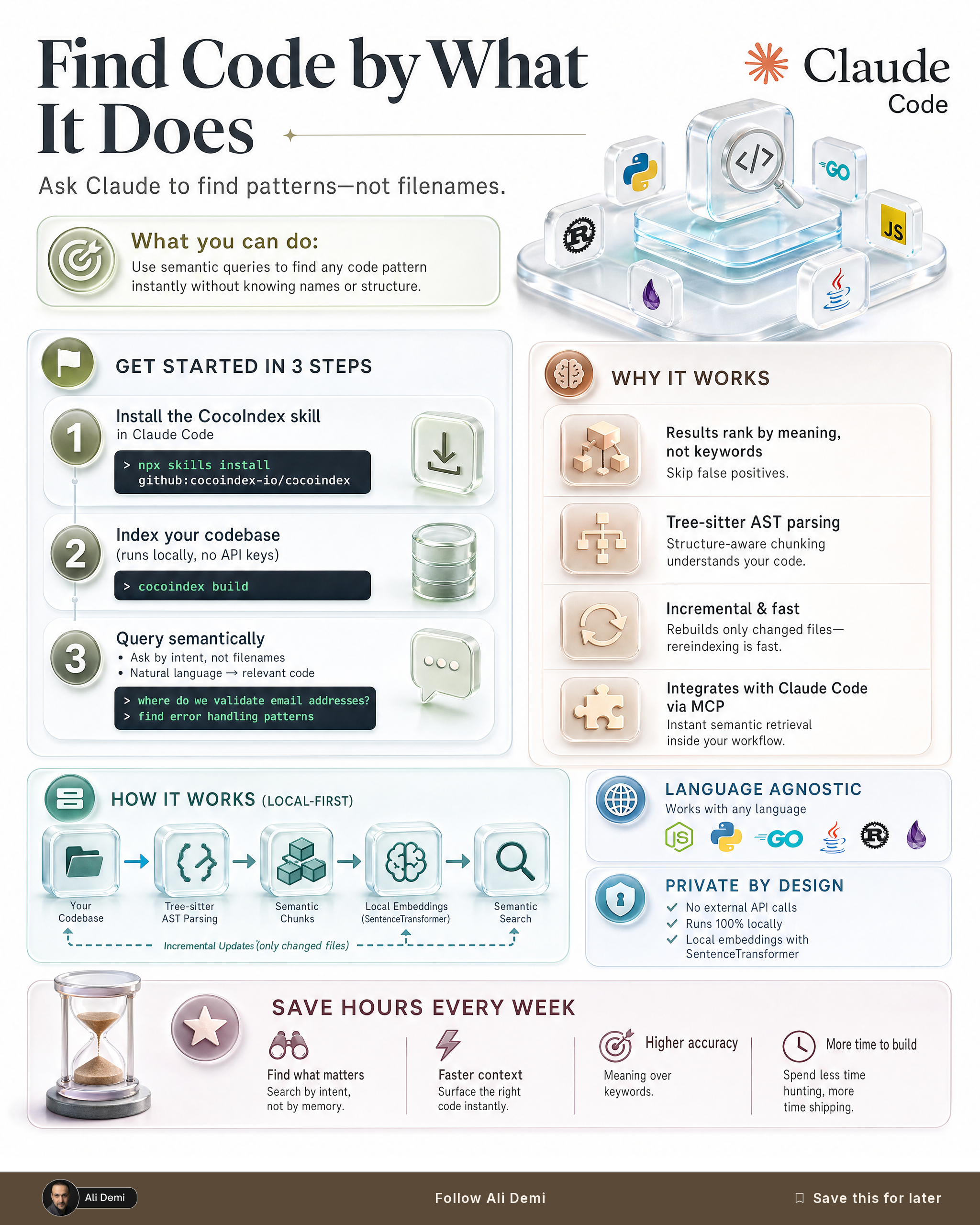
    Stop Searching Blind: Find Code by Intent, Not Keywords

    You’re hunting for where you handle payment failures. You don’t know which service owns it. You don’t know what the function’s called. You grep for “payment” or “fail” and get 47 false positives. You dig through each one. You waste an hour.

    Semantic code search changes that. Instead of guessing keywords, you ask Claude in natural language. “Find where we validate payment input” or “Show me how errors get logged to external services.” Claude understands what the code does, not just what it’s called. It returns exactly what you need.

    Here’s how to build it in minutes.

    Step 1: Install the CocoIndex skill. CocoIndex is an open-source semantic indexer built for Claude Code. It parses your codebase with Tree-sitter (AST-aware, so it understands code structure), embeds chunks locally using SentenceTransformer (no API keys), and stores them searchably.

    Step 2: Index your codebase. One command builds the semantic index. It’s incremental, so reruns only touch changed files. A 10K-file codebase takes minutes.

    Step 3: Search semantically.” Now you ask questions instead of guessing. “Where do we retry failed API calls?” or “Show me all database access that skips permission checks.” Claude returns code snippets ranked by semantic relevance, not keyword match.

    No more guessing filenames. No more manual file-by-file review. You ask, Claude finds. It works across patterns that have different names, different files, different implementation styles.

    The math is brutal: benchmark data from 2026 shows semantic search cuts wasted reads by 75% compared to grep. On a large codebase, that’s hours saved per week.

    ——

    Book your free AI clarity call, NOW!
    https://buff.ly/TpWy277

    ——

    Repost this. Thanks.
  • Stop Using Real Customer Data in Tests: Auto-Redact PII in Minutes

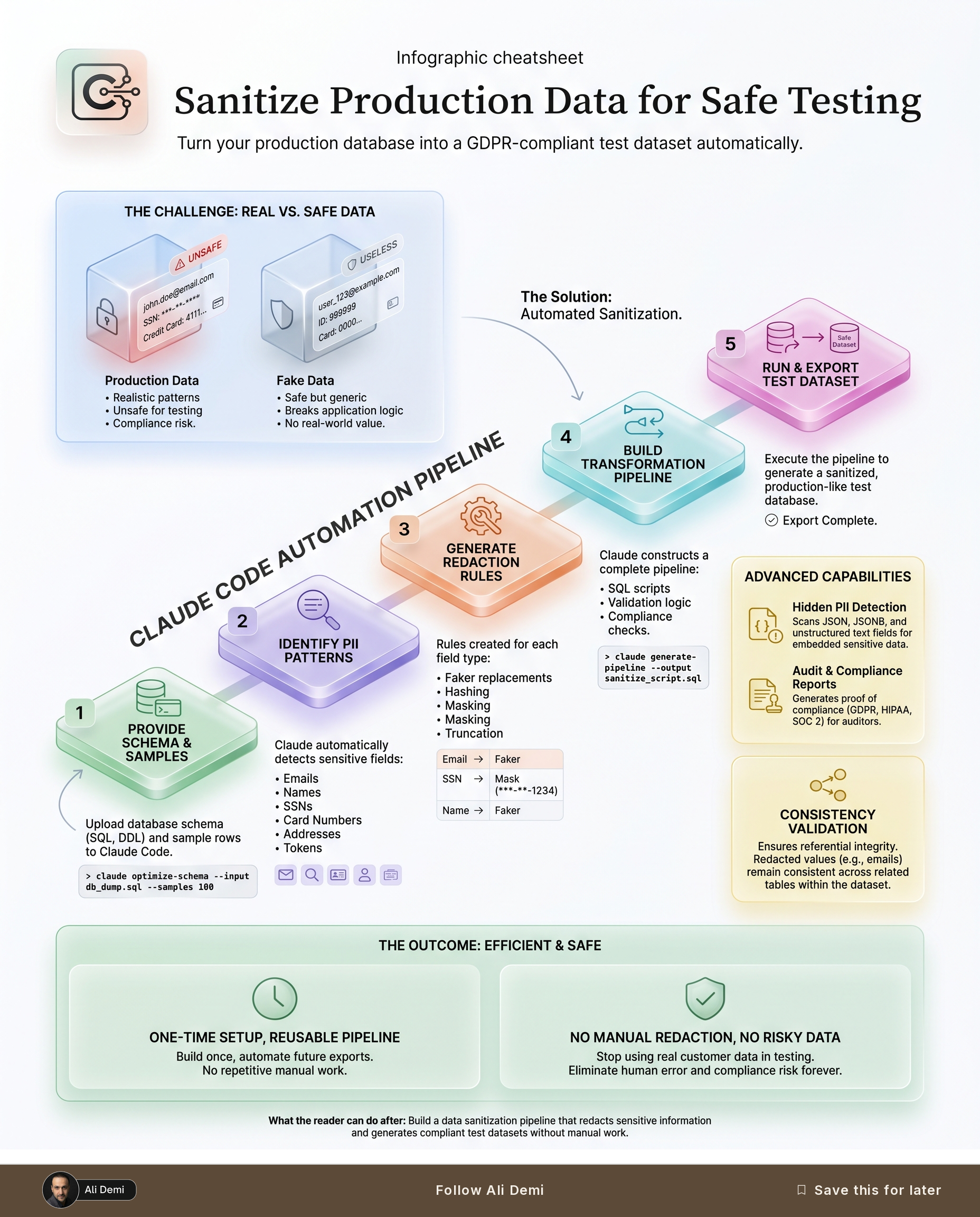
    Stop Using Real Customer Data in Tests: Auto-Redact PII in Minutes

    Your test database is either fake and useless, or real and dangerous.

    Fake data doesn’t catch edge cases. Real data finds bugs. But using actual customer info in tests violates GDPR, HIPAA, and common sense.

    The usual workaround is weeks of manual redaction: hunting for emails, masking credit cards, guessing what counts as sensitive. It’s slow, incomplete, and easy to miss PII hiding in unexpected places.

    Claude Code flips this. Point it at your database schema, and it builds a complete sanitization pipeline in minutes.

    Here’s how:

    1. Give Claude your database schema and sample rows. It identifies PII patterns automatically: emails, phone numbers, names, SSNs, card numbers, API keys, anything sensitive.
    2. Claude generates redaction rules for each field: faker-based replacements (realistic fake names, emails), hashing (consistent across rows), masking (keep last 4 digits of cards), truncation.
    3. Claude builds the transformation pipeline: SQL queries, validation checks, compliance reporting.
    4. Run once, export a sanitized dataset that looks and behaves like production but contains zero real customer data.
    5. Teams get production-realistic data for testing. Security and compliance win. Done.

    The real power: Claude doesn’t just redact what you tell it to. It scans the entire schema, finds PII you didn’t notice (that user_metadata JSON field hiding emails, the notes column with phone numbers), and redacts it all at once.

    Result: safe test data in hours instead of weeks. No more using real customer info in tests. No more pretending fake data is good enough.

    ——
    Book your free AI clarity call, NOW!
    https://buff.ly/TpWy277
    ——

    Repost this. Thanks.
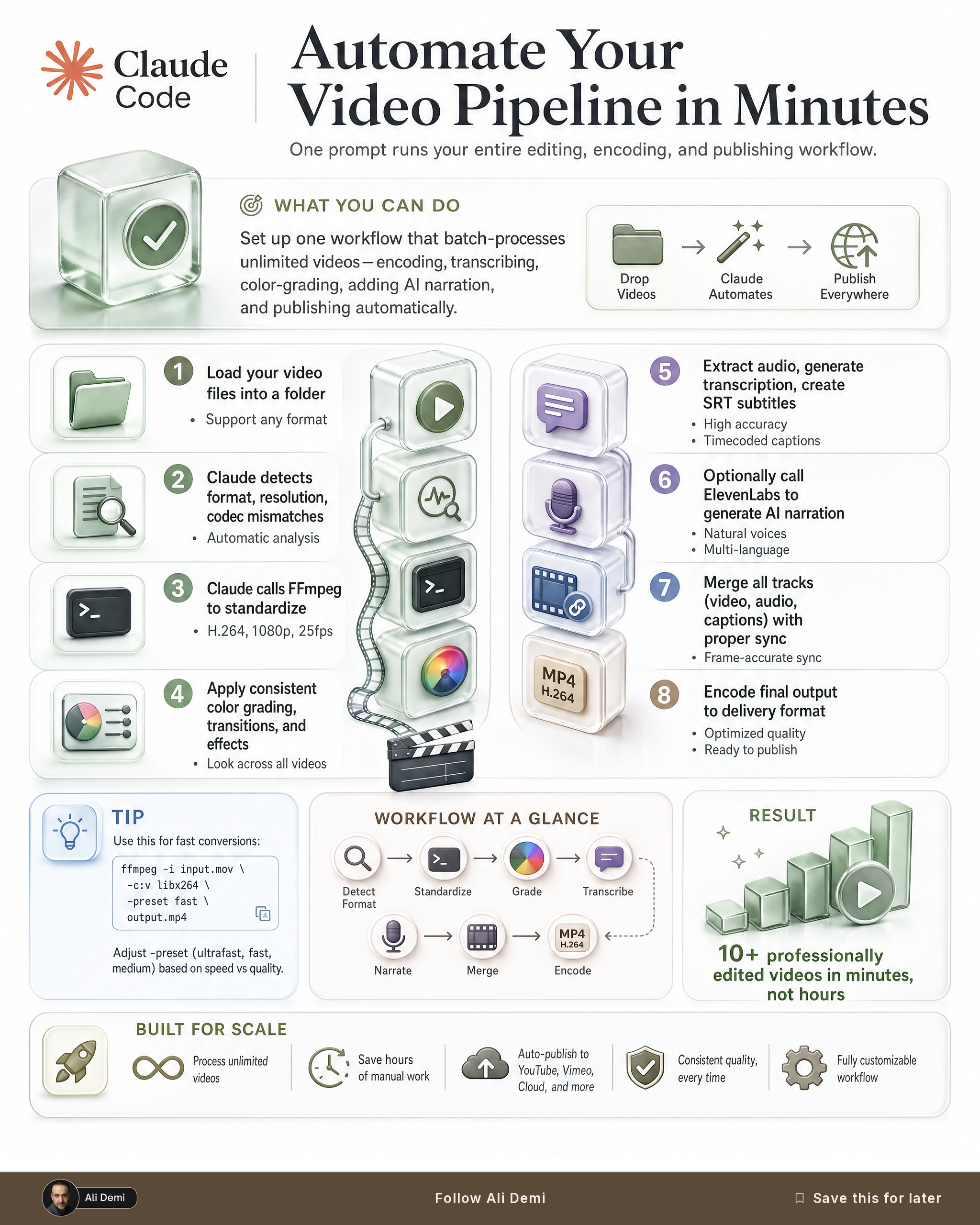
  • Stop Editing Videos by Hand: Automate Your Entire Pipeline

    Stop Editing Videos by Hand: Automate Your Entire Pipeline

    You’re spending hours editing videos manually. One video at a time. Same tasks, over and over: convert formats, add subtitles, color grade, encode. If you’ve got 10 videos to process, that’s your whole day gone.

    Claude Code changes that. Set up ONE workflow, and it runs on as many videos as you throw at it. Batch processing your entire library in minutes, not hours.

    Here’s how it works. Claude orchestrates the entire pipeline. Point it at your video folder. It detects the format and resolution, calls FFmpeg to standardize everything to 1080p H.264, applies consistent color grading and transitions, extracts audio, generates subtitles, and outputs broadcast-ready MP4s. You don’t touch a single file.

    Want AI narration? Claude calls ElevenLabs to convert your script to professional voiceover, then syncs it with animated visuals from HyperFrames, all in one pass. Marketing teams use this to generate product demo videos automatically from feature docs.

    Content agencies report cutting video processing time from 8+ hours to minutes per batch. Podcast producers use it to auto-convert long-form episodes into short-form clips with captions and graphics.

    The real win: once your pipeline is set up, adding new videos is instant. Change one parameter, run the workflow, walk away. No manual labor, no mistakes, always consistent output.

    Your competitors are probably still clicking buttons. You’re shipping 10x faster.

    ——

    Book your free AI clarity call, NOW!
    https://buff.ly/TpWy277

    ——

    Repost this. Thanks.
  • Your Dependencies Are Getting Old: Automate Safe Updates

    Your Dependencies Are Getting Old: Automate Safe Updates

    Your dependencies are getting older every day.

    You know it.

    Security vulnerabilities hide in old packages. Performance regresses. But reviewing every breaking change, running tests, and merging updates manually? That’s hours of busywork you don’t have time for.

    Stop doing it by hand.

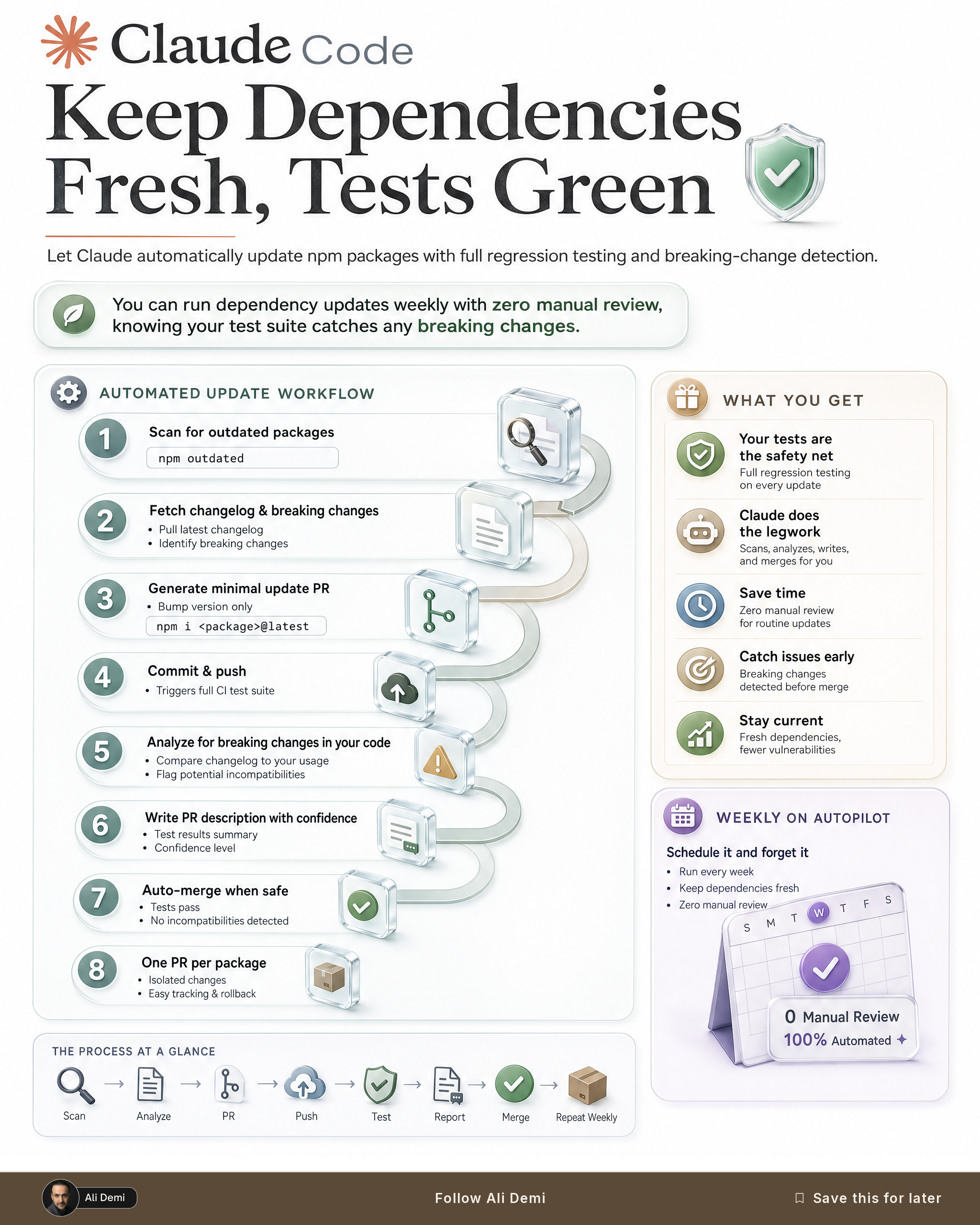
    Claude can automate your entire dependency update workflow. Run it on a schedule, get back a batch of smart, tested update PRs ready to merge.

    Here’s how it works:

    Claude scans your package.json and runs npm outdated, instantly finding which packages are behind.

    For each outdated package, Claude fetches the changelog and breaking change summary, analyzing what might break in your code.

    Claude generates a careful, minimal update: just the version bump, nothing else.

    It commits and pushes a new branch, triggering your full test suite.

    While CI runs, Claude analyzes the changelog for incompatibilities specific to your codebase, flagging any risky upgrades.

    When tests complete, Claude writes a smart PR description: what changed, whether it’s safe, and the confidence level based on test results.

    If all tests pass and no breaking changes were detected, Claude can auto-merge or mark it ready.

    One PR per package, one run per week, all your dependencies stay fresh.

    Your test suite is your safety net. Claude does the work.

    ——

    Book your free AI clarity call, NOW!
    https://buff.ly/TpWy277

    ——

    Repost this. Thanks.
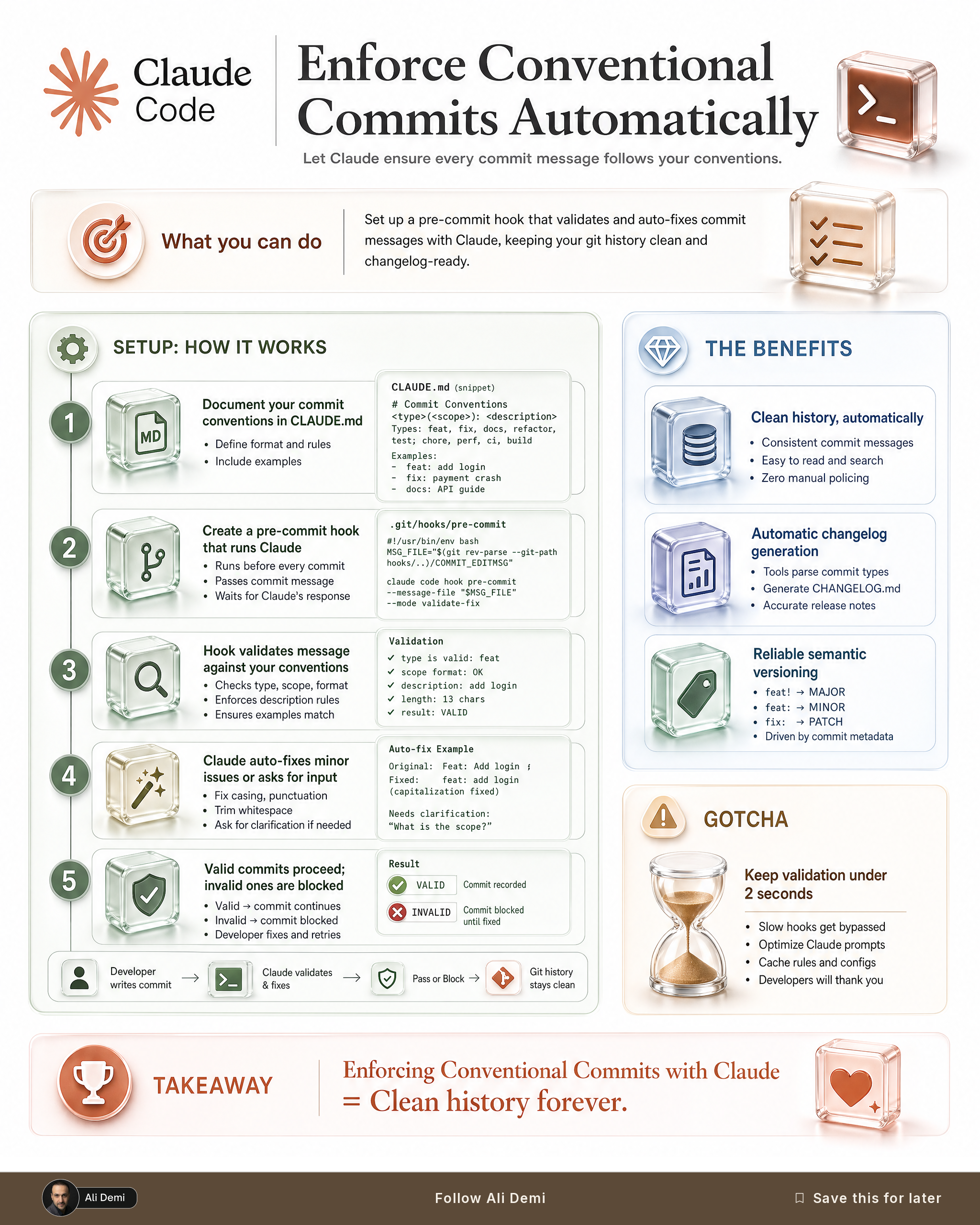
  • Keep Your Commits Clean: Auto-Enforce Conventions with Claude

    Keep Your Commits Clean: Auto-Enforce Conventions with Claude

    Your git history is a mess. Commits say “updates” and “fix bug.” When you need to generate release notes or understand what changed, you are digging through commit messages that tell you nothing.

    Conventional Commits solves this, but only if everyone follows the format. Documenting the standard in a README doesn’t work. People forget, or misremember, and now you are cleaning up history manually.

    Here is the fix: a pre-commit hook that runs Claude on every commit message. Claude validates it against your conventions and either auto-fixes minor issues or guides you to the right format. Clean git history becomes automatic.

    The workflow:

    1. Document your conventions in CLAUDE.md with examples for your team’s commit prefixes
    2. Create a pre-commit hook in your version control system
    3. Hook runs Claude to check the message against your documented format
    4. Claude auto-fixes trivial violations or asks for clarification
    5. Commit lands in standard format or is blocked until fixed

    Result: you can now reliably generate changelogs, auto-bump versions by commit type, and your git log actually tells a story instead of being a wall of vague messages.

    Teams using this report cleaner history, fewer PR comment threads about commit message standards, and release notes that assemble themselves from git.

    ——

    Book your free AI clarity call, NOW!
    https://buff.ly/TpWy277

    ——

    Repost this. Thanks.