Blog

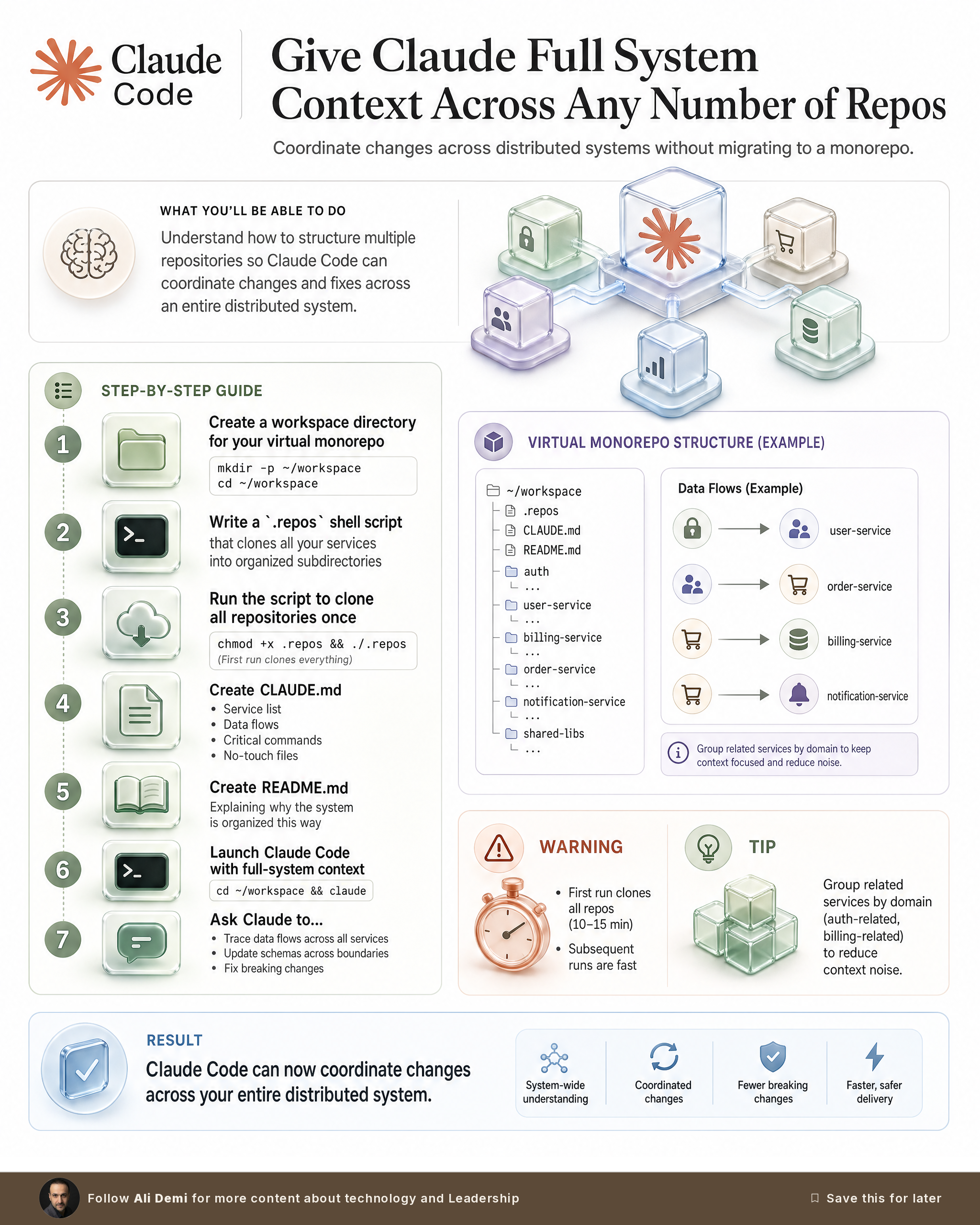
  • Scale Claude Code to 35 Repos: The Virtual Monorepo Pattern

    Scale Claude Code to 35 Repos: The Virtual Monorepo Pattern

    Your system is split across 35 repositories.

    Portal, API gateway, auth service, billing, event bus, notification workers.

    Each team owns their service.

    Each deploys independently.

    But when a user signs up, the ripple goes through six services and you need them all to work together.

    The problem: Claude Code sees one repo at a time.

    Ask it to update the auth service, and it has no idea that service-b expects the old schema.

    Ask it to trace a data flow, and you only get half the story.

    You don’t want a real monorepo-your teams need autonomy, different tech stacks, separate deploy cadences.

    The virtual monorepo solves this.

    The pattern is simple:

    Create a single workspace directory.

    Clone all 35 repos into organized subdirectories.

    Write two files: a terse CLAUDE.md that documents data flows and critical commands, and a narrative README explaining why the system is organized this way.

    Launch Claude Code from the workspace root.

    Now Claude sees all repos at once and understands the full system architecture.

    You can ask it to trace a signup flow end-to-end, fix breaking changes across service boundaries, or update API contracts and all their callers simultaneously.

    The gotchas: disk space (35 repos is 10-50 GB), sync (when repos are added, update your clone script), and context noise (group related services into subdirectories to stay organized).

    Your CI/CD unchanged-this is purely a reading layer for Claude Code, not a deployment artifact.

    The payoff: Claude can now understand and coordinate changes across your entire distributed system without human handoff between repos.

    ——

    Book your free AI clarity call, NOW!
    https://buff.ly/TpWy277

    ——

    Repost this. Thanks.
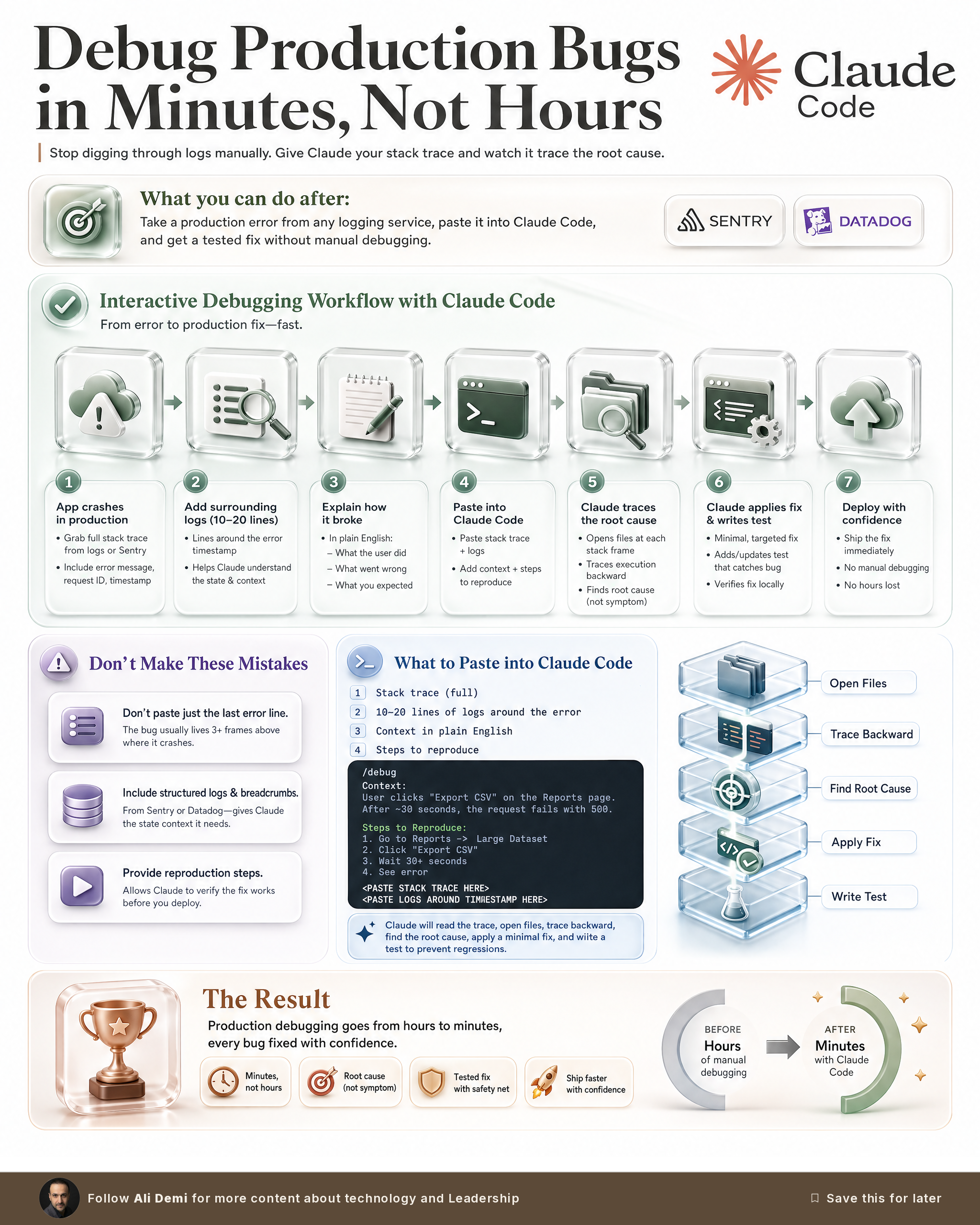
  • Debug Production Bugs 3x Faster: Paste the Stack Trace, Get the Fix

    Debug Production Bugs 3x Faster: Paste the Stack Trace, Get the Fix

    Your app just crashed in production.

    You copy the stack trace from Sentry. You grep the logs. You open seven files, squint at line 47, wonder if that could be it, rebuild, deploy, watch it fail again.

    Claude Code does this differently.

    Paste the stack trace. Add the logs from 10 minutes before the error. Say how it broke (“user hit checkout, got 500”). Claude reads every frame in the stack, opens the source files at the exact lines, follows the execution path backward, and finds the real cause, not the symptom.

    You get a fix. You get a test that would have caught it. You deploy.

    The secret: Claude doesn’t just see “NullPointerException at line 47.” It reads the full call chain and understands the sequence of events that led to it. Half the time, line 47 is where it crashed, but the bug lives three frames up, in code that prepared bad data.

    This matters because the frame where the exception lands is almost never the frame where the bug lives.

    Real example: your e-commerce store reads the customer’s credit balance, approves the charge, then applies the promotional discount. But the discount makes the final total larger than the approved balance, and the charge fails silently. The error lands in the payment processor. The bug lives in the checkout sequence-validation happened before discount. Claude traces the stack, spots the order dependency, swaps two function calls, writes a test that reproduces the bug if you ever reverse it again.

    The fix takes 90 seconds. Manual debugging would take an hour.

    All you have to do: gather the real context. The full stack trace, not the headline. Logs from around the error timestamp. Steps to reproduce. What changed recently. Claude handles the rest.

    Your production bugs stop being emergencies and become puzzles you solve while your coffee is still warm.

    ——

    Book your free AI clarity call, NOW!
    https://buff.ly/TpWy277

    ——

    Repost this. Thanks.
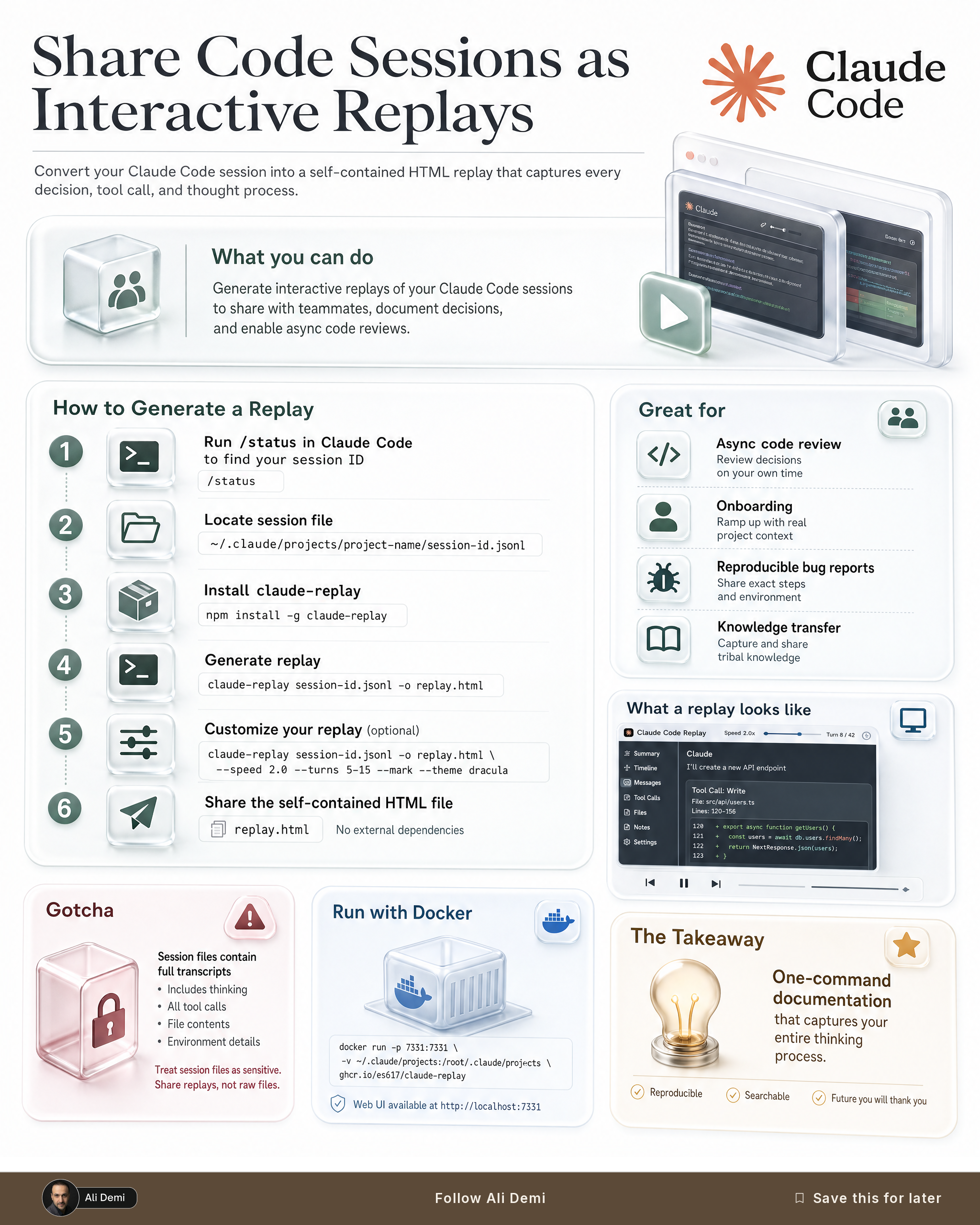
  • Stop Writing Recap Notes: Share Your Claude Sessions as Replays

    Stop Writing Recap Notes: Share Your Claude Sessions as Replays

    You finish a complex refactor or figure out a tricky bug. Your team asks “what did you do?” So you write a 500-word recap, paste code snippets, explain your thinking.

    There’s a better way.

    Claude-replay turns your entire Claude Code session into an interactive, self-contained HTML file. Your teammates watch the session unfold – every prompt, every tool call, every decision – in a shareable replay. No video player, no external dependencies. One HTML file.

    Here’s how:

    1. Run `/status` in Claude Code to grab your session ID.
    2. Find the session file at `~/.claude/projects/project-name/session-id.jsonl`.
    3. Install the replay tool: `npm install -g claude-replay`
    4. Generate the HTML: `claude-replay session-id.jsonl -o replay.html`
    5. Customize it: add flags like `–speed 2.0` to skip slow parts, `–turns 5-15` to focus on specific exchanges, `–mark` to add chapter markers.
    6. Share the HTML file – email it, drop it in a doc, push it to a repo.

    Your team opens it in a browser and steps through your thinking at their own pace. They can expand any tool call to see the exact output, search the transcript, rewind to a moment they missed.

    Perfect for onboarding new devs (“watch how we debug this”), code review (“see the approach I tried”), reproducible bug reports (“here’s exactly what happened”), and async work (“I’ll review your replay tomorrow”).

    The session JSONL file holds everything – your prompts, Claude’s full responses, all thinking and tool calls, timestamps. It’s already being recorded. Claude-replay just makes it shareable and navigable, without you lifting a finger.

    ——

    Book your free AI clarity call, NOW!
    https://buff.ly/TpWy277

    ——

    Repost this. Thanks.
  • Catch Security Bugs Before They Merge: Automated PR Reviews

    Catch Security Bugs Before They Merge: Automated PR Reviews

    Your team reviews code for bugs and logic errors. But security issues slip through because nobody reads every PR thinking like an attacker.

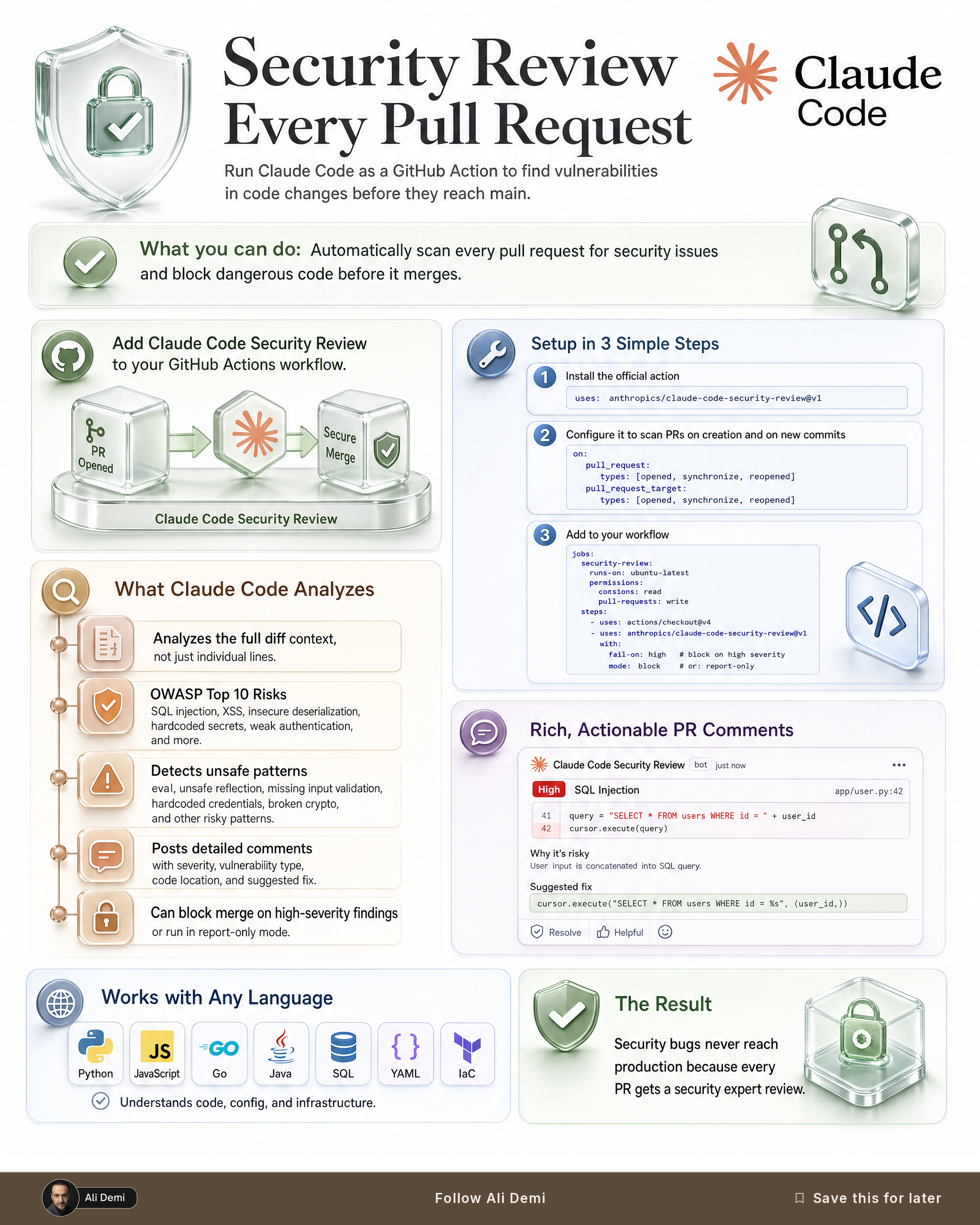
    Claude Code Security Review runs in GitHub Actions and scans every pull request for security vulnerabilities before developers hit merge.

    It understands context: it reads the full diff, not just pattern-matching signatures. It catches SQL injection risks in dynamic queries, hardcoded secrets buried in config files, unsafe deserialization, weak crypto, missing input validation-the real stuff that opens backdoors.

    When it finds something, it doesn’t just flag the line. It explains the vulnerability, shows the attack vector, and suggests the fix. Your developers learn from the feedback instead of just ignoring a linter message.

    Setup is simple: add the official action to your workflow, point it at your repo. It runs automatically on every PR. Failed security checks can block merge, or run in report-only mode while you build the habit.

    The real win: you ship with fewer zero-day-adjacent vulnerabilities. Security reviews that used to require a specialist now happen on every change.

    ——

    Book your free AI clarity call, NOW!
    https://buff.ly/TpWy277

    ——

    Repost this. Thanks.
  • Stop Writing Migrations By Hand: Auto-Generate Them

    Stop Writing Migrations By Hand: Auto-Generate Them

    Database migrations are one of the most error-prone parts of development.

    You describe the change, then spend an hour writing the SQL, another hour testing the rollback, and hope you didn’t miss an index or a constraint.

    Here’s how to let Claude handle the whole thing.

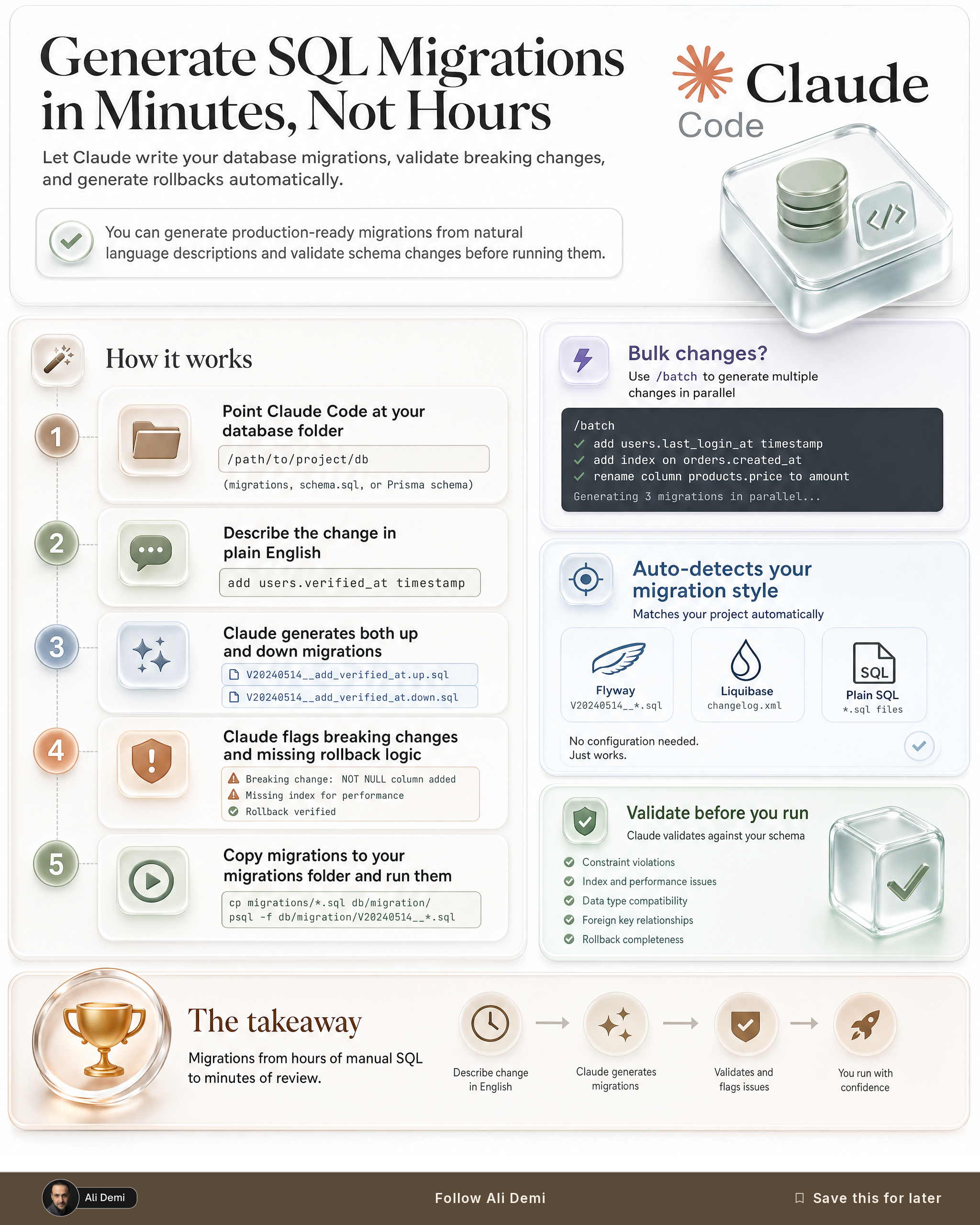
    1. Point Claude Code at your schema folder or migration history.
    2. Describe the change in plain English: add a column, rename a table, create an index.
    3. Claude generates the up migration, the down migration, and checks for breaking changes.
    4. Review the generated files, run them, Claude confirms success.

    For bulk changes, use /batch to generate multiple migrations in parallel.

    Claude catches the gotchas: missing rollbacks, breaking existing queries, forgotten constraints.

    Your migrations are tested, documented, and safe to commit.

    ——

    Book your free AI clarity call, NOW!
    https://buff.ly/TpWy277

    ——

    Repost this. Thanks.
  • Stop Debugging Query Performance Manually: Find N+1s with Claude

    Stop Debugging Query Performance Manually: Find N+1s with Claude

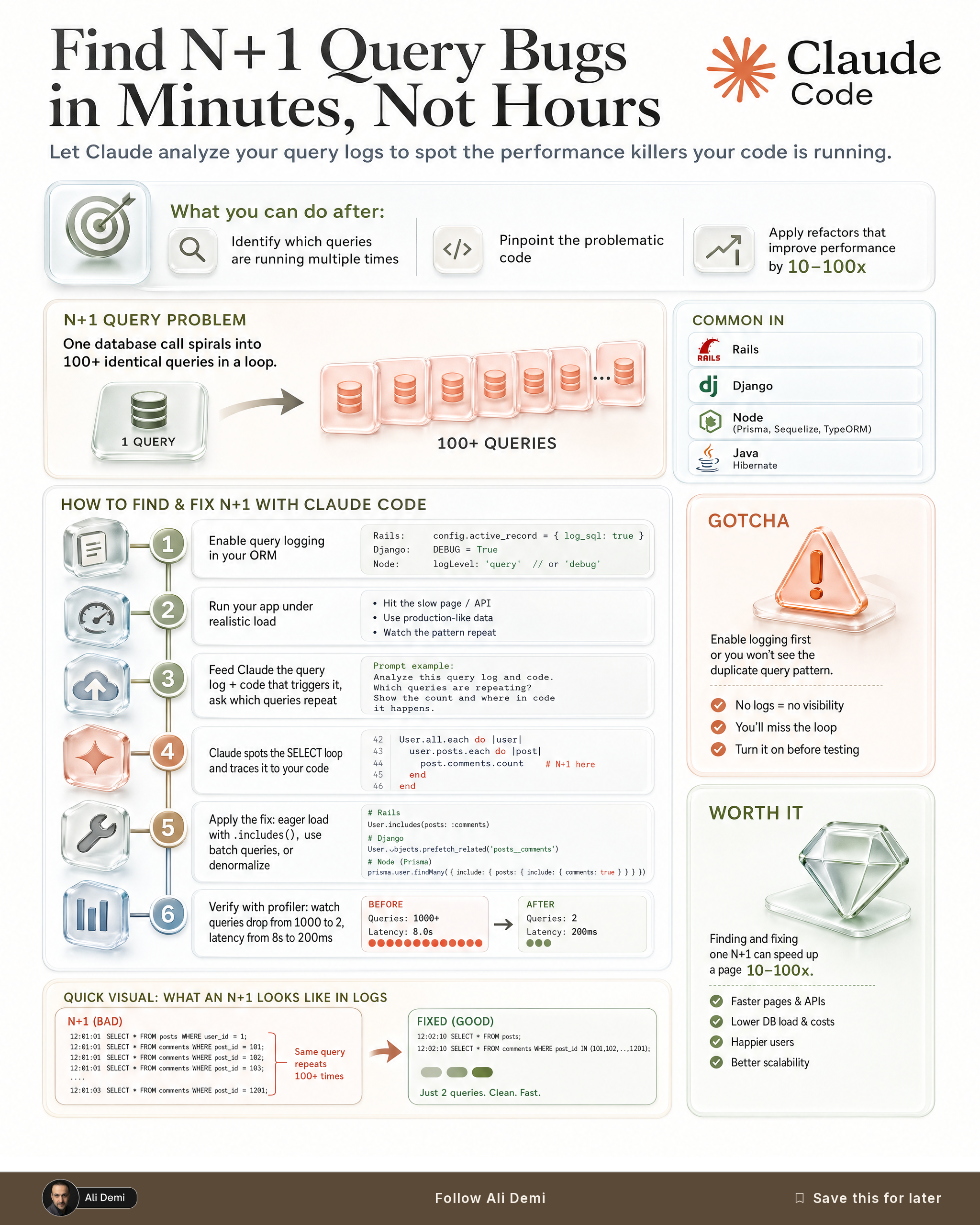
    Your app is slow. You profile it. Nine times out of ten, the culprit is an N+1 query: one SELECT fetches a user, then the code loops and does another SELECT for each user’s posts, each post’s comments, each comment’s author. One request becomes 1,000 database hits.

    You can hunt these manually, but it’s tedious: dig through logs, grep for repeated query patterns, trace the code path, refactor. Hours. Claude finds them in minutes.

    Step 1: Enable query logging. Most ORMs have a debug mode. Rails: add set_property(Arel::Visitors::ToSql, 'log_sql', true) to your config. Node Prisma: use `logLevel: “query”` in your schema. Python Django: set DEBUG=True and read django.db.backends logs. Run your app under realistic load so the pattern shows up.

    Step 2: Load logs and code into Claude. Paste your query log and the controller/resolver that triggered it. Ask: Which queries repeat with different parameters?

    Step 3: Claude spots the pattern. It finds the SELECT that runs once per item in a loop. It traces back to your code: usually a loop over a list of items, with a separate query inside. N+1.

    Step 4: Claude proposes the fix. Eager load the associations (Rails: add `.includes(:posts)` to your find). Use a batch query operator. Denormalize. Move to a subquery. Claude will show the exact refactored code.

    Step 5: Verify the win. Run the profiler again. Watch the query count drop from 1,000 to 2. App goes from 8 seconds to 200ms.

    Common in Rails, Django, Node (Prisma, Sequelize, TypeORM), Java Hibernate. Works on any ORM that exposes query logs. The gotcha: enable logging BEFORE profiling, or you won’t see the pattern.

    ——

    Book your free AI clarity call, NOW!
    https://buff.ly/TpWy277

    ——

    Repost this. Thanks.
  • Stop Manually Migrating Node.js to ESM: Let Claude Handle It

    Stop Manually Migrating Node.js to ESM: Let Claude Handle It

    You’re stuck: your Node.js project is on CommonJS, but you need ESM to use modern packages and stay current.

    The problem: manually rewriting require() to import, renaming module.exports, and handling the edge cases (__dirname doesn’t exist, circular dependencies break, some patterns don’t translate) takes days and leaves you paranoid.

    The fix: use Claude Code’s batch-processing workflow to parallelize the migration.

    The workflow:

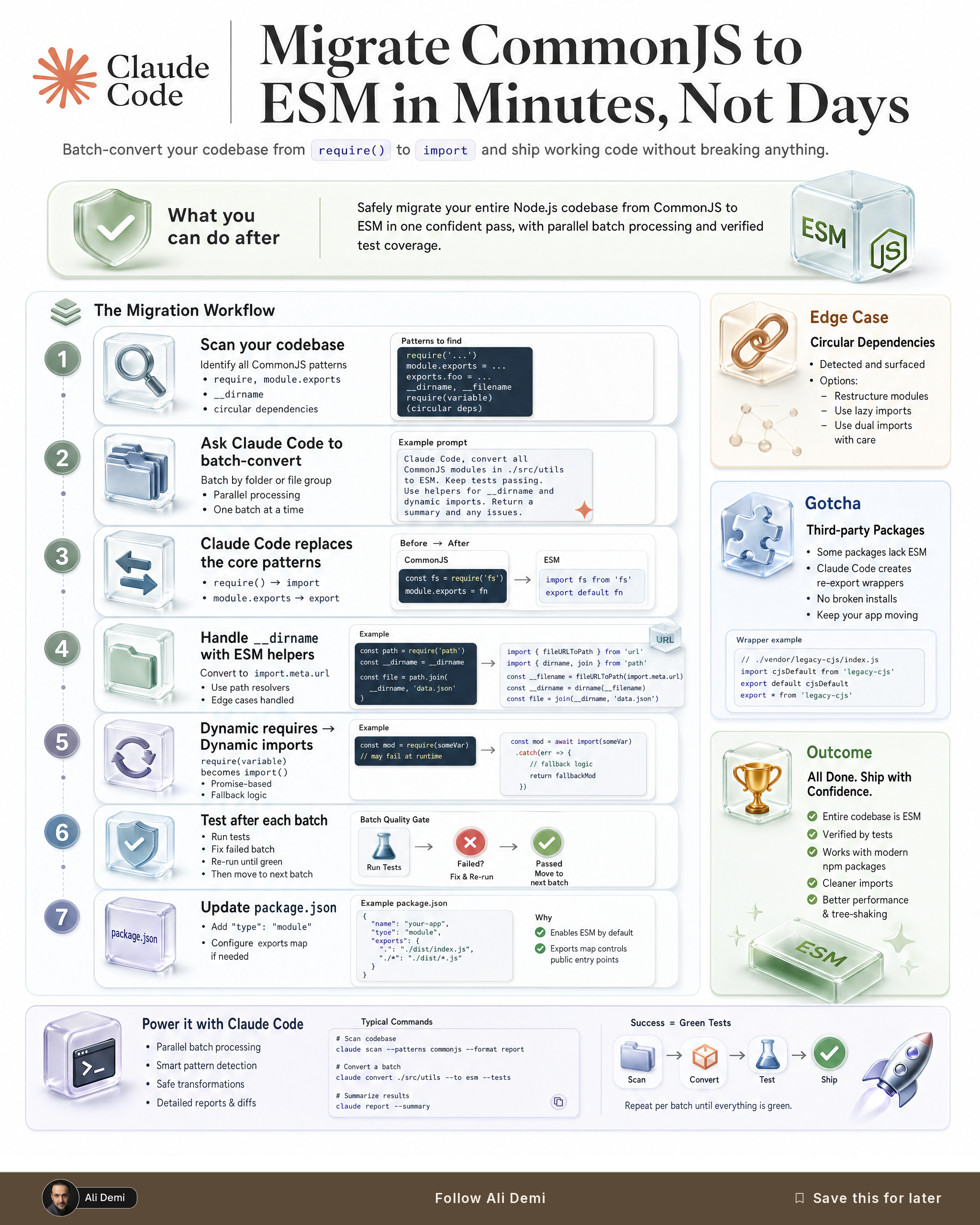
    1. Run a quick scan: ask Claude Code to identify all CommonJS patterns (every require, every module.exports, __dirname, __filename, dynamic requires). It also spots circular dependencies and risky patterns.
    2. Batch-convert modules: split your src/ into files and hand them to Claude Code in parallel batches. Each batch converts its files to ESM, handling the edge cases (replaces __dirname with import.meta.url logic, wraps dynamic requires in Promise-based fallbacks).
    3. Verify in real time: after each batch, run your test suite. If a batch breaks, Claude Code shows you exactly which file caused it and fixes it before moving on.
    4. Update config: once files are converted, Claude Code updates your package.json (sets type: module), build tool config, and any explicit exports map.

    The gotchas to watch:

    __dirname and __filename don’t exist in ESM modules. The fix: import.meta.url becomes your reference point (one extra import per file that needs it).

    Circular dependencies get exposed in ESM where they were hidden in CommonJS. Claude Code spots them; you decide if you restructure or work around.

    Some packages don’t export ESM yet. For those, ask Claude Code to generate a thin CommonJS re-export wrapper so you can keep importing the old way (temporary bridge).

    The whole migration runs in parallel, verified by your test suite every step. No manual find-and-replace, no guessing.

    ——

    Book your free AI clarity call, NOW!
    https://buff.ly/TpWy277

    ——

    Repost this. Thanks.
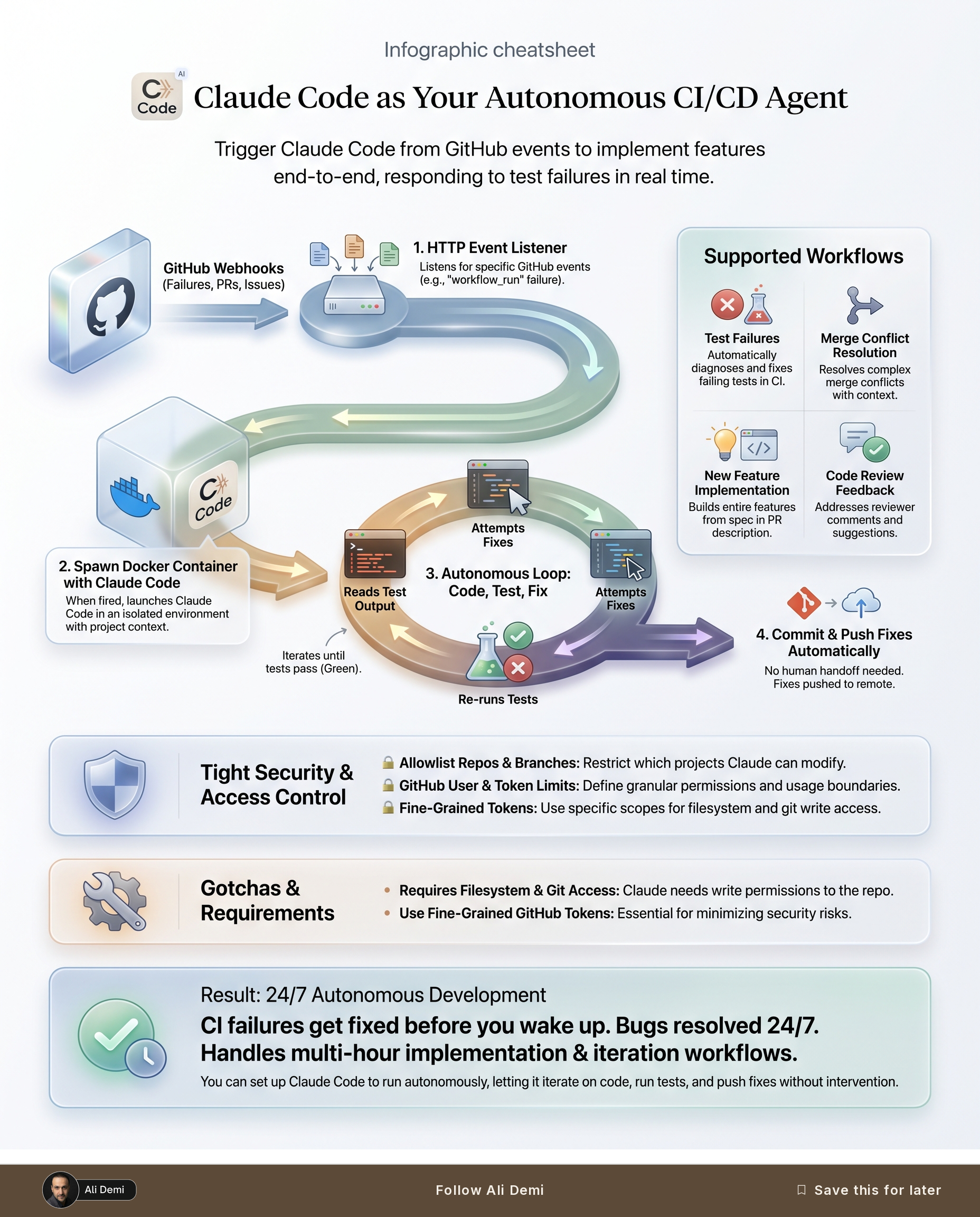
  • Deploy Claude as Your GitHub Bot: Autonomous CI/CD Agent

    Deploy Claude as Your GitHub Bot: Autonomous CI/CD Agent

    You’re waiting for CI to finish. A test failed. Your teammate went home.

    Normally, you’d have to wake up tomorrow and dig through the logs. Not anymore.

    You can deploy Claude Code as a persistent GitHub bot that wakes up on webhook events-CI failures, pull request reviews, new issues-and runs for hours, iterating on your codebase in real time. It runs tests, reads the output, fixes the code, and pushes the result back without you touching the keyboard.

    Here is how it works:

    1. Set up a webhook listener. Deploy a simple HTTP service that listens for GitHub events (push, pull request, workflow failures). This can live on any cloud service-AWS Lambda, Railway, DigitalOcean-anywhere you can run a Docker container.

    2. Trigger Claude Code in a container. When an event fires, spawn a Docker container that launches Claude Code with a prompt. Point it at your repo folder, give it the context (what test failed, what the error was, what branch to work on), and let it go.

    3. Claude Code iterates in a feedback loop. It reads test output, tries fixes, re-runs tests, and repeats until they pass. It commits and pushes automatically. No human in the loop.

    4. Security is built in. Use GitHub token allowlists, webhook signature validation, and fine-grained permissions so Claude only touches the branches and repos you authorize. Only allow specific users to trigger the bot.

    Real example: A test fails on your main branch. The webhook fires. Claude Code spins up, reads the error, tries three fixes, gets green on the second attempt, commits with a message, and pushes back to main. You wake up to a passing build.

    The gap it fills: Hooks and basic automation handle single tasks. This pattern runs multi-hour workflows-implementation, testing, iteration, and deployment-triggered once and left alone.

    The gotcha: Your Claude Code instance needs filesystem access and git write permissions. That is why token allowlists matter. Be explicit about what repos and branches it can touch.

    Why this matters: You get always-on development without hiring 24/7 staff. Reduce on-call friction. Fix bugs before you wake up. Ship features while you sleep.

    ——

    Book your free AI clarity call, NOW!
    https://buff.ly/TpWy277

    ——

    Repost this. Thanks.
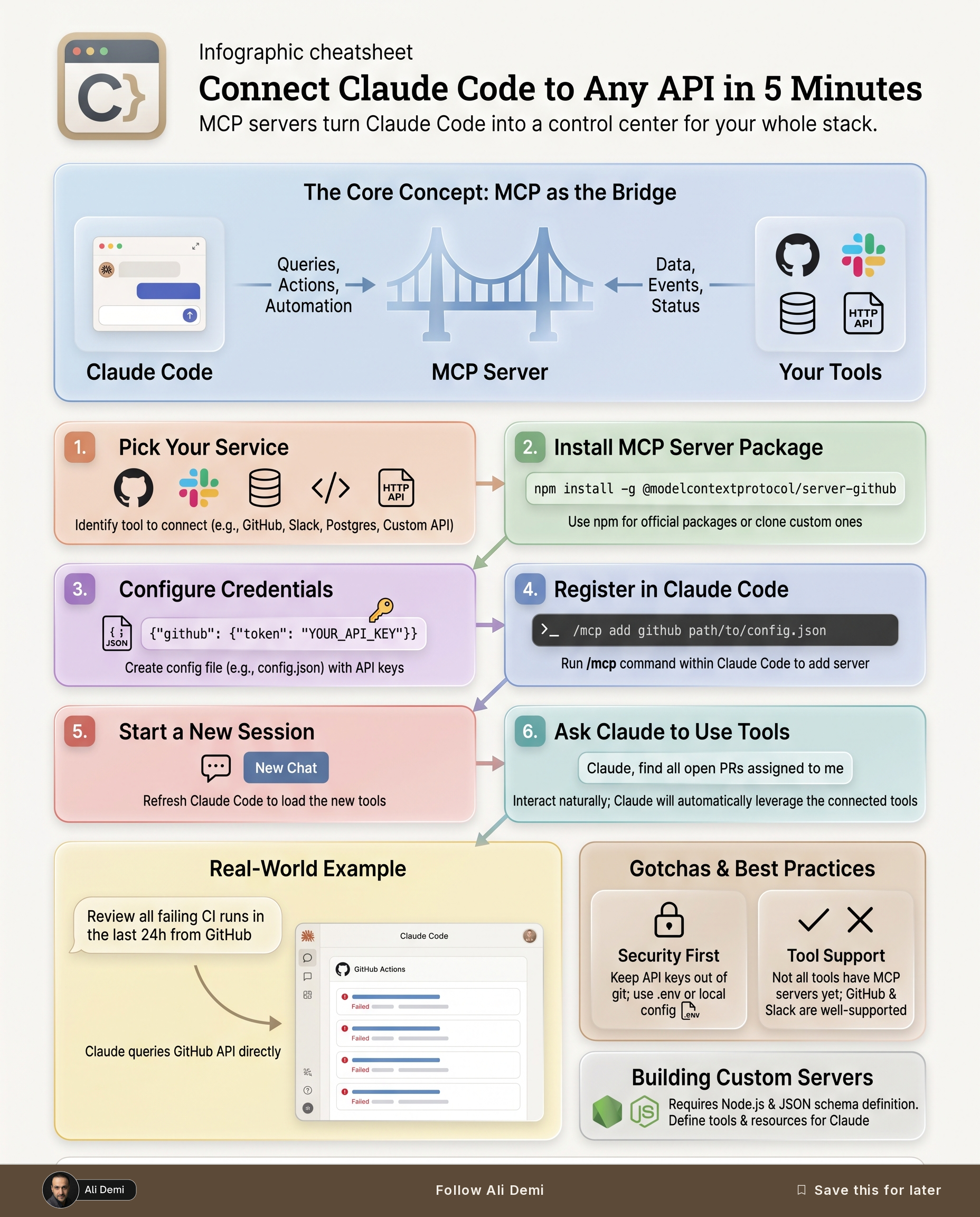
  • Stop Copy-Pasting API Docs: Connect Claude to Any Tool

    Stop Copy-Pasting API Docs: Connect Claude to Any Tool

    You’re deep in Claude Code, building something, and you need to ping Slack or query your database or hit an API. Right now you either memorize the docs or copy the endpoint details into the prompt by hand.

    There’s a better way: MCP servers.

    MCP (Model Context Protocol) is the USB port for AI. Plug in an MCP server once, and Claude Code can call that tool natively, inside your prompts, without you fishing for credentials or spelling out API details every time.

    The 5-minute setup:

    1. Pick your tool (GitHub API, Slack, a database driver, whatever). Check if an MCP server exists for it.

    2. Install or configure it. Most live in npm, npm install at-server-github or similar.

    3. Open Claude Code. Run /mcp to open the MCP manager.

    4. Point it at your server config (usually a JSON file with the server command and your API keys).

    5. Start a new session. The server’s tools show up automatically. Ask Claude to use them.

    Real example: Wire the GitHub MCP server, then ask Claude, “Review the last 3 PRs and tell me which ones have failing CI.” It hits GitHub’s API, reads the PR data, and reports back. No copy-paste. No manual API calls.

    The gotchas:

    MCP servers need valid credentials. Stick your API key in the config file, keep it out of version control, and treat it like any other secret. Custom servers need Node.js and a JSON schema definition, which is doable but takes longer than using a pre-built one.

    Not every tool has an MCP server yet. Start with the popular ones: GitHub, Slack, linear, built-in database drivers, and the Anthropic-maintained servers. If your tool doesn’t have one, you can build one, but that’s a longer project.

    Why this matters: MCP servers collapse the gap between Claude and your stack. No more context-switching. Claude becomes a real control center, not a sandbox.

    ——

    Book your free AI clarity call, NOW!
    https://buff.ly/TpWy277

    ——

    Repost this. Thanks!

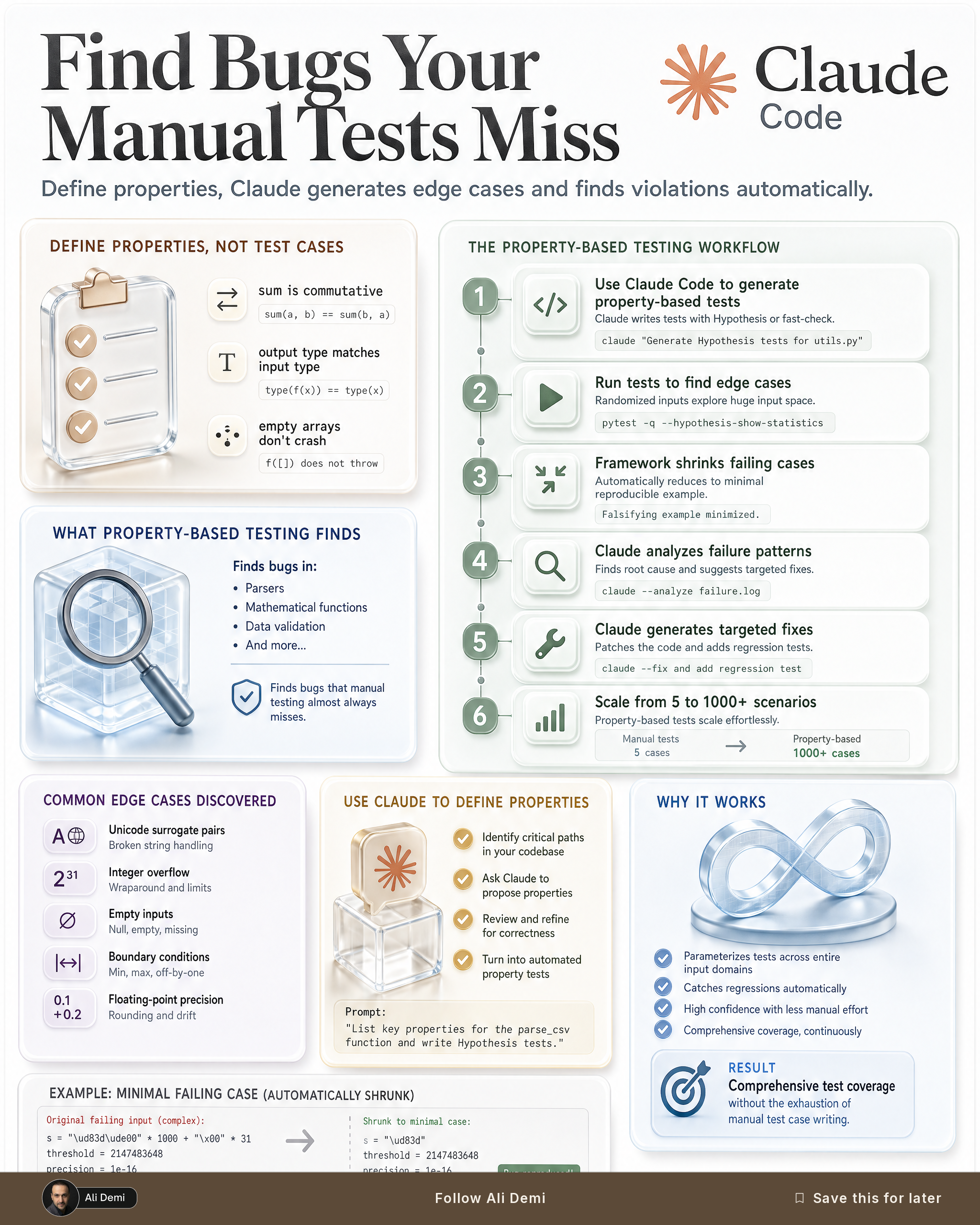
  • Stop Writing Edge Case Tests: Let Claude Find the Bugs

    Stop Writing Edge Case Tests: Let Claude Find the Bugs

    You write 5 test cases for your function and ship it. Then a user hits an edge case you never thought of-and your code crashes.

    Manual test writing is exhausting. You list scenarios: empty input, null, negative numbers, Unicode, extremely long strings. You miss half of them.

    Property-based testing flips this. Instead of writing individual test cases, you define properties-invariants that should always be true. Claude Code generates hundreds of randomized inputs automatically, finds violations, and shrinks failures to the minimal reproducible example.

    It’s the difference between testing 5 cases and testing 1000.

    Start by defining your properties: “sum is commutative,” “JSON roundtrip equals original,” “parser output length matches input constraint.” Then tell Claude to generate property-based tests using hypothesis or fast-check. Claude writes the test suite. Run it. The framework finds edge cases you wouldn’t discover in months of manual testing.

    When a test fails, Claude analyzes the pattern-“your parser fails on surrogate pairs,” “off-by-one in boundary condition”-and generates a targeted fix.

    This scales to mathematical functions, parsers, database queries, and data validation. One team found 15+ edge-case bugs in a date parser that manual testing completely missed.

    ——

    Book your free AI clarity call, NOW!
    https://buff.ly/TpWy277

    ——

    Repost this. Thanks.