Tag: ai news

  • Stop Guessing What to Build: Auto-Prioritize Features From Customer Feedback

    Stop Guessing What to Build: Auto-Prioritize Features From Customer Feedback

    Your product team gets 200 support tickets and survey responses this month. Everyone has opinions about what to build next. Nobody agrees.

    By the time you sort through the noise, it’s time for the next planning meeting.

    Claude Code can read all 200 responses, extract what customers actually want, score each idea by impact and effort, and rank them for you. In minutes.

    Here’s the workflow:

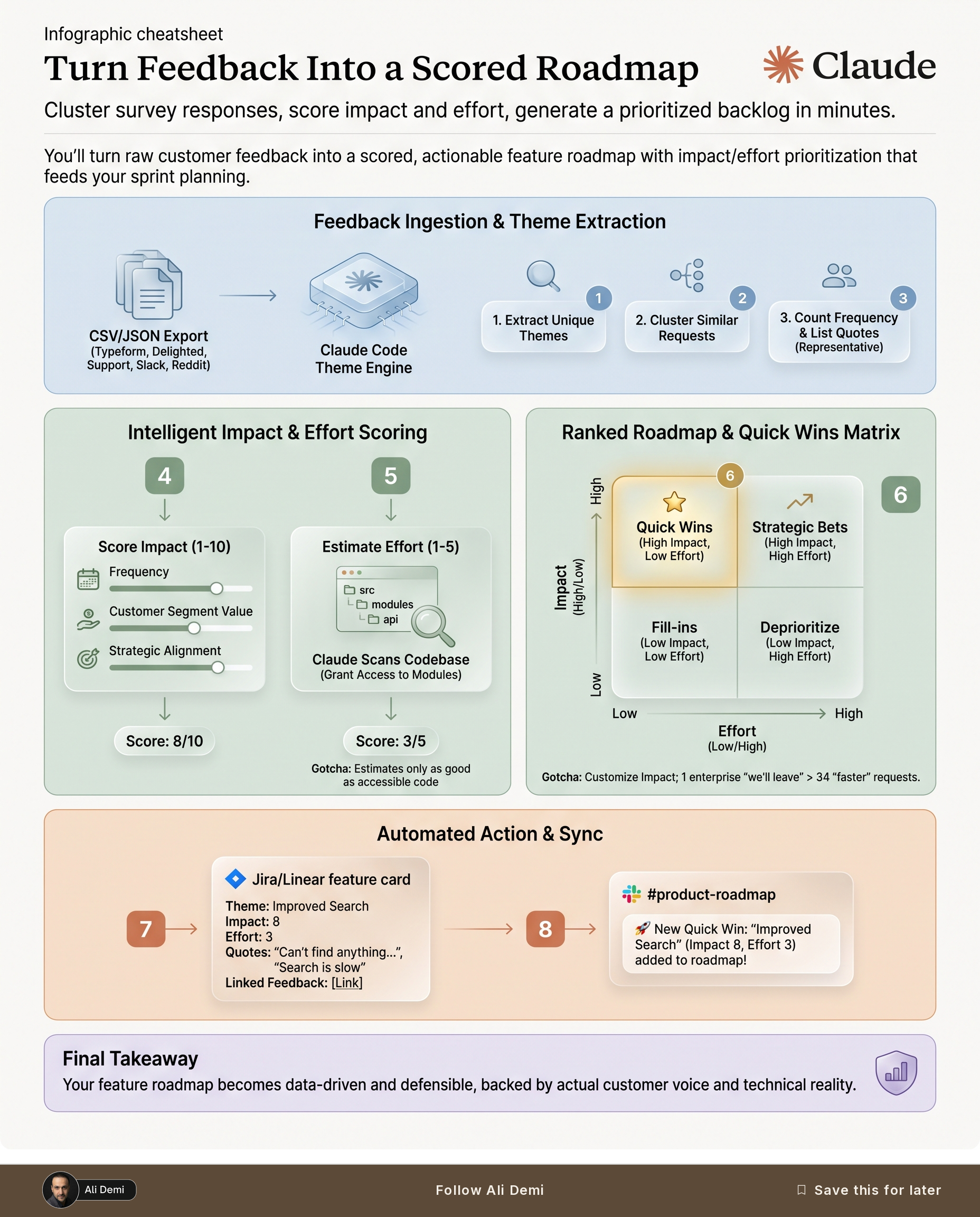
    Export your feedback. Typeform surveys, Delighted responses, Slack threads, support tickets, Reddit threads, all of it. Claude reads them all at once and finds the patterns.

    Claude clusters similar requests even when they’re phrased differently. Twenty people say “faster”, “slow”, “performance”, “speed up export”? Claude groups them as one theme: “export performance”. Frequency matters. If 34 people mention export speed and 8 mention bulk operations, the scores start there.

    Then Claude scores impact. It looks at customer segment, complaint frequency, and how hard a customer might leave if you ignore them. It estimates effort by reading your actual codebase. How many files would change? How complex is the module? Would it need database changes, API updates, frontend work? Claude estimates LOC and technical risk (1-5 scale).

    The output is a scored 2×2 matrix: impact on one axis, effort on the other. Quick wins (high impact, low effort) bubble to the top. Your next sprint plans itself.

    Claude generates feature cards in Jira or Linear with the original feedback excerpts, impact score, effort estimate, and customer quotes. Post to Slack when a new Quick Win emerges. Your PM has a fact-based roadmap, not a gut call.

    The gotcha: Claude needs to read your source code to estimate effort accurately. Grant it access to your repo, or at least the modules customers complain about. Generic effort scores are worse than useless.

    ——

    Book your free AI clarity call, NOW!
    https://buff.ly/TpWy277

    ——

    Repost this. Thanks.
  • Stop Lost in Translation: Turn Requirements Into Tests

    Stop Lost in Translation: Turn Requirements Into Tests

    Your product specs live in Slack and your code lives in Git. By the time your feature ships, nobody remembers what was actually promised.

    What if requirements and tests were the same thing?

    This is different from testing what your code does. This is testing that your code does what you said it would.

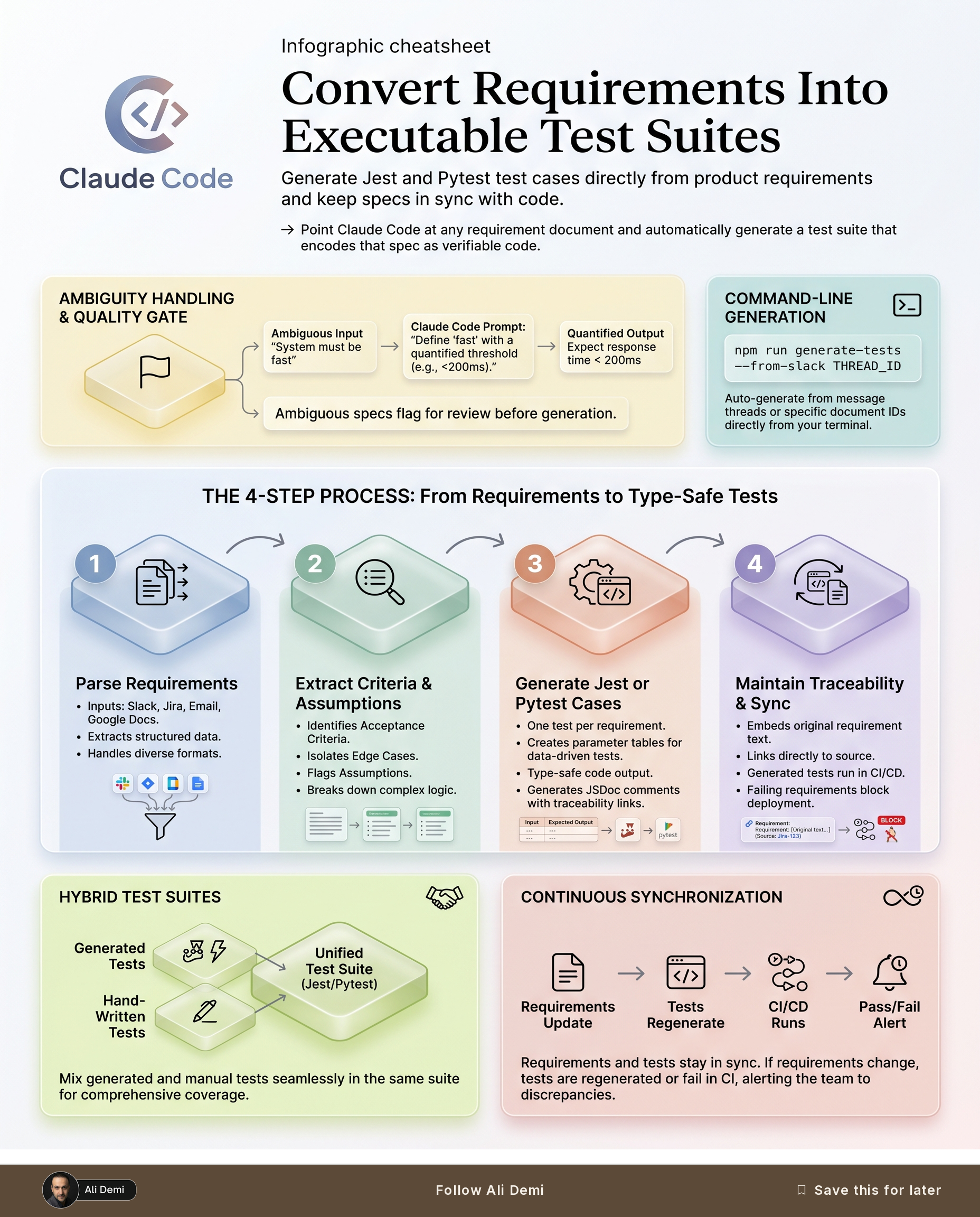
    Point Claude Code at a Slack thread, Jira issue, or email spec. Claude extracts the acceptance criteria, edge cases, and assumptions. Then it generates a full Jest or Pytest test suite where each test case maps back to the original requirement.

    Your workflow becomes:

    1. Product writes a spec (Slack thread, issue description, email)
    2. Run `claude generate-tests –from-slack thread_id` or point Claude at the Jira issue
    3. Claude generates tests with JSDoc comments linking to the original requirement
    4. Tests land in your PR, reviewers can see intent, code review talks about behavior not implementation
    5. Tests run in CI; when product changes spec, test fails, blocking deployment until code matches the new promise

    Claude handles the hardest part: understanding ambiguous English and turning it into precise, executable assertions. Ambiguous specs (say “fast” without defining latency thresholds) are flagged for clarification before code-gen starts.

    The real win: your test suite becomes the contract between product and engineering. When someone says “I don’t remember if we committed to that,” run the tests. The code is the truth.

    ——

    Book your free AI clarity call, NOW!
    https://buff.ly/TpWy277

    ——

    Repost this. Thanks.
  • Stop Shipping Broken Deploys: Automate Pre-Deploy Safety Checks

    Stop Shipping Broken Deploys: Automate Pre-Deploy Safety Checks

    Your deployments are one missed environment variable away from production meltdown.

    Most teams catch it after the page is down. Claude Code can catch it before you deploy.

    Here’s what to automate:

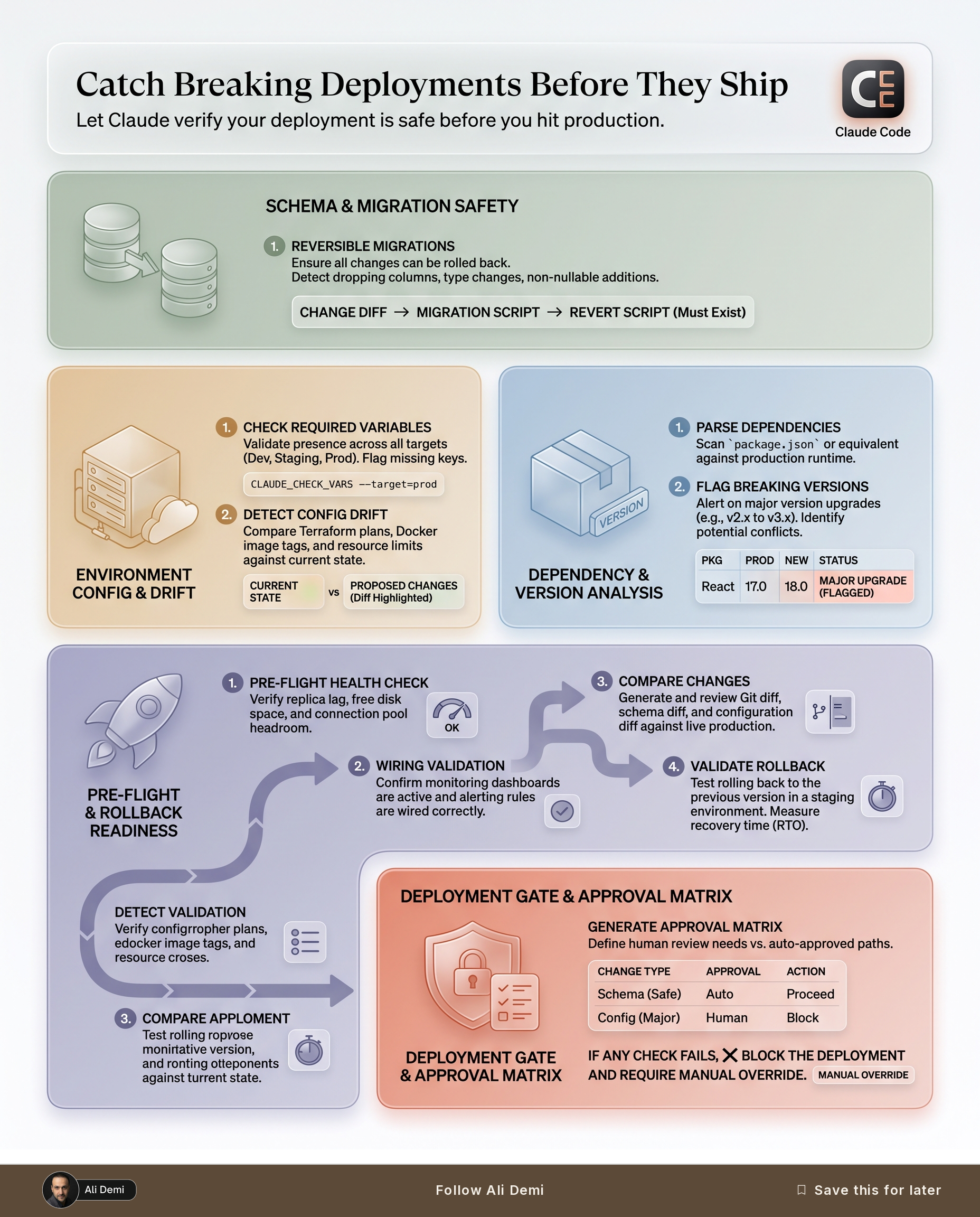
    1. Schema compatibility. Parse migrations, detect non-reversible changes (dropping columns, changing types), check against production schema. Flag breaking changes.
    2. Environment validation. Scan code for required env vars, verify they exist in target environment, type-check values, catch typos.
    3. Dependency compatibility. Compare package versions in your change against what’s running in prod. Detect deprecated APIs, breaking dependency updates, missing peer dependencies.
    4. Configuration drift. Compare your deployment config (docker-compose, terraform, helm charts) against what’s actually running. Catch accidental deletions, changed resource limits.
    5. Rollback readiness. Verify previous versions are still available, test the rollback script, confirm you can revert within SLA.
    6. Health checks. Run pre-flight database health checks (replica lag, disk space, connections), verify dependent services are healthy.

    Wire this into your GitHub Actions as a required status check. Block merging if checks fail.

    One deployment without this catches bugs that cost hours. One month without this catches bugs that cost millions.

    ——

    Book your free AI clarity call, NOW!
    https://buff.ly/TpWy277

    ——

    Repost this. Thanks.
  • Stop Drowning in Pipeline Data: Automate RevOps with Claude

    Stop Drowning in Pipeline Data: Automate RevOps with Claude

    Your RevOps team spends hours every week on manual work: cleaning messy pipeline data, routing leads by hand, running reports, enriching records. Claude Code changes this.

    You can now build custom CRM automation that rivals enterprise RevOps platforms-in minutes instead of months. No developer required.

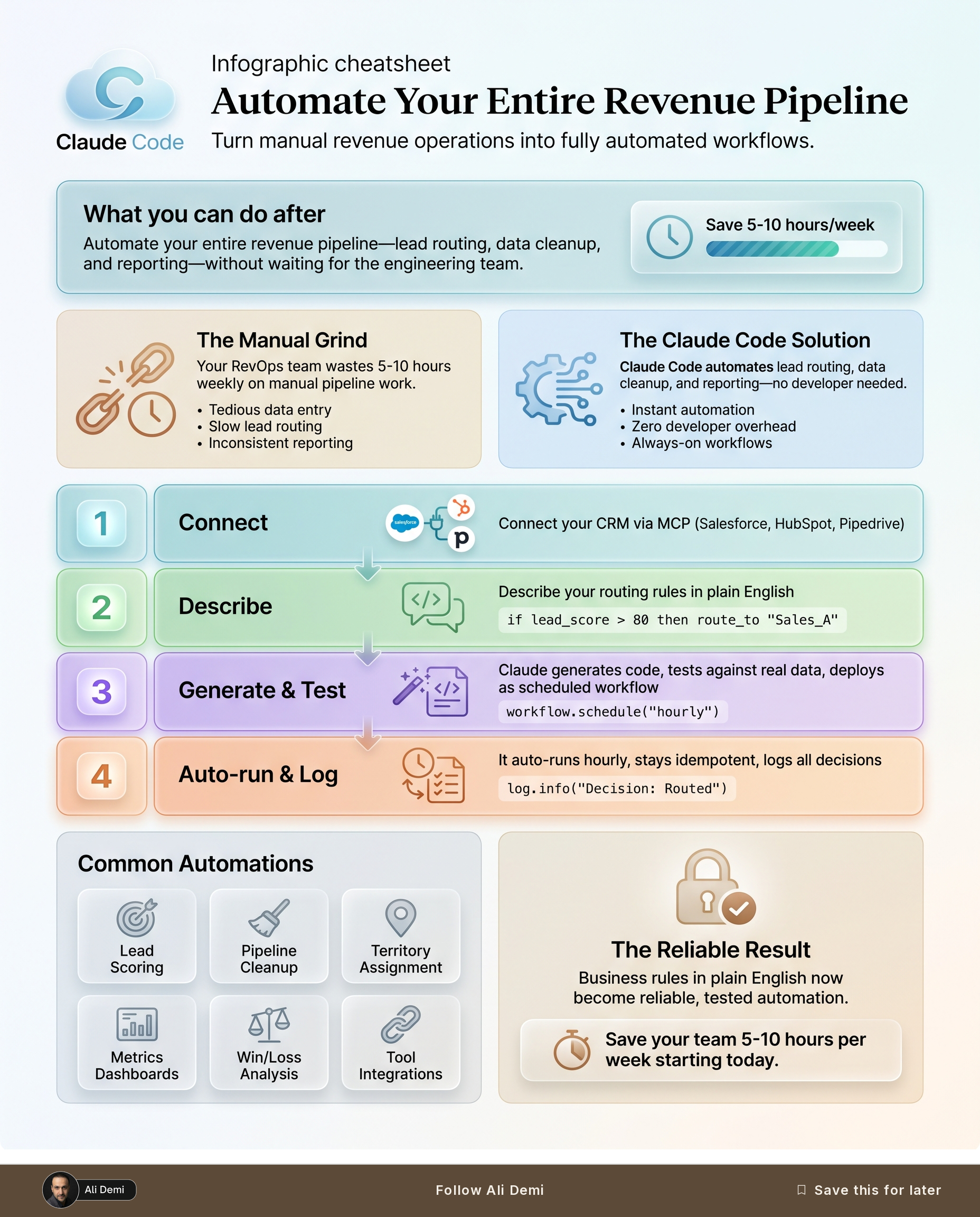
    The real advantage: Claude understands business logic. You describe your lead routing rules in plain English. Claude generates the code, tests it against your actual CRM data, and deploys it as a scheduled workflow.

    Start here:

    1. Connect your CRM via MCP (Salesforce, HubSpot, Pipedrive-whatever you use).
    2. Tell Claude what needs to happen. Example: “Route hot leads with deal size over 100k to senior reps, cold outreach to SDRs.”
    3. Claude reads your actual data, writes the routing logic, tests it, then runs it on a schedule.
    4. It auto-logs decisions and skips duplicates so it idempotent-safe to run every hour.

    Common workflows teams build:

    • Lead scoring and auto-routing based on custom rules
    • Pipeline data cleanup (deduping, fixing formats, enriching missing fields)
    • Automatic account hierarchies and territory assignments
    • Custom metrics and health dashboards that update every hour
    • Win/loss analysis and sales cycle metrics
    • Integration glue between tools (sync Slack to CRM, CRM to billing, etc.)

    The workflow: Create a small prompt hook in your CRM that Claude runs on schedule. It takes 15 minutes to set up. The business impact is instant.

    Why this works: Your business rules live in your head and in spreadsheets-they’re rarely in code. Claude can read plain English rules and turn them into reliable automation in one shot. No spec doc. No back-and-forth with engineering.

    ——

    Book your free AI clarity call, NOW!
    https://buff.ly/TpWy277

    ——

    Repost this. Thanks.
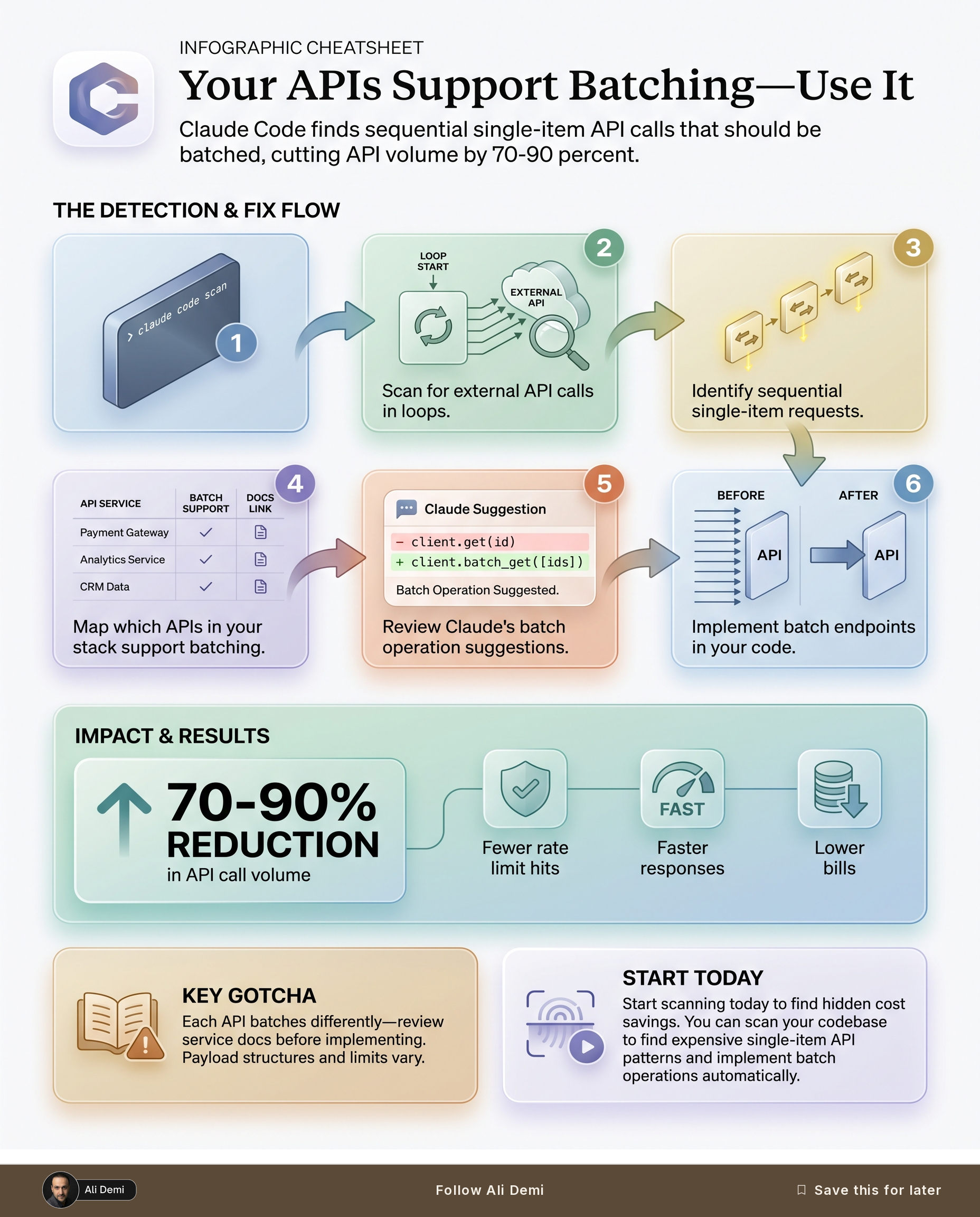
  • Stop Making Single API Calls: Find Batching Opportunities Automatically

    Stop Making Single API Calls: Find Batching Opportunities Automatically

    You make a Stripe API call to charge a card.
    Then another to delete a webhook.
    Then three more to sync customer records.

    That’s five separate API calls when Stripe’s batching API could do them in one request.

    Same story everywhere: GitHub’s GraphQL lets you fetch twenty repositories in one call, but your loop hits the REST API twenty times. Slack has a batch endpoint, but you’re calling it once per message. SendGrid supports batch sending, but your code loops and sends individually.

    You’re paying per-request for APIs built to batch.

    Claude Code finds these patterns. It scans your codebase, spots loops making single-item API calls, maps which services support batching, and shows you exactly where to batch.

    The result: 70 to 90 percent fewer API calls. Your code gets faster. Your bill gets smaller.

    ——

    Book your free AI clarity call, NOW!
    https://buff.ly/TpWy277

    ——

    Repost this. Thanks.
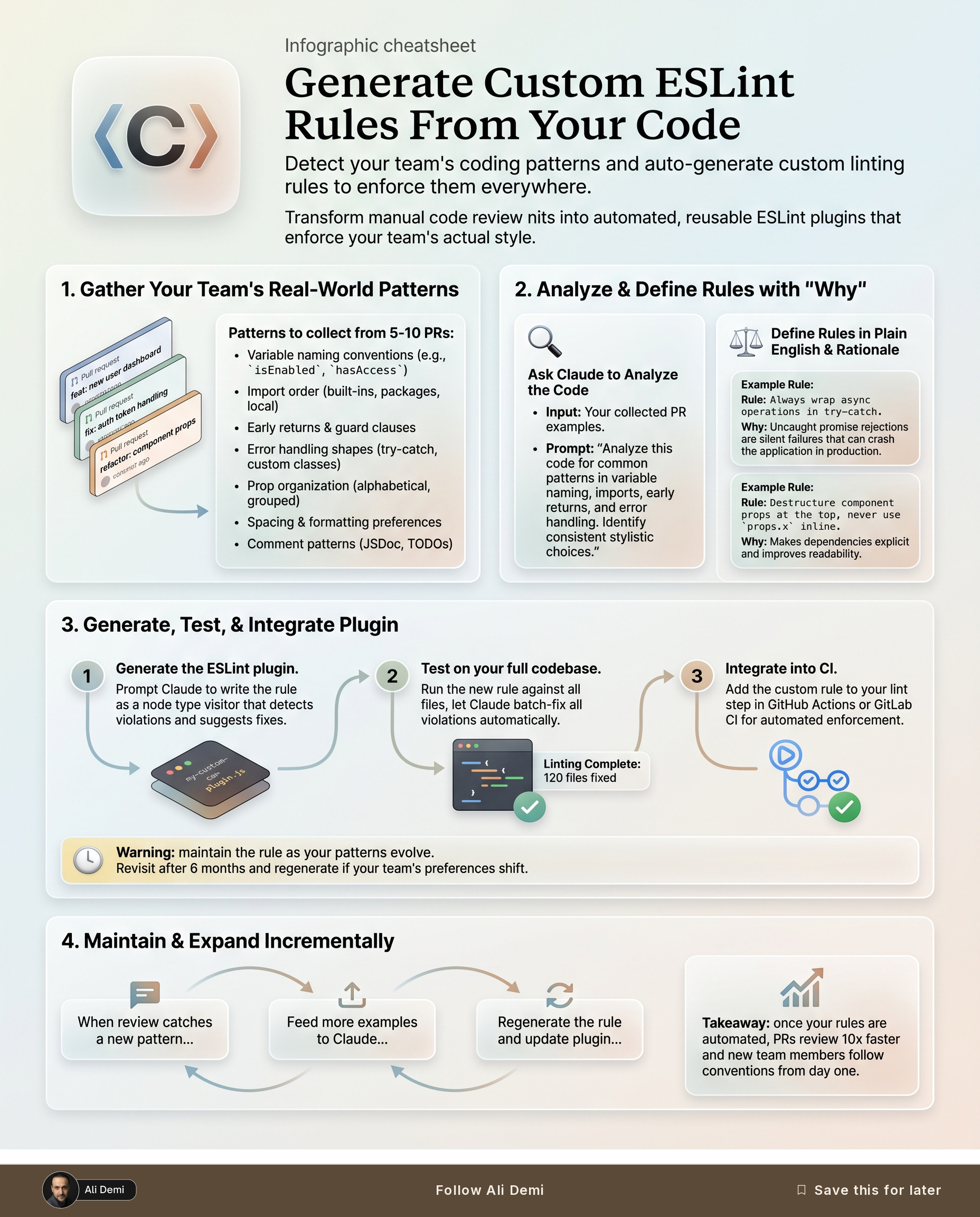
  • Stop Enforcing Style Manually: Auto-Generate ESLint Rules

    Stop Enforcing Style Manually: Auto-Generate ESLint Rules

    Every dev team has unwritten style rules.

    One person always destructures props first, another hoists types to the top of files, someone else hates nested ternaries, the lead wants meaningful variable names instead of single letters.

    Right now you catch these in code review: send it back, wait for the fix, review again.

    Here is how to turn those rules into custom ESLint plugins Claude generates and your CI/CD enforces automatically.

    1. Collect your team’s actual patterns. Pick 5-10 recent PRs. Ask Claude: what patterns do you see across these files? Look for variable naming, import order, early returns, error handling shapes, prop organization, spacing, comment style.
    2. Define the rule in plain English. Not just the pattern but WHY. Example: custom rule to always wrap async operations in try-catch, because uncaught promise rejections are silent failures. Another: destructure component props at the top, never use props.x inline, because it makes dependencies visible.
    3. Generate the ESLint plugin. Prompt Claude to write a custom ESLint rule (node type visitors, detect violations, suggest fixes). It generates a working plugin you drop into .eslintrc or publish as an npm package.
    4. Test it on your codebase. Run the new rule against your entire repo. Claude can generate fixes for all violations in one batch pass.
    5. Integrate into CI. Add the rule to your lint step. New PRs fail lint if they break your pattern. No more review ping-pong on style.
    6. Expand over time. Caught a new anti-pattern in review? Feed Claude more examples and regenerate the rule to catch it next time.

    The payoff: style decisions stick, PRs review 10x faster because lint handles it, and new team members follow the rules from day one without asking.

    ——

    Book your free AI clarity call, NOW!
    https://buff.ly/TpWy277

    ——

    Repost this. Thanks.
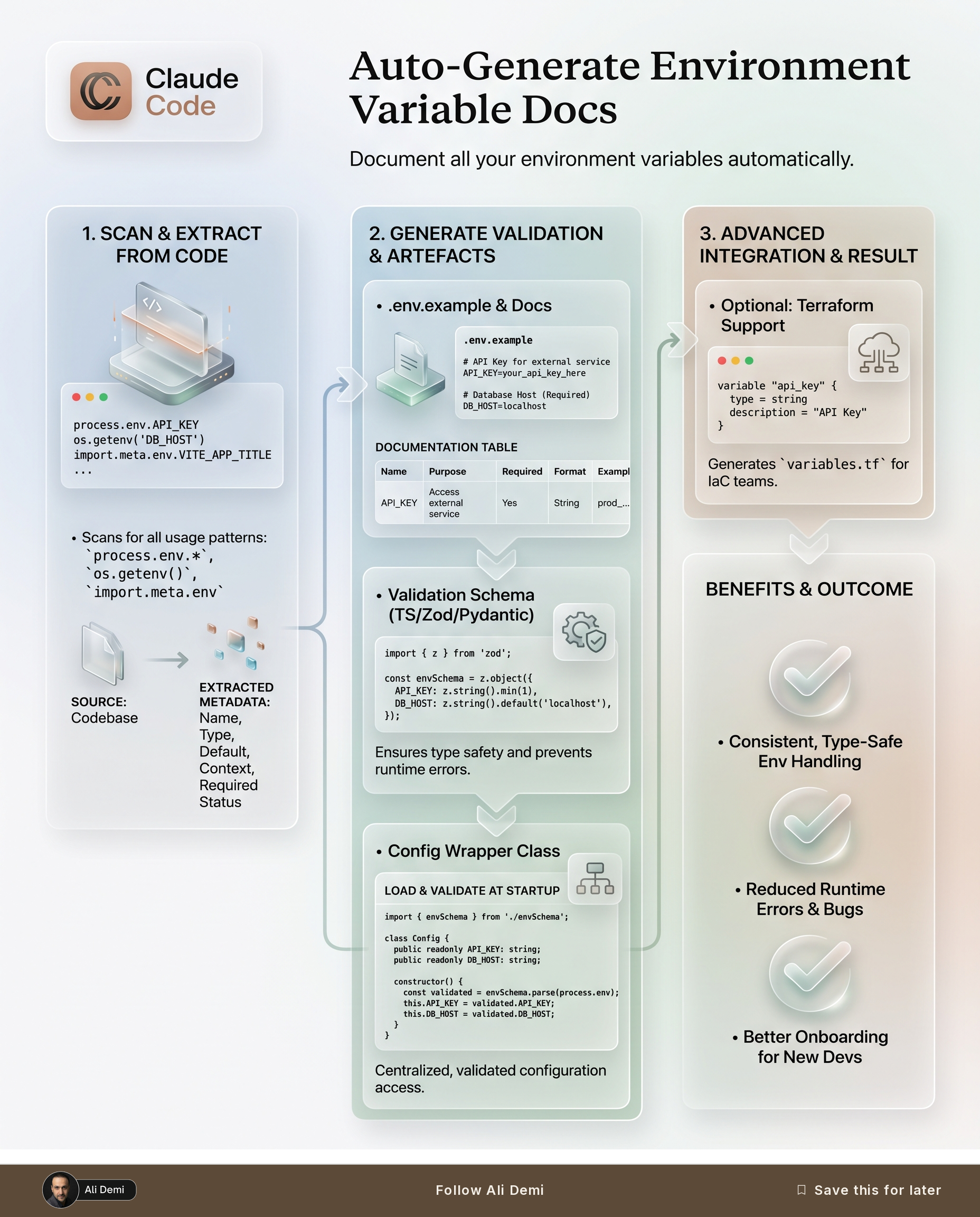
  • Stop Guessing Config: Auto-Document Every Environment Variable

    Stop Guessing Config: Auto-Document Every Environment Variable

    Your app’s environment variables are probably scattered across code comments, README footnotes, and your head.

    That’s a recipe for missing vars on deployment, silent config bugs, and new developers asking ‘what env vars do we need?’

    Claude Code can scan your codebase, extract every environment variable, and generate the infrastructure you forgot to build: `.env.example`, TypeScript validation schemas, and documentation tables.

    Here’s the workflow:

    1. Point Claude at your codebase and ask it to find all `process.env.*`, `os.getenv()`, `import.meta.env` usage
    2. Claude extracts variable names, types, usage context, and defaults
    3. Generate `.env.example` with descriptions and sample values for each var
    4. Generate TypeScript/Zod validation schema that enforces types and required fields
    5. Create documentation table: var name, purpose, required/optional, format, example
    6. Generate a config wrapper class that loads, validates, and exposes env vars safely

    One run gives you consistency across local, staging, and production environments.

    New teammates know exactly what vars they need.

    Your CI/CD pipelines stop silently skipping vars and causing runtime errors.

    ——

    Book your free AI clarity call, NOW!
    https://buff.ly/TpWy277

    ——

    Repost this. Thanks.
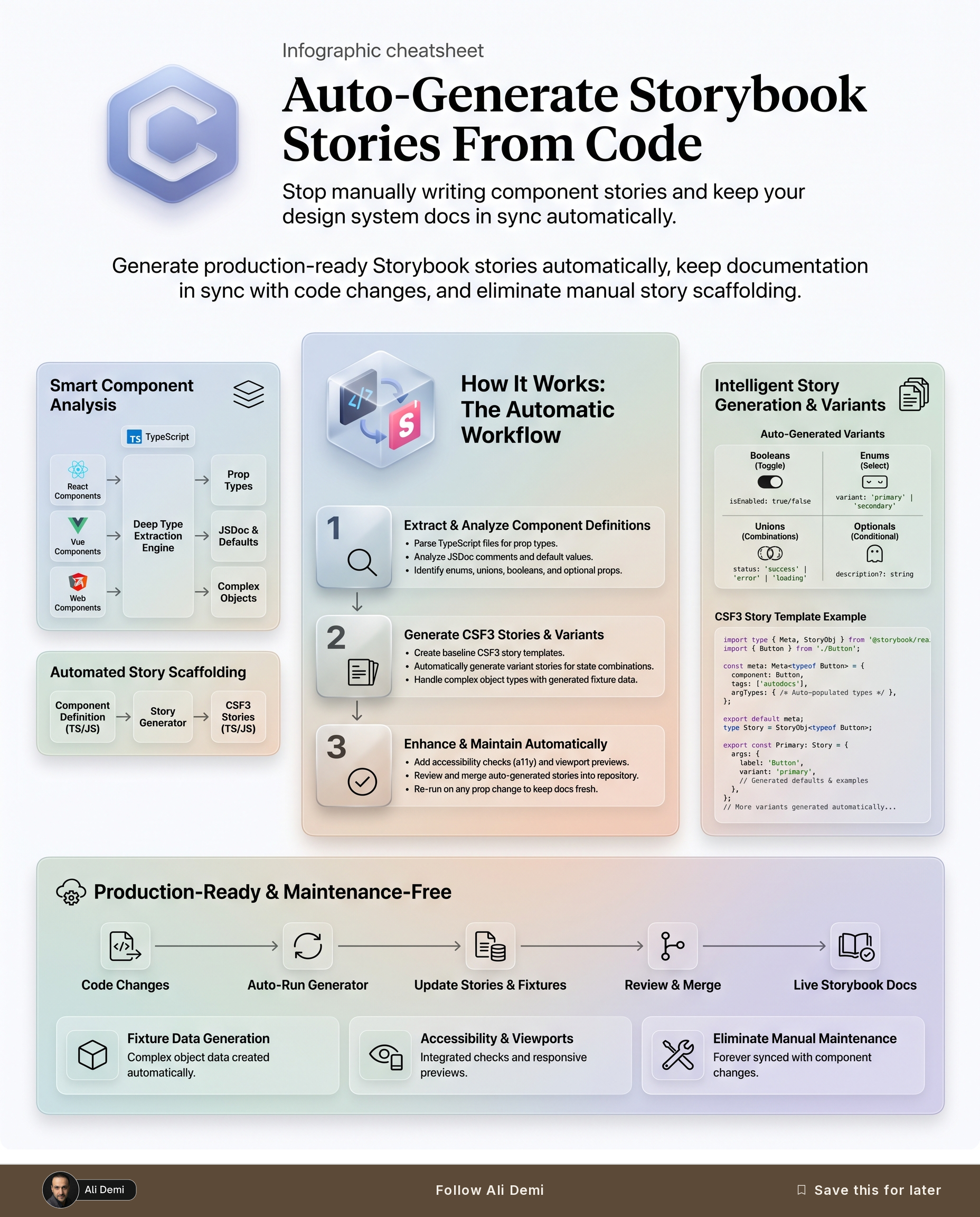
  • Your Storybook Deserves Auto-Generated Stories

    Your Storybook Deserves Auto-Generated Stories

    Your component library is evolving fast. Each time a prop changes, someone updates the component but forgets to update the Storybook story. Now your documentation is out of sync and newer developers can’t find examples of how to use your components correctly.

    Claude Code reads your TypeScript component files, extracts the prop types and defaults, and generates complete, production-ready Storybook stories in CSF3 format. No manual scaffolding. No stale documentation. No hunting for examples.

    The workflow is simple: point Claude Code at your components folder, let it analyze the TypeScript interfaces, and it generates stories with all the prop variants. For enums, it creates separate stories per value. For complex types, it generates realistic fixture data. For optional props, it creates stories showing both states. One PR review instead of dozens of manual story files.

    Every time your component props change, re-run Claude Code and your stories update automatically. Your design system documentation stays fresh without lifting a finger.

    ——
    Book your free AI clarity call, NOW!
    https://buff.ly/TpWy277
    ——

    Repost this. Thanks.
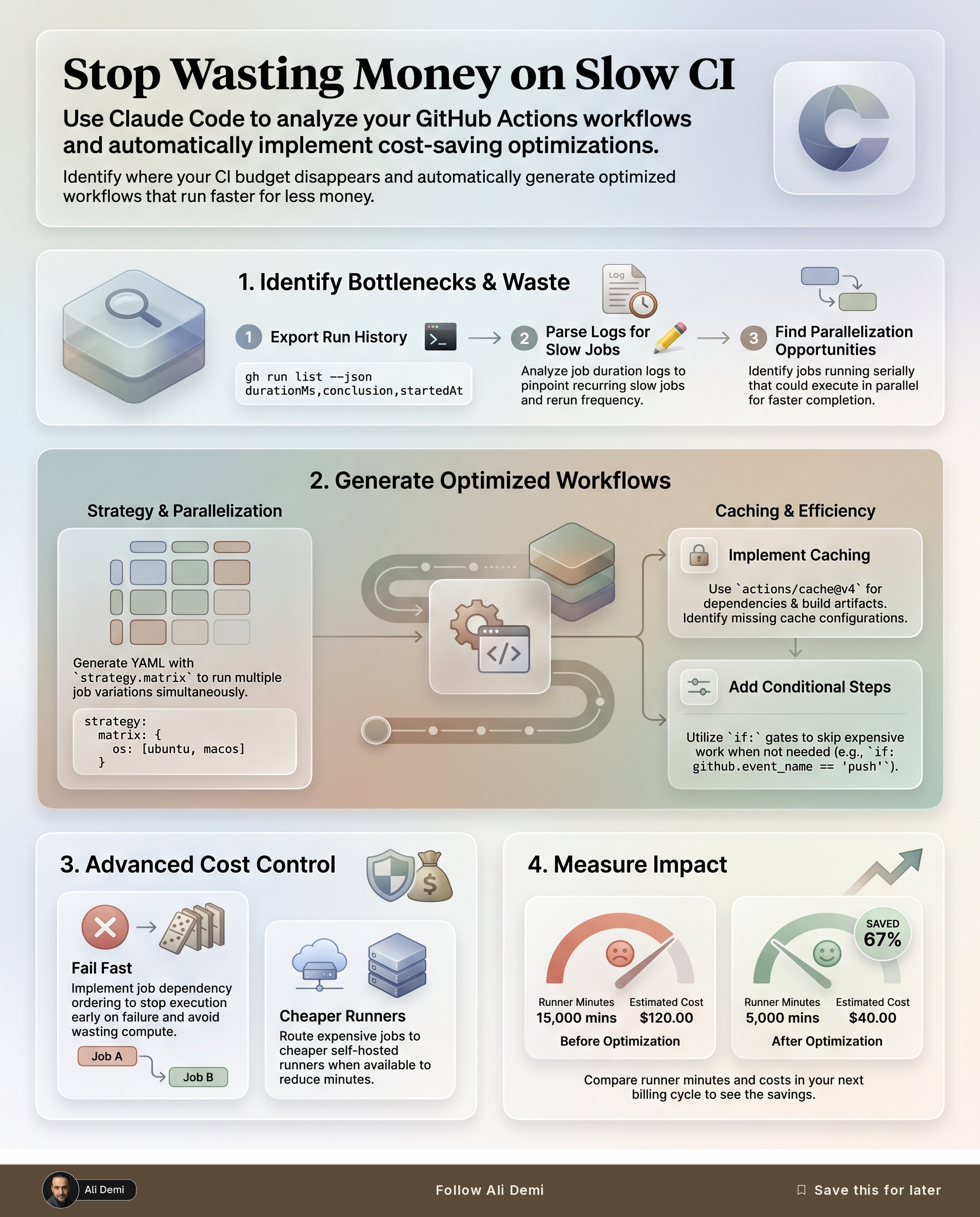
  • Your CI Bill is Out of Control: Cut Costs Without Cutting Speed

    Your CI Bill is Out of Control: Cut Costs Without Cutting Speed

    Your GitHub Actions bill is climbing. Every slow job, every cache miss, every redundant run costs money. But you can’t just kill jobs-your team needs fast feedback.

    The real problem: your workflow was built to work, not to be optimal. Dead code branches in CI jobs. Missing caching. Jobs that could run parallel but don’t. Re-runs of expensive tests on flaky failures.

    Claude Code can read your run history, spot the waste, and rewrite your workflow automatically.

    Here’s how:

    1. Export your GitHub Actions run history with the GitHub CLI. Claude reads the wall-clock time each job took, how often it failed, which jobs always wait for others to finish.
    2. Claude identifies the patterns: which jobs are your cost drivers, which ones block everything else, which ones have cache misses you could fix.
    3. Claude generates an optimized workflow YAML. Parallel job groups that run together. Strategic caching to avoid rebuilding what hasn’t changed. Conditional steps that skip expensive work when it’s not needed. Smart runner assignment so expensive compute runs on cheaper hardware.
    4. Push the new workflow. Watch your next billing cycle.

    The best part: Claude doesn’t just guess. It quantifies the waste. You see exactly how many runner minutes you’re burning on re-runs, unused cache, and serial job chains that could be parallel.

    Teams routinely cut 30-50% from their CI spend this way-and the pipeline runs faster because fewer jobs block each other.

    ——

    Book your free AI clarity call, NOW!
    https://buff.ly/TpWy277

    ——

    Repost this. Thanks.
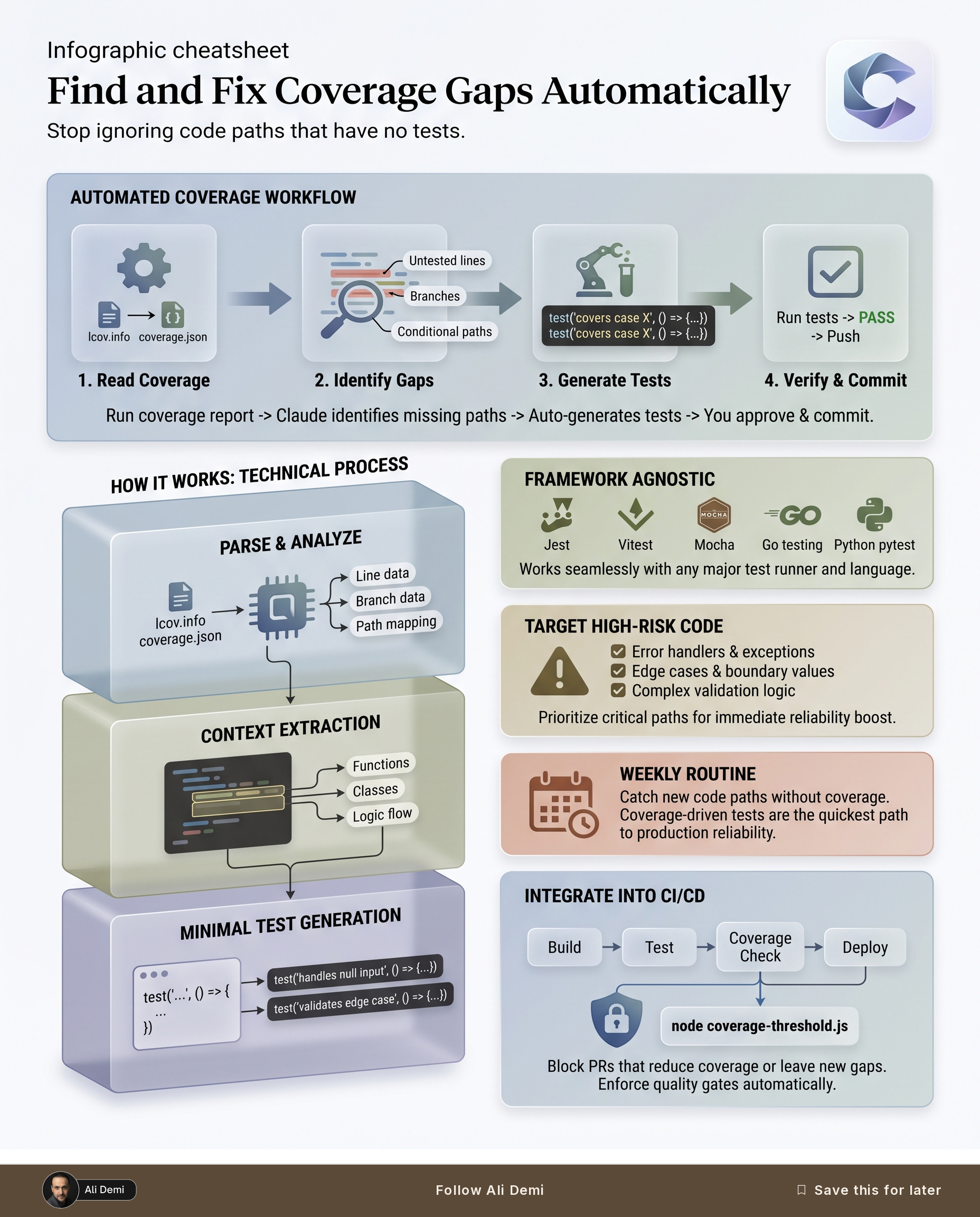
  • Your Coverage Report is Lying: Auto-Fix Test Gaps

    Your Coverage Report is Lying: Auto-Fix Test Gaps

    You run your test suite, coverage report lands, and half your code has no tests.

    You know you should write tests for the gaps. But your coverage report doesn’t tell you WHICH gaps matter, WHICH branches are uncovered, or WHERE the untested paths hide.

    Claude changes that. It reads your coverage report, finds every untested code path, and generates the minimal test case needed to cover it.

    The workflow:

    1. Run your test suite with coverage instrumentation. Get back lcov.info or coverage.json.
    2. Point Claude at your coverage report and source files. It parses which lines and branches have zero execution.
    3. For each untested path, Claude extracts the code and generates a laser-focused test case that exercises it.
    4. Push the generated tests to your repo, run them to verify coverage goes up.
    5. Set up a GitHub Actions workflow that fails any PR dropping coverage, runs this analysis automatically.

    What you get: no more technically tested code that fails in production. No more guessing which functions matter. No more coverage theater.

    ——

    Book your free AI clarity call, NOW!
    https://buff.ly/TpWy277

    ——

    Repost this. Thanks.