Tag: ai news

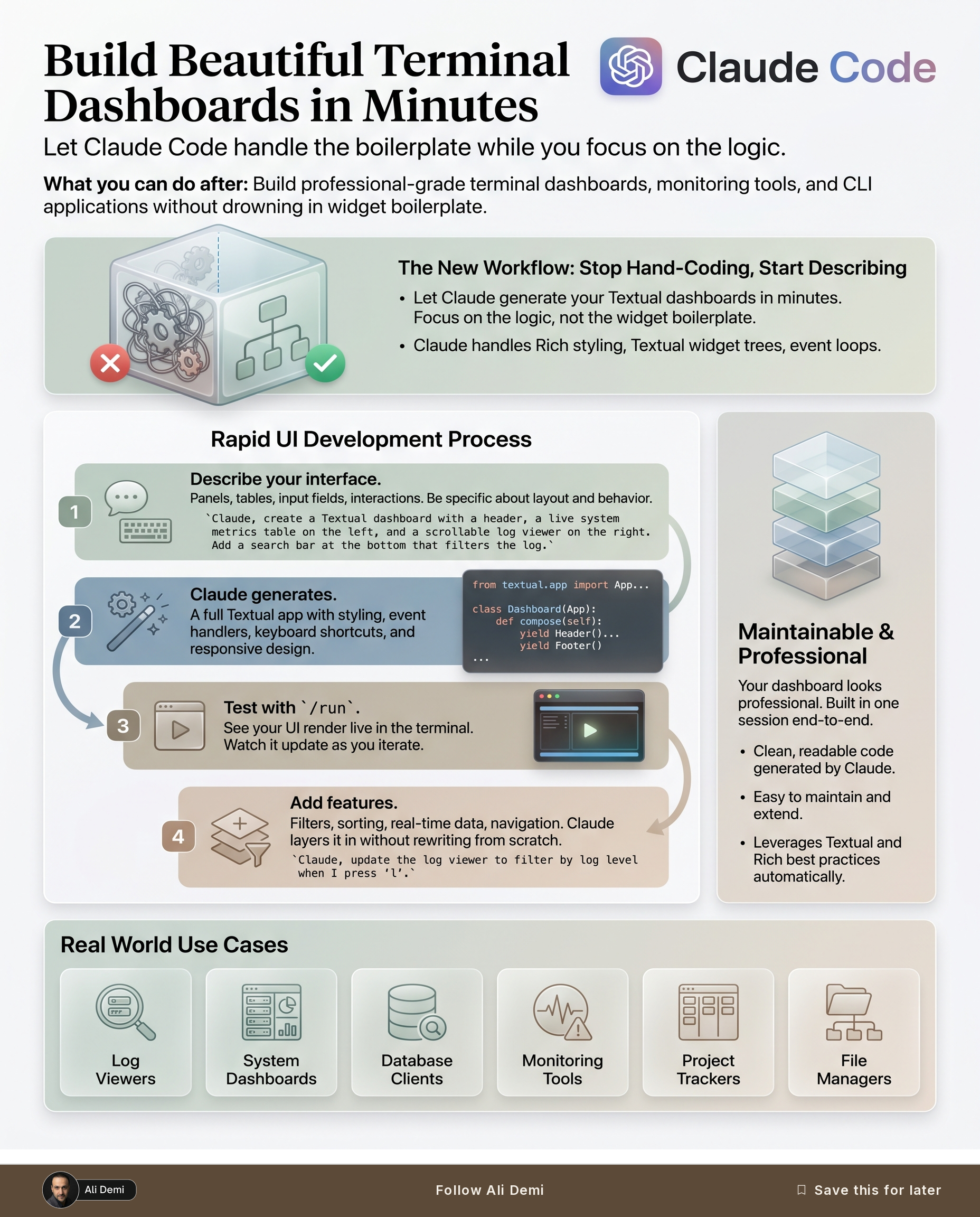
  • Build Beautiful Terminal Dashboards in Minutes, Not Weeks

    Build Beautiful Terminal Dashboards in Minutes, Not Weeks

    Your dashboard lives in the terminal, but building it shouldn’t feel like a battle.

    Textual and Rich let you build professional terminal interfaces: CSS-like styling, responsive layouts, interactive widgets, mouse support, animations. But the code is dense. Widget hierarchies sprawl. Styling takes forever. You’re threading event loops just to wire up a button.

    Claude Code changes that.

    Describe what you want. A log viewer with search. A system metrics dashboard. A database browser. Claude generates the full interactive app-styling, event handlers, keyboard shortcuts, the works. You test it live with `/run`. See it render in real time. Iterate. Done.

    One session. Professional result.

    The workflow is simple. Tell Claude the layout and widgets you need. Be specific: which panels go where, what tables display, how users interact. Claude generates a complete Textual application.

    Then use `/run` to test. The UI renders instantly in your terminal. Want to add a filter? A new panel? Tweak the color scheme? Tell Claude. It regenerates and you watch the changes live.

    The result is clean, readable Python code that you own. Not a generated blob. The styling makes sense. The event handlers are clear. Need to customize later? You can.

    This beats every alternative. Hand-coding widget hierarchies is tedious and error-prone. GUI builders lock you into thinking. This approach is faster, produces better code, and stays under your control.

    Build it once, own it forever.

    ——

    Book your free AI clarity call, NOW!
    https://buff.ly/TpWy277

    ——

    Repost this. Thanks.
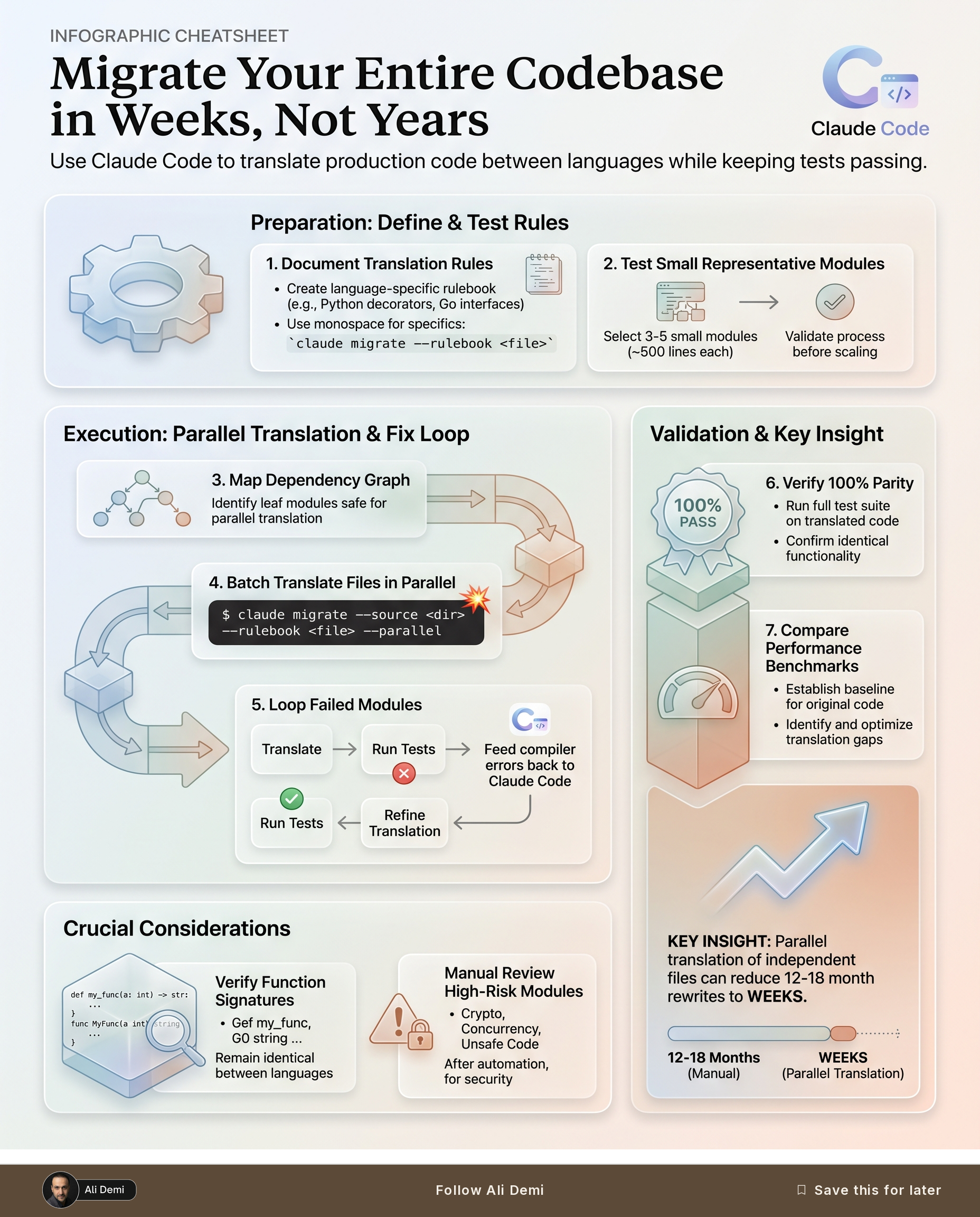
  • Stop Rewriting from Scratch: Migrate Millions of Lines Automatically

    Stop Rewriting from Scratch: Migrate Millions of Lines Automatically

    You’re stuck with legacy Python. You want Go.

    You’re on an old Node.js stack. You want Rust.

    Rewriting from scratch takes years. Hiring language experts takes months. Manual line-by-line translation is error-prone and tedious.

    What if Claude translated your entire codebase automatically, passing every test suite as it goes?

    The process:

    Start by documenting your migration rules in a simple markdown file. Map language-specific patterns: Python decorators to TypeScript hooks, Go interfaces to Rust traits, whatever your translation needs. This becomes your rulebook that Claude follows across the entire migration.

    Build a dependency graph of your codebase. Identify leaf modules with zero external dependencies. These become your safe starting points for parallel translation.

    Run a mini stress-test first. Pick 3-5 representative small modules (a few hundred lines each). Feed Claude the rulebook plus source code plus tests, and ask it to translate and verify. This validates your process before scaling.

    Now parallelize. Feed Claude batches of files with the rulebook and their corresponding tests. Claude translates, you run your test suite automatically. Files that pass move forward. Files that fail loop back to Claude with compiler errors attached.

    Claude sees the error, fixes the code, tests again. No human guessing, no manual debugging cycles. The loop runs until green.

    After translation, run your full test suite on the new code. Compare performance benchmarks. Manually review the highest-risk modules. Everything else is systematically proven equivalent.

    The payoff: Codebases that would take 12-18 months to migrate manually can be translated, tested, and verified in weeks. No rewrites. No losing your architecture. Your tests prove correctness every step.

    ——

    Book your free AI clarity call, NOW!
    https://buff.ly/TpWy277

    ——

    Repost this. Thanks.
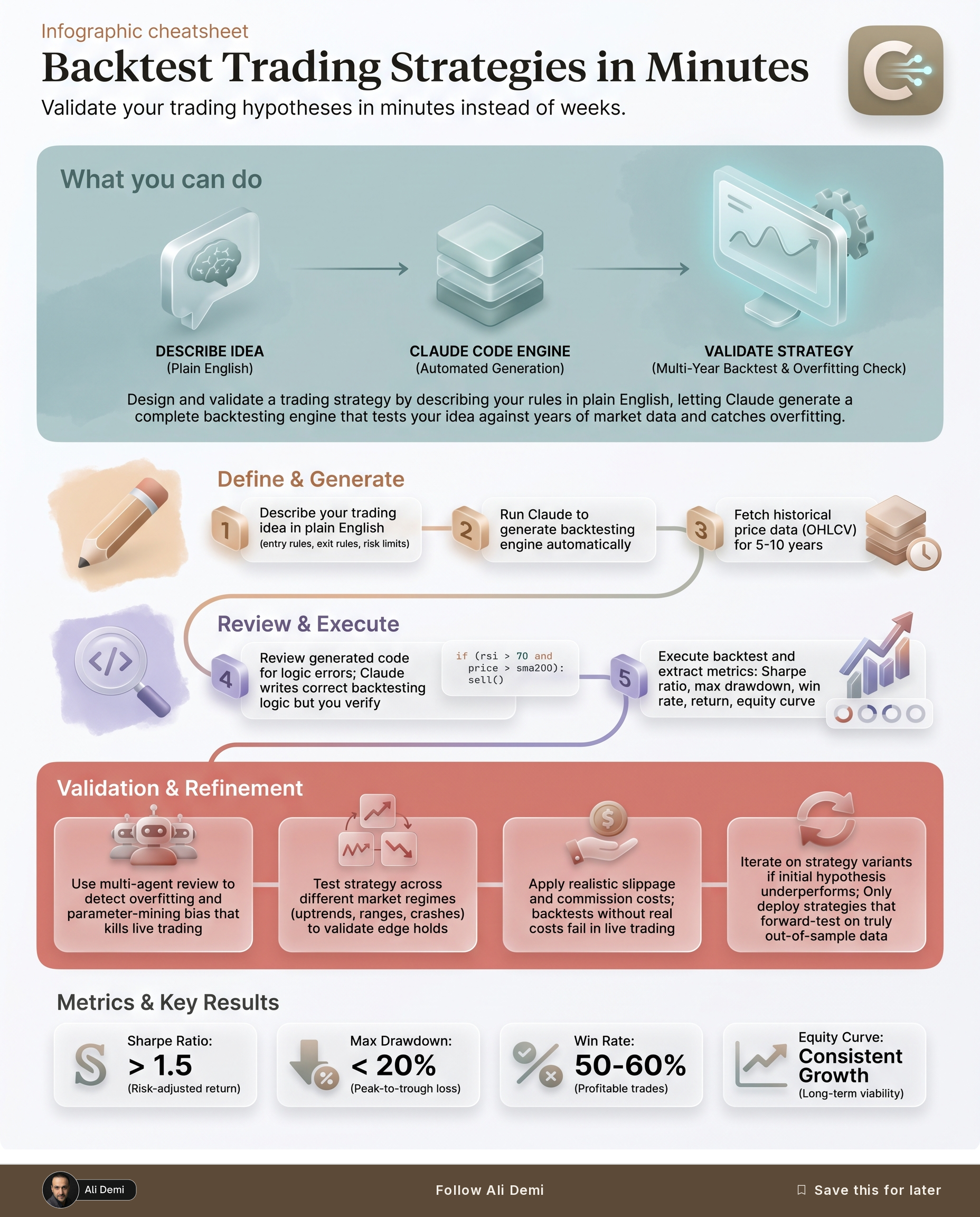
  • Your Trading Strategy Should Backtest Itself

    Your Trading Strategy Should Backtest Itself

    You’ve got a trading idea that feels solid. But how do you know it actually works?

    Most traders spend weeks building backtests in spreadsheets, hunting for bugs, and tweaking parameters endlessly.

    Even then, half your edge is likely just luck: market noise that won’t repeat.

    Claude Code turns this around.

    Describe your trading rules in plain English (when to buy, when to sell, your stop-loss).

    Claude generates a complete backtesting engine.

    It fetches 5-10 years of historical price data automatically.

    Runs your strategy against every price bar.

    Calculates Sharpe ratio, max drawdown, win rate, and risk-adjusted returns.

    All in minutes.

    But here’s the kicker: Claude doesn’t just backtest, it verifies.

    Use multi-agent review to catch overfitting, survivorship bias, and the thousand ways traders fool themselves.

    Test your strategy across different market regimes (uptrends, ranges, crashes) to see where it actually holds up.

    Apply realistic transaction costs (slippage, commissions) so your backtest matches real-world results.

    Iterate fast.

    If your first hypothesis underperforms, generate new strategy variants and backtest them again.

    In a day, you validate 20 hypotheses instead of one.

    The game changes when verification is instant.

    You catch bad strategies in 10 minutes instead of losing real money on them.

    You stop second-guessing and start shipping only validated, forward-tested strategies.

    ——

    Book your free AI clarity call, NOW!
    https://buff.ly/TpWy277

    ——

    Repost this. Thanks.
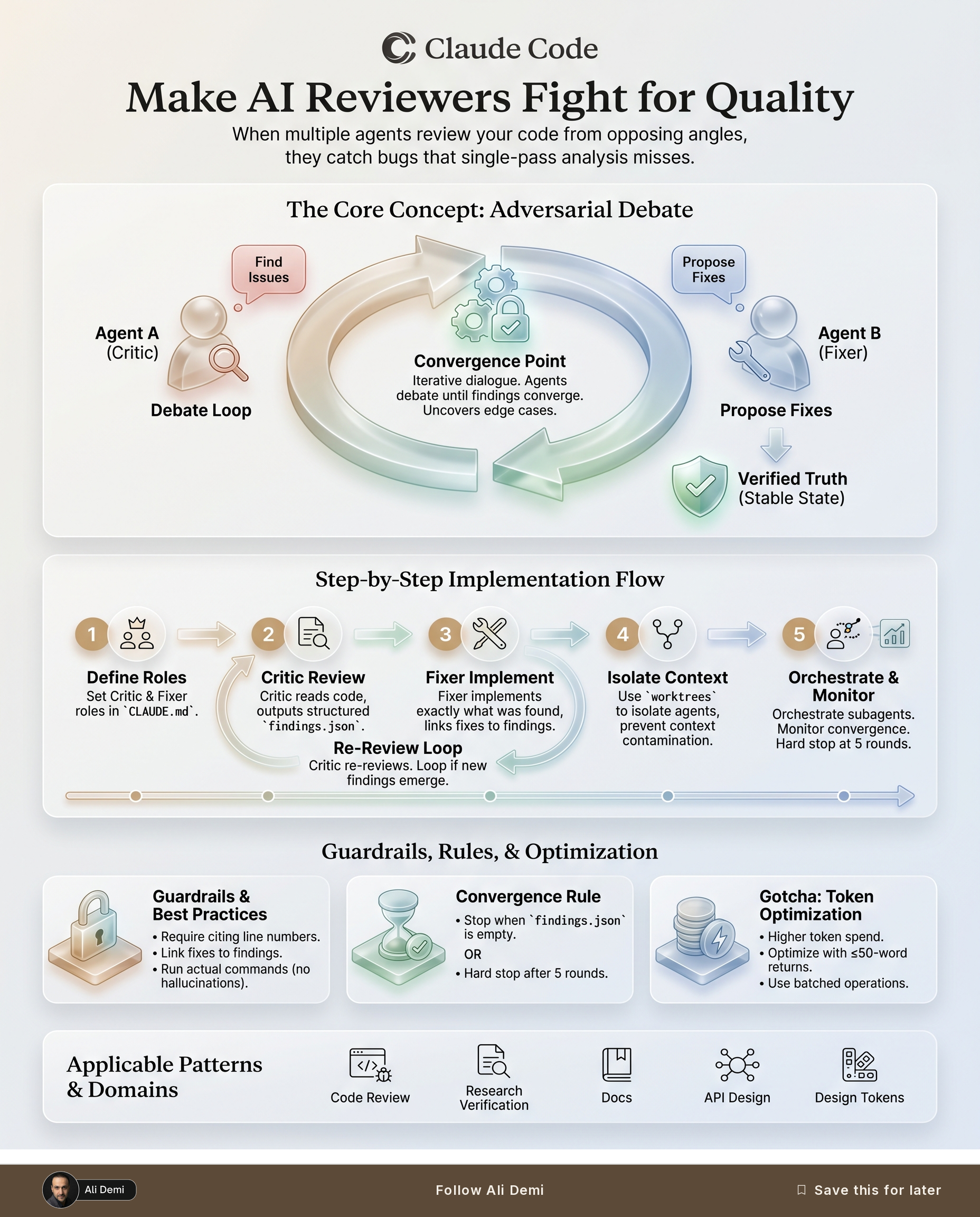
  • When AI Reviewers Disagree, You Catch More Bugs

    When AI Reviewers Disagree, You Catch More Bugs

    Single-pass code review misses bugs. One AI reviewer, one pass-you get one angle, one set of blind spots.

    What if your code went to two agents with opposite jobs? One finds problems. The other fixes them. They debate until they agree.

    That’s adversarial multi-agent verification. It’s where critics and fixers loop until the findings list is empty.

    The pattern:

    1. Critic reviews code, produces structured findings (JSON)
    2. Fixer reads findings, implements fixes
    3. Critic re-reviews fixes
    4. Loop until zero new findings (convergence)
    5. Hard stop at 5 rounds to prevent infinite loops

    Real teams use this for code review, research verification, documentation accuracy, and API design. The evidence: researchers caught slide inconsistencies others missed; product teams went 4 rounds to hit feature quality targets; security reviewers caught logic flaws traditional SAST tools never find.

    Set it up:

    1. Define roles in your CLAUDE.md: one agent is critic, one is fixer, one is evaluator
    2. Use Claude Code hooks to run quality gates on pre-commit
    3. Pass findings as JSON files (findings.json from critic to fixer)
    4. Use worktrees to isolate each agent-no context bleeding
    5. Orchestrate with subagents; monitor convergence; stop when dry

    Watch the gotchas:

    Keep iterations capped. Higher token spend per feature. Enforce strict JSON handoffs so agents don’t misalign. Make critic cite line numbers. Make fixer link fixes to findings. Make evaluator run actual commands-no hallucinated results.

    Adversarial loops work on code review, research claims, documentation accuracy, API contracts, design tokens-anywhere one pass isn’t enough.

    ——

    Book your free AI clarity call, NOW!
    https://buff.ly/TpWy277

    ——

    Repost this. Thanks.
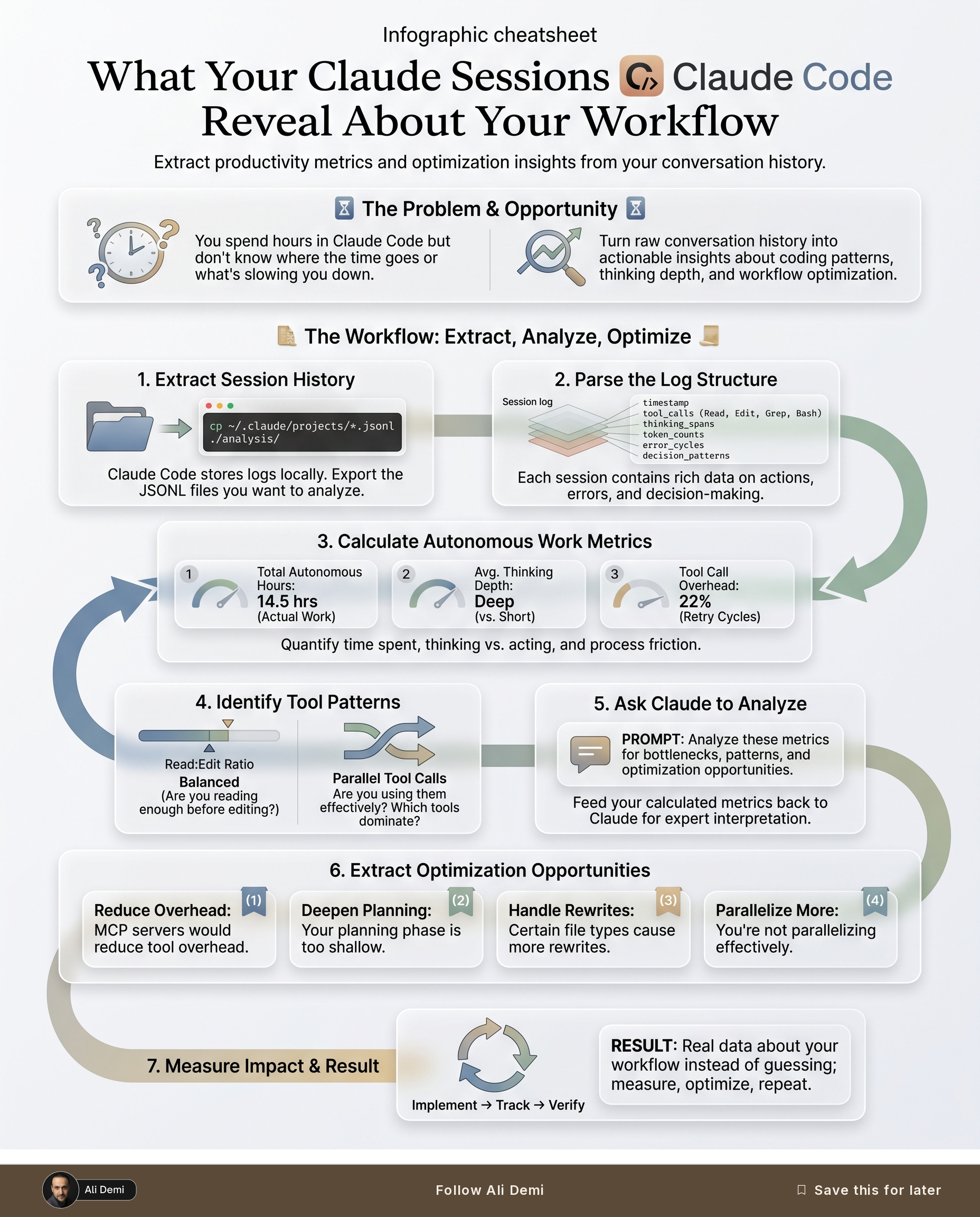
  • Measure Your AI Coding Productivity: Analyze Claude Code Sessions

    Measure Your AI Coding Productivity: Analyze Claude Code Sessions

    You spend hours in Claude Code getting work done. But where’s the time actually going? Are you bottlenecked on tool calls? Is your thinking phase too shallow? Let Claude analyze your own sessions to find out.

    1. Export your session history. Claude Code stores all conversation history locally in JSONL format at ~/.claude/projects/. Extract the logs from sessions you want to analyze (last week, last month, a specific project).
    2. Parse tool calls and thinking spans. Each session contains timestamps, tool use patterns (Read vs Edit vs Grep ratio), thinking duration, token counts, and decision cycles. These patterns reveal your workflow.
    3. Aggregate into metrics. Calculate: total autonomous work hours, average thinking depth (long vs short thinking sessions), tool call overhead, error and retry cycles, which commands you use most, time per task type (features vs migrations vs debugging).
    4. Ask Claude for analysis. Feed Claude a summary of your metrics and ask: What’s the pattern? Why do migrations take 5x longer than features? When does thinking depth matter most? Where are the bottlenecks?
    5. Extract optimization opportunities. Claude identifies specific patterns: Maybe you need MCP servers to reduce tool overhead. Maybe your planning phase is too shallow. Maybe certain file types cause more rewrites. Maybe you’re not using parallel tool calls effectively.
    6. Compare across time. Track the same metrics week to week or month to month. Implement one optimization and measure if it actually worked. Real data beats intuition.

    The result: you understand your own workflow at a level your IDE never showed you. Stop guessing. Measure, optimize, repeat.

    ——

    Book your free AI clarity call, NOW!
    https://buff.ly/TpWy277

    ——

    Repost this. Thanks.
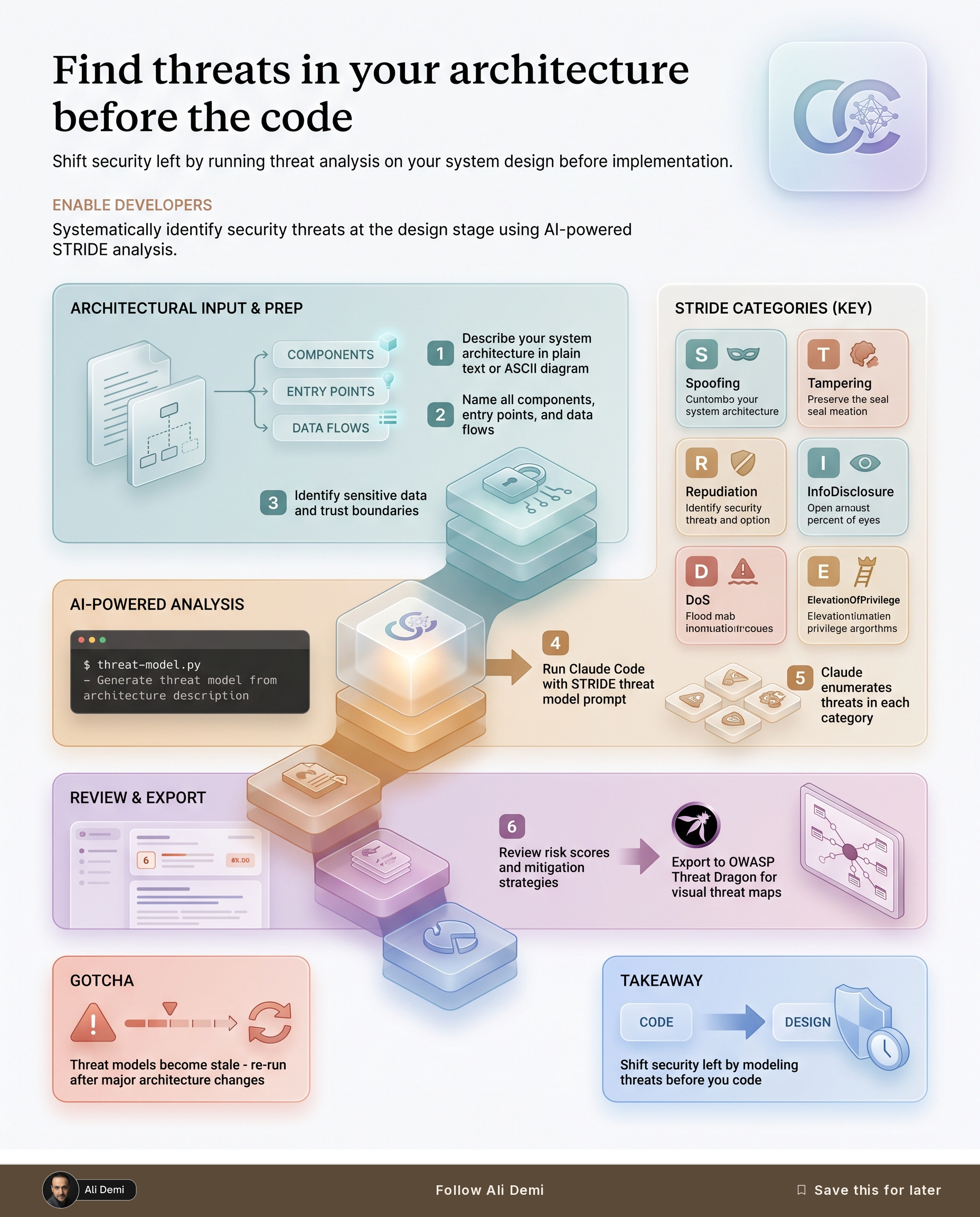
  • Model Your Threats Before You Code: Automate Threat Modeling with Claude

    Model Your Threats Before You Code: Automate Threat Modeling with Claude

    You ship code, then your security team finds vulnerabilities weeks later in review. By then you’re locked into architectural choices. Threat modeling should happen before you write a line of code, but it’s tedious-manual, slow, and most teams skip it.

    Claude Code can automate this. Describe your system architecture, and Claude generates a complete threat model using the STRIDE framework. It analyzes your components, trust boundaries, and data flows, then enumerates threats ranked by severity and suggests concrete mitigations.

    The workflow is dead simple. Write out your architecture (or provide a diagram). Give Claude a prompt that names your components, entry points, and sensitive data. Claude breaks down each STRIDE category-Spoofing, Tampering, Repudiation, Information Disclosure, Denial of Service, Elevation of Privilege-and maps specific threats to your system. Every threat gets a risk score and mitigation strategy tied back to architectural changes.

    Build this as a reusable workflow in Claude Code. Feed it your design docs, let it run, and review the threat model in your terminal. Export to OWASP Threat Dragon for visuals. Your security team gets an architecture-aware baseline before code review even starts.

    Threat modeling is one of the highest-leverage security practices. Automating it means you can do it on every project, not just critical ones. Security becomes a design constraint, not an afterthought.

    ——

    Book your free AI clarity call, NOW!
    https://buff.ly/TpWy277

    ——

    Repost this. Thanks.
  • Stop Installing Blind: Vet Every Package Before It Lands

    Stop Installing Blind: Vet Every Package Before It Lands

    Someone on your team finds a package on a blog post.

    They install it. It works. It ships.

    Nobody checked who publishes it, when it was last updated, what licence it carries, or what its install script does on the way in.

    That is the moment most supply chain problems start. Not at review, not at deploy. At the install.

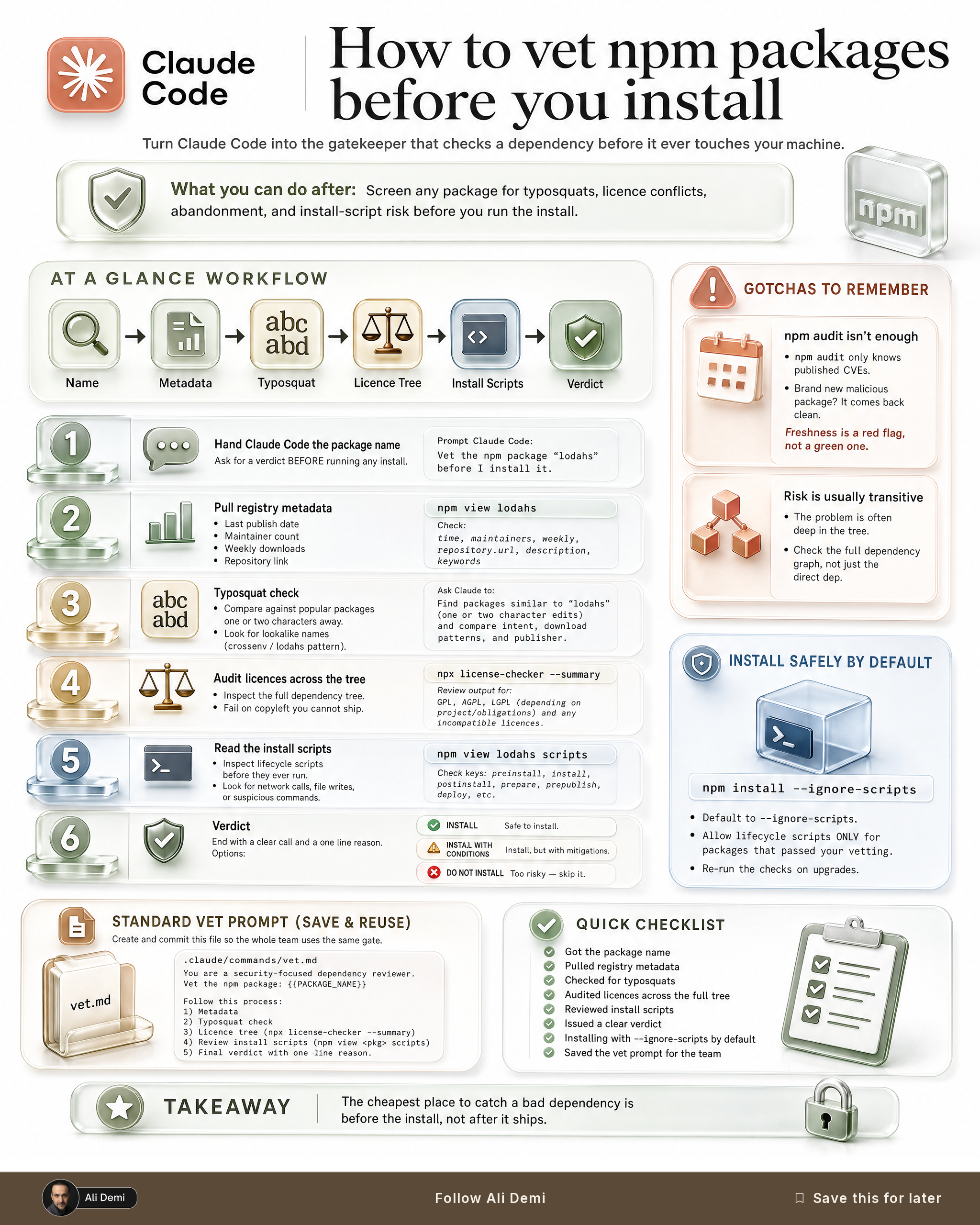
    Claude Code is good at this check because it is a research task, not a scan. It reads the registry metadata, compares the name against real packages, reads the licence tree, and reads the install scripts. Then it gives you a verdict.

    Here is the flow.

    1. Ask before you install. Give Claude the package name and tell it to report back before anything is added.
    2. Pull the registry metadata. Last publish date, number of maintainers, weekly downloads, repository link. A package with one maintainer and no commits in two years is a maintenance risk even if it is clean today.
    3. Run the typosquat check. Have Claude compare the name against the popular packages it is one or two characters away from. The classic attacks are a swapped letter or a dropped one, and they get thousands of installs before anyone notices.
    4. Audit the licence, including the tree. Ask for every licence in the full dependency graph, not just the direct package. Strong copyleft buried three levels deep is still copyleft in your proprietary build.
    5. Read the install scripts. Preinstall and postinstall hooks run with your shell permissions the second you install. Have Claude print them and explain what they do in plain words.
    6. Get a verdict, not a dump. Tell Claude to end with install, install with conditions, or do not install, and to say why in one line.

    Two things worth knowing.

    First, a vulnerability audit only knows about published CVEs. A malicious package uploaded yesterday has no CVE yet. A clean audit result on a brand new package is not reassurance, it is silence.

    Second, the risk almost never sits in the package you chose. It sits in the forty packages it pulls in behind it. Check the tree.

    Once the check works, save the prompt as a custom slash command in your project so the whole team runs the same one. And set your installs to skip lifecycle scripts by default, then allow them only for packages that passed.

    The cheapest place to catch a bad dependency is before the install, not after it ships.

    ——

    Book your free AI clarity call, NOW!
    https://buff.ly/TpWy277

    ——

    Repost this. Thanks.
  • Find Your Knowledge Gaps: Detect Code Silos Automatically

    Your codebase is a map of who knows what. But that map stays hidden until someone leaves, and suddenly you realize a critical system was entirely in one person’s head.

    You can analyze this automatically. Use Claude Code to run git blame and commit history on your critical modules, then extract ownership patterns – which developer wrote most of the auth system, who owns the database layer, where is knowledge scattered versus concentrated.

    The workflow:

    1. Point Claude at critical modules (auth, payments, core business logic).
    2. Claude runs git blame and commit history analysis to extract per-author contribution ratios.
    3. Calculate ownership concentration: if one author wrote 90% of a file, that is a silo.
    4. Identify red flags: modules touched by only one or two people, files not modified in 6+ months with no documentation.
    5. Generate a report mapping expertise, flagging risk zones, and suggesting who to pair for cross-training.

    Now you know where your knowledge actually lives. Cross-train deliberately. Distribute ownership of critical systems. Reduce the bus factor.

    ——

    Book your free AI clarity call, NOW!
    https://buff.ly/TpWy277

    ——

    Repost this. Thanks.
  • Stop Praying Your API Calls Don’t Fail: Add Resilience Automatically

    Stop Praying Your API Calls Don’t Fail: Add Resilience Automatically

    Your API calls fail. Temporarily. Then they work again. That temporary failure tanks your users until you restart or manually retry.

    You know you need retries. And circuit breakers. And exponential backoff. And a timeout. But writing that from scratch for every API call is tedious and error-prone, so you skip it until something breaks at 3 AM.

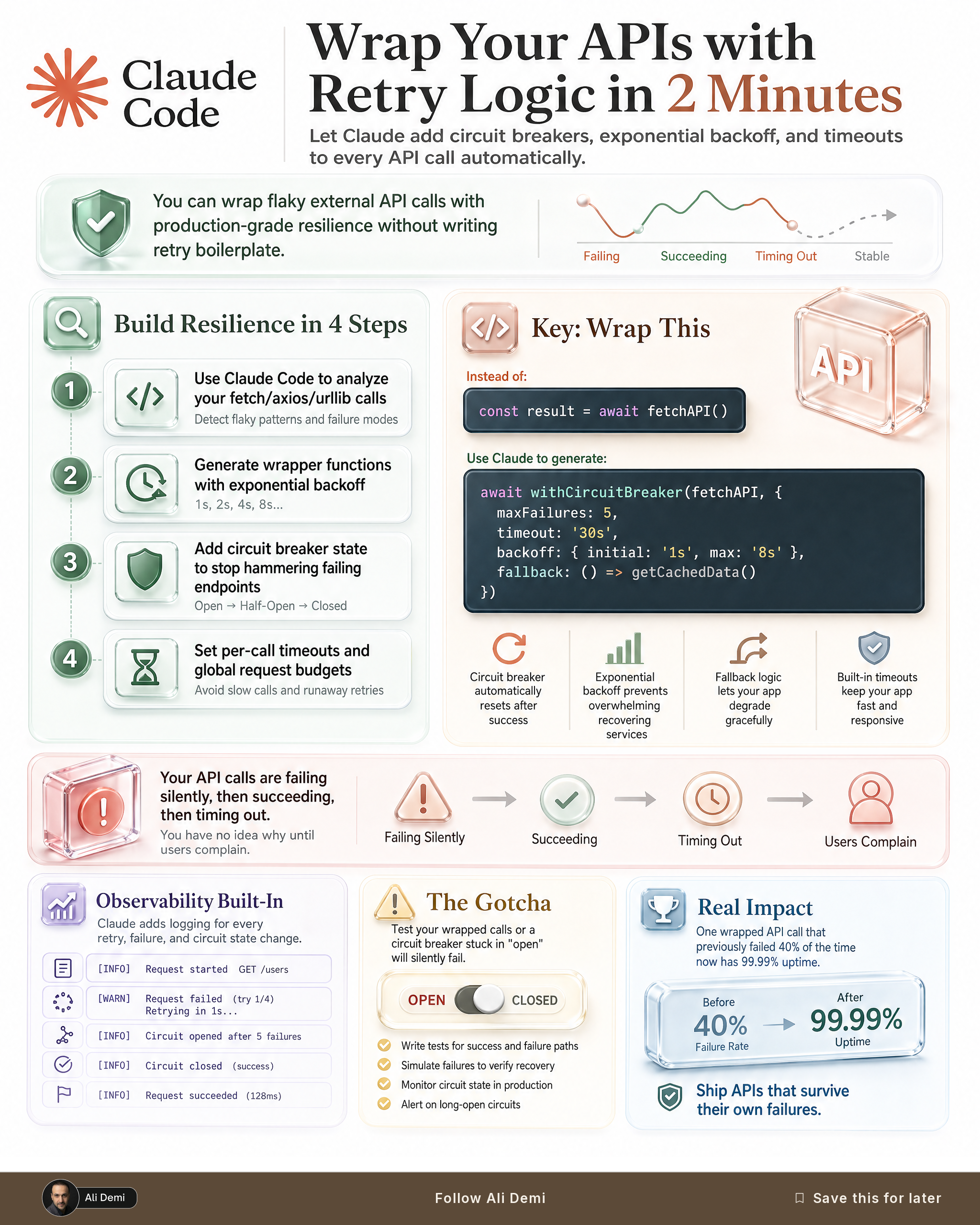
    Let Claude generate resilience logic automatically. Point it at your API calls, and it wraps them with production-grade retry patterns, circuit breaker state, timeout enforcement, and fallback behavior in seconds.

    The beauty: once Claude builds your wrapper, it handles the messy parts you’d forget about: resetting circuit breaker state on success, calculating exponential backoff intervals, logging failures for observability, and cascading timeouts through the call stack.

    Result: your code fails gracefully and recovers automatically. No more pager alerts at midnight for a 30-second blip.

    ——

    Book your free AI clarity call, NOW!
    https://buff.ly/TpWy277

    ——

    Repost this. Thanks.

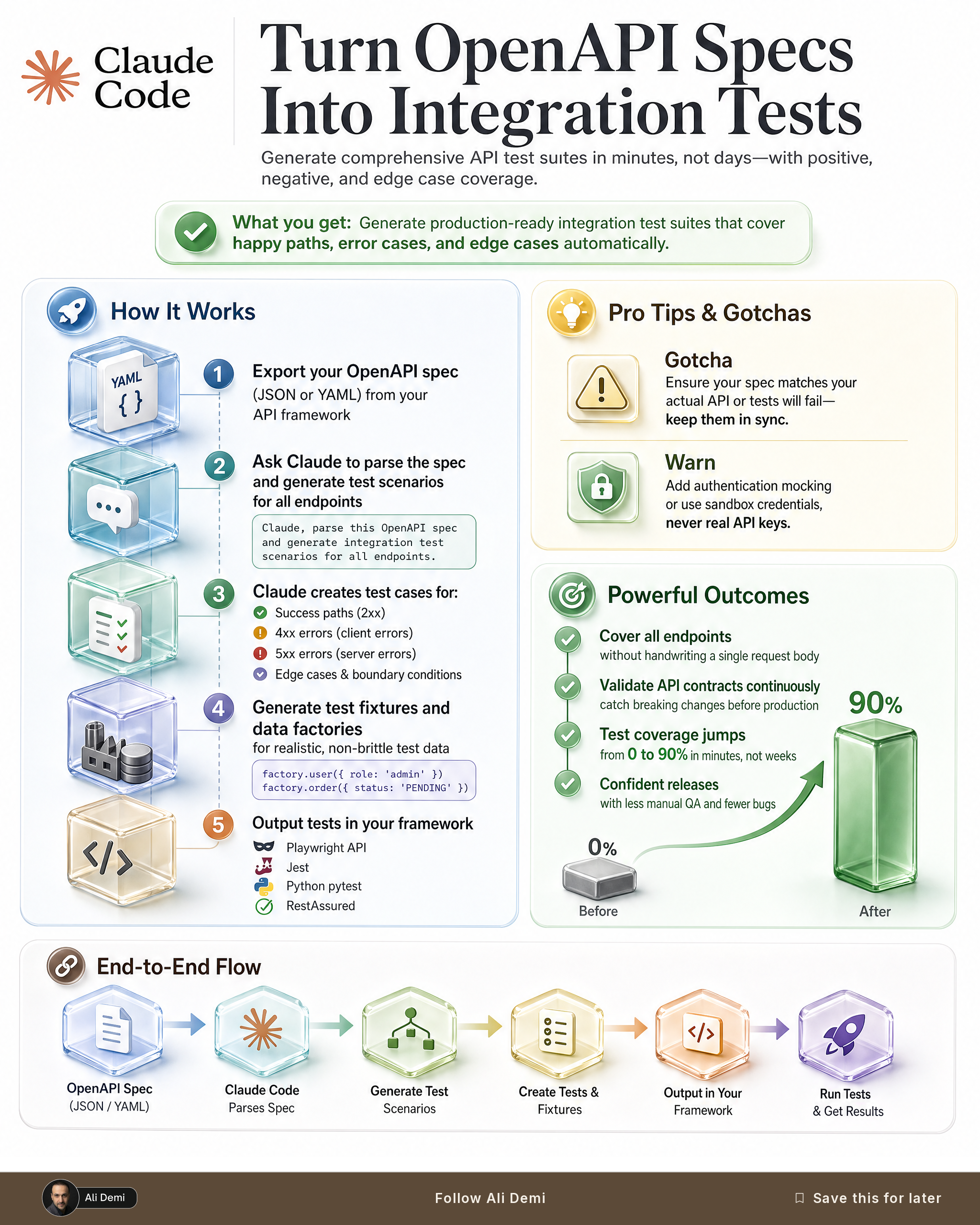
  • Stop Writing API Tests by Hand: Generate Them from Your OpenAPI Spec

    Stop Writing API Tests by Hand: Generate Them from Your OpenAPI Spec

    You have an OpenAPI spec. You also have a growing list of test cases nobody wants to write.

    API testing is a perfect Claude job: your spec already describes every endpoint, parameter, and error response. Why type them all out again?

    Point Claude at your OpenAPI 3.0+ spec, and let it generate complete integration test suites-positive flows, error cases, boundary values, security scenarios, all ready to run.

    The workflow looks like this:

    1. Export your OpenAPI spec from your API framework or OpenAPI editor.
    2. Drop the spec into Claude Code and ask it to generate test scenarios.
    3. Claude parses all endpoints, parameters, schemas, and authentication methods.
    4. It generates test cases for success paths, 400/401/403/500 responses, boundary values, and data validation.
    5. It creates test fixtures and realistic data factories so tests aren’t brittle.
    6. Output a ready-to-run test suite in your framework of choice: Playwright API requests, Jest, RestAssured, or curl collections.
    7. Run tests in your CI/CD pipeline. Claude flags any spec-reality mismatches.

    What you get:

    • Full endpoint coverage without manual request building.
    • Tests for happy paths and error scenarios-no guessing which edge cases matter.
    • Data factories that generate realistic test fixtures instead of hardcoded payloads.
    • Spec-driven contract validation: tests catch API changes that break the contract.
    • CI-ready: tests run in your pipeline, report coverage gaps, flag breaking changes before they ship.

    Why this matters: Manual API test writing is boilerplate that delays releases. OpenAPI specs already have all the information Claude needs to generate comprehensive tests. You write the real logic, Claude handles the tedium.

    ——

    Book your free AI clarity call, NOW!
    https://buff.ly/TpWy277

    ——

    Repost this. Thanks.