Tag: database

  • Stop Guessing Your Schema: Auto-Generate Optimized SQL From Your ORM

    Stop Guessing Your Schema: Auto-Generate Optimized SQL From Your ORM

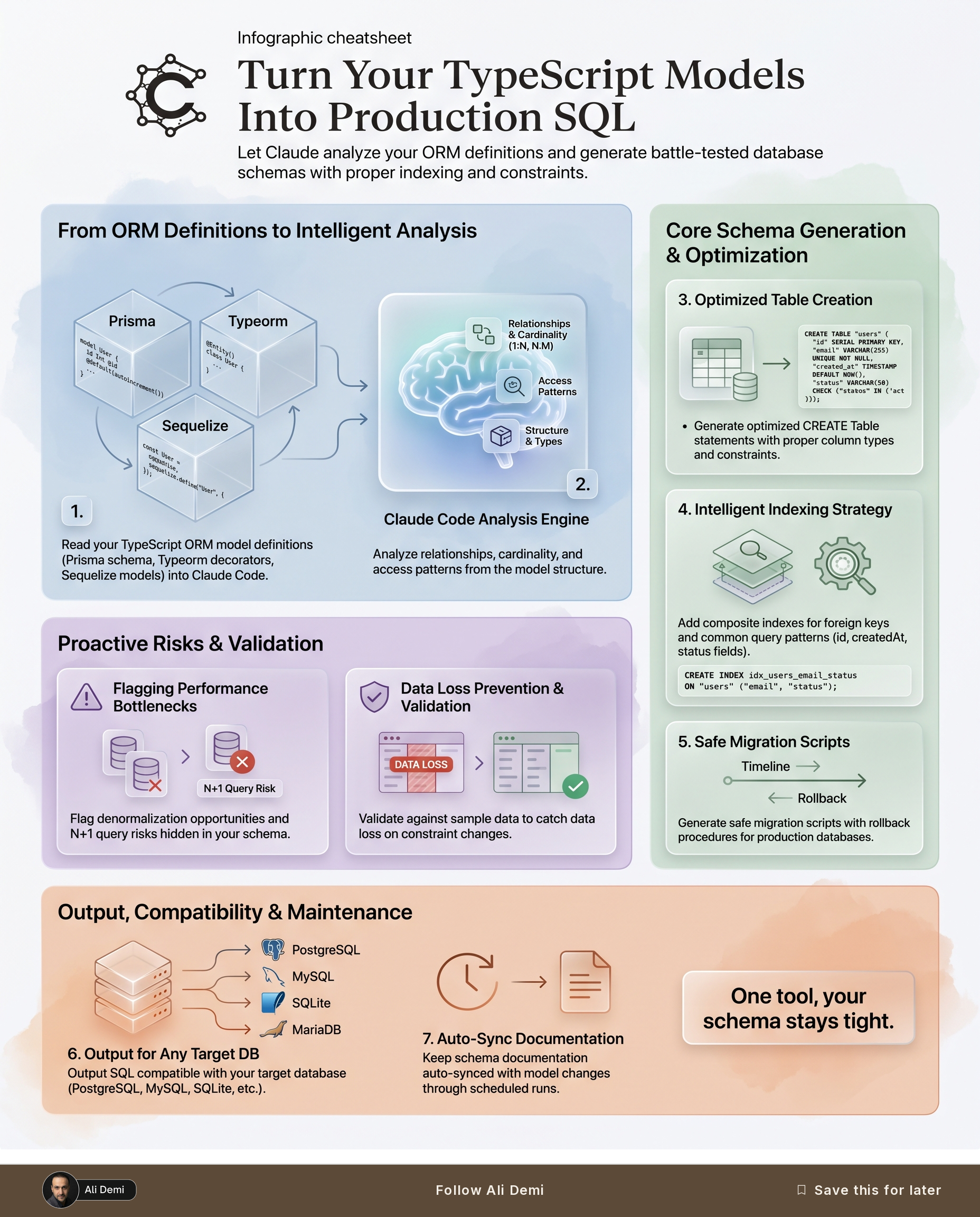
    Your TypeScript ORM models define your data structure, but your actual SQL schema lags behind.

    Composite indexes? Forgotten.

    Foreign key constraints? Sometimes. Check constraints? Never.

    N+1 queries hiding in your schema design? Guaranteed.

    Here’s the fix: let Claude Code analyze your Prisma, Typeorm, or Sequelize models and generate the SQL your database actually needs.

    Point Claude at your models. It reads the relationships, cardinality, and access patterns baked into your type definitions.

    Claude generates optimized CREATE TABLE statements. Composite indexes for your most common queries. Foreign keys with the right cascade rules. Check constraints that enforce invariants your code assumes. Column-level documentation that stays in sync.

    Compare with your current schema. Claude flags missing indexes, dangling constraints, and denormalization opportunities you’ve been ignoring.

    Generate safe migrations. No data loss. Claude wraps changes in transactions, tests rollback paths, and validates the migration against sample data.

    Your database schema should be as intentional as your code. Now it can be.

    ——

    Book your free AI clarity call, NOW!
    https://buff.ly/TpWy277

    ——

    Repost this. Thanks.
  • Your Slow Queries Don’t Have to Stay Slow: Auto-Index Them

    Your Slow Queries Don’t Have to Stay Slow: Auto-Index Them

    Your slow query log has been sitting there for weeks.

    You know it’s costing you money in database CPU and user wait time.

    But analyzing queries, figuring out which indexes would help, and testing them safely takes time you don’t have.

    Claude Code can do this automatically.

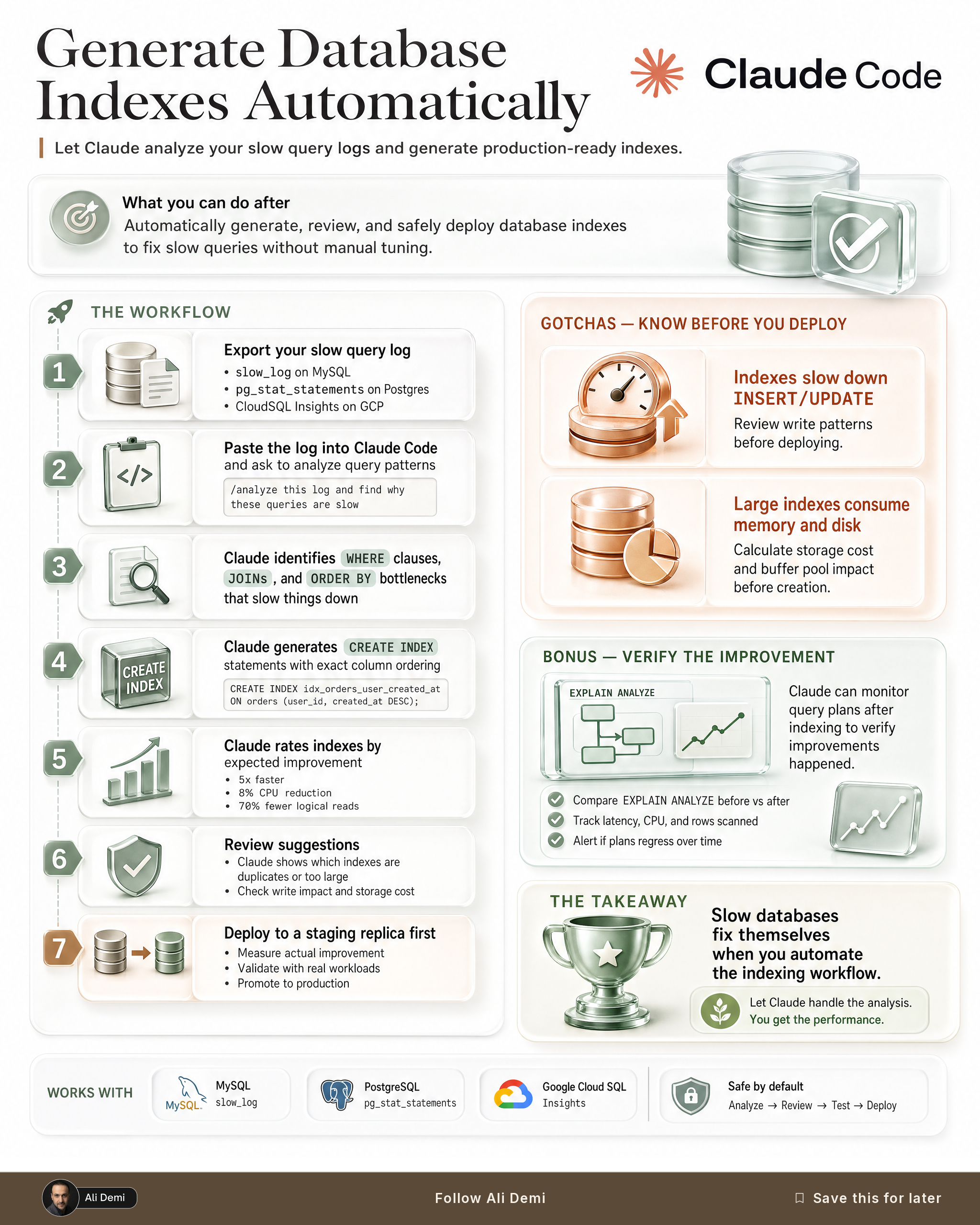
    Feed it your slow query log (from MySQL’s slow_log, PostgreSQL’s pg_stat_statements, or query audit logs), and it will:

    1. Parse each query and understand what it’s doing semantically
    2. Identify WHERE clauses, JOINs, and ORDER BY patterns that slow things down
    3. Suggest indexes with exact column ordering and coverage
    4. Generate CREATE INDEX statements with safe naming and batching
    5. Calculate estimated query improvements before deployment

    This is different from asking ChatGPT to write indexes.

    Claude Code can read your entire schema, understand your data distribution, and see which indexes already exist so it doesn’t suggest duplicates.

    It can also rate-limit deployments, test them on replicas, and even check if an index would be too large to fit in memory.

    The result: your production database runs faster without you manually tuning anything.

    ——

    Book your free AI clarity call, NOW!
    https://buff.ly/TpWy277

    ——

    Repost this. Thanks.
  • Your Database Is Drowning: Fix N+1 Queries Automatically

    Your Database Is Drowning: Fix N+1 Queries Automatically

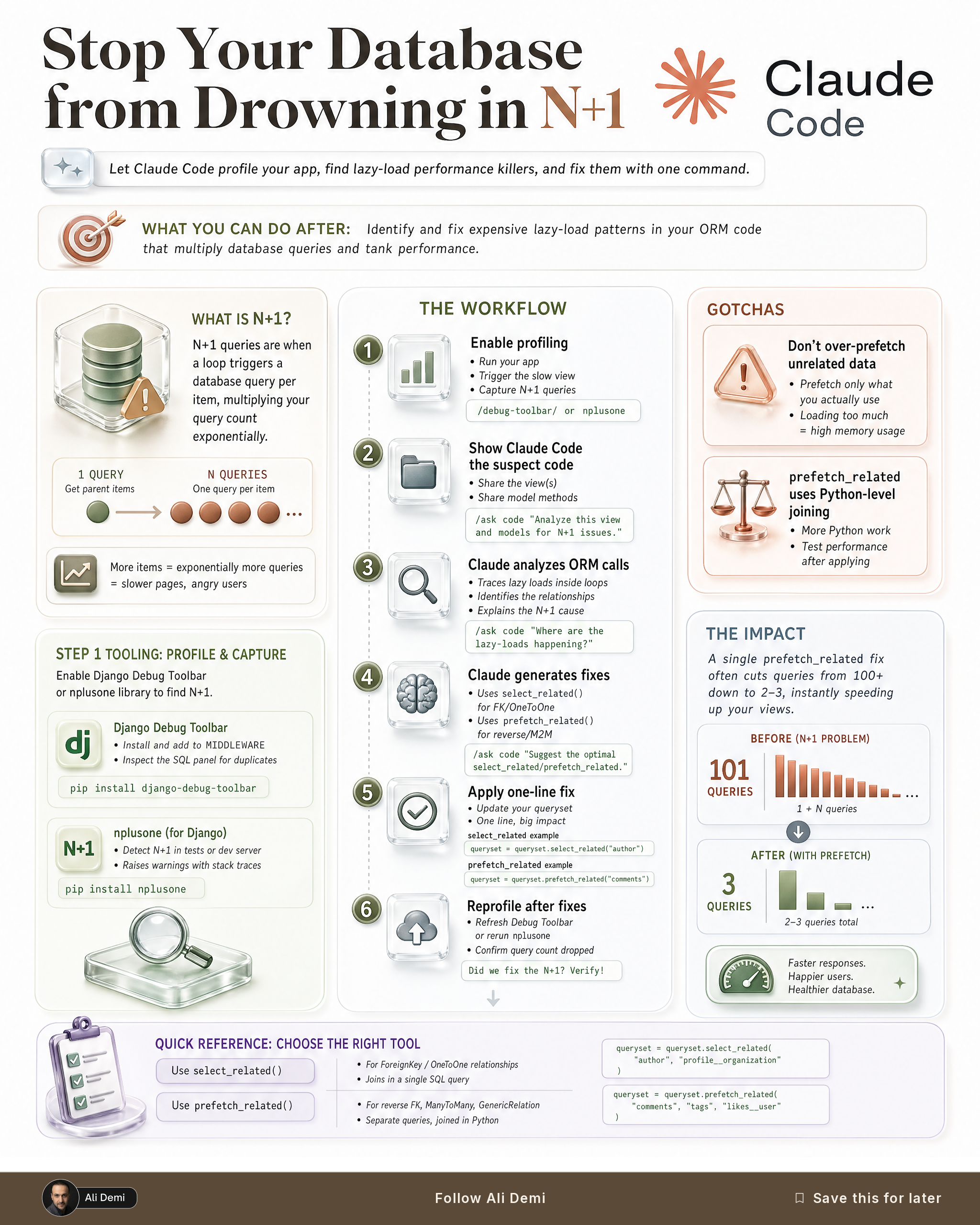
    Your database is screaming. Every user action fires 50 queries when it should fire five. The culprit is N+1 queries, the classic hidden performance killer: loop over 100 users, then load their profile inside the loop, and boom, you just asked the database 101 questions.

    Finding them is the hard part. Your profiler shows the symptoms (slow page load, many queries) but not the code. Pattern matchers catch the obvious ones. Semantic analysis finds the subtle ones.

    Use Claude Code to scan your views and model methods, find the loops that trigger lazy loads, and auto-apply select_related or prefetch_related to eliminate the extra queries.

    The workflow:

    1. Profile your app with Django Debug Toolbar or nplusone and capture suspected N+1 sites
    2. Point Claude Code at the code files
    3. Claude analyzes the ORM calls, loop structure, and query patterns
    4. Claude generates the exact select_related/prefetch_related calls needed
    5. Review and apply the fixes
    6. Re-profile to confirm the queries dropped

    The fix is usually one line: change User.objects.all() to User.objects.prefetch_related(‘profile’), and your query count just fell from 101 to 2.

    ——

    Book your free AI clarity call, NOW!
    https://buff.ly/TpWy277

    ——

    Repost this. Thanks.
  • Stop Breaking Production: Deploy Database Migrations Safely

    Stop Breaking Production: Deploy Database Migrations Safely

    Database migrations are where safe infrastructure meets messy reality. Add a column? Risky at scale. Drop a column? Irreversible. Change a type? Databases lock. One wrong move and your prod deployment turns into a four-hour rollback.

    The manual approach: write migrations by hand, pray you got the constraints right, keep your DBA on speed dial.

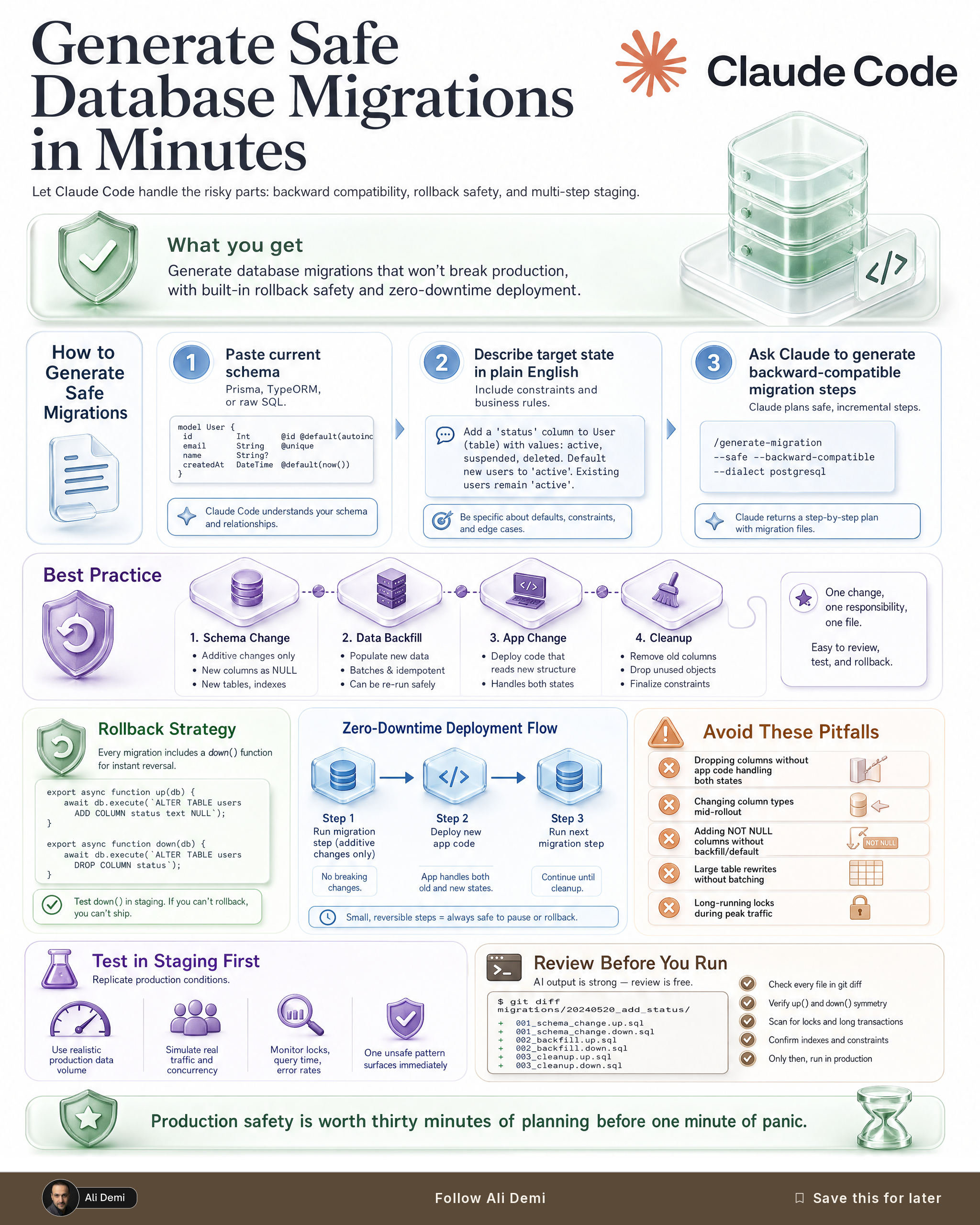
    A better way: hand Claude Code your current schema and target state. Let it generate backward-compatible migrations that work with both old and new app versions running at the same time.

    Here’s how it works:

    1. Paste your Prisma schema, TypeORM models, or raw SQL schema into Claude Code.
    2. Describe your target state in plain language: “Add a verified_at timestamp, populate it from created_at, make it required for new records.”
    3. Ask Claude to split it into safe, reversible steps. It will output timestamped migration files, each with a matching down() function for instant rollback.
    4. Run the migrations in staging with your app under load. One breaks? You rolled back in seconds.
    5. Deploy to production with zero downtime: run migration step 1, deploy app that handles both states, run migration step 2, clean up old data.

    The safety constraints Claude includes:

    Avoid breaking changes in production: new columns are nullable by default, old columns aren’t dropped until the app stops using them, indexes are added after data backfill (not before, when they lock the table).

    Built-in rollback: every migration comes with a down() function. If prod breaks, you revert instantly.

    Concurrent versions: migrations work when old code and new code run simultaneously for the five minutes between deploy steps.

    This is how teams with real scale actually ship. Now you can too, in minutes instead of days of manual design.

    ——

    Book your free AI clarity call, NOW!
    https://buff.ly/TpWy277

    ——

    Repost this. Thanks.
  • Stop Guessing Why Your Queries Are Slow: Let Claude Find the Bottleneck

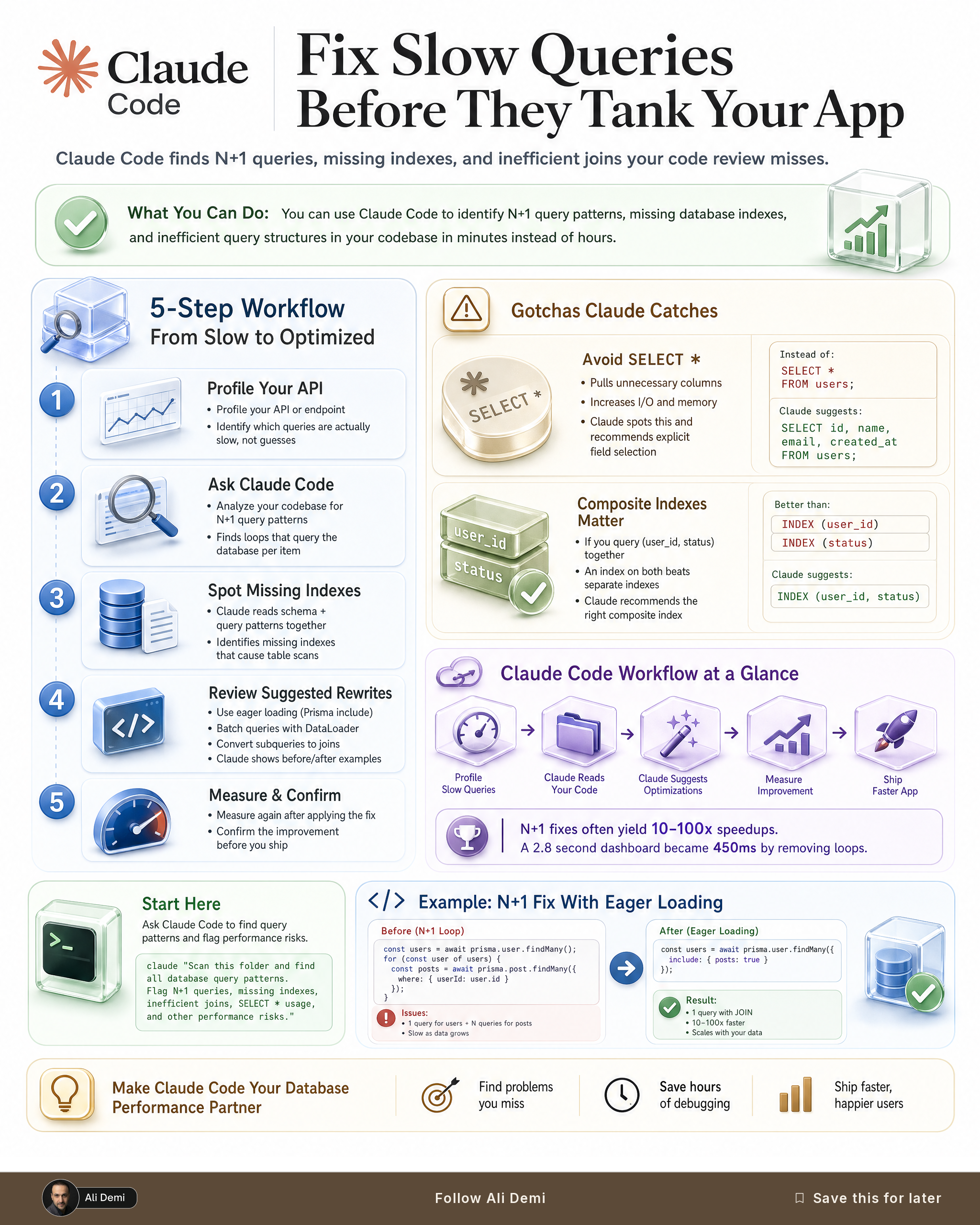
    Stop Guessing Why Your Queries Are Slow: Let Claude Find the Bottleneck

    Your API is slow. You profile it, and the bottleneck is database queries.

    But which queries? How many round trips are really happening? Is it a missing index, an N+1 loop, or a join that should be an eager load?

    Claude Code reads your entire codebase at once and traces the data flow. It spots patterns humans miss: fetching a list of users, then querying their posts inside a loop. Missing composite indexes on the exact column combinations your WHERE clauses filter. Subqueries that could be joins. Selects pulling back fields you never use.

    Here is the workflow:

    1. Point Claude Code at your app folder and ask it to analyze database queries for performance issues.
    2. Claude reads your ORM calls (Prisma, SQLAlchemy, whatever), raw SQL, and controller logic together.
    3. It flags N+1 patterns: looping over results and querying related data item-by-item instead of batching or eager loading.
    4. It spots missing indexes by reading your queries and schema, finding column combinations that appear in every WHERE clause but lack an index.
    5. It suggests concrete rewrites: replace that loop with a DataLoader batch, use Prisma include instead of separate queries, add an index on userId and status.
    6. You measure before and after with profiling. Often you see 10-100x improvements: dashboards dropping from 2.8 seconds to 450ms just by fixing N+1s.

    The trick is being systematic: profile first to find the true bottleneck, then let Claude trace exactly why it is happening. Don’t guess. Let the data tell you where the problem is, and let Claude read the code and tell you how to fix it.

    Your database is not slow. Your queries are.

    ——

    Book your free AI clarity call, NOW!
    https://buff.ly/TpWy277

    ——

    Repost this. Thanks.
  • Stop Writing Migrations By Hand: Auto-Generate Them

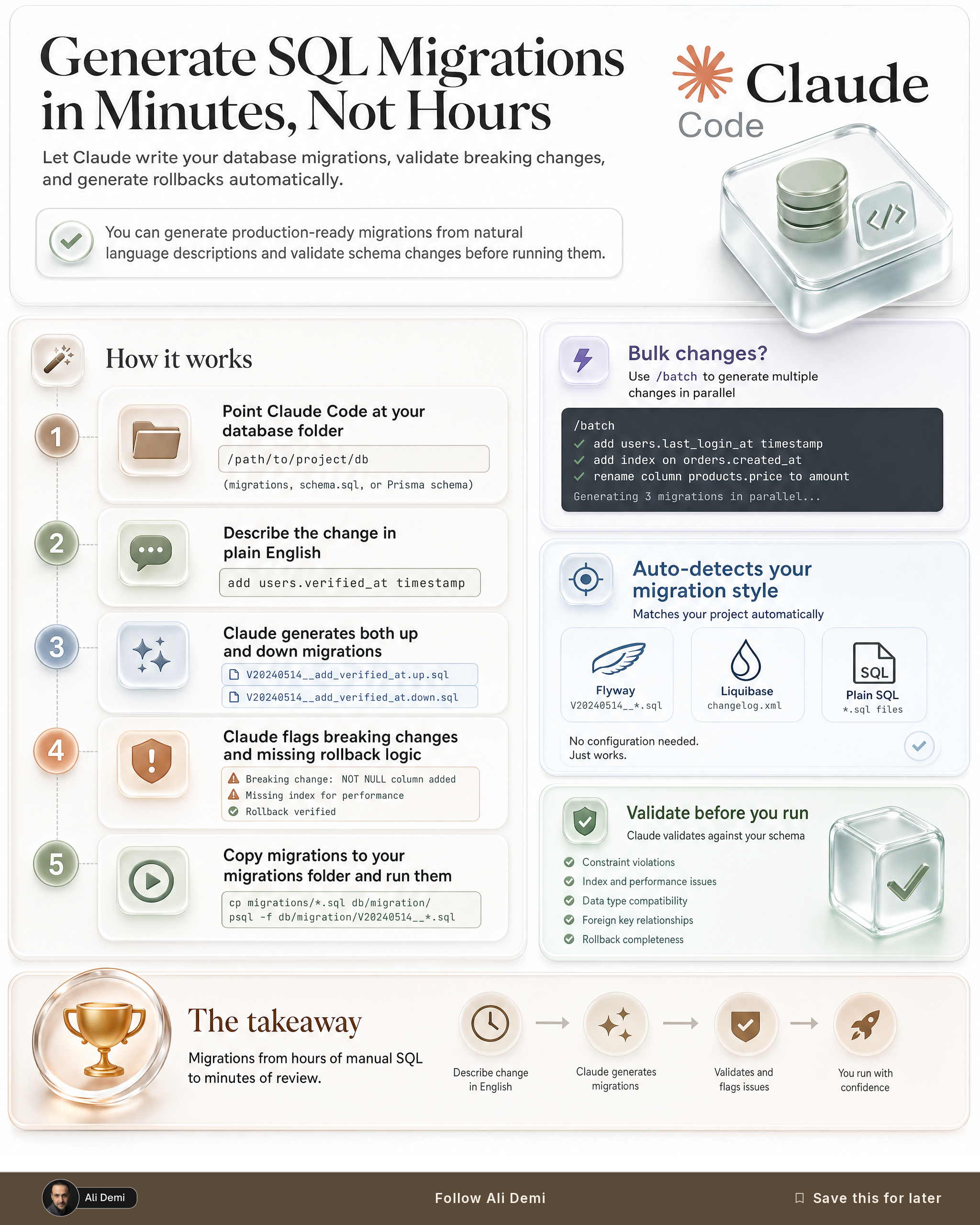
    Stop Writing Migrations By Hand: Auto-Generate Them

    Database migrations are one of the most error-prone parts of development.

    You describe the change, then spend an hour writing the SQL, another hour testing the rollback, and hope you didn’t miss an index or a constraint.

    Here’s how to let Claude handle the whole thing.

    1. Point Claude Code at your schema folder or migration history.
    2. Describe the change in plain English: add a column, rename a table, create an index.
    3. Claude generates the up migration, the down migration, and checks for breaking changes.
    4. Review the generated files, run them, Claude confirms success.

    For bulk changes, use /batch to generate multiple migrations in parallel.

    Claude catches the gotchas: missing rollbacks, breaking existing queries, forgotten constraints.

    Your migrations are tested, documented, and safe to commit.

    ——

    Book your free AI clarity call, NOW!
    https://buff.ly/TpWy277

    ——

    Repost this. Thanks.