Tag: devops

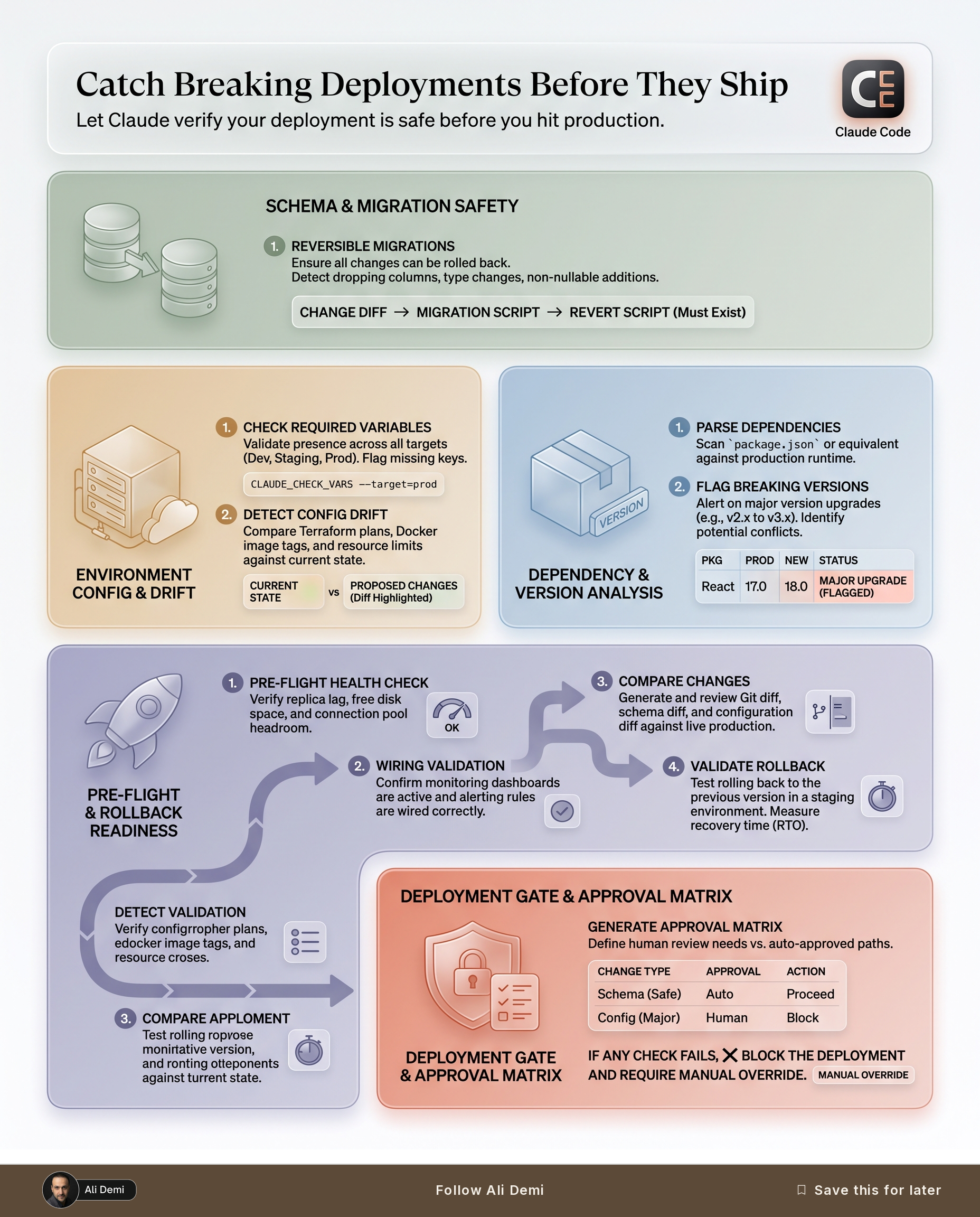
  • Stop Shipping Broken Deploys: Automate Pre-Deploy Safety Checks

    Stop Shipping Broken Deploys: Automate Pre-Deploy Safety Checks

    Your deployments are one missed environment variable away from production meltdown.

    Most teams catch it after the page is down. Claude Code can catch it before you deploy.

    Here’s what to automate:

    1. Schema compatibility. Parse migrations, detect non-reversible changes (dropping columns, changing types), check against production schema. Flag breaking changes.
    2. Environment validation. Scan code for required env vars, verify they exist in target environment, type-check values, catch typos.
    3. Dependency compatibility. Compare package versions in your change against what’s running in prod. Detect deprecated APIs, breaking dependency updates, missing peer dependencies.
    4. Configuration drift. Compare your deployment config (docker-compose, terraform, helm charts) against what’s actually running. Catch accidental deletions, changed resource limits.
    5. Rollback readiness. Verify previous versions are still available, test the rollback script, confirm you can revert within SLA.
    6. Health checks. Run pre-flight database health checks (replica lag, disk space, connections), verify dependent services are healthy.

    Wire this into your GitHub Actions as a required status check. Block merging if checks fail.

    One deployment without this catches bugs that cost hours. One month without this catches bugs that cost millions.

    ——

    Book your free AI clarity call, NOW!
    https://buff.ly/TpWy277

    ——

    Repost this. Thanks.
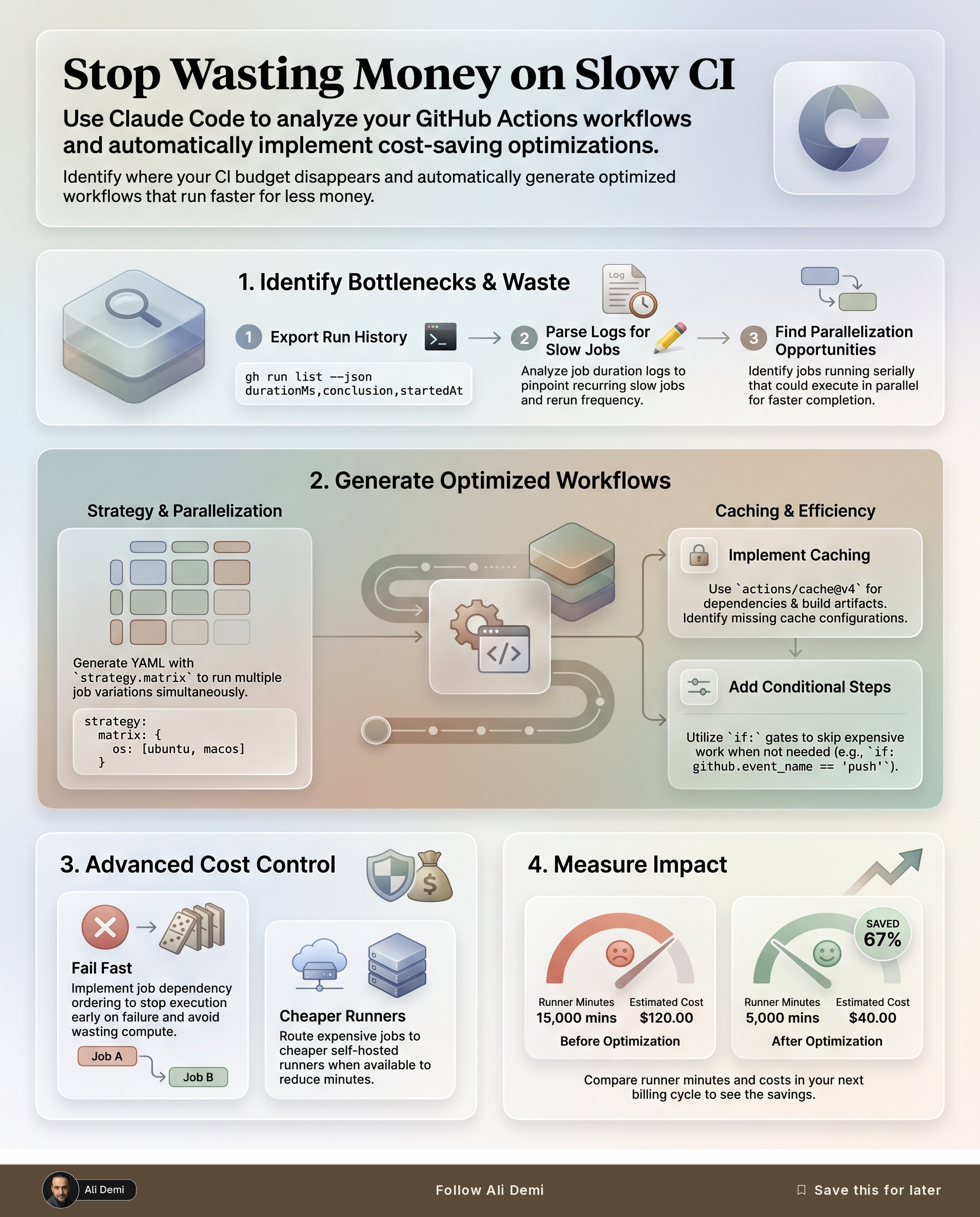
  • Your CI Bill is Out of Control: Cut Costs Without Cutting Speed

    Your CI Bill is Out of Control: Cut Costs Without Cutting Speed

    Your GitHub Actions bill is climbing. Every slow job, every cache miss, every redundant run costs money. But you can’t just kill jobs-your team needs fast feedback.

    The real problem: your workflow was built to work, not to be optimal. Dead code branches in CI jobs. Missing caching. Jobs that could run parallel but don’t. Re-runs of expensive tests on flaky failures.

    Claude Code can read your run history, spot the waste, and rewrite your workflow automatically.

    Here’s how:

    1. Export your GitHub Actions run history with the GitHub CLI. Claude reads the wall-clock time each job took, how often it failed, which jobs always wait for others to finish.
    2. Claude identifies the patterns: which jobs are your cost drivers, which ones block everything else, which ones have cache misses you could fix.
    3. Claude generates an optimized workflow YAML. Parallel job groups that run together. Strategic caching to avoid rebuilding what hasn’t changed. Conditional steps that skip expensive work when it’s not needed. Smart runner assignment so expensive compute runs on cheaper hardware.
    4. Push the new workflow. Watch your next billing cycle.

    The best part: Claude doesn’t just guess. It quantifies the waste. You see exactly how many runner minutes you’re burning on re-runs, unused cache, and serial job chains that could be parallel.

    Teams routinely cut 30-50% from their CI spend this way-and the pipeline runs faster because fewer jobs block each other.

    ——

    Book your free AI clarity call, NOW!
    https://buff.ly/TpWy277

    ——

    Repost this. Thanks.
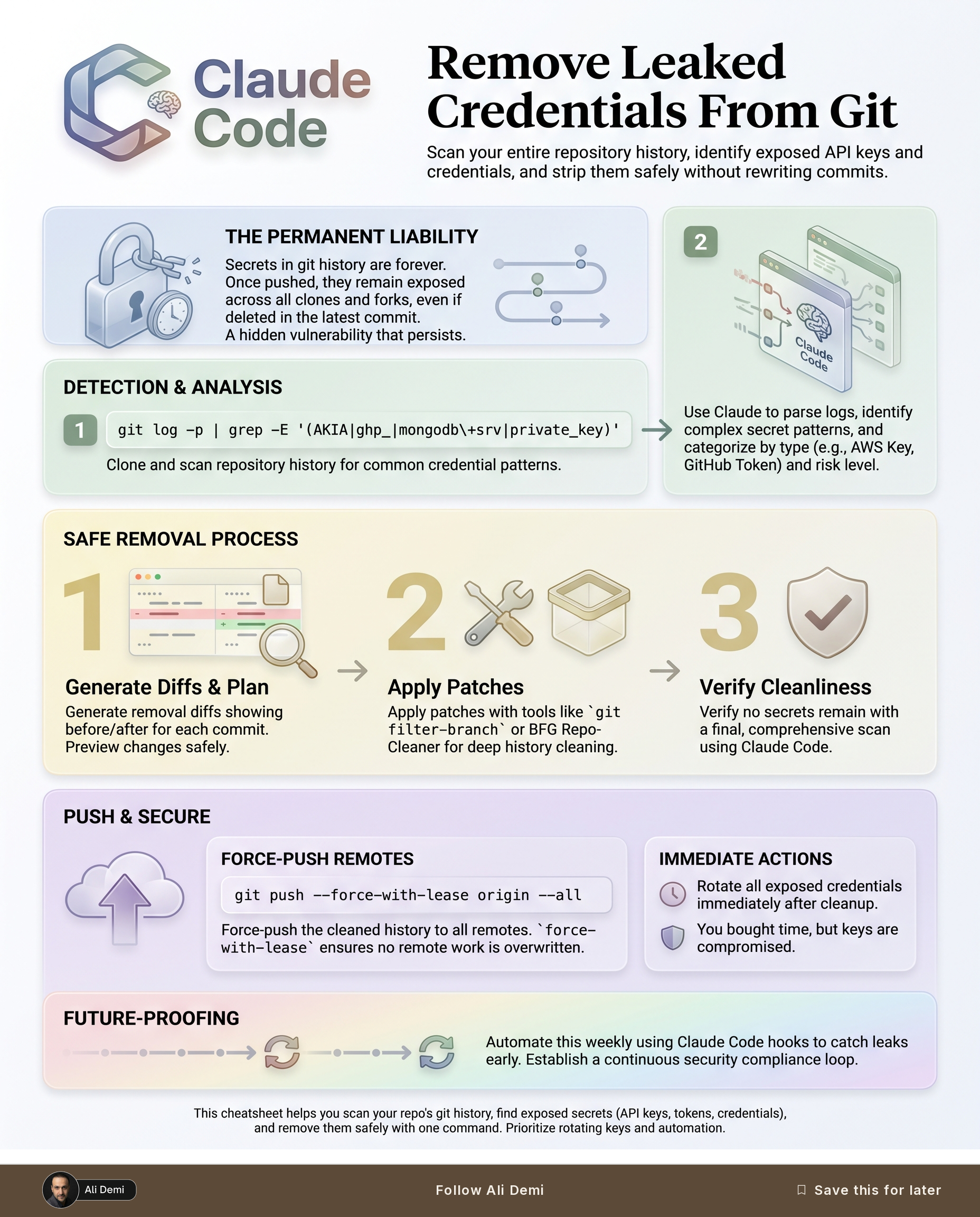
  • Your Git History Is Full of Secrets: Scrub Them Automatically

    Your Git History Is Full of Secrets: Scrub Them Automatically

    Your API keys are probably in your git history right now.

    You committed them once, didn’t notice, and pushed them. Maybe weeks ago. Maybe from a laptop you lost. Now they’re floating in every clone, every fork, every backup. No amount of revoking the key changes the fact that it’s permanently visible to anyone who can see your repository history.

    Traditional secret-removal tools like git-filter-branch or BFG require rewrites that break everyone’s checkouts. Claude Code can do better: scan your entire history, find the secrets, strip them, and regenerate commits without the chaos.

    Here’s how it works:

    1. Point Claude at your repo.
    2. Run a scan for common secret patterns: AWS keys, GitHub tokens, database passwords, private keys, API credentials.
    3. Claude finds them, shows you what it found and where.
    4. Approve the removal (it’s non-destructive until you verify).
    5. Claude strips them from history and regenerates the commits cleanly.
    6. Force-push once to update all remotes.

    Your history is now clean. Your team doesn’t have to rebase. Your secrets aren’t exposed anymore.

    Run this weekly as part of your security routine, especially after adding new developers or onboarding new services.

    ——

    Book your free AI clarity call, NOW!

    https://buff.ly/TpWy277

    ——

    Repost this. Thanks.
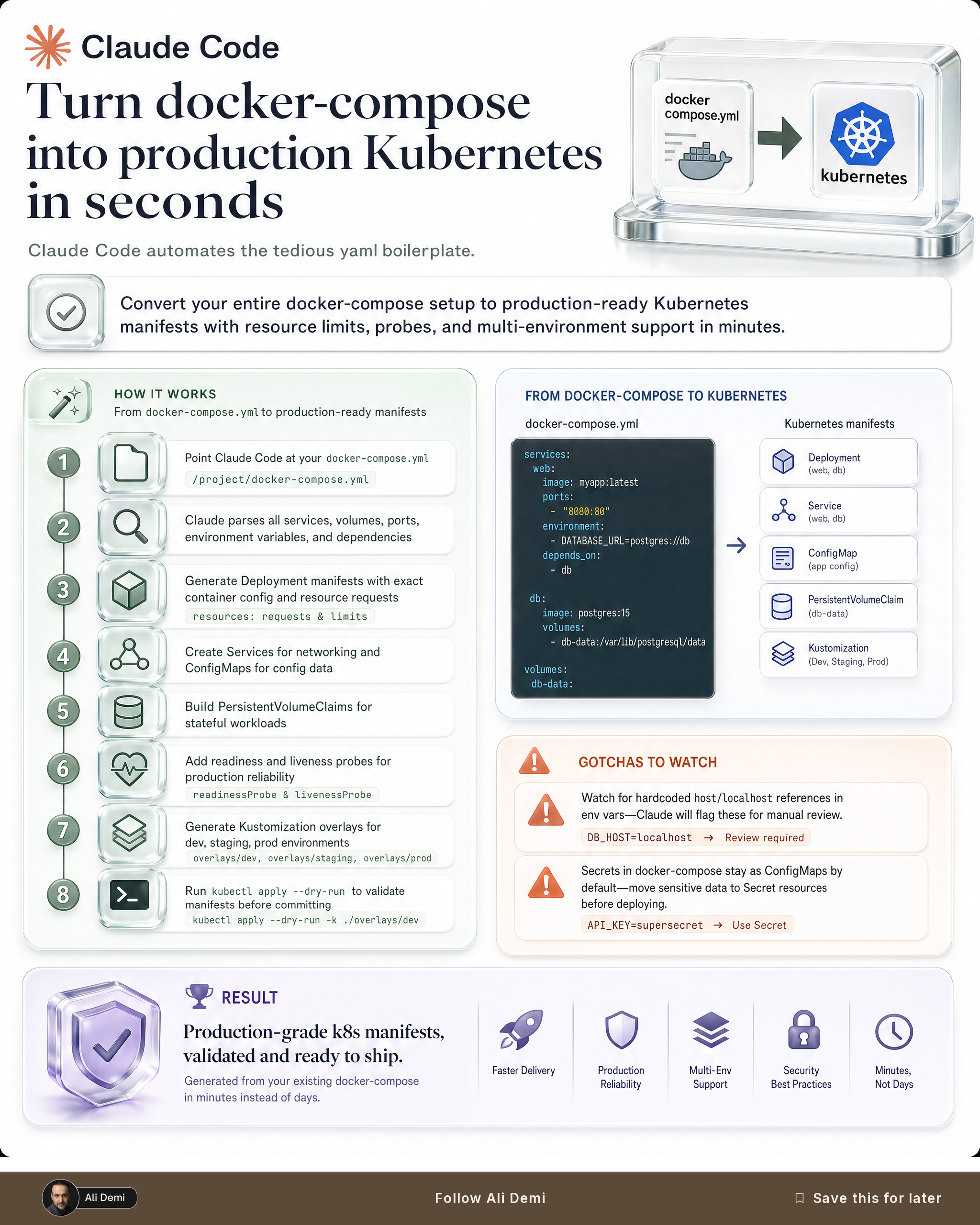
  • Stop Converting By Hand: Generate Kubernetes Manifests from Docker Compose

    Stop Converting By Hand: Generate Kubernetes Manifests from Docker Compose

    You’ve got a working docker-compose setup.

    Now you need to deploy it to Kubernetes.

    So you spend a day hand-writing YAML: Deployments, Services, ConfigMaps, PersistentVolumeClaims, and Kustomization overlays for dev/staging/prod.

    Every service gets the same boilerplate. Every environment needs the same structure tweaked.

    Claude Code can automate this entirely.

    Point it at your docker-compose.yml and it will:

    1. Parse every service, volume, port, and environment variable
    2. Generate clean Deployment manifests with container args and env vars
    3. Create matching Services for each component
    4. Extract config into ConfigMaps, secrets into Secret resources
    5. Set up PersistentVolumeClaims for stateful volumes
    6. Add resource requests and limits based on your setup
    7. Inject readiness and liveness probes for reliability
    8. Build a Kustomization structure for multi-environment support
    9. Validate everything with kubectl dry-run

    What took a day now takes five minutes.

    Your manifests come out organized, validated, and immediately deployable.

    ——

    Book your free AI clarity call, NOW!
    https://buff.ly/TpWy277

    ——

    Repost this. Thanks.
  • Stop Writing Changelogs by Hand: Auto-Generate Them from Git

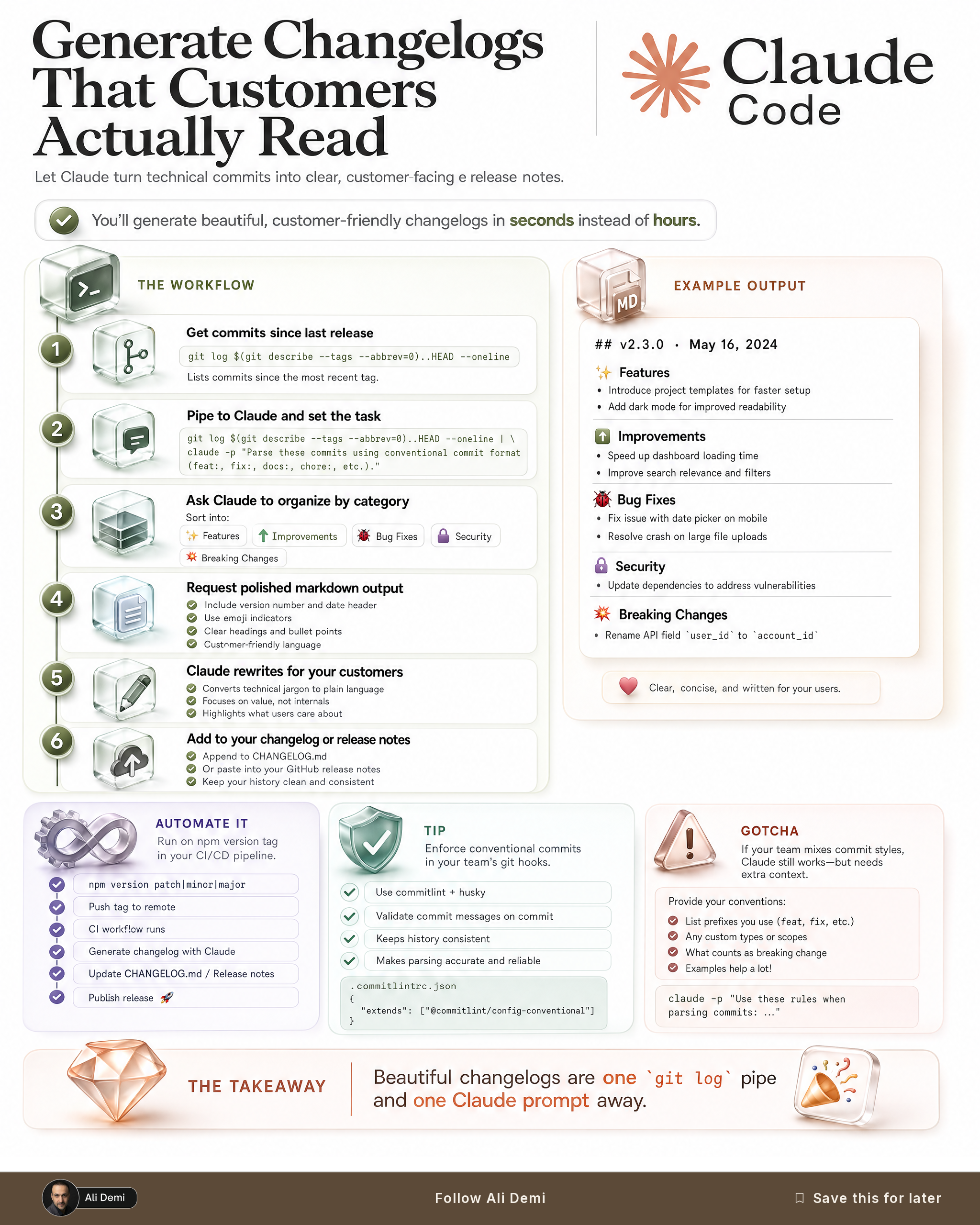
    Stop Writing Changelogs by Hand: Auto-Generate Them from Git

    You know the drill: release day arrives, and you’re staring at a wall of git commits, trying to figure out what actually changed.

    How do you translate “fix: race condition in token refresh” into something a customer cares about?

    Claude handles this in seconds.

    Here’s the workflow:

    1. Pull your commit history since the last release using `git log` with conventional commits format (feat:, fix:, docs:, etc.)
    2. Feed that log to Claude with a prompt asking it to categorize changes into Features, Improvements, Bug Fixes, Breaking Changes, and Security
    3. Claude rewrites technical language into clear, user-focused descriptions with emoji indicators
    4. Format as markdown with version header and date, ready to paste into CHANGELOG.md or your GitHub release
    5. Optional: wire it into a pre-release hook so changelog generation runs automatically when you tag a new version

    The payoff: your customers see what’s actually new instead of decoding jargon, your release day runs faster, and your changelog stays up-to-date without manual toil.

    If your team commits with conventional commits (feat:, fix:, refactor:, etc.), Claude can parse and transform that history into professional release notes in one pass.

    ——

    Book your free AI clarity call, NOW!
    https://buff.ly/TpWy277

    ——

    Repost this. Thanks.
  • Stop Breaking Production: Deploy Database Migrations Safely

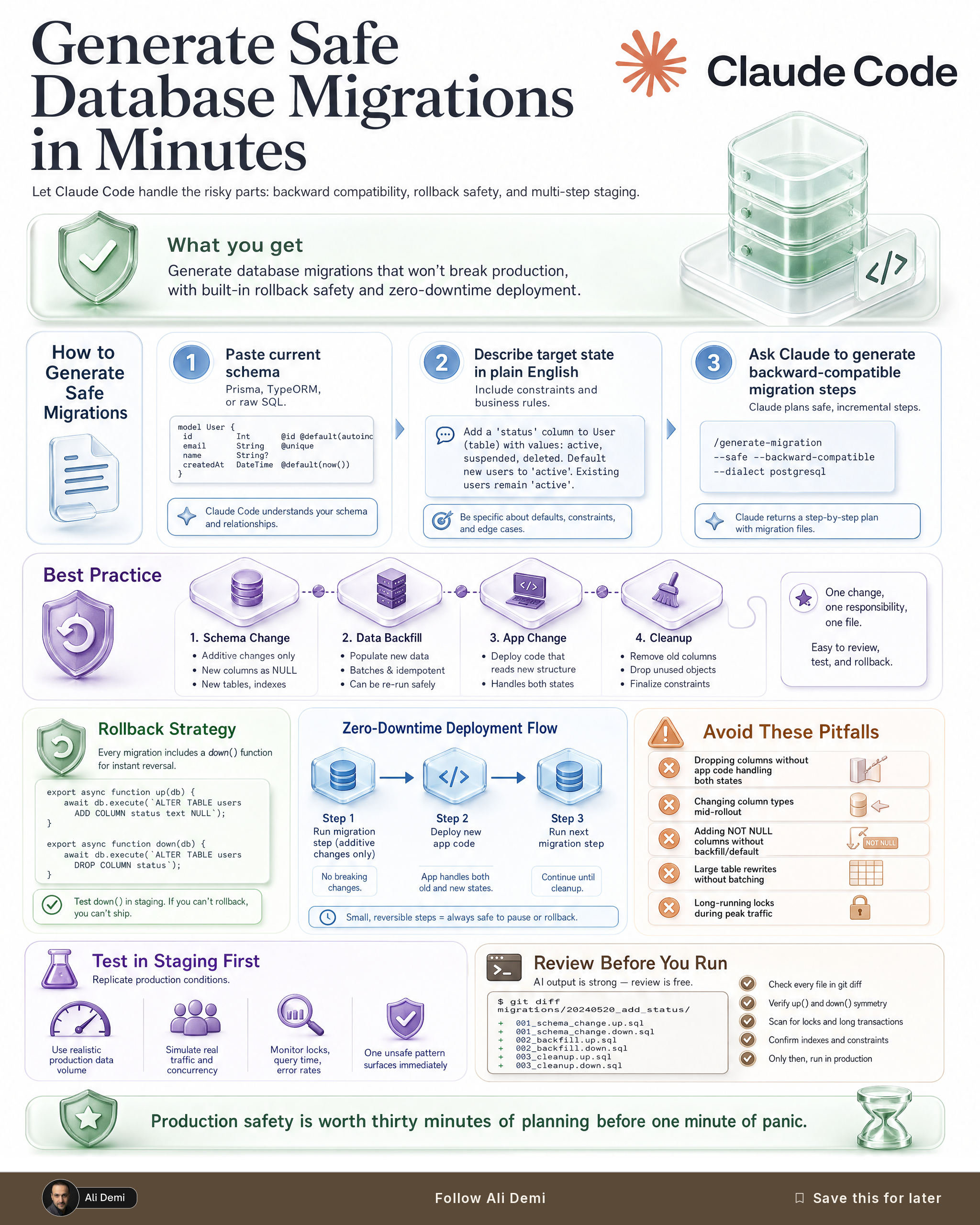
    Stop Breaking Production: Deploy Database Migrations Safely

    Database migrations are where safe infrastructure meets messy reality. Add a column? Risky at scale. Drop a column? Irreversible. Change a type? Databases lock. One wrong move and your prod deployment turns into a four-hour rollback.

    The manual approach: write migrations by hand, pray you got the constraints right, keep your DBA on speed dial.

    A better way: hand Claude Code your current schema and target state. Let it generate backward-compatible migrations that work with both old and new app versions running at the same time.

    Here’s how it works:

    1. Paste your Prisma schema, TypeORM models, or raw SQL schema into Claude Code.
    2. Describe your target state in plain language: “Add a verified_at timestamp, populate it from created_at, make it required for new records.”
    3. Ask Claude to split it into safe, reversible steps. It will output timestamped migration files, each with a matching down() function for instant rollback.
    4. Run the migrations in staging with your app under load. One breaks? You rolled back in seconds.
    5. Deploy to production with zero downtime: run migration step 1, deploy app that handles both states, run migration step 2, clean up old data.

    The safety constraints Claude includes:

    Avoid breaking changes in production: new columns are nullable by default, old columns aren’t dropped until the app stops using them, indexes are added after data backfill (not before, when they lock the table).

    Built-in rollback: every migration comes with a down() function. If prod breaks, you revert instantly.

    Concurrent versions: migrations work when old code and new code run simultaneously for the five minutes between deploy steps.

    This is how teams with real scale actually ship. Now you can too, in minutes instead of days of manual design.

    ——

    Book your free AI clarity call, NOW!
    https://buff.ly/TpWy277

    ——

    Repost this. Thanks.
  • Stop Writing Migrations By Hand: Auto-Generate Them

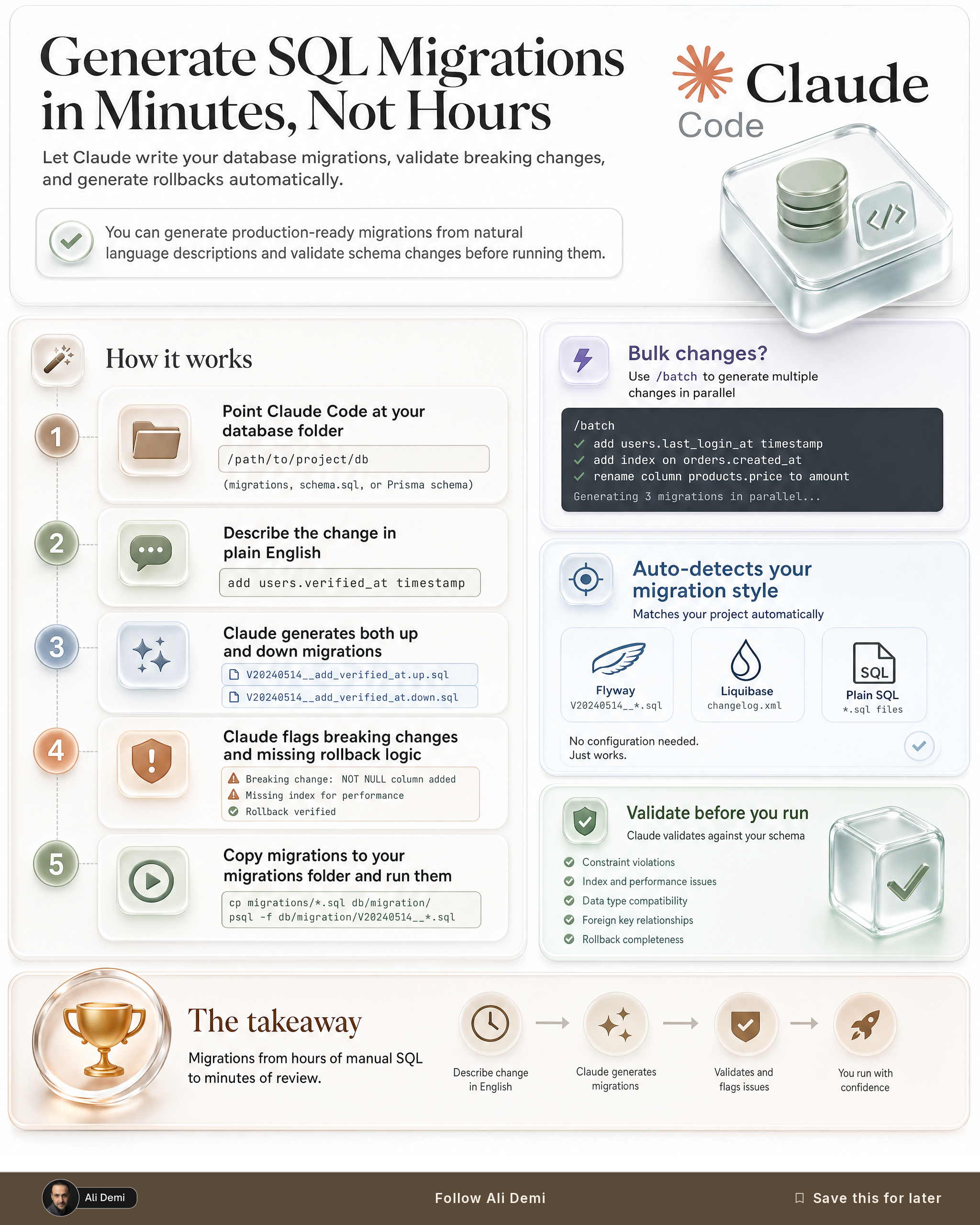
    Stop Writing Migrations By Hand: Auto-Generate Them

    Database migrations are one of the most error-prone parts of development.

    You describe the change, then spend an hour writing the SQL, another hour testing the rollback, and hope you didn’t miss an index or a constraint.

    Here’s how to let Claude handle the whole thing.

    1. Point Claude Code at your schema folder or migration history.
    2. Describe the change in plain English: add a column, rename a table, create an index.
    3. Claude generates the up migration, the down migration, and checks for breaking changes.
    4. Review the generated files, run them, Claude confirms success.

    For bulk changes, use /batch to generate multiple migrations in parallel.

    Claude catches the gotchas: missing rollbacks, breaking existing queries, forgotten constraints.

    Your migrations are tested, documented, and safe to commit.

    ——

    Book your free AI clarity call, NOW!
    https://buff.ly/TpWy277

    ——

    Repost this. Thanks.