Tag: productivity

  • Your PR Queue Is Killing Velocity: Automate Code Review Triage

    Your PR Queue Is Killing Velocity: Automate Code Review Triage

    Your team just shipped 50 PRs this week. Three reviewers.

    AI made developers 60% faster in the last year, but your review team didn’t get faster. They got slower. Your backlog isn’t growing because code is broken-it’s growing because nobody can review it fast enough.

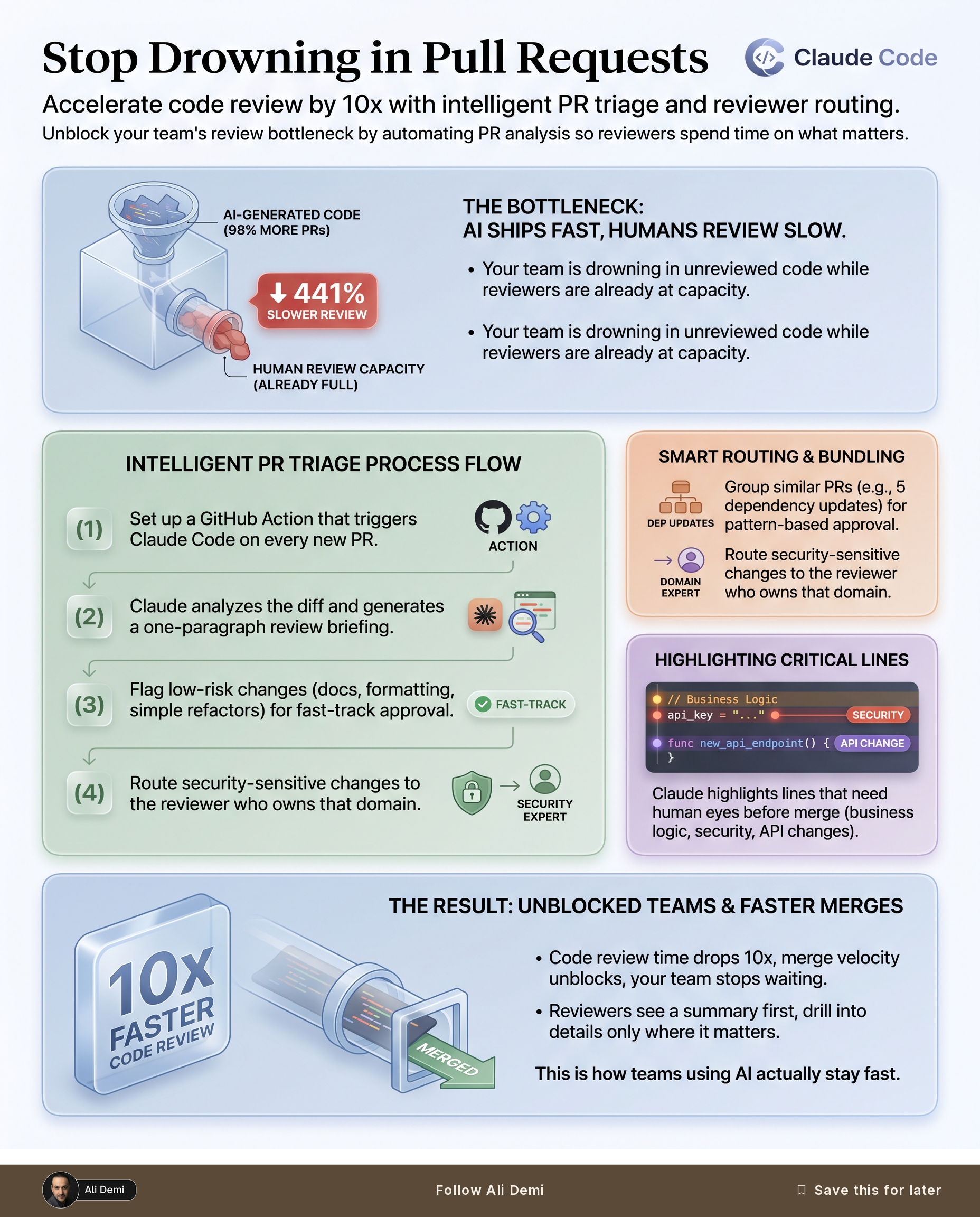
    Here’s what’s changed: teams using Claude and Copilot now merge 98% more PRs, but code review time jumped 441%. The bottleneck moved from coding to reviewing. And reviewing AI-written code is harder-it surfaces 1.7x more issues that need careful eyes.

    Claude Code can fix this. Not by replacing review, but by making it 10x faster.

    Start with a simple GitHub Action that triggers Claude Code on every PR. Claude reads the diff and generates a **review briefing**-one paragraph saying what changed, why, and which lines need human eyes. Flag low-risk changes (docs, formatting, simple refactors) for instant approval. Route complex changes to the engineer who owns that code. Batch five similar PRs together so reviewers spot patterns instead of reading boilerplate ten times.

    The math changes immediately: instead of every reviewer reading every line, they see **only what matters**. Security-sensitive changes get a checklist. Business logic changes surface the exact data flows to verify. Dependency updates get grouped-approve the pattern, not each file.

    Your reviewers actually review again. Developers stop waiting. Merge time drops from three days to three hours.

    This isn’t optional anymore. AI accelerated the generation side. If you don’t accelerate review, you break velocity.

    ——

    Book your free AI clarity call, NOW!
    https://buff.ly/TpWy277

    ——

    Repost this. Thanks.
  • Measure Your AI Coding Productivity: Analyze Claude Code Sessions

    Measure Your AI Coding Productivity: Analyze Claude Code Sessions

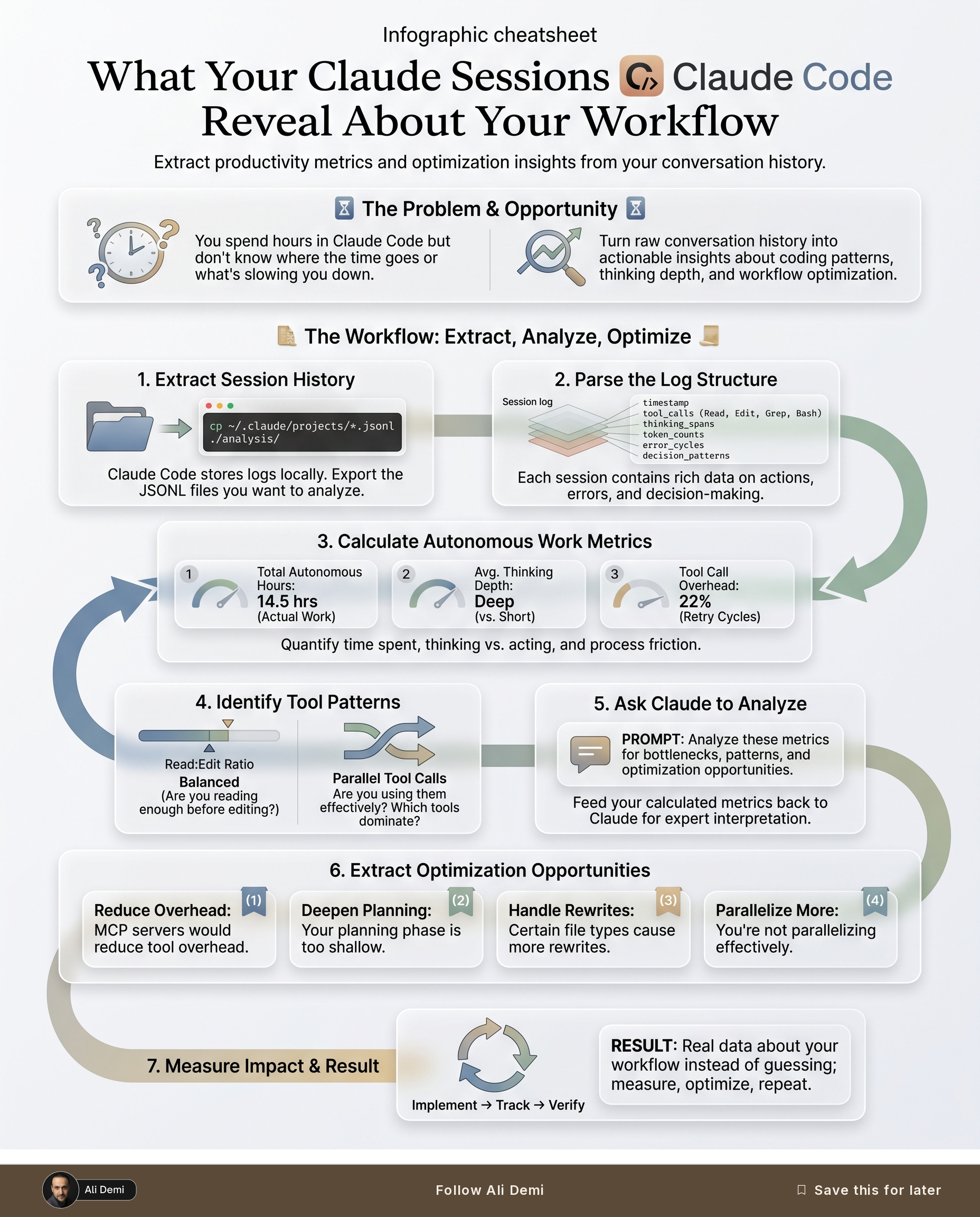
    You spend hours in Claude Code getting work done. But where’s the time actually going? Are you bottlenecked on tool calls? Is your thinking phase too shallow? Let Claude analyze your own sessions to find out.

    1. Export your session history. Claude Code stores all conversation history locally in JSONL format at ~/.claude/projects/. Extract the logs from sessions you want to analyze (last week, last month, a specific project).
    2. Parse tool calls and thinking spans. Each session contains timestamps, tool use patterns (Read vs Edit vs Grep ratio), thinking duration, token counts, and decision cycles. These patterns reveal your workflow.
    3. Aggregate into metrics. Calculate: total autonomous work hours, average thinking depth (long vs short thinking sessions), tool call overhead, error and retry cycles, which commands you use most, time per task type (features vs migrations vs debugging).
    4. Ask Claude for analysis. Feed Claude a summary of your metrics and ask: What’s the pattern? Why do migrations take 5x longer than features? When does thinking depth matter most? Where are the bottlenecks?
    5. Extract optimization opportunities. Claude identifies specific patterns: Maybe you need MCP servers to reduce tool overhead. Maybe your planning phase is too shallow. Maybe certain file types cause more rewrites. Maybe you’re not using parallel tool calls effectively.
    6. Compare across time. Track the same metrics week to week or month to month. Implement one optimization and measure if it actually worked. Real data beats intuition.

    The result: you understand your own workflow at a level your IDE never showed you. Stop guessing. Measure, optimize, repeat.

    ——

    Book your free AI clarity call, NOW!
    https://buff.ly/TpWy277

    ——

    Repost this. Thanks.
  • Find Dead Code Fast: Let Claude Clean Your Codebase

    Find Dead Code Fast: Let Claude Clean Your Codebase

    Dead code creeps in everywhere: unused exports, files nobody imports, dependencies no one needs.

    It makes refactoring harder, slows down navigation, bloats your ship size.

    Claude Code can hunt all of it down and delete it safely.

    Why this matters. Dead code makes your codebase fragile.

    When you’re deciding whether to refactor that old utility function, you don’t know if someone’s using it secretly.

    When you’re modernizing your stack, you can’t tell which packages are actually critical.

    Dead code is mental friction on every change.

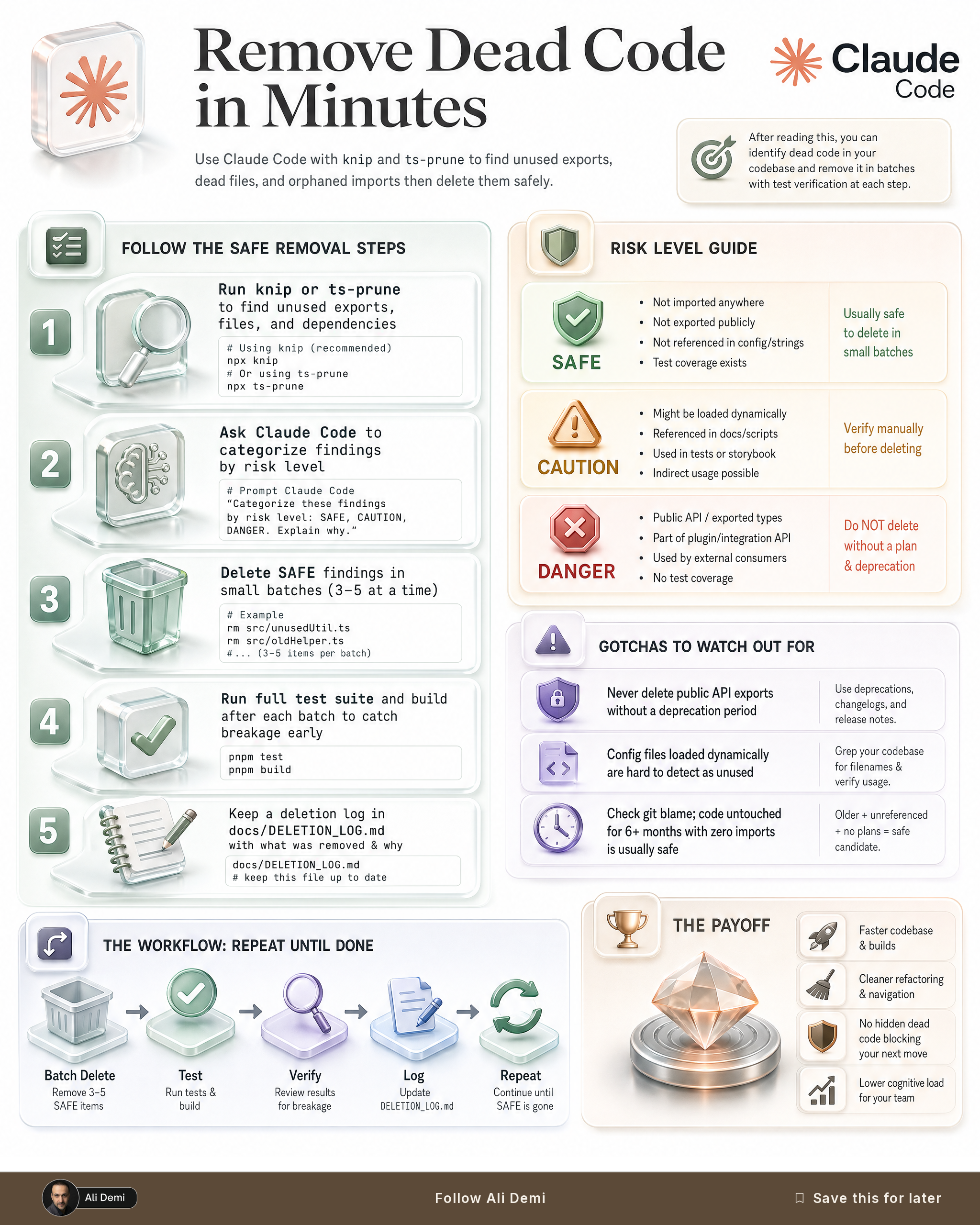
    The workflow: detect, categorize, delete in batches. You run analysis tools like knip or ts-prune, Claude Code reads the report, and you delete in small, safe chunks with full test verification after each batch.

    Step 1: Run the analysis. In a TypeScript project, run knip to find unused exports, unused files, unused dependencies, and unused types.

    In a smaller project, run ts-prune to find unused TypeScript exports specifically.

    Both emit a clear list of what’s unreferenced.

    Step 2: Let Claude Code categorize the findings. Paste the report and ask Claude to group findings by risk level: SAFE (clearly unreferenced internal exports, unused dev deps), CAUTION (UI components, route handlers), DANGER (config files, entrypoints, public APIs).

    This takes seconds.

    Step 3: Delete SAFE findings first, in batches of 3-5. Have Claude delete a small batch, then run your test suite and build.

    Confirm both pass.

    If something breaks, you’ve got a small changeset to debug.

    If it passes, move to the next batch.

    Step 4: Keep a deletion log. Create a file like docs/DELETION_LOG.md and ask Claude to append each deletion batch with: what was deleted, why (unused export, nobody imports, dead import), and the batch date.

    Six months from now, you’ll know exactly when and why that code vanished.

    Gotchas: public APIs and config files. Never delete a public export without a deprecation period.

    Never delete a config you’re not 100% sure is dead (some configs are loaded dynamically at runtime).

    When in doubt, grep the whole codebase plus your docs, and check git blame to see when it was last touched.

    Code untouched for 6+ months and never imported is safe to kill.

    Why batch deletion matters. Deleting 50 dead exports in one commit is a nightmare to debug if it breaks.

    Deleting 5 at a time, running tests, and moving on means you pinpoint any breakage to exactly those 5.

    One test failure per batch beats one failure across 50.

    The payoff. Your codebase gets faster to navigate.

    Your build gets faster.

    Your next refactor is cleaner.

    You can refactor that old utility without wondering if anyone’s using it, because you’ve already confirmed nobody is.

    ——

    Book your free AI clarity call, NOW!
    https://buff.ly/TpWy277

    ——

    Repost this. Thanks.
  • Refactor 10x Faster: Parallel Batch Processing

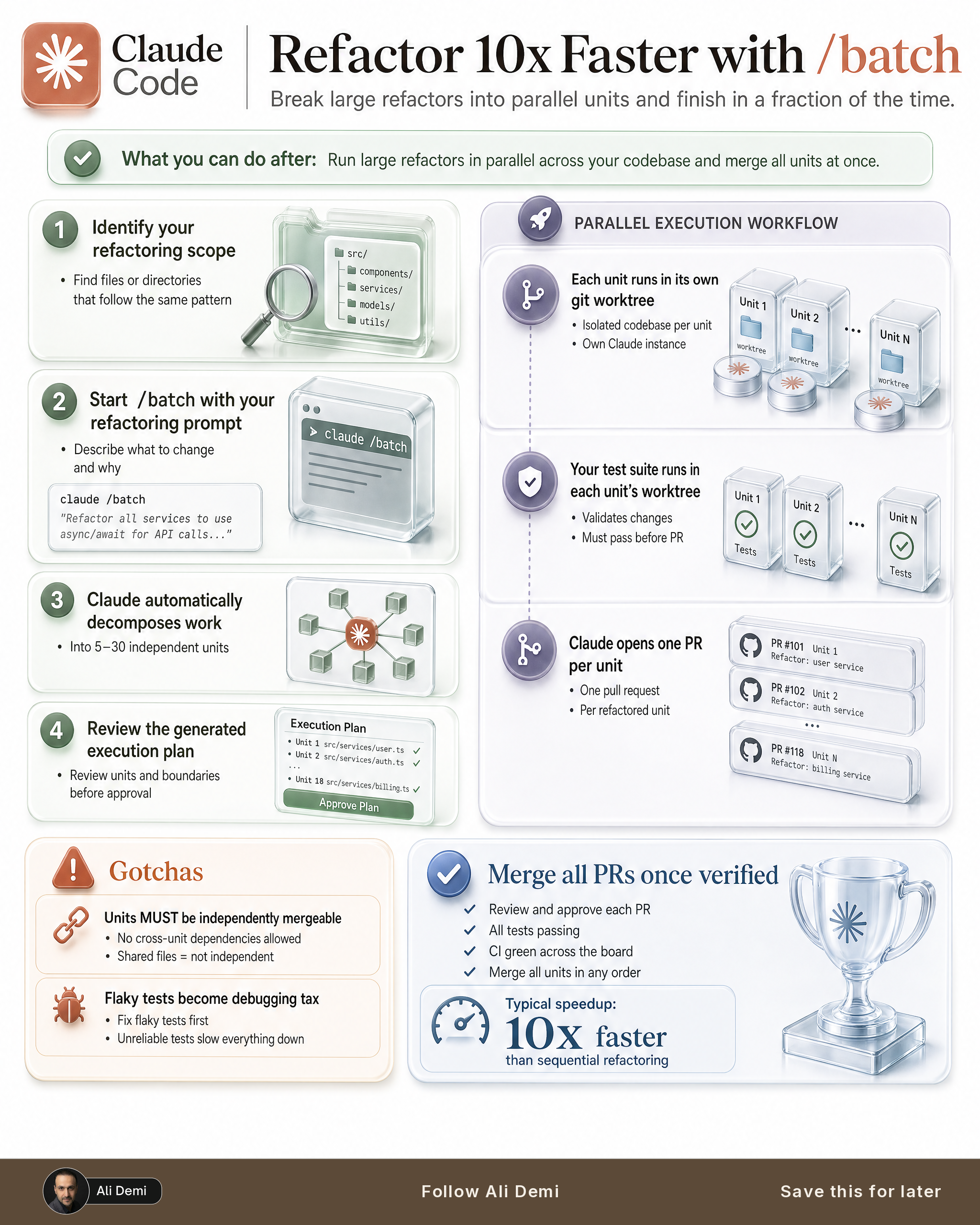
    Refactor 10x Faster: Parallel Batch Processing

    Refactoring your whole codebase file-by-file takes forever.

    You make the same change ten times, wait for tests to pass ten times, debug the same edge case across ten PRs.

    Claude Code’s /batch command breaks that pattern.

    Instead of one refactor running sequentially, /batch decomposes your task into 5-30 independent units and runs them in parallel. Each unit gets its own Claude instance, its own git worktree, its own PR. When they finish, you merge them all at once. Typical speedup: 10x faster than file-by-file.

    Here’s the flow:

    First, identify your refactoring scope. Large codebases usually have clusters of files that follow the same pattern. An old API client library used in 15 places. A deprecated utility function scattered across the backend. A style migration across all React components. Find them with grep, a glob, or your own knowledge of the codebase.

    Pass your refactoring prompt to /batch. Tell it what you’re changing and why. Claude decomposes the work: one unit per file, or one per logical scope if they’re naturally grouped. It shows you the plan before executing anything. Read it. Does each unit stand alone? Can a reviewer merge one without waiting for another? If yes, approve.

    From there, /batch takes over. Each unit spins up in its own worktree. Claude runs your refactoring prompt independently on each one. Tests run. Changes go into a PR. No waiting for one unit to finish before the next starts.

    Watch the PRs come in. Merge when tests pass. Done.

    One gotcha: units must be independently mergeable. If unit B depends on unit A’s result, /batch isn’t the right tool. For that kind of sequential work, run the refactors one at a time. Another gotcha: each unit needs its own passing test suite. If your tests are flaky, fix that before starting /batch or you’ll spend more time debugging than you saved.

    For codebases with hundreds of files, /batch is a productivity multiplier. It’s especially useful for migrations, deprecations, and style updates where the change is the same everywhere but independent per-file.

    ——

    Book your free AI clarity call, NOW!
    https://buff.ly/TpWy277

    ——

    Repost this. Thanks.
  • Turn Scattered Notes Into a Searchable Knowledge Base in Minutes

    Most knowledge workers have it: a notes folder that is part goldmine, part chaos. Hundreds of files in no particular order, duplicate ideas scattered across different files, no way to find the connection between that marketing insight from three months ago and today’s project brief.

    Claude Code can fix this in one run. Point it at your notes folder, give it a simple structure rule, and Claude reads every file, extracts the key concepts, identifies which notes are related, generates tags, and builds a wiki with wikilinks that connect everything.

    Create a project folder with three directories: `input/` (your raw notes), `output/` (where the wiki lives), and a CLAUDE.md file with your rules. Tell Claude: read every markdown and text file in input, extract one topic per note, identify 3-5 entities and concepts, look for connections to other notes, generate 2-4 relevant tags, and create structured markdown output with yaml frontmatter (title, tags, related-notes).

    Claude generates three outputs: your organized notes with wikilinks in output/notes/, a root index.md that lists all topics and tags, and a graph.json file that maps connections. Open index.md in any markdown app or wiki tool and start navigating. All your scattered ideas are now one search away.

    The magic is the wikilinks: Claude finds that your note on customer retention connects to your note on pricing strategy, and embeds that link so you discover the connection you didn’t know you made.


    Book your free AI clarity call, NOW!
    https://buff.ly/TpWy277


    Sources:
    https://obsidian.md/
    https://roamresearch.com/
    https://docs.anthropic.com/en/docs/claude-code/overview

    Repost this. Thanks.

  • Turn Zoom Transcripts into Action Items

    Turn Zoom Transcripts into Action Items

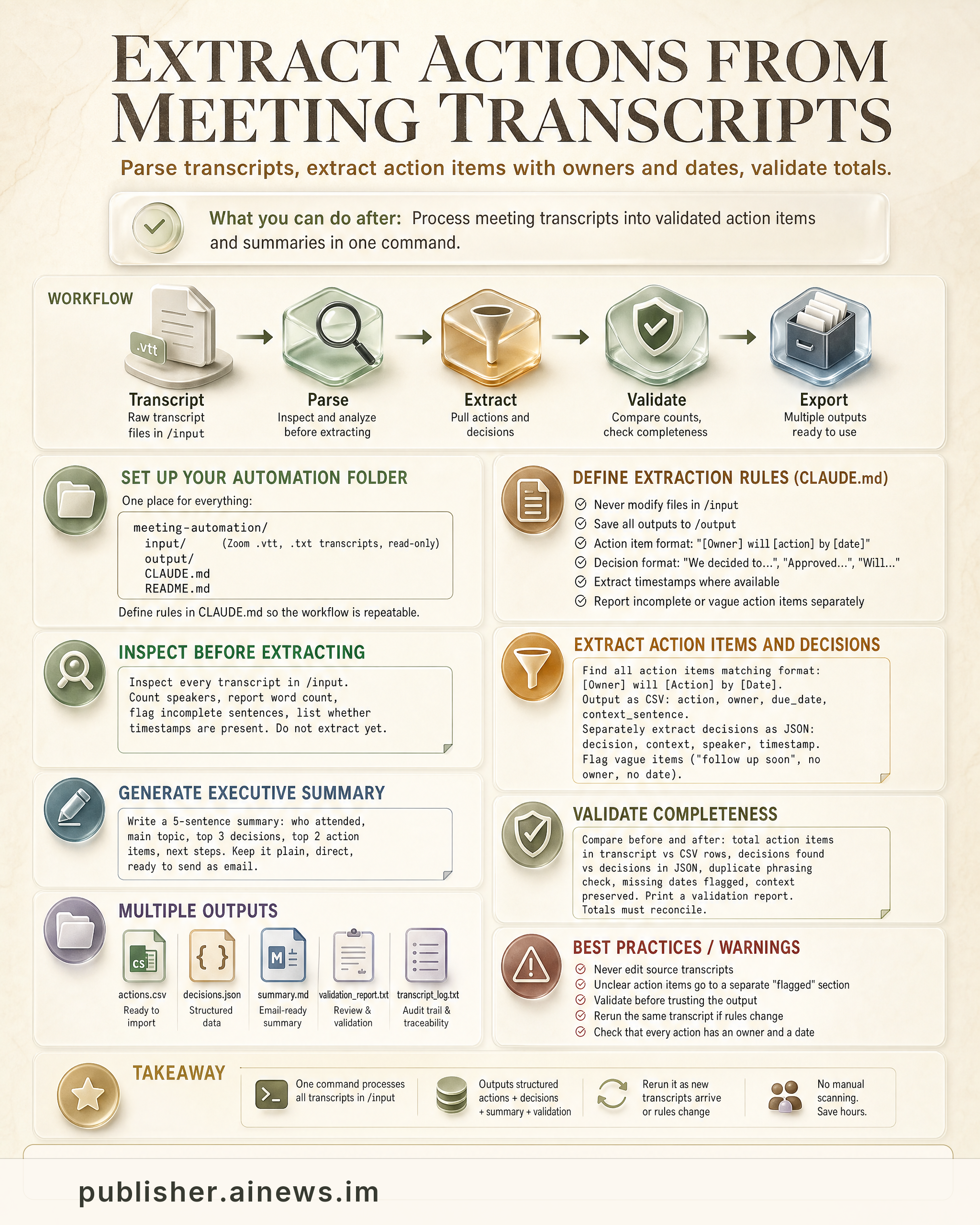
    Meeting transcripts arrive as text files, Zoom .vtt exports, or voice memo dumps. Most teams manually scan them: highlight action items, note who owns what, spot the decisions, write a summary email. Claude Code can read transcripts from a folder, extract structured data, and save multiple outputs in one pass.

    Start with a project folder: an /input directory for transcripts (read-only), an /output folder for results, and a CLAUDE.md file that defines extraction rules. Rules matter. Define what counts as an action item: “X will do Y by DATE” is clear; “follow up soon” is not.

    Ask Claude to inspect first. Count speakers, report word count, flag incomplete sentences, list timestamps present or missing. Do not extract yet. Then define the rules: extract action items with owner, deadline, and context. Extract decisions separately. Generate a 5-sentence summary. Output three files: actions.csv, decisions.json, and summary.md.

    Before export, validate. Compare total action items mentioned in the transcript vs items in the CSV. Check for duplicates phrased differently. Report any action items that mention dates vs those that don’t. A validation report shows what was captured and what might have been missed.

    Once it works, rerun it with one command across all new transcripts. The output is ready to paste into project trackers or send as a follow-up email.


    Book your free AI clarity call, NOW!
    https://buff.ly/TpWy277


    Sources:
    https://docs.anthropic.com/en/docs/claude-code/overview

    Repost this. Thanks.

  • Turn Meeting Chaos Into Actionable Notes in Seconds

    Turn Meeting Chaos Into Actionable Notes in Seconds

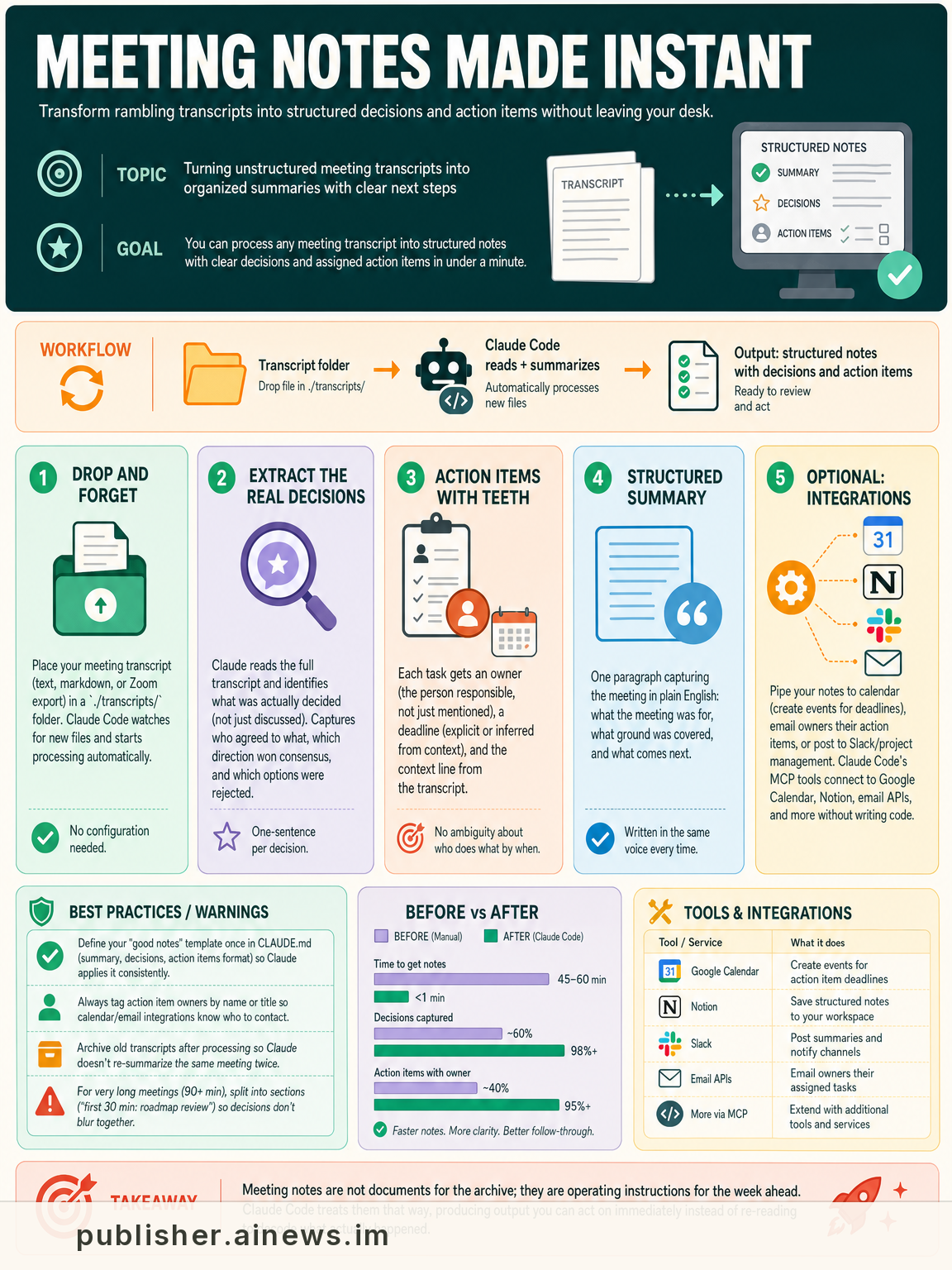
    Every meeting ends the same way: someone volunteers to “send the notes” and then nothing arrives until people start asking what they were supposed to do. Claude Code stops that. Drop your transcript or Zoom recording in a folder, and within seconds you have a document that lists decisions, action items with owners, and deadlines.

    The structure beats any human note-taker. Claude reads the whole transcript at once, doesn’t miss side comments where decisions actually happen, and formats everything the same way every time. Meetings with 5 people or 50 feel identical in the output.

    You need no code. You need no templates to memorize. You describe once what a good note looks like (summary, decisions, action items with owners). Claude Code learns it and applies it to every meeting for the rest of the quarter.

    The payoff compounds. A team of 10 running 4 meetings a week saves 40 hours a quarter on note-taking, follow-up emails asking “wait, was I supposed to do this?”, and hunting through Slack threads for decisions. That’s 10 hours per person per quarter spent on things that actually matter.


    Book your free AI clarity call, NOW!
    https://buff.ly/TpWy277


    Sources:
    https://www.hustlebadger.com/what-do-product-teams-do/project-meeting-summarizer/
    https://www.analyticsvidhya.com/blog/2026/03/ai-meeting-summarizer-with-claude-code-mcp/
    https://every.to/source-code/how-to-use-claude-code-for-everyday-tasks-no-programming-required

    Repost this. Thanks.