Dead code creeps in everywhere: unused exports, files nobody imports, dependencies no one needs.
It makes refactoring harder, slows down navigation, bloats your ship size.
Claude Code can hunt all of it down and delete it safely.
Why this matters. Dead code makes your codebase fragile.
When you’re deciding whether to refactor that old utility function, you don’t know if someone’s using it secretly.
When you’re modernizing your stack, you can’t tell which packages are actually critical.
Dead code is mental friction on every change.
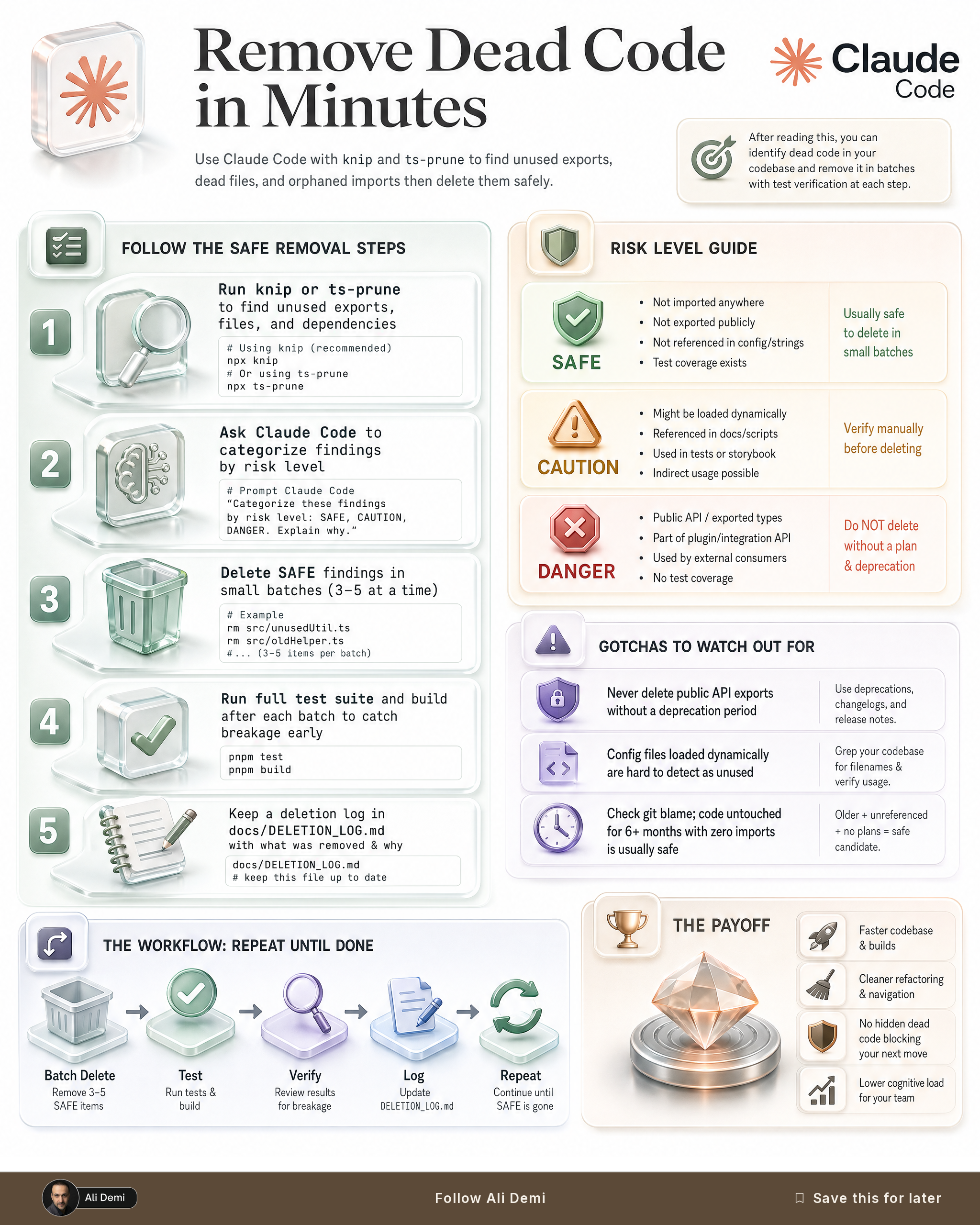
The workflow: detect, categorize, delete in batches. You run analysis tools like knip or ts-prune, Claude Code reads the report, and you delete in small, safe chunks with full test verification after each batch.
Step 1: Run the analysis. In a TypeScript project, run knip to find unused exports, unused files, unused dependencies, and unused types.
In a smaller project, run ts-prune to find unused TypeScript exports specifically.
Both emit a clear list of what’s unreferenced.
Step 2: Let Claude Code categorize the findings. Paste the report and ask Claude to group findings by risk level: SAFE (clearly unreferenced internal exports, unused dev deps), CAUTION (UI components, route handlers), DANGER (config files, entrypoints, public APIs).
This takes seconds.
Step 3: Delete SAFE findings first, in batches of 3-5. Have Claude delete a small batch, then run your test suite and build.
Confirm both pass.
If something breaks, you’ve got a small changeset to debug.
If it passes, move to the next batch.
Step 4: Keep a deletion log. Create a file like docs/DELETION_LOG.md and ask Claude to append each deletion batch with: what was deleted, why (unused export, nobody imports, dead import), and the batch date.
Six months from now, you’ll know exactly when and why that code vanished.
Gotchas: public APIs and config files. Never delete a public export without a deprecation period.
Never delete a config you’re not 100% sure is dead (some configs are loaded dynamically at runtime).
When in doubt, grep the whole codebase plus your docs, and check git blame to see when it was last touched.
Code untouched for 6+ months and never imported is safe to kill.
Why batch deletion matters. Deleting 50 dead exports in one commit is a nightmare to debug if it breaks.
Deleting 5 at a time, running tests, and moving on means you pinpoint any breakage to exactly those 5.
One test failure per batch beats one failure across 50.
The payoff. Your codebase gets faster to navigate.
Your build gets faster.
Your next refactor is cleaner.
You can refactor that old utility without wondering if anyone’s using it, because you’ve already confirmed nobody is.
——
Book your free AI clarity call, NOW!
https://buff.ly/TpWy277
——
Repost this. Thanks.
Leave a Reply