Tag: refactoring

  • Stop Rewriting from Scratch: Migrate Millions of Lines Automatically

    Stop Rewriting from Scratch: Migrate Millions of Lines Automatically

    You’re stuck with legacy Python. You want Go.

    You’re on an old Node.js stack. You want Rust.

    Rewriting from scratch takes years. Hiring language experts takes months. Manual line-by-line translation is error-prone and tedious.

    What if Claude translated your entire codebase automatically, passing every test suite as it goes?

    The process:

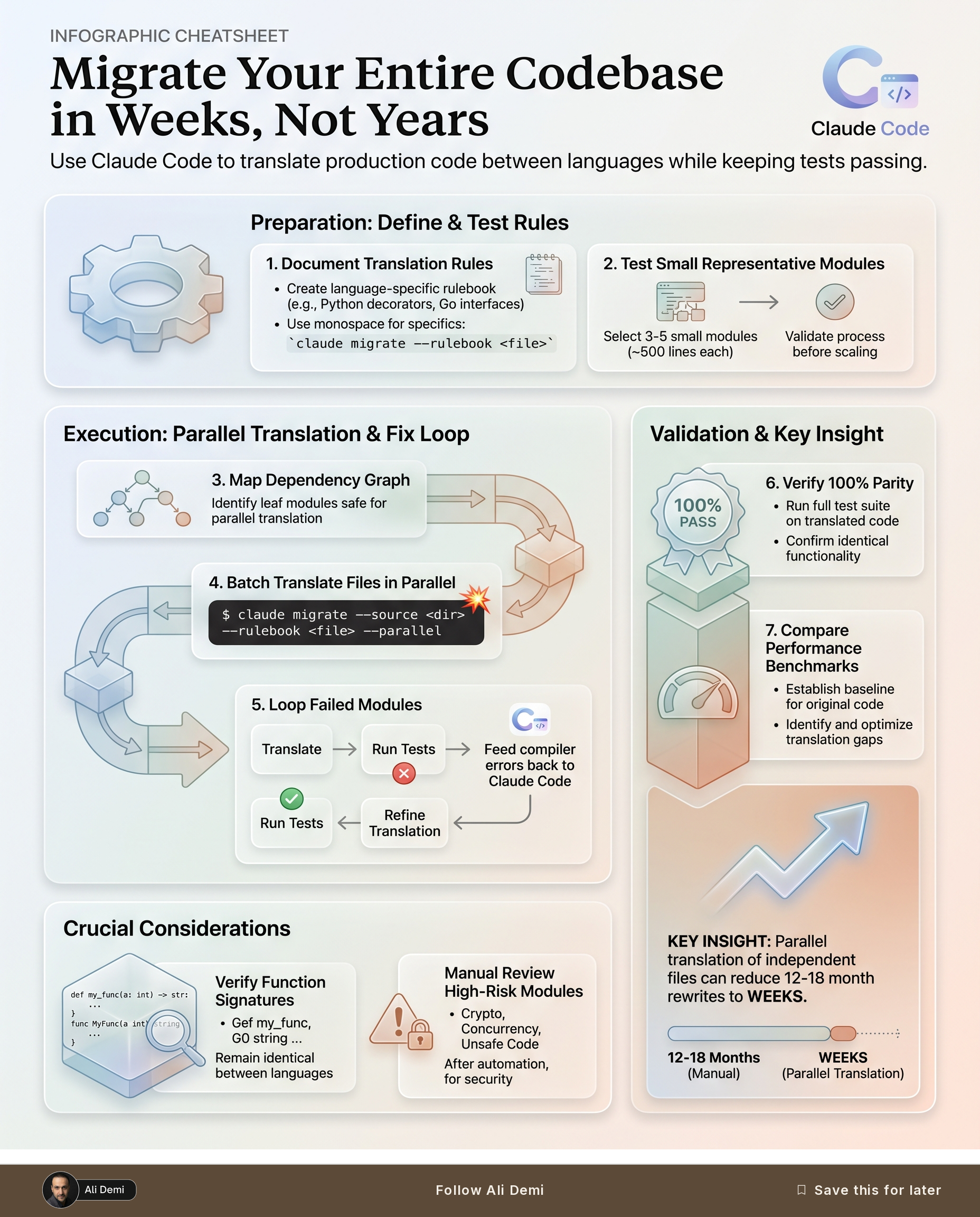
    Start by documenting your migration rules in a simple markdown file. Map language-specific patterns: Python decorators to TypeScript hooks, Go interfaces to Rust traits, whatever your translation needs. This becomes your rulebook that Claude follows across the entire migration.

    Build a dependency graph of your codebase. Identify leaf modules with zero external dependencies. These become your safe starting points for parallel translation.

    Run a mini stress-test first. Pick 3-5 representative small modules (a few hundred lines each). Feed Claude the rulebook plus source code plus tests, and ask it to translate and verify. This validates your process before scaling.

    Now parallelize. Feed Claude batches of files with the rulebook and their corresponding tests. Claude translates, you run your test suite automatically. Files that pass move forward. Files that fail loop back to Claude with compiler errors attached.

    Claude sees the error, fixes the code, tests again. No human guessing, no manual debugging cycles. The loop runs until green.

    After translation, run your full test suite on the new code. Compare performance benchmarks. Manually review the highest-risk modules. Everything else is systematically proven equivalent.

    The payoff: Codebases that would take 12-18 months to migrate manually can be translated, tested, and verified in weeks. No rewrites. No losing your architecture. Your tests prove correctness every step.

    ——

    Book your free AI clarity call, NOW!
    https://buff.ly/TpWy277

    ——

    Repost this. Thanks.
  • Refactor Components Once, Update Everywhere Automatically

    Refactor Components Once, Update Everywhere Automatically

    You just realized your Button component has five different ways to handle size. Time to consolidate.

    But you also have 200 uses of Button scattered across your codebase.

    Manual find-and-replace? That’s error-prone and takes hours. Let Claude do it.

    The workflow:

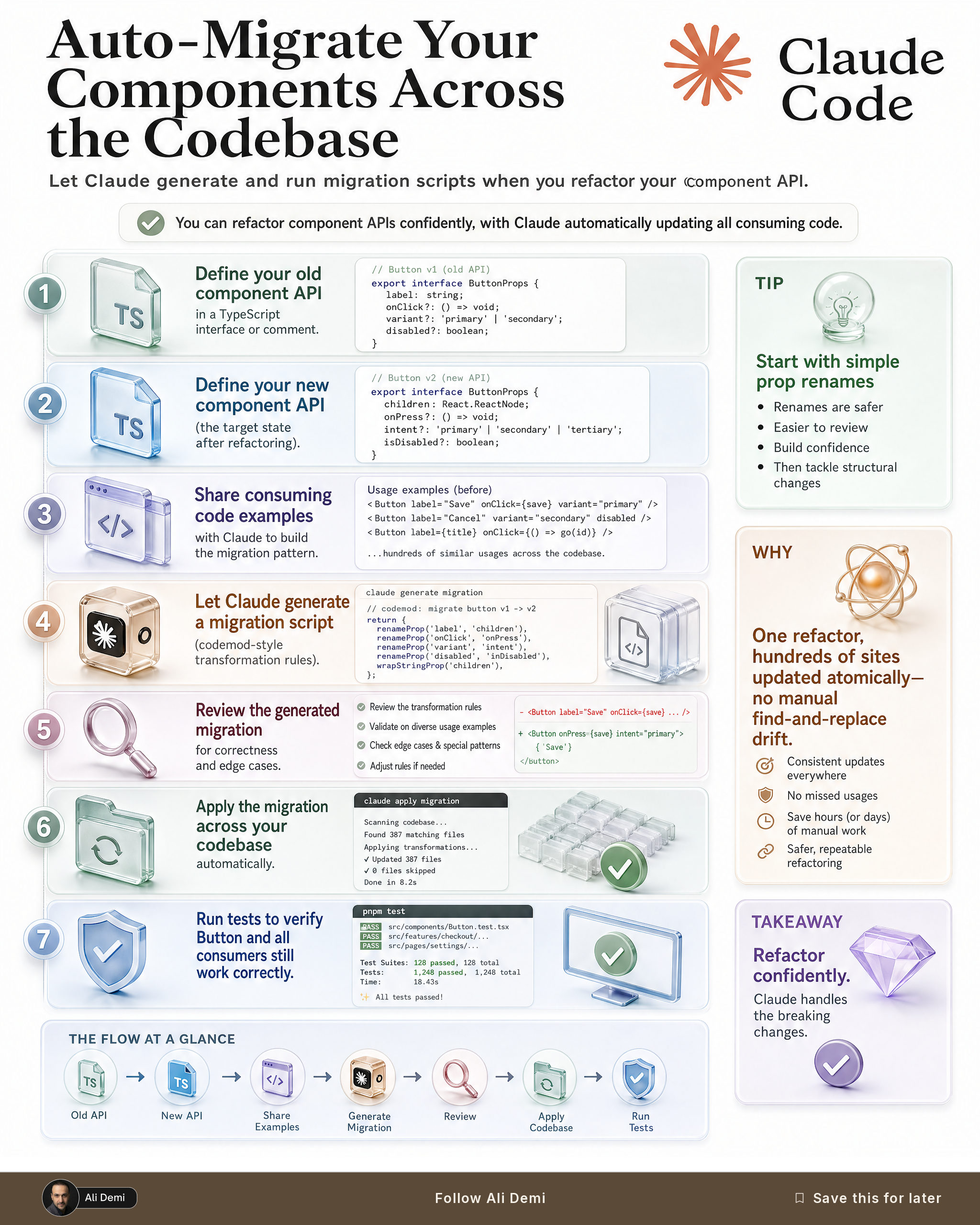
    1. Write the old component API (current prop shapes and interfaces).
    2. Write the new component API (desired changes, renamed props, restructured objects).
    3. Paste a few examples of current usage into Claude Code.
    4. Ask Claude to generate a migration script that transforms all usages from old to new.
    5. Claude analyzes the consuming code and outputs transformation rules (regex or AST patterns).
    6. Review the generated script, then let Claude apply it across your entire codebase.
    7. Run your test suite to verify nothing broke.

    Real example: Your Button component goes from separate `loading`, `disabled`, `variant` props to a single `state` prop. Claude generates the migration that rewrites all 200 Button usages from `

  • Your Code is a Mess: Let Claude Find the Worst Parts

    Your Code is a Mess: Let Claude Find the Worst Parts

    You have messy code. Somewhere in your codebase, a function is nested four levels deep, packed with conditionals, and hasn’t been touched in six months. When it breaks, nobody knows why. When you need to change it, you’re terrified.

    The problem: you have no idea which functions are the most dangerous.

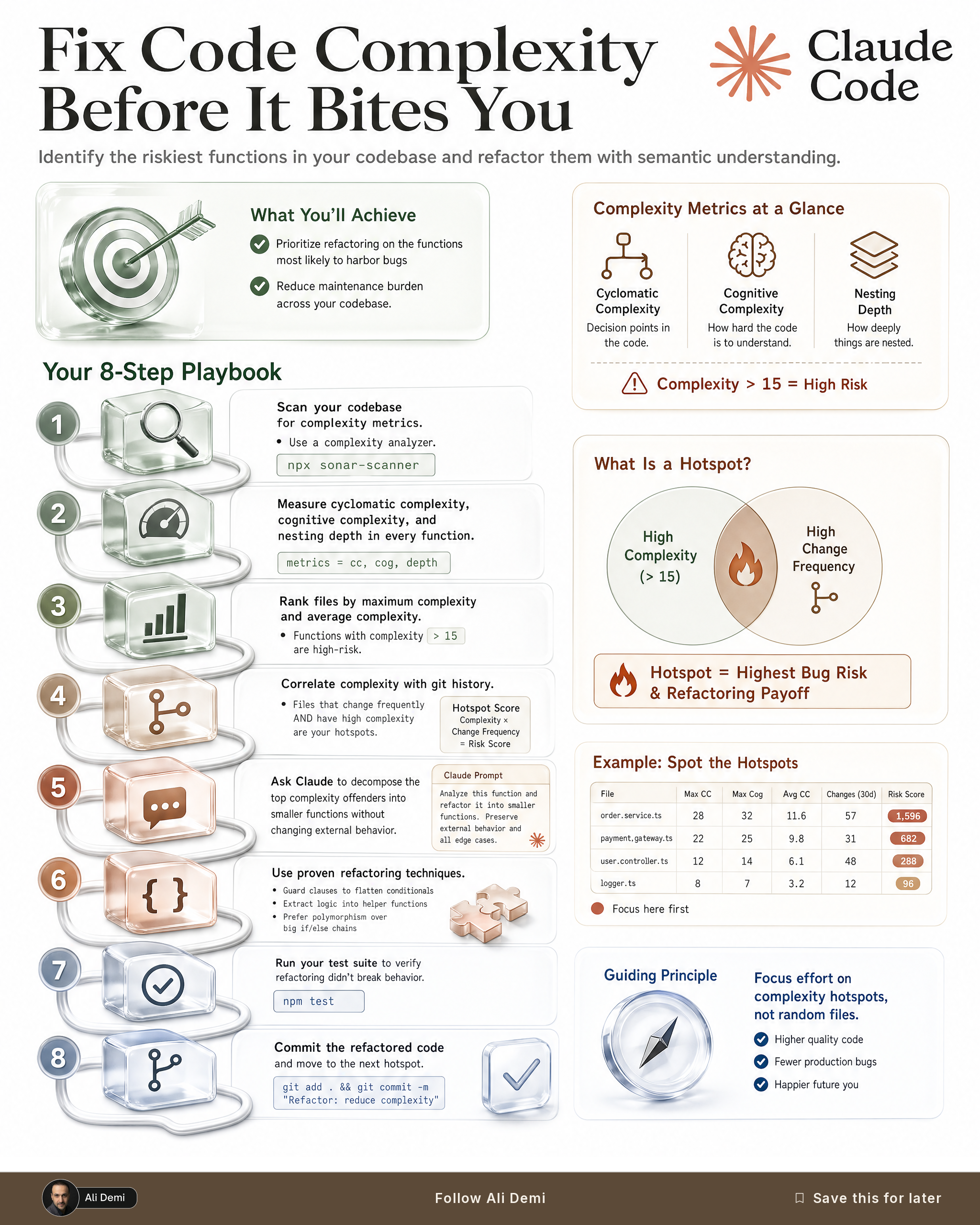
    Complexity metrics tell you. Cyclomatic complexity counts decision points (if/else, loops, switches). Cognitive complexity measures how hard code is to read. Functions with complexity scores above 15 are statistically more likely to hide bugs and take longer to maintain.

    Claude Code can scan your entire codebase, measure complexity in every function, rank files by risk (complexity + change frequency), and refactor the hotspots that matter most.

    The process is straightforward.

    Step 1: Measure complexity across your codebase. Ask Claude to run a complexity analyzer on your project. It scans every file, calculates cyclomatic complexity, cognitive complexity, nesting depth, and method length. Output ranks files by maximum complexity and average complexity per function.

    Step 2: Identify your hotspots. Hotspots are files that are both complex AND change frequently. A 500-line file nobody touches is low-risk. A 30-line function with complexity 18 that your team modifies every week is a time bomb. Claude can correlate complexity with git history to find these.

    Step 3: Decompose the worst functions. Take the top complexity offenders and ask Claude to refactor them. The key: refactor without changing the external interface. Break a complex function into smaller helpers, extract conditional logic into guard clauses, use polymorphism instead of big if/else chains. Claude understands the intent and preserves behavior.

    Step 4: Verify and commit. Run your test suite. If everything passes, commit the refactored code. You’ve just reduced maintenance burden on the functions most likely to fail.

    A real example: a 210-line Python function with cyclomatic complexity 16 was refactored into a clean 30-line function with complexity dropping to 3-6 across the extracted helpers. Same behavior, dramatically easier to maintain.

    Stop guessing which code needs work. Measure it. Focus effort where it matters. Claude handles the analysis and the refactoring.

    ——

    Book your free AI clarity call, NOW!
    https://buff.ly/TpWy277

    ——

    Repost this. Thanks.
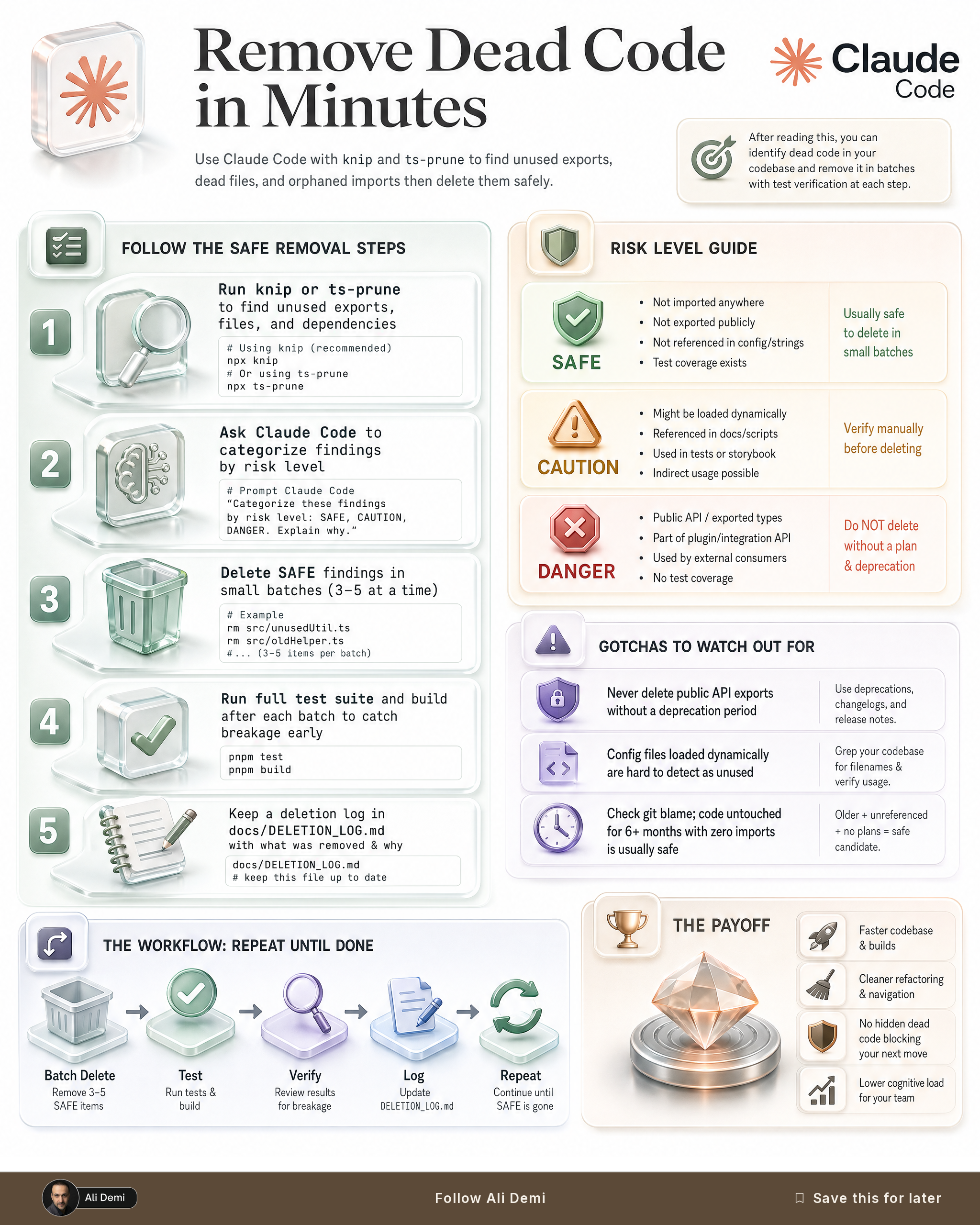
  • Find Dead Code Fast: Let Claude Clean Your Codebase

    Find Dead Code Fast: Let Claude Clean Your Codebase

    Dead code creeps in everywhere: unused exports, files nobody imports, dependencies no one needs.

    It makes refactoring harder, slows down navigation, bloats your ship size.

    Claude Code can hunt all of it down and delete it safely.

    Why this matters. Dead code makes your codebase fragile.

    When you’re deciding whether to refactor that old utility function, you don’t know if someone’s using it secretly.

    When you’re modernizing your stack, you can’t tell which packages are actually critical.

    Dead code is mental friction on every change.

    The workflow: detect, categorize, delete in batches. You run analysis tools like knip or ts-prune, Claude Code reads the report, and you delete in small, safe chunks with full test verification after each batch.

    Step 1: Run the analysis. In a TypeScript project, run knip to find unused exports, unused files, unused dependencies, and unused types.

    In a smaller project, run ts-prune to find unused TypeScript exports specifically.

    Both emit a clear list of what’s unreferenced.

    Step 2: Let Claude Code categorize the findings. Paste the report and ask Claude to group findings by risk level: SAFE (clearly unreferenced internal exports, unused dev deps), CAUTION (UI components, route handlers), DANGER (config files, entrypoints, public APIs).

    This takes seconds.

    Step 3: Delete SAFE findings first, in batches of 3-5. Have Claude delete a small batch, then run your test suite and build.

    Confirm both pass.

    If something breaks, you’ve got a small changeset to debug.

    If it passes, move to the next batch.

    Step 4: Keep a deletion log. Create a file like docs/DELETION_LOG.md and ask Claude to append each deletion batch with: what was deleted, why (unused export, nobody imports, dead import), and the batch date.

    Six months from now, you’ll know exactly when and why that code vanished.

    Gotchas: public APIs and config files. Never delete a public export without a deprecation period.

    Never delete a config you’re not 100% sure is dead (some configs are loaded dynamically at runtime).

    When in doubt, grep the whole codebase plus your docs, and check git blame to see when it was last touched.

    Code untouched for 6+ months and never imported is safe to kill.

    Why batch deletion matters. Deleting 50 dead exports in one commit is a nightmare to debug if it breaks.

    Deleting 5 at a time, running tests, and moving on means you pinpoint any breakage to exactly those 5.

    One test failure per batch beats one failure across 50.

    The payoff. Your codebase gets faster to navigate.

    Your build gets faster.

    Your next refactor is cleaner.

    You can refactor that old utility without wondering if anyone’s using it, because you’ve already confirmed nobody is.

    ——

    Book your free AI clarity call, NOW!
    https://buff.ly/TpWy277

    ——

    Repost this. Thanks.
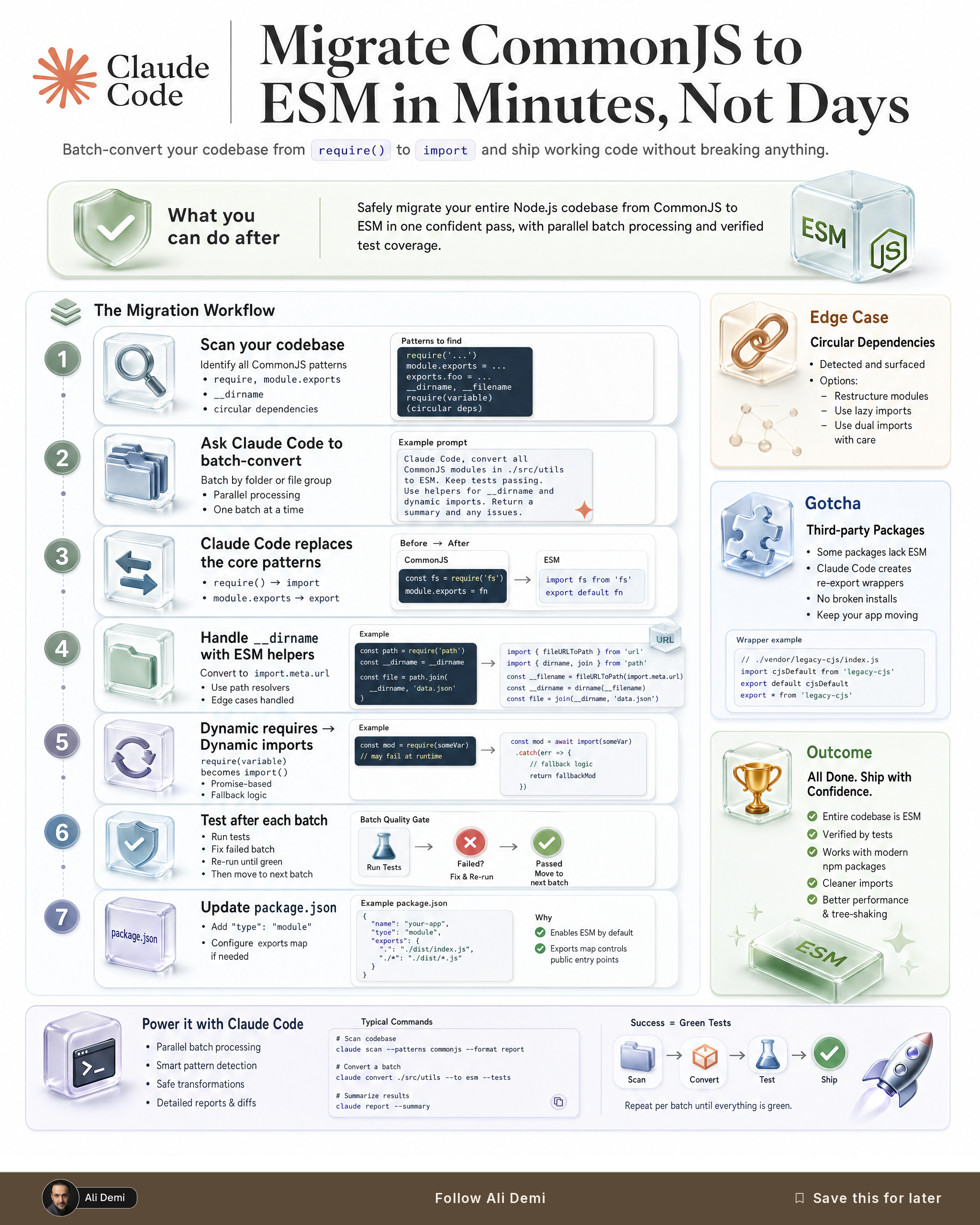
  • Stop Manually Migrating Node.js to ESM: Let Claude Handle It

    Stop Manually Migrating Node.js to ESM: Let Claude Handle It

    You’re stuck: your Node.js project is on CommonJS, but you need ESM to use modern packages and stay current.

    The problem: manually rewriting require() to import, renaming module.exports, and handling the edge cases (__dirname doesn’t exist, circular dependencies break, some patterns don’t translate) takes days and leaves you paranoid.

    The fix: use Claude Code’s batch-processing workflow to parallelize the migration.

    The workflow:

    1. Run a quick scan: ask Claude Code to identify all CommonJS patterns (every require, every module.exports, __dirname, __filename, dynamic requires). It also spots circular dependencies and risky patterns.
    2. Batch-convert modules: split your src/ into files and hand them to Claude Code in parallel batches. Each batch converts its files to ESM, handling the edge cases (replaces __dirname with import.meta.url logic, wraps dynamic requires in Promise-based fallbacks).
    3. Verify in real time: after each batch, run your test suite. If a batch breaks, Claude Code shows you exactly which file caused it and fixes it before moving on.
    4. Update config: once files are converted, Claude Code updates your package.json (sets type: module), build tool config, and any explicit exports map.

    The gotchas to watch:

    __dirname and __filename don’t exist in ESM modules. The fix: import.meta.url becomes your reference point (one extra import per file that needs it).

    Circular dependencies get exposed in ESM where they were hidden in CommonJS. Claude Code spots them; you decide if you restructure or work around.

    Some packages don’t export ESM yet. For those, ask Claude Code to generate a thin CommonJS re-export wrapper so you can keep importing the old way (temporary bridge).

    The whole migration runs in parallel, verified by your test suite every step. No manual find-and-replace, no guessing.

    ——

    Book your free AI clarity call, NOW!
    https://buff.ly/TpWy277

    ——

    Repost this. Thanks.
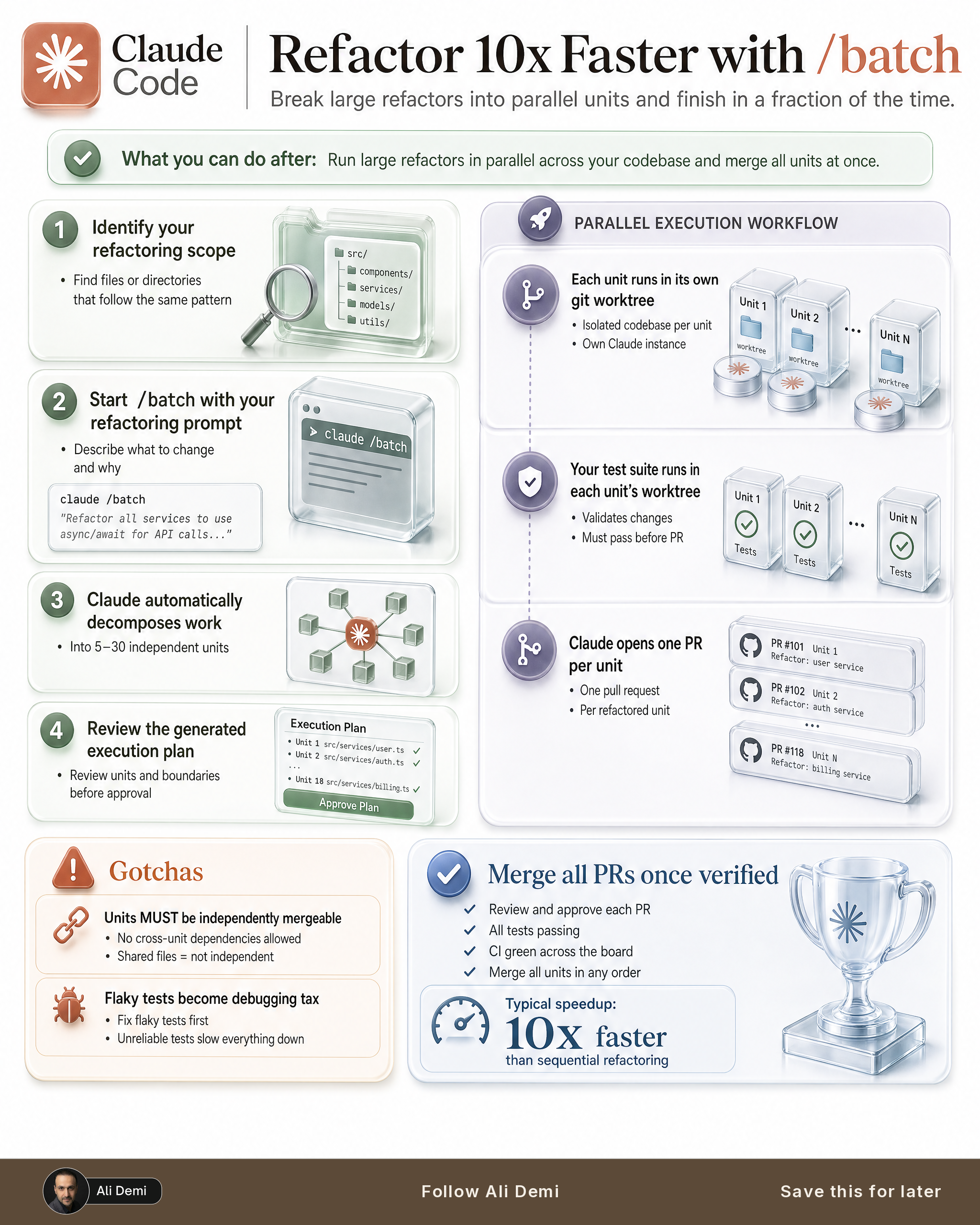
  • Refactor 10x Faster: Parallel Batch Processing

    Refactor 10x Faster: Parallel Batch Processing

    Refactoring your whole codebase file-by-file takes forever.

    You make the same change ten times, wait for tests to pass ten times, debug the same edge case across ten PRs.

    Claude Code’s /batch command breaks that pattern.

    Instead of one refactor running sequentially, /batch decomposes your task into 5-30 independent units and runs them in parallel. Each unit gets its own Claude instance, its own git worktree, its own PR. When they finish, you merge them all at once. Typical speedup: 10x faster than file-by-file.

    Here’s the flow:

    First, identify your refactoring scope. Large codebases usually have clusters of files that follow the same pattern. An old API client library used in 15 places. A deprecated utility function scattered across the backend. A style migration across all React components. Find them with grep, a glob, or your own knowledge of the codebase.

    Pass your refactoring prompt to /batch. Tell it what you’re changing and why. Claude decomposes the work: one unit per file, or one per logical scope if they’re naturally grouped. It shows you the plan before executing anything. Read it. Does each unit stand alone? Can a reviewer merge one without waiting for another? If yes, approve.

    From there, /batch takes over. Each unit spins up in its own worktree. Claude runs your refactoring prompt independently on each one. Tests run. Changes go into a PR. No waiting for one unit to finish before the next starts.

    Watch the PRs come in. Merge when tests pass. Done.

    One gotcha: units must be independently mergeable. If unit B depends on unit A’s result, /batch isn’t the right tool. For that kind of sequential work, run the refactors one at a time. Another gotcha: each unit needs its own passing test suite. If your tests are flaky, fix that before starting /batch or you’ll spend more time debugging than you saved.

    For codebases with hundreds of files, /batch is a productivity multiplier. It’s especially useful for migrations, deprecations, and style updates where the change is the same everywhere but independent per-file.

    ——

    Book your free AI clarity call, NOW!
    https://buff.ly/TpWy277

    ——

    Repost this. Thanks.