Tag: testing

  • Stop Lost in Translation: Turn Requirements Into Tests

    Stop Lost in Translation: Turn Requirements Into Tests

    Your product specs live in Slack and your code lives in Git. By the time your feature ships, nobody remembers what was actually promised.

    What if requirements and tests were the same thing?

    This is different from testing what your code does. This is testing that your code does what you said it would.

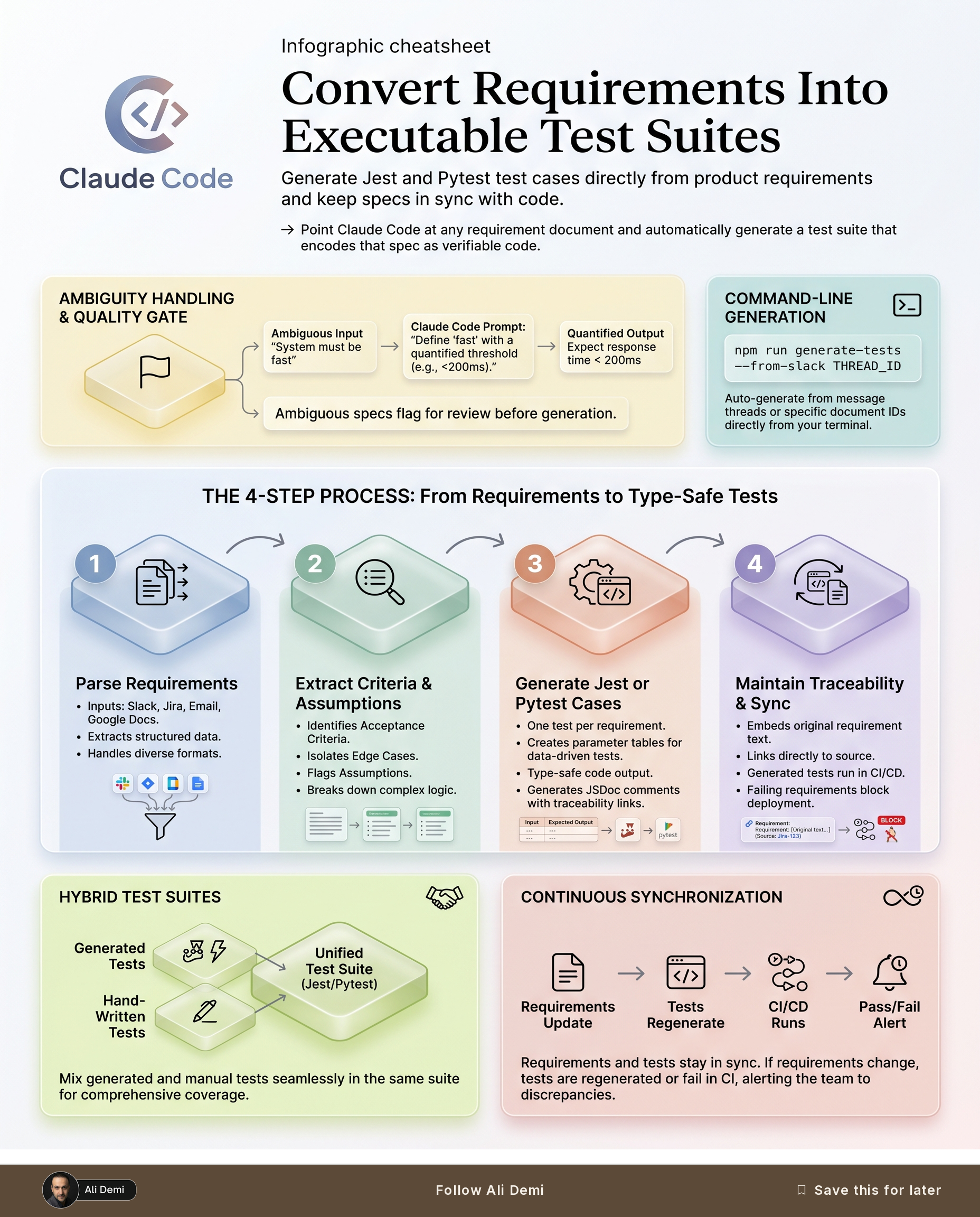
    Point Claude Code at a Slack thread, Jira issue, or email spec. Claude extracts the acceptance criteria, edge cases, and assumptions. Then it generates a full Jest or Pytest test suite where each test case maps back to the original requirement.

    Your workflow becomes:

    1. Product writes a spec (Slack thread, issue description, email)
    2. Run `claude generate-tests –from-slack thread_id` or point Claude at the Jira issue
    3. Claude generates tests with JSDoc comments linking to the original requirement
    4. Tests land in your PR, reviewers can see intent, code review talks about behavior not implementation
    5. Tests run in CI; when product changes spec, test fails, blocking deployment until code matches the new promise

    Claude handles the hardest part: understanding ambiguous English and turning it into precise, executable assertions. Ambiguous specs (say “fast” without defining latency thresholds) are flagged for clarification before code-gen starts.

    The real win: your test suite becomes the contract between product and engineering. When someone says “I don’t remember if we committed to that,” run the tests. The code is the truth.

    ——

    Book your free AI clarity call, NOW!
    https://buff.ly/TpWy277

    ——

    Repost this. Thanks.
  • Your Coverage Report is Lying: Auto-Fix Test Gaps

    Your Coverage Report is Lying: Auto-Fix Test Gaps

    You run your test suite, coverage report lands, and half your code has no tests.

    You know you should write tests for the gaps. But your coverage report doesn’t tell you WHICH gaps matter, WHICH branches are uncovered, or WHERE the untested paths hide.

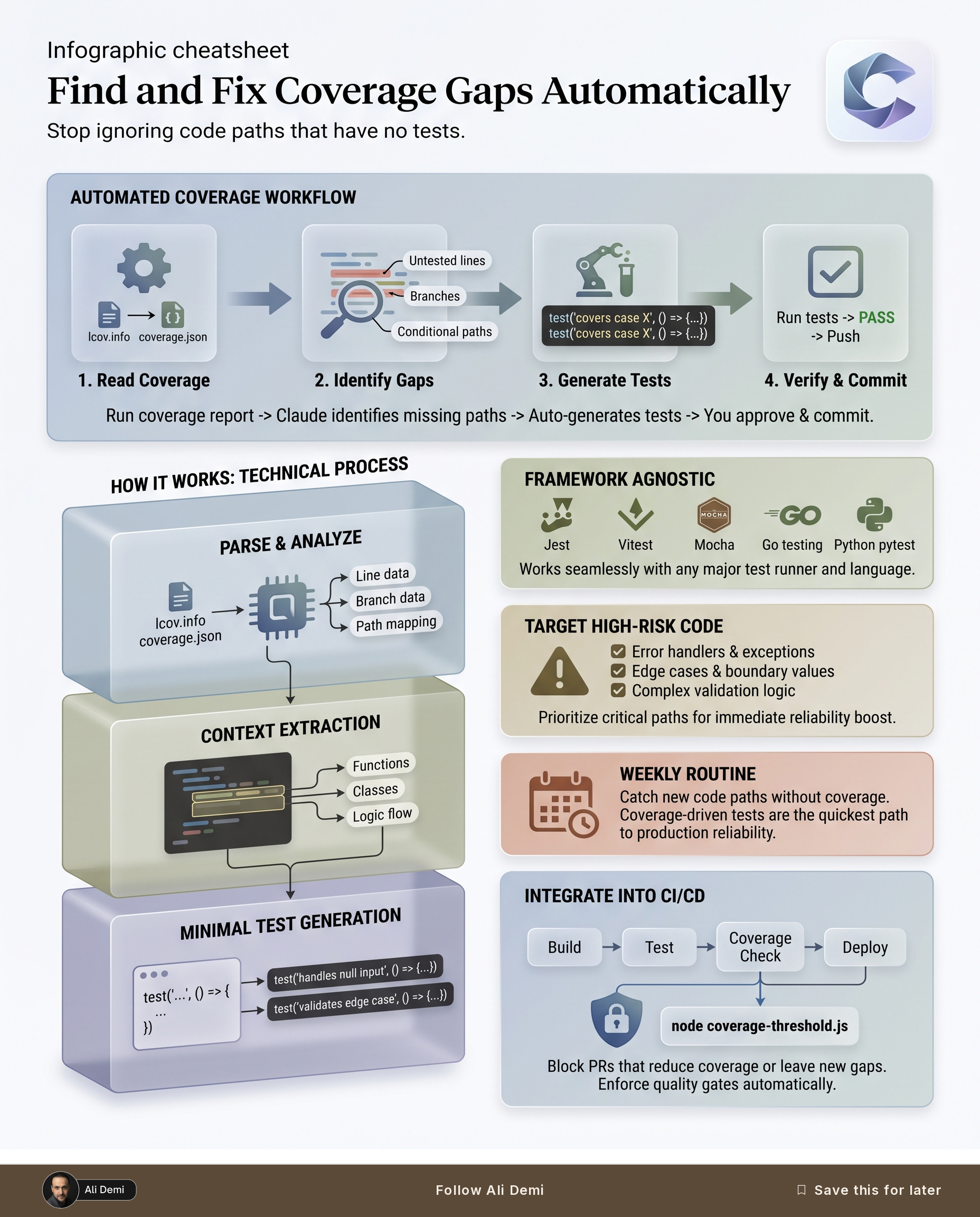
    Claude changes that. It reads your coverage report, finds every untested code path, and generates the minimal test case needed to cover it.

    The workflow:

    1. Run your test suite with coverage instrumentation. Get back lcov.info or coverage.json.
    2. Point Claude at your coverage report and source files. It parses which lines and branches have zero execution.
    3. For each untested path, Claude extracts the code and generates a laser-focused test case that exercises it.
    4. Push the generated tests to your repo, run them to verify coverage goes up.
    5. Set up a GitHub Actions workflow that fails any PR dropping coverage, runs this analysis automatically.

    What you get: no more technically tested code that fails in production. No more guessing which functions matter. No more coverage theater.

    ——

    Book your free AI clarity call, NOW!
    https://buff.ly/TpWy277

    ——

    Repost this. Thanks.
  • Test Your Prompts Like Code: Automate LLM Evaluation

    Test Your Prompts Like Code: Automate LLM Evaluation

    You write a prompt, ship it to production, and hope it works across all your use cases. Then you discover it fails on edge cases. No metrics. No score. Just broken.

    Treat prompts like code. Test them with a scoring rubric. Measure against baselines. Iterate until you win.

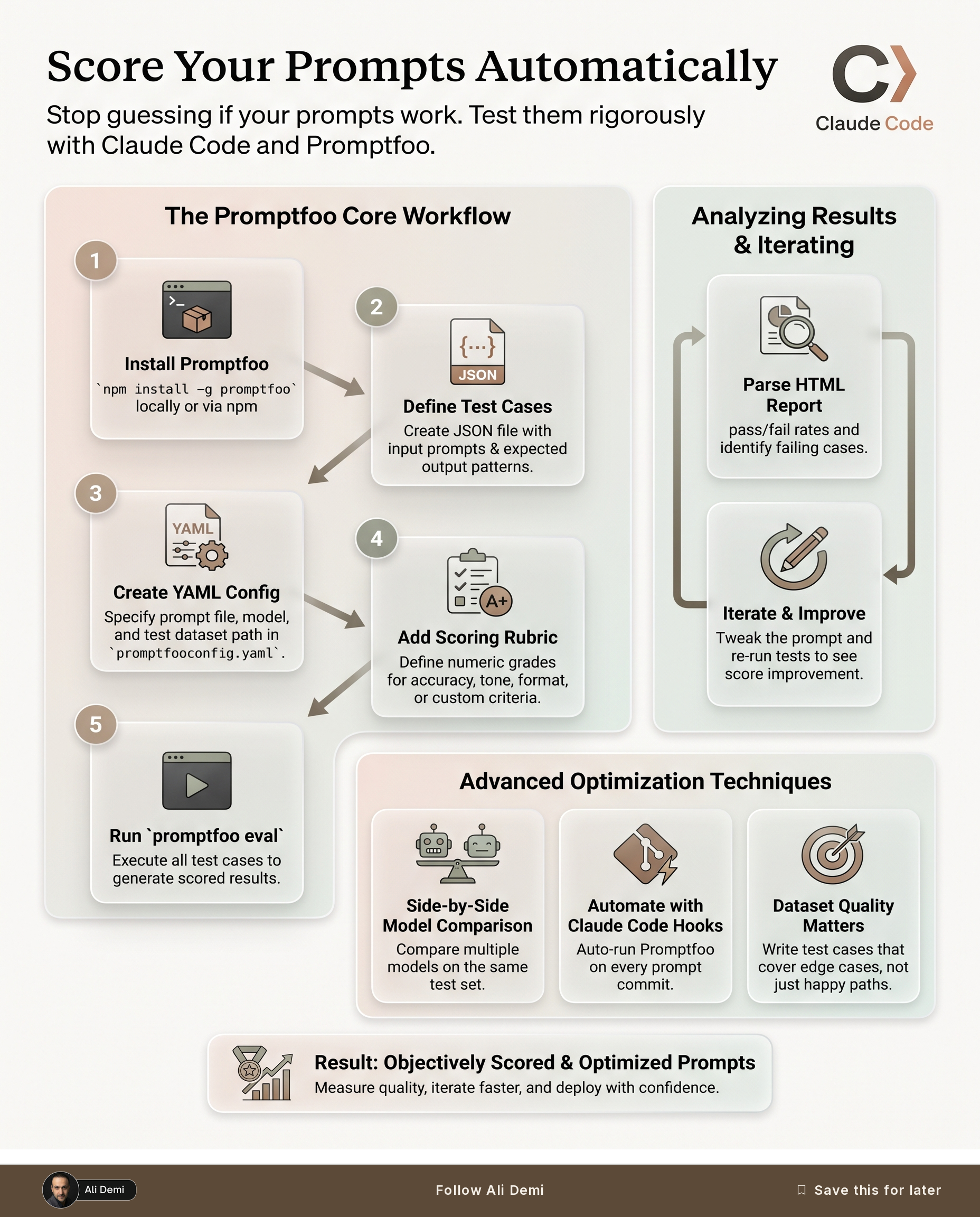
    Promptfoo is a testing framework for LLM applications. It runs your prompt against a dataset of test cases, scores each result with a rubric (accuracy, tone, format compliance, whatever you need), and shows you pass/fail rates. Claude Code automates the whole pipeline.

    You define the rubric once. Claude Code sets up your test harness, runs Promptfoo, parses results, and shows you exactly which cases fail and why. Then you tweak the prompt, re-run the tests, and watch your score climb.

    You can test different prompts in parallel, compare Claude Opus vs Sonnet on the same cases, or measure the cost-quality tradeoff of switching models. Data, not vibes.

    ——

    Book your free AI clarity call, NOW!
    https://buff.ly/TpWy277

    ——

    Repost this. Thanks.
  • Stop Using Real Customer Data in Tests: Auto-Redact PII in Minutes

    Stop Using Real Customer Data in Tests: Auto-Redact PII in Minutes

    Your test database is either fake and useless, or real and dangerous.

    Fake data doesn’t catch edge cases. Real data finds bugs. But using actual customer info in tests violates GDPR, HIPAA, and common sense.

    The usual workaround is weeks of manual redaction: hunting for emails, masking credit cards, guessing what counts as sensitive. It’s slow, incomplete, and easy to miss PII hiding in unexpected places.

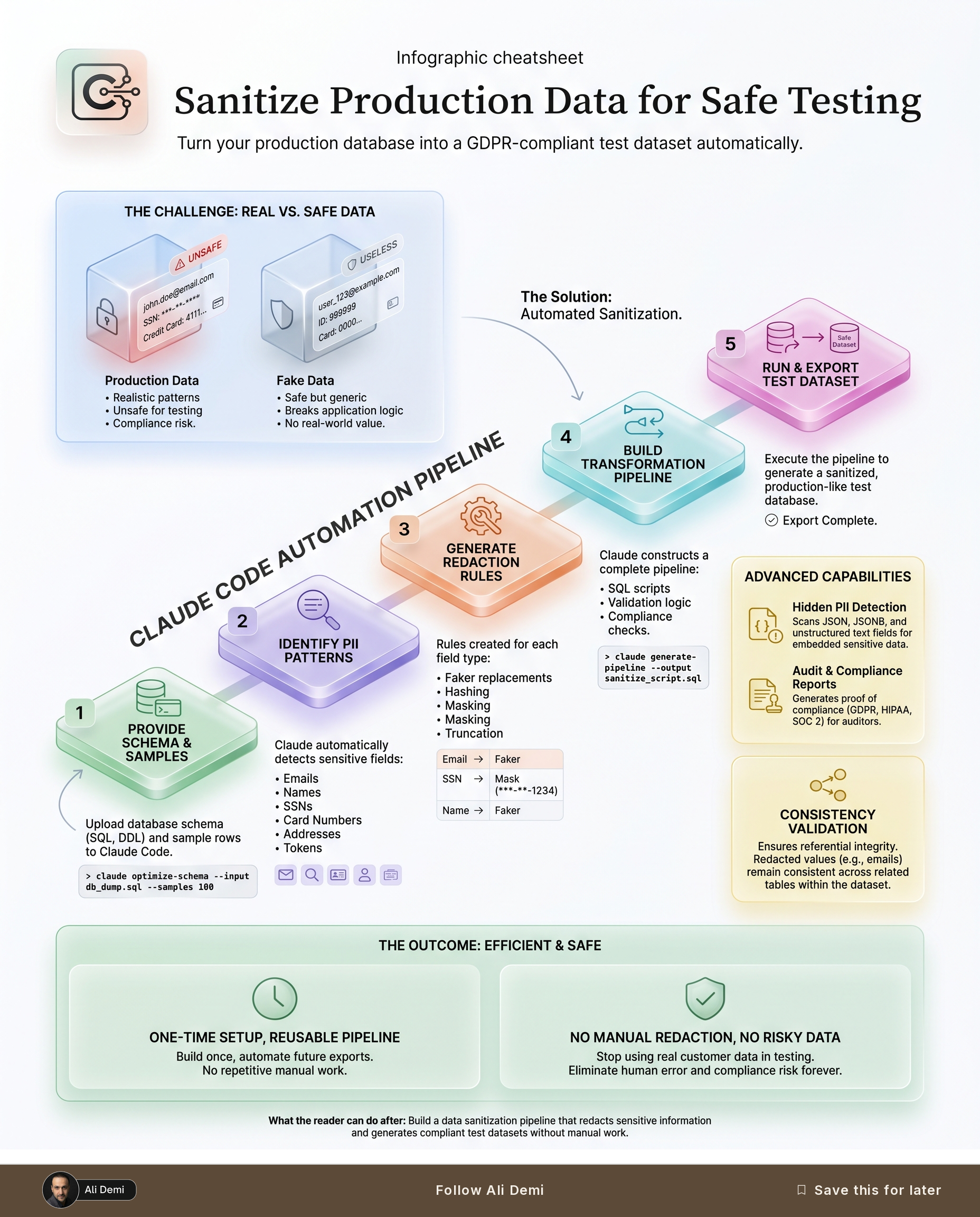
    Claude Code flips this. Point it at your database schema, and it builds a complete sanitization pipeline in minutes.

    Here’s how:

    1. Give Claude your database schema and sample rows. It identifies PII patterns automatically: emails, phone numbers, names, SSNs, card numbers, API keys, anything sensitive.
    2. Claude generates redaction rules for each field: faker-based replacements (realistic fake names, emails), hashing (consistent across rows), masking (keep last 4 digits of cards), truncation.
    3. Claude builds the transformation pipeline: SQL queries, validation checks, compliance reporting.
    4. Run once, export a sanitized dataset that looks and behaves like production but contains zero real customer data.
    5. Teams get production-realistic data for testing. Security and compliance win. Done.

    The real power: Claude doesn’t just redact what you tell it to. It scans the entire schema, finds PII you didn’t notice (that user_metadata JSON field hiding emails, the notes column with phone numbers), and redacts it all at once.

    Result: safe test data in hours instead of weeks. No more using real customer info in tests. No more pretending fake data is good enough.

    ——
    Book your free AI clarity call, NOW!
    https://buff.ly/TpWy277
    ——

    Repost this. Thanks.
  • Stop Writing Test Scripts: Generate E2E Tests from User Stories

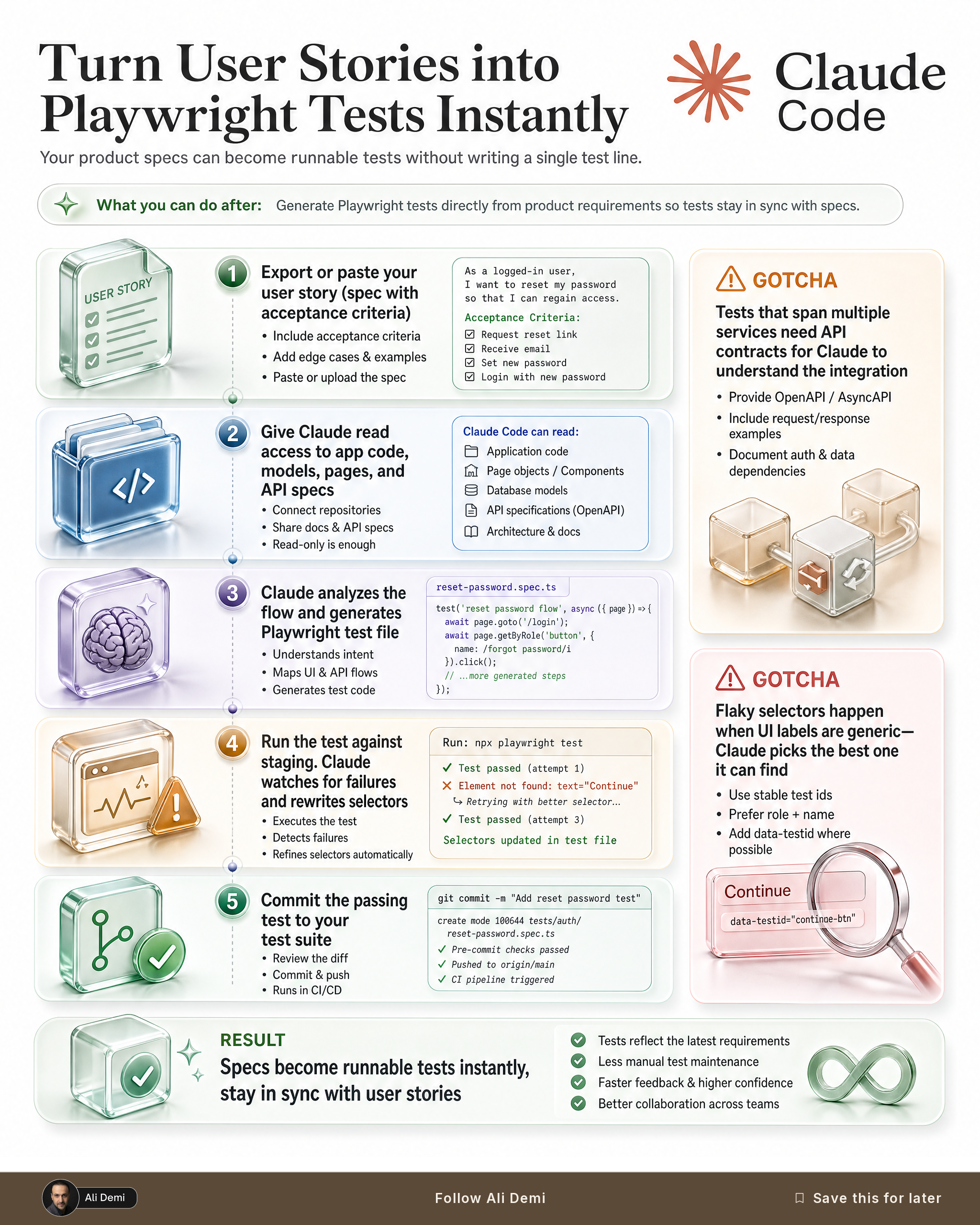
    Stop Writing Test Scripts: Generate E2E Tests from User Stories

    Writing E2E tests is the work that never ends. Your QA team gets a user story, reads it three times, writes forty lines of Playwright code, and guesses whether they got the flow right. By the time tests ship, the spec’s already changed.

    Instead: feed your user story straight to Claude, point it at the app, and watch it generate tests that actually work.

    Here’s how it works:

    1. Paste your user story into Claude Code. Example: “As a user, I sign up with email, set a password, verify my email, and land on the dashboard.”
    2. Claude reads your codebase, finds the login page, understands the form fields and API calls.
    3. Claude generates a Playwright test that navigates the flow, fills forms, clicks buttons, and asserts the expected outcome.
    4. Run the test. If it fails, Claude sees the error and rewrites the selector or the assertion.
    5. Commit. Your test is maintainable because Claude understands WHY it exists-not just WHAT it does.

    The magic: Claude doesn’t just write click(‘button’). It understands your app’s structure and labels inputs by their actual purpose-“email input”, “submit button”-so tests survive refactors.

    Gotcha: Claude needs access to your app’s code (models, pages, API routes). If your test depends on a flow that spans multiple services, give Claude the API contracts too. Otherwise it’ll generate tests that look right but fail on integration.

    This scales. One story per Claude run. String together twenty stories, you have a full smoke test suite in an afternoon, not two weeks.

    ——

    Book your free AI clarity call, NOW!
    https://buff.ly/TpWy277

    ——

    Repost this. Thanks.
  • Stop Guessing: Use AI to Diagnose Flaky Tests

    Stop Guessing: Use AI to Diagnose Flaky Tests

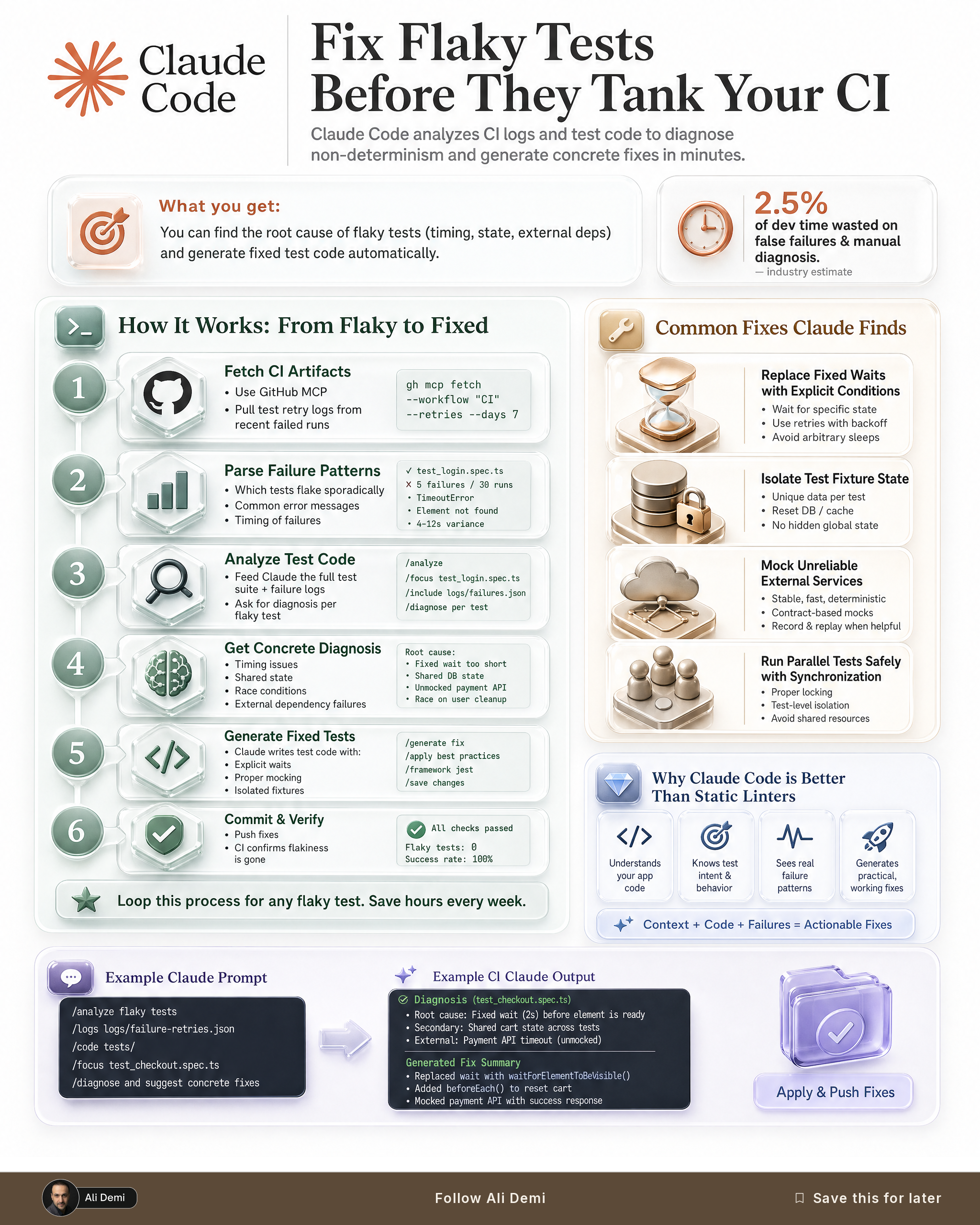
    Flaky tests are a silent killer. You rerun CI, tests pass. You merge, they fail in production. Your team spends 2.5% of productive time chasing false failures and patching over symptoms instead of fixing root causes.

    The problem is diagnosis. Most flaky test tools just detect (reruns pass/fail ratio) or retry (and mask the bug). They don’t tell you WHY a test is non-deterministic: Is it a timing issue? Shared state? Race condition? Mocked service that sometimes fails?

    Claude Code reads test code and CI logs together to find the answer.

    The workflow:

    1. Pull test retry history from your last 20 CI runs (GitHub Actions artifacts, GitHub API).
    2. Parse failure patterns: which tests fail sporadically, what errors do they log, are the failures time-correlated or environment-specific.
    3. Read the test source code. Ask Claude: based on this code and these failure patterns, what’s the non-deterministic behavior.
    4. Generate fixed test code: add explicit waits, isolate fixture state, mock external calls, parallelize safely.
    5. Commit, push, let CI verify the fix works.

    Why Claude is better than static analyzers for this:

    A linter flags “setTimeout in test” as risky. Claude reads the test, the app code it exercises, the CI logs, and the failure mode, then tells you: “This test times out only on slow CI runners. Replace the fixed 500ms wait with an explicit wait for the modal to be visible.” Same problem, concrete fix.

    The commands you’d use:

    Use the GitHub MCP to fetch CI run artifacts and logs. Feed the full test suite and a sample of flaky test runs to Claude with a prompt like: “Analyze these tests and CI failure logs. Which tests are flaky, what’s the likely root cause of each (timing, state isolation, race condition, external dependency), and what’s the concrete fix.”

    Claude returns a ranked list of flaky tests, diagnosis for each, and fixed test code you can commit directly.

    What you save:

    Investigating a flaky test manually takes an hour: dig through CI logs, trace the failure, read the test code, hypothesize, build a fix, iterate. Claude does it in 2 minutes. On a team with 3-5 consistently flaky tests, that’s 5-10 hours a week back in your pocket.

    ——

    Book your free AI clarity call, NOW!
    https://buff.ly/TpWy277

    ——

    Repost this. Thanks.
  • Stop Writing Test Fixtures: Generate Realistic Test Data in Minutes

    Stop Writing Test Fixtures: Generate Realistic Test Data in Minutes

    You’re hand-writing JSON fixtures.

    They’re brittle, they never look like real data, and when your schema changes, you rewrite half of them.

    Stop.

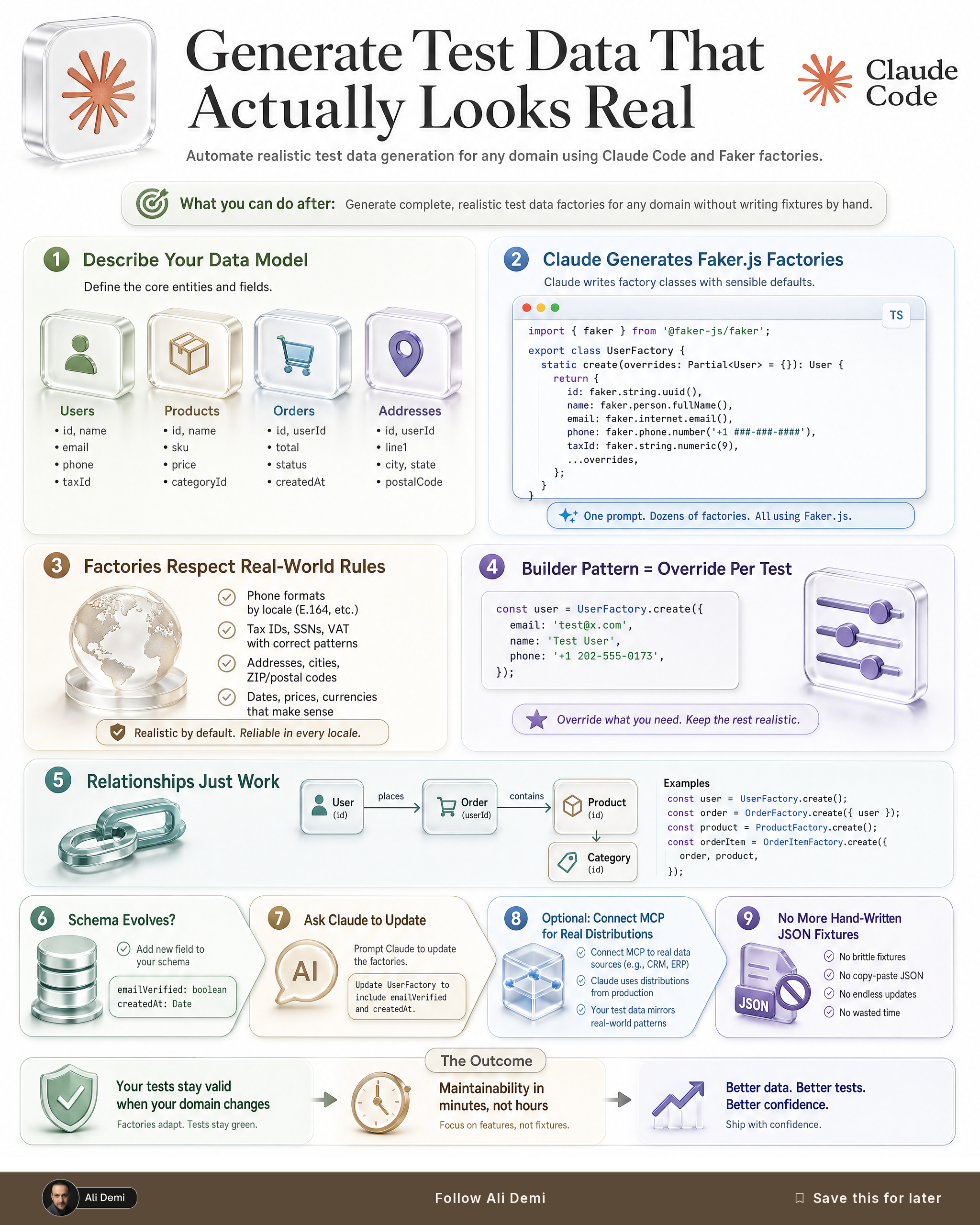
    Claude Code can generate Faker factories that build realistic test data automatically.

    Here’s how:

    1. Describe your domain (Users, Products, Orders, Addresses)
    2. Claude generates a factory module with localized, realistic data
    3. Replace hardcoded fixtures with factory calls
    4. Add new fields? Just ask Claude to update the factory
    5. Optionally connect to real data via MCP for production-like distributions

    Your factories respect real-world rules: Indian phone formats, valid tax IDs, believable addresses.

    Relationships work too – Orders know their Users, OrderItems know their Products.

    The result: maintainable test suites that don’t break when your schema evolves.

    ——

    Book your free AI clarity call, NOW!
    https://buff.ly/TpWy277

    ——

    Repost this. Thanks.
  • Stop Writing Edge Case Tests: Let Claude Find the Bugs

    Stop Writing Edge Case Tests: Let Claude Find the Bugs

    You write 5 test cases for your function and ship it. Then a user hits an edge case you never thought of-and your code crashes.

    Manual test writing is exhausting. You list scenarios: empty input, null, negative numbers, Unicode, extremely long strings. You miss half of them.

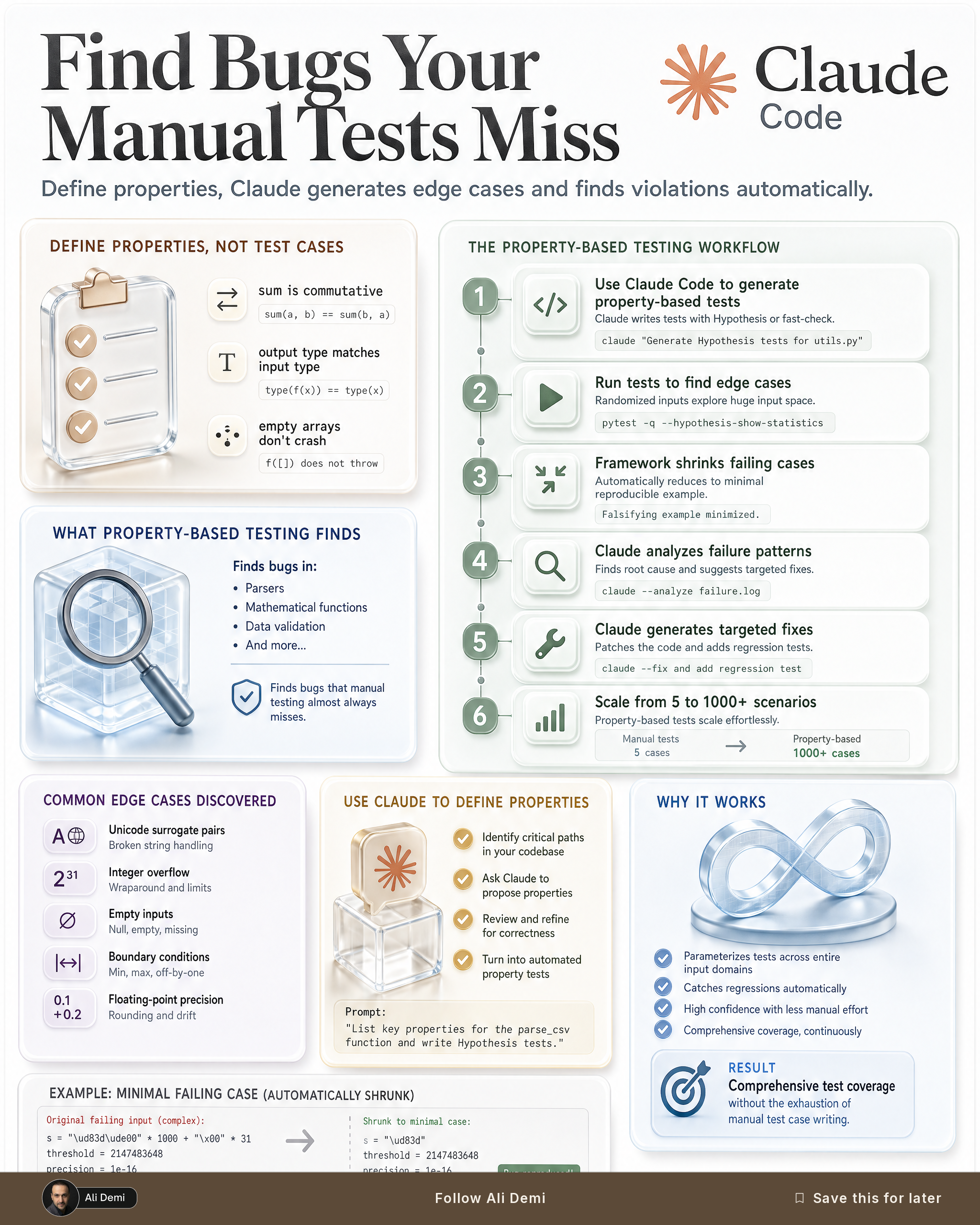
    Property-based testing flips this. Instead of writing individual test cases, you define properties-invariants that should always be true. Claude Code generates hundreds of randomized inputs automatically, finds violations, and shrinks failures to the minimal reproducible example.

    It’s the difference between testing 5 cases and testing 1000.

    Start by defining your properties: “sum is commutative,” “JSON roundtrip equals original,” “parser output length matches input constraint.” Then tell Claude to generate property-based tests using hypothesis or fast-check. Claude writes the test suite. Run it. The framework finds edge cases you wouldn’t discover in months of manual testing.

    When a test fails, Claude analyzes the pattern-“your parser fails on surrogate pairs,” “off-by-one in boundary condition”-and generates a targeted fix.

    This scales to mathematical functions, parsers, database queries, and data validation. One team found 15+ edge-case bugs in a date parser that manual testing completely missed.

    ——

    Book your free AI clarity call, NOW!
    https://buff.ly/TpWy277

    ——

    Repost this. Thanks.
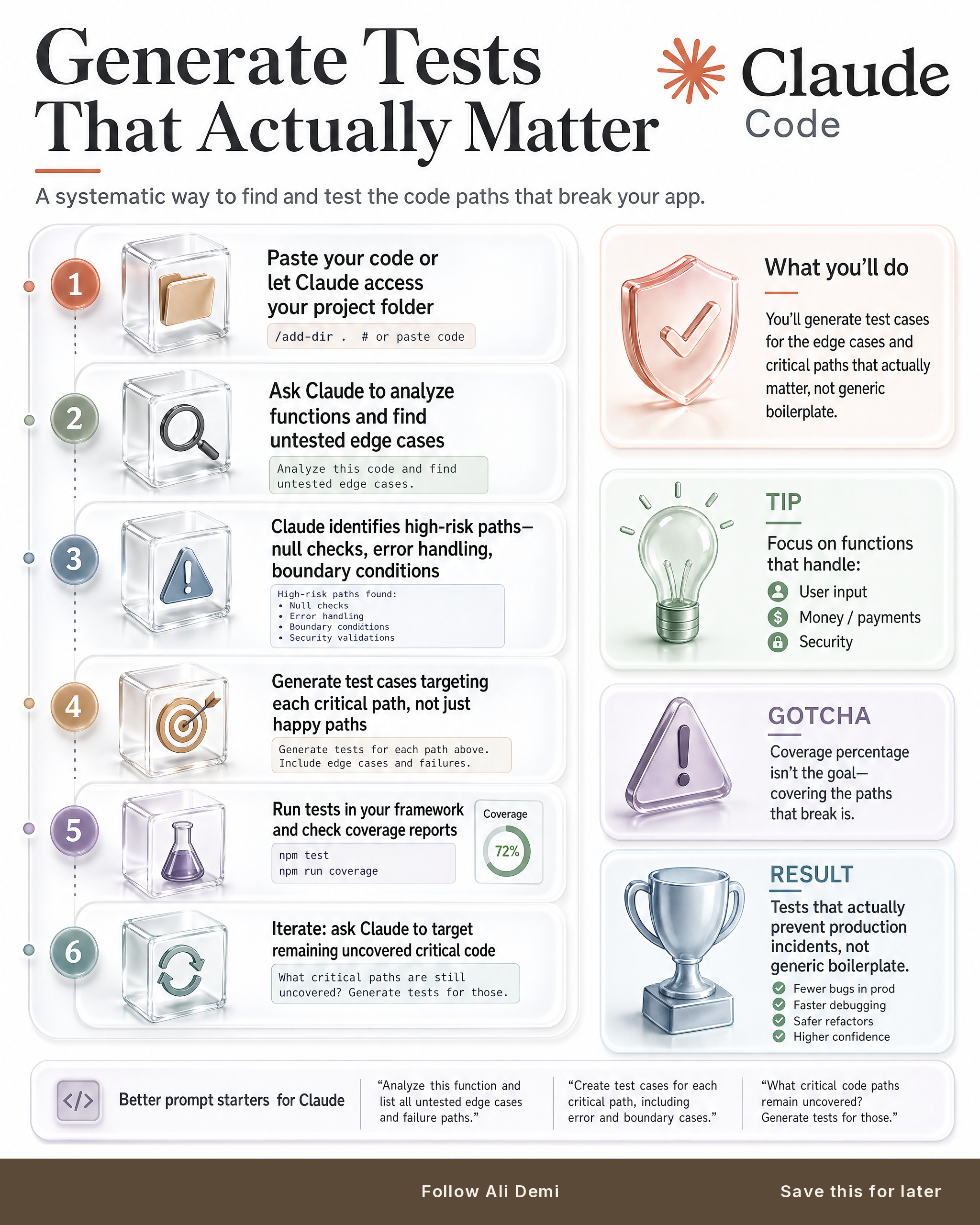
  • Stop Writing Dummy Tests: Generate Tests That Actually Matter

    Stop Writing Dummy Tests: Generate Tests That Actually Matter

    You write tests, but something is always breaking in production that your test suite didn’t catch. The problem isn’t that you have too few tests-it’s that your tests are missing the paths that actually break.

    Claude Code can analyze your code, spot the untested corner cases and critical paths, and generate real test cases for exactly those scenarios. No more generic boilerplate.

    The workflow:

    1. Point Claude at your code files-paste them into the chat or give Claude Code access to your folder.
    2. Ask Claude to analyze your functions and identify the edge cases, error paths, and critical logic branches that aren’t covered.
    3. For each high-risk path, Claude generates test cases that exercise that scenario.
    4. Run the tests in your test framework and use the results to spot gaps.
    5. Use coverage reports to iterate: ask Claude to target the remaining critical uncovered paths.

    Why this matters:

    Manual test writing focuses on the happy path. Claude thinks in corner cases. It spots off-by-one errors, null pointer risks, race conditions, and boundary violations that humans skip. When you target the code paths that break most often, your tests actually prevent production incidents.

    Example:

    If you have a payment function, Claude doesn’t just test “successful payment.” It generates cases for: zero amounts, negative amounts, currency mismatches, timeout scenarios, duplicate requests, and network failures. Those edge cases are where real bugs hide.

    ——

    Book your free AI clarity call, NOW!
    https://buff.ly/TpWy277

    ——

    Repost this. Thanks.
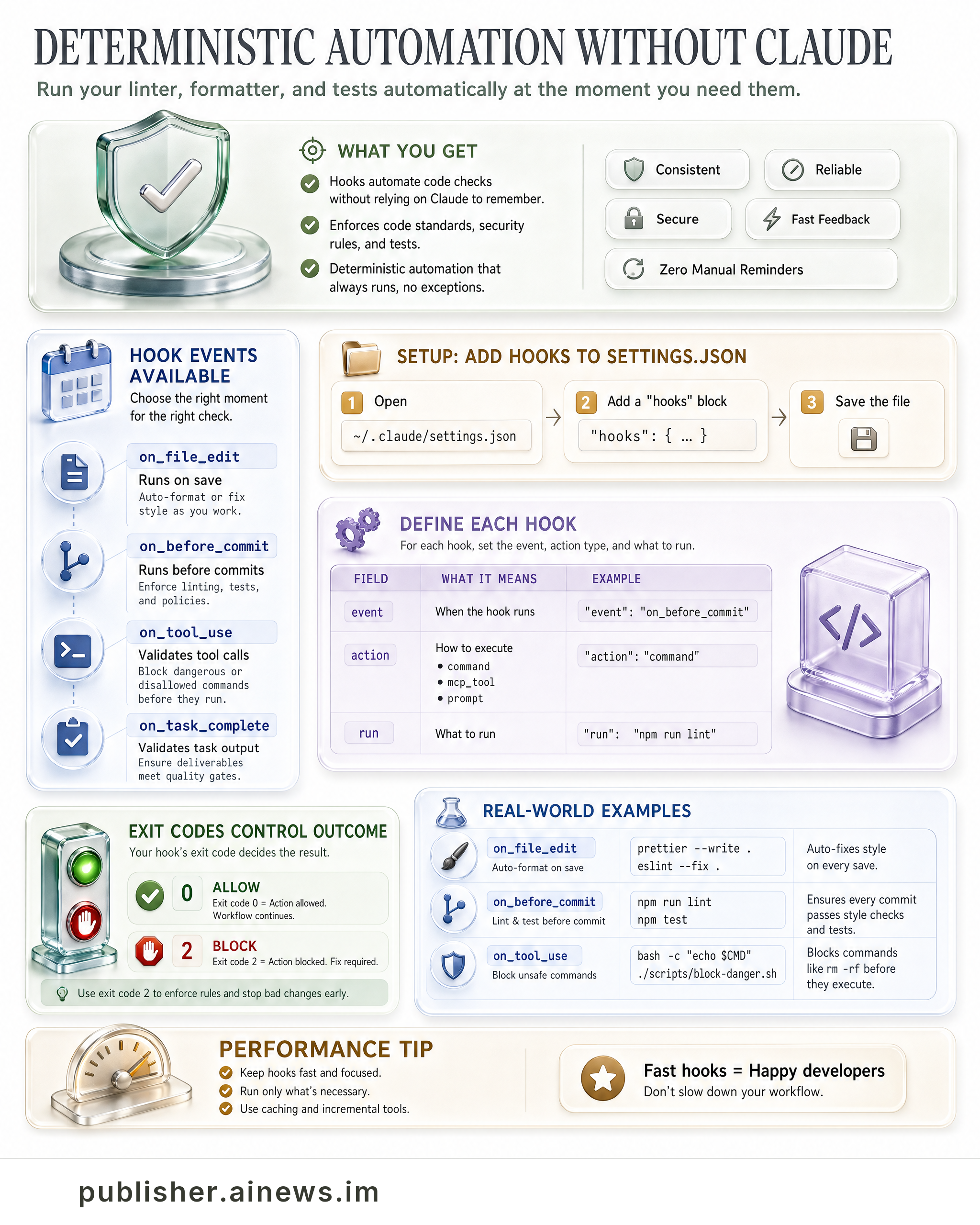
  • Stop Asking Claude to Remember: Automate with Hooks

    Stop Asking Claude to Remember: Automate with Hooks

    You’re in Claude Code, making changes, and you know linting should happen before commit. But someone’s going to forget to run it.

    Hooks solve that. They’re event handlers that automatically run shell commands, call tools, or trigger workflows at the exact moment Claude Code needs them. No prompts. No guessing. Just deterministic automation that always works.

    Set it up once in your settings, and your linter runs on every file save. Your tests run before every commit. Your security scanner checks every tool use. It’s not “ask Claude nicely.” It’s guaranteed.

    How to set this up:

    1. Open your Claude settings.json file
    2. Add a hooks block with the event you want to trigger on (file edits, before commits, task completion)
    3. Define the action: a shell command, a script, or a call to an MCP tool
    4. Save the file
    5. From now on, that automation runs every time the event fires

    Common hooks: auto-format on file edits, block dangerous commands on tool use, validate output on task completion, run tests before commits.

    The payoff is huge. Your code standards run whether Claude remembers or not. Security checks run automatically. Tests run automatically. You go from hoping to knowing it will always happen.

    Book your free AI clarity call, NOW!
    https://buff.ly/TpWy277

    Repost this. Thanks.