Category: AI Products

  • Build Beautiful Terminal Dashboards in Minutes, Not Weeks

    Build Beautiful Terminal Dashboards in Minutes, Not Weeks

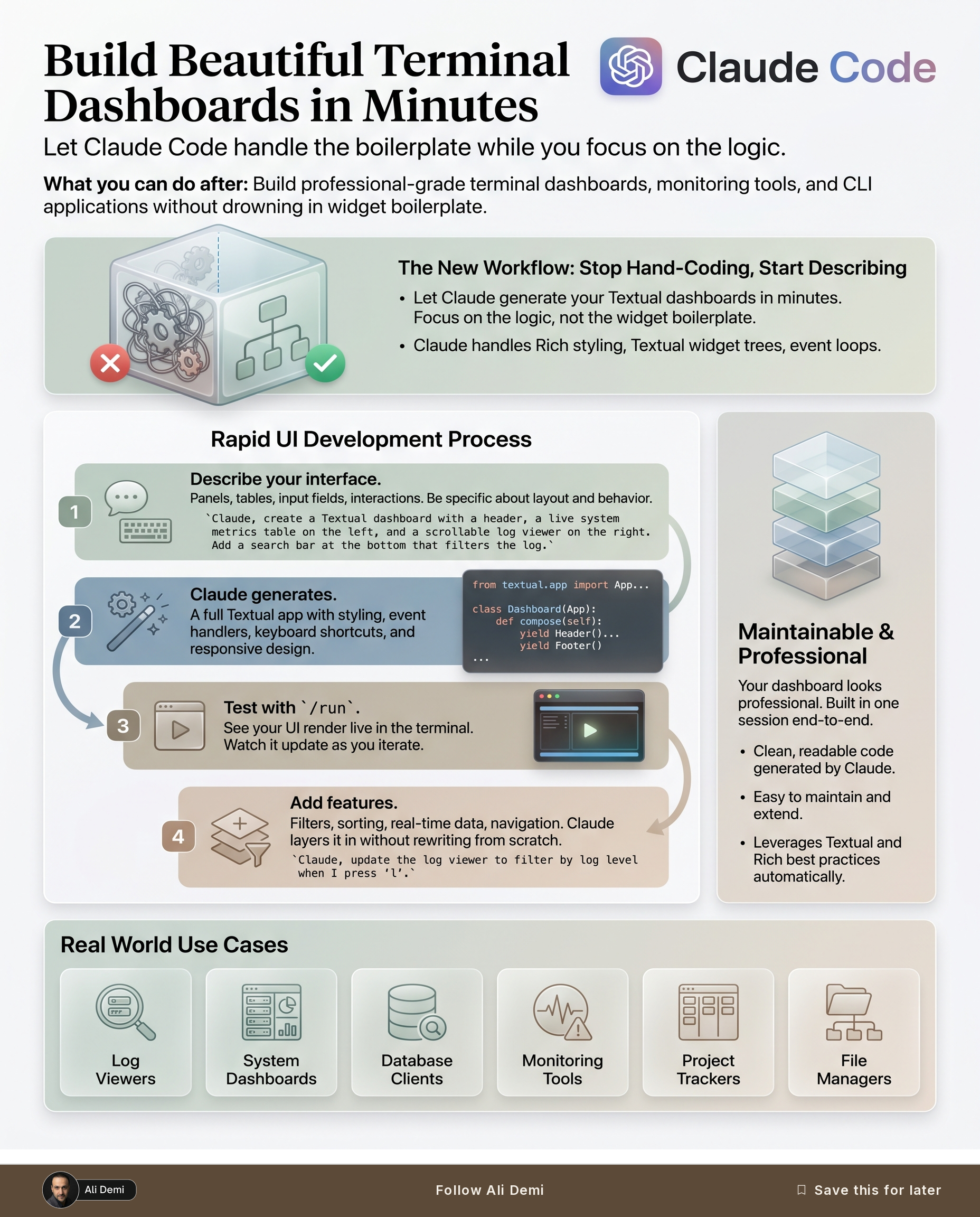
    Your dashboard lives in the terminal, but building it shouldn’t feel like a battle.

    Textual and Rich let you build professional terminal interfaces: CSS-like styling, responsive layouts, interactive widgets, mouse support, animations. But the code is dense. Widget hierarchies sprawl. Styling takes forever. You’re threading event loops just to wire up a button.

    Claude Code changes that.

    Describe what you want. A log viewer with search. A system metrics dashboard. A database browser. Claude generates the full interactive app-styling, event handlers, keyboard shortcuts, the works. You test it live with `/run`. See it render in real time. Iterate. Done.

    One session. Professional result.

    The workflow is simple. Tell Claude the layout and widgets you need. Be specific: which panels go where, what tables display, how users interact. Claude generates a complete Textual application.

    Then use `/run` to test. The UI renders instantly in your terminal. Want to add a filter? A new panel? Tweak the color scheme? Tell Claude. It regenerates and you watch the changes live.

    The result is clean, readable Python code that you own. Not a generated blob. The styling makes sense. The event handlers are clear. Need to customize later? You can.

    This beats every alternative. Hand-coding widget hierarchies is tedious and error-prone. GUI builders lock you into thinking. This approach is faster, produces better code, and stays under your control.

    Build it once, own it forever.

    ——

    Book your free AI clarity call, NOW!
    https://buff.ly/TpWy277

    ——

    Repost this. Thanks.
  • Stop Rewriting from Scratch: Migrate Millions of Lines Automatically

    Stop Rewriting from Scratch: Migrate Millions of Lines Automatically

    You’re stuck with legacy Python. You want Go.

    You’re on an old Node.js stack. You want Rust.

    Rewriting from scratch takes years. Hiring language experts takes months. Manual line-by-line translation is error-prone and tedious.

    What if Claude translated your entire codebase automatically, passing every test suite as it goes?

    The process:

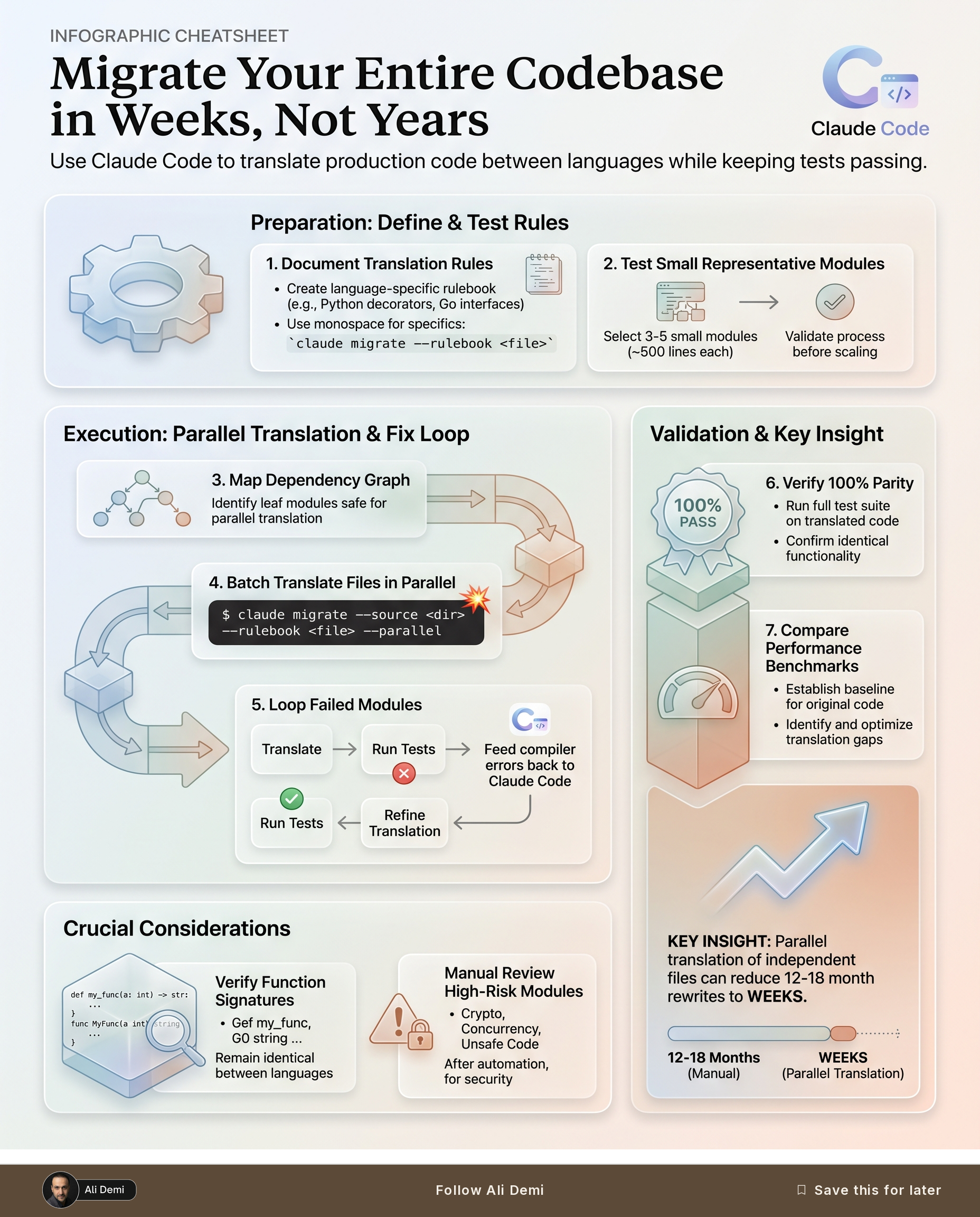
    Start by documenting your migration rules in a simple markdown file. Map language-specific patterns: Python decorators to TypeScript hooks, Go interfaces to Rust traits, whatever your translation needs. This becomes your rulebook that Claude follows across the entire migration.

    Build a dependency graph of your codebase. Identify leaf modules with zero external dependencies. These become your safe starting points for parallel translation.

    Run a mini stress-test first. Pick 3-5 representative small modules (a few hundred lines each). Feed Claude the rulebook plus source code plus tests, and ask it to translate and verify. This validates your process before scaling.

    Now parallelize. Feed Claude batches of files with the rulebook and their corresponding tests. Claude translates, you run your test suite automatically. Files that pass move forward. Files that fail loop back to Claude with compiler errors attached.

    Claude sees the error, fixes the code, tests again. No human guessing, no manual debugging cycles. The loop runs until green.

    After translation, run your full test suite on the new code. Compare performance benchmarks. Manually review the highest-risk modules. Everything else is systematically proven equivalent.

    The payoff: Codebases that would take 12-18 months to migrate manually can be translated, tested, and verified in weeks. No rewrites. No losing your architecture. Your tests prove correctness every step.

    ——

    Book your free AI clarity call, NOW!
    https://buff.ly/TpWy277

    ——

    Repost this. Thanks.
  • Measure Your AI Coding Productivity: Analyze Claude Code Sessions

    Measure Your AI Coding Productivity: Analyze Claude Code Sessions

    You spend hours in Claude Code getting work done. But where’s the time actually going? Are you bottlenecked on tool calls? Is your thinking phase too shallow? Let Claude analyze your own sessions to find out.

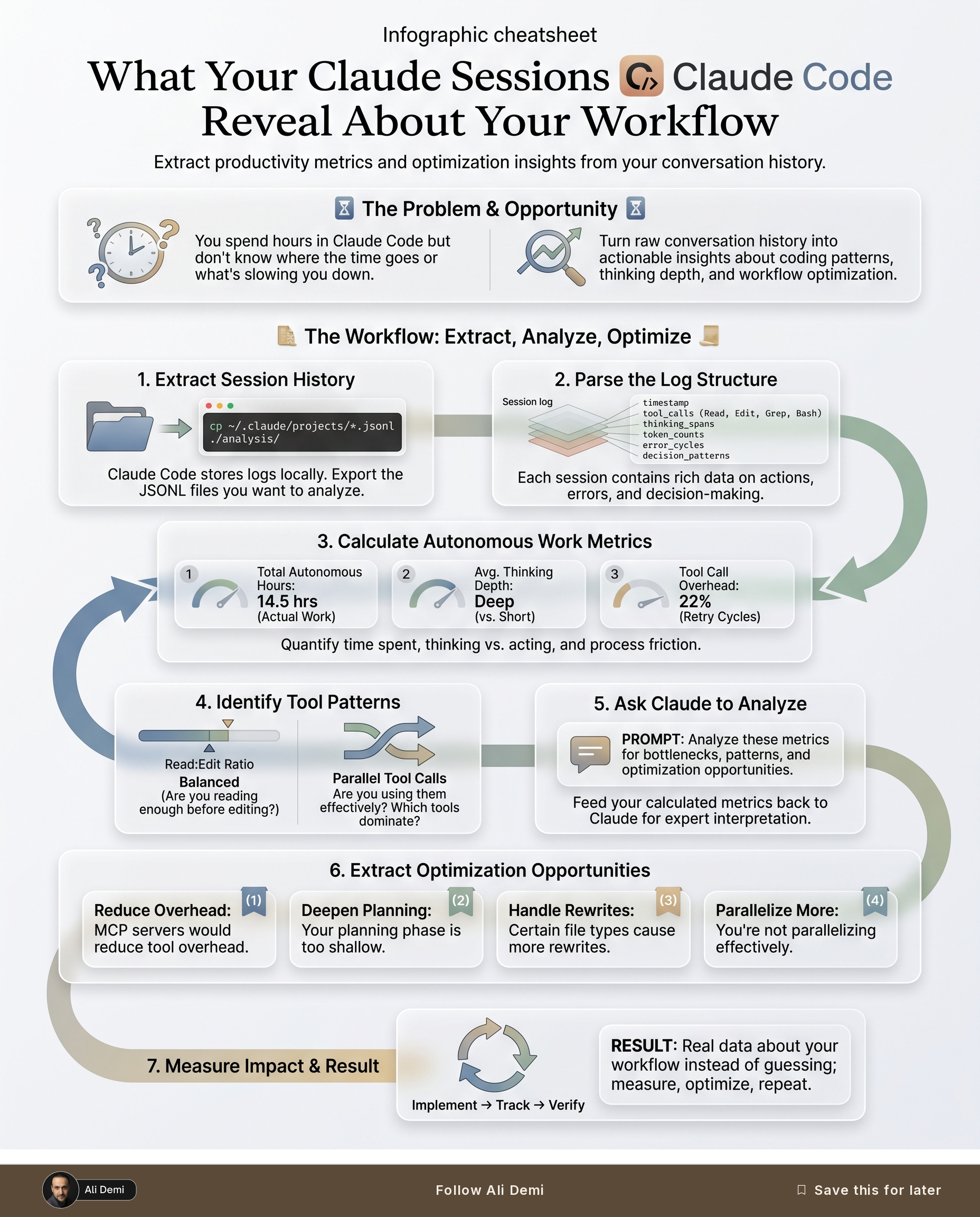
    1. Export your session history. Claude Code stores all conversation history locally in JSONL format at ~/.claude/projects/. Extract the logs from sessions you want to analyze (last week, last month, a specific project).
    2. Parse tool calls and thinking spans. Each session contains timestamps, tool use patterns (Read vs Edit vs Grep ratio), thinking duration, token counts, and decision cycles. These patterns reveal your workflow.
    3. Aggregate into metrics. Calculate: total autonomous work hours, average thinking depth (long vs short thinking sessions), tool call overhead, error and retry cycles, which commands you use most, time per task type (features vs migrations vs debugging).
    4. Ask Claude for analysis. Feed Claude a summary of your metrics and ask: What’s the pattern? Why do migrations take 5x longer than features? When does thinking depth matter most? Where are the bottlenecks?
    5. Extract optimization opportunities. Claude identifies specific patterns: Maybe you need MCP servers to reduce tool overhead. Maybe your planning phase is too shallow. Maybe certain file types cause more rewrites. Maybe you’re not using parallel tool calls effectively.
    6. Compare across time. Track the same metrics week to week or month to month. Implement one optimization and measure if it actually worked. Real data beats intuition.

    The result: you understand your own workflow at a level your IDE never showed you. Stop guessing. Measure, optimize, repeat.

    ——

    Book your free AI clarity call, NOW!
    https://buff.ly/TpWy277

    ——

    Repost this. Thanks.
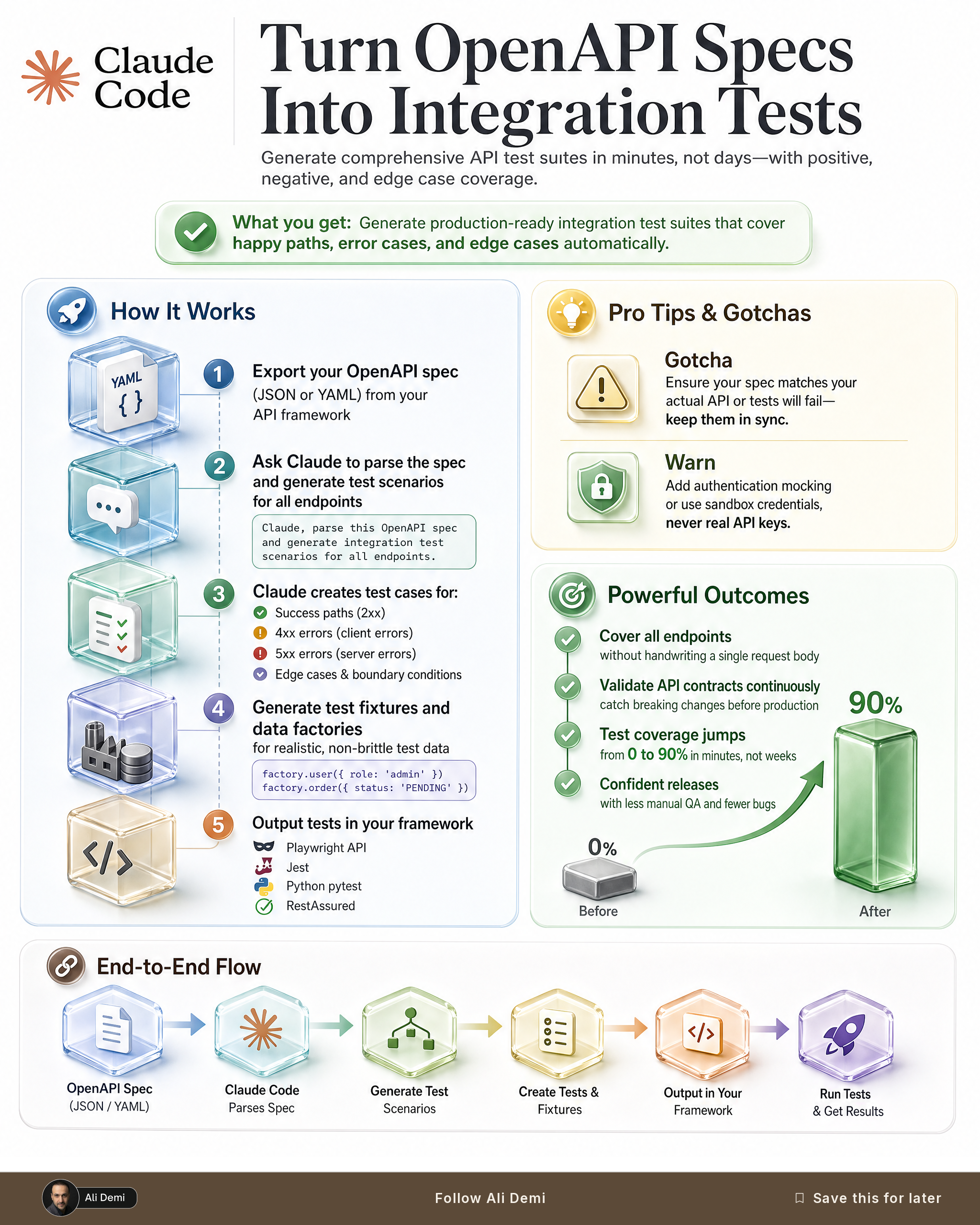
  • Stop Writing API Tests by Hand: Generate Them from Your OpenAPI Spec

    Stop Writing API Tests by Hand: Generate Them from Your OpenAPI Spec

    You have an OpenAPI spec. You also have a growing list of test cases nobody wants to write.

    API testing is a perfect Claude job: your spec already describes every endpoint, parameter, and error response. Why type them all out again?

    Point Claude at your OpenAPI 3.0+ spec, and let it generate complete integration test suites-positive flows, error cases, boundary values, security scenarios, all ready to run.

    The workflow looks like this:

    1. Export your OpenAPI spec from your API framework or OpenAPI editor.
    2. Drop the spec into Claude Code and ask it to generate test scenarios.
    3. Claude parses all endpoints, parameters, schemas, and authentication methods.
    4. It generates test cases for success paths, 400/401/403/500 responses, boundary values, and data validation.
    5. It creates test fixtures and realistic data factories so tests aren’t brittle.
    6. Output a ready-to-run test suite in your framework of choice: Playwright API requests, Jest, RestAssured, or curl collections.
    7. Run tests in your CI/CD pipeline. Claude flags any spec-reality mismatches.

    What you get:

    • Full endpoint coverage without manual request building.
    • Tests for happy paths and error scenarios-no guessing which edge cases matter.
    • Data factories that generate realistic test fixtures instead of hardcoded payloads.
    • Spec-driven contract validation: tests catch API changes that break the contract.
    • CI-ready: tests run in your pipeline, report coverage gaps, flag breaking changes before they ship.

    Why this matters: Manual API test writing is boilerplate that delays releases. OpenAPI specs already have all the information Claude needs to generate comprehensive tests. You write the real logic, Claude handles the tedium.

    ——

    Book your free AI clarity call, NOW!
    https://buff.ly/TpWy277

    ——

    Repost this. Thanks.
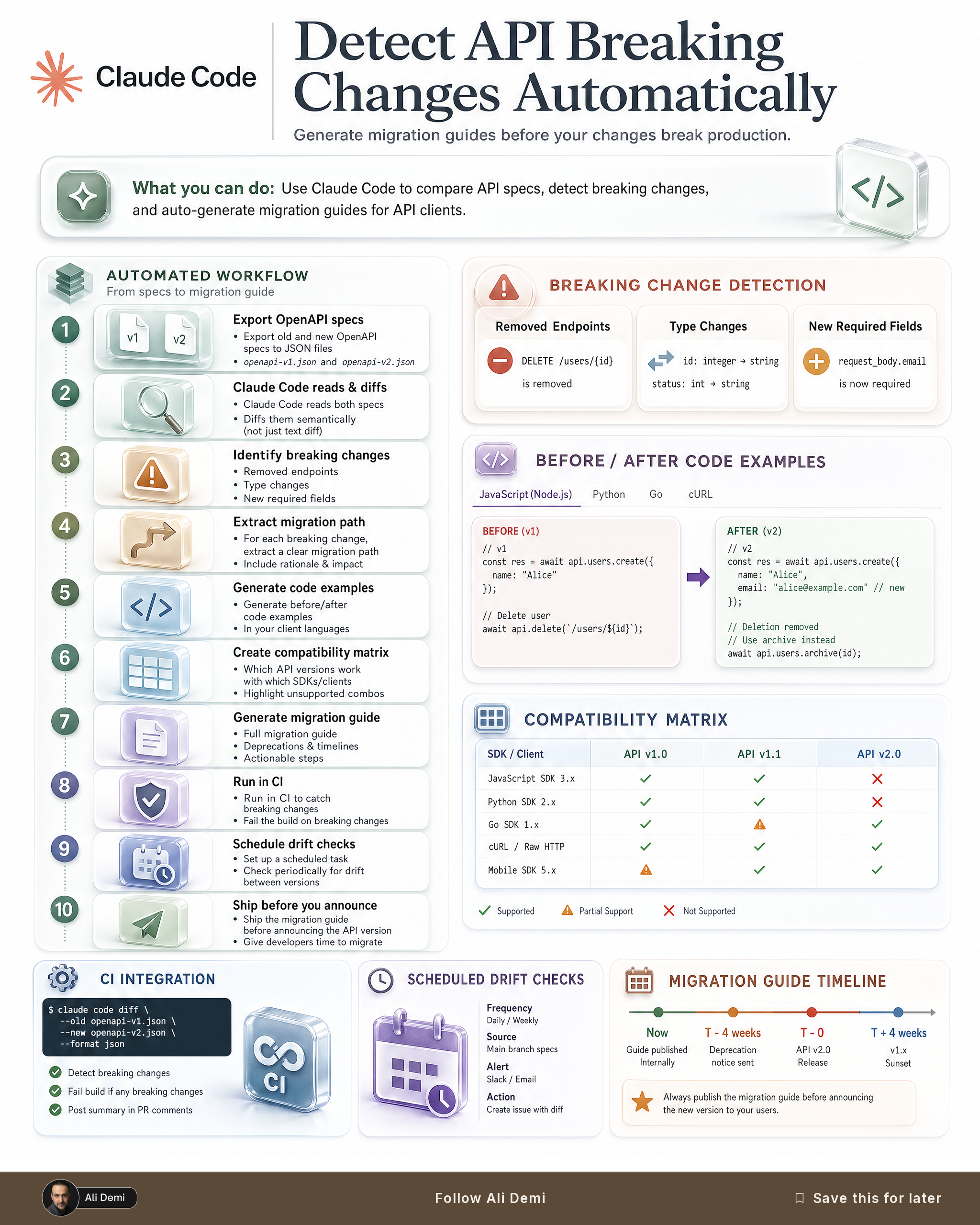
  • Stop Surprising Your API Clients: Auto-Detect Breaking Changes

    Stop Surprising Your API Clients: Auto-Detect Breaking Changes

    You refactor your API. You test it. You ship it.

    Then your customers wake up to 500 errors.

    You forgot to tell them you removed an endpoint. Or changed how the status codes work. Or you didn’t realize a parameter rename was a breaking change.

    It’s a mess. Blame gets passed around. Trust erodes.

    Claude Code can catch this before you ship. Here’s how.

    The workflow:

    1. Export your old and new OpenAPI specs (or Swagger JSON). Claude reads both.
    2. Claude compares them semantically, not string-by-string.
    3. It detects: removed endpoints, changed parameter types, new required fields, status code changes, authentication changes.
    4. For each breaking change, Claude generates: what broke, which clients are affected, how to migrate, before/after code examples.
    5. You get a migration guide your customers can actually follow, plus a deprecation timeline.

    What breaking changes it catches:

    • Removed or moved endpoints
    • Required fields added to request bodies
    • Response field types changed (string to int, etc.)
    • Status codes removed or their meanings changed
    • Authentication method changes
    • Rate limit changes
    • Pagination format changes

    The migration guide it generates includes:

    • Breaking change summary (what changed, when it’s live)
    • Which SDK versions are affected
    • Step-by-step migration for each change
    • Before/after code snippets in your client’s language
    • Deprecation timeline (when old endpoints stop working)
    • A compatibility matrix (which API versions work with which SDK versions)

    Pro tip: Run this in CI before you merge any API-touching PR. Let Claude flag breaking changes before code review. Your team sees the migration work required, and it might even be cheaper to fix the API than generate the docs.

    ——

    Book your free AI clarity call, NOW!
    https://buff.ly/TpWy277

    ——

    Repost this. Thanks.
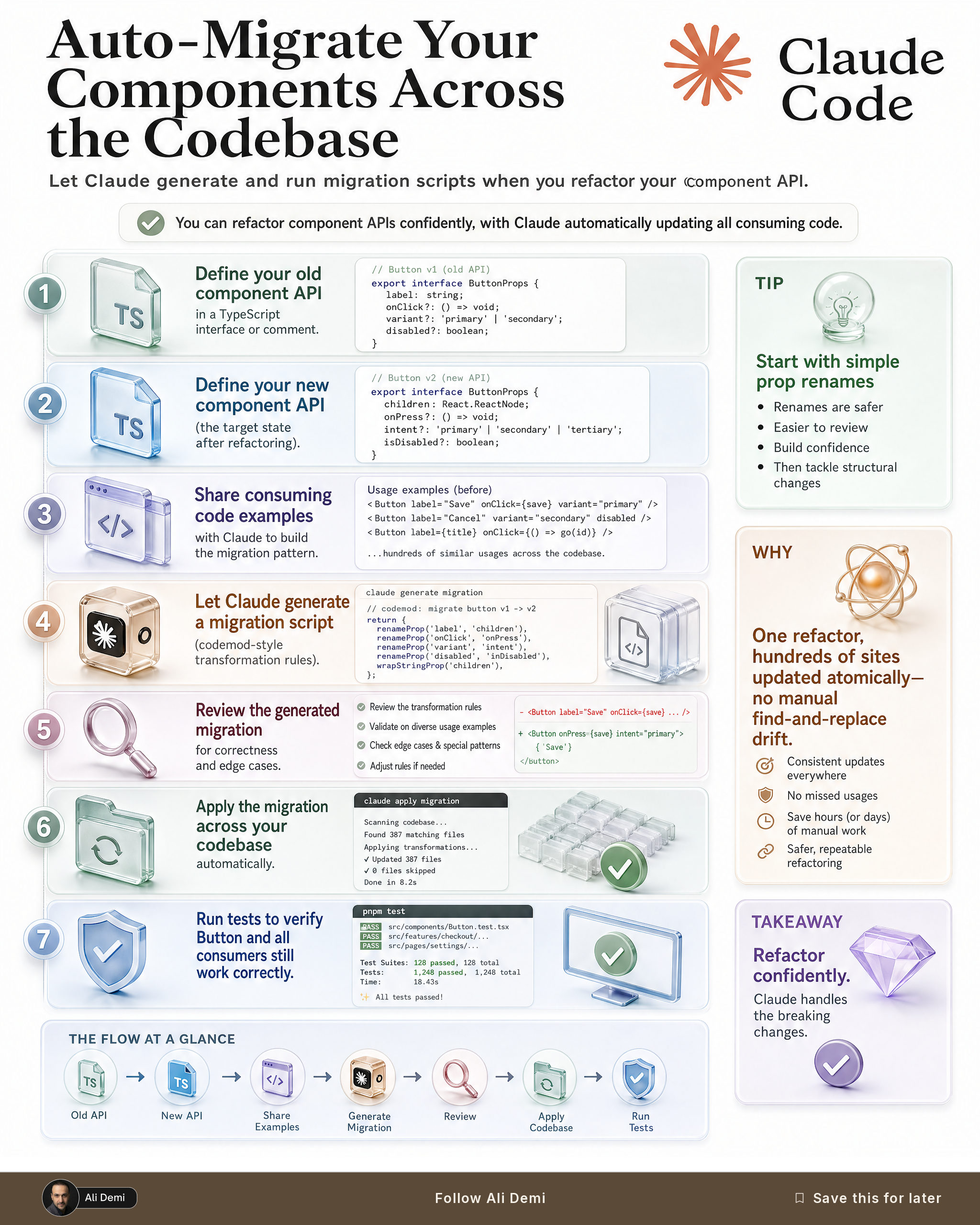
  • Refactor Components Once, Update Everywhere Automatically

    Refactor Components Once, Update Everywhere Automatically

    You just realized your Button component has five different ways to handle size. Time to consolidate.

    But you also have 200 uses of Button scattered across your codebase.

    Manual find-and-replace? That’s error-prone and takes hours. Let Claude do it.

    The workflow:

    1. Write the old component API (current prop shapes and interfaces).
    2. Write the new component API (desired changes, renamed props, restructured objects).
    3. Paste a few examples of current usage into Claude Code.
    4. Ask Claude to generate a migration script that transforms all usages from old to new.
    5. Claude analyzes the consuming code and outputs transformation rules (regex or AST patterns).
    6. Review the generated script, then let Claude apply it across your entire codebase.
    7. Run your test suite to verify nothing broke.

    Real example: Your Button component goes from separate `loading`, `disabled`, `variant` props to a single `state` prop. Claude generates the migration that rewrites all 200 Button usages from `

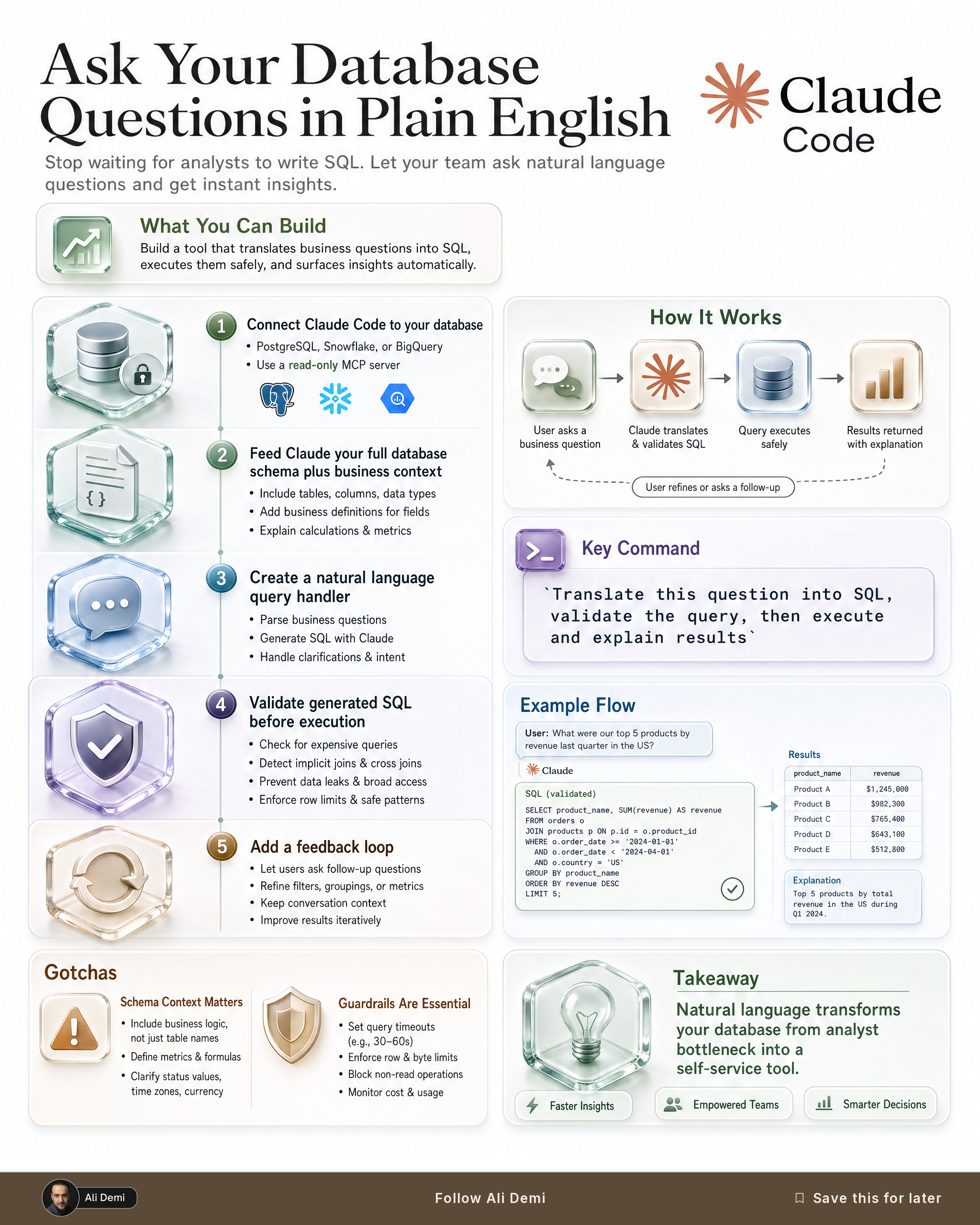
  • Your Data Analyst is Just a Question Away: Query Data in Plain English

    Your Data Analyst is Just a Question Away: Query Data in Plain English

    Your analysts spend half their time writing SQL for questions that take five minutes to answer.

    Your business users wait days for simple data questions, and your team spins in that cycle.

    What if your team could just ask their database questions in plain English?

    Claude Code can translate natural language questions directly into SQL, validate the queries, execute them safely, and explain the results back in plain English.

    Here’s how to build it:

    1. Connect your database. Use Claude Code with a read-only MCP server to Postgres, Snowflake, or BigQuery. Set up separate credentials for query execution so Claude can’t write or delete.
    2. Feed the schema. Paste your database schema into context, but include the business dictionary too. “Users table has a revenue field” isn’t enough. Say what revenue means to your business, how it’s calculated, which fields are test data.
    3. Write a question handler. Create a function that takes plain English input, asks Claude to generate SQL, validates it for cost and safety, executes it, and surfaces the results with an explanation.
    4. Validate before you execute. Use Claude to review generated queries for red flags: expensive full table scans, implicit joins that might miss data, queries against tables users shouldn’t see.
    5. Add a feedback loop. Let users ask follow-up questions. “Show me this broken down by region” should refine the query, not start from scratch.
    6. Set guardrails. Timeouts on queries. Cost limits on BigQuery. A whitelist of tables users can ask about. This keeps curious questions from turning into expensive mistakes.

    The payoff is big: analysts stop being a data bottleneck, your team self-serves answers in minutes, and you get better questions asked because people don’t have to pre-filter for feasibility.

    ——

    Book your free AI clarity call, NOW!
    https://buff.ly/TpWy277

    ——

    Repost this. Thanks.
  • Stop Searching Blind: Find Code by Intent, Not Keywords

    Stop Searching Blind: Find Code by Intent, Not Keywords

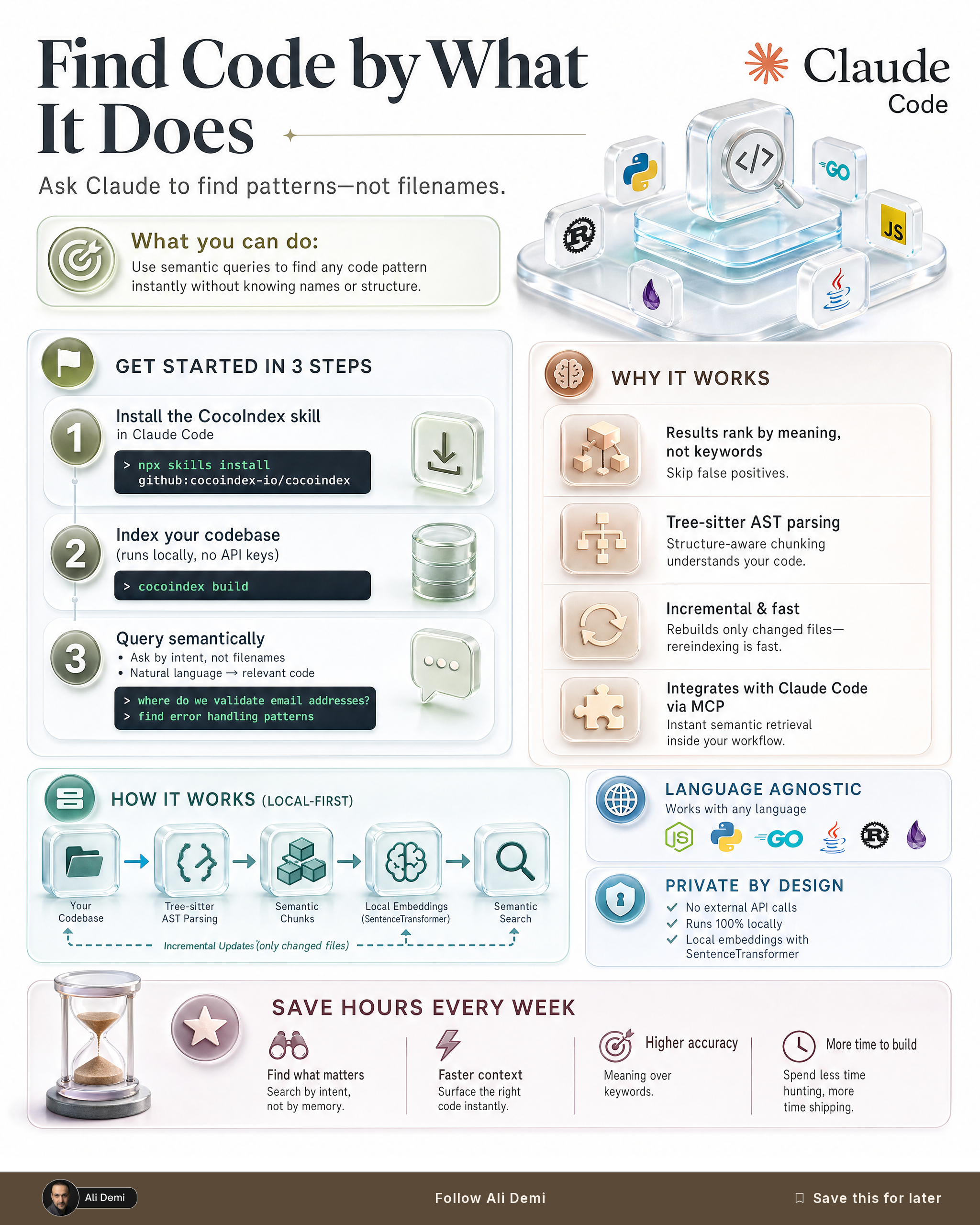
    You’re hunting for where you handle payment failures. You don’t know which service owns it. You don’t know what the function’s called. You grep for “payment” or “fail” and get 47 false positives. You dig through each one. You waste an hour.

    Semantic code search changes that. Instead of guessing keywords, you ask Claude in natural language. “Find where we validate payment input” or “Show me how errors get logged to external services.” Claude understands what the code does, not just what it’s called. It returns exactly what you need.

    Here’s how to build it in minutes.

    Step 1: Install the CocoIndex skill. CocoIndex is an open-source semantic indexer built for Claude Code. It parses your codebase with Tree-sitter (AST-aware, so it understands code structure), embeds chunks locally using SentenceTransformer (no API keys), and stores them searchably.

    Step 2: Index your codebase. One command builds the semantic index. It’s incremental, so reruns only touch changed files. A 10K-file codebase takes minutes.

    Step 3: Search semantically.” Now you ask questions instead of guessing. “Where do we retry failed API calls?” or “Show me all database access that skips permission checks.” Claude returns code snippets ranked by semantic relevance, not keyword match.

    No more guessing filenames. No more manual file-by-file review. You ask, Claude finds. It works across patterns that have different names, different files, different implementation styles.

    The math is brutal: benchmark data from 2026 shows semantic search cuts wasted reads by 75% compared to grep. On a large codebase, that’s hours saved per week.

    ——

    Book your free AI clarity call, NOW!
    https://buff.ly/TpWy277

    ——

    Repost this. Thanks.
  • Stop Using Real Customer Data in Tests: Auto-Redact PII in Minutes

    Stop Using Real Customer Data in Tests: Auto-Redact PII in Minutes

    Your test database is either fake and useless, or real and dangerous.

    Fake data doesn’t catch edge cases. Real data finds bugs. But using actual customer info in tests violates GDPR, HIPAA, and common sense.

    The usual workaround is weeks of manual redaction: hunting for emails, masking credit cards, guessing what counts as sensitive. It’s slow, incomplete, and easy to miss PII hiding in unexpected places.

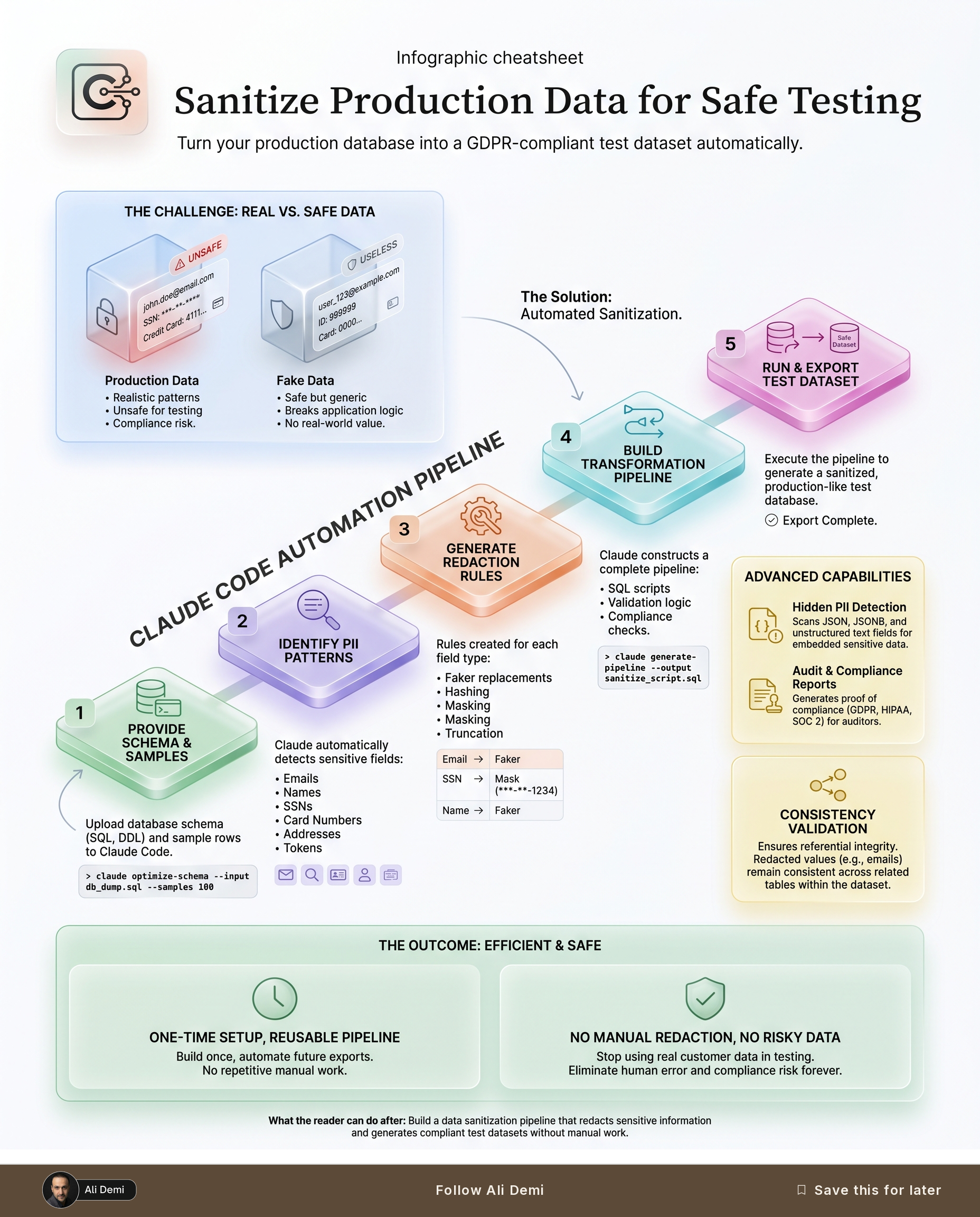
    Claude Code flips this. Point it at your database schema, and it builds a complete sanitization pipeline in minutes.

    Here’s how:

    1. Give Claude your database schema and sample rows. It identifies PII patterns automatically: emails, phone numbers, names, SSNs, card numbers, API keys, anything sensitive.
    2. Claude generates redaction rules for each field: faker-based replacements (realistic fake names, emails), hashing (consistent across rows), masking (keep last 4 digits of cards), truncation.
    3. Claude builds the transformation pipeline: SQL queries, validation checks, compliance reporting.
    4. Run once, export a sanitized dataset that looks and behaves like production but contains zero real customer data.
    5. Teams get production-realistic data for testing. Security and compliance win. Done.

    The real power: Claude doesn’t just redact what you tell it to. It scans the entire schema, finds PII you didn’t notice (that user_metadata JSON field hiding emails, the notes column with phone numbers), and redacts it all at once.

    Result: safe test data in hours instead of weeks. No more using real customer info in tests. No more pretending fake data is good enough.

    ——
    Book your free AI clarity call, NOW!
    https://buff.ly/TpWy277
    ——

    Repost this. Thanks.
  • Stop Editing Videos by Hand: Automate Your Entire Pipeline

    Stop Editing Videos by Hand: Automate Your Entire Pipeline

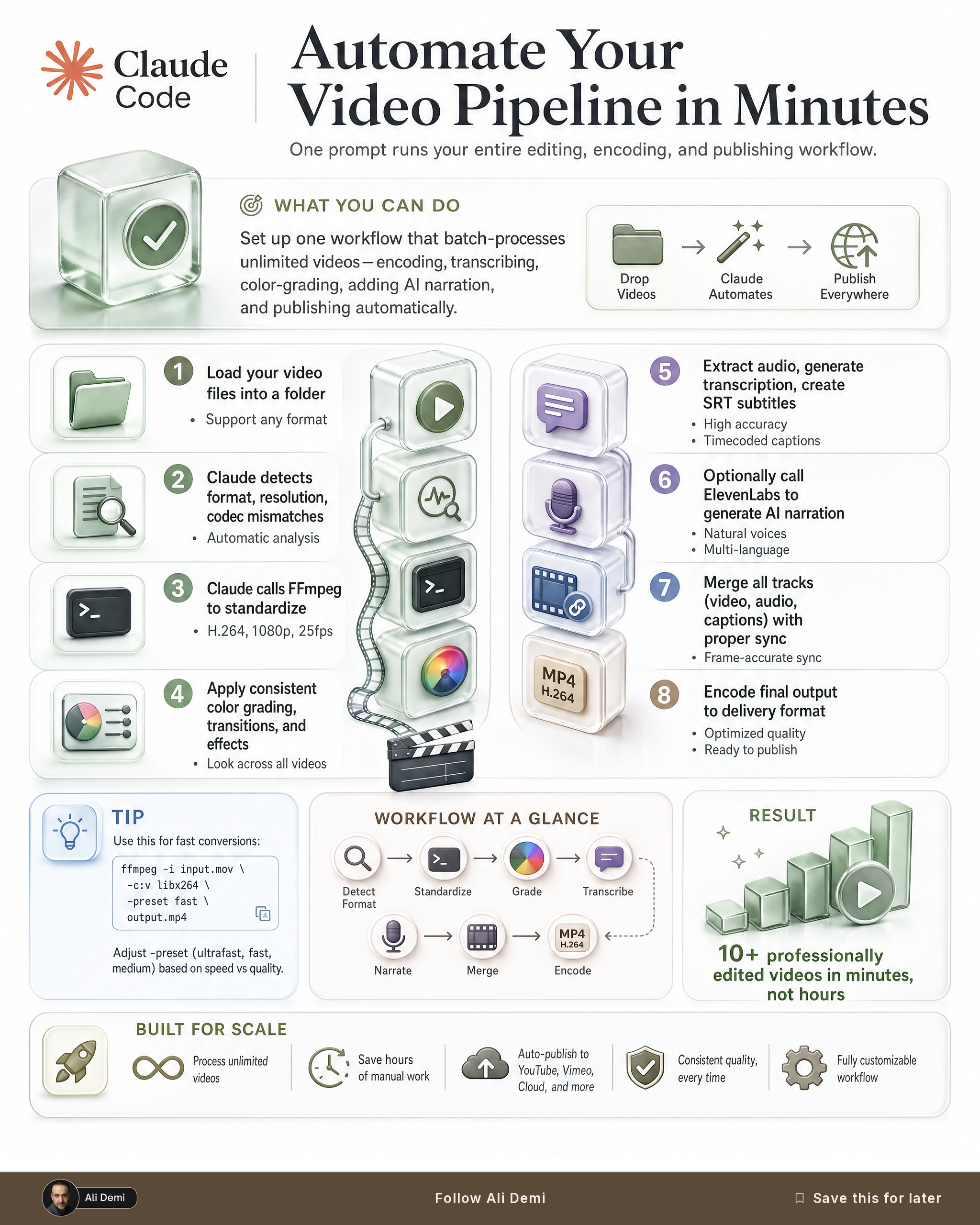
    You’re spending hours editing videos manually. One video at a time. Same tasks, over and over: convert formats, add subtitles, color grade, encode. If you’ve got 10 videos to process, that’s your whole day gone.

    Claude Code changes that. Set up ONE workflow, and it runs on as many videos as you throw at it. Batch processing your entire library in minutes, not hours.

    Here’s how it works. Claude orchestrates the entire pipeline. Point it at your video folder. It detects the format and resolution, calls FFmpeg to standardize everything to 1080p H.264, applies consistent color grading and transitions, extracts audio, generates subtitles, and outputs broadcast-ready MP4s. You don’t touch a single file.

    Want AI narration? Claude calls ElevenLabs to convert your script to professional voiceover, then syncs it with animated visuals from HyperFrames, all in one pass. Marketing teams use this to generate product demo videos automatically from feature docs.

    Content agencies report cutting video processing time from 8+ hours to minutes per batch. Podcast producers use it to auto-convert long-form episodes into short-form clips with captions and graphics.

    The real win: once your pipeline is set up, adding new videos is instant. Change one parameter, run the workflow, walk away. No manual labor, no mistakes, always consistent output.

    Your competitors are probably still clicking buttons. You’re shipping 10x faster.

    ——

    Book your free AI clarity call, NOW!
    https://buff.ly/TpWy277

    ——

    Repost this. Thanks.