Category: AI Products

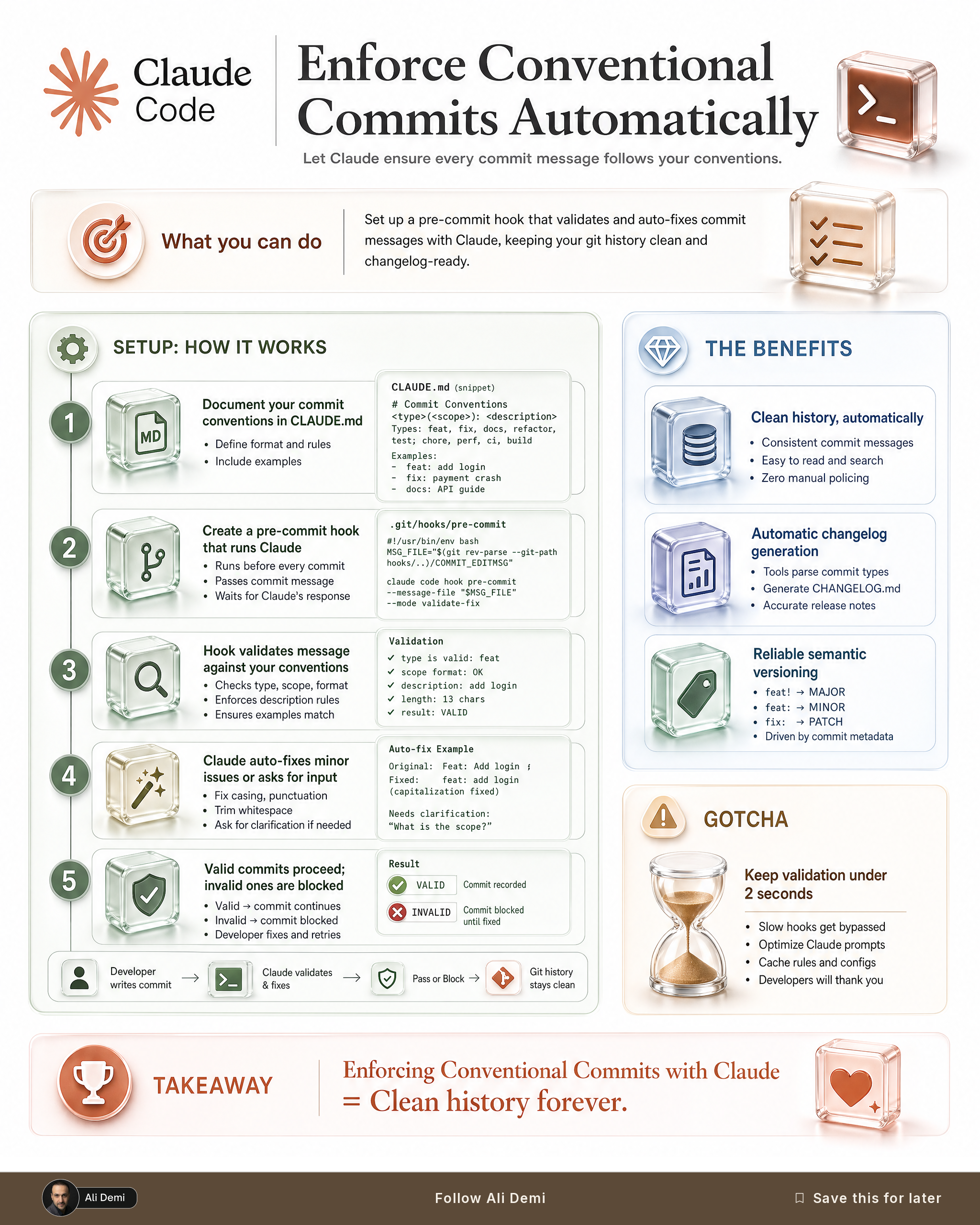
  • Keep Your Commits Clean: Auto-Enforce Conventions with Claude

    Keep Your Commits Clean: Auto-Enforce Conventions with Claude

    Your git history is a mess. Commits say “updates” and “fix bug.” When you need to generate release notes or understand what changed, you are digging through commit messages that tell you nothing.

    Conventional Commits solves this, but only if everyone follows the format. Documenting the standard in a README doesn’t work. People forget, or misremember, and now you are cleaning up history manually.

    Here is the fix: a pre-commit hook that runs Claude on every commit message. Claude validates it against your conventions and either auto-fixes minor issues or guides you to the right format. Clean git history becomes automatic.

    The workflow:

    1. Document your conventions in CLAUDE.md with examples for your team’s commit prefixes
    2. Create a pre-commit hook in your version control system
    3. Hook runs Claude to check the message against your documented format
    4. Claude auto-fixes trivial violations or asks for clarification
    5. Commit lands in standard format or is blocked until fixed

    Result: you can now reliably generate changelogs, auto-bump versions by commit type, and your git log actually tells a story instead of being a wall of vague messages.

    Teams using this report cleaner history, fewer PR comment threads about commit message standards, and release notes that assemble themselves from git.

    ——

    Book your free AI clarity call, NOW!
    https://buff.ly/TpWy277

    ——

    Repost this. Thanks.
  • Your Slow Queries Don’t Have to Stay Slow: Auto-Index Them

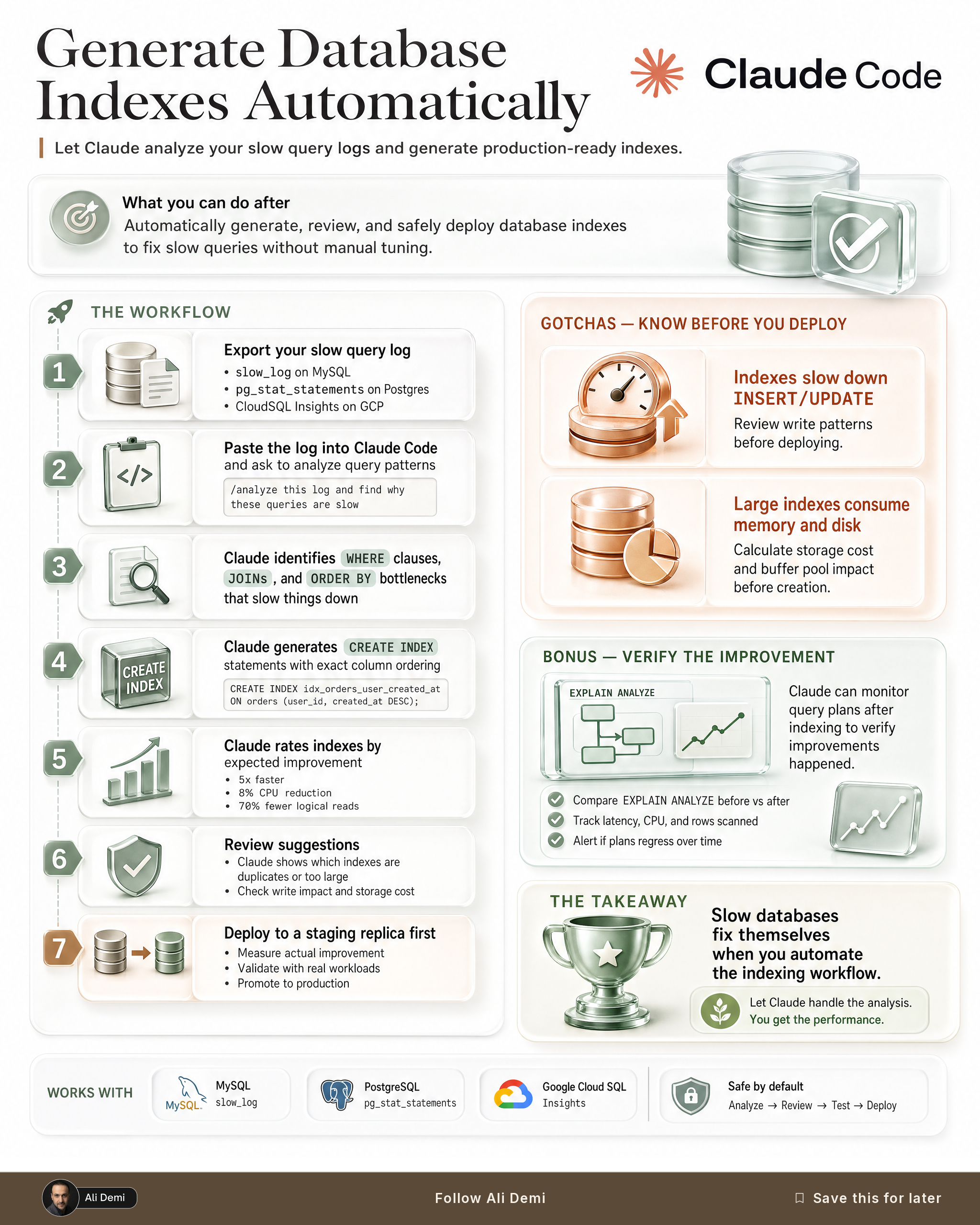
    Your Slow Queries Don’t Have to Stay Slow: Auto-Index Them

    Your slow query log has been sitting there for weeks.

    You know it’s costing you money in database CPU and user wait time.

    But analyzing queries, figuring out which indexes would help, and testing them safely takes time you don’t have.

    Claude Code can do this automatically.

    Feed it your slow query log (from MySQL’s slow_log, PostgreSQL’s pg_stat_statements, or query audit logs), and it will:

    1. Parse each query and understand what it’s doing semantically
    2. Identify WHERE clauses, JOINs, and ORDER BY patterns that slow things down
    3. Suggest indexes with exact column ordering and coverage
    4. Generate CREATE INDEX statements with safe naming and batching
    5. Calculate estimated query improvements before deployment

    This is different from asking ChatGPT to write indexes.

    Claude Code can read your entire schema, understand your data distribution, and see which indexes already exist so it doesn’t suggest duplicates.

    It can also rate-limit deployments, test them on replicas, and even check if an index would be too large to fit in memory.

    The result: your production database runs faster without you manually tuning anything.

    ——

    Book your free AI clarity call, NOW!
    https://buff.ly/TpWy277

    ——

    Repost this. Thanks.
  • Stop Writing Test Scripts: Generate E2E Tests from User Stories

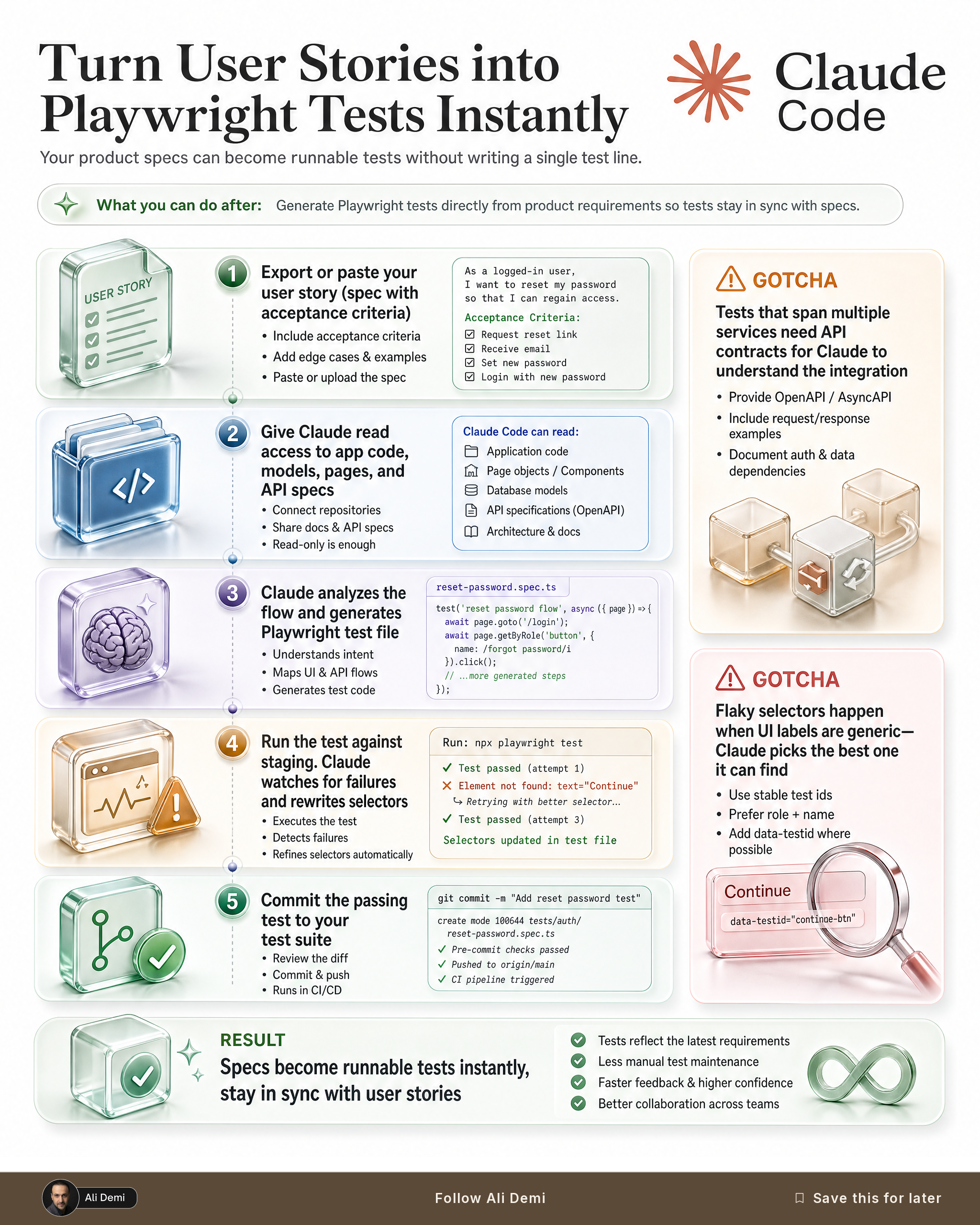
    Stop Writing Test Scripts: Generate E2E Tests from User Stories

    Writing E2E tests is the work that never ends. Your QA team gets a user story, reads it three times, writes forty lines of Playwright code, and guesses whether they got the flow right. By the time tests ship, the spec’s already changed.

    Instead: feed your user story straight to Claude, point it at the app, and watch it generate tests that actually work.

    Here’s how it works:

    1. Paste your user story into Claude Code. Example: “As a user, I sign up with email, set a password, verify my email, and land on the dashboard.”
    2. Claude reads your codebase, finds the login page, understands the form fields and API calls.
    3. Claude generates a Playwright test that navigates the flow, fills forms, clicks buttons, and asserts the expected outcome.
    4. Run the test. If it fails, Claude sees the error and rewrites the selector or the assertion.
    5. Commit. Your test is maintainable because Claude understands WHY it exists-not just WHAT it does.

    The magic: Claude doesn’t just write click(‘button’). It understands your app’s structure and labels inputs by their actual purpose-“email input”, “submit button”-so tests survive refactors.

    Gotcha: Claude needs access to your app’s code (models, pages, API routes). If your test depends on a flow that spans multiple services, give Claude the API contracts too. Otherwise it’ll generate tests that look right but fail on integration.

    This scales. One story per Claude run. String together twenty stories, you have a full smoke test suite in an afternoon, not two weeks.

    ——

    Book your free AI clarity call, NOW!
    https://buff.ly/TpWy277

    ——

    Repost this. Thanks.
  • Build Games Like a Studio: Let Claude Coordinate Your Art, Code, and Design Teams

    Build Games Like a Studio: Let Claude Coordinate Your Art, Code, and Design Teams

    Game development needs a team. One person codes, another designs levels, another audits assets, another writes docs. Coordinating them takes discipline and time.

    Claude Code can BE your team.

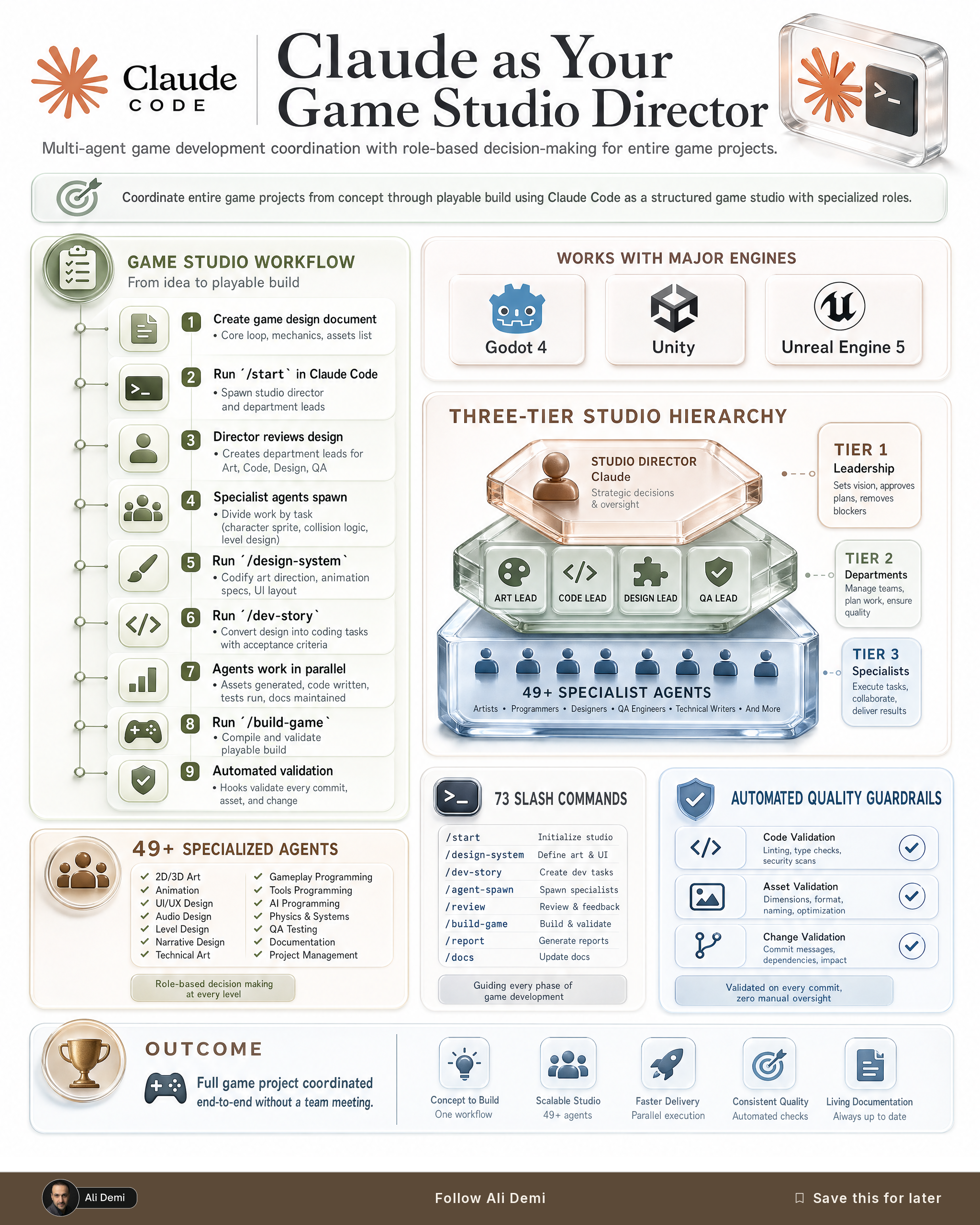
    Claude Code Game Studios is a multi-agent framework that transforms a single Claude Code session into a structured game development studio with 49+ specialized agents organized into a three-tier hierarchy: Directors guard creative vision, Department Leads own domains (Programming, Art, Design, QA), and Specialists execute tasks.

    Give Claude your game design document. It:

    • Spawns a creative director to oversee the whole vision.
    • Creates department leads for code, art, design, and quality.
    • Generates specialized agents to build systems, create assets, and validate quality.
    • Automates hooks that check every commit, asset, and change.
    • Supports Godot 4, Unity, and Unreal Engine 5.

    The workflow uses 73 slash commands that guide you through game dev phases: `/start`, `/design-system`, `/create-stories`, `/dev-story`, `/build-game`.

    Real example: one developer used it to coordinate a full 2D Godot game from concept to playable build in a week. Agents handled sprite generation, scene assembly, character logic, collision systems, and bug fixes in parallel-tasks that would normally require a team.

    Not a code generator. A studio simulator with role-based decision making.

    ——

    Book your free AI clarity call, NOW!
    https://buff.ly/TpWy277

    ——

    Repost this. Thanks.
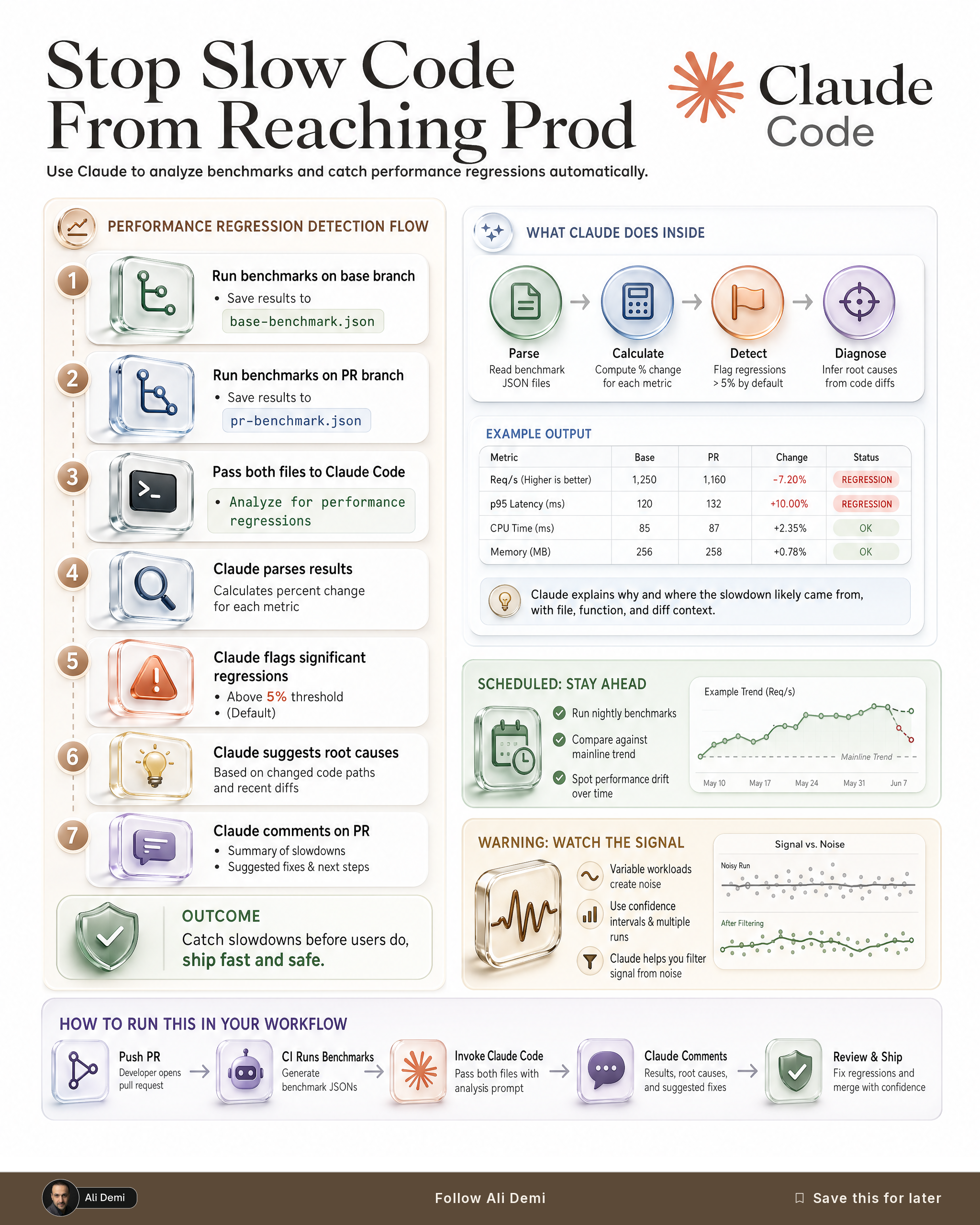
  • Catch Performance Regressions Before They Ship

    Catch Performance Regressions Before They Ship

    Your benchmarks run every pull request. But nobody reads them. By the time someone notices a 15% slowdown on mainline, it’s been live for a week.

    Claude can parse benchmark output, compare before and after, and flag performance regressions in your PR comment-with context about what probably broke.

    Here’s the flow:

    1. Run your benchmark suite on the base branch, save results to a file.
    2. Run the same suite on your PR branch.
    3. Pass both result files to Claude Code with a simple script.
    4. Claude identifies regressions, calculates percentage change, spots statistical noise vs. real problems.
    5. Claude comments on the PR with: what slowed down, by how much, and likely causes (memory leak, algorithm shift, I/O spike).

    The key insight: Claude understands context. A 5% slowdown on a hot path matters. The same 5% on startup time does not. Raw metrics tools miss this.

    For continuous monitoring, wire Claude into a scheduled task that runs benchmarks nightly, compares against the previous week, and alerts if mainline performance degrades by more than your threshold.

    Why this beats manual review: Benchmarks run every PR. Humans don’t read every result. Claude does. Zero friction, always on.

    ——

    Book your free AI clarity call, NOW!
    https://buff.ly/TpWy277

    ——

    Repost this. Thanks.
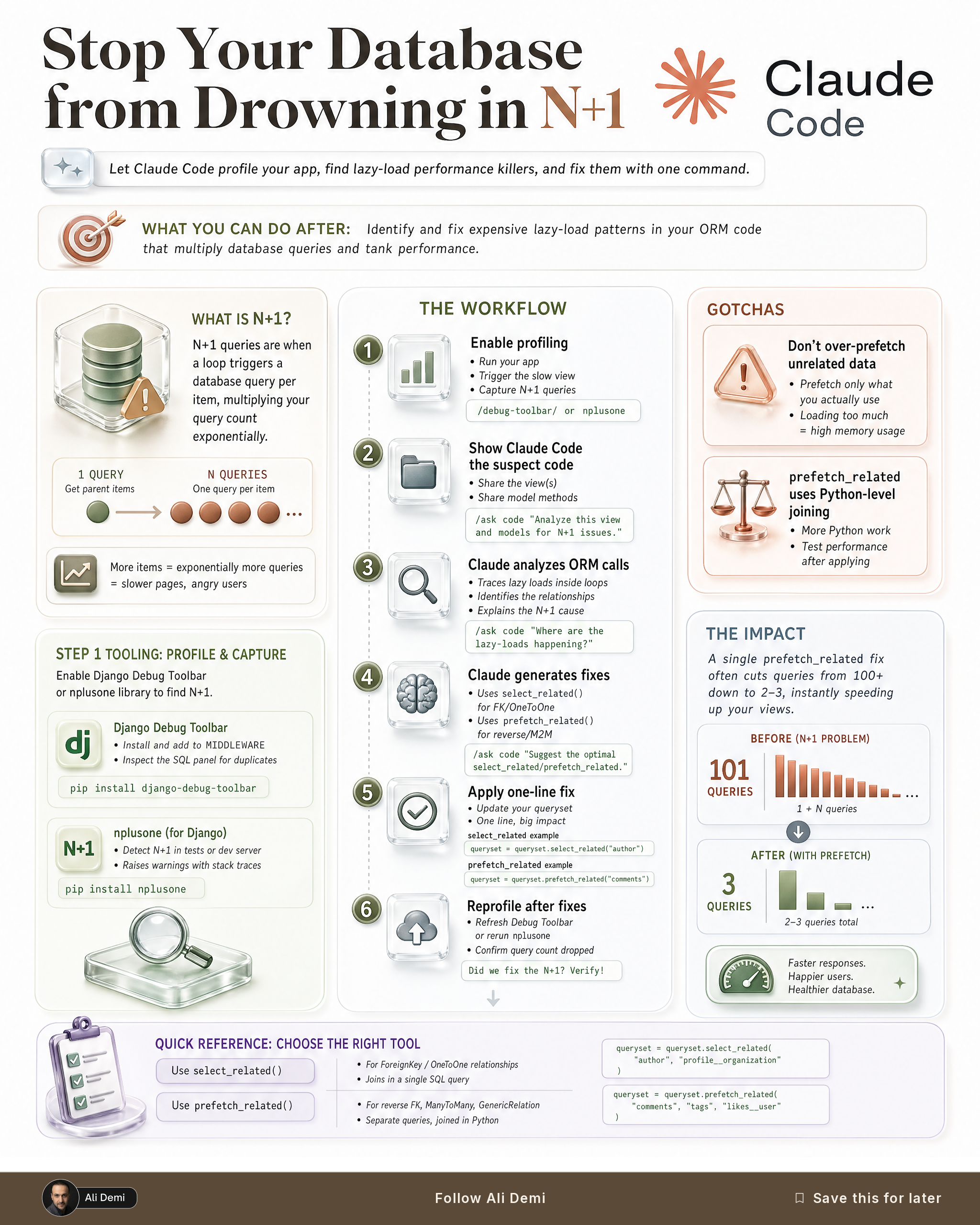
  • Your Database Is Drowning: Fix N+1 Queries Automatically

    Your Database Is Drowning: Fix N+1 Queries Automatically

    Your database is screaming. Every user action fires 50 queries when it should fire five. The culprit is N+1 queries, the classic hidden performance killer: loop over 100 users, then load their profile inside the loop, and boom, you just asked the database 101 questions.

    Finding them is the hard part. Your profiler shows the symptoms (slow page load, many queries) but not the code. Pattern matchers catch the obvious ones. Semantic analysis finds the subtle ones.

    Use Claude Code to scan your views and model methods, find the loops that trigger lazy loads, and auto-apply select_related or prefetch_related to eliminate the extra queries.

    The workflow:

    1. Profile your app with Django Debug Toolbar or nplusone and capture suspected N+1 sites
    2. Point Claude Code at the code files
    3. Claude analyzes the ORM calls, loop structure, and query patterns
    4. Claude generates the exact select_related/prefetch_related calls needed
    5. Review and apply the fixes
    6. Re-profile to confirm the queries dropped

    The fix is usually one line: change User.objects.all() to User.objects.prefetch_related(‘profile’), and your query count just fell from 101 to 2.

    ——

    Book your free AI clarity call, NOW!
    https://buff.ly/TpWy277

    ——

    Repost this. Thanks.
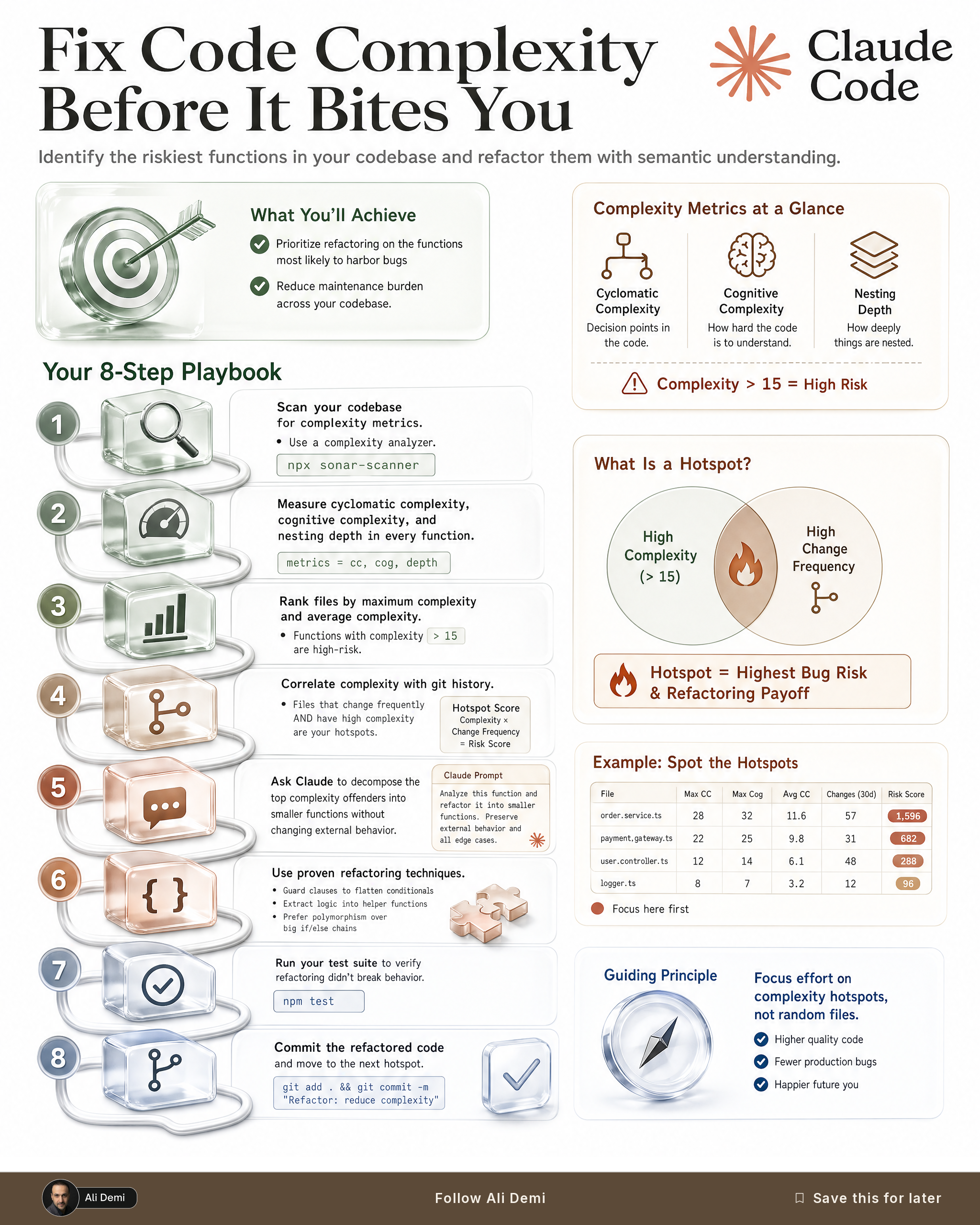
  • Your Code is a Mess: Let Claude Find the Worst Parts

    Your Code is a Mess: Let Claude Find the Worst Parts

    You have messy code. Somewhere in your codebase, a function is nested four levels deep, packed with conditionals, and hasn’t been touched in six months. When it breaks, nobody knows why. When you need to change it, you’re terrified.

    The problem: you have no idea which functions are the most dangerous.

    Complexity metrics tell you. Cyclomatic complexity counts decision points (if/else, loops, switches). Cognitive complexity measures how hard code is to read. Functions with complexity scores above 15 are statistically more likely to hide bugs and take longer to maintain.

    Claude Code can scan your entire codebase, measure complexity in every function, rank files by risk (complexity + change frequency), and refactor the hotspots that matter most.

    The process is straightforward.

    Step 1: Measure complexity across your codebase. Ask Claude to run a complexity analyzer on your project. It scans every file, calculates cyclomatic complexity, cognitive complexity, nesting depth, and method length. Output ranks files by maximum complexity and average complexity per function.

    Step 2: Identify your hotspots. Hotspots are files that are both complex AND change frequently. A 500-line file nobody touches is low-risk. A 30-line function with complexity 18 that your team modifies every week is a time bomb. Claude can correlate complexity with git history to find these.

    Step 3: Decompose the worst functions. Take the top complexity offenders and ask Claude to refactor them. The key: refactor without changing the external interface. Break a complex function into smaller helpers, extract conditional logic into guard clauses, use polymorphism instead of big if/else chains. Claude understands the intent and preserves behavior.

    Step 4: Verify and commit. Run your test suite. If everything passes, commit the refactored code. You’ve just reduced maintenance burden on the functions most likely to fail.

    A real example: a 210-line Python function with cyclomatic complexity 16 was refactored into a clean 30-line function with complexity dropping to 3-6 across the extracted helpers. Same behavior, dramatically easier to maintain.

    Stop guessing which code needs work. Measure it. Focus effort where it matters. Claude handles the analysis and the refactoring.

    ——

    Book your free AI clarity call, NOW!
    https://buff.ly/TpWy277

    ——

    Repost this. Thanks.
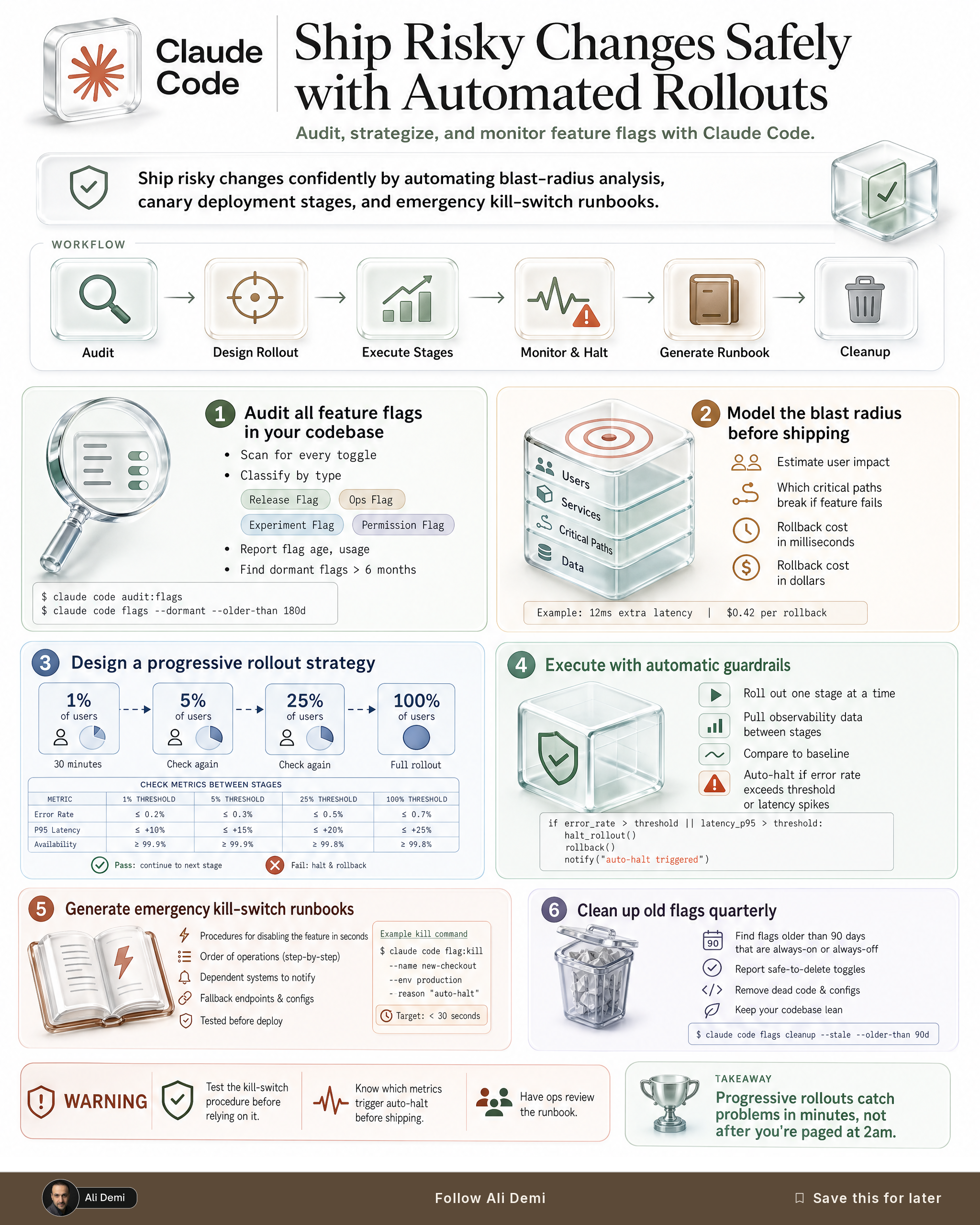
  • Ship Risky Changes Without Breaking Prod: Feature Flags Done Right

    Ship Risky Changes Without Breaking Prod: Feature Flags Done Right

    Shipping a risky change feels like holding your breath. You hope the tests catch everything. They don’t. Manual feature flag management makes it worse – you’re juggling toggles, guessing at safe rollout percentages, and scrambling for a kill switch when things go sideways.

    Claude Code automates the hard parts: auditing your existing flags, designing staged rollouts with real blast-radius math, monitoring health metrics between stages, and generating kill-switch runbooks you can actually trust.

    Step 1: Audit your feature flags. Ask Claude to scan your codebase and classify every flag by type – release flags (decouple deploy from ship), ops flags (kill switches), experiment flags (A/B tests), and permission flags (entitlements). Report flag age, usage, and dormant toggles you can delete.

    Step 2: Model the blast radius. Before touching production, have Claude estimate impact – if this feature breaks, how many users are affected? Which critical paths go down? What’s the rollback cost in milliseconds and dollars?

    Step 3: Design a progressive rollout. Instead of binary on/off, Claude generates staged deployment: 1% of users for 30 minutes, check error rates and latency, 5%, check again, 25%, then 100%. At each stage, define what metrics you’re watching and what threshold triggers an auto-halt.

    Step 4: Execute with guardrails. Roll out one stage at a time. Between stages, Claude pulls your observability data, compares to baseline, and either green-lights the next stage or halts with a clear reason.

    Step 5: Generate emergency runbooks. Before you deploy, ask Claude to write the kill-switch procedure – exactly which systems to toggle, order of operations, dependencies to notify, fallback endpoints. Ops has this before anything ships.

    Step 6: Clean up quarterly. Flags older than 90 days that are always-on or always-off are cruft. Claude finds them, reports which can be safely deleted, and cleans up the code.

    The result: you move fast, you catch problems early, and when something breaks, you’re not frantically Slack-calling ops at midnight. You have a runbook and a rollback path waiting.

    ——

    Book your free AI clarity call, NOW!
    https://buff.ly/TpWy277

    ——

    Repost this. Thanks.
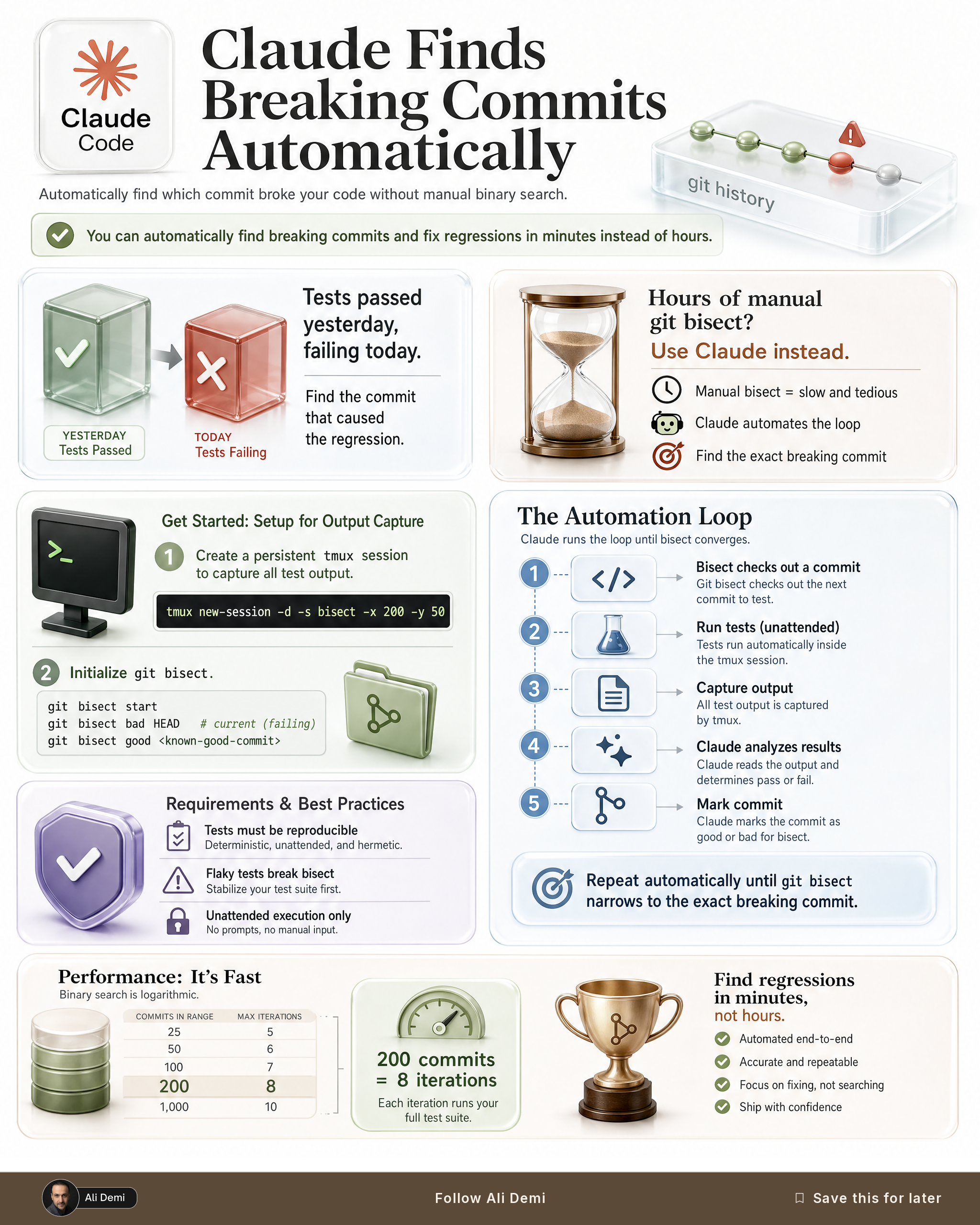
  • Stop Hunting Breaking Commits: Let Claude Auto-Bisect Your History

    Stop Hunting Breaking Commits: Let Claude Auto-Bisect Your History

    Your tests passed yesterday. Today they fail. You don’t know why.

    You could manually git bisect – running tests at each commit, marking good/bad, binary searching through history. That takes hours.

    Or you could let Claude do it.

    Claude Code can autonomously run git bisect: spawn a tmux session, run your test suite, read the pass/fail output, and instruct git bisect to mark commits. It loops until it finds the exact commit that broke your code.

    It’s fully automated. No human in the loop, no guessing.

    Set it up:

    1. Start a tmux session for output capture.
    2. Tell Claude the known-good commit and current broken state.
    3. Claude runs the bisect loop: test, read output, mark commit, repeat.
    4. When bisect finishes, Claude shows you the breaking commit with full diff context.

    The trick is reproducible tests. If your tests flake, bisect gets confused. Stabilize them first.

    Commit ranges can take time – each iteration runs your full test suite. A 200-commit range might take 8 iterations. Plan for that.

    One run finds your regression. No manual searching, no guesswork.

    ——

    Book your free AI clarity call, NOW!
    https://buff.ly/TpWy277

    ——

    Repost this. Thanks.
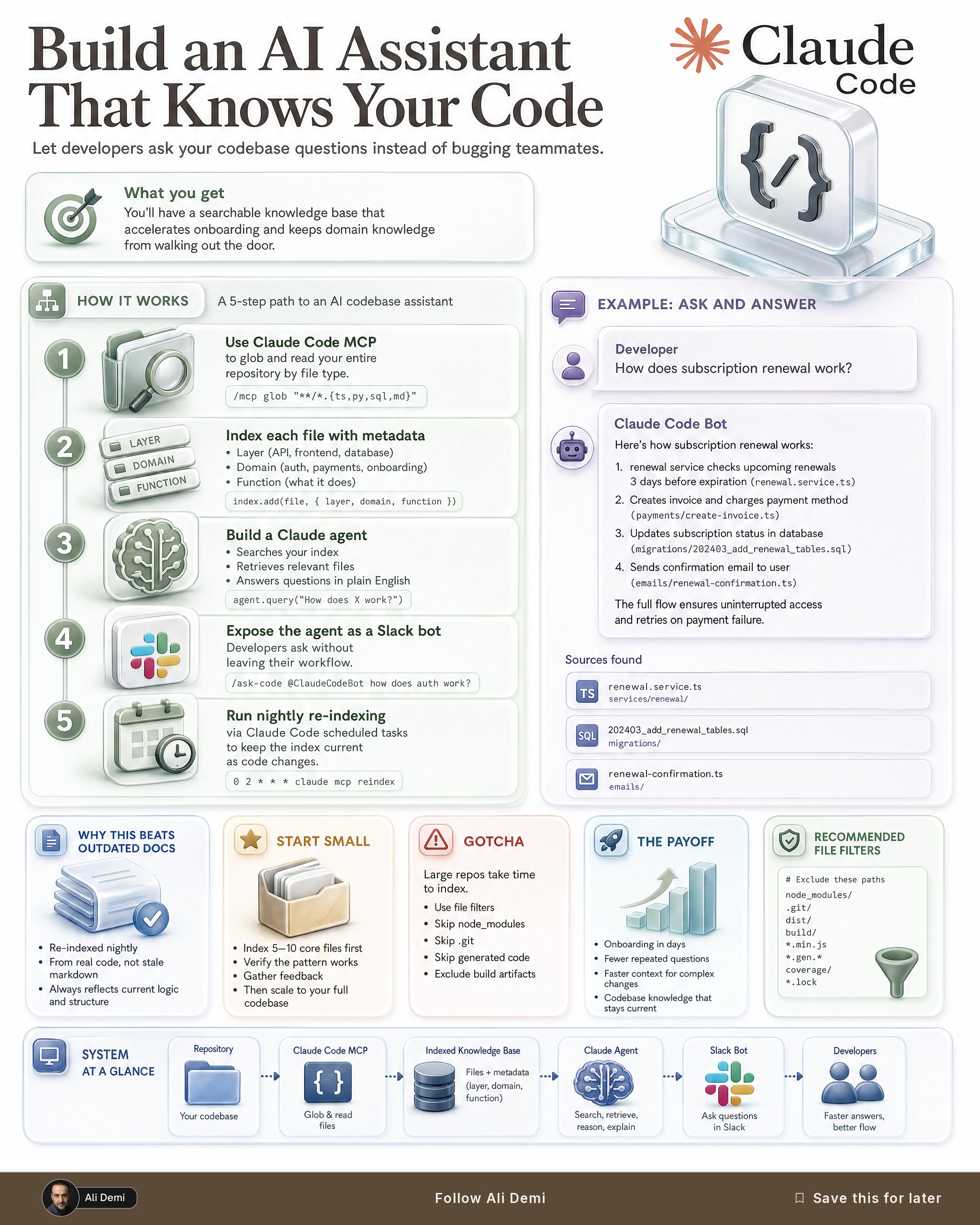
  • Your Codebase Should Answer Questions: Build an AI Assistant

    Your Codebase Should Answer Questions: Build an AI Assistant

    Here’s the problem: a junior engineer joins your team and spends two days figuring out why the transaction system works the way it does. A teammate leaves and their architectural decisions live only in git history nobody reads. You answer the same architecture question three times a month.

    Your codebase already knows the answers. It just can’t talk.

    Claude Code can fix that. Build an AI assistant that indexes your repo and lets developers ask it questions in plain English.

    What you’re building:

    1. Use Claude Code MCP tools to glob and read files by type (controllers, models, migrations, schemas).
    2. Index the structure: each file gets tagged by layer (frontend, API, database), business domain (auth, payments, reports), and functionality.
    3. Build a Claude agent that searches your index, reads relevant files, and synthesizes answers to natural language questions.
    4. Wire it as a Slack bot, CLI, or internal web tool so your team can ask it without leaving their workflow.
    5. Run a scheduled task nightly to re-index; Claude finds new files, renamed patterns, changed architecture, and updates the index.

    Real-world example: A developer asks, “How does the subscription renewal process work?”. The agent finds your subscription service, the renewal cron, the database migrations that track billing state, and the email notifications. It synthesizes: “Here’s the flow, here’s the code path, here’s where it can fail, and here’s how we handle retries.” Boom. Onboarding cut by hours.

    Why this beats traditional docs: Your README gets stale in weeks. This assistant re-reads your codebase nightly. When you rename a module, move a file, or refactor an algorithm, the assistant knows. Developers ask current questions; they get current answers backed by the real code.

    The gotcha: Indexing a large repo takes time and tokens. Start with your core services (5-10 key files), verify the pattern works, then scale. Use file filtering to skip node_modules, .git, and generated code.

    Make it sticky: Wire it into Slack so developers use it without friction. Add a “cite sources” feature so answers include file paths and line numbers. Let anyone on the team update the index with a single command.

    The result: onboarding in days instead of weeks, fewer repeated questions, and institutional knowledge that doesn’t depend on any one person staying.

    ——

    Book your free AI clarity call, NOW!
    https://buff.ly/TpWy277

    ——

    Repost this. Thanks.