Category: AI Products

  • Your CSS Isn’t Broken, Claude Just Can’t See It

    Your CSS Isn’t Broken, Claude Just Can’t See It

    Your CSS looks fine in the mockup.

    You tell Claude to build it.

    Claude builds it.

    You click the link and… buttons are cut off, the form is off-screen, the footer overlaps content.

    Claude’s code parses fine, so what changed?

    Nothing.

    Claude just built it blind.

    Here’s the thing: Claude writes HTML and CSS flawlessly – syntax is perfect, logic is sound. But it can’t see what it creates. It has no idea the buttons are cut off or the z-index is wrong or contrast fails.

    You take a screenshot, paste it back, and say “nope, try again.” Three rounds later, you’re done.

    With visual feedback, Claude sees its own work and fixes it automatically.

    Give it a browser.

    Then it stops being blind.

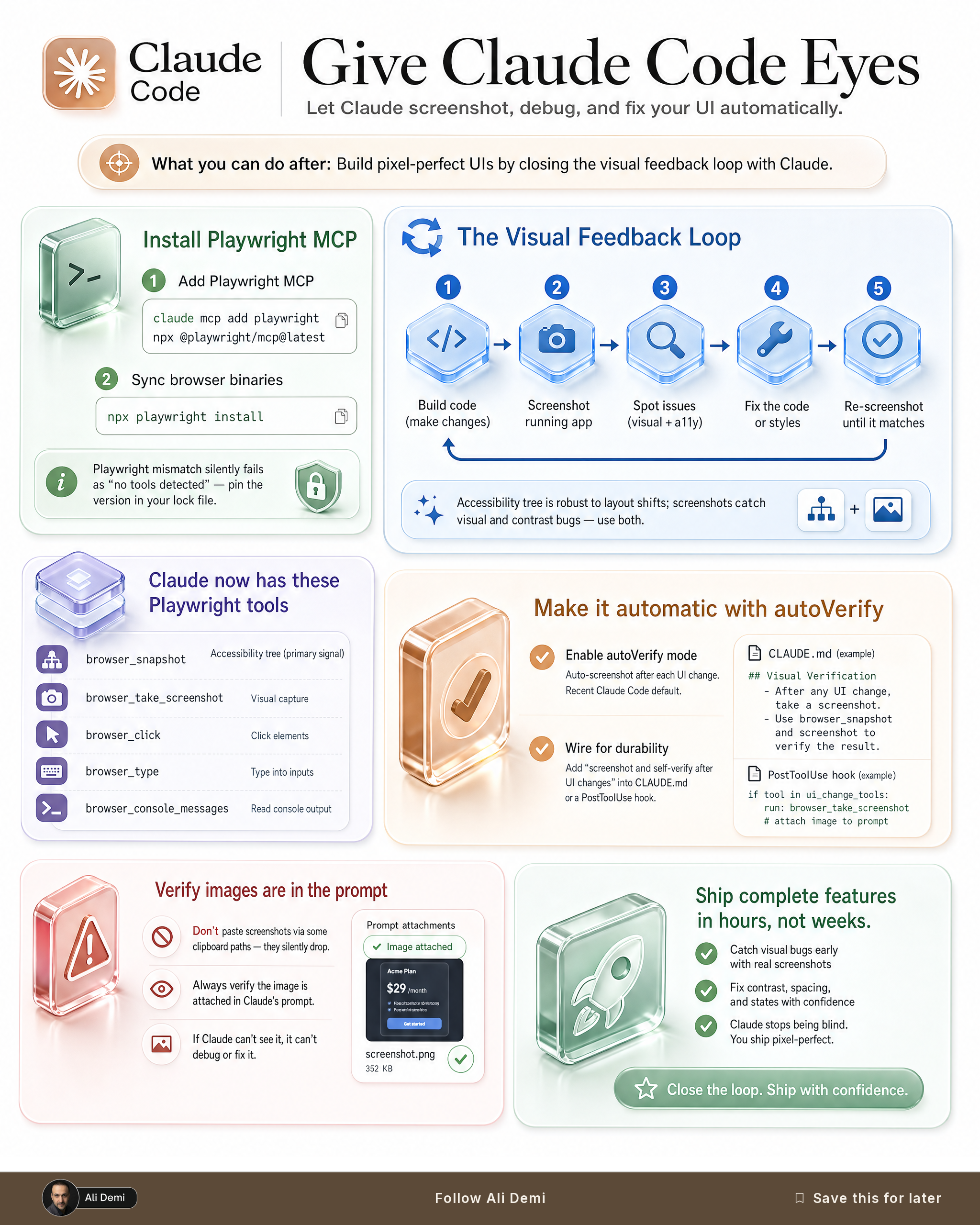
    Playwright MCP is the hook. It lets Claude Code see what it built – snapshots of the DOM structure, screenshots of the running app, the ability to click and type, access to browser console errors. Claude can now navigate to localhost, screenshot the page, compare it to your mock, spot what’s broken, edit the code, and verify again. The loop closes.

    The result: pixel-perfect UIs built in a single conversation. No “take a screenshot for me” back-and-forth. No guessing at CSS fixes. Claude sees the same pixels you do and corrects them before you ever load the page.

    ——

    Book your free AI clarity call, NOW!
    https://buff.ly/TpWy277

    ——

    Repost this. Thanks.
  • Stop Guessing: Use AI to Diagnose Flaky Tests

    Stop Guessing: Use AI to Diagnose Flaky Tests

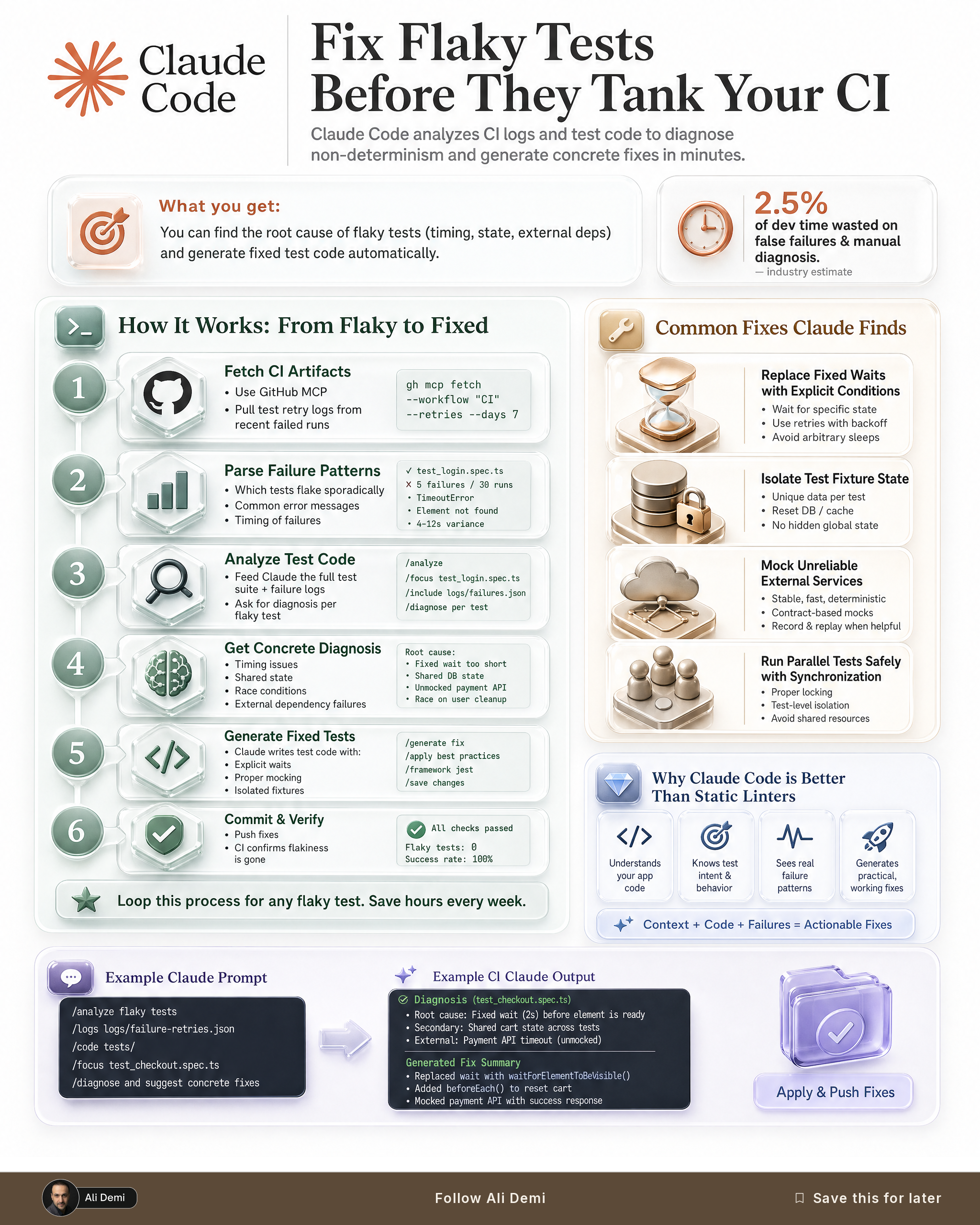
    Flaky tests are a silent killer. You rerun CI, tests pass. You merge, they fail in production. Your team spends 2.5% of productive time chasing false failures and patching over symptoms instead of fixing root causes.

    The problem is diagnosis. Most flaky test tools just detect (reruns pass/fail ratio) or retry (and mask the bug). They don’t tell you WHY a test is non-deterministic: Is it a timing issue? Shared state? Race condition? Mocked service that sometimes fails?

    Claude Code reads test code and CI logs together to find the answer.

    The workflow:

    1. Pull test retry history from your last 20 CI runs (GitHub Actions artifacts, GitHub API).
    2. Parse failure patterns: which tests fail sporadically, what errors do they log, are the failures time-correlated or environment-specific.
    3. Read the test source code. Ask Claude: based on this code and these failure patterns, what’s the non-deterministic behavior.
    4. Generate fixed test code: add explicit waits, isolate fixture state, mock external calls, parallelize safely.
    5. Commit, push, let CI verify the fix works.

    Why Claude is better than static analyzers for this:

    A linter flags “setTimeout in test” as risky. Claude reads the test, the app code it exercises, the CI logs, and the failure mode, then tells you: “This test times out only on slow CI runners. Replace the fixed 500ms wait with an explicit wait for the modal to be visible.” Same problem, concrete fix.

    The commands you’d use:

    Use the GitHub MCP to fetch CI run artifacts and logs. Feed the full test suite and a sample of flaky test runs to Claude with a prompt like: “Analyze these tests and CI failure logs. Which tests are flaky, what’s the likely root cause of each (timing, state isolation, race condition, external dependency), and what’s the concrete fix.”

    Claude returns a ranked list of flaky tests, diagnosis for each, and fixed test code you can commit directly.

    What you save:

    Investigating a flaky test manually takes an hour: dig through CI logs, trace the failure, read the test code, hypothesize, build a fix, iterate. Claude does it in 2 minutes. On a team with 3-5 consistently flaky tests, that’s 5-10 hours a week back in your pocket.

    ——

    Book your free AI clarity call, NOW!
    https://buff.ly/TpWy277

    ——

    Repost this. Thanks.
  • Stop Reading Contracts by Hand: Extract Key Terms Automatically

    Stop Reading Contracts by Hand: Extract Key Terms Automatically

    Contracts are just PDFs full of dense text, tables, and fine print. Your team spends hours scanning each one, hunting for payment terms, renewal dates, liability caps, and who’s actually responsible if things break.

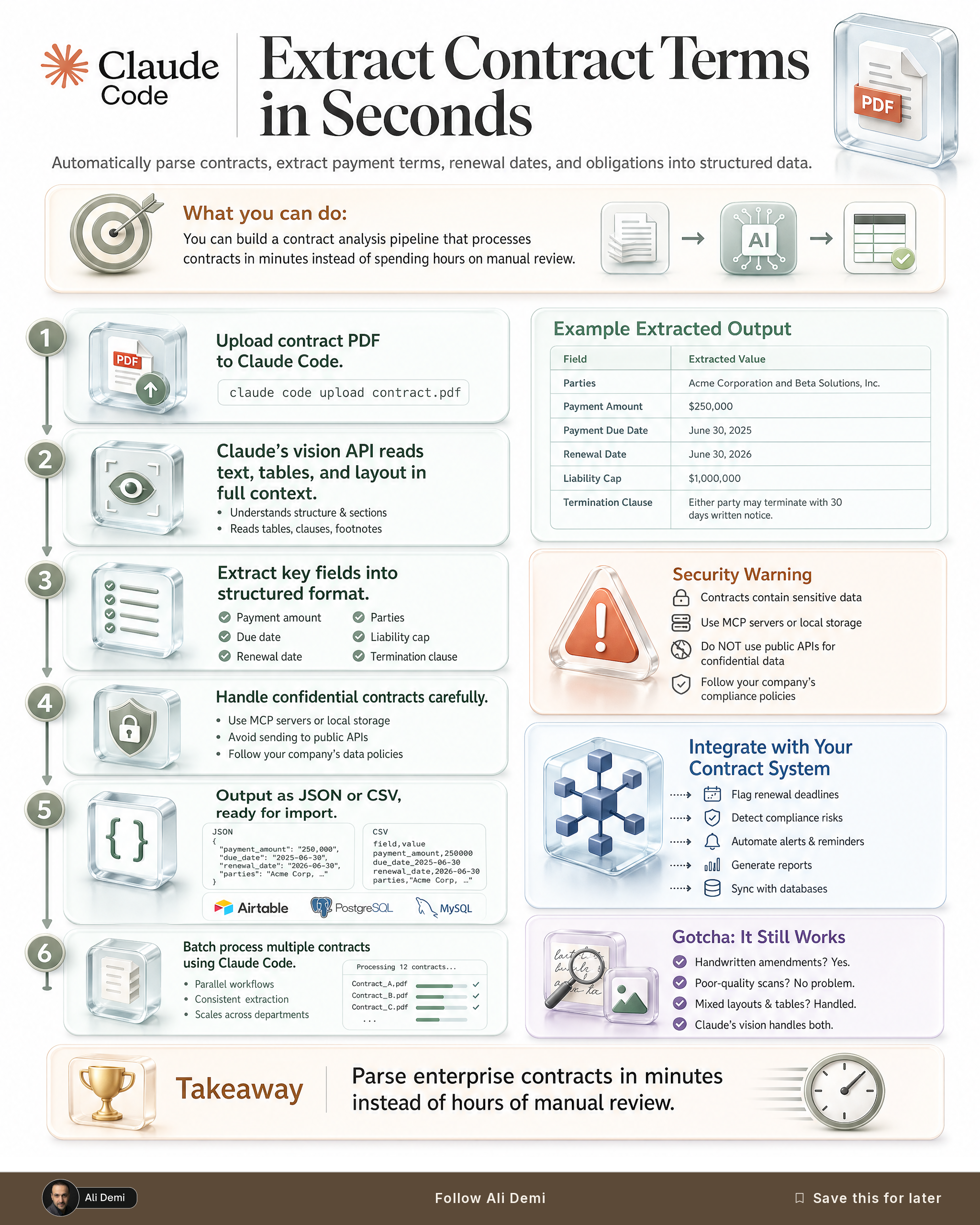
    Claude Code + vision changes that. Upload a PDF contract and Claude reads the entire document-text, tables, signatures, everything. Extract what matters into clean JSON. Feed it straight into your contract management tool or database.

    Here’s what you get:

    1. Drop any contract PDF into Claude Code.
    2. Claude’s vision reads text, tables, and layout holistically (not line-by-line OCR).
    3. Extract structured data: payment amount, payment due date, renewal conditions, termination clauses, liability caps, parties involved.
    4. Output JSON that slots straight into Airtable, Ironclad, or your own contract tracking database.
    5. Batch process 50 contracts in the time it took to read 2 by hand.

    The magic: Claude understands context. It knows that “Net 30” in a payment clause is different from “30 days” in a notice section. It flags ambiguous terms. It catches redlined amendments on page 7 that change the whole game.

    No more hunting through contracts. No more copy-paste into spreadsheets. Parse, extract, sync, and move on.

    ——

    Book your free AI clarity call, NOW!
    https://buff.ly/TpWy277

    ——

    Repost this. Thanks.
  • Stop Writing Test Fixtures: Generate Realistic Test Data in Minutes

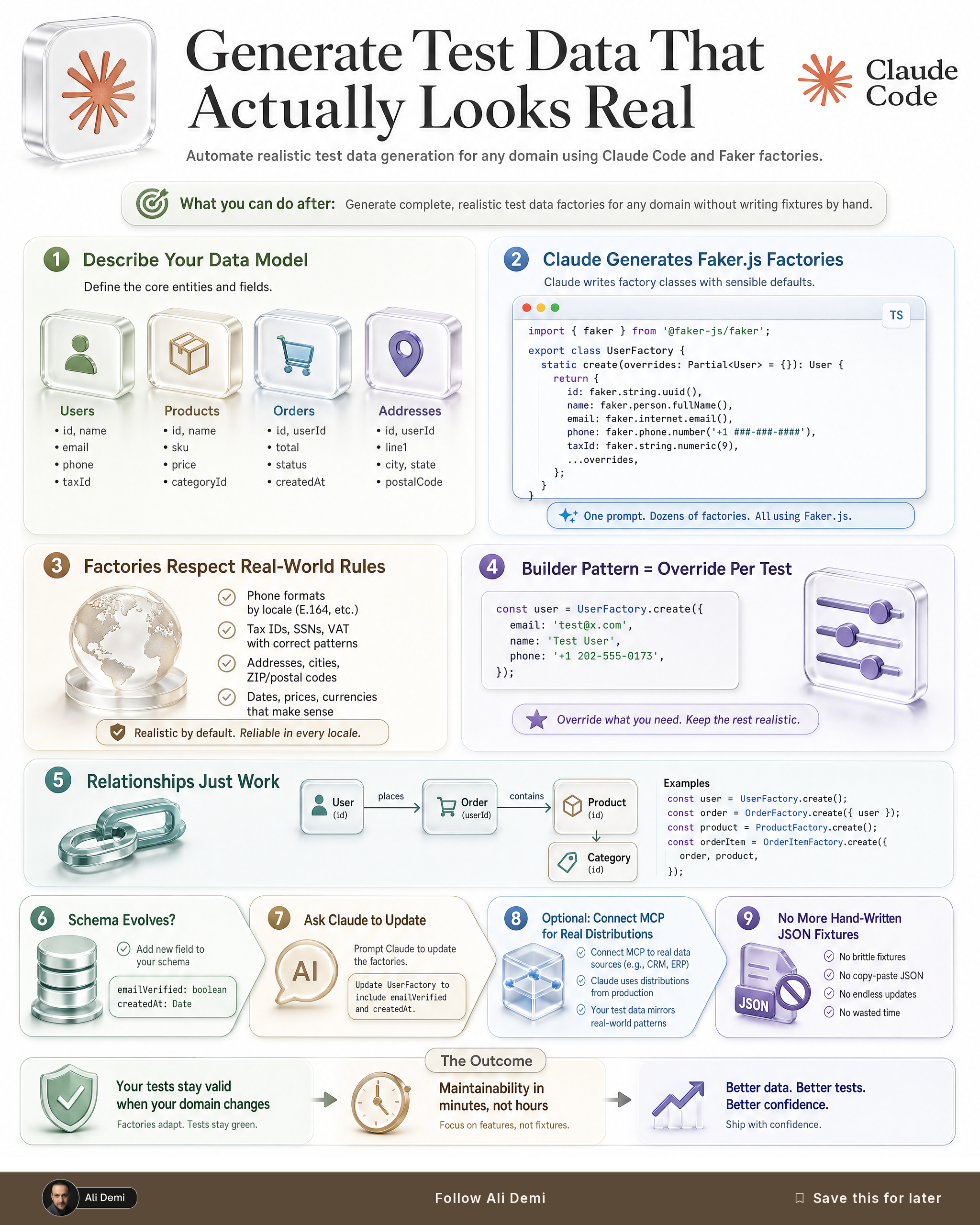
    Stop Writing Test Fixtures: Generate Realistic Test Data in Minutes

    You’re hand-writing JSON fixtures.

    They’re brittle, they never look like real data, and when your schema changes, you rewrite half of them.

    Stop.

    Claude Code can generate Faker factories that build realistic test data automatically.

    Here’s how:

    1. Describe your domain (Users, Products, Orders, Addresses)
    2. Claude generates a factory module with localized, realistic data
    3. Replace hardcoded fixtures with factory calls
    4. Add new fields? Just ask Claude to update the factory
    5. Optionally connect to real data via MCP for production-like distributions

    Your factories respect real-world rules: Indian phone formats, valid tax IDs, believable addresses.

    Relationships work too – Orders know their Users, OrderItems know their Products.

    The result: maintainable test suites that don’t break when your schema evolves.

    ——

    Book your free AI clarity call, NOW!
    https://buff.ly/TpWy277

    ——

    Repost this. Thanks.
  • Extract Years of Lost Knowledge: Reverse-Engineer Legacy Systems

    Extract Years of Lost Knowledge: Reverse-Engineer Legacy Systems

    You have old code. Nobody remembers why it works that way. Original developers are gone. The business says “modernize it,” but you have no documentation of what it actually does.

    This is the hidden cost of legacy systems: institutional knowledge walks out the door. Modernization stalls because your team spends months reverse-engineering the system just to understand what it does.

    Claude Code solves this by extracting that knowledge automatically.

    The workflow:

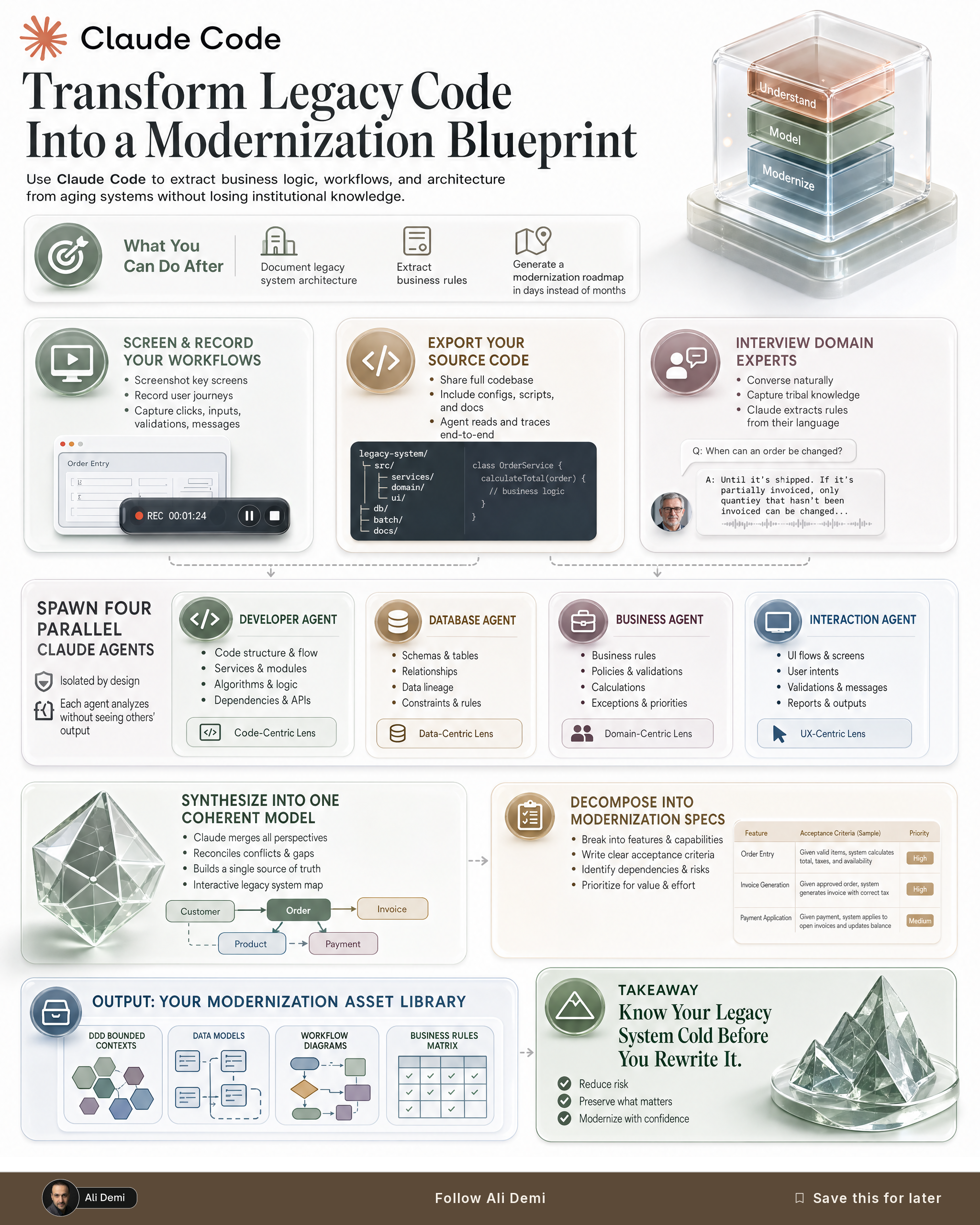
    Step 1: Gather your inputs. Collect UI screenshots (or video recordings of workflows), source code, and domain expert interviews (voice, transcript, or notes). Store them in folders: screenshots/, src/, transcripts/.

    Step 2: Analyze in parallel. Spin up four Claude agents analyzing simultaneously:

    • Application Developer reads the code, traces workflows, extracts business logic
    • Database Analyst maps your schema and data models
    • Business Analyst listens to interviews, extracts domain rules and constraints
    • Interaction Analyst maps UI flows and user journeys from screenshots

    They run in parallel. This takes hours, not weeks.

    Step 3: Synthesize and decompose. Claude synthesizes all four analyses into a living PRD: business rules, architecture diagrams (as Mermaid), feature decomposition, data models, and an interaction matrix. Each output is a separate document, ready for your modernization sprint.

    What you get: A complete understanding of your legacy system in structured form. Domain-driven design contexts. Business rule inventory. UI flow diagrams. Acceptance criteria for each modernized feature. No more guessing.

    Why this matters: Modernization teams often fail because they skip understanding and jump straight to rewriting. Claude Code compresses that understanding phase from months to hours, using your actual system as the source of truth.

    ——
    Book your free AI clarity call, NOW!
    https://buff.ly/TpWy277
    ——

    Repost this. Thanks.
  • Stop Writing Changelogs by Hand: Auto-Generate Them from Git

    Stop Writing Changelogs by Hand: Auto-Generate Them from Git

    You know the drill: release day arrives, and you’re staring at a wall of git commits, trying to figure out what actually changed.

    How do you translate “fix: race condition in token refresh” into something a customer cares about?

    Claude handles this in seconds.

    Here’s the workflow:

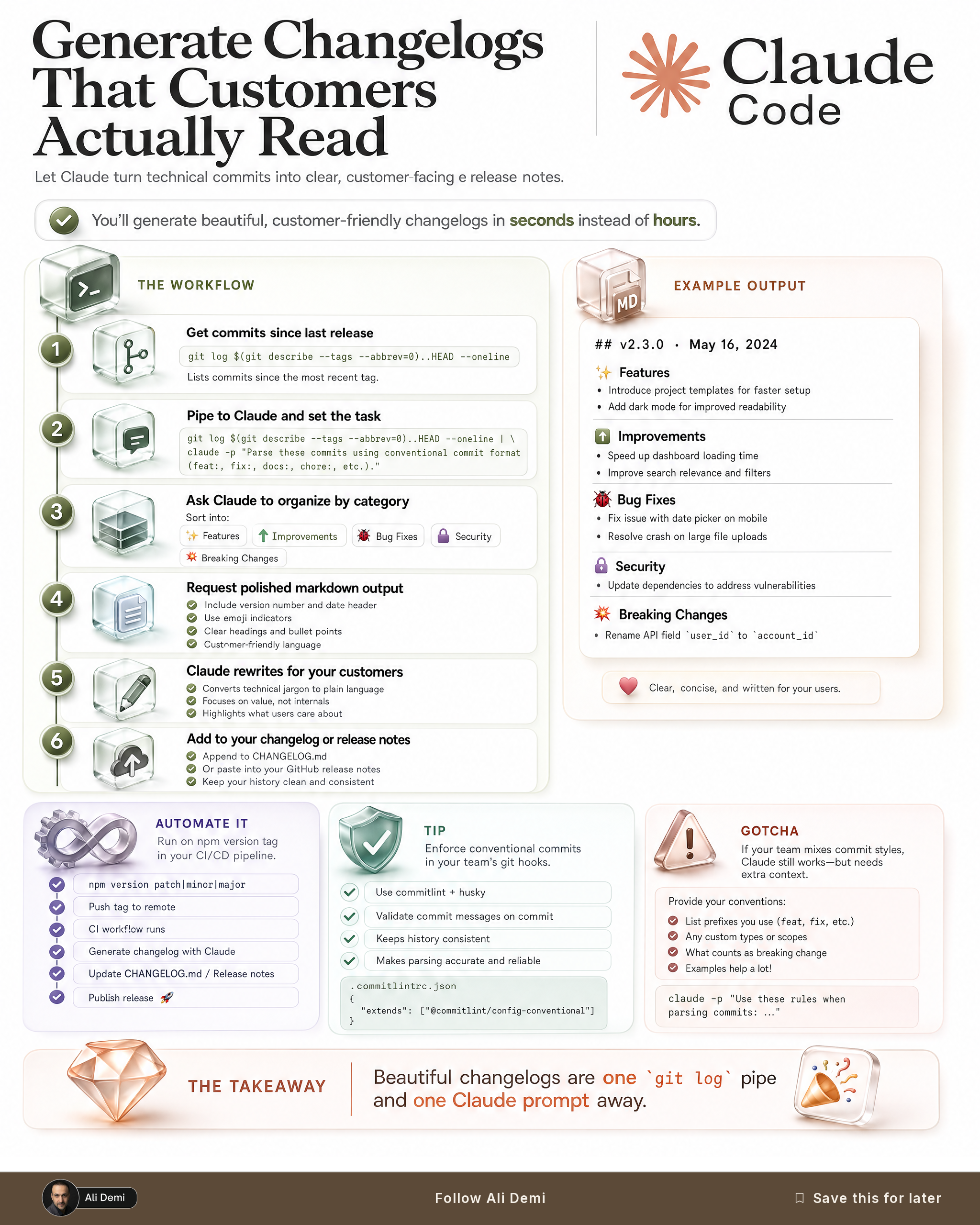
    1. Pull your commit history since the last release using `git log` with conventional commits format (feat:, fix:, docs:, etc.)
    2. Feed that log to Claude with a prompt asking it to categorize changes into Features, Improvements, Bug Fixes, Breaking Changes, and Security
    3. Claude rewrites technical language into clear, user-focused descriptions with emoji indicators
    4. Format as markdown with version header and date, ready to paste into CHANGELOG.md or your GitHub release
    5. Optional: wire it into a pre-release hook so changelog generation runs automatically when you tag a new version

    The payoff: your customers see what’s actually new instead of decoding jargon, your release day runs faster, and your changelog stays up-to-date without manual toil.

    If your team commits with conventional commits (feat:, fix:, refactor:, etc.), Claude can parse and transform that history into professional release notes in one pass.

    ——

    Book your free AI clarity call, NOW!
    https://buff.ly/TpWy277

    ——

    Repost this. Thanks.
  • Automate Accessibility Audits: Catch WCAG Violations Your Team Misses

    Automate Accessibility Audits: Catch WCAG Violations Your Team Misses

    Manual accessibility audits are slow, expensive, and miss subtle violations.

    You’re shipping apps that fail keyboard navigation, color contrast, or ARIA attributes-catches never show up in code review until a user with a screen reader hits the problem, or worse, a compliance audit fails.

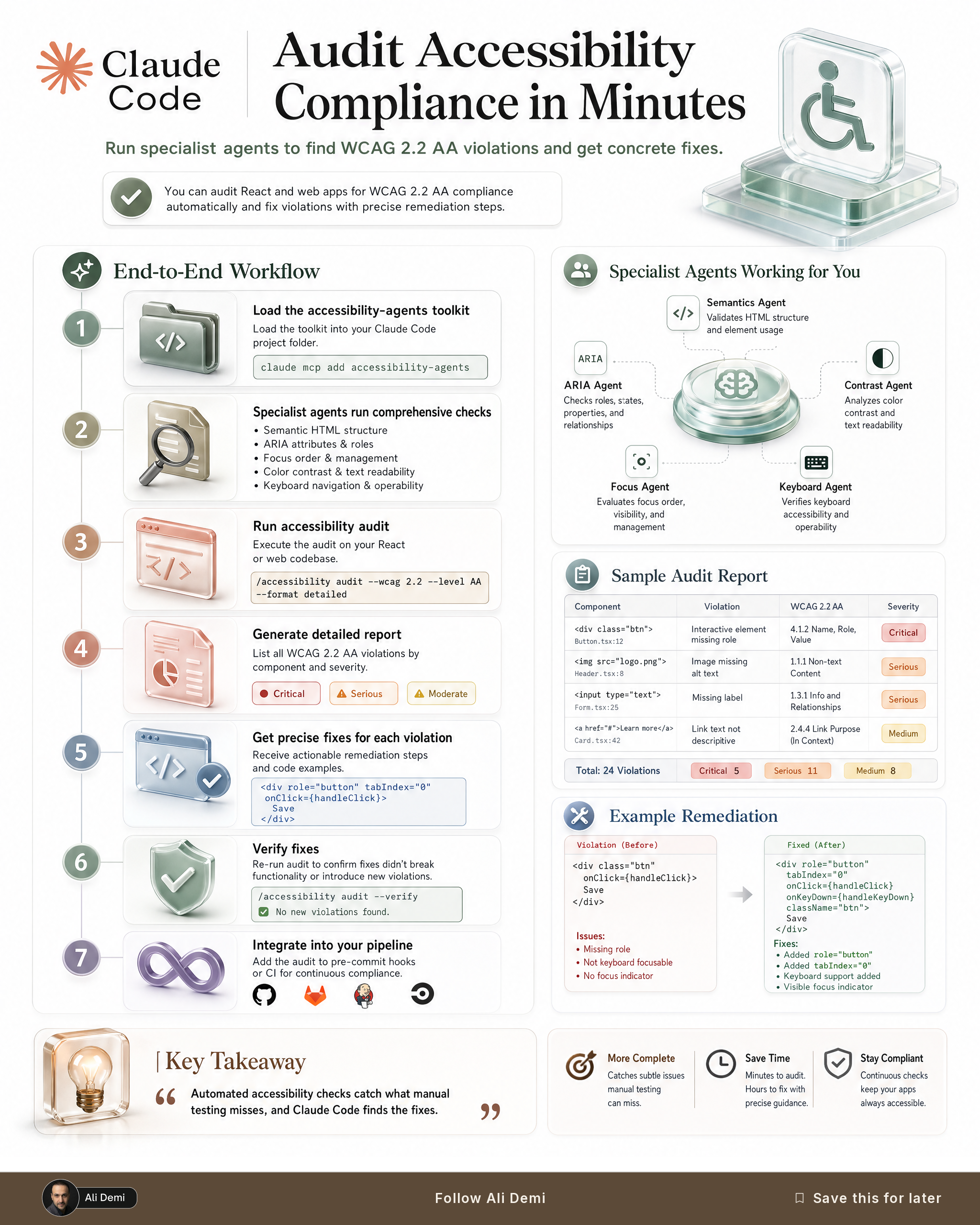
    Claude Code has specialist accessibility review agents that run automatically, examine your codebase for semantic HTML, focus management, color contrast, ARIA misuse, and screen reader compatibility, then report violations with exact component locations and remediation steps.

    It’s the difference between a compliance checkbox and shipping accessible software.

    ——

    Book your free AI clarity call, NOW!
    https://buff.ly/TpWy277

    ——

    Repost this. Thanks.
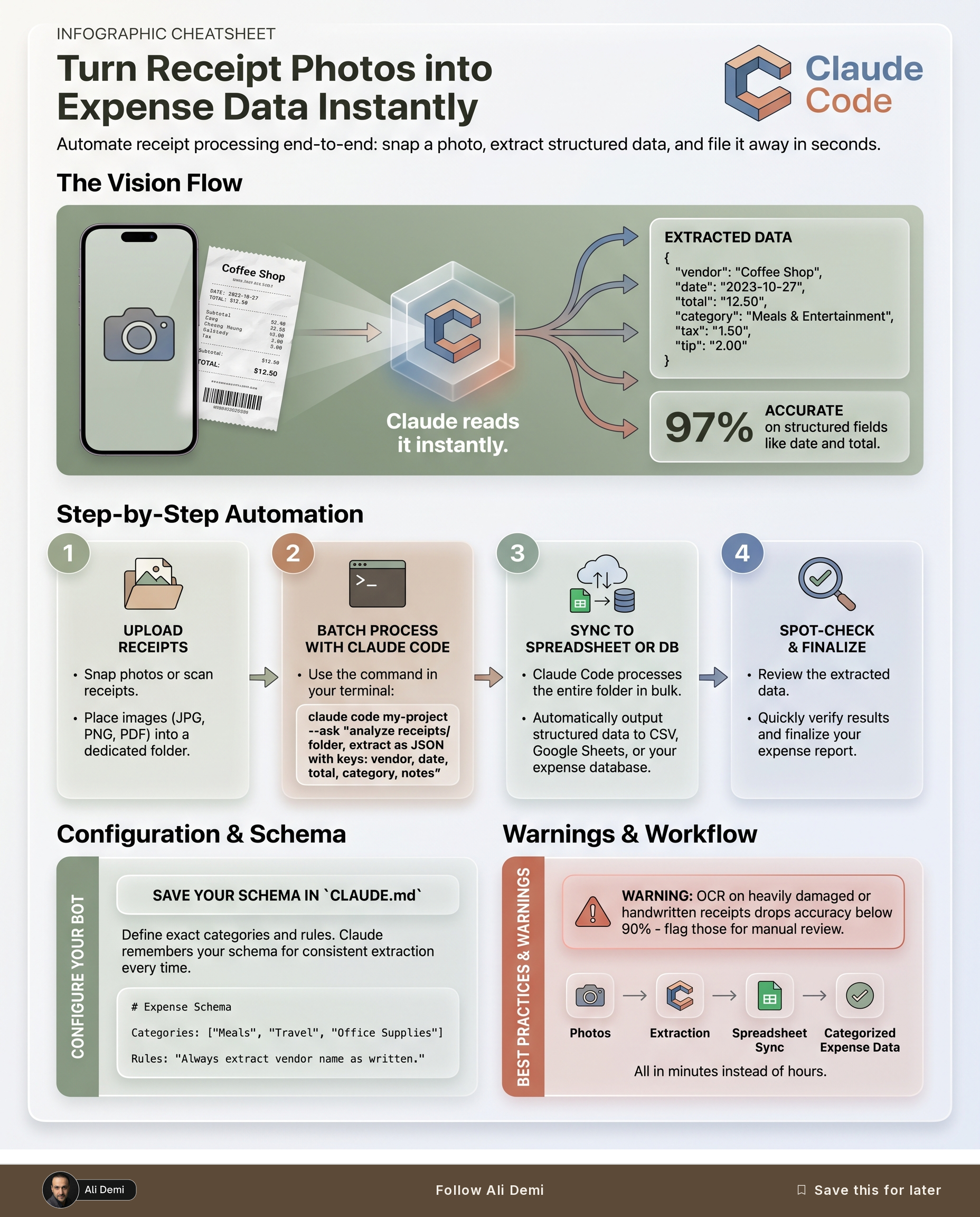
  • Stop Typing Receipts By Hand: Build a Receipt Bot in Minutes

    Stop Typing Receipts By Hand: Build a Receipt Bot in Minutes

    You know the drill: expense report comes due, you dig through a folder of blurry receipt photos, and spend an hour typing vendor names, dates, and amounts into a spreadsheet.

    Stop. Let Claude read the receipts for you.

    Claude’s vision model understands photos well enough to extract every field you need from a receipt: vendor name, date, total, line items, even tax and tip. Feed it a batch of receipt images, and it returns structured data ready for a database or CSV.

    The workflow is simple.

    1. Point Claude Code at a folder of receipt photos or PDFs.
    2. Ask it to extract vendor, date, total, category, and any notes.
    3. Have it write the data to CSV, JSON, or straight to Google Sheets via an API call.
    4. Spot-check a few rows for accuracy (Claude’s vision is 97% reliable on structured fields), then sync it to your expense system.

    For recurring workflows, save your extraction rules in a CLAUDE.md file so Claude remembers your exact schema and categories every time you run it.

    The real win: what used to take an hour now takes minutes. No more manual data entry, no more typos, no more forgetting where that coffee receipt went.

    Your future self will thank you when tax season hits and all your expenses are already organized.

    ——

    Book your free AI clarity call, NOW!
    https://buff.ly/TpWy277

    ——

    Repost this. Thanks.
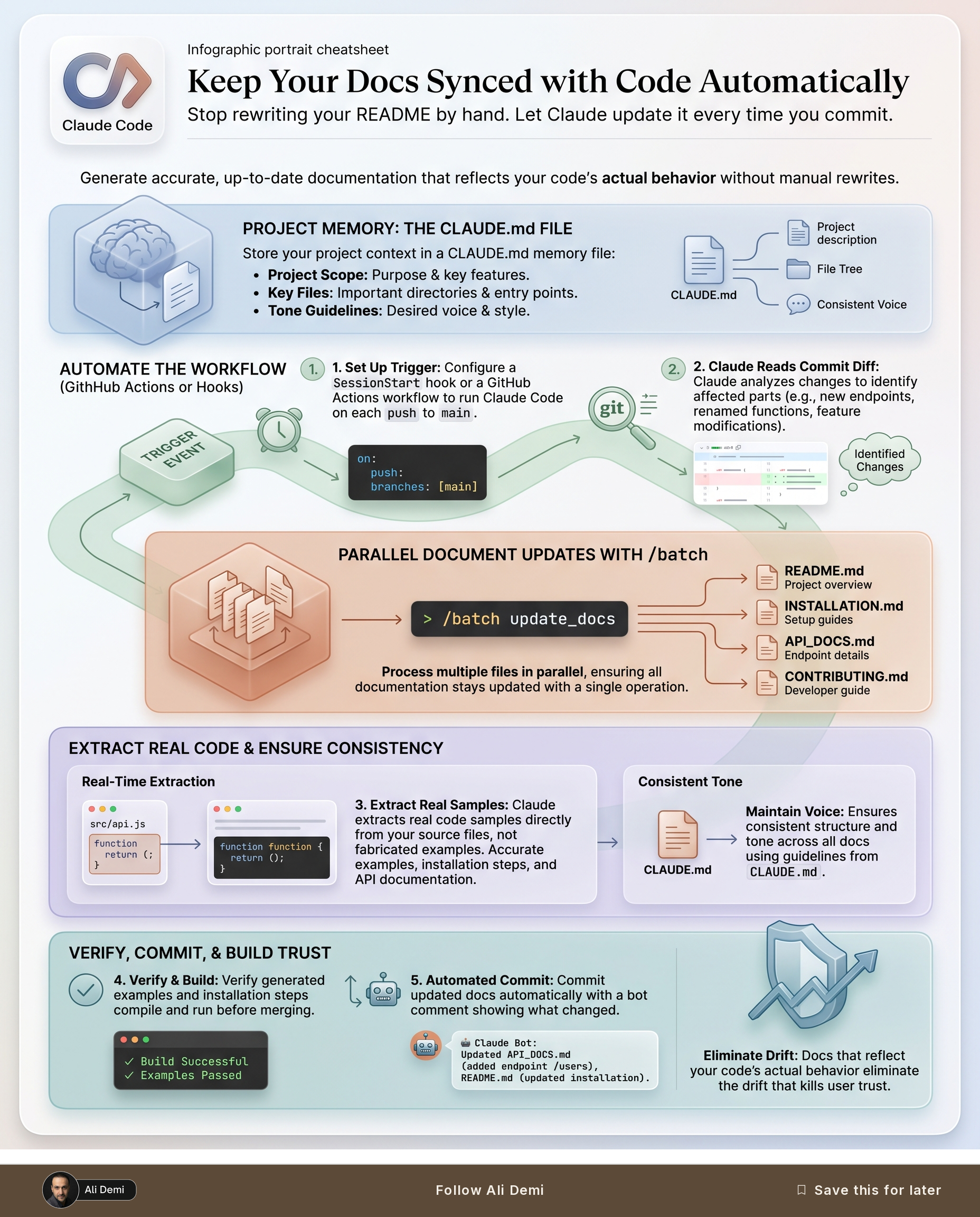
  • Your README Doesn’t Have to Be Stale: Auto-Generate It

    Your README Doesn’t Have to Be Stale: Auto-Generate It

    Your README is outdated the moment you ship a new feature.

    Maintaining docs by hand is a losing game: they drift, examples break, API endpoints change, and no one notices until a user complains. The truth is, the source of truth for what your code does is your code itself.

    Clause Code can read your codebase and keep documentation fresh. Store your project context in a CLAUDE.md memory file, set up Claude Code to trigger on each commit, and it will analyze your changes, generate accurate examples directly from your source, and update README, API docs, and guides automatically. No manual rewrites. No drift.

    Here’s how it works:

    Step 1: Seed your project context. Write a brief CLAUDE.md in your repo root that describes your project’s purpose, key files, and the tone you want in docs. Claude uses this to maintain consistency.

    Step 2: Trigger on commits. Add a SessionStart hook or GitHub Actions workflow that invokes Claude Code whenever you push to main. Use your CLI or web interface to set it up no OAuth dancing.

    Step 3: Analyze the diff. Claude reads the commit diff and identifies what changed: new endpoints, renamed functions, updated config, new features. It notes which docs are affected.

    Step 4: Generate new docs. Claude extracts real code samples from your source, generates accurate installation steps, writes API documentation directly from your endpoints, and updates examples in your README. It uses the tone and structure from your CLAUDE.md to stay consistent.

    Step 5: Commit and push. The updated docs are committed automatically, ready for review. A bot comment surfaces what changed so humans can audit before merge.

    This workflow scales: use `/batch` to process multiple doc files in parallel. Your README, INSTALLATION.md, CONTRIBUTING.md, and API_DOCS.md all stay in lockstep with your code.

    The gotcha: Ask Claude to extract real code samples from your project, not fabricate examples. Broken examples in docs kill trust faster than missing docs.

    Docs that reflect reality are docs people actually use.

    ——

    Book your free AI clarity call, NOW!
    https://buff.ly/TpWy277

    ——

    Repost this. Thanks.