Tag: automation

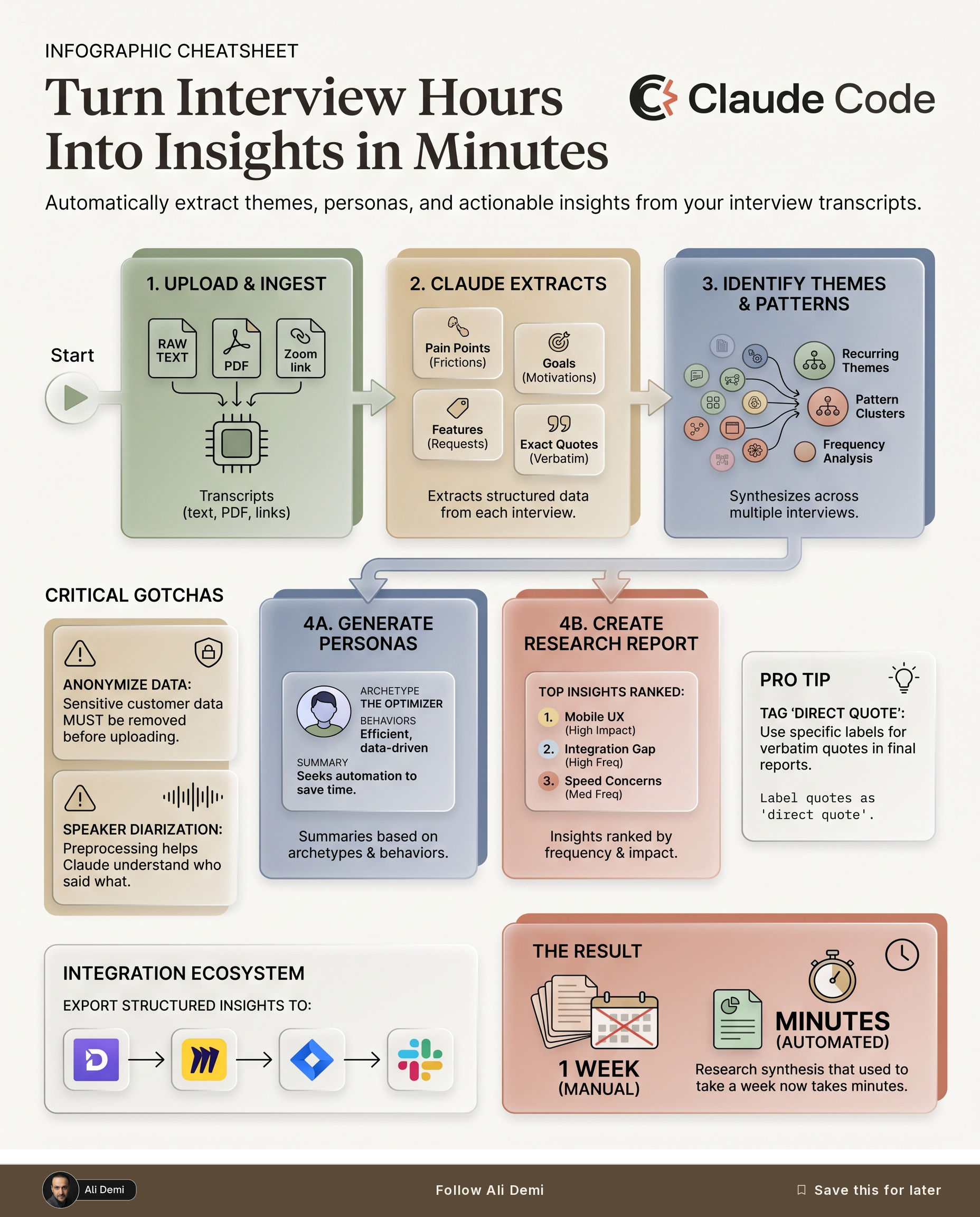
  • Stop Reading 20 Hours of Interviews: Synthesize User Research Instantly

    Stop Reading 20 Hours of Interviews: Synthesize User Research Instantly

    You record 50 user interviews. Then you spend a week reading transcripts, highlighting quotes, and writing synthesis notes by hand.

    Claude can do that in minutes.

    The workflow is simple.

    1. Upload your interview transcripts (paste raw text, upload PDFs, or point at your Zoom recordings)
    2. Claude extracts the meat: pain points, goals, workarounds, feature requests, and exact quotes
    3. Across multiple interviews, Claude clusters themes and identifies patterns
    4. You get: a persona summary, a heat map of problems, and a research report with primary quotes
    5. Export to Dovetail, Miro, or your Jira backlog

    What makes this fast.

    Claude understands context. It knows when someone says their workflow is broken versus when they’re just frustrated. It spots contradictions across interviews (some users want X, others want Y). It finds the real problems buried in rambling conversations.

    Run this at scale: batch process 50 interviews while you sleep, then wake up to themes already clustered and personas already written.

    Where it saves time.

    User researchers spend 80% of their time on synthesis. Claude handles the reading, highlighting, and organizing. You spend your time validating insights and asking follow-up questions, not transcribing pain points.

    Product managers get actionable research reports in hours, not weeks. Teams ship faster because you actually ship what users need, not what your gut says.

    ——
    Book your free AI clarity call, NOW!
    https://buff.ly/TpWy277
    ——

    Repost this. Thanks.
  • Your Code Reviewer Never Sleeps: Auto-Review Every PR

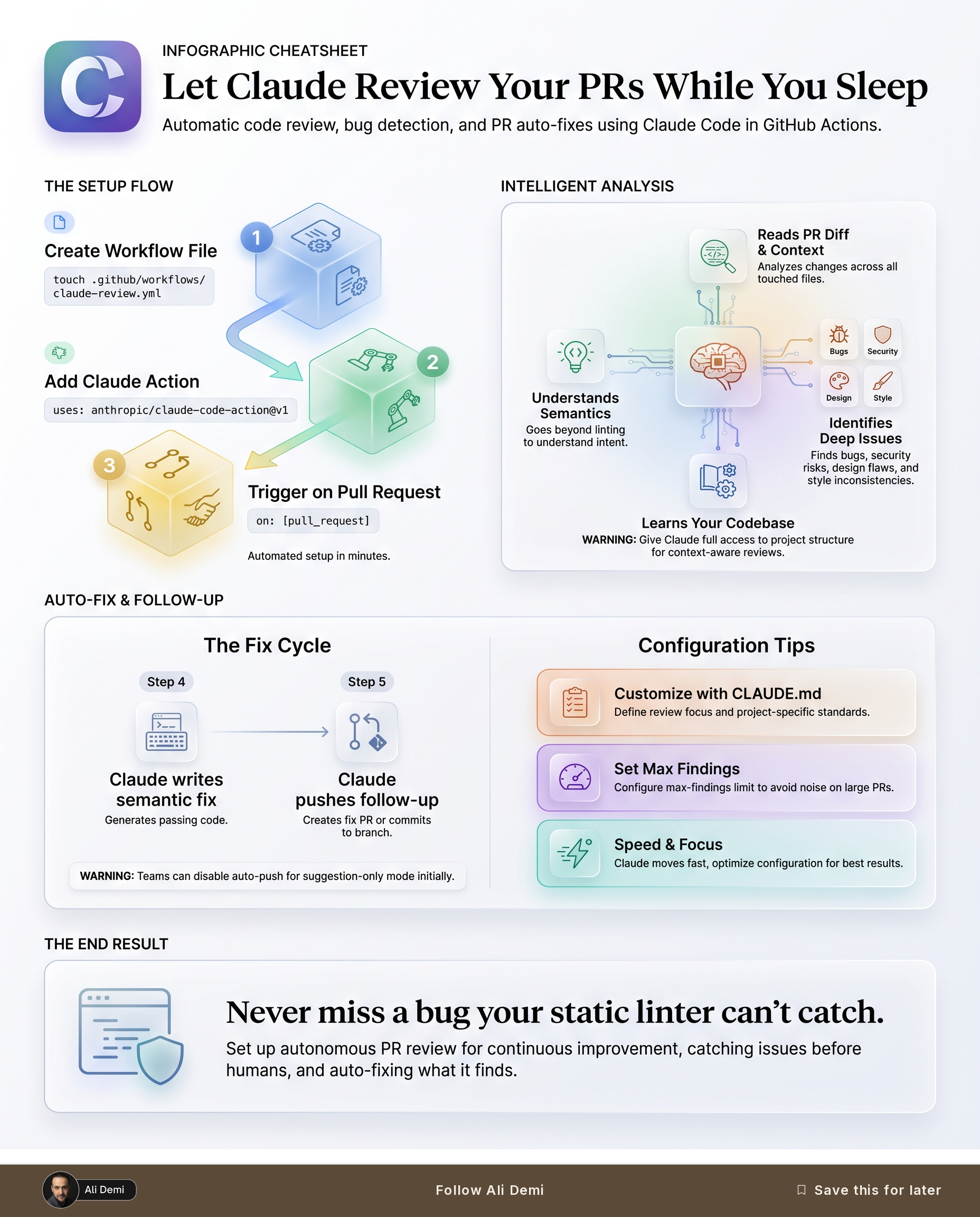
    Your Code Reviewer Never Sleeps: Auto-Review Every PR

    Your PR sits in the queue waiting for review. Two days later, someone finds a bug that would have taken thirty seconds to catch. Claude Code can fix that.

    Set up Claude Code to run on every PR, read the diff, find the bugs, and push fixes before your team even looks at the PR.

    This is the difference between slow code review and continuous verification.

    What Claude can review:

    • Logic errors and edge case bugs in the diff
    • Missing null checks, error handling, off-by-one mistakes
    • Security vulnerabilities (auth bypasses, injection risks, race conditions)
    • Performance issues (N+1 queries, memory leaks, blocking operations)
    • Code style and naming inconsistencies

    When Claude finds a bug, it doesn’t just comment. It runs the test suite, traces the failure across files, writes a fix that actually works, and opens a PR for you to approve.

    Your team reviews better code. Humans stay focused on design and architecture. Claude handles the 80% of review work that’s mechanical.

    ——

    Book your free AI clarity call, NOW!
    https://buff.ly/TpWy277

    ——

    Repost this. Thanks.
  • Stop Paying for Monitoring: Build Smart Dashboards with Claude

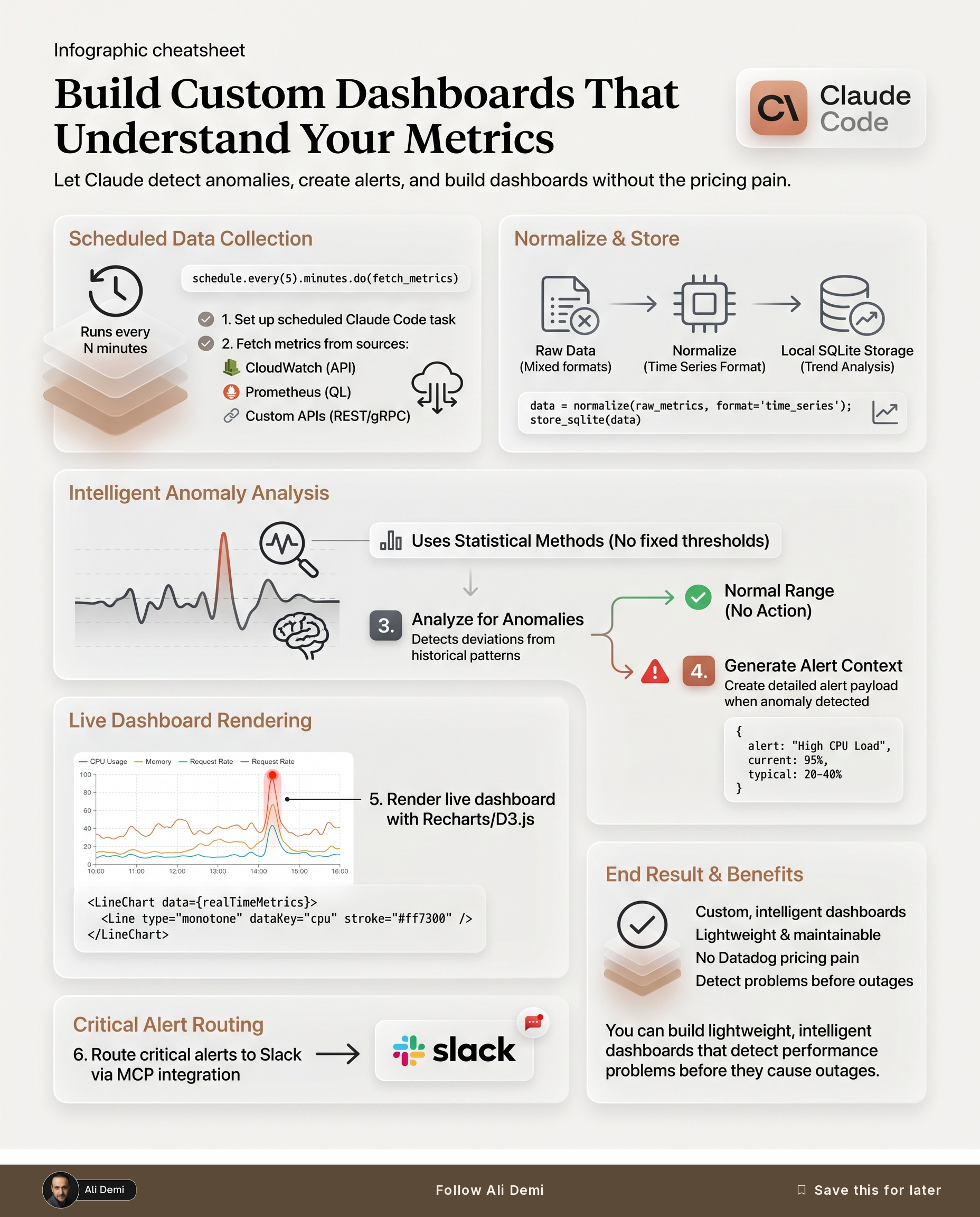
    Stop Paying for Monitoring: Build Smart Dashboards with Claude

    Your monitoring tool is costing you thousands a month, and half the alerts are noise.

    Claude Code can build a smarter alternative.

    The idea is simple: fetch your metrics, let Claude detect real anomalies (not just threshold crossings), and trigger alerts that actually mean something. All without Datadog’s per-metric pricing.

    Here’s what a real workflow looks like:

    1. Schedule a Claude Code task to run every minute and fetch metrics from CloudWatch, Prometheus, or your custom APIs.
    2. Claude analyzes the time series data to detect real anomalies: performance degradation, unusual latency spikes, traffic patterns that break your model.
    3. If something looks wrong, Claude generates an alert with context: what changed, why it matters, what to check first.
    4. The dashboard updates live with all your metrics, color-coded by health.
    5. Serious anomalies route to Slack or PagerDuty automatically.

    The key difference from traditional alerting: Claude understands context. A 2x spike in latency at 3 AM during a database backup is fine. A 2x spike during peak hours is not. Traditional tools can’t tell the difference. Claude can.

    You can build this in a few hours with scheduled tasks, a metrics API, and Claude’s ability to write analysis code. The dashboard is just a React component that polls your metrics endpoint. The hard part, the analysis and anomaly detection, Claude handles.

    Your monitoring just became intelligent, and you fired an expensive SaaS tool.

    ——

    Book your free AI clarity call, NOW!
    https://buff.ly/TpWy277

    ——

    Repost this. Thanks.
  • Stop Hunting Hardcoded Strings: Automate Your i18n Setup

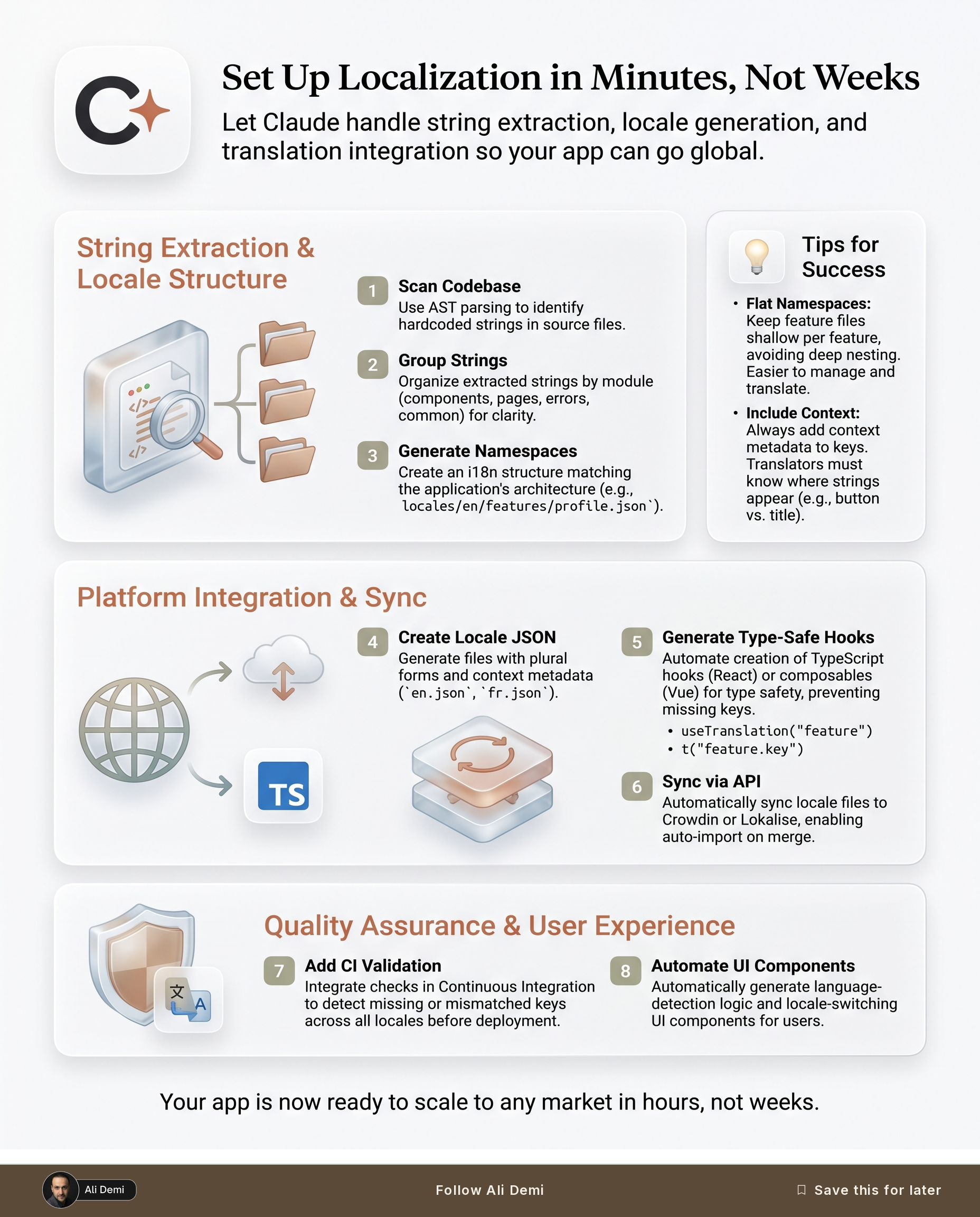
    Stop Hunting Hardcoded Strings: Automate Your i18n Setup

    Your app only works in English right now, but your customers live everywhere.

    Going global means extracting every hardcoded string, creating translation key structures, setting up pluralization rules, wiring in locale selectors, and syncing with a translation service. It’s tedious, error-prone, and it eats weeks of engineering time.

    Claude Code can automate all of it.

    The workflow:

    1. Scan your codebase with Claude to find every hardcoded string and existing i18n calls
    2. Generate a clean namespace structure (common, pages, components, errors) based on where strings live
    3. Create locale files with automatic plural and context rules for each language
    4. Generate type-safe i18n hooks or composables so developers catch missing translations at compile time
    5. Push locale files to Crowdin or Lokalise via their API, wired to auto-sync on merge
    6. Validate all locales have matching keys-no silent missing translations in production

    The result: your codebase speaks 10 languages, your translations stay in sync, and your next hire in Spain gets full type safety in Spanish without touching a config file.

    ——

    Book your free AI clarity call, NOW!
    https://buff.ly/TpWy277

    ——

    Repost this. Thanks.
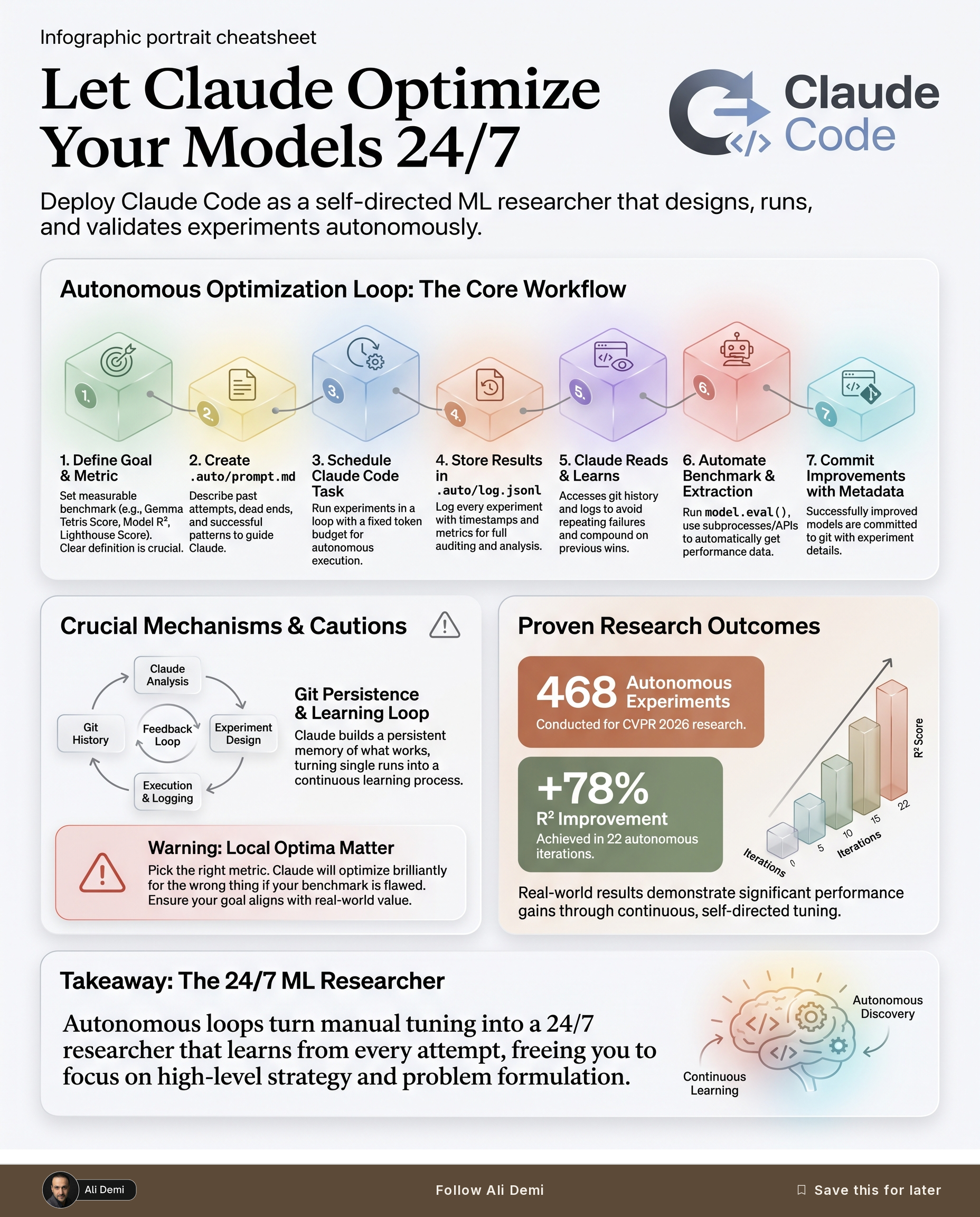
  • Stop Manual Tuning: Run Autonomous ML Experiments

    Stop Manual Tuning: Run Autonomous ML Experiments

    Your models need tuning. Your research needs experiments. But running them manually is a sinkhole.

    Claude Code can run the whole loop for you: define a goal, set a benchmark, and watch as it autonomously tries variations, measures results, commits improvements, and logs what failed.

    At CVPR 2026, Lambda Labs ran a live demo where Claude Code completed 468 autonomous Tetris training experiments over 2.5 days, zero human touches. One research team improved model R² from 0.44 to 0.78 (+78%) by letting Claude iterate 22 times without touching code once.

    Here’s how it works. You define the goal in a prompt or `.auto/prompt.md` file. Claude runs on a schedule, tries a code or parameter change, executes the benchmark, checks if it improved, and commits the win or logs the loss. Each experiment lands in `.auto/log.jsonl` for auditing. The key is persistent memory: Claude reads past attempts from git and the log, avoids dead ends, and compounds wins.

    The domains where this shines: hyperparameter tuning (learning rates, batch sizes, regularization), architecture search (layer counts, activation functions), prompt optimization (instruction phrasing, few-shot examples), and compound screening (chemistry researchers used it to design 2,200 compounds autonomously).

    The setup needs three pieces. First, a measurable benchmark that returns a single score or metric (accuracy, R², loss, latency, whatever matters). Second, git hooks or a scheduled task to keep the loop alive-the_lab.api is one reference implementation. Third, a bounded token budget per run so experiments don’t spiral.

    One gotcha: the loop finds local optima, not global ones. Your benchmark needs to be the real signal you care about. If you reward the wrong metric, it’ll optimize the wrong thing brilliantly. Pick carefully.

    The payoff is compounding. Early experiments fail fast and cheap. By week two, Claude has intuition about what works in your domain and starts hitting the high-value changes. Research teams report 15 40% improvements in key metrics over month-long autonomous runs.

    ——

    Book your free AI clarity call, NOW!
    https://buff.ly/TpWy277

    ——

    Repost this. Thanks.
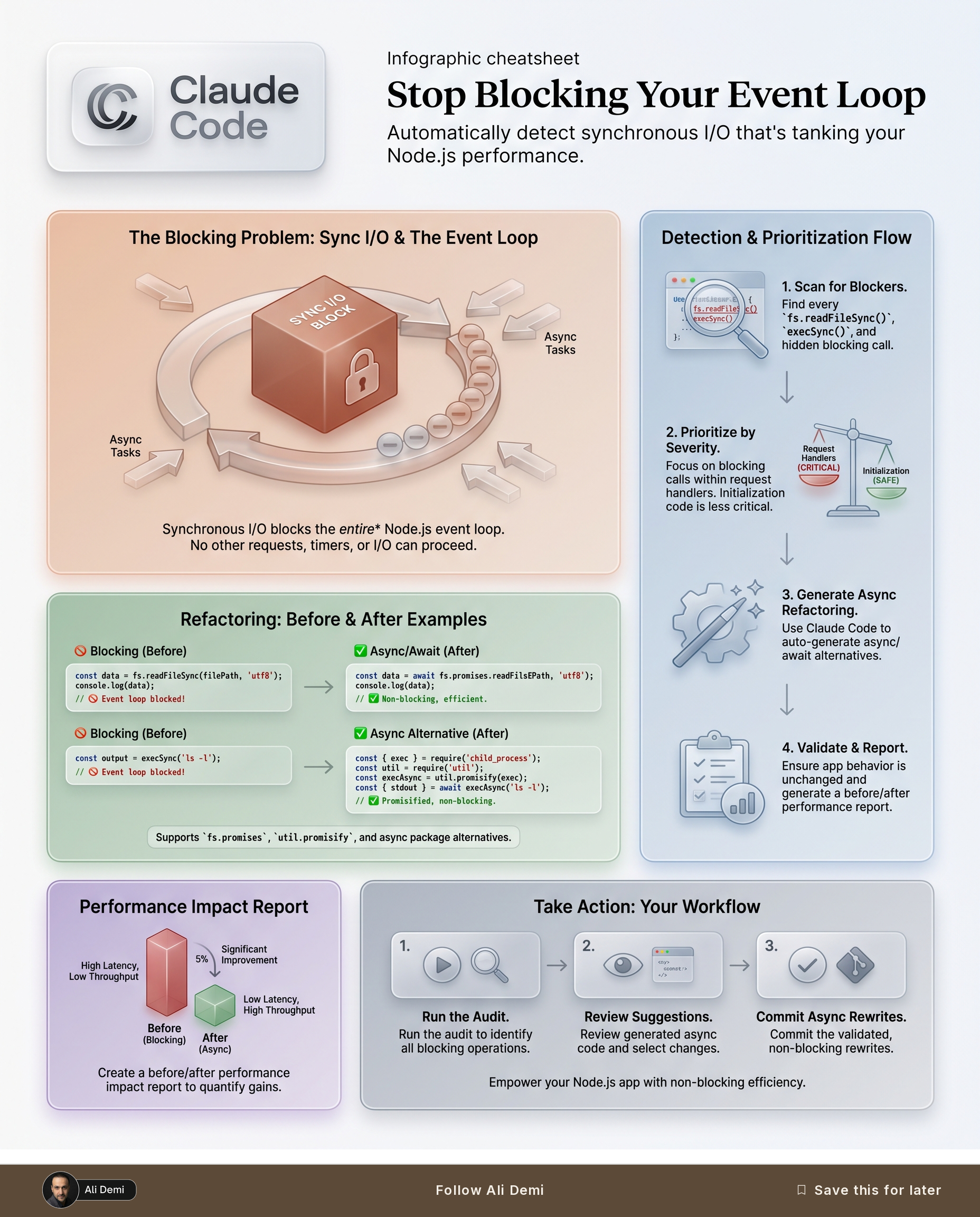
  • Your Node.js App Is Blocking: Find and Fix It Automatically

    Your Node.js App Is Blocking: Find and Fix It Automatically

    Your Node.js app feels slow. Users complain about latency spikes. You check CPU, it’s fine. Memory, fine. Then you remember: the event loop.

    One fs.readFileSync(), one execSync(), one synchronous call hiding in middleware, and your entire application stalls. Every other request waits. But finding these is tedious, they hide in middleware, in initialization code, in third-party packages.

    Claude Code scans your entire codebase semantically, finds every blocking I/O call, and generates the async rewrites for you.

    What Claude finds:

    1. Direct blocking calls: fs.readFileSync(), execSync(), require(‘child_process’).execSync()
    2. Blocking in request handlers and middleware
    3. Synchronous operations called in event listeners or callbacks
    4. Blocking patterns hiding inside loops or conditionals
    5. Third-party packages with only synchronous APIs

    What Claude generates:

    1. A complete audit of blocking calls ranked by severity (blocking in hot paths vs. initialization)
    2. Refactoring suggestions for each call with code examples
    3. Automated migrations to fs.promises, util.promisify, or alternative async packages
    4. A “Node.js Health Report” showing before/after bottleneck reduction
    5. Safe refactoring that validates the behavior matches the original code

    The gotcha: Some blocking during startup is fine. Claude distinguishes initialization code (where blocking is acceptable) from request paths (where it’s a performance killer).

    Run it, get your refactoring list, commit the async rewrites, watch your latency drop.

    ——

    Book your free AI clarity call, NOW!
    https://buff.ly/TpWy277

    ——

    Repost this. Thanks.
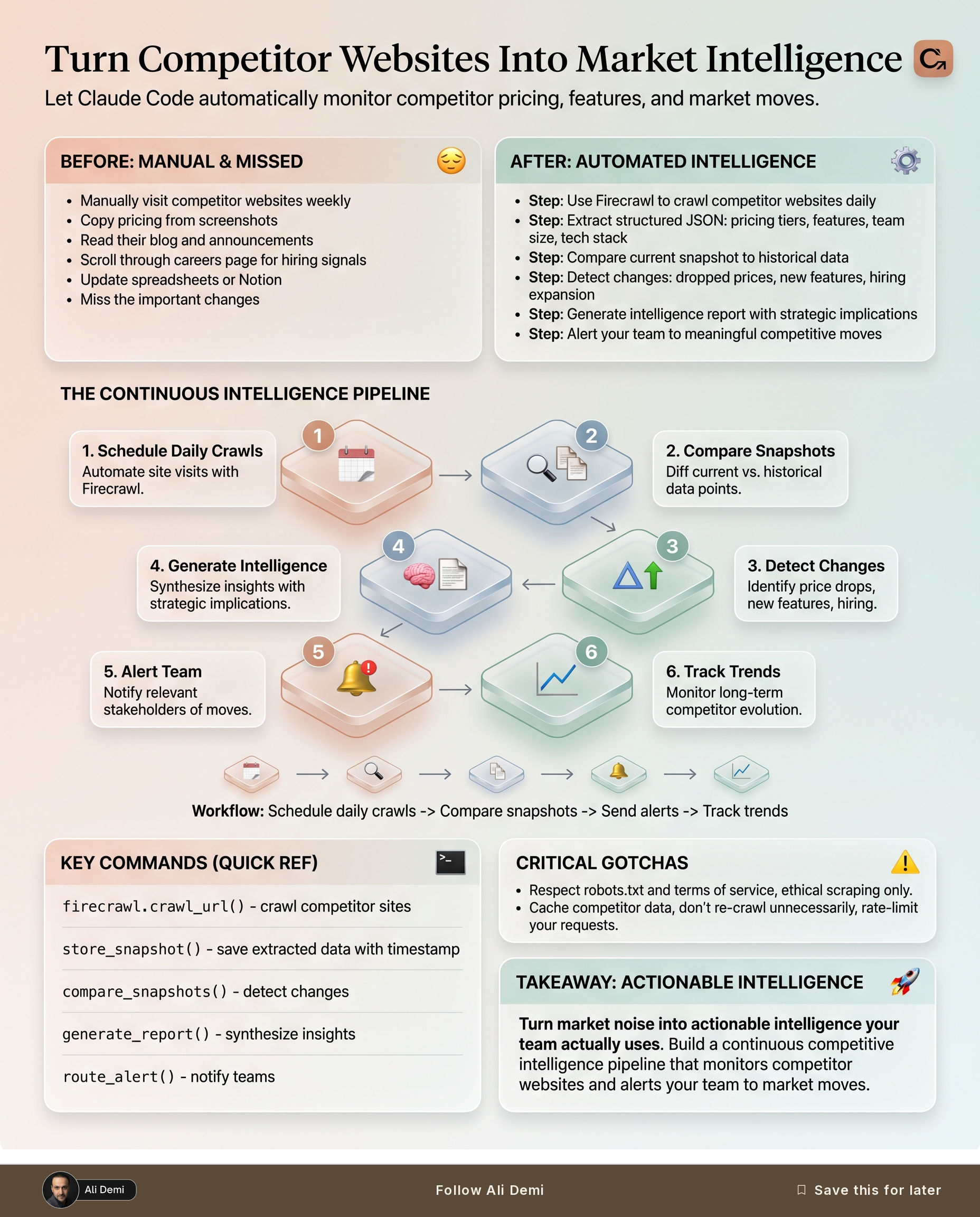
  • Stop Tracking Competitors By Hand: Automate Competitive Intelligence

    Stop Tracking Competitors By Hand: Automate Competitive Intelligence

    You’re manually checking competitor websites weekly. Their pricing changes. New features ship. They hire aggressively. You find out late.

    Claude Code plus Firecrawl automate this into a continuous intelligence pipeline that never sleeps.

    Here’s how it works:

    Step 1: Set up Firecrawl MCP. Connect it to Claude Code. Now Claude can crawl websites and extract structured data from any layout.

    Step 2: Define your competitors. Give Claude a list of competitor domains and what to extract: pricing tiers, feature lists, hiring signals, tech stack changes, positioning language.

    Step 3: Let Claude extract to JSON. Each crawl returns structured data, even when competitor sites have totally different designs. Firecrawl handles the messy HTML; Claude understands the business meaning.

    Step 4: Compare snapshots. Claude stores historical data and detects what changed: price drops, feature launches, budget expansions (new careers page listings), technology switches.

    Step 5: Generate intelligence reports. Claude synthesizes raw data into narrative: “Competitor X dropped pricing on enterprise tier, may be targeting mid-market.” Or “Competitor Y is hiring 12 engineers on the platform team.”

    Step 6: Route alerts. Meaningful changes trigger notifications to your product, marketing, and sales teams. No more surprises.

    Run this on a schedule. Daily crawls are cheap with Firecrawl’s batching. You get what normally requires a dedicated analyst, without hiring one.

    The magic: Claude understands context. It knows “new compliance certifications” matter more than “logo was redesigned.” It connects dots (hiring patterns plus feature launches) to infer strategy. It’s not regex pattern matching; it’s actual business intelligence.

    ——

    Book your free AI clarity call, NOW!
    https://buff.ly/TpWy277

    ——

    Repost this. Thanks.
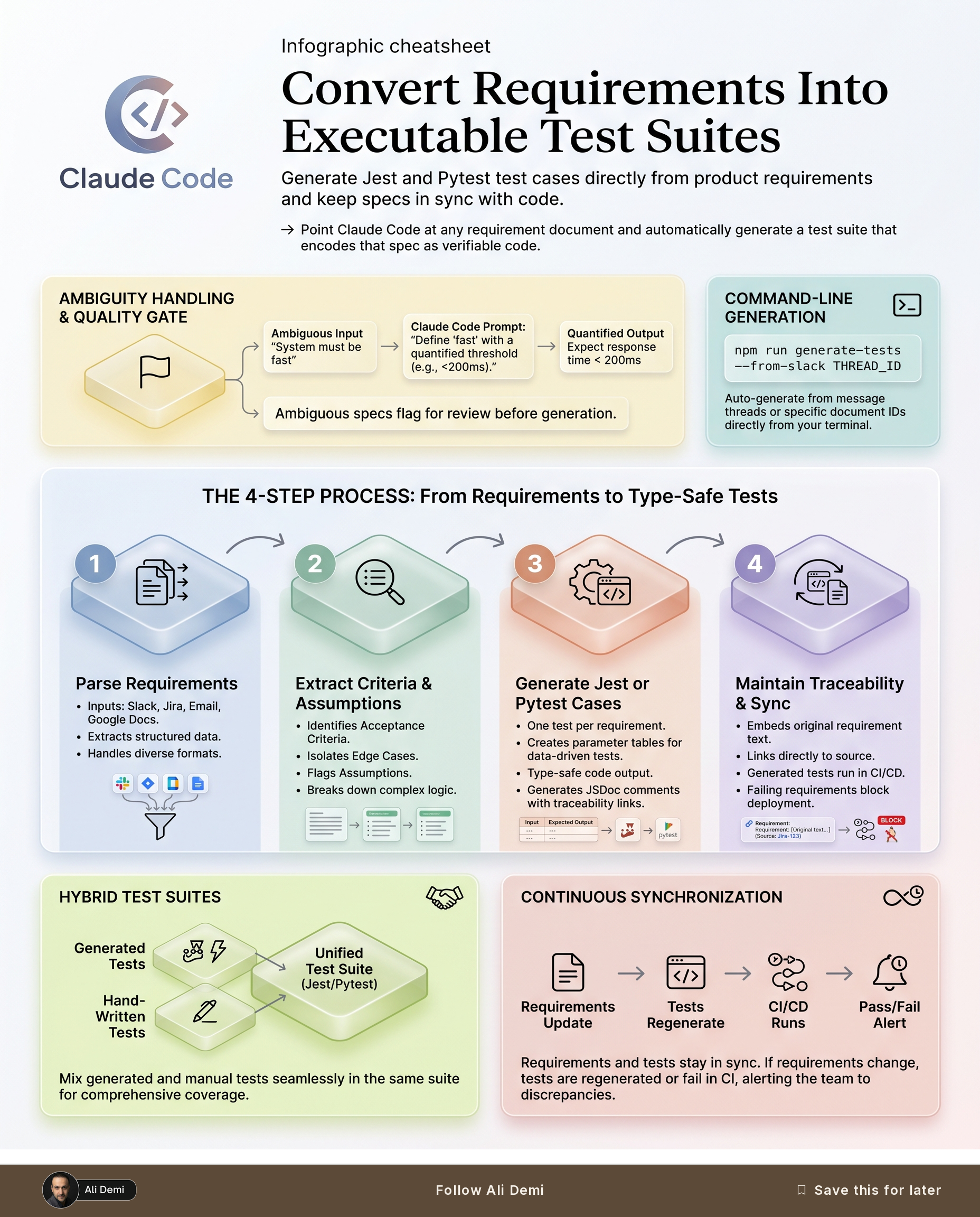
  • Stop Lost in Translation: Turn Requirements Into Tests

    Stop Lost in Translation: Turn Requirements Into Tests

    Your product specs live in Slack and your code lives in Git. By the time your feature ships, nobody remembers what was actually promised.

    What if requirements and tests were the same thing?

    This is different from testing what your code does. This is testing that your code does what you said it would.

    Point Claude Code at a Slack thread, Jira issue, or email spec. Claude extracts the acceptance criteria, edge cases, and assumptions. Then it generates a full Jest or Pytest test suite where each test case maps back to the original requirement.

    Your workflow becomes:

    1. Product writes a spec (Slack thread, issue description, email)
    2. Run `claude generate-tests –from-slack thread_id` or point Claude at the Jira issue
    3. Claude generates tests with JSDoc comments linking to the original requirement
    4. Tests land in your PR, reviewers can see intent, code review talks about behavior not implementation
    5. Tests run in CI; when product changes spec, test fails, blocking deployment until code matches the new promise

    Claude handles the hardest part: understanding ambiguous English and turning it into precise, executable assertions. Ambiguous specs (say “fast” without defining latency thresholds) are flagged for clarification before code-gen starts.

    The real win: your test suite becomes the contract between product and engineering. When someone says “I don’t remember if we committed to that,” run the tests. The code is the truth.

    ——

    Book your free AI clarity call, NOW!
    https://buff.ly/TpWy277

    ——

    Repost this. Thanks.
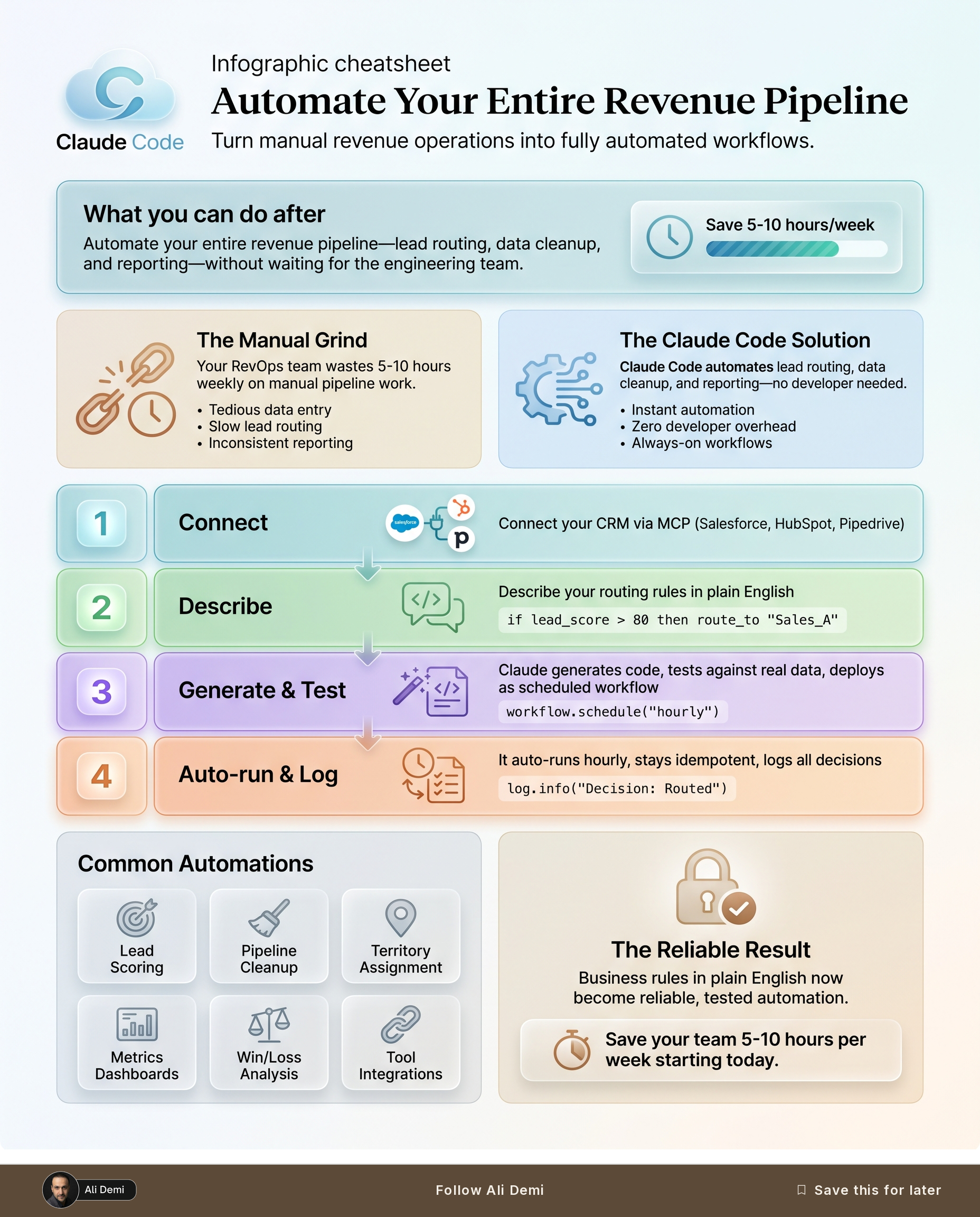
  • Stop Drowning in Pipeline Data: Automate RevOps with Claude

    Stop Drowning in Pipeline Data: Automate RevOps with Claude

    Your RevOps team spends hours every week on manual work: cleaning messy pipeline data, routing leads by hand, running reports, enriching records. Claude Code changes this.

    You can now build custom CRM automation that rivals enterprise RevOps platforms-in minutes instead of months. No developer required.

    The real advantage: Claude understands business logic. You describe your lead routing rules in plain English. Claude generates the code, tests it against your actual CRM data, and deploys it as a scheduled workflow.

    Start here:

    1. Connect your CRM via MCP (Salesforce, HubSpot, Pipedrive-whatever you use).
    2. Tell Claude what needs to happen. Example: “Route hot leads with deal size over 100k to senior reps, cold outreach to SDRs.”
    3. Claude reads your actual data, writes the routing logic, tests it, then runs it on a schedule.
    4. It auto-logs decisions and skips duplicates so it idempotent-safe to run every hour.

    Common workflows teams build:

    • Lead scoring and auto-routing based on custom rules
    • Pipeline data cleanup (deduping, fixing formats, enriching missing fields)
    • Automatic account hierarchies and territory assignments
    • Custom metrics and health dashboards that update every hour
    • Win/loss analysis and sales cycle metrics
    • Integration glue between tools (sync Slack to CRM, CRM to billing, etc.)

    The workflow: Create a small prompt hook in your CRM that Claude runs on schedule. It takes 15 minutes to set up. The business impact is instant.

    Why this works: Your business rules live in your head and in spreadsheets-they’re rarely in code. Claude can read plain English rules and turn them into reliable automation in one shot. No spec doc. No back-and-forth with engineering.

    ——

    Book your free AI clarity call, NOW!
    https://buff.ly/TpWy277

    ——

    Repost this. Thanks.
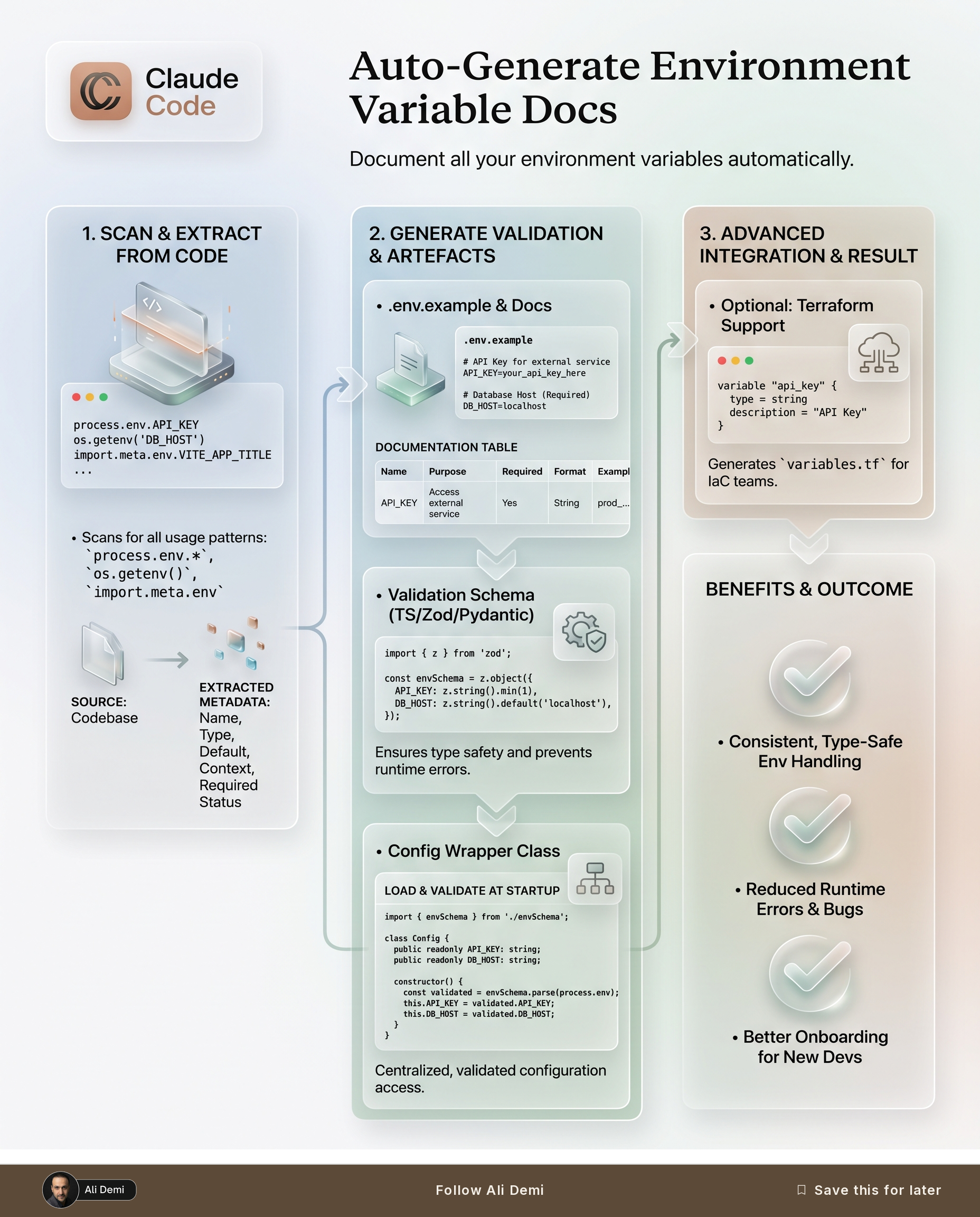
  • Stop Guessing Config: Auto-Document Every Environment Variable

    Stop Guessing Config: Auto-Document Every Environment Variable

    Your app’s environment variables are probably scattered across code comments, README footnotes, and your head.

    That’s a recipe for missing vars on deployment, silent config bugs, and new developers asking ‘what env vars do we need?’

    Claude Code can scan your codebase, extract every environment variable, and generate the infrastructure you forgot to build: `.env.example`, TypeScript validation schemas, and documentation tables.

    Here’s the workflow:

    1. Point Claude at your codebase and ask it to find all `process.env.*`, `os.getenv()`, `import.meta.env` usage
    2. Claude extracts variable names, types, usage context, and defaults
    3. Generate `.env.example` with descriptions and sample values for each var
    4. Generate TypeScript/Zod validation schema that enforces types and required fields
    5. Create documentation table: var name, purpose, required/optional, format, example
    6. Generate a config wrapper class that loads, validates, and exposes env vars safely

    One run gives you consistency across local, staging, and production environments.

    New teammates know exactly what vars they need.

    Your CI/CD pipelines stop silently skipping vars and causing runtime errors.

    ——

    Book your free AI clarity call, NOW!
    https://buff.ly/TpWy277

    ——

    Repost this. Thanks.