Tag: automation

  • Turn Messy Spreadsheets Into Clean Data in Minutes

    You export a contact list from three different sources and end up with 2,000 rows: duplicates galore, phone numbers in a dozen formats, missing first names, extra whitespace.

    Claude Code can codify your cleanup rules and generate a script that does it once, reproducibly, for the next export too.


    Book your free AI clarity call, NOW!
    https://buff.ly/TpWy277


    Repost this. Thanks.

  • Turn Zoom Transcripts into Action Items

    Turn Zoom Transcripts into Action Items

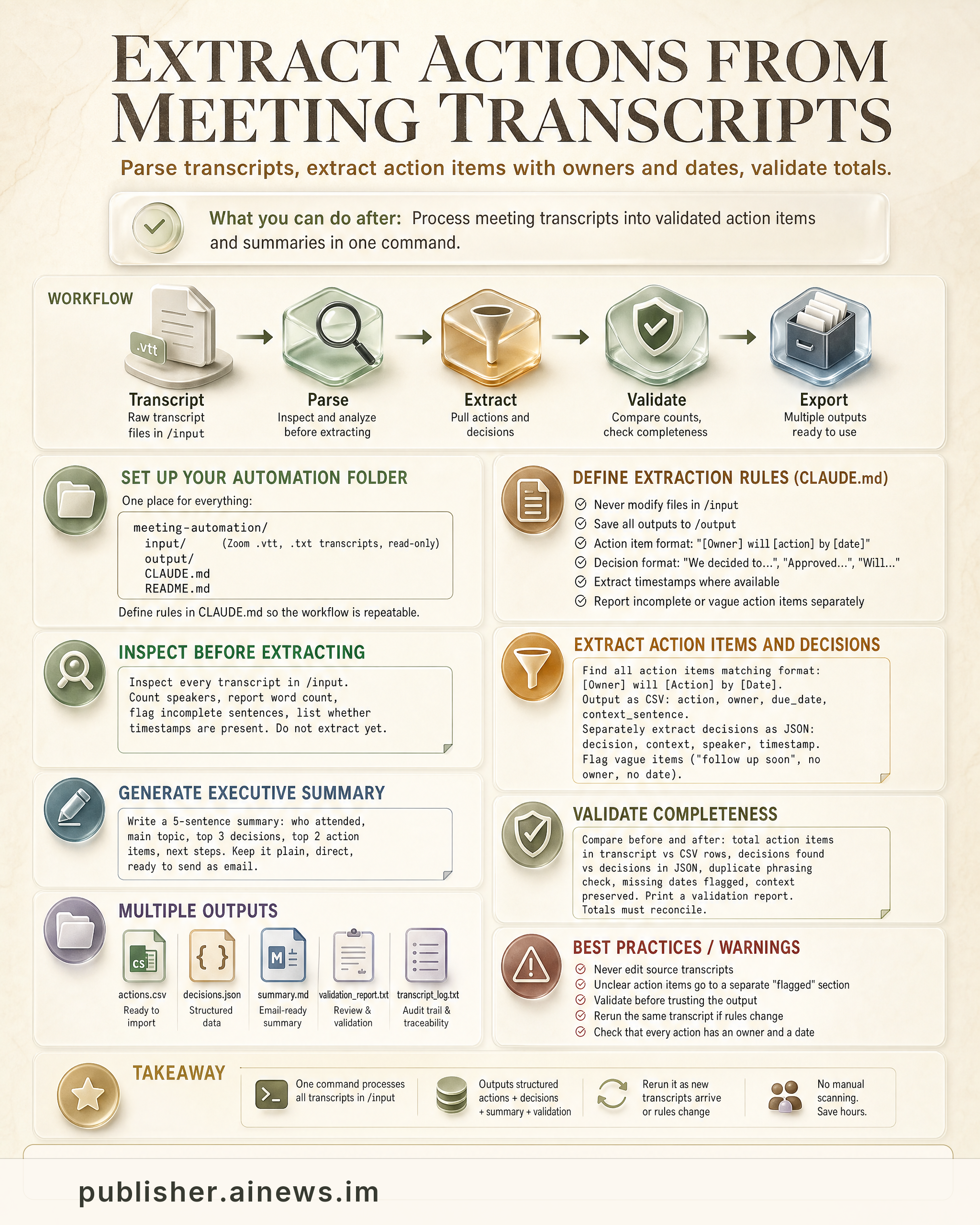
    Meeting transcripts arrive as text files, Zoom .vtt exports, or voice memo dumps. Most teams manually scan them: highlight action items, note who owns what, spot the decisions, write a summary email. Claude Code can read transcripts from a folder, extract structured data, and save multiple outputs in one pass.

    Start with a project folder: an /input directory for transcripts (read-only), an /output folder for results, and a CLAUDE.md file that defines extraction rules. Rules matter. Define what counts as an action item: “X will do Y by DATE” is clear; “follow up soon” is not.

    Ask Claude to inspect first. Count speakers, report word count, flag incomplete sentences, list timestamps present or missing. Do not extract yet. Then define the rules: extract action items with owner, deadline, and context. Extract decisions separately. Generate a 5-sentence summary. Output three files: actions.csv, decisions.json, and summary.md.

    Before export, validate. Compare total action items mentioned in the transcript vs items in the CSV. Check for duplicates phrased differently. Report any action items that mention dates vs those that don’t. A validation report shows what was captured and what might have been missed.

    Once it works, rerun it with one command across all new transcripts. The output is ready to paste into project trackers or send as a follow-up email.


    Book your free AI clarity call, NOW!
    https://buff.ly/TpWy277


    Sources:
    https://docs.anthropic.com/en/docs/claude-code/overview

    Repost this. Thanks.
  • Synthesize 50 research papers into a literature review matrix in hours

    Synthesize 50 research papers into a literature review matrix in hours

    Literature reviews kill weeks. You download 30 papers, read abstracts, then read the ones that matter, then go back through your notes to map which papers agree on what and which contradict. By Friday you have a folder of PDFs and a mess of highlights. Claude Code ends that.

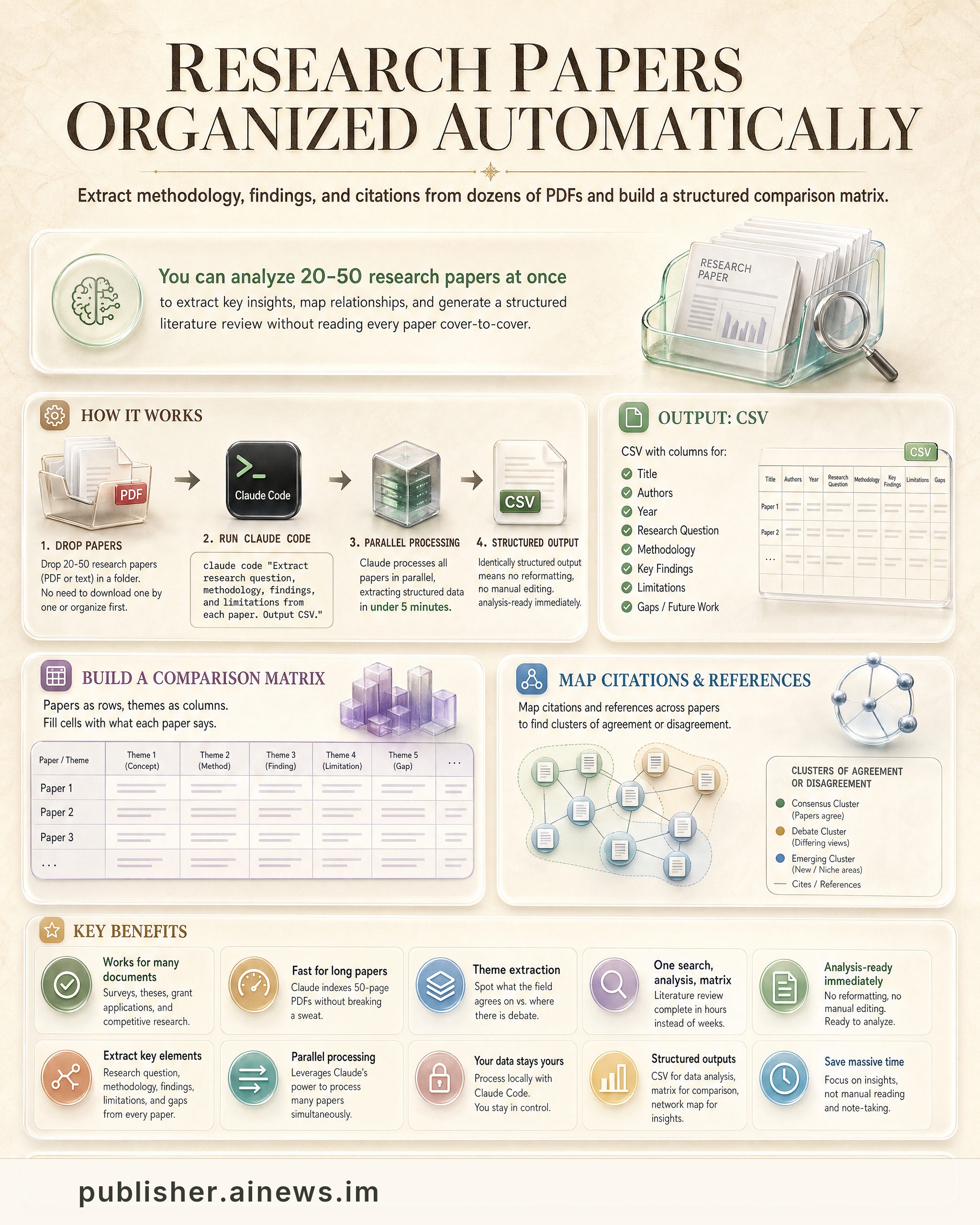
    Drop your research papers (PDF or text) in a folder. Tell Claude Code: extract the research question, methodology, findings, and limitations from each one. It reads all 30 at once and builds you a CSV that maps each paper against every other one by topic and conclusion. Rows are papers. Columns are themes. Cells show what that paper says about that theme.

    The matrix is the literature review. You are done. You can cite from it, spot contradictions, find gaps, and trace how thinking has evolved across papers. All in a format that lives in spreadsheet, not in your scattered highlights.

    It works for survey papers, grant applications, thesis outlines, and competitor analysis. Anywhere you need to know what 20 sources say about one question. Claude Code cuts the reading time from 40 hours to 8. You read the abstracts. Claude reads the papers.


    Book your free AI clarity call, NOW!
    https://buff.ly/TpWy277


    Sources:
    https://www.anthropic.com
    https://docs.anthropic.com/en/docs/build-a-chatbot
    https://github.com/anthropics

    Repost this. Thanks.

  • Turn Meeting Chaos Into Actionable Notes in Seconds

    Turn Meeting Chaos Into Actionable Notes in Seconds

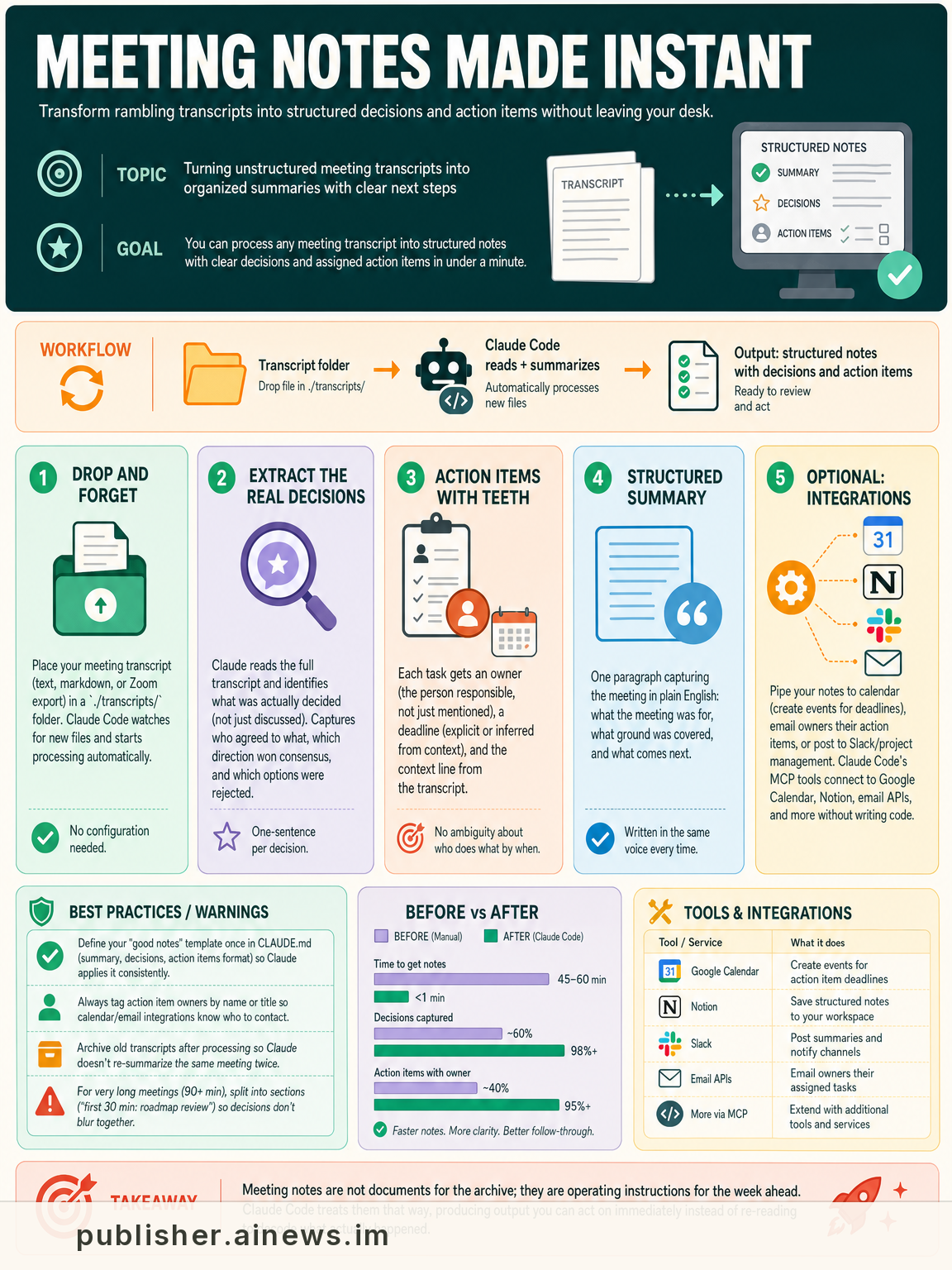
    Every meeting ends the same way: someone volunteers to “send the notes” and then nothing arrives until people start asking what they were supposed to do. Claude Code stops that. Drop your transcript or Zoom recording in a folder, and within seconds you have a document that lists decisions, action items with owners, and deadlines.

    The structure beats any human note-taker. Claude reads the whole transcript at once, doesn’t miss side comments where decisions actually happen, and formats everything the same way every time. Meetings with 5 people or 50 feel identical in the output.

    You need no code. You need no templates to memorize. You describe once what a good note looks like (summary, decisions, action items with owners). Claude Code learns it and applies it to every meeting for the rest of the quarter.

    The payoff compounds. A team of 10 running 4 meetings a week saves 40 hours a quarter on note-taking, follow-up emails asking “wait, was I supposed to do this?”, and hunting through Slack threads for decisions. That’s 10 hours per person per quarter spent on things that actually matter.


    Book your free AI clarity call, NOW!
    https://buff.ly/TpWy277


    Sources:
    https://www.hustlebadger.com/what-do-product-teams-do/project-meeting-summarizer/
    https://www.analyticsvidhya.com/blog/2026/03/ai-meeting-summarizer-with-claude-code-mcp/
    https://every.to/source-code/how-to-use-claude-code-for-everyday-tasks-no-programming-required

    Repost this. Thanks.