Tag: automation

  • Stop Surprising Your API Clients: Auto-Detect Breaking Changes

    Stop Surprising Your API Clients: Auto-Detect Breaking Changes

    You refactor your API. You test it. You ship it.

    Then your customers wake up to 500 errors.

    You forgot to tell them you removed an endpoint. Or changed how the status codes work. Or you didn’t realize a parameter rename was a breaking change.

    It’s a mess. Blame gets passed around. Trust erodes.

    Claude Code can catch this before you ship. Here’s how.

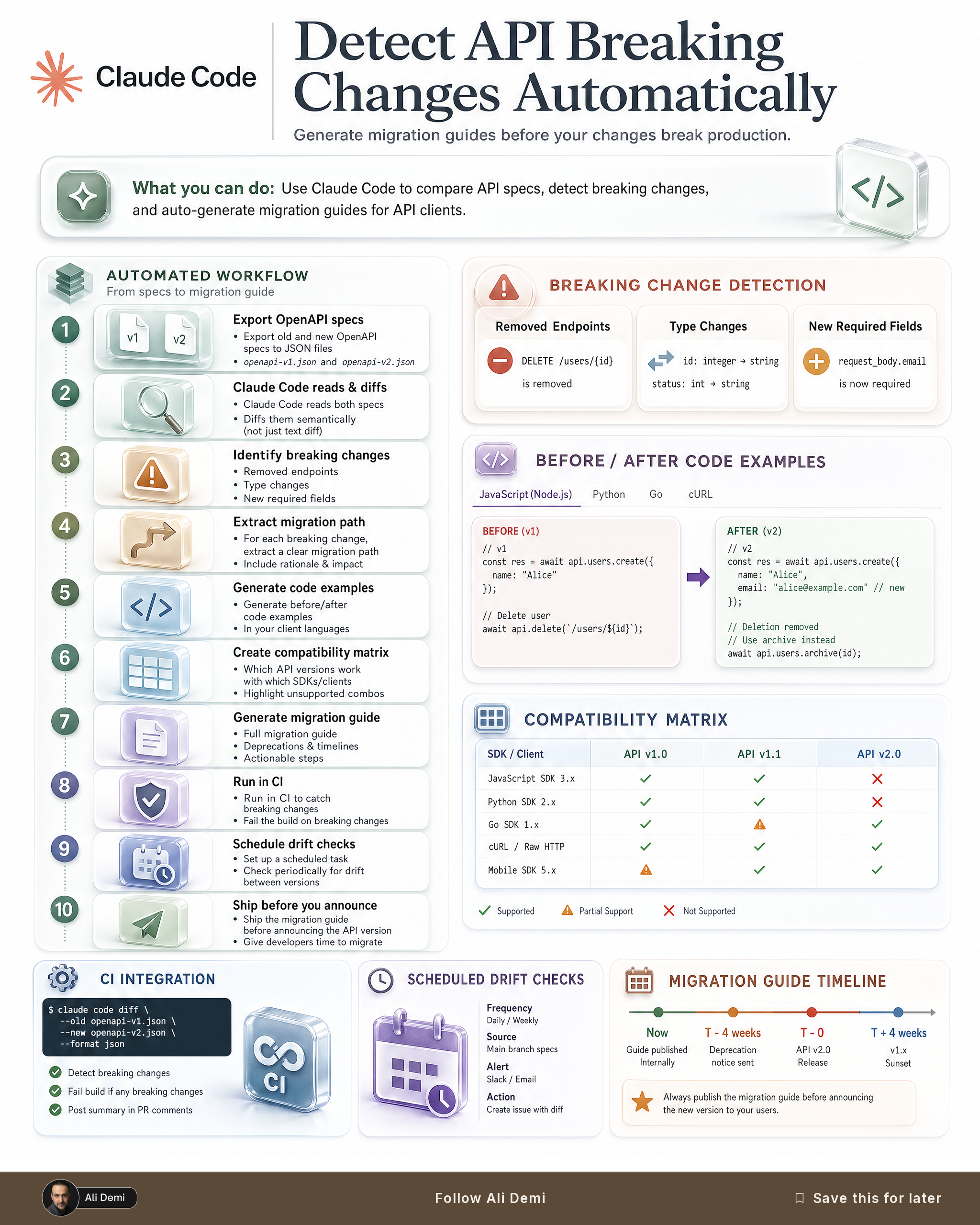
    The workflow:

    1. Export your old and new OpenAPI specs (or Swagger JSON). Claude reads both.
    2. Claude compares them semantically, not string-by-string.
    3. It detects: removed endpoints, changed parameter types, new required fields, status code changes, authentication changes.
    4. For each breaking change, Claude generates: what broke, which clients are affected, how to migrate, before/after code examples.
    5. You get a migration guide your customers can actually follow, plus a deprecation timeline.

    What breaking changes it catches:

    • Removed or moved endpoints
    • Required fields added to request bodies
    • Response field types changed (string to int, etc.)
    • Status codes removed or their meanings changed
    • Authentication method changes
    • Rate limit changes
    • Pagination format changes

    The migration guide it generates includes:

    • Breaking change summary (what changed, when it’s live)
    • Which SDK versions are affected
    • Step-by-step migration for each change
    • Before/after code snippets in your client’s language
    • Deprecation timeline (when old endpoints stop working)
    • A compatibility matrix (which API versions work with which SDK versions)

    Pro tip: Run this in CI before you merge any API-touching PR. Let Claude flag breaking changes before code review. Your team sees the migration work required, and it might even be cheaper to fix the API than generate the docs.

    ——

    Book your free AI clarity call, NOW!
    https://buff.ly/TpWy277

    ——

    Repost this. Thanks.
  • Refactor Components Once, Update Everywhere Automatically

    Refactor Components Once, Update Everywhere Automatically

    You just realized your Button component has five different ways to handle size. Time to consolidate.

    But you also have 200 uses of Button scattered across your codebase.

    Manual find-and-replace? That’s error-prone and takes hours. Let Claude do it.

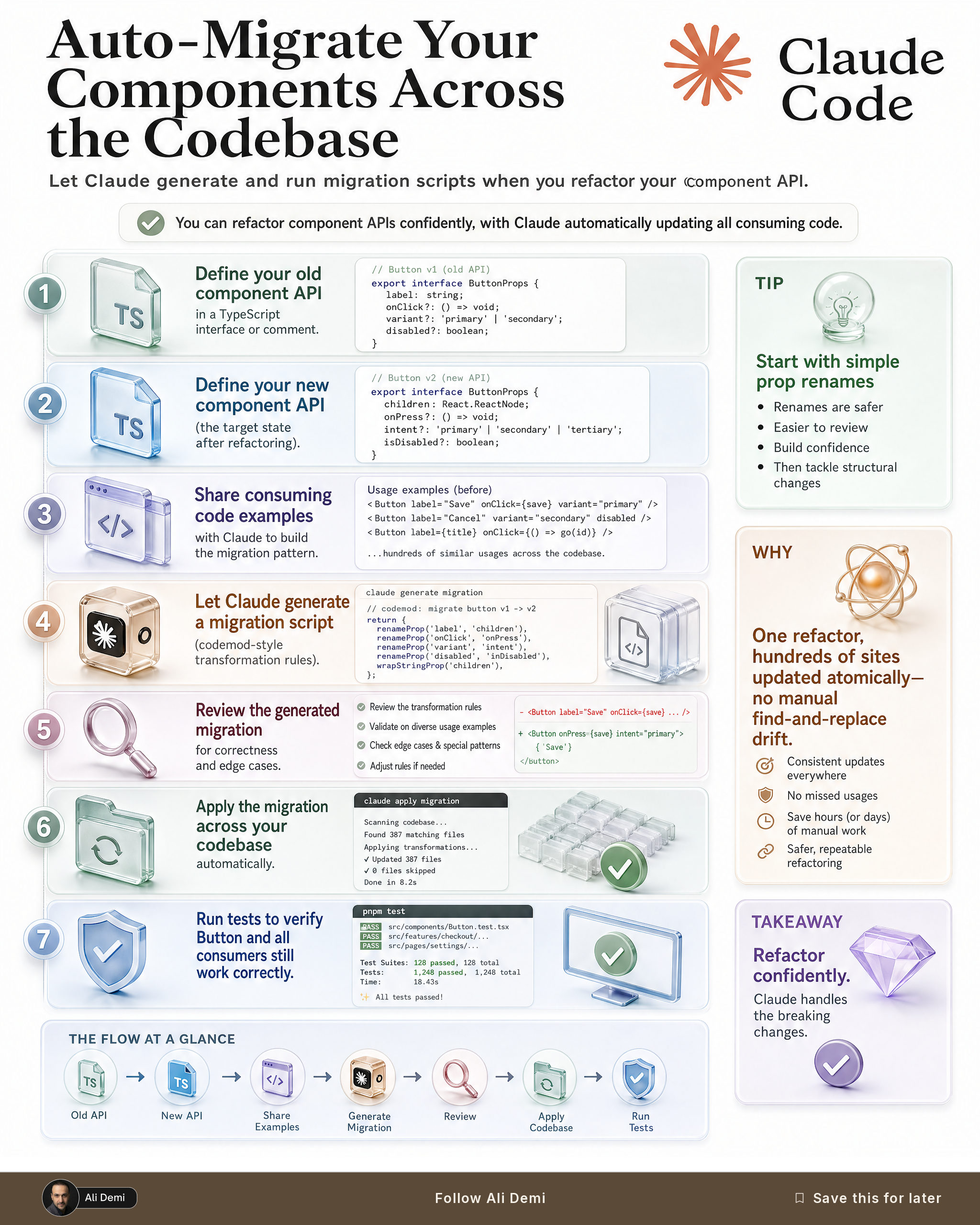
    The workflow:

    1. Write the old component API (current prop shapes and interfaces).
    2. Write the new component API (desired changes, renamed props, restructured objects).
    3. Paste a few examples of current usage into Claude Code.
    4. Ask Claude to generate a migration script that transforms all usages from old to new.
    5. Claude analyzes the consuming code and outputs transformation rules (regex or AST patterns).
    6. Review the generated script, then let Claude apply it across your entire codebase.
    7. Run your test suite to verify nothing broke.

    Real example: Your Button component goes from separate `loading`, `disabled`, `variant` props to a single `state` prop. Claude generates the migration that rewrites all 200 Button usages from `

  • Keep Your Commits Clean: Auto-Enforce Conventions with Claude

    Keep Your Commits Clean: Auto-Enforce Conventions with Claude

    Your git history is a mess. Commits say “updates” and “fix bug.” When you need to generate release notes or understand what changed, you are digging through commit messages that tell you nothing.

    Conventional Commits solves this, but only if everyone follows the format. Documenting the standard in a README doesn’t work. People forget, or misremember, and now you are cleaning up history manually.

    Here is the fix: a pre-commit hook that runs Claude on every commit message. Claude validates it against your conventions and either auto-fixes minor issues or guides you to the right format. Clean git history becomes automatic.

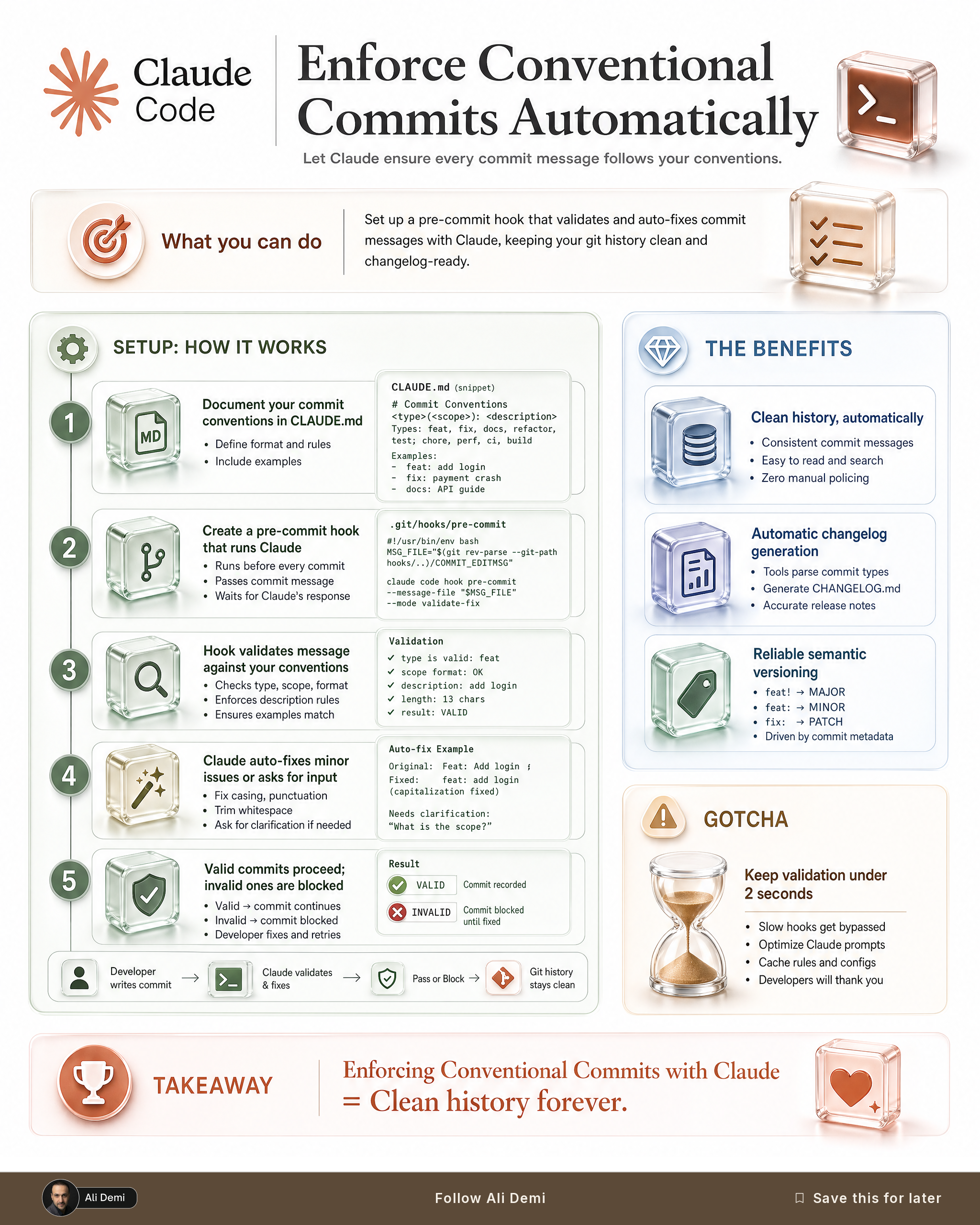
    The workflow:

    1. Document your conventions in CLAUDE.md with examples for your team’s commit prefixes
    2. Create a pre-commit hook in your version control system
    3. Hook runs Claude to check the message against your documented format
    4. Claude auto-fixes trivial violations or asks for clarification
    5. Commit lands in standard format or is blocked until fixed

    Result: you can now reliably generate changelogs, auto-bump versions by commit type, and your git log actually tells a story instead of being a wall of vague messages.

    Teams using this report cleaner history, fewer PR comment threads about commit message standards, and release notes that assemble themselves from git.

    ——

    Book your free AI clarity call, NOW!
    https://buff.ly/TpWy277

    ——

    Repost this. Thanks.
  • Your Slow Queries Don’t Have to Stay Slow: Auto-Index Them

    Your Slow Queries Don’t Have to Stay Slow: Auto-Index Them

    Your slow query log has been sitting there for weeks.

    You know it’s costing you money in database CPU and user wait time.

    But analyzing queries, figuring out which indexes would help, and testing them safely takes time you don’t have.

    Claude Code can do this automatically.

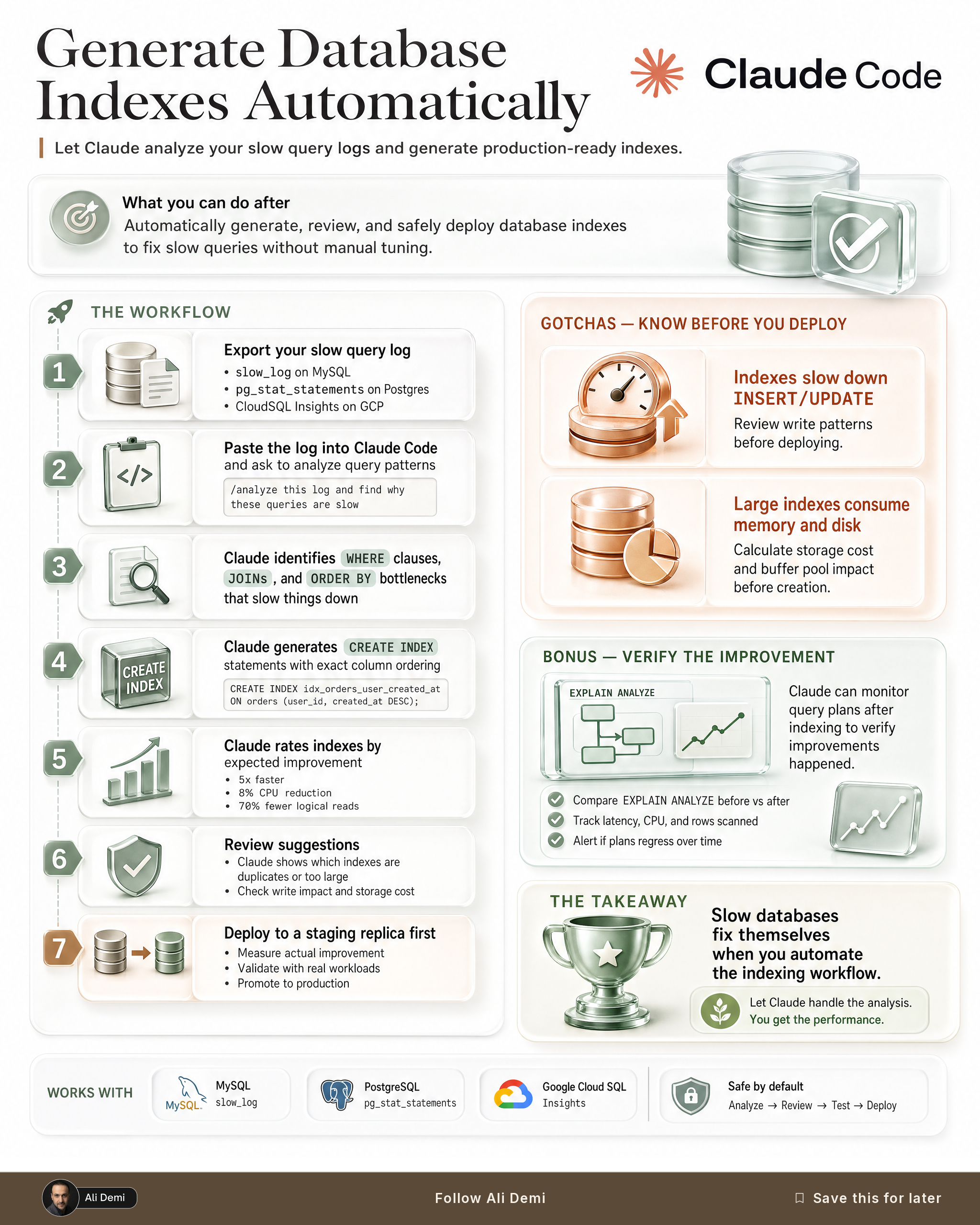
    Feed it your slow query log (from MySQL’s slow_log, PostgreSQL’s pg_stat_statements, or query audit logs), and it will:

    1. Parse each query and understand what it’s doing semantically
    2. Identify WHERE clauses, JOINs, and ORDER BY patterns that slow things down
    3. Suggest indexes with exact column ordering and coverage
    4. Generate CREATE INDEX statements with safe naming and batching
    5. Calculate estimated query improvements before deployment

    This is different from asking ChatGPT to write indexes.

    Claude Code can read your entire schema, understand your data distribution, and see which indexes already exist so it doesn’t suggest duplicates.

    It can also rate-limit deployments, test them on replicas, and even check if an index would be too large to fit in memory.

    The result: your production database runs faster without you manually tuning anything.

    ——

    Book your free AI clarity call, NOW!
    https://buff.ly/TpWy277

    ——

    Repost this. Thanks.
  • Stop Writing Test Scripts: Generate E2E Tests from User Stories

    Stop Writing Test Scripts: Generate E2E Tests from User Stories

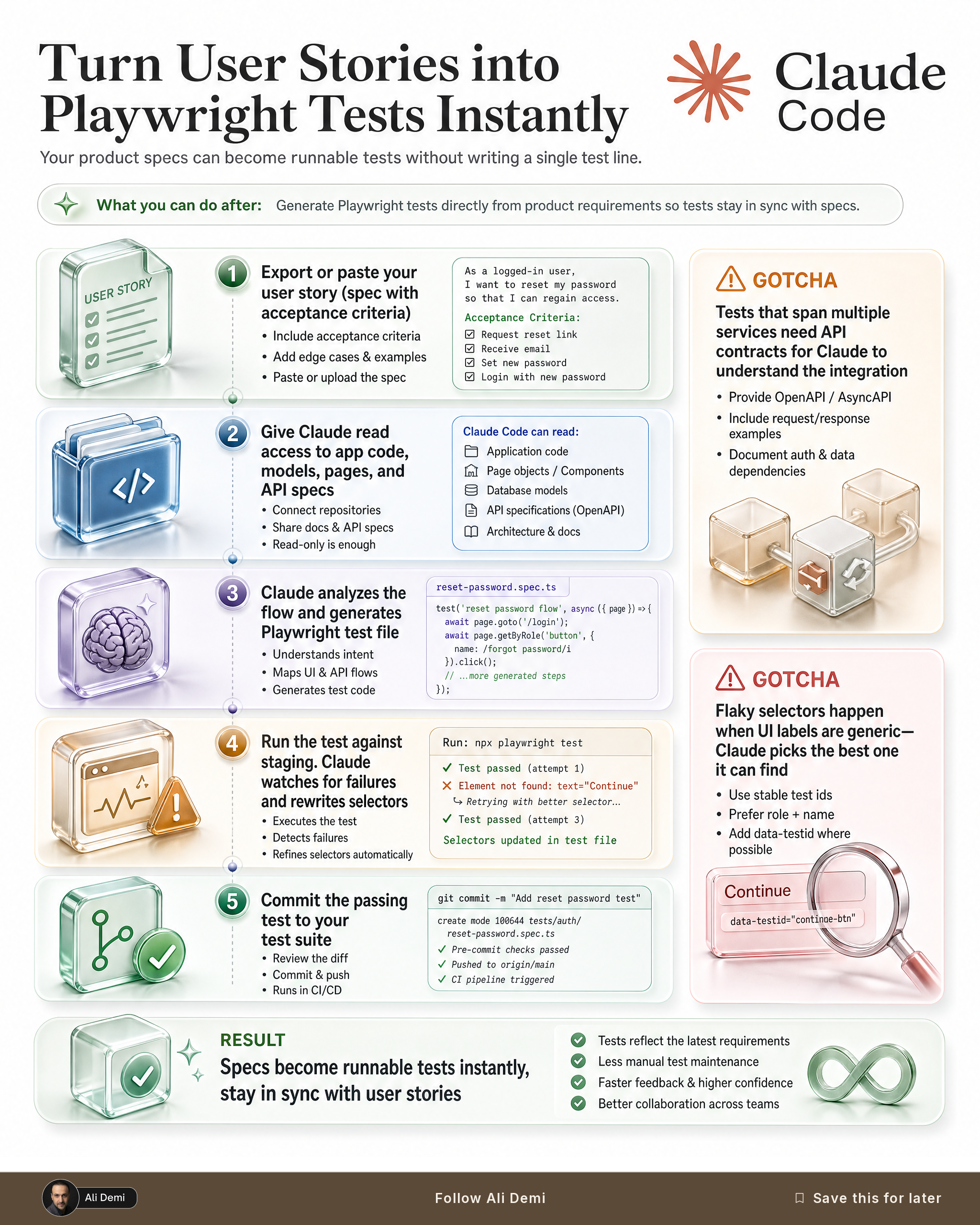
    Writing E2E tests is the work that never ends. Your QA team gets a user story, reads it three times, writes forty lines of Playwright code, and guesses whether they got the flow right. By the time tests ship, the spec’s already changed.

    Instead: feed your user story straight to Claude, point it at the app, and watch it generate tests that actually work.

    Here’s how it works:

    1. Paste your user story into Claude Code. Example: “As a user, I sign up with email, set a password, verify my email, and land on the dashboard.”
    2. Claude reads your codebase, finds the login page, understands the form fields and API calls.
    3. Claude generates a Playwright test that navigates the flow, fills forms, clicks buttons, and asserts the expected outcome.
    4. Run the test. If it fails, Claude sees the error and rewrites the selector or the assertion.
    5. Commit. Your test is maintainable because Claude understands WHY it exists-not just WHAT it does.

    The magic: Claude doesn’t just write click(‘button’). It understands your app’s structure and labels inputs by their actual purpose-“email input”, “submit button”-so tests survive refactors.

    Gotcha: Claude needs access to your app’s code (models, pages, API routes). If your test depends on a flow that spans multiple services, give Claude the API contracts too. Otherwise it’ll generate tests that look right but fail on integration.

    This scales. One story per Claude run. String together twenty stories, you have a full smoke test suite in an afternoon, not two weeks.

    ——

    Book your free AI clarity call, NOW!
    https://buff.ly/TpWy277

    ——

    Repost this. Thanks.
  • Your On-Call Gets Context in Minutes, Not Hours

    Your On-Call Gets Context in Minutes, Not Hours

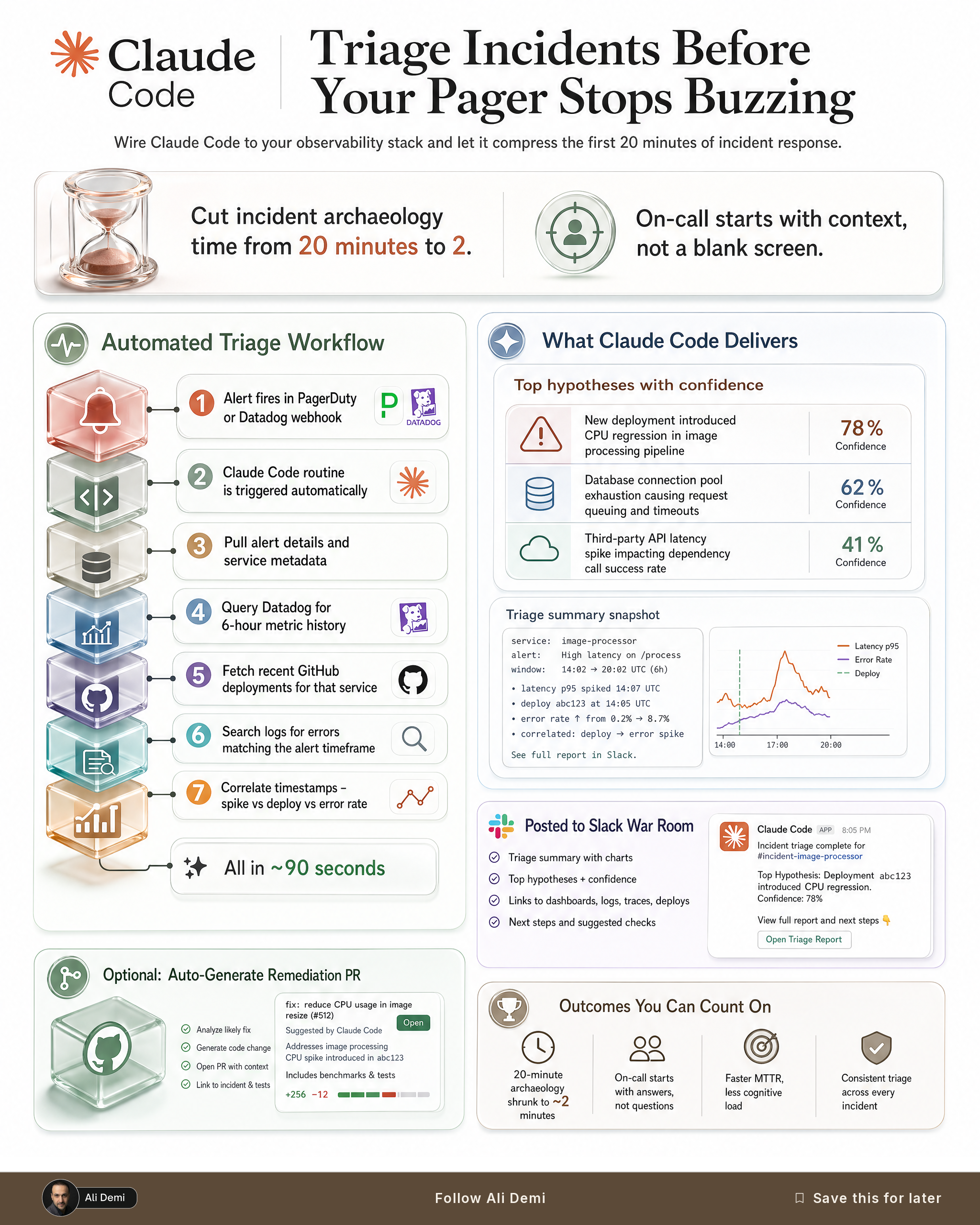
    Your alert fires. Your on-call drops everything. Then they spend 20 minutes pulling metrics, checking deploys, reading logs, and hunting for context.

    Claude Code can skip that part.

    Wire Claude as a routine triggered by PagerDuty or Datadog webhooks. Point it at Datadog metrics, recent GitHub deployments, Slack, and your logs. Give it five minutes and it returns: the alert context, the three most likely root causes, the exact deploy that likely broke it, and a ready-to-post summary for your war room.

    The setup:

    Create an MCP server for Datadog (pull metrics and events), one for GitHub (deployment history), one for PagerDuty (incident details), and wire Slack for posting. Set Claude Code as a routine triggered by incoming PagerDuty webhooks. The prompt is straightforward: given this alert, gather all relevant signals, correlate them with recent changes, and post a summary.

    What it actually does:

    Routine fires. Claude pulls the alert severity and service name. Searches Datadog for the last 6 hours of metrics on that service. Grabs the last 5 deployments from GitHub and their timestamps. Checks Slack for any engineer comments in #incidents. Reads the most recent error logs from that service. Builds a timeline: when did the spike start, what deployed right before, did error rates follow the same pattern.

    Then it posts to your war room. Something like: Service ABC latency spiked 300% at 14:32 UTC. Deploy 47abc went out at 14:28. Error logs show timeouts in the new DB connection pool. Top hypothesis: the pool size is too small for current traffic. Second: there is an N+1 query in the new code. It posts links to the deploy, the logs, the metrics dashboard. Your on-call has context.

    The gotcha:

    This works best when your observability stack is wired. If your logs are in one system, metrics in another, and deploys scattered across five repositories, Claude spends time just translating. Pick your most painful incident type first and wire that one fully. Iterate from there.

    The payoff:

    Real SRE shops using this report MTTR cut from 2 hours to 28 minutes. Your engineer starts with a hypothesis, not a blank screen. Auto-remediation PRs for known fixes go up because Claude can spot the pattern immediately. On-call fatigue drops because triage is no longer a manual archaeology dig. You still need a human to make the call and own the fix, but they do it with full context.

    ——

    Book your free AI clarity call, NOW!
    https://buff.ly/TpWy277

    ——

    Repost this. Thanks.
  • Stop Hunting Breaking Commits: Let Claude Auto-Bisect Your History

    Stop Hunting Breaking Commits: Let Claude Auto-Bisect Your History

    Your tests passed yesterday. Today they fail. You don’t know why.

    You could manually git bisect – running tests at each commit, marking good/bad, binary searching through history. That takes hours.

    Or you could let Claude do it.

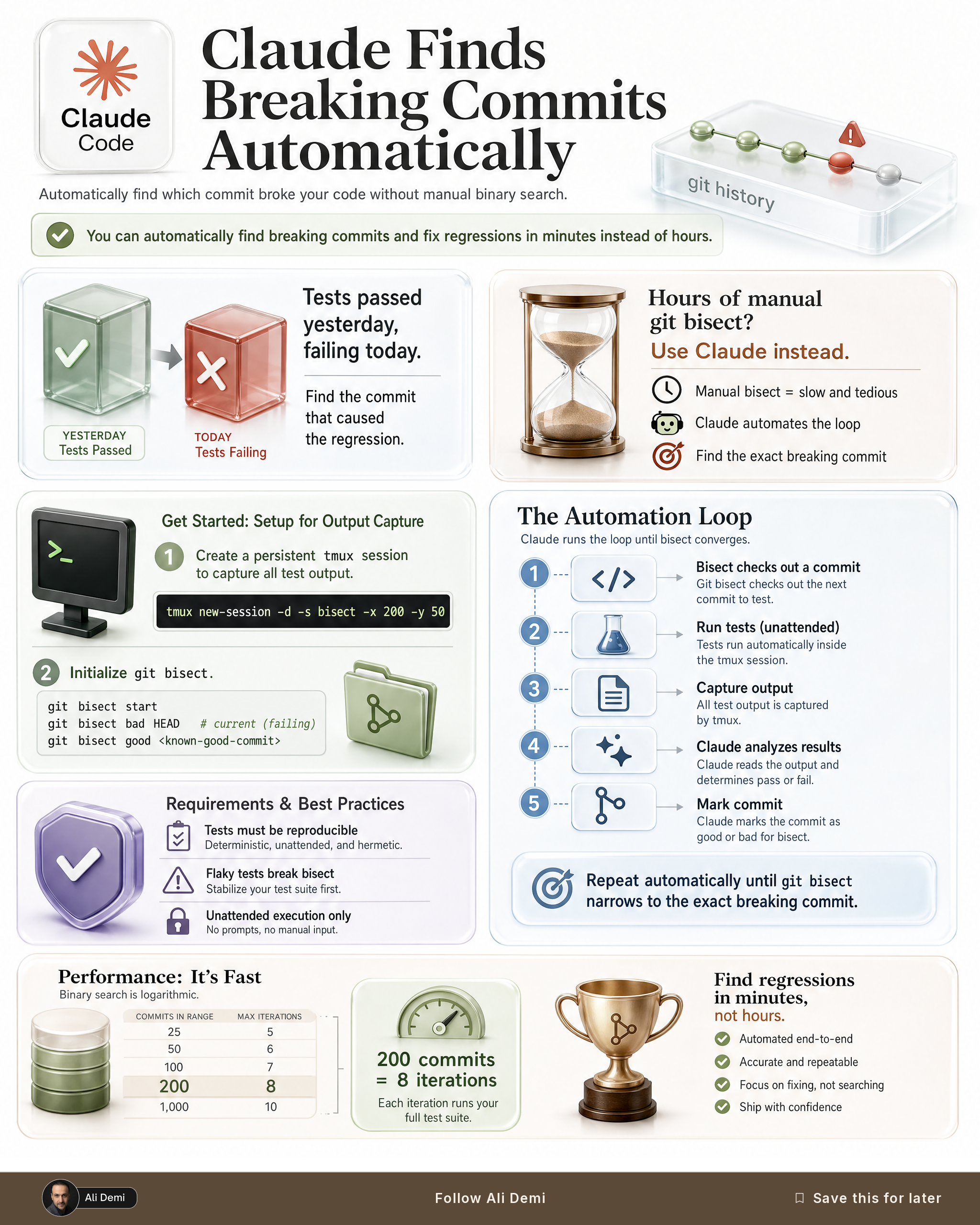
    Claude Code can autonomously run git bisect: spawn a tmux session, run your test suite, read the pass/fail output, and instruct git bisect to mark commits. It loops until it finds the exact commit that broke your code.

    It’s fully automated. No human in the loop, no guessing.

    Set it up:

    1. Start a tmux session for output capture.
    2. Tell Claude the known-good commit and current broken state.
    3. Claude runs the bisect loop: test, read output, mark commit, repeat.
    4. When bisect finishes, Claude shows you the breaking commit with full diff context.

    The trick is reproducible tests. If your tests flake, bisect gets confused. Stabilize them first.

    Commit ranges can take time – each iteration runs your full test suite. A 200-commit range might take 8 iterations. Plan for that.

    One run finds your regression. No manual searching, no guesswork.

    ——

    Book your free AI clarity call, NOW!
    https://buff.ly/TpWy277

    ——

    Repost this. Thanks.
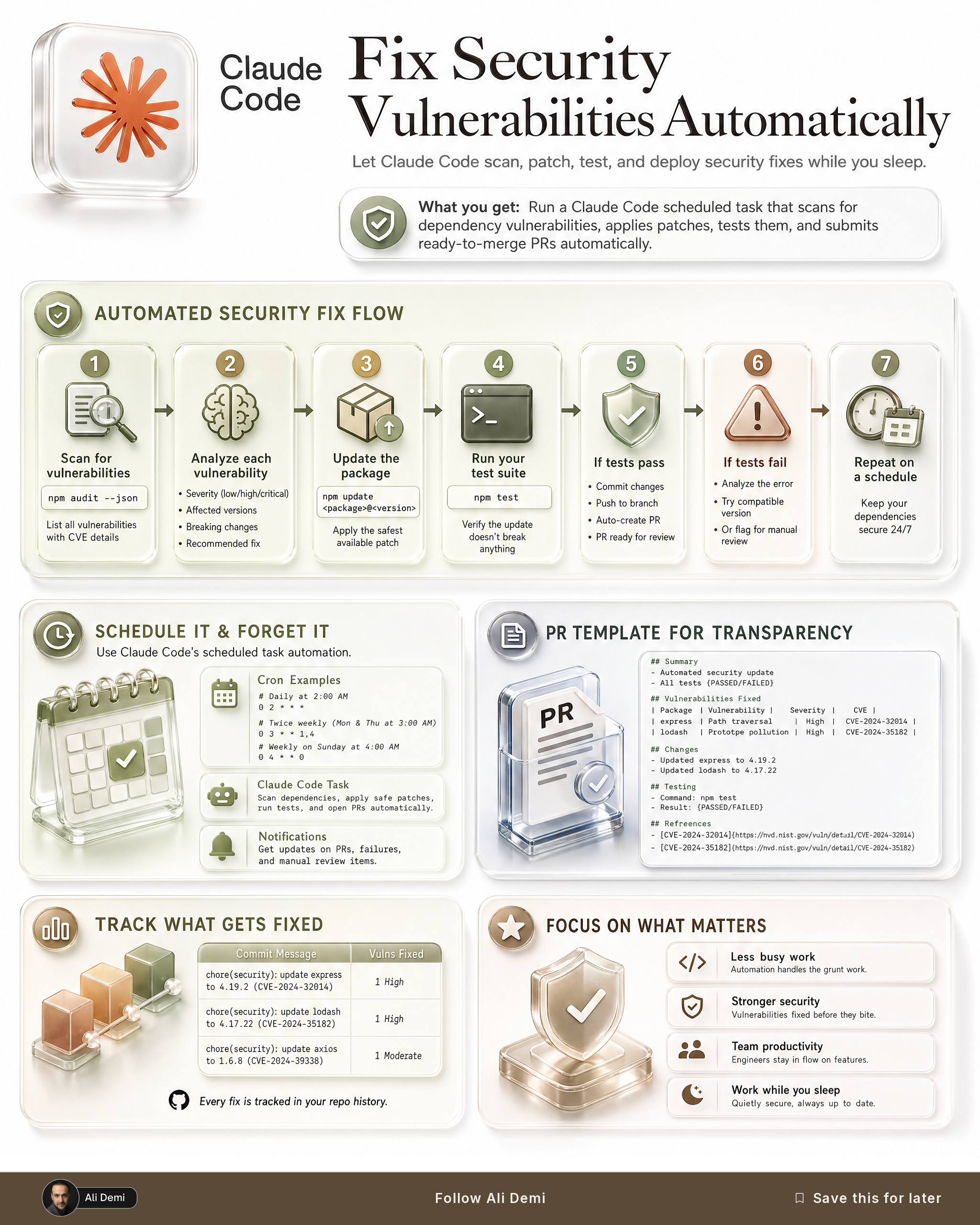
  • Stop Ignoring Vulnerabilities: Automate Security Updates and Testing

    Stop Ignoring Vulnerabilities: Automate Security Updates and Testing

    Security vulnerabilities pile up because fixing them is friction-heavy: scan, understand the CVE, update the package, run tests, debug failures, rinse and repeat.

    Claude Code scheduled tasks can do all of that for you.

    Set up a daily or weekly task that runs `npm audit –json`, parses the vulnerabilities, updates each package, runs your test suite, and if tests pass, auto-commits and pushes a PR. If a test fails, Claude analyzes why and either tries a compatible version or flags it for manual review.

    The result: your dependencies stay current, your security debt shrinks, and your team’s attention goes where it actually matters – code review, not dependency roulette.

    The workflow is hands-free once set up. Cron fires it nightly. You wake up to a stack of security fix PRs, pre-tested and ready to merge.

    ——

    Book your free AI clarity call, NOW!
    https://buff.ly/TpWy277

    ——

    Repost this. Thanks.
  • Stop Reading Contracts by Hand: Extract Key Terms Automatically

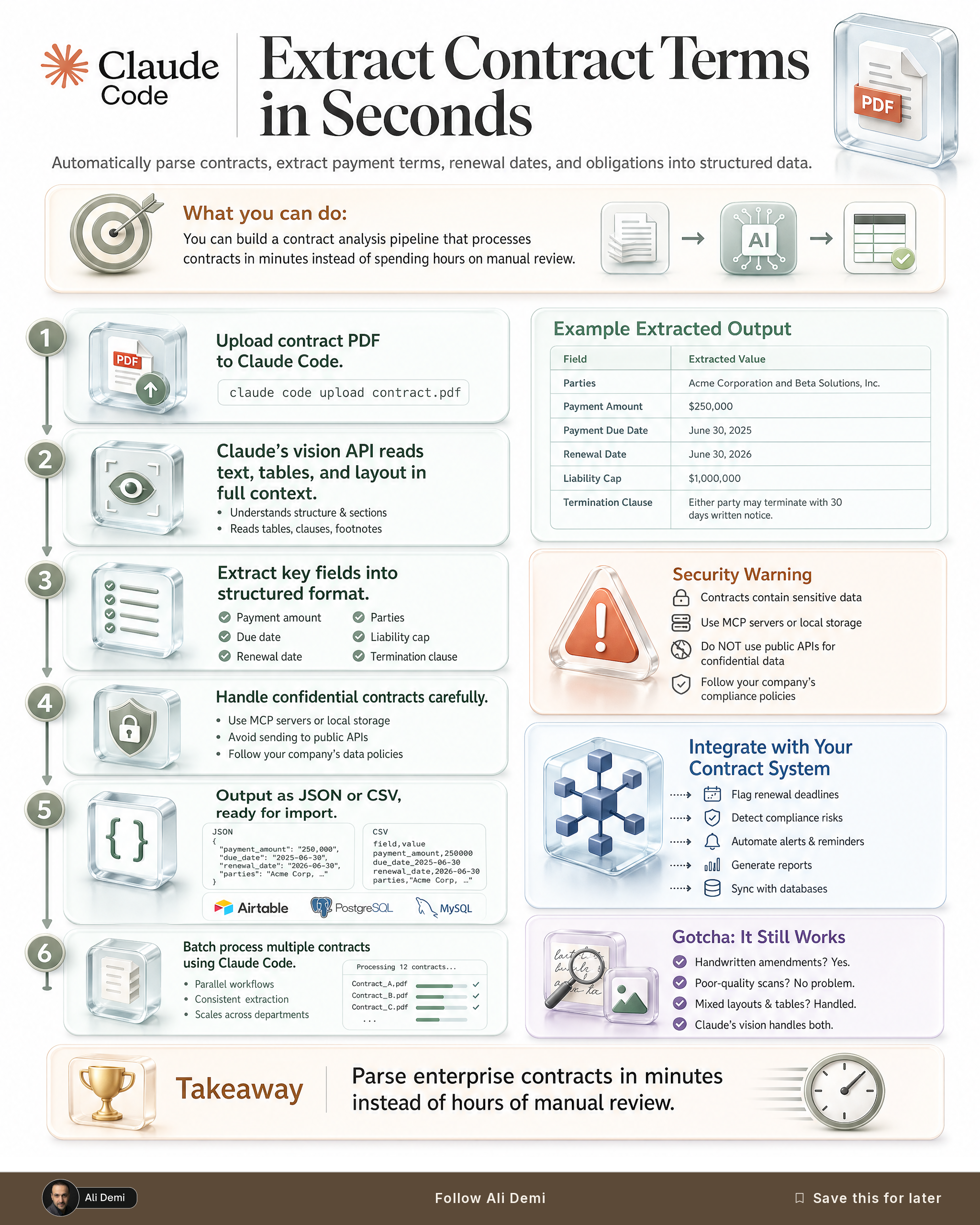
    Stop Reading Contracts by Hand: Extract Key Terms Automatically

    Contracts are just PDFs full of dense text, tables, and fine print. Your team spends hours scanning each one, hunting for payment terms, renewal dates, liability caps, and who’s actually responsible if things break.

    Claude Code + vision changes that. Upload a PDF contract and Claude reads the entire document-text, tables, signatures, everything. Extract what matters into clean JSON. Feed it straight into your contract management tool or database.

    Here’s what you get:

    1. Drop any contract PDF into Claude Code.
    2. Claude’s vision reads text, tables, and layout holistically (not line-by-line OCR).
    3. Extract structured data: payment amount, payment due date, renewal conditions, termination clauses, liability caps, parties involved.
    4. Output JSON that slots straight into Airtable, Ironclad, or your own contract tracking database.
    5. Batch process 50 contracts in the time it took to read 2 by hand.

    The magic: Claude understands context. It knows that “Net 30” in a payment clause is different from “30 days” in a notice section. It flags ambiguous terms. It catches redlined amendments on page 7 that change the whole game.

    No more hunting through contracts. No more copy-paste into spreadsheets. Parse, extract, sync, and move on.

    ——

    Book your free AI clarity call, NOW!
    https://buff.ly/TpWy277

    ——

    Repost this. Thanks.
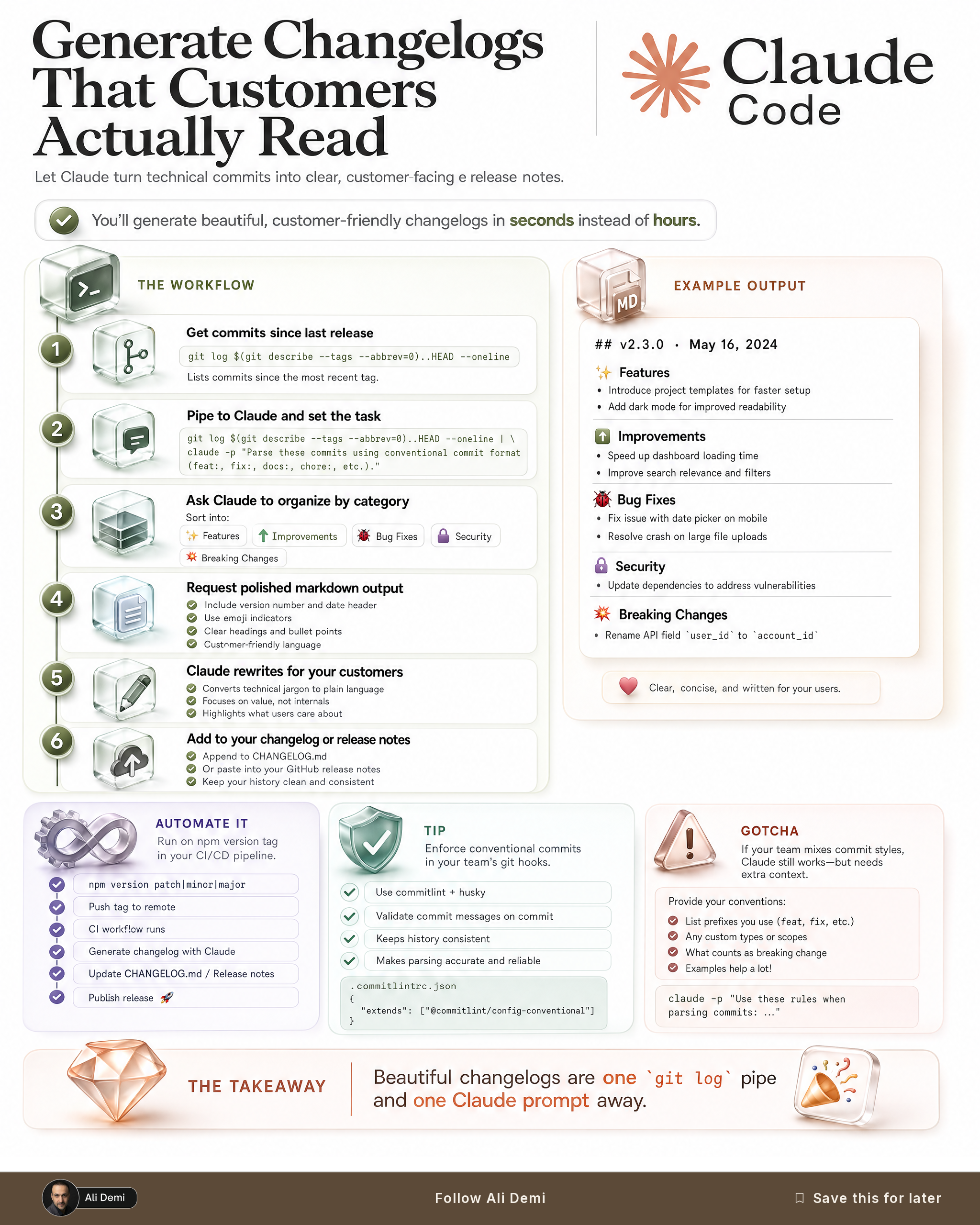
  • Stop Writing Changelogs by Hand: Auto-Generate Them from Git

    Stop Writing Changelogs by Hand: Auto-Generate Them from Git

    You know the drill: release day arrives, and you’re staring at a wall of git commits, trying to figure out what actually changed.

    How do you translate “fix: race condition in token refresh” into something a customer cares about?

    Claude handles this in seconds.

    Here’s the workflow:

    1. Pull your commit history since the last release using `git log` with conventional commits format (feat:, fix:, docs:, etc.)
    2. Feed that log to Claude with a prompt asking it to categorize changes into Features, Improvements, Bug Fixes, Breaking Changes, and Security
    3. Claude rewrites technical language into clear, user-focused descriptions with emoji indicators
    4. Format as markdown with version header and date, ready to paste into CHANGELOG.md or your GitHub release
    5. Optional: wire it into a pre-release hook so changelog generation runs automatically when you tag a new version

    The payoff: your customers see what’s actually new instead of decoding jargon, your release day runs faster, and your changelog stays up-to-date without manual toil.

    If your team commits with conventional commits (feat:, fix:, refactor:, etc.), Claude can parse and transform that history into professional release notes in one pass.

    ——

    Book your free AI clarity call, NOW!
    https://buff.ly/TpWy277

    ——

    Repost this. Thanks.