Tag: automation

  • Stop Typing Receipts By Hand: Build a Receipt Bot in Minutes

    Stop Typing Receipts By Hand: Build a Receipt Bot in Minutes

    You know the drill: expense report comes due, you dig through a folder of blurry receipt photos, and spend an hour typing vendor names, dates, and amounts into a spreadsheet.

    Stop. Let Claude read the receipts for you.

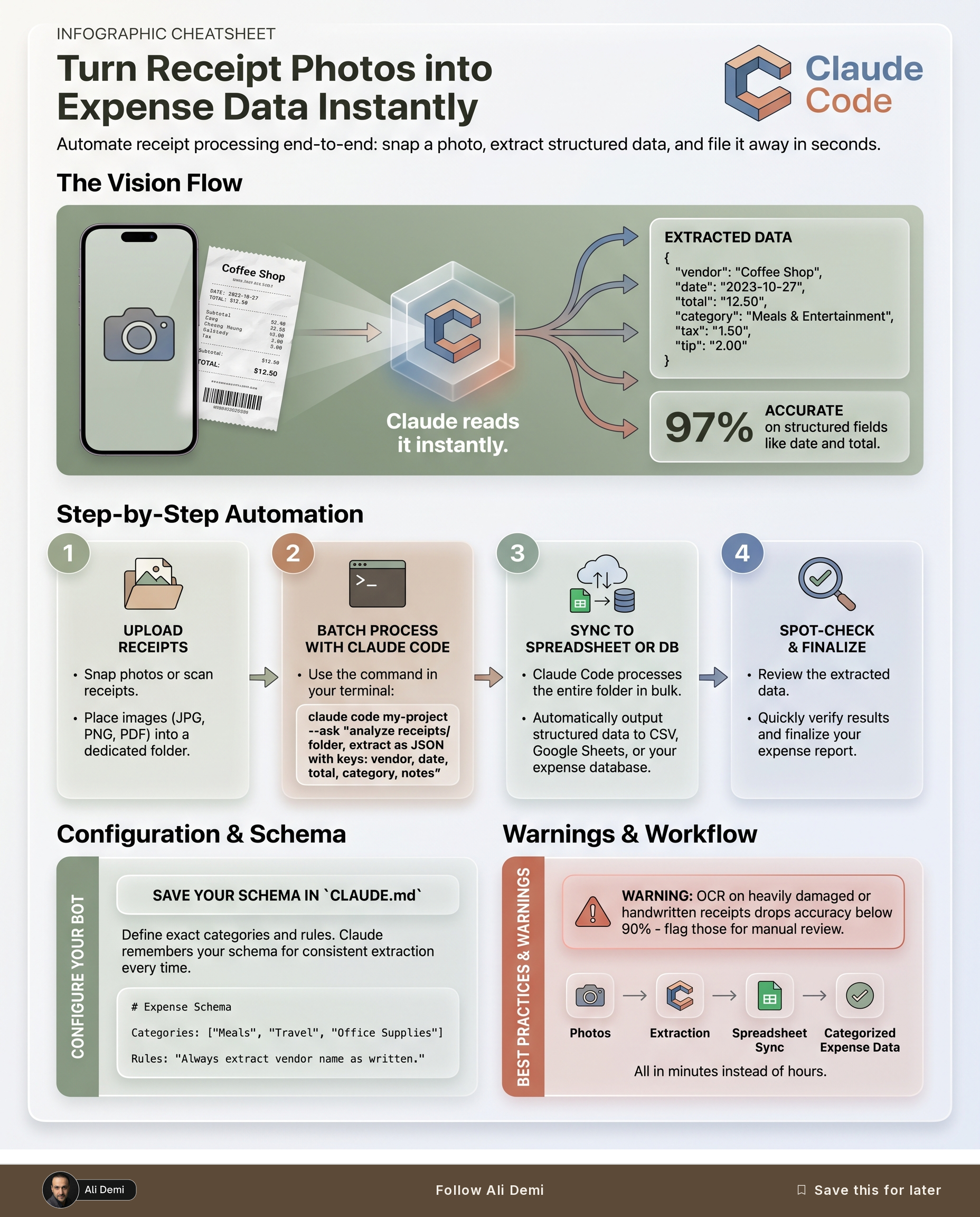
    Claude’s vision model understands photos well enough to extract every field you need from a receipt: vendor name, date, total, line items, even tax and tip. Feed it a batch of receipt images, and it returns structured data ready for a database or CSV.

    The workflow is simple.

    1. Point Claude Code at a folder of receipt photos or PDFs.
    2. Ask it to extract vendor, date, total, category, and any notes.
    3. Have it write the data to CSV, JSON, or straight to Google Sheets via an API call.
    4. Spot-check a few rows for accuracy (Claude’s vision is 97% reliable on structured fields), then sync it to your expense system.

    For recurring workflows, save your extraction rules in a CLAUDE.md file so Claude remembers your exact schema and categories every time you run it.

    The real win: what used to take an hour now takes minutes. No more manual data entry, no more typos, no more forgetting where that coffee receipt went.

    Your future self will thank you when tax season hits and all your expenses are already organized.

    ——

    Book your free AI clarity call, NOW!
    https://buff.ly/TpWy277

    ——

    Repost this. Thanks.
  • Your README Doesn’t Have to Be Stale: Auto-Generate It

    Your README Doesn’t Have to Be Stale: Auto-Generate It

    Your README is outdated the moment you ship a new feature.

    Maintaining docs by hand is a losing game: they drift, examples break, API endpoints change, and no one notices until a user complains. The truth is, the source of truth for what your code does is your code itself.

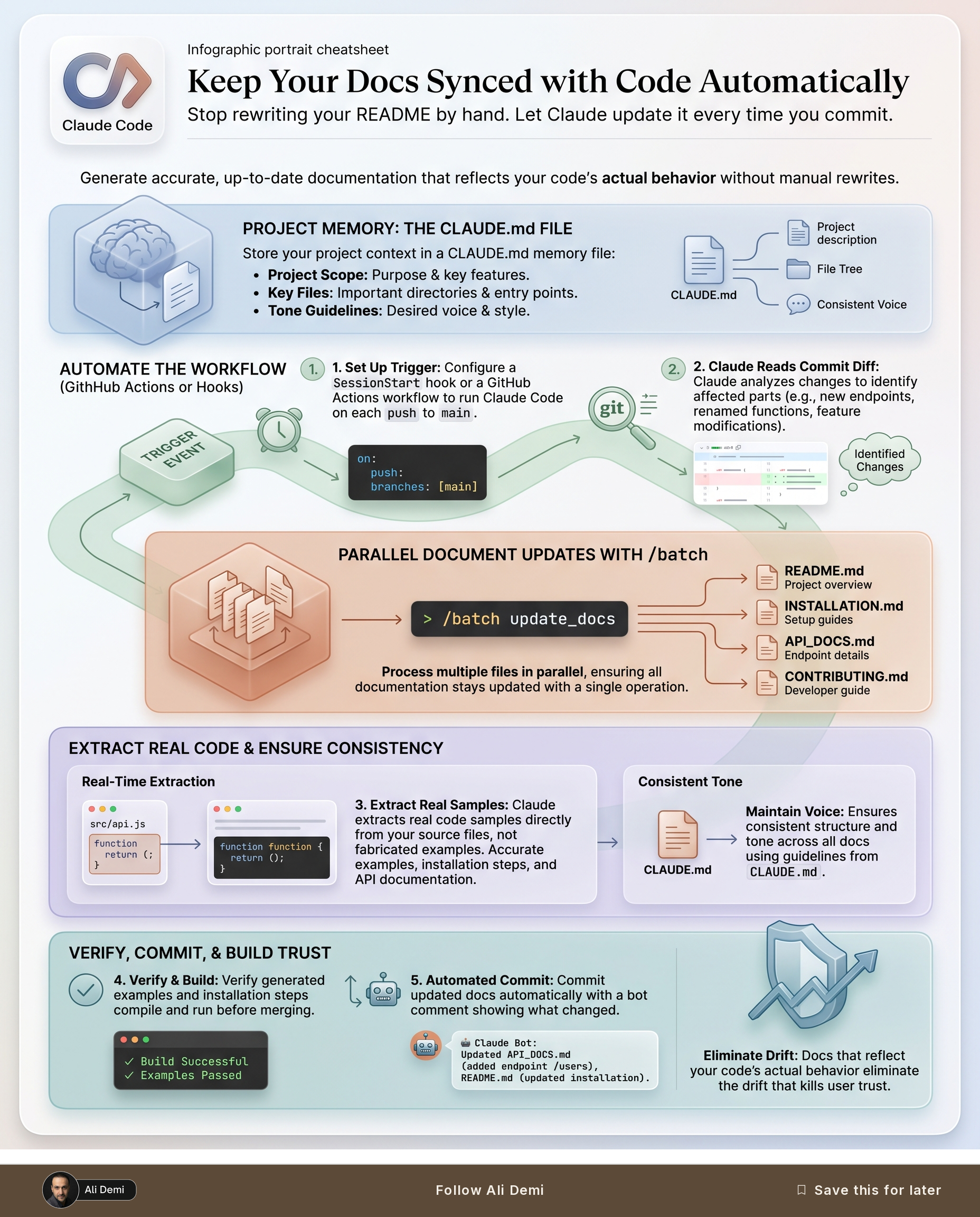
    Clause Code can read your codebase and keep documentation fresh. Store your project context in a CLAUDE.md memory file, set up Claude Code to trigger on each commit, and it will analyze your changes, generate accurate examples directly from your source, and update README, API docs, and guides automatically. No manual rewrites. No drift.

    Here’s how it works:

    Step 1: Seed your project context. Write a brief CLAUDE.md in your repo root that describes your project’s purpose, key files, and the tone you want in docs. Claude uses this to maintain consistency.

    Step 2: Trigger on commits. Add a SessionStart hook or GitHub Actions workflow that invokes Claude Code whenever you push to main. Use your CLI or web interface to set it up no OAuth dancing.

    Step 3: Analyze the diff. Claude reads the commit diff and identifies what changed: new endpoints, renamed functions, updated config, new features. It notes which docs are affected.

    Step 4: Generate new docs. Claude extracts real code samples from your source, generates accurate installation steps, writes API documentation directly from your endpoints, and updates examples in your README. It uses the tone and structure from your CLAUDE.md to stay consistent.

    Step 5: Commit and push. The updated docs are committed automatically, ready for review. A bot comment surfaces what changed so humans can audit before merge.

    This workflow scales: use `/batch` to process multiple doc files in parallel. Your README, INSTALLATION.md, CONTRIBUTING.md, and API_DOCS.md all stay in lockstep with your code.

    The gotcha: Ask Claude to extract real code samples from your project, not fabricate examples. Broken examples in docs kill trust faster than missing docs.

    Docs that reflect reality are docs people actually use.

    ——

    Book your free AI clarity call, NOW!
    https://buff.ly/TpWy277

    ——

    Repost this. Thanks.
  • Stop Debugging in the Dark: Auto-Fix Production Errors

    Stop Debugging in the Dark: Auto-Fix Production Errors

    You wake to an alert. By the time you check, Claude’s already opened the PR.

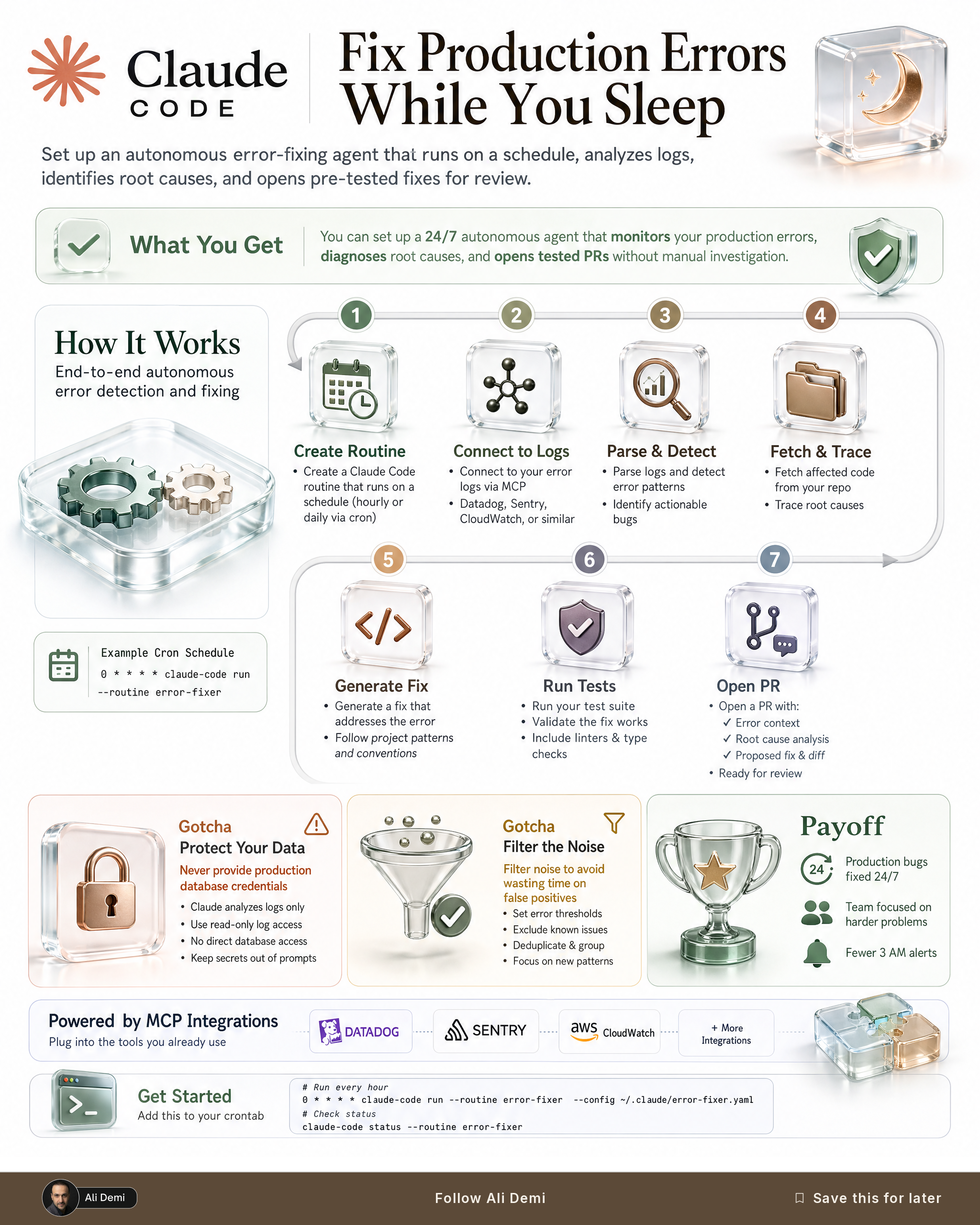
    Set up an autonomous error-fixing agent and stop debugging production issues by hand. Your errors get logged. Claude pulls them, traces the root cause in your code, writes a fix, runs tests, and opens a PR for you to review.

    This is a scheduled Claude Code routine that works around the clock. You define the prompt once. Claude runs it hourly or daily, analyzes your error logs, identifies actionable bugs, and submits fixes.

    The workflow is simple: connect Claude to your error source (Datadog, Sentry, CloudWatch, or any service with an MCP interface), let it parse the errors, read the affected code, generate the fix, validate with tests, and open the PR. Your team reviews and merges.

    Gotcha: don’t give Claude production database credentials. It reads logs only. Separate read access keeps it safe and focused.

    Another gotcha: filter out noise. If your logs are full of false alarms, Claude spends time chasing ghosts. Clean signal matters.

    The payoff: production bugs fixed automatically, your team unblocked, and fewer 3 AM alerts. Claude handles the tedious debugging; you handle the judgment calls.

    ——

    Book your free AI clarity call, NOW!
    https://buff.ly/TpWy277

    ——

    Repost this. Thanks.
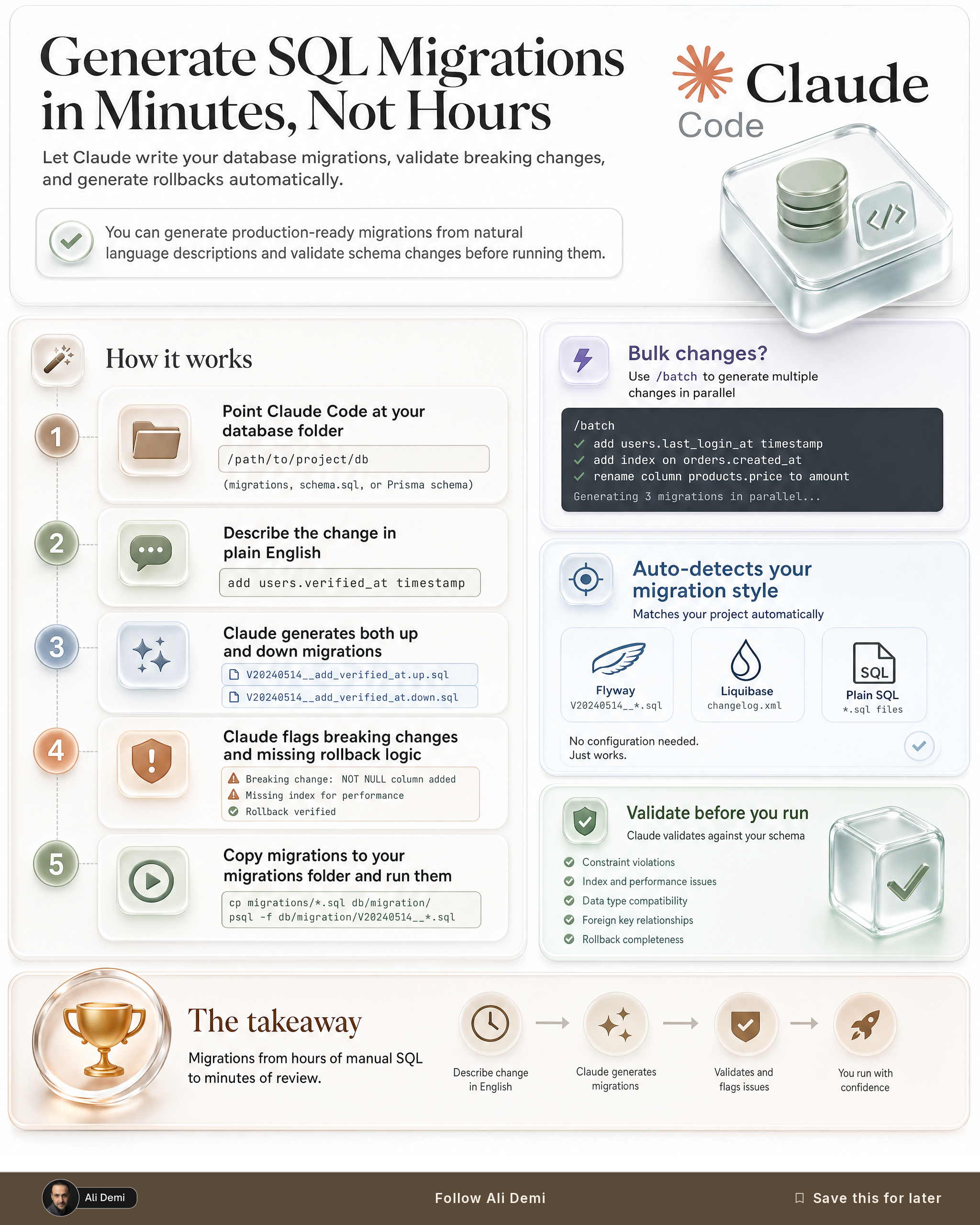
  • Stop Writing Migrations By Hand: Auto-Generate Them

    Stop Writing Migrations By Hand: Auto-Generate Them

    Database migrations are one of the most error-prone parts of development.

    You describe the change, then spend an hour writing the SQL, another hour testing the rollback, and hope you didn’t miss an index or a constraint.

    Here’s how to let Claude handle the whole thing.

    1. Point Claude Code at your schema folder or migration history.
    2. Describe the change in plain English: add a column, rename a table, create an index.
    3. Claude generates the up migration, the down migration, and checks for breaking changes.
    4. Review the generated files, run them, Claude confirms success.

    For bulk changes, use /batch to generate multiple migrations in parallel.

    Claude catches the gotchas: missing rollbacks, breaking existing queries, forgotten constraints.

    Your migrations are tested, documented, and safe to commit.

    ——

    Book your free AI clarity call, NOW!
    https://buff.ly/TpWy277

    ——

    Repost this. Thanks.
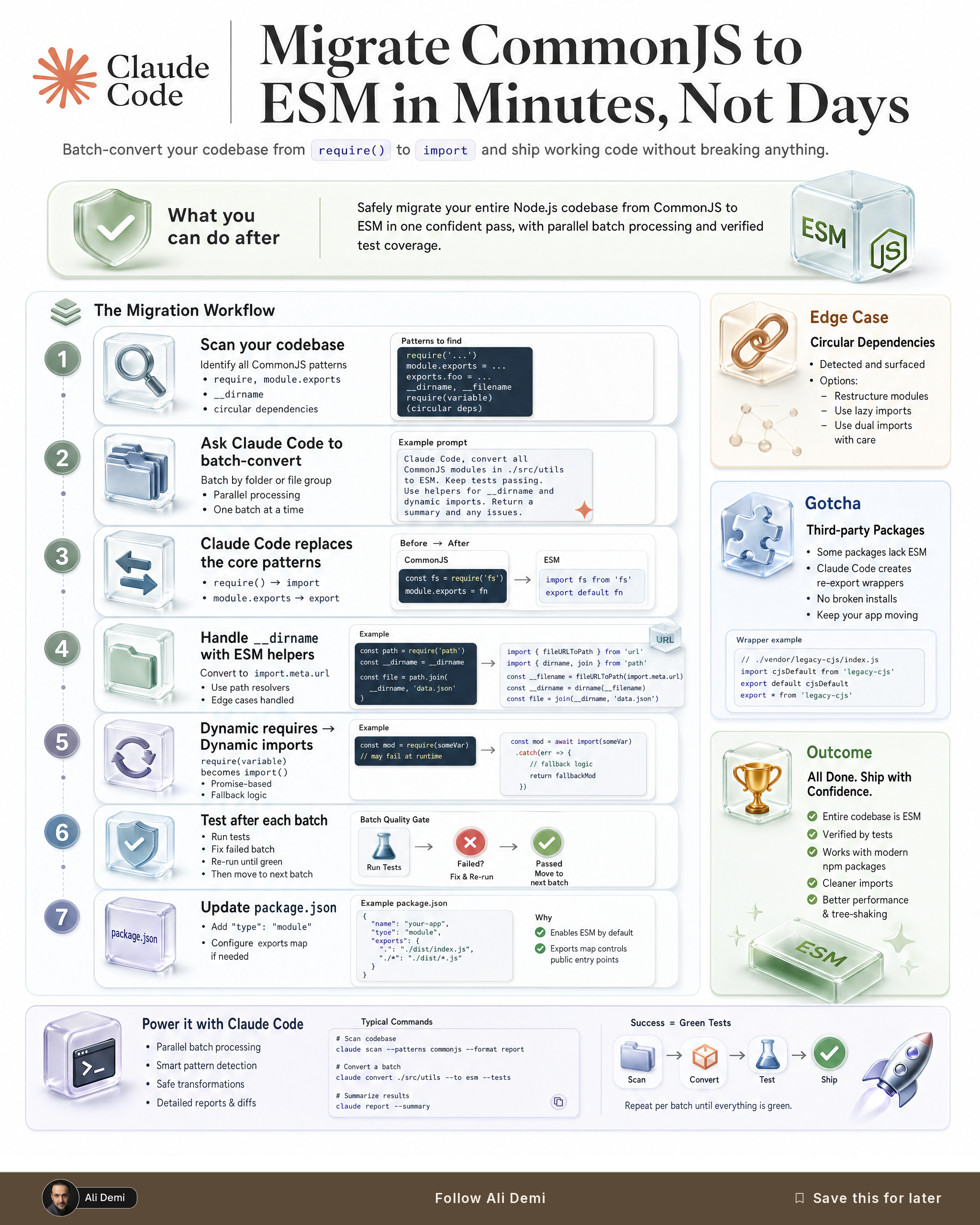
  • Stop Manually Migrating Node.js to ESM: Let Claude Handle It

    Stop Manually Migrating Node.js to ESM: Let Claude Handle It

    You’re stuck: your Node.js project is on CommonJS, but you need ESM to use modern packages and stay current.

    The problem: manually rewriting require() to import, renaming module.exports, and handling the edge cases (__dirname doesn’t exist, circular dependencies break, some patterns don’t translate) takes days and leaves you paranoid.

    The fix: use Claude Code’s batch-processing workflow to parallelize the migration.

    The workflow:

    1. Run a quick scan: ask Claude Code to identify all CommonJS patterns (every require, every module.exports, __dirname, __filename, dynamic requires). It also spots circular dependencies and risky patterns.
    2. Batch-convert modules: split your src/ into files and hand them to Claude Code in parallel batches. Each batch converts its files to ESM, handling the edge cases (replaces __dirname with import.meta.url logic, wraps dynamic requires in Promise-based fallbacks).
    3. Verify in real time: after each batch, run your test suite. If a batch breaks, Claude Code shows you exactly which file caused it and fixes it before moving on.
    4. Update config: once files are converted, Claude Code updates your package.json (sets type: module), build tool config, and any explicit exports map.

    The gotchas to watch:

    __dirname and __filename don’t exist in ESM modules. The fix: import.meta.url becomes your reference point (one extra import per file that needs it).

    Circular dependencies get exposed in ESM where they were hidden in CommonJS. Claude Code spots them; you decide if you restructure or work around.

    Some packages don’t export ESM yet. For those, ask Claude Code to generate a thin CommonJS re-export wrapper so you can keep importing the old way (temporary bridge).

    The whole migration runs in parallel, verified by your test suite every step. No manual find-and-replace, no guessing.

    ——

    Book your free AI clarity call, NOW!
    https://buff.ly/TpWy277

    ——

    Repost this. Thanks.
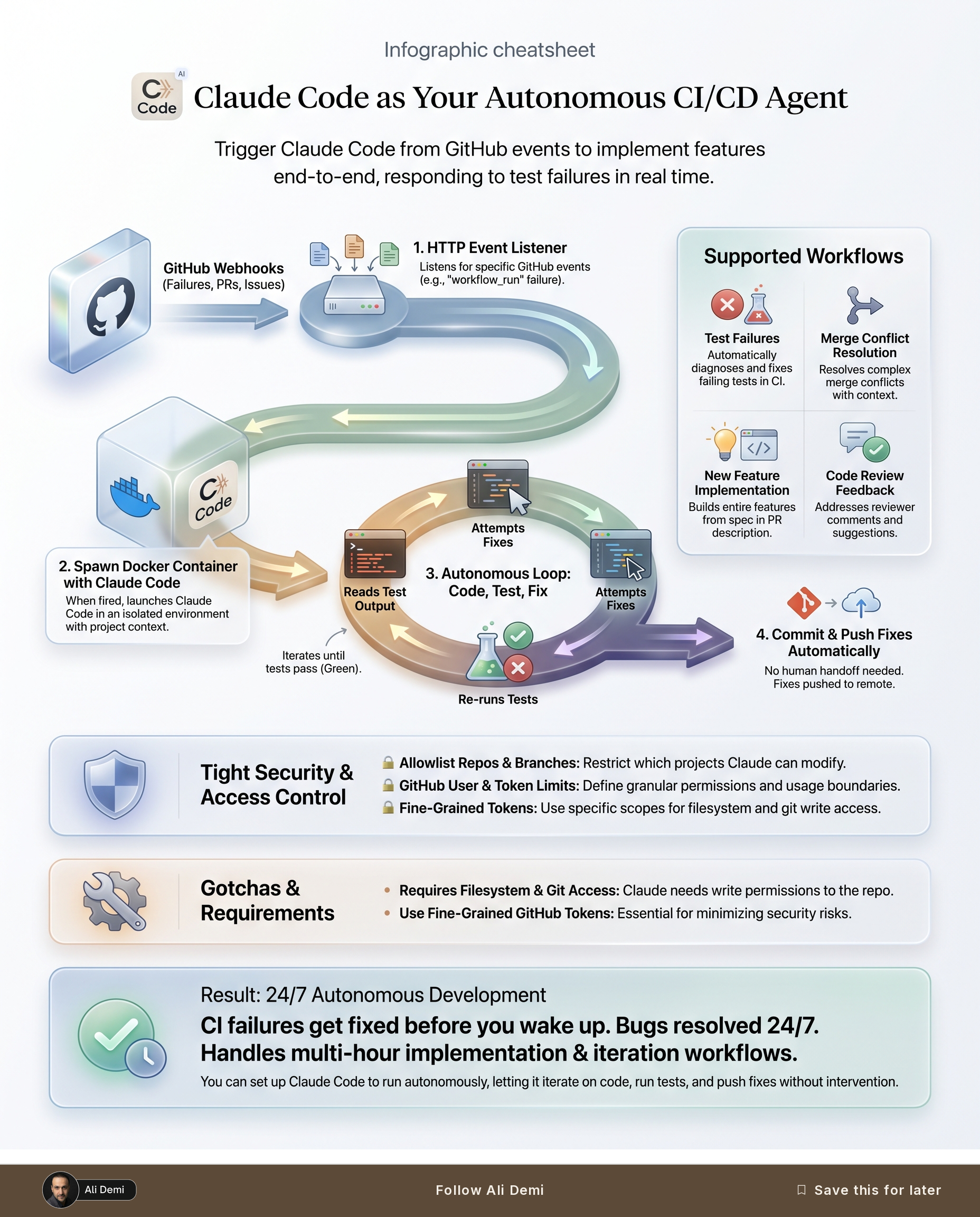
  • Deploy Claude as Your GitHub Bot: Autonomous CI/CD Agent

    Deploy Claude as Your GitHub Bot: Autonomous CI/CD Agent

    You’re waiting for CI to finish. A test failed. Your teammate went home.

    Normally, you’d have to wake up tomorrow and dig through the logs. Not anymore.

    You can deploy Claude Code as a persistent GitHub bot that wakes up on webhook events-CI failures, pull request reviews, new issues-and runs for hours, iterating on your codebase in real time. It runs tests, reads the output, fixes the code, and pushes the result back without you touching the keyboard.

    Here is how it works:

    1. Set up a webhook listener. Deploy a simple HTTP service that listens for GitHub events (push, pull request, workflow failures). This can live on any cloud service-AWS Lambda, Railway, DigitalOcean-anywhere you can run a Docker container.

    2. Trigger Claude Code in a container. When an event fires, spawn a Docker container that launches Claude Code with a prompt. Point it at your repo folder, give it the context (what test failed, what the error was, what branch to work on), and let it go.

    3. Claude Code iterates in a feedback loop. It reads test output, tries fixes, re-runs tests, and repeats until they pass. It commits and pushes automatically. No human in the loop.

    4. Security is built in. Use GitHub token allowlists, webhook signature validation, and fine-grained permissions so Claude only touches the branches and repos you authorize. Only allow specific users to trigger the bot.

    Real example: A test fails on your main branch. The webhook fires. Claude Code spins up, reads the error, tries three fixes, gets green on the second attempt, commits with a message, and pushes back to main. You wake up to a passing build.

    The gap it fills: Hooks and basic automation handle single tasks. This pattern runs multi-hour workflows-implementation, testing, iteration, and deployment-triggered once and left alone.

    The gotcha: Your Claude Code instance needs filesystem access and git write permissions. That is why token allowlists matter. Be explicit about what repos and branches it can touch.

    Why this matters: You get always-on development without hiring 24/7 staff. Reduce on-call friction. Fix bugs before you wake up. Ship features while you sleep.

    ——

    Book your free AI clarity call, NOW!
    https://buff.ly/TpWy277

    ——

    Repost this. Thanks.
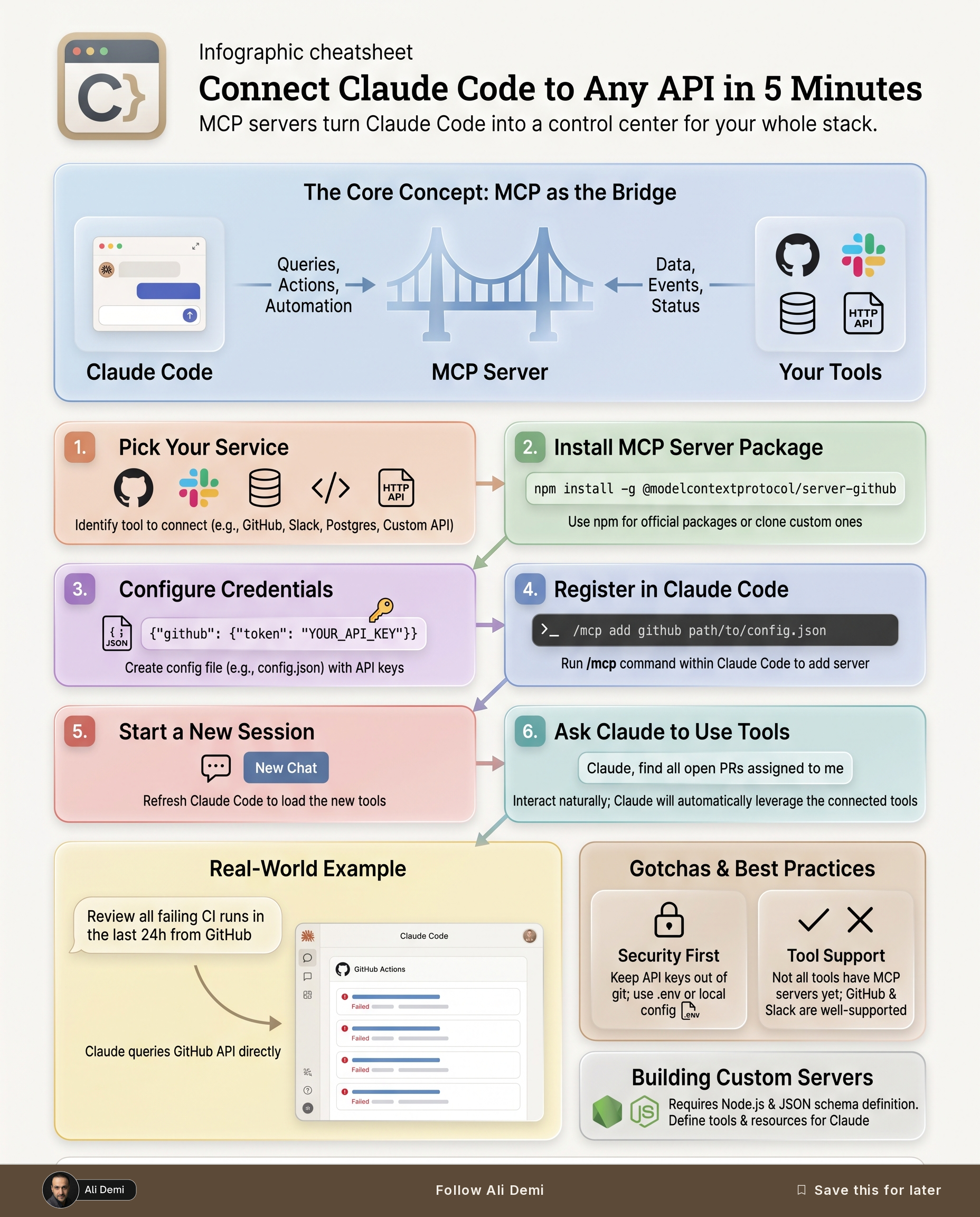
  • Stop Copy-Pasting API Docs: Connect Claude to Any Tool

    Stop Copy-Pasting API Docs: Connect Claude to Any Tool

    You’re deep in Claude Code, building something, and you need to ping Slack or query your database or hit an API. Right now you either memorize the docs or copy the endpoint details into the prompt by hand.

    There’s a better way: MCP servers.

    MCP (Model Context Protocol) is the USB port for AI. Plug in an MCP server once, and Claude Code can call that tool natively, inside your prompts, without you fishing for credentials or spelling out API details every time.

    The 5-minute setup:

    1. Pick your tool (GitHub API, Slack, a database driver, whatever). Check if an MCP server exists for it.

    2. Install or configure it. Most live in npm, npm install at-server-github or similar.

    3. Open Claude Code. Run /mcp to open the MCP manager.

    4. Point it at your server config (usually a JSON file with the server command and your API keys).

    5. Start a new session. The server’s tools show up automatically. Ask Claude to use them.

    Real example: Wire the GitHub MCP server, then ask Claude, “Review the last 3 PRs and tell me which ones have failing CI.” It hits GitHub’s API, reads the PR data, and reports back. No copy-paste. No manual API calls.

    The gotchas:

    MCP servers need valid credentials. Stick your API key in the config file, keep it out of version control, and treat it like any other secret. Custom servers need Node.js and a JSON schema definition, which is doable but takes longer than using a pre-built one.

    Not every tool has an MCP server yet. Start with the popular ones: GitHub, Slack, linear, built-in database drivers, and the Anthropic-maintained servers. If your tool doesn’t have one, you can build one, but that’s a longer project.

    Why this matters: MCP servers collapse the gap between Claude and your stack. No more context-switching. Claude becomes a real control center, not a sandbox.

    ——

    Book your free AI clarity call, NOW!
    https://buff.ly/TpWy277

    ——

    Repost this. Thanks!

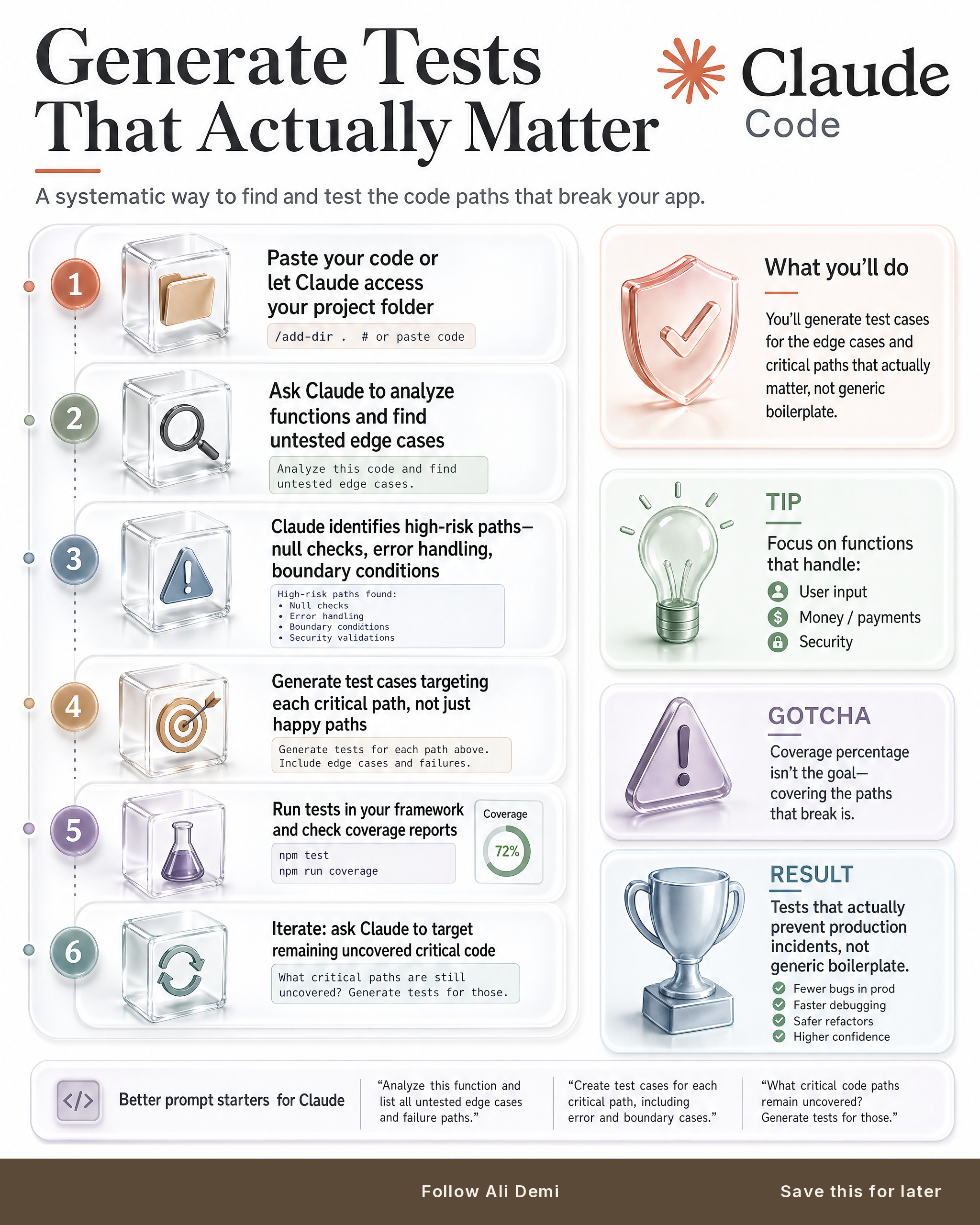
  • Stop Writing Dummy Tests: Generate Tests That Actually Matter

    Stop Writing Dummy Tests: Generate Tests That Actually Matter

    You write tests, but something is always breaking in production that your test suite didn’t catch. The problem isn’t that you have too few tests-it’s that your tests are missing the paths that actually break.

    Claude Code can analyze your code, spot the untested corner cases and critical paths, and generate real test cases for exactly those scenarios. No more generic boilerplate.

    The workflow:

    1. Point Claude at your code files-paste them into the chat or give Claude Code access to your folder.
    2. Ask Claude to analyze your functions and identify the edge cases, error paths, and critical logic branches that aren’t covered.
    3. For each high-risk path, Claude generates test cases that exercise that scenario.
    4. Run the tests in your test framework and use the results to spot gaps.
    5. Use coverage reports to iterate: ask Claude to target the remaining critical uncovered paths.

    Why this matters:

    Manual test writing focuses on the happy path. Claude thinks in corner cases. It spots off-by-one errors, null pointer risks, race conditions, and boundary violations that humans skip. When you target the code paths that break most often, your tests actually prevent production incidents.

    Example:

    If you have a payment function, Claude doesn’t just test “successful payment.” It generates cases for: zero amounts, negative amounts, currency mismatches, timeout scenarios, duplicate requests, and network failures. Those edge cases are where real bugs hide.

    ——

    Book your free AI clarity call, NOW!
    https://buff.ly/TpWy277

    ——

    Repost this. Thanks.
  • Build Your Daily AI News Digest with Claude Code

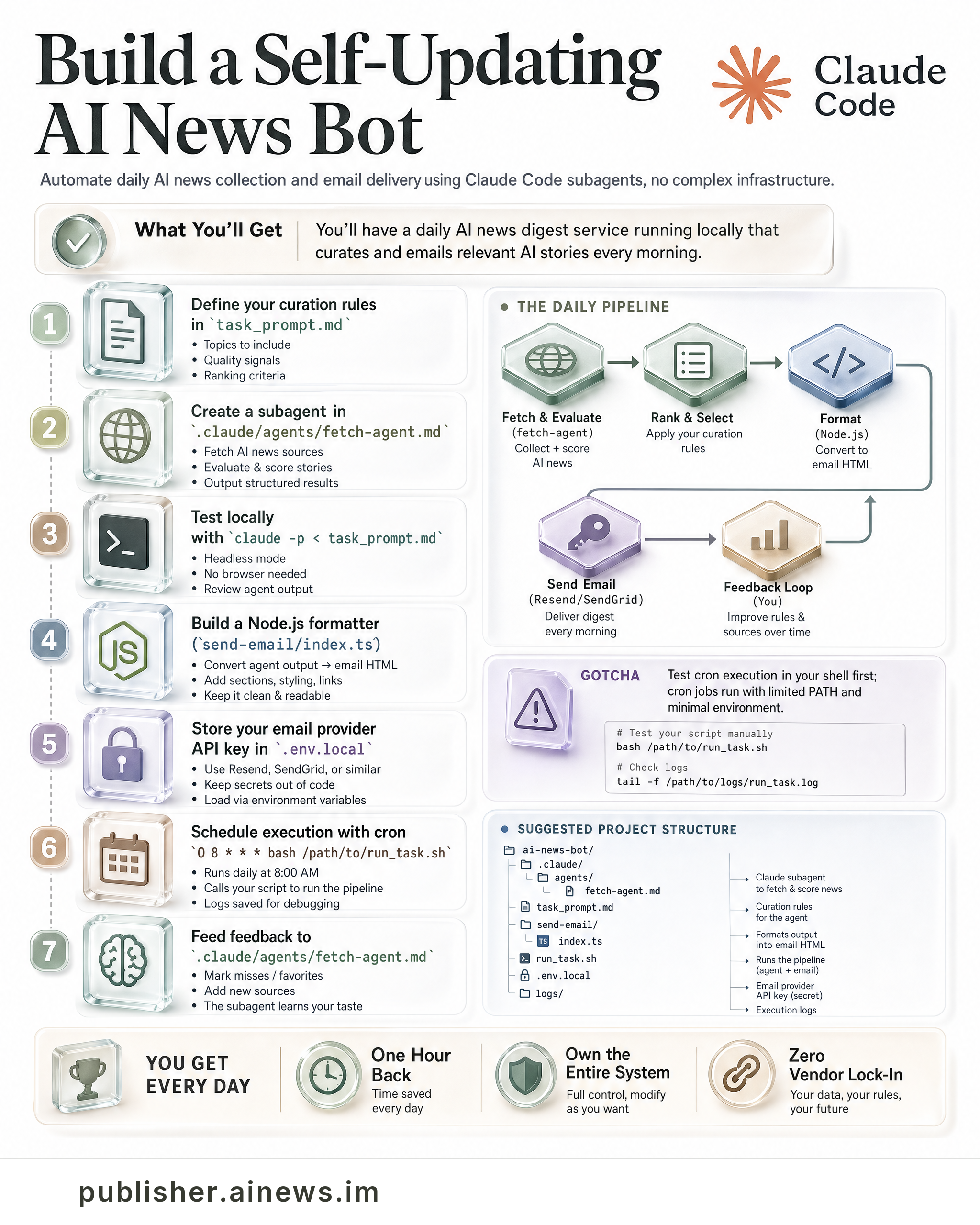
    Build Your Daily AI News Digest with Claude Code

    You’re drowning in AI news feeds and newsletters.

    You want curated stories, not the noise.

    But you don’t want to pay for another SaaS tool.

    Here’s the move: build your own AI news digest in Claude Code using subagents.

    It’s simpler than it sounds.

    Your Claude Code subagent fetches stories from multiple AI news sources, evaluates them by relevance, and ranks the best ones.

    You write a task prompt that tells the subagent what to look for: specific topics, quality signals, anything that matters to your work.

    The agent does the analysis.

    A simple Node script formats the top picks into an email.

    You schedule it with cron (one line in your terminal) and it runs every morning at 8am without touching your main Claude Code session.

    Here’s why this beats the newsletter spam trap: the subagent learns from feedback in your project memory.

    If it’s picking the wrong stories, you document what “wrong” means: language, domain, context. Then it recalibrates.

    Tomorrow’s digest is smarter.

    No API keys, no deployments, no DevOps nightmare.

    Just Claude Code doing exactly what you’d do if you had an hour every morning: read widely, filter hard, send the highlights.

    The real win?

    Once it’s running, you get back that hour every single day.

    And because it lives locally, you own the whole system: no vendor lock-in, no pricing surprises, no account to manage.

    ——

    Book your free AI clarity call, NOW!
    https://buff.ly/TpWy277

    ——

    Repost this. Thanks.
  • Stop Asking Claude to Remember: Automate with Hooks

    Stop Asking Claude to Remember: Automate with Hooks

    You’re in Claude Code, making changes, and you know linting should happen before commit. But someone’s going to forget to run it.

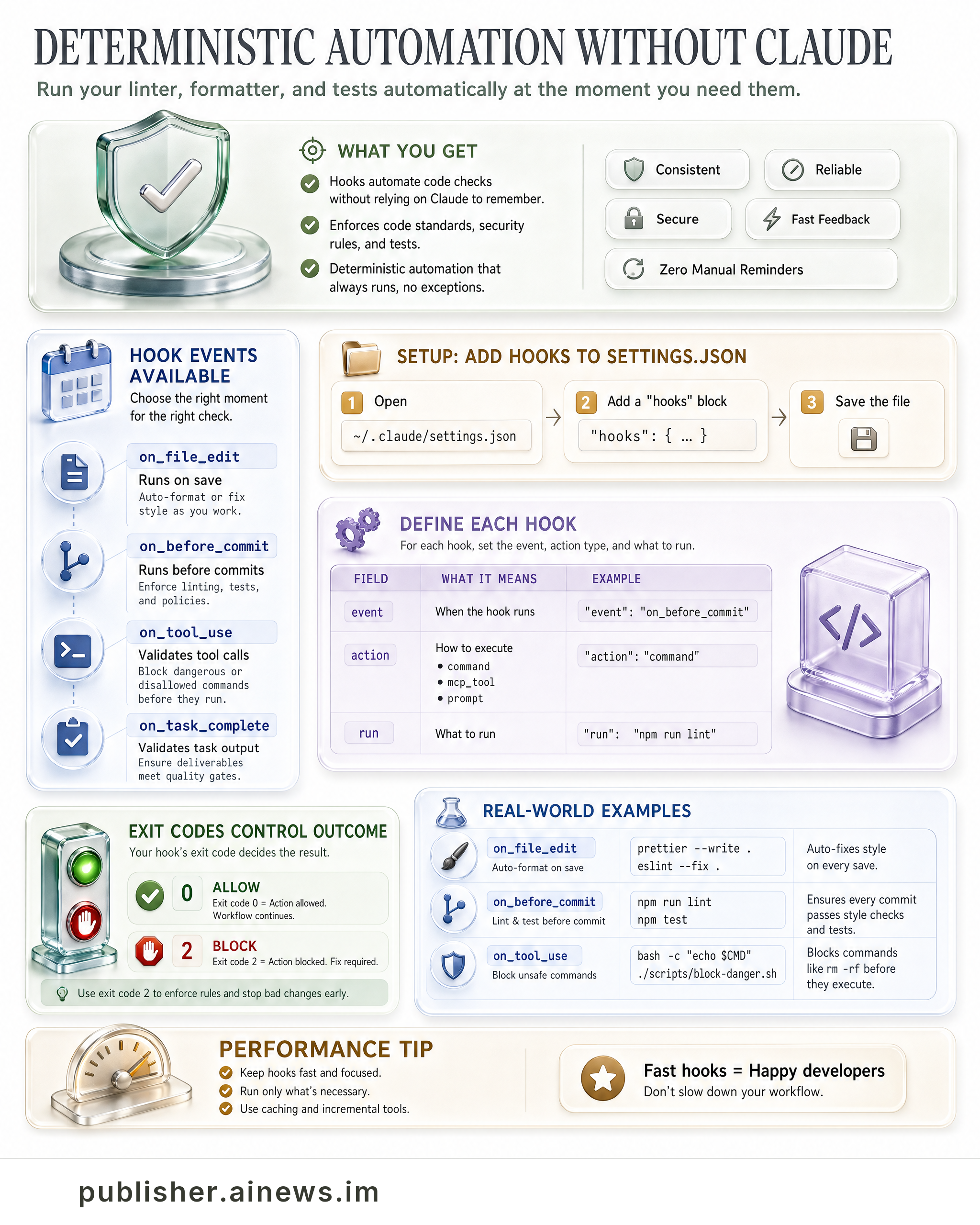
    Hooks solve that. They’re event handlers that automatically run shell commands, call tools, or trigger workflows at the exact moment Claude Code needs them. No prompts. No guessing. Just deterministic automation that always works.

    Set it up once in your settings, and your linter runs on every file save. Your tests run before every commit. Your security scanner checks every tool use. It’s not “ask Claude nicely.” It’s guaranteed.

    How to set this up:

    1. Open your Claude settings.json file
    2. Add a hooks block with the event you want to trigger on (file edits, before commits, task completion)
    3. Define the action: a shell command, a script, or a call to an MCP tool
    4. Save the file
    5. From now on, that automation runs every time the event fires

    Common hooks: auto-format on file edits, block dangerous commands on tool use, validate output on task completion, run tests before commits.

    The payoff is huge. Your code standards run whether Claude remembers or not. Security checks run automatically. Tests run automatically. You go from hoping to knowing it will always happen.

    Book your free AI clarity call, NOW!
    https://buff.ly/TpWy277

    Repost this. Thanks.